

Depop Scraper — Listings, Shops, Reviews & Followers [$1.50/1K]
Pricing
from $1.50 / 1,000 results
Depop Scraper — Listings, Shops, Reviews & Followers [$1.50/1K]
From $1.50 per 1,000 rows. Search 12 Depop countries, or paste a product, shop, search or category link. Shop reviews, follower lists, and scheduled runs that return only new, changed or sold listings.
Pricing
from $1.50 / 1,000 results
Rating
0.0
(0)
Developer

Muhamed Didovic
Maintained by CommunityActor stats
0
Bookmarked
2
Total users
1
Monthly active users
21 hours ago
Last modified
Categories
Features
Share
Depop Scraper — Listings, Shops, Reviews and Followers
Pull Depop listings, a shop's inventory, seller reviews, or a follower list. $1.50 per 1,000 rows.
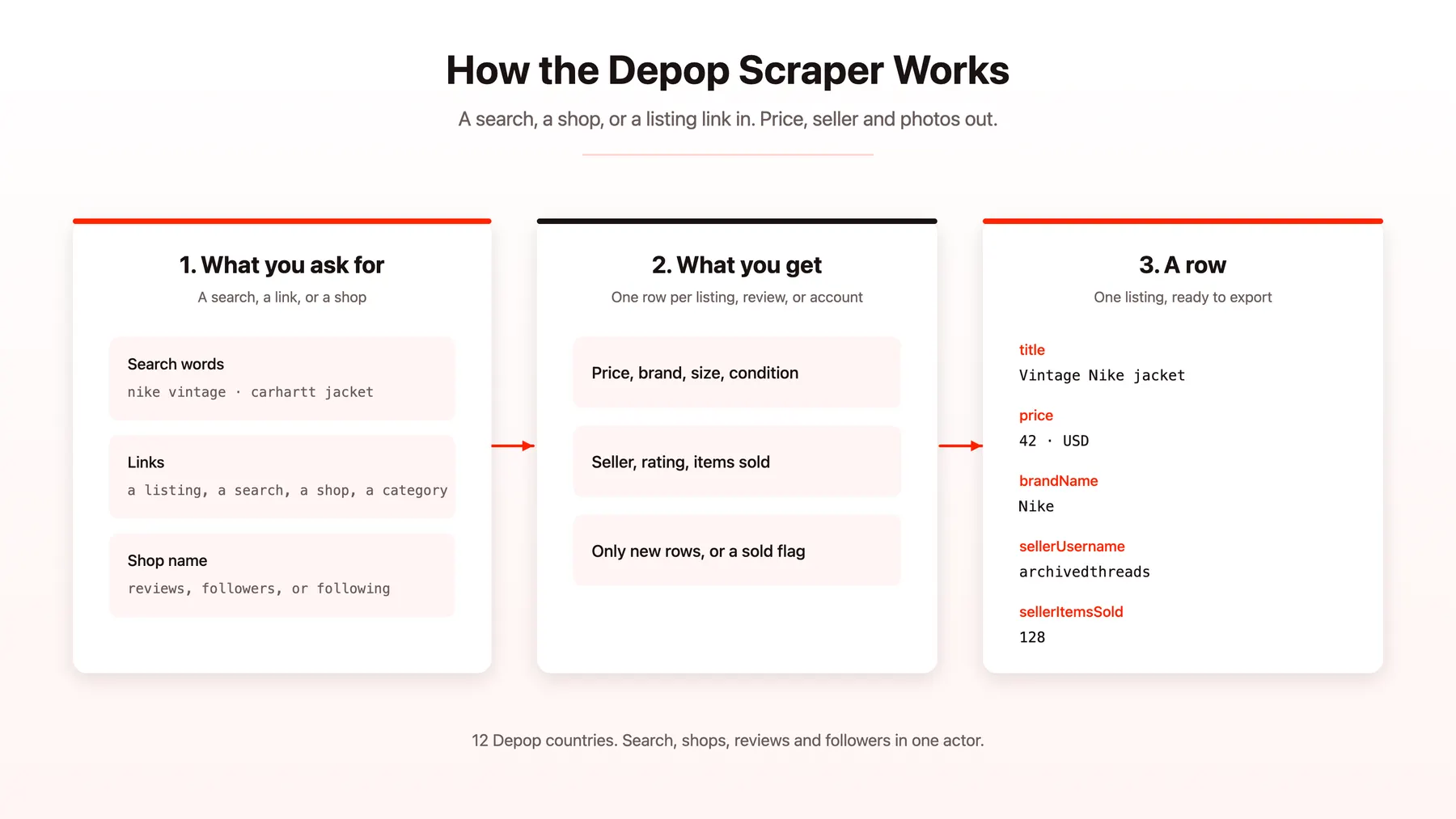
Give it search words, or paste a listing, search, shop or category link. Each listing row has the price, brand, size, condition, photos and the seller (rating, items sold, followers). Schedule it and later runs can return only what is new, what changed, or what disappeared.
Why use this scraper?
- Search, shops, reviews and followers in one actor. Keyword search with filters, a shop's listings, the reviews a shop received, or the accounts that follow it.
- Twelve countries. US, UK, Australia, Canada, New Zealand, Ireland, Germany, France, Italy, Spain, the Netherlands and Belgium. Prices come back in that site's currency.
- A seller on every listing. Username, rating, review count, items sold, followers, bio, and an email when the bio contains one.
- Sold tracking for scheduled runs. Turn on "Also report listings that disappeared". A listing that was here last time and is gone this time is written once more with status
soldand its last price. - Only new or changed rows. Turn on "Only new or changed listings" so a daily run does not charge you again for the same jacket.
- Paste the link you already have. A product page, a search page (filters in the link are kept), a shop page, or a category page.
- No Depop login. Public listings, reviews and follow lists only.
Overview
Depop is a fashion resale marketplace. This actor reads public listings, shop pages, reviews and follow lists across the twelve country sites and writes flat rows you can export as JSON, CSV or Excel.
One run is one mode. A search or a set of links writes listing rows. Reviews mode writes one row per review. Followers mode writes one row per account. Use a separate run for each.
It is built for resale pricing, shop monitoring and seller research. A listing row is one product. A review row is one piece of feedback. A follow row is one account.
Supported inputs
Links
| Kind | Example |
|---|---|
| Listing | https://www.depop.com/products/<slug>/ |
| Search | https://www.depop.com/search/?q=carhartt |
| Shop | https://www.depop.com/<shop>/ |
| Category | https://www.depop.com/category/sweatshirts/ |
Filters already in a search link (price, brand, colour, condition, sort, country) are kept. A link on another site is skipped and named in the log.
Search words
Set What to scrape to keyword search and put one search per line, for example nike vintage or carhartt jacket. Each line runs with the same filters.
Shops for reviews or followers
A shop name as it appears in depop.com/<shop>/, or the numeric user id, one per line.
Not read
Messages, the bag, checkout, and anything behind a Depop login. Sold search does not exist as a filter on the site: sold rows only appear on a later scheduled run, for listings this actor saw before and no longer finds.
Use cases
| Who | What they do with it |
|---|---|
| Resellers | Watch a search or a shop and price against live listings |
| Shop monitors | Schedule a shop link and keep only new listings |
| Comp researchers | Flag listings that disappeared, with the last asking price |
| Seller research | Pull a shop's reviews, or the accounts that follow it |
| Marketplaces and brands | Track a brand, a colour and a price band across countries |
How it works
- You pick a country and a mode: search words, Depop links, shop reviews, or followers.
- You set a row cap. Search mode can also filter by price, department, brand, colour, condition, size and sort.
- The actor writes one row per listing, review or account, up to your cap.
- On a schedule, turn on new-or-changed, or disappeared listings. The first run saves the set. Later runs write only what moved.
- Export the dataset, or set a webhook and each row is posted as it is saved.
Input configuration
| Field | What it does |
|---|---|
country | us, gb, au, ca, nz, ie, de, fr, it, es, nl, be. Default us. UK is gb, not uk. |
mode | search (default), url, reviews, or followers. |
queries | Search words, one per line. Used when mode is search. |
urls | Listing, search, shop or category links. A nested category link such as /category/womens/tops/tshirts/ is read as that page. Used when mode is url. |
sellers | Shop names or numeric user ids. Used for reviews and followers. |
reviewRole | seller (default) or buyer. |
followDirection | followers (default), following, or both. |
maxFollows | Cap per shop, per direction. Default 500. |
maxItems | Stop after this many rows across the whole run. Default 20. 0 means no cap. Free plans stop at 100. |
maxListings | Same cap. When it is set, including 0, it wins over maxItems. A positive cap is shared across the searches, links and shops in the run. |
maxPages | Pages per search, shop or review list. 0 (default) reads until the results end. |
fetchDetails | Does not add fields and does not add a charge. Leave it off. |
conditions | Condition codes, one per line, for example used_excellent. Empty means any. |
sizes | Size ids as they appear in a filtered Depop search link. |
brands | Brand ids as they appear in a filtered search link (brands=). |
colours | Colour names, for example black. |
categories | Category ids or slugs, one per line. |
groups | Product groups, for example tops or footwear. |
gender | any (default), mens, womens, female, male, or unisex. female and womens are the same department. male and mens are the same department. |
minPrice / maxPrice | Whole currency units. 0 means no limit. |
sortBy | relevance (default), newest, price_asc, price_desc, price-asc, price-desc, priceAscending, priceDescending, or popular. The price spellings are the same two orders. |
onSale | On: only listings whose price is marked down. |
incrementalMode | Write a row only when it is new, changed, or back after it had disappeared. Unchanged rows are not written and are not charged. |
includeSold | Also write listings that disappeared between runs, with status sold and changeType EXPIRED. A resume id turns this off for that run. |
includeSoldHistory | On a shop link: also write that shop's sold listings, with the last asking price and soldAt. Cap with maxSold (default 100). |
maxSold | Sold listings per shop when shop sold history is on. 0 means no separate cap. |
emitExpired | On a later run that reads every page, with no row cap and no resume id, write missing listings with changeType EXPIRED. |
resumeFromRunId | A previous run id or dataset id. Rows already in that dataset are skipped. Do not combine this with saved state and incrementalMode. The first time both are used and the state is empty, those rows become the baseline. |
stateKey | Name of the saved state. Leave it empty and a name is made from the search. Set one when two schedules should share a baseline. |
ignoreFieldsForChanges | Extra fields to leave out of the change check. Likes, seller activity and the full listing record are already left out. |
webhookUrl | Optional. Each row is also posted as JSON to this URL. |
mcpConnectors | Optional. Notion, Linear, Airtable or Apify. The dataset stays complete. The app gets a short title and the key fields. |
notionParentPageUrl | The Notion page new pages should sit under. Required when Notion is selected. |
maxNotifyListings | How many short summaries to send to the app. Default 50. The dataset is not capped by this. |
proxy | The default works out of the box. Change it only if you bring your own proxy. |
Search the US site
A shop, plus reviews on a second run
Daily: only what is new, and what sold
Output overview
Search and link runs write listing rows. Reviews mode writes review rows. Followers mode writes follow rows (recordType is follow).
A listing row carries the price the buyer sees, the brand and condition, the photo URLs, and the seller's public profile. priceKind is last_ask only on a row emitted because the listing disappeared. That figure is the last price this actor saved, not a confirmed sale price.
Output sample
One listing from a US search for nike vintage on 24 Nov 2026. Photo list and a few empty fields are left out.
Key output fields
Listing
| Field | Meaning |
|---|---|
title, price, currency | Name and current price |
originalPrice, isReduced, discountPercentage | Set when the price is marked down |
shippingCost, hasFreeShipping | Shipping when the page shows it |
brandName, conditionName, sizes, colours | Brand, condition, sizes, colours |
categoryName, categoryPath, gender | Category name, and a path such as female/tops/tshirts |
createdAt, updatedAt, soldAt | When the listing was posted, last changed, and an approximate sale date on a sold-history row |
description, likeCount, pictures, mainPicture | Description, likes, photos |
totalPrice, buyerFee, tax, taxType | Buyer total, fee and tax when the listing shows them |
nationalShippingCost, internationalShippingCost, shippingId | Shipping amounts and the shipping option id |
sku, variants, attributeTags | SKU, variants and attribute tags when the listing has them |
sellerAverageShippingDays | The seller's average shipping time, in days |
raw, sellerRaw | The full listing record and the full seller record |
status, isSold | active on a live listing. sold when it disappeared between runs |
priceKind | last_ask on a disappeared listing |
changeType, changedFields | NEW, UPDATED, REAPPEARED or EXPIRED on a scheduled run. changedFields lists what moved on an update |
firstSeenAt, lastSeenAt | When this state first and last saw the row |
url, slug, id | Where to open it, and Depop's id |
Seller, on a listing row
| Field | Meaning |
|---|---|
sellerUsername, sellerId | Shop name and numeric id |
sellerReviewsRating, sellerReviewsTotal, sellerItemsSold | Rating, review count, items sold |
sellerFollowers, sellerFollowing | Follower and following counts |
sellerVerified, sellerLocation, sellerBio | Badge, location, bio |
sellerWebsite, sellerEmail | Website, and an email when the bio contains one |
sellerFirstName, sellerLastName, sellerPictureUrl | Name and avatar |
Review
rating, text, date, authorUsername, productId, sellerUsername, transactionId.
Follow
direction (followers or following), subjectUsername (the shop you asked about), username, profileUrl, bio, country, followersCount, followingCount.
FAQ
Which country code is the UK?
gb. uk is not a marketplace code in the form.
Do I pay extra to open each listing? No. Listing rows already include the description, pictures and seller profile. Leave Full listing details off. It does not add a charge.
How do I get a shop's sold listings?
Put the shop link in urls and turn on Shop sold history. Each sold row has status sold, priceKind last_ask, and soldAt (an approximate date). maxSold caps that list per shop. Also report listings that disappeared is different: it only writes a listing your earlier run saved and this run no longer finds.
What is the difference between new-or-changed and disappeared?
New-or-changed writes NEW, UPDATED and REAPPEARED rows and skips anything that did not move. Likes and seller activity do not count as a change. Disappeared writes listings that were in the saved set and are missing now, with changeType EXPIRED. includeSold does that on any run that is not a resume. emitExpired does it only after a full read: no page cap, no row cap, no resume id. Leave stateKey empty unless two schedules should share one baseline.
Can I continue a run that already saved rows?
Set resumeFromRunId to that run id or its dataset id. Those rows are skipped. If the schedule already has saved state, turn off only-new-or-changed. The first time both are on and the state is empty, the earlier rows become the baseline and are not written as new.
Can I send a short copy to Notion or another app?
Pick the app under Send a short summary to. The dataset still has every field. Notion also needs the parent page URL. At most maxNotifyListings summaries are sent (default 50). A delivery problem is logged and the dataset run still finishes.
What does an empty dataset mean? Nothing matched the words, filters or links. A link the actor cannot read is skipped. The run log names it.
What does it cost? A start fee, plus one charge per saved row (listing, review or follow). A run that saves nothing is not charged for rows. See the Pricing tab. Free plans stop at 100 rows.
Can I send rows somewhere else as they are saved?
Set webhookUrl. Each row is posted as JSON. A failed post is logged and the run continues. The dataset is still written.
Your feedback
If this actor saves you time, a short review on this page helps other people find it. If a field is missing, open an issue.
Support
- For issues or feature requests, use the Issues tab of this actor on Apify Console.
- For further assistance, contact the author:
- Website: https://muhamed-didovic.github.io/
- Email: muhamed.didovic@gmail.com
Additional services
- A private cut of this actor, another resale site, or a scheduled export to your sheet or database: muhamed.didovic@gmail.com
- Other scrapers: memo23's Apify profile
Explore More Scrapers
- Vinted Scraper: second-hand fashion listings, prices and sellers
- Poshmark Scraper: listings, sold prices, closets and brands
- Mercari Japan Scraper: items, sold prices, sellers and shops
🤖 For AI Agents & LLM Apps
Compact reference for AI agents calling this actor via the Apify MCP server or the Apify API (actor: memo23/depop-scraper).
Purpose: Public Depop listings, shop reviews, or follower lists across 12 countries. One row per listing, review, or account.
Minimal input:
Output: Listing fields include id, slug, url, title, description, price, originalPrice, totalPrice, buyerFee, currency, shippingCost, brandName, conditionName, colours, sizes, categoryName, gender, likeCount, pictures, mainPicture, sellerUsername, sellerId, sellerReviewsRating, sellerReviewsTotal, sellerItemsSold, sellerFollowers, sellerBio, sellerEmail, status, isSold, priceKind, changeType, changedFields, raw, sellerRaw, scrapedAt. Review rows use rating, text, date, authorUsername. Follow rows set recordType to follow and include direction, username, profileUrl, followersCount.
Behaviors an agent should know:
- Always set
maxItems.0does not cap the run. Free plans stop at 100. - One mode per run.
searchusesqueries.urlusesurls.reviewsandfollowersusesellers. - UK is
country: "gb". Sort valuespriceAscendingandpriceDescendingmatchprice-ascandprice-desc. Department valuesfemaleandmalematchwomensandmens. onSale: truekeeps only listings with a reduced price.includeSoldHistoryon a shop link adds that shop's sold listings (soldAt, last asking price).maxSoldcaps them.includeSoldis the scheduled disappeared-listing switch.maxListings, when present, replacesmaxItems, including0. A positive cap is shared across queries, links and shops.- A category URL is opened as that path, including nested paths.
fetchDetailschanges nothing and adds no charge. Leave it false.incrementalModewritesNEW,UPDATEDandREAPPEARED, and skips unchanged rows.includeSoldwrites disappeared listings asEXPIRED.emitExpireddoes that only on a full read. LeavestateKeyempty to keep one baseline per search.resumeFromRunIdskips ids already saved in that run or dataset. Do not combine it with existing incremental state.mcpConnectorssends a short summary to Notion, Linear, Airtable or Apify. Notion needsnotionParentPageUrl. The dataset stays complete.priceKind: "last_ask"is the last saved asking price, not a confirmed sale.- Pay-per-event: one start charge plus one charge per saved row. See the Pricing tab.
⚠️ Disclaimer
This actor is an independent tool and is not affiliated with, endorsed by, or sponsored by Depop Limited or any of its subsidiaries. All trademarks mentioned are the property of their respective owners.
The scraper reads only publicly available listing, shop, review and follow pages. It does not log in. Users are responsible for ensuring their use complies with Depop's Terms of Service, applicable data-protection law (GDPR, CCPA and others), and any contractual obligations of their own organization.
SEO Keywords
depop scraper, scrape depop, depop api, depop.com scraper, Apify depop, depop listings scraper, depop shop scraper, depop seller reviews, depop followers scraper, depop sold listings, resale pricing data, fashion resale scraper, vintage clothing data, secondhand marketplace export, depop brand monitor, depop price tracker, seller lead data, depop UK listings, depop search export, streetwear resale data, depop inventory monitor, depop comps


