

B2B Email Finder & Verifier - Find Emails, LinkedIn & Phones
Pricing
from $10.00 / 1,000 company enricheds
B2B Email Finder & Verifier - Find Emails, LinkedIn & Phones
Find emails from a name + company domain, a LinkedIn profile, or a whole company, in bulk. Pick the decision-makers you want (founder, CEO, VP) and get names, titles, phones and B2B emails ranked by confidence. An optional SMTP check confirms the inbox exists. Pay only for verified contacts.
Pricing
from $10.00 / 1,000 company enricheds
Rating
5.0
(2)
Developer

Muhamed Didovic
Maintained by CommunityActor stats
1
Bookmarked
350
Total users
109
Monthly active users
3.9 hours
Issues response
11 days ago
Last modified
Categories
Share
Email Finder & Verifier - Find Decision-Makers & Verify Their Emails

Find the decision-makers at any company for free - then pay only for the ones that resolve to a verified, deliverable email. Give it a company domain and the roles you want (founder, CEO, VP, head of sales, marketing lead); it reads the team, about, and leadership pages, pulls the real people with their titles, infers each business address, cross-checks it against the emails the company actually publishes, and asks the company's mail server which address really exists. Finding the people costs nothing. A mail-capable person-email is $0.02, and one the mail server confirms is $0.05 in total - against $0.028-$0.20 per verified contact at the pay-per-verify lead tools - and every result ships with ranked candidate addresses, the mail provider, and a confidence score, not a single blind guess.
The whole funnel, in one line:
| Input | Row(s) emitted |
|---|---|
| Discovery query (roles × company / location) | One discovered-person row per person found - name, title, LinkedIn + verified email. Finding is free; you pay only for verified hits. |
| Domain or company name | One company row - ranked emails + phones, provenance, confidence |
Person (fullName + companyDomain) or a LinkedIn /in/ URL | One person row - best email (mailbox-confirmed when the server says so), ranked candidates, MX + provider |
Pure HTTP. No API keys, no LinkedIn login, no cookies - and no 5,000-row dumps of unverified guesses you pay for by the row.
Why Use This Scraper?
- Find free, pay only for verified. Discovering who works at a company - and inferring, ranking, and MX-checking their addresses - costs nothing. You're billed only when a person resolves to a mail-capable business email ($0.02, plus $0.03 when the mail server confirms the exact mailbox). A run full of misses costs $0, and so does a person whose likely addresses the mail server all refuses. That's the opposite of bulk dumpers, who bill for every unverified row they emit.
- Cheaper per verified email than the pay-per-verify tools. $0.05 per person-email the mail server confirms, $0.02 when it can only be MX-checked (catch-all domains, servers that won't answer). The dedicated "verified contact" finders charge $0.028 to $0.20 for a verified contact - a confirmed address here costs a quarter of the top of that range, with ranking and provenance they don't ship.
- You verify AND rank - most finders just hand you an address. Every person row is MX-checked, the top candidates are asked of the company's mail server over SMTP until one is accepted (
mailboxConfirmed: true), and the result is cross-checked against the addresses the company actually publishes (a published match returns assite-match, high confidence), and comes with the full ranked candidate list (first.last@,flast@,first@, …) plus scores, the mail provider (Google Workspace, Microsoft 365, …), and asource/confidencepair. You see how each answer was derived, not just the answer. - Target the decision-makers, by role. Pick a preset with
targetPersona- Founder/CEO, Sales leader, Finance leader, and so on - and the actor turns a plain list of domains into a decision-maker search, no per-company query to write. Or filter discovery by exact job title (["founder", "ceo", "vp", "head of sales"]) when you want fine control. Either way you get named executives with titles and verified emails, not a genericinfo@. - No API keys, no login, no cookies. The core path - team-page discovery, site scrape, pattern inference, MX verification - is fully self-contained. Nothing to sign up for, no LinkedIn session, no headless browser. (Optional keys only add coverage: RocketReach for open-web search, Hunter.io for a domain-search fallback.)
- Phones included. Company rows carry every phone number harvested from the same contact pages - no extra charge, no second tool.
- Bulk by design. Paste arrays, spreadsheet columns, or a comma-separated blob of hundreds of companies; mix companies, people, and discovery queries in one run.
- Monetization qualification for free. Flip
qualifyByPaymentand each company row is flagged withtakesPayments+paymentProcessors(Stripe, Shopify, PayPal, Paddle, …) - reusing pages already fetched, zero extra cost.
Overview
Email Finder is a find-and-verify lead engine. The first three modes mix freely in one run; the fourth is a standalone verifier:
- Discovery - the funnel. You know only the role/company/location; the actor finds the people (company team pages by default, open-web RocketReach search with your own API key), then resolves each person to a verified email. Discovery itself is free - you're billed only per verified email found.
- People - you already know the person;
{fullName, companyDomain}returns their most-likely business email with ranked candidates, MX verification, and site cross-checking. - Companies - by domain (Track A: the site is scraped directly, most accurate) or by name (Track B: the website is resolved first behind a name-match precision guard, then scraped). Output: ranked emails + phones per company.
- Verify-only - paste a raw list of emails and the actor validates each (syntax, MX, disposable/role/free, and a valid/risky/invalid verdict) and exits. A bulk email verifier when that's all you need - billed $0.001 per address.
A realistic note on hit rates: on-page emails exist for companies that publish a contact address - most small and mid-sized businesses, agencies, shops, and firms. Discovery finds people on sites that publish a team/about/leadership page (very common for agencies, startups, professional services); enterprises that hide both go through the person-inference or BYO-key paths. Every row tells you exactly where its answer came from, so quality is never a guess.
Supported Inputs
Mix and match in one run - all merged and de-duplicated:
domains- company websites/domains (Track A, most accurate).companyNames- company/brand names to resolve, then find emails (Track B).inputText- paste a blob of domains or names (new-line / comma / semicolon separated).companies- advanced structured rows mixingname+website+city/state.people- person-level lookups:{ "fullName": "Patrick Collison", "companyDomain": "stripe.com" },"Patrick Collison, stripe.com", or a LinkedIn profile URL (https://www.linkedin.com/in/satyanadella/).linkedinUrls- publiclinkedin.com/in/…links only. Same path as People: public card → name + employer → inferred email.peopleDatasetId- an Apify dataset of people (name + domain, or a/in/URL), for example the output of a LinkedIn or Maps run. Company-only rows are skipped.discoverPeople(new) - discovery queries:{ "website": "stripe.com", "jobTitles": ["engineering"] },{ "company": "Notion", "personName": "Ivan" }, or with a RocketReach key{ "jobTitles": ["CTO"], "locations": ["Austin"] }. Plain strings work too:"CTO @ stripe.com".emailList(verify-only) - paste emails you already have to validate them. When set, the actor runs in verify-only mode (no finding): each email gets syntax, MX, disposable, role-based and free-provider checks plus a valid / risky / invalid verdict (and ansmtpobject whensmtpCheckis on). Billed per email viaemails-verified($0.001).
Verify a list of emails
Output per email:
Use Cases
| Who | What they use it for |
|---|---|
| Sales & lead-gen teams | Turn a target-account list into verified decision-maker emails - including accounts where they don't know a single name yet. |
| Agencies & freelancers | Build a niche prospect list (dentists, law firms, e-commerce shops) from names or domains, with phones. |
| Recruiters | Find the hiring manager or team lead at a company (Discovery by title), then their verified email. |
| Market researchers | Attach contact emails, phones, and resolved websites to a company list for a study or directory. |
| RevOps / data teams | Enrich a CRM segment with verified emails, provenance, and payment-stack qualification in bulk. |
How It Works
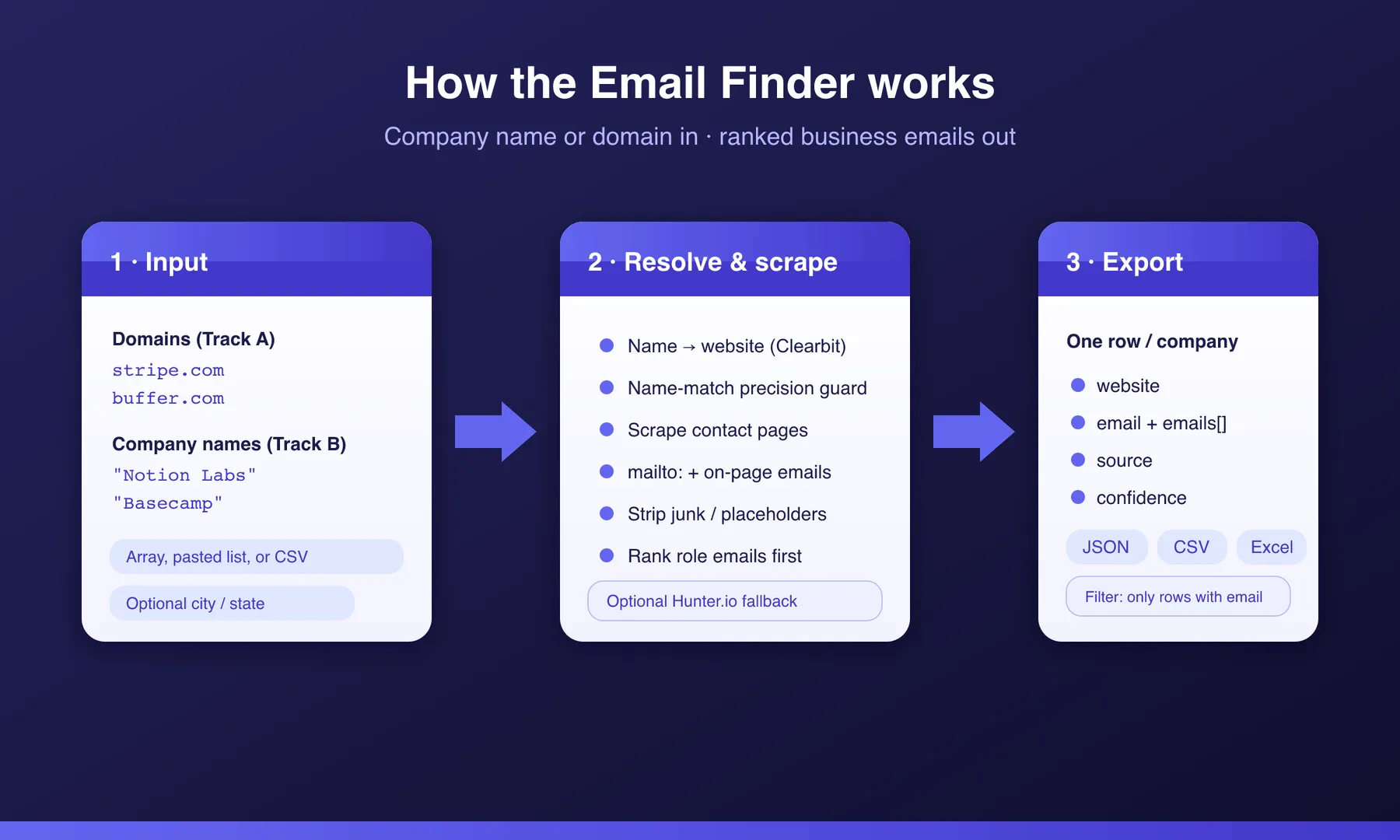
- Input - companies (domains / names / pasted blob), known people, and/or discovery queries (title × company × location).
- Discover (Discovery mode) - the company's team, about, and leadership pages are scanned for real people (JSON-LD Person schema, LinkedIn profile cards, team-card markup - strict name validation, no fabrications). With your own RocketReach API key, open-web search by title/location runs instead, using only the free search teaser.
- Resolve & verify - every person is resolved to their most-likely address: all standard corporate patterns generated and ranked, the domain MX-verified, the mail provider detected, the result cross-checked against emails actually published on the site (a published address =
site-match, high confidence), and the top candidates (up to 4) asked of the mail server until one is accepted. Catch-all domains and servers that won't answer keep the ranked guess. Company rows get their contact pages scraped, junk stripped, role emails ranked first, phones harvested - with optional per-address verification. - Export - one flat row per company / person / discovered person, streamed to the dataset: JSON, CSV, Excel, or API.
Input Configuration
| Field | Type | Description |
|---|---|---|
domains | array | Company websites/domains to find emails for (Track A, most accurate). |
companyNames | array | Company names to resolve to a website, then find emails (Track B). |
targetPersona | array | Decision-maker presets - pick roles (Founder/CEO, Full C-suite, Sales leader, Marketing leader, Engineering leader, Finance leader, HR leader, Operations leader) and the actor auto-runs a people search for each domain/companyName. Turns a plain domain list into a decision-maker search - no per-row discoverPeople query needed. |
defaultCountry | string | Country hint applied to every persona search (e.g. United States). |
inputText | string | Paste a blob of domains or names (new-line / comma / semicolon separated). |
companies | array | Advanced - structured { name, website, city, state } rows. |
people | array | Person lookups - { fullName, companyDomain } objects or "Name, domain.com" strings. |
discoverPeople | array | Discovery queries - { company?, website?, personName?, jobTitles?, locations?, maxPeople? } objects or "CTO @ acme.com" strings. Finds the people, then resolves their emails. locations applies on the RocketReach path (team pages don't publish per-person locations). |
rocketreachApiKey | string | Optional official RocketReach API key - upgrades Discovery to open-web search by title/location/industry with no company needed. Search teaser only: your per-contact unlock credits are never spent. |
maxDiscoveredPeople | integer | Global cap on people processed by Discovery per run (default 200; per-query default 25 via maxPeople). |
guardMode | string | Domain-match strictness for name→website discovery: business (default), off, residential. |
onlyWithEmails | boolean | On by default - emit and bill only company rows where an email was found, so you never pay for a no-email company. Set false to also get no-email rows (for coverage auditing); those are billed when emitted. |
verifyEmails | boolean | Validate every found company email (syntax + MX + disposable/role/free flags); adds emailVerifications, validEmails, bestValidEmail. Billed per email verified. |
smtpCheck | boolean | On by default. Real SMTP mailbox check on top of verification (EHLO → MAIL FROM → RCPT, plus catch-all detection), run from our own mail-check server because Apify blocks the SMTP port. Adds an smtp object and mailboxConfirmed per checked email, confirmedEmailCount per company, and ranks confirmed addresses first in validEmails. An unreachable or rate-limited server defers to the DNS/MX verdict; only a clean 550 marks an address invalid. No extra charge. |
qualifyByPayment | boolean | Flag each company with takesPayments, paymentProcessors (Stripe/Shopify/…), stripeLiveKey - free, reuses pages already fetched. |
hunterApiKey | string | Optional Hunter.io API key for a paid domain-search fallback. |
maxItems | integer | Hard cap on companies processed this run. |
maxConcurrency | integer | How many jobs to run in parallel. |
proxy | object | Leave empty - traffic already routes through the actor's built-in residential proxy at no extra cost. |
Example input
Output Overview
Every result is one flat JSON object. Company rows have no rowType; person rows carry rowType: "person"; discovery rows carry rowType: "discovered-person". Fields that don't resolve come back null or empty rather than missing, so the schema stays consistent. Download as JSON, CSV, Excel, or via the Apify API.
Output Samples
A domain that publishes emails (Track A) - note the phones, harvested from the same pages:
A person lookup (people input) - rowType: "person":
A discovery result (discoverPeople input) - rowType: "discovered-person", the person AND their verified email in one row:
With verifyEmails: true, company rows also carry per-address validation:
verdict is valid (syntax + MX ok, not disposable), risky (role-based or free-provider), or invalid (bad syntax, no MX, or disposable).
Key Output Fields
Company rows
website- the resolved company website ·email/emails/emailCount- ranked, de-duplicatedphone/phones/phoneCount- phones from the same contact pagestakesPayments/paymentProcessors/stripeLiveKey- withqualifyByPayment
Person & discovered-person rows
email- best inferred address ·candidates- every pattern, ranked with scoresmxValid- domain accepts mail (the billing gate) ·emailProvider- google-workspace, microsoft-365, …title/linkedinUrl/location/discoverySource/discoveryQuery- discovery rows only
Provenance (all rows)
source-site-scrape/hunter/site-match/site-pattern/pattern/noneconfidence-high/medium/low·foundAt- ISO timestamp
Pricing
Pay-per-event - you're charged for results, not runtime:
| Event | When it fires | Rate |
|---|---|---|
| Person email found | A person (looked-up or discovered) resolves to a mail-capable business email. Never fires on dead domains, or when the mail server refuses every likely address. | $0.02 |
| Person email confirmed | On top of the above, when the mail server accepted that exact mailbox (mailboxConfirmed: true). From 16 October 2026. | $0.03 |
| Company enriched | One company row emitted (emails + phones + optional payment qualification). | $0.01 |
| Email verified | One address validated when verifyEmails is on. | $0.001 |
| Actor start | Once per run. | $0.005 |
Discovery is free. Finding the people costs nothing - you pay only when a discovered person resolves to a verified, mail-capable address. A 100-person discovery run where 60 resolve and 40 of those are confirmed by the mail server: $0.005 + 60 × $0.02 + 40 × $0.03 = $2.41, and the 40 misses cost nothing.
Where $0.05 per confirmed email sits. The dedicated verified-contact finders bill the same unit - one verified business email:
Same deliverable - a business email the mail server confirmed - at a quarter of the top price, and you also get the ranked candidates, the site cross-check, and the mail provider that the pricier tools leave out. Discovery stays free on top.
How this compares
| Capability | Bulk dump actors | Pay-per-verify contact finders | This actor |
|---|---|---|---|
| Price per verified business email | n/a (sells dumps) | $0.028 - $0.20 per contact | $0.05 confirmed by the mail server, $0.02 MX-checked |
| The find / discovery step | billed per row | often billed too ($0.004-$0.06 per profile or domain) | free |
| Billing unit | every emitted row, verified or not | per verified contact | only mail-capable results |
| Ranked candidate list with scores | ✗ | ✗ (one address handed back) | ✓ full pattern list, scored |
| Cross-check vs the company's own site | ✗ | ✗ | ✓ (site-match / site-pattern) |
| Finds the people, not just the addresses | ✗ (bring your own list) | ✓ | ✓ Discovery mode, free |
Mail provider + source/confidence per row | ✗ | rarely | ✓ every row |
| API keys required | varies | often | none (optional keys only add coverage) |
| Phones on company rows | ✗ | varies | ✓ included |
| Payment-stack qualification | ✗ | ✗ | ✓ free opt-in |
The pay-per-verify finders do one thing - hand back a verified address - and charge $0.028 to $0.20 for it. This actor resolves an address the mail server confirms for $0.05, keeps the discovery step free, and ships the ranked candidates, the site cross-check, the mail provider, and the provenance in the row you pay for. A 5,000-row dump you have to verify elsewhere isn't cheaper either - it's the same work moved to your desk, plus a second tool's bill.
Switching from another email or lead finder?
The most common complaints on other lead/email finders come down to paying for empty or junk results. Here's how each is handled here - every answer is a capability the actor already ships, not a promise:
| A complaint you may recognise | How this actor handles it |
|---|---|
| "Ran and consumed my credit with no output" · "all my credits gone for 2 emails" | Person results bill only on a mail-capable hit - misses cost $0, and so do people whose likely addresses the mail server all refuses. Company rows gate with onlyWithEmails. |
| "Not accurate" · "half the verified emails were undeliverable" | The company's mail server is asked whether the exact address exists before it's called confirmed; addresses are also cross-checked against the company's own published emails, with a confidence score - not a blind guess. |
| "Duplicate emails and random results" · "90% the same leads every run" | Inputs are normalised and de-duplicated to one billable row per company/person; every row is flat, self-contained, and carries its provenance. |
| "It just keeps running" · "one crawl returned 1,800 rows and drained my credits" | Hard caps you set: maxItems, maxDiscoveredPeople, maxVerifiedEmailsPerCompany, and per-query maxPeople. It never runs away. |
| "Can't get phone numbers" | Phones are harvested from the same contact pages and included on company rows at no extra charge. |
| "Unexpected / unknown enrichment charges" | Flat pay-per-event rates, listed in Pricing; person hits bill only when mail-capable, and the confirmed surcharge only when the mail server accepted the mailbox. Nothing hidden. |
Notes & limitations
- Site-engine Discovery finds people on companies that publish a team/about/leadership page (very common for agencies, startups, and professional services). Companies without one return no discovered people - honestly, rather than fabricating names. The open-web path (BYO RocketReach key) covers the rest.
locationsfilters apply on the RocketReach path; public team pages don't publish per-person locations.- Person emails are resolved by pattern ranking, MX check, site cross-checking and the SMTP mailbox check (
smtpCheck, on by default), which also covers the per-address verification step (verifyEmailsand verify-onlyemailList). A confirmedfirst@orlast@address keeps confidencemedium: the mailbox exists, but at a large company it may belong to someone else with that name. The check runs from our own mail-check server and gets honest answers from Gmail, Google Workspace, Microsoft 365 and most company mail servers. Catch-all domains accept every address, and some servers greylist or rate-limit checks; those come backcatchAll: trueoraccepted: nulland fall back to the DNS/MX verdict.mailboxConfirmed: trueis the strong signal. - Company email hit-rates depend on the company publishing an address;
source: "none"rows tell you exactly which didn't.
FAQ
How is Discovery different from the people input?
people needs a name you already know. discoverPeople finds the names: it scans the company's team/about/leadership pages (or searches the open web with your RocketReach key), extracts real people with their titles, and then runs each through exactly the same email-inference + verification pipeline. One run, one row per person, discovery free, billed only on verified hits.
Can I pass a dataset instead of typing names?
Yes. Set peopleDatasetId to an Apify dataset whose rows have a name and a company domain, or a linkedin.com/in/ URL. Those rows are read after the People list and billed the same way.
Can I paste LinkedIn profile URLs?
Yes. Put linkedin.com/in/… links in linkedinUrls, in people, or in the paste box. The actor reads the public card (name, headline, employer) without a login, resolves the company domain, and runs the same person-email path. You are billed only when a mail-capable address is found. Company pages, jobs and sales-navigator links are ignored.
Does Discovery spend my RocketReach credits? No. The actor calls only the RocketReach search endpoint, whose results include the person's professional email domain as a teaser. The actual address is resolved by this actor's own inference + MX verification. Per-contact unlock credits are never touched.
Why did a discovery query return few (or no) people?
The default engine reads what the company publishes. If there's no team/about page - or it's rendered entirely client-side - there's nothing trustworthy to extract, and the actor returns nothing rather than inventing names (strict validation drops nav labels, section headings, and marketing cards). Add a rocketreachApiKey for open-web coverage of those companies.
What's the difference between passing a domain and a company name? A domain (Track A) is scraped exactly as given - no guessing. A company name (Track B) is resolved to a website first behind a name-match guard so the wrong company's domain is never attached. If you have domains, prefer them.
Do I pay for companies or people where nothing was found?
Person-level results (looked-up or discovered) are charged only when mail-capable. Company rows are charged when emitted, and onlyWithEmails is on by default - so no-email companies are dropped and not billed unless you set onlyWithEmails: false to keep them for coverage auditing.
How are the emails ranked?
Role/outreach addresses (info@, sales@, contact@, hello@) float to the top of company rows; junk (tracking pixels, asset filenames, placeholders, no-reply@) is stripped. Person rows rank every corporate pattern by real-world frequency, boosted by what the company's own site reveals.
How does the person lookup work - is it scraped or guessed?
Both, in the right order. All standard patterns are generated and ranked, the domain is MX-verified, the provider detected - and the company site is scanned: a published address returns as site-match (high confidence); published addresses revealing the org's naming style boost the matching pattern (site-pattern). Then the top candidates are asked of the mail server over SMTP, and the first one it accepts becomes the answer (mailboxConfirmed: true).
Do I need a Hunter.io or RocketReach key? No. The free paths (site scrape, team-page discovery, pattern inference) work on their own. Keys are optional upgrades: Hunter.io adds a paid domain-search fallback; RocketReach upgrades discovery to open-web title/location search.
How fast is it, and how many companies can it handle?
Jobs run in parallel (tune maxConcurrency) and scale from a handful to thousands. Traffic routes through the actor's built-in residential proxy at no extra cost.
What export formats are supported? Every run writes to an Apify dataset - JSON, CSV, Excel, XML, JSONL, or the Apify API - and wires into scheduling, webhooks, Google Sheets, Zapier, or Make.
Support
- Found a bug or need a new field? Open a ticket on the Issues tab of this actor - it's the fastest way to reach me and I actively maintain this actor.
- Email: muhamed.didovic@gmail.com
- Website: muhamed-didovic.github.io
Additional Services
Need something beyond the standard output? I build and maintain custom actors and data pipelines. Happy to help with:
- Deeper person-level contact discovery (titles, LinkedIn profiles, custom sources)
- Custom fields, filters, or export formats tailored to your workflow
- Private or dedicated actors for high-volume or compliance-sensitive use
Reach out via the Issues tab or email and describe what you need.
Explore More Scrapers
Browse my other Apify actors - job boards, business directories, review sites, social platforms, and more - on my profile: memo23 on Apify.
🤖 For AI Agents & LLM Apps
Compact reference for AI agents calling this actor via the Apify MCP server or the Apify API (actor: memo23/email-finder).
Purpose: find and verify business emails (plus phones on company rows) by company domain/name, by person (name + domain), or by discovery mode (job title / company / location → people → SMTP-confirmed or MX-checked emails); billed only on mail-capable hits.
Minimal input:
Person mode: { "people": ["Patrick Collison, stripe.com"] } · Discovery mode: { "discoverPeople": [{ "website": "posthog.com", "jobTitles": ["founder"] }] } - modes can be mixed in one call.
Output: company rows carry website, email, emails[], emailCount, phone, phones[], phoneCount, source, confidence, foundAt. Person rows (rowType: "person") carry fullName, companyDomain, email, pattern, candidates[] {email, pattern, score, smtp}, mxValid, mailboxConfirmed, smtpStatus, emailProvider, source, confidence. Discovery rows (rowType: "discovered-person") carry the person fields plus title, companyName, location, linkedinUrl, discoverySource, discoveryQuery.
Behaviors an agent should know:
maxItemscaps companies processed (default 100000);maxDiscoveredPeoplecaps discovery output (default 200) - set both low to bound cost.- Mix
domains,companyNames,people, anddiscoverPeoplein one run;discoverPeopleaccepts loose strings like"CTO @ acme.com". - Without
rocketreachApiKey, discovery queries need acompanyorwebsite; the actor never spends RocketReach unlock credits. onlyWithEmailsdefaults to true (no-email company rows are dropped and not billed); set itfalseto keep them.verifyEmails: trueadds per-address validation;smtpCheck(defaulttrue) adds a real SMTP mailbox check withmailboxConfirmedper email; set itfalsefor DNS-only.- Billing:
company-enriched$0.01 per company row (primary event);person-email-found$0.02 only whenmxValidand an email resolved;person-email-confirmed+$0.03 whenmailboxConfirmed(from 2026-10-16); email verified $0.001 each withverifyEmails; actor start $0.005. Discovery is free.
⚠️ Disclaimer
This actor discovers publicly available business contact information - the same email addresses, phone numbers, and team-page listings any visitor can see on a company's public website, plus (optionally, with your own API key) data from providers you hold an account with. It does not access private data, bypass authentication, or scrape gated content.
You are responsible for how you use the data you collect. Use it in compliance with applicable laws (including the GDPR, CAN-SPAM, CASL, and other data-protection and anti-spam regulations) and any contractual obligations you may have. Finding an email address does not constitute consent to contact it - ensure your outreach complies with the relevant marketing and messaging laws in your jurisdiction. Do not use this tool to facilitate spam, harassment, or any violation of privacy.
SEO Keywords
email finder, bulk email finder, business email finder, company email lookup, domain email finder, email scraper, email extractor, find company emails, b2b email finder, lead generation tool, sales prospecting, contact email finder, email discovery, company contact scraper, domain to email, email hunter alternative, cold outreach emails, crm enrichment, bulk email lookup, email finder api, person email finder, find email by name and company, name to email, email pattern finder, email permutator, verified business email, mx verification, find employees by company, find people by job title, decision maker finder, team page scraper, apollo alternative, rocketreach alternative, discover leads by title, verified leads finder, email verification built in


![Collecting Cars [$3💰] | 33k SOLD prices + live bids avatar](https://images.apifyusercontent.com/Hbn_LDWbVTHAyPL8k_edq8GAZOEin7g5i4_bFf2WimM/rs:fill:76:76/cb:1/aHR0cHM6Ly9hcGlmeS1pbWFnZS11cGxvYWRzLXByb2QuczMudXMtZWFzdC0xLmFtYXpvbmF3cy5jb20vbmduOHZSRVNUa3NleVdFNnAtYWN0b3ItRm1EYVRESkEyWGNYU0s4N24tVkJhU3V5RENuYi1Db2xsZWN0aW5nX0NhcnMud2VicA.webp)
![Car & Classic [$1💰] | Full 46k catalogue | Beats 10k cap avatar](https://images.apifyusercontent.com/yR5ZcWq7huml1KRn39casUADIIm6kQumb9tA8E00od4/rs:fill:76:76/cb:1/aHR0cHM6Ly9hcGlmeS1pbWFnZS11cGxvYWRzLXByb2QuczMudXMtZWFzdC0xLmFtYXpvbmF3cy5jb20vbmduOHZSRVNUa3NleVdFNnAtYWN0b3ItbmRLcGNQOFNyWFNueW5Na3IteGE3RlJRTHRTVy1jYXJfYW5kX2NsYXNzaWMuanBlZw.webp)


![PistonHeads.com [$1💰] | Full 208k catalogue | Real pagination avatar](https://images.apifyusercontent.com/N5yGW7wlseLIwvxB9V1DcTJVHEdFqV2MhaITdnhRlFM/rs:fill:76:76/cb:1/aHR0cHM6Ly9hcGlmeS1pbWFnZS11cGxvYWRzLXByb2QuczMudXMtZWFzdC0xLmFtYXpvbmF3cy5jb20vbmduOHZSRVNUa3NleVdFNnAtYWN0b3IteEpXSmV2d2I5dVBrZDdwU08tOHRWc0xnWEUzZi1waXN0b25oZWFkcy5wbmc.webp)

