

Facebook Hashtag Search Scraper
Pricing
from $3.00 / 1,000 posts
Facebook Hashtag Search Scraper
Search Facebook posts by hashtag. Supports any language including Thai. No browser or login required.
Pricing
from $3.00 / 1,000 posts
Rating
0.0
(0)
Developer

Muhamed Didovic
Maintained by CommunityActor stats
0
Bookmarked
4
Total users
3
Monthly active users
a day ago
Last modified
Categories
Share
How it works
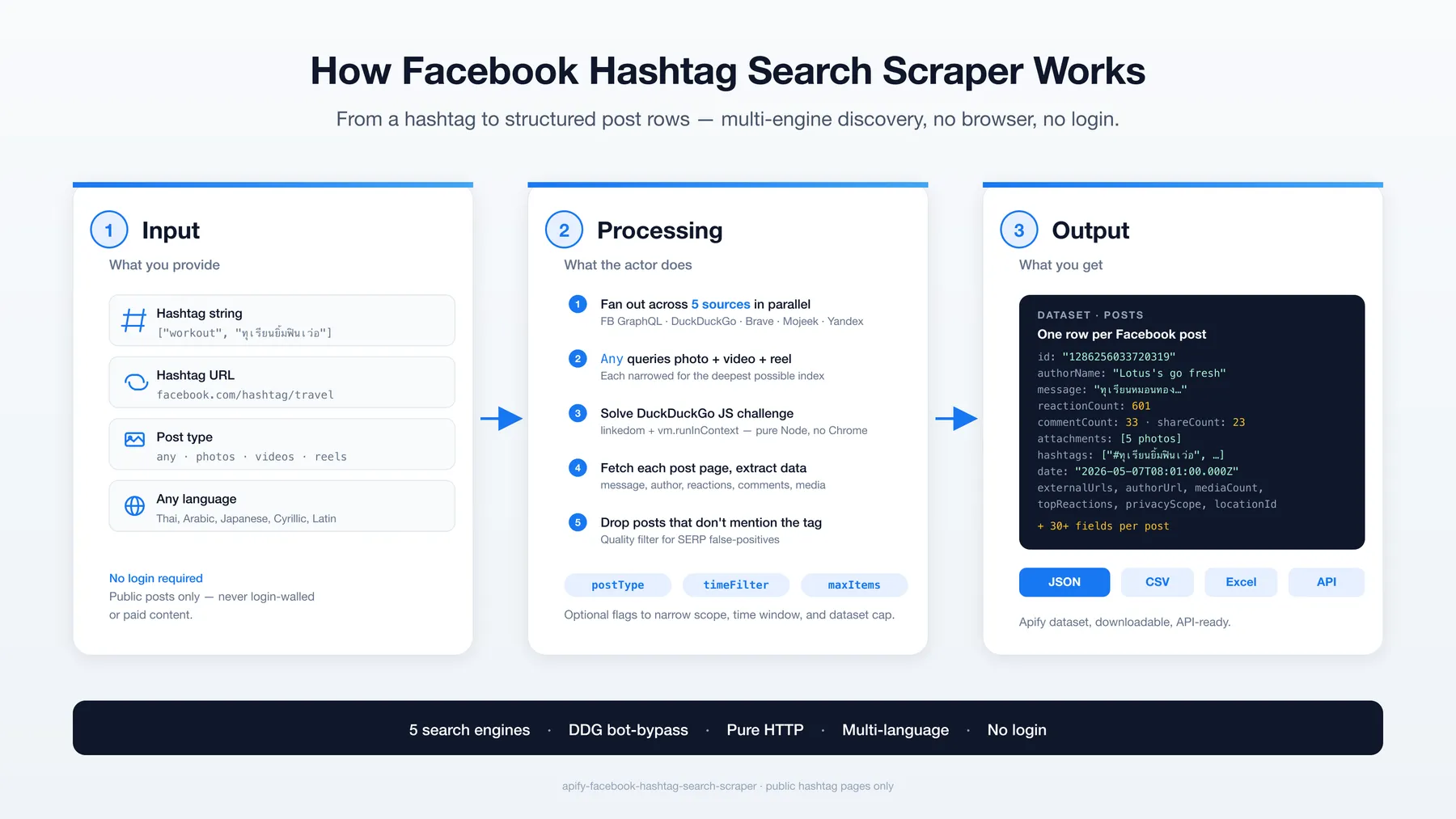
Find every public Facebook post that mentions a hashtag — across reels, photos, videos, and posts — without a browser, without a login. Combines Facebook's own hashtag search with deep multi-engine SERP discovery (DuckDuckGo, Brave, Mojeek, Yandex), solves DuckDuckGo's anti-bot JavaScript challenge in pure Node.js, and delivers structured rows ready for analytics.
Pure HTTP. No Puppeteer. No Playwright. $3 per 1,000 posts, and maxItems is a hard cap.
Why Use This Scraper?
- Multi-engine SERP discovery — runs Facebook's hashtag search AND fans out across DuckDuckGo, Brave, Mojeek, and Yandex in parallel.
- Per-post-type fan-out —
Anyautomatically queriessite:facebook.com/photo,/videos, and/reelseparately for the deepest possible coverage. - DuckDuckGo bot-bypass — extracts the
dptoken from the landing page and solves DDG's JavaScript anti-bot challenge in pure Node (linkedom +vm.runInContext). No Chrome required. - Hashtag-presence quality filter — drops false positives where search engines surfaced loosely-matched URLs whose body doesn't actually contain the searched hashtag.
- Auto-region detection — Thai-script queries route to DDG's
kl=th-thindex; Japanese, Cyrillic, and Arabic auto-route to their matching regions. - Pure HTTP — no browser — runs in seconds, not minutes; minimal RAM; cheap on Apify compute.
- Pin-shape (post-shape) output — every dataset row is a Facebook post object: message, author, engagement, attachments. Same shape regardless of which engine surfaced it.
Overview
The Facebook Hashtag Search Scraper is a hashtag-first scraper for Facebook public posts. You provide a hashtag (or a facebook.com/hashtag/{tag} URL); the actor returns every public Facebook post — across reels, videos, photos, and standard posts — that contains that hashtag.
The dataset shape is post rows. Whether a result was discovered via Facebook's own hashtag GraphQL flow or via DuckDuckGo/Brave/Mojeek/Yandex site-search, every row has the same structure: post text, author info, engagement metrics, attachments, hashtags, and permalink URL.
This actor is designed for marketers monitoring sponsored brand hashtags (e.g. #ทุเรียนยิ้มฟินเว่อ, #workout), agencies verifying influencer deliverables, researchers building hashtag-conversation datasets, and analysts mapping competitive hashtag activity.
Supported Inputs
Two ways to specify hashtags:
Plain hashtag strings
The simplest path. Provide one or more hashtags with or without #, in any language (Latin, Thai, Cyrillic, Arabic, CJK):
Hashtag URLs
Paste full Facebook hashtag URLs — the actor parses out the tag automatically:
You can mix both — duplicates are deduped.
Pattern rules
| Pattern | Supported? |
|---|---|
https://www.facebook.com/hashtag/{tag} | ✅ yes |
https://m.facebook.com/hashtag/{tag} | ✅ yes |
Percent-encoded Unicode (/hashtag/%E0%B8%97...) | ✅ yes |
https://www.facebook.com/groups/... | ❌ unsupported (use the Facebook Group Posts scraper) |
https://www.facebook.com/{user}/posts/... | ❌ unsupported (single-post URLs aren't hashtag searches) |
Hosts outside *.facebook.com | ❌ unsupported |
Non-hashtag URLs in startUrls are skipped with a warning rather than failing the run.
Use Cases
| Audience | What they get |
|---|---|
| Marketing teams | Track every public post under your campaign hashtag — spot influencer reach and engagement-rich participants. |
| Brand agencies | Verify deliverables on hashtag-required sponsored posts (campaign tags like #YourBrandChallenge). |
| SEO / content teams | Map hashtag conversation depth, top author handles, and engagement-by-media-type. |
| Researchers | Build longitudinal datasets of public hashtag activity in any language including Thai, Arabic, Japanese. |
| Competitive analysts | Snapshot a competitor's branded-hashtag footprint across post types. |
| Brand teams | Monitor unsanctioned use of trademarked hashtags. |
How It Works
- You provide hashtags (or hashtag URLs) and a post type (
any,photos,videos, orreels). - Actor fans out across discovery sources — Facebook's hashtag GraphQL flow + DuckDuckGo + Brave Search + Mojeek + Yandex, one query per concrete post type.
- Anti-bot bypass — DuckDuckGo's JavaScript challenge is solved in pure Node.js using
linkedom+vm.runInContextto compute thejsatoken and resolve the next-page URL. - Per-URL enrichment — every discovered Facebook URL is fetched and parsed for full post data (message, author, reactions, comments, shares, media, hashtags).
- Quality filter — posts whose page body doesn't actually contain the searched hashtag are dropped (false-positive control).
- Export — structured JSON, CSV, or Excel.
Input Configuration
The scraper requires a simple JSON input. Real fields only:
| Field | Type | Description | Default |
|---|---|---|---|
hashtags | Array | Hashtags to search (with or without #). | [] |
startUrls | Array<{url}> | Facebook hashtag URLs (alternative or supplement to hashtags). | [] |
postType | Enum | any, photos, videos, reels. any fans out to all three. | "any" |
timeFilter | Enum | SERP date filter: any, day, week, month, year. | "any" |
maxItems | Integer | Maximum number of posts in the dataset. | 50 |
minDelay | Integer | Min seconds between paginated GraphQL requests. | 5 |
maxDelay | Integer | Max seconds between paginated GraphQL requests (random jitter). | 10 |
proxy | Object | Proxy configuration. Highly recommended to use Apify Residential to avoid blocks. | Apify Residential |
Example input — single niche hashtag
Example input — popular hashtag, reels only
Example input — mixed strings + URLs
Output Overview
Every dataset item is a Facebook post row — same shape regardless of which discovery source surfaced it (FB hashtag search, DDG, Brave, Mojeek, or Yandex). Posts whose body doesn't contain the searched hashtag are filtered out before export.
You can export the dataset as:
- JSON — full nested objects (attachments, engagement breakdown, etc.)
- CSV / Excel — flat rows; nested arrays/objects are stringified
Field availability varies slightly by source — Facebook GraphQL-discovered rows have richer engagement breakdowns; SERP-discovered rows always include core fields (id, url, message, author, hashtags) and engagement counts.
Output Samples
First row from a real ทุเรียนยิ้มฟินเว่อ run, shortened for readability:
Key Output Fields
Grouped by category:
Post Core
id— Facebook post IDurl— permalink URLmessage— post textcreationTime— Unix timestamp (seconds)date— ISO 8601 stringelapsedMinutes/elapsedSeconds— age at scrape timeprivacyScope—"Public","Unknown", etc.hashtag— the hashtag the search was forhashtags[]— every hashtag found in the post body (Unicode-aware)externalUrls[]— external links in the post
Author
authorName— display nameauthorId— Facebook numeric IDauthorUrl— author profile URL
Engagement
reactionCount/commentCount/shareCountengagement.reactions.totalengagement.reactions.topReactions[]— array of{ type, count }(Like, Love, Haha, Wow, Sad, Angry)
Media (Attachments)
attachments[]— each entry:{ type, url, thumbnailUrl, accessibility, mediaId }mediaCount— convenience count
Geo
locationId— currently alwaysnull(not yet extracted; planned)
Pricing
Pay per event, no subscription:
| Event | Price |
|---|---|
| Post (one row in the dataset) | $0.003 ($3 per 1,000) |
| Run start | $0.005 per GB of run memory |
maxItems is a hard cap: the run never pushes, or charges for, a post past it. If you set a spending limit on the run, the scraper stops at the number of posts that limit covers. Residential proxy is included and does not show up as a separate cost.
FAQ
How many posts can I expect per hashtag? Depends on the hashtag's footprint:
- Popular generic hashtags (
#workout,#travel,#food): 100–300+ posts. - Niche brand campaigns (e.g.
#ทุเรียนยิ้มฟินเว่อ): 10–25 posts. This is a content limit, not a code limit — the scraper paginates to offset 430+ on DuckDuckGo and exhausts the index.
Why do I sometimes get fewer results than I expect? Three reasons: (a) the hashtag genuinely doesn't have many indexed posts on the open web; (b) DuckDuckGo / Brave's index varies by proxy geography (request from a Thailand IP for Thai content for best coverage); (c) very recent posts may not be indexed yet.
Does this scraper need a Facebook login? No. Everything runs against public endpoints — Facebook's logged-out hashtag GraphQL flow plus public web-search engines. No account, no login, no ban risk.
Is this scraper fast?
Pure HTTP, so no browser start-up. Most of a run is waiting on the search engines and on each post page: two hashtags with maxItems: 20 took about three minutes on the platform. A niche tag with few posts finishes sooner.
How does it bypass DuckDuckGo's anti-bot?
DDG serves a JavaScript anti-bot challenge that requires DOM-aware execution (malformed-HTML innerHTML.length probes). The scraper solves it in pure Node.js using linkedom (lightweight DOM emulator) + vm.runInContext — no Chrome required.
What's the difference between Any and selecting a specific post type?
Any runs THREE separate SERP queries per source (site:facebook.com/photo, /videos, /reel) — much deeper coverage than a bare site:facebook.com query. Specific types narrow to that single type but go just as deep.
Why does the scraper sometimes return slightly different counts on consecutive runs? Search engines vary their results per IP/region/time. Run-to-run variance of ±10–20% on the same hashtag is normal.
Can I scrape private hashtags? There is no such thing — hashtags are public on Facebook by design. The scraper only accesses public posts that contain the hashtag.
Can I mix multiple hashtags in one run?
Yes — pass multiple hashtags in hashtags[] (or as startUrls). Each runs through the full discovery pipeline; maxItems is the global cap across all of them.
Support
- For issues or feature requests, please use the Issues section of this actor.
- If you need customization or have questions, feel free to contact the author:
- Author's website: https://muhamed-didovic.github.io/
- Email: muhamed.didovic@gmail.com
Additional Services
- Request customization or whole dataset: muhamed.didovic@gmail.com
- If you need anything else scraped, or this actor customized, email: muhamed.didovic@gmail.com
- For API services of this scraper (no Apify fee, just usage fee for the API), contact: muhamed.didovic@gmail.com
Explore More Scrapers
If you found this Facebook Hashtag Search Scraper useful, be sure to check out our other powerful scrapers and actors at memo23's Apify profile. We offer a wide range of tools to enhance your web scraping and automation needs across various platforms and use cases.
⚠️ Disclaimer
This Actor is an independent tool and is not affiliated with, endorsed by, or sponsored by Meta Platforms, Inc. or any of its subsidiaries. All trademarks (Facebook, Meta) mentioned are the property of their respective owners.
The scraper accesses only publicly available Facebook hashtag search pages and public post pages — no authenticated endpoints, paid features, or content behind the Facebook login wall. Discovery uses public web-search engines (DuckDuckGo, Brave, Mojeek, Yandex) querying the public web. Users are responsible for ensuring their use complies with Facebook's Terms of Service, applicable data-protection law (GDPR, CCPA, PDPA, etc.), and any contractual obligations of their own organization.
SEO Keywords
facebook hashtag scraper, scrape facebook hashtag, facebook hashtag API, facebook hashtag search, Apify facebook hashtag, facebook reels scraper, facebook posts scraper, facebook brand campaign monitoring, hashtag tracking scraper, facebook influencer scraper, facebook engagement data, facebook brand mentions scraper, hashtag analytics, facebook content monitoring, facebook reels API, social media data extraction, brand campaign reach scraper, multilingual hashtag scraper, thai hashtag scraper, facebook search scraper


