

Google Flights Scraper API 💰$2/1k — Fares & Multi-City
Pricing
from $2.00 / 1,000 results
Google Flights Scraper API 💰$2/1k — Fares & Multi-City
[💰$2/1K] Google Flights scraper for fare monitoring and price comparison. One-way, round-trip & multi-city from airports, cities or countries, with every Google filter. Explore cheapest trips anywhere, price graph, return flights, CO2, layovers, bags, booking options & a link per flight.
Pricing
from $2.00 / 1,000 results
Rating
5.0
(2)
Developer

Muhamed Didovic
Maintained by CommunityActor stats
1
Bookmarked
866
Total users
151
Monthly active users
15 hours ago
Last modified
Categories
Share
Google Flights Scraper API — Fares, Itineraries & Multi-City
How It Works
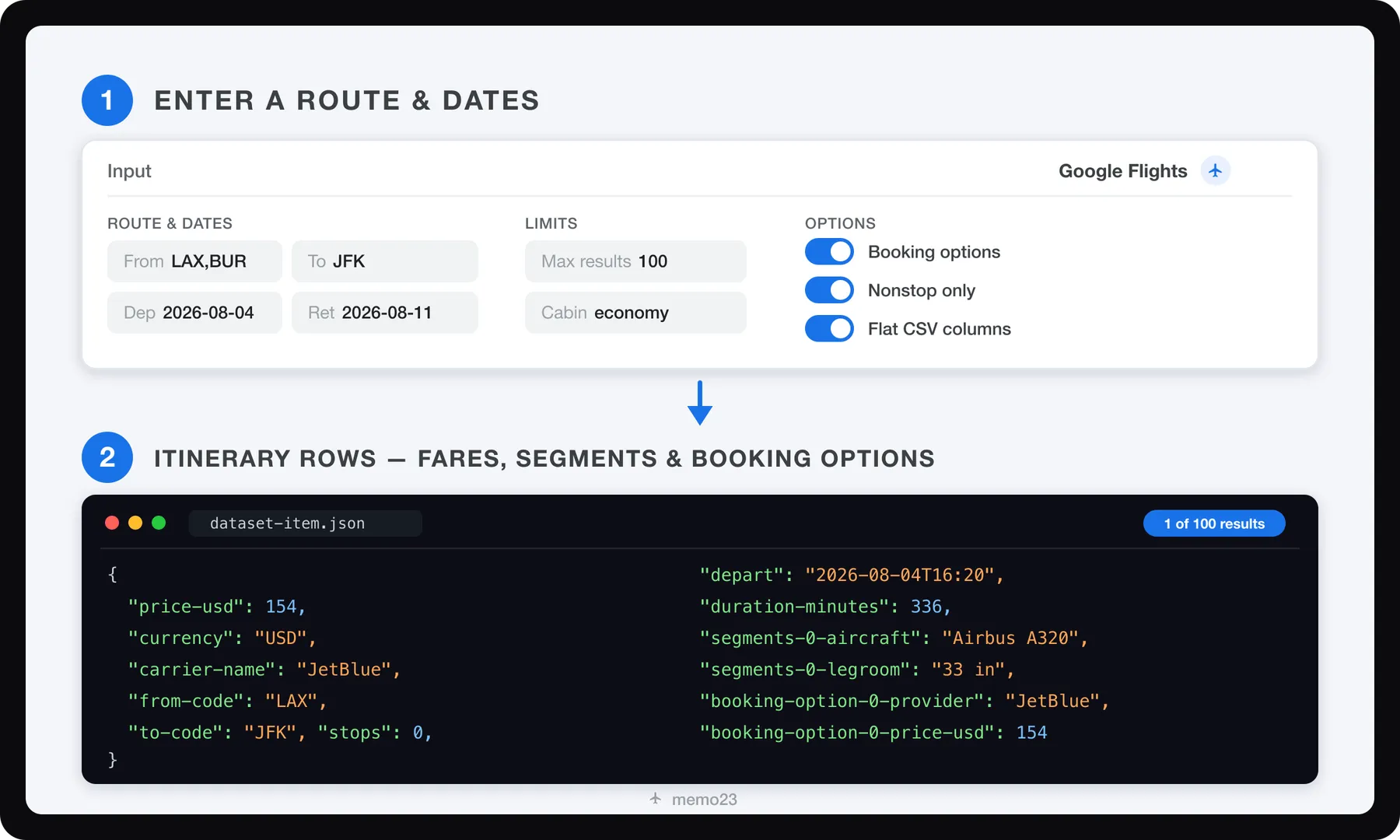
- Your input — origin and destination (airport, city or country), dates, passengers, cabin, Google's filters, multi-city legs, market/currency/language. Or paste a Google Flights URL from your browser instead.
- Search — the Actor runs your search on Google Flights and returns Google's full sorted result set (~150 itineraries on busy routes) plus price insights. No login or API key needed.
- Your dataset — flat rows or nested JSON with price, carrier, stops, duration, per-segment aircraft/flight-number/legroom/times, a booking token, and optional booking options — CSV-ready or JSON.
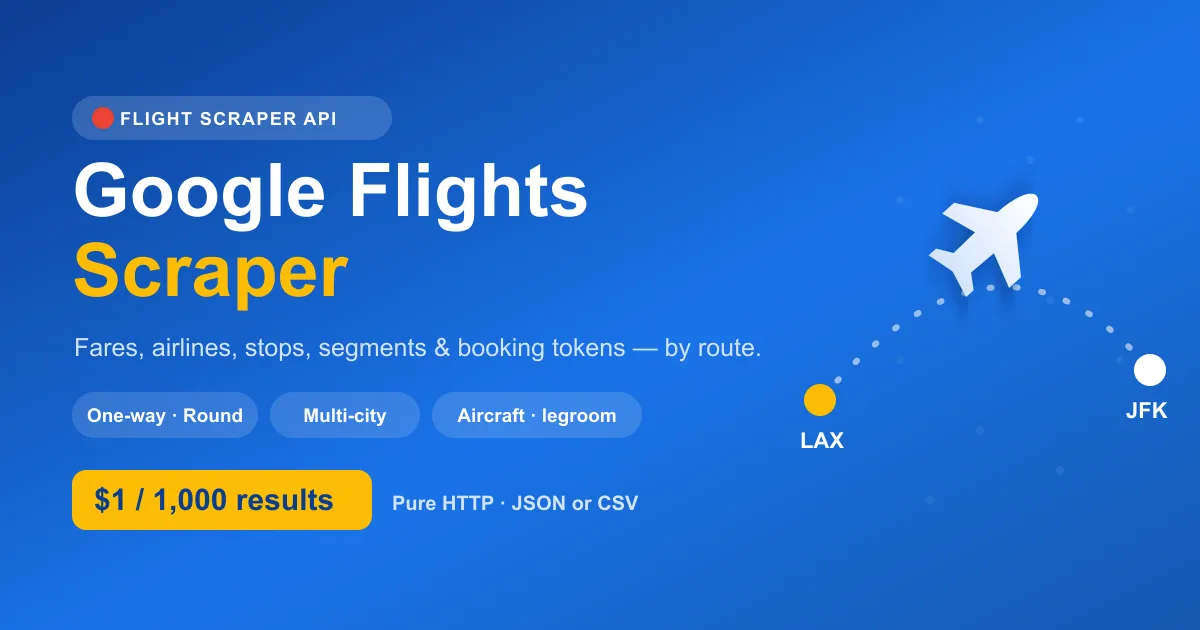
Scrape flight itineraries, fares, schedules and routes from Google Flights — by route + dates — at $2 per 1,000 results. One-way, round-trip and multi-city all supported, from airports, cities or whole countries, with every filter the site has. Each itinerary carries price, airline, stops, total duration, exact times, layovers, CO2 emissions, included bags, aircraft type, flight number, legroom, full airport names, a booking token and a Google Flights link that opens that exact flight — plus, optionally, the airlines/OTAs selling each fare with their prices, fare names and booking links, the return flights for each outbound and Google's price graph (cheapest fare per date). Pure HTTP — no browser, no CAPTCHA solver (a residential proxy is recommended and on by default, since Google serves empty results to datacenter IPs). Output is CSV-ready flat rows or nested JSON, straight into your Apify dataset.
Why Use This Scraper?
- $2 / 1,000 results — flat, simple pricing. No opaque per-page math.
- No login or API key needed — fast, lightweight runs. Residential proxy recommended; the default works out of the box.
- Full trip coverage — one-way, round-trip, and multi-city priced as one ticket, the way Google Flights prices it (or as separate one-ways per leg, if you prefer).
- Airports, cities or countries —
From: "Los Angeles",To: "United Kingdom"searches every airport Google lists for them, as the site does. - Every Google Flights filter — stops, airlines and alliances (include or exclude), price cap, departure/arrival time windows, max duration, connecting airports (only via / never via), layover length, bags, no basic economy, less emissions only, and the sort order.
- Return flights per outbound — for round trips, list the returns for the top outbound flights, each with its round-trip price and booking link.
- Price graph — the cheapest fare for each departure date over up to 330 days, from the same search.
- Explore anywhere — the cheapest trip from your city to every destination Google Flights Explore shows, worldwide or by region, for set or flexible dates.
- Many searches per run — paste several URLs or list several routes; one startup fee, one dataset.
- A Google Flights link per flight — opens Google's booking page for that exact itinerary.
- Deep itinerary data — per-segment airport codes + full names, departure/arrival timestamps, duration, aircraft model, flight number, legroom, layovers (airport, city, minutes), CO2 emissions vs typical, bags included in the fare, plus carrier and booking token.
- Booking options (who sells it & for how much) — optionally resolve, per itinerary, the airlines/OTAs selling the fare with per-option price, fare name (e.g. "Blue Basic"), baggage fee, booking domain and a click-through URL. No login needed.
- Price insights — current vs typical price and the delta, straight from Google.
- Best & other flights — every row is tagged
bestorotherso you can rank instantly. - Global — any market, currency and language (
gl/curr/hl). - Spreadsheet or JSON — flat dashed columns (
price-usd,segments-0-aircraft…) for Excel/Sheets, or nested objects for pipelines.
The sticker price vs your final bill
Cheaper-looking Google Flights actors exist on the Store. Two cost lines never show on a listing's price tag, so check them before comparing per-row prices:
| This Actor | A typical "$0.20/1k" listing | |
|---|---|---|
| Proxy cost | Included for paying runs — nothing extra is metered to your Apify account. (Free-plan runs use your own Apify proxy.) | Runs through your proxyConfiguration, so the proxy traffic each search needs is billed to your Apify plan on top of the row price. |
| What one row holds | A whole itinerary: per-segment aircraft, flight number, legroom, times, layovers, CO2, bags in the fare, booking token, a link to that exact flight — plus optional booking options, return flights and price-graph rows. | Row depth varies between actors. Compare an actual output row, not the price alone. |
| Filters and your bill | Every Google filter runs inside the search (stops, airlines and alliances with return-leg overrides, time windows, duration, connecting airports, layover length, bags, basic economy, emissions), so non-matching flights are never delivered or billed. | Fewer server-side filters mean more rows you did not want, delivered and billed. |
| Track record | On the Store since June 2026, 71,000+ runs. | — |
For one small unfiltered search, a cheaper sticker can genuinely cost less in total. For filtered, scheduled or bulk work, the included proxy and server-side filters usually turn the comparison around. The test that settles it: run the same search on both and read the two bills.
Overview
This Actor runs Google Flights searches for a route, date and passenger mix and returns the sorted result set (best + other flights) plus price insights as structured itineraries.
Output is one row per itinerary. Each itinerary nests its flight segments (with per-segment aircraft, flight number, legroom and times). For multi-city, each row is a first-leg flight priced as the whole ticket, and the top rows carry the later legs in leg-2-…, leg-3-… columns. Optional return-flight, price-graph and Explore rows sit in the same dataset, told apart by record-type. One run can hold many searches: every URL in startUrls and every entry of searches is searched, and rows carry search-index.
Supported Inputs
| Input | What it does |
|---|---|
| Google Flights URL | startUrls: paste a Google Flights link instead of filling the route fields. Both shapes work: the address-bar URL after a search (…/travel/flights/search?tfs=…) and a text-query URL (…/travel/flights?q=Flights+from+DPS+to+LGK+on+2026-11-03). Route, dates, cabin, passengers, the link's filters (airlines, connecting airports, layovers, stops) and the URL's curr/hl/gl are read from it. Each URL is its own search; the route fields are ignored when URLs are given. Explore links (/travel/explore?tfs=…) run as Explore searches, and a round-trip link with the outbound already picked lists that flight's return flights. A city in the link is searched as that city, the way the site does, not as a list of its airports: Google's Explore answers differ between the two. |
| Several searches per run | searches: a list of objects with the same fields as the form, e.g. [{"origin":"LAX","destination":"JFK","departDate":"2026-11-10"},{"origin":"Paris","destination":"Tokyo","departDate":"2026-12-01"}]. Each entry needs its own route; everything else it leaves out comes from the form. Startup is charged once per run. |
| Explore (anywhere) | exploreDestinations: list the cheapest trip from origin to every destination Google Flights Explore shows, cheapest first, worldwide or in one region (exploreRegion), for your dates or for flexible dates (exploreMonth, exploreTripLength). |
| Route + dates | origin, destination, departDate (+ optional returnDate). IATA codes, e.g. LAX, JFK; comma-separate for multi-airport search, e.g. LAX,BUR → JFK,EWR. City, region or country names work too (Paris, New York, United Kingdom): Google searches all their airports. Separate several names with ;. |
| Stops filter | maxStops: 0 = nonstop only, 1 = ≤1 stop, 2 = ≤2 stops. |
| Airlines filter | airlines: include only these airlines, by code or by name as Google Flights shows them, e.g. ["DL"] or ["Air France","KLM"]. alliances: ONEWORLD, SKYTEAM, STAR_ALLIANCE. excludeAirlines: codes or alliances to leave out. |
| Max price | maxPrice: only itineraries at or below this price (in the selected currency). |
| Times & duration | outboundDepartureTime, outboundArrivalTime, returnDepartureTime, returnArrivalTime as hour windows like 6-12; maxDurationHours. |
| Connections | connectOnlyVia / neverConnectVia (airport codes), minLayoverHours, maxLayoverHours. |
| Fare filters | checkedBags (0-2) and carryOnBags (0-1) price the fare with bags; excludeBasicEconomy; lessEmissionsOnly. |
| Sort | sortBy: top (Google's order), price, departure, arrival, duration, emissions. |
| Price graph | priceGraphDays: also return the cheapest fare per departure date for this many days (up to 330), one row per date, ranked by price-rank. |
| Date grid | dateGridDays: round trips get Google's date grid, the cheapest price for every departure date ±N days × return date ±N days around yours (3 → 7 × 7 = 49 prices). priceCalendarOnly writes just the graph and grid, no flights. |
| Relative dates | departDaysAhead (depart N days after the run day), tripLengthDays (return N days later) and departDateWindowDays (also search the next N dates). Saved and scheduled runs keep searching ahead instead of a fixed date. |
| Return flights | returnFlightsTop + returnFlightsPerOutbound: round trips list the return flights for the top N outbound flights. |
| Booking options | resolveBookingOptions: for each itinerary, fetch who sells the fare (airline/OTA) with price, fare name, baggage fee and a booking URL. Capped by maxBookingItineraries. One-way, round-trip & multi-city. resolveBookingUrls also follows each link to the seller's own booking page (e.g. a jetblue.com or aa.com link with the flights filled in). |
| Multi-city | multiCityLegs: one entry per leg as ORIGIN-DEST-DATE (e.g. LAX-JFK-2026-08-04). Priced as one ticket by default (multiCityPricing: single_ticket); the top multiCityCompleteTop rows get their later legs picked. separate_tickets searches each leg as its own one-way. |
| Return-only filters | returnMaxStops, returnAirlines, returnExcludeAirlines: round trips can filter the return differently, e.g. nonstop out and up to 1 stop back. |
| Explore a country | exploreCountry: Explore limited to one country (e.g. Italy), with the map zoomed onto it so smaller towns show up. Pasted Explore links limited to a country work too. |
| Passengers & cabin | adults, children, infantsInSeat, infantsOnLap, cabinClass. |
| Locale | market (gl), currency (curr), language (hl). market takes an ISO country code; UK and country names are converted (UK → GB). |
Not supported: hotels or car hire, live booking/checkout, seat selection. This Actor is flights-only.
Use Cases
| Audience | What they do with it |
|---|---|
| Travel aggregators / OTAs | Power a fare-comparison page across many routes and dates. |
| Fare-alert products | Track a route + date daily and notify when the cheapest fare drops. |
| Revenue / pricing teams | Snapshot competitor fares and price bands over time. |
| Data & ML pipelines | Ingest multi-route fare data daily to model price movement. |
| Travel agencies | Export structured itineraries for clients on demand. |
| Researchers | Build open fare/route datasets for connectivity analysis. |
Input Configuration
| Field | Type | Required | Notes |
|---|---|---|---|
startUrls | array | — | Google Flights URLs (tfs= or q= links). Each URL is a search of its own; route, dates, cabin, passengers and curr/hl/gl come from it, and the route fields below are ignored. |
searches | array | — | More searches in the same run: objects with the form's fields, each with its own route. |
origin | string | — | Airport code (LAX), codes (LAX,BUR), or a city/region/country name (Los Angeles, United Kingdom; several names separated by ;). Defaults to LAX. |
destination | string | — | Same forms as origin. Defaults to JFK. |
departDate | string | — | YYYY-MM-DD. Defaults to ~30 days out if empty. |
returnDate | string | — | Omit for one-way; set for round-trip. |
multiCityLegs | array | — | List of ORIGIN-DEST-DATE strings, e.g. ["LAX-JFK-2026-08-04","JFK-MIA-2026-08-10"]. Overrides the single-route fields. |
multiCityPricing | enum | — | single_ticket (default): the whole trip as one ticket, as Google prices it. separate_tickets: each leg as its own one-way search (often cheaper in total, but separate bookings). |
multiCityCompleteTop | integer | — | One-ticket multi-city: how many first-leg flights get their later legs picked. Default 5. |
departDaysAhead | integer | — | Depart this many days after the day the run starts. Wins over departDate. |
tripLengthDays | integer | — | Return this many days after departure. Wins over returnDate. |
departDateWindowDays | integer | — | Also search each of the next N departure dates (max 30), each as its own search, trip length kept. |
adults | integer | — | Default 1. Google's limits apply: at most 9 travellers, no more lap infants than adults, at most 2 infants per adult (the run stops with a message past them, since Google would quietly price a different search). |
children / infantsInSeat / infantsOnLap | integer | — | Default 0. |
cabinClass | enum | — | economy · premium_economy · business · first. |
maxStops | integer | — | 0 = nonstop only, 1 = ≤1 stop, 2 = ≤2 stops. Empty = any. |
airlines | array | — | Include only these airlines: codes or names, e.g. ["DL","AA"] or ["Air France","KLM"]. Empty = all. |
maxPrice | integer | — | Only itineraries at or below this price, in the selected currency. Empty = no cap. |
alliances | array | — | ONEWORLD, SKYTEAM, STAR_ALLIANCE. Joins airlines (either matches). |
excludeAirlines | array | — | Airline codes and/or alliances to leave out. |
outboundDepartureTime / outboundArrivalTime | string | — | Hour window, 24-hour clock, e.g. 6-12. Multi-city legs all use the outbound window. |
returnDepartureTime / returnArrivalTime | string | — | Round trips: hour window for the return. |
returnMaxStops / returnAirlines / returnExcludeAirlines | integer / array | — | Round trips: the return's own stops and airlines, over the trip-wide filters. |
maxDurationHours | integer | — | Longest journey per direction, layovers included. |
connectOnlyVia / neverConnectVia | array | — | Airport codes where connections must / must never happen. |
minLayoverHours / maxLayoverHours | integer | — | Allowed connection time. |
checkedBags / carryOnBags | integer | — | Price fares with bags, as Google's Bags filter does: totals for the whole party, at most one of each per traveller with a seat. |
excludeBasicEconomy | boolean | — | Leave out basic-economy fares. |
lessEmissionsOnly | boolean | — | Only flights Google marks as lower emissions. |
sortBy | enum | — | top · price · departure · arrival · duration · emissions. Default top. |
priceGraphDays | integer | — | Days of price graph from the departure date (0-330). One row per date. Default 0 (off). |
dateGridDays | integer | — | Round trips: date grid of departure ±N × return ±N days (0-7). One row per date pair. Default 0 (off). |
priceCalendarOnly | boolean | — | Only the price-graph and date-grid rows, no flight rows. Default false. |
searchSummaryRow | boolean | — | One search-summary row per search: flights found, cheapest price and flight, cheapest nonstop, price level, typical range, price history. Default false. |
returnFlightsTop | integer | — | Round trips: list return flights for the first N outbound flights. Default 0 (off). |
returnFlightsPerOutbound | integer | — | Return flights listed per outbound flight. Default 5. |
exploreDestinations | boolean | — | Explore mode: cheapest trips from origin to anywhere instead of flights to destination. Default false. |
exploreCountry | string | — | Explore: only destinations in this country, as Google names it (Italy, Japan, United States). |
exploreRegion | enum | — | anywhere · europe · asia · middle_east · africa · north_america · central_america_caribbean · south_america · oceania. Default anywhere. |
exploreMonth | enum | — | Flexible dates: next_6_months or a month name (january … december). Used when no departDate is set. |
exploreTripLength | enum | — | Flexible dates: weekend · 1_week · 2_weeks · one_way. Used when no departDate is set. |
resolveBookingOptions | boolean | — | Resolve per-itinerary booking options (airlines/OTAs + price, fare name, baggage, URL). Default false. One-way, round-trip & multi-city. |
maxBookingItineraries | integer | — | When the above is on, how many top itineraries to resolve (one extra request each). Default 10. |
includeRawData | boolean | — | Attach Google's own itinerary array to each flight row as raw-google. Default false. |
resolveBookingUrls | boolean | — | Also follow each booking link to the seller's own page, as booking-option-{n}-final-url. One extra request per option. Default false. |
currency | string | — | ISO 4217, e.g. USD, EUR. Default USD. When Google doesn't price in it for the market, rows carry the currency Google actually used. |
market | string | — | ISO country code, e.g. US, GB. UK and country names are converted (UK → GB). Default US. |
language | string | — | e.g. en, de. Default en. |
maxItems | integer | — | Max itineraries to return. Default 100. |
proxy | object | — | Residential proxy, on by default and recommended. The default works out of the box. |
Everything is optional — run it with no input at all and it searches LAX → JFK ~30 days out as a sane default. Provide origin/destination/departDate (+ optional returnDate) for a normal search, multiCityLegs for multi-city, or a Google Flights URL in startUrls.
Example input
Multi-city:
City to country, with filters, a price graph and the return flights for the top 3 outbound flights:
Explore — the cheapest weekend trips from Chicago to Europe in December:
Several searches in one run:
From a Google Flights URL:
Output Overview
One row per itinerary, tagged best or other. Each itinerary nests its segments (dashed columns like segments-0-aircraft) and its layovers (layovers-0-airport-code, …). A nonstop itinerary has one segment; connections have more. Multi-city rows also carry multi-city-leg.
Every row has a record-type:
record-type | What it is |
|---|---|
flight | An itinerary from the search (for round trips, the outbound flight with the cheapest round-trip price). |
return-flight | Only with returnFlightsTop: a return flight for the outbound row whose index equals its outbound-index. price is the total round-trip price for that pair, and google-flights-url opens the booking page for both flights. |
price-graph | Only with priceGraphDays: one departure date with its cheapest fare (depart-date, return-date for round trips, price, cheapest-in-range, price-rank). |
date-grid | Only with dateGridDays: one departure/return date pair with its cheapest round-trip price (depart-date, return-date, trip-length-days, price, price-rank, cheapest-in-grid). |
search-summary | Only with searchSummaryRow: one row per search with flights-found, cheapest-price, cheapest-flight-numbers, cheapest-nonstop-price, price-level, typical-price, the typical range and price-history (a list of {date, price}). |
explore-destination | Only with exploreDestinations: one destination with its cheapest trip (destination-name, destination-country, to-code, price, dates, trip-length-days, carrier-code, stops, duration-minutes, hotel-price-per-night, latitude/longitude, image-url, google-flights-url). |
Output Samples
Real row from a test run (LAX→JFK with one stop, abbreviated):
A price-graph row (JFK→LHR round trip, 7 nights):
Key Output Fields
Itinerary
price(in the run'scurrency),currency,bucket(best/other).price-usdholds the same number for older integrations, whatever the currency.carrier-code,carrier-namerecord-type—flight,return-flight,price-graphorexplore-destination(see above)search-index,search-label— which search of the run the row belongs to, e.g.link 2orParis → Tokyo(only on runs with several searches)trip-type,cabin-class,passengers— what was searched (Explore rows too, withtrip-type: explore)origin-searched,destination-searched— what each typed or linked place matched, e.g.Paris, FranceorChicagosearch-url— this whole search on Google Flightsprice-level(low/typical/high),typical-price,typical-price-low,typical-price-high— Google's price insights for the search; the first row also carriesprice-history(date:price|…, Google's recent cheapest price per day)data-source— which Google results view the row came from: the full results list (the normal case) orsearch-page, Google's first results page, used when the full list didn't come through (see the FAQ)filters-applied— the filters this search sent to Google (only when it set any)filter-warnings— filters this route can't satisfy, e.g. a connecting airport Google doesn't offer on the route, an airline with no flights there, or a maximum duration below the quickest tripfrom-code,to-code,stops,duration-minutes(the whole journey, layovers included)depart-date/depart-time/arrive-date/arrive-timeco2-grams,co2-typical-grams,co2-vs-typical-percent,co2-label(lower/typical/higher) — Google's emissions estimatechecked-bags-included,carry-on-bags-included— bags the shown fare includes, for the whole partygoogle-flights-url— opens Google's booking page for this itinerary (a round trip's outbound row opens the list of its return flights)booking-token— Google's booking-handoff tokenlabels—best(Google's top flights),cheapest,fastestacross the search's whole result list; also asis-cheapest/is-fastestraw-google— withincludeRawData: Google's own itinerary array, for fields this Actor doesn't mapmulti-city-pricing(single-ticket/separate-tickets),multi-city-legs— on multi-city runs; one-ticket rows'priceis the whole tripleg-{k}-…— one-ticket multi-city rows whose later legs were picked:from-code,to-code,depart-date,depart-time,arrive-date,arrive-time,duration-minutes,stops,carrier-code,carrier-name,flight-numbers; plusticket-priceand agoogle-flights-urlthat opens the whole ticketmulti-city-leg— separate-tickets multi-city runs: which leg the row belongs toreturn-flights-count— on outbound rows that got their returns listed
Layovers (layovers-{n}-…)
airport-code,airport-name,city,minutes;depart-airport-codewhen the connection changes airport
Return flights (record-type: return-flight)
- the itinerary fields above for the return flight, plus
outbound-index,return-index,outbound-flight-numbers;data-source: search-pagewhen they came from Google's results page because the return-flights request was declined
Segments (segments-{n}-…)
from-code/from-name/to-code/to-namedepart/arrive— ISO timestampsduration-minutes,airline,flight-numberaircraft,legroomoperated-by— the airline that flies it when another sells it (e.g. "SkyWest DBA United Express")co2-grams— this flight's CO2 estimateamenities— on-board amenities as Google lists them, e.g. "free Wi-Fi; in-seat power & USB outlets; live TV";wifi(free/fee);legroom-rating(below average/average/above average)
Booking options (only when resolveBookingOptions is on)
booking-options-count— number of bookable options foundcheapest-booking-price-usd/cheapest-booking-provider— the cheapest option at a glancebooking-option-{n}-…— per option:provider,price-usd,fare-name(e.g. "Blue Basic"),domain,url(click-through booking link; it opens the seller's page with a plain click),final-url(withresolveBookingUrls: the seller's own booking page),provider-code,is-airline(airline or agency),fare-code,flight-numbers,basic-economy(Google's basic-economy flag),legroom,first-bag-fee/second-bag-fee(checked bags, when Google lists them),fare-features(the fare's conditions as Google lists them, e.g. "1 free carry-on; no seat selection; changes for a fee; no refunds"),changes/refunds/seat-selection/carry-on(free,fee,partialornone),booking-method(online/phone),phoneandfee-included(e.g. an airline's phone-booking fee already in the price)bag-policy-links— each airline's baggage-policy page, as Google links it under the booking optionsbooking-options-for-return/booking-options-round-trip-price— round trips: the return flight the options were priced with (the cheapest return, which gives the trip's lowest total); up to 20 offers are listed per flightbooking-options-error,return-flights-error— why a flight has no booking options or return flights, when it doesn'tbooking-options-source—booking-pagewhen Google declined the booking request and the options were read from its booking page instead (same sellers, fares, prices and conditions, but no booking links); absent in the normal casebooking-option-{n}-separate-tickets—truewhen the offer is several tickets bought one by one
FAQ
Is this an official Google API? No. It's an independent scraper that reads publicly available Google Flights search results. Not affiliated with or endorsed by Google.
Do I need a proxy? Yes — a residential proxy is on by default and recommended for reliable results, and the default works out of the box. If you run from your own residential connection you can turn it off.
Does it do multi-city?
Yes. Set multiCityLegs to a list of ORIGIN-DEST-DATE strings (e.g. ["LAX-JFK-2026-08-04","JFK-MIA-2026-08-10"]). By default the trip is priced as one ticket, exactly as Google Flights shows it: each row is a first-leg flight with the whole ticket's price, and the top multiCityCompleteTop rows get the cheapest flight on each later leg (leg-2-… columns) and a link to the full ticket. With multiCityPricing: separate_tickets, each leg is searched as its own one-way instead (rows tagged multi-city-leg, maxItems split across legs), which can be cheaper in total but means separate bookings.
Can I paste a Google Flights link instead of filling the fields?
Yes. Put the URL in startUrls: either the address-bar URL after you search on google.com/travel/flights (it contains tfs=), or a text-query URL like https://www.google.com/travel/flights?q=Flights+from+DPS+to+LGK+on+2026-11-03. The route, dates, cabin, passengers and the URL's currency, language and country are read from it. When a URL is given, the From/To and date fields are ignored, so you don't have to clear them. Paste as many URLs as you like: each one is its own search in the same run, and its rows carry search-index.
Can I run several routes in one run?
Yes. Paste several URLs, or list the searches in searches (each entry takes the same fields as the form, with its own route). The run's startup fee is charged once, and every search's rows land in the same dataset with search-index.
Can I search "anywhere", like Google Flights Explore?
Yes. Set exploreDestinations: true and origin. The run lists the cheapest trip to every destination Explore shows, cheapest first, worldwide or in one region (exploreRegion). "Anywhere" reads Google's own map around your origin (the nearby, often cheapest places) plus the world and every region map, typically 400-500 destinations. Give dates for those exact dates, or leave them empty and pick a month and trip length (weekend, 1 week, 2 weeks, one-way).
What does data-source: search-page mean?
When the full results list doesn't come through for a search, the run delivers the rows from Google's first results page instead of ending empty. Those rows carry data-source: search-page. On busy US routes the page holds the whole list; on other routes it can hold fewer itineraries, though every nonstop and the cheapest fare stay, and a few prices (about 4%) are a first draft that Google updates moments later. Your price cap, duration and time windows are applied to those rows too. Searches with lap infants, bags, basic economy left out or the emissions filter don't use the page.
What about the "Cheapest" tab on Google Flights?
It re-ranks the same itineraries by price; Google's data behind it is the same set this actor returns. Set sortBy: "price" to get that order.
One-way vs round-trip?
Omit returnDate for one-way; include it for round-trip. Round-trip rows are the outbound flights, priced as the cheapest round trip, the same as the first page on Google Flights. Set returnFlightsTop to also get the return flights for the top outbound flights.
Can I search from a city or a whole country?
Yes. Type the name in From or To (Paris, New York, Japan, United Kingdom). It is looked up in Google Flights' own place search and searched the way the site does, across every airport Google lists for it. Three-letter values are read as airport codes, and several names go in one field separated by ;.
What is the price graph?
Google's cheapest fare for each departure date. Set priceGraphDays (up to 330) and the run adds one price-graph row per date, starting at your departure date, with the cheapest date flagged by cheapest-in-range. Round trips keep your trip length. Each date counts as one result.
Can I open a result on Google Flights?
Yes. Every flight row has google-flights-url, which opens Google's booking page for that exact itinerary, with your passengers and cabin, and the airlines and agencies selling it.
What currency / market?
currency (ISO 4217), market (country), language. Defaults USD / US / en. Use an ISO country code for market (GB for the United Kingdom); UK and country names are converted automatically.
How many results per search?
The Actor requests Google's full result set (the same as clicking "View more flights") — typically ~100–150 itineraries across best + other on a busy route, controlled by maxItems. Run many route×date searches to build an even larger dataset.
Why are some itineraries best and others other?
Google groups its top recommendations as "best" and the rest as "other". Both are returned and tagged.
Can I get who sells the ticket and for how much?
Yes — set resolveBookingOptions: true. For each itinerary (up to maxBookingItineraries), the Actor resolves the bookable options — the airline and/or OTAs selling that fare — with each option's price, fare name (e.g. "Blue Basic"), first checked-bag fee, booking domain and a click-through URL. It adds extra requests per itinerary (one for one-way/multi-city; round-trip does a select-outbound → pick-return → book flow), so it's capped and off by default. Supported for one-way, round-trip and multi-city.
Support
Found a bug or need a field that isn't exposed? Open an issue on the Actor's Issues tab on Apify, or reach out via the Apify Store profile. Include your input JSON and the run ID.
Additional Services
Need a custom flight or travel data pipeline — a different source, a bespoke schema, scheduled delivery to S3/BigQuery, or fare monitoring with alerts? Custom scraping and data-engineering work is available via the Apify Store profile.
Explore More Scrapers
✈️ More flight scrapers:
- Skyscanner Flight Scraper — 180+ fields per itinerary, Best/Cheapest/Fastest tags, OTA aggregation
- Ryanair Scraper — budget fares & the cheapest routes Google misses
- Award Flights Scraper — miles & points award availability (Flightpoints + Roame)
Also: Expedia & Hotels.com Scraper · 140+ other scrapers
🤖 For AI Agents & LLM Apps
Compact reference for AI agents calling this actor via the Apify MCP server or the Apify API (actor: memo23/google-flights-scraper).
Purpose: Scrapes Google Flights search results — one dataset row per itinerary (price, carrier, stops, times, layovers, CO2, included bags, per-segment aircraft/flight number/legroom, booking token, Google Flights link) for one-way, round-trip and multi-city routes from airports, cities or countries, with Google's filters, and optionally the airlines/OTAs selling each fare, return flights per outbound and the price graph.
Minimal input:
Multi-city variant: { "multiCityLegs": ["LAX-JFK-2026-08-04", "JFK-MIA-2026-08-10"], "maxItems": 40 }. Add returnDate for round-trip.
Output: one dataset row per itinerary — record-type (flight; return-flight, price-graph and explore-destination rows appear only when asked for), price, price-usd (same number), currency, bucket (best / other), carrier-code, carrier-name, from-code, to-code, stops, duration-minutes, depart-date, depart-time, arrive-date, arrive-time, co2-grams, co2-typical-grams, co2-vs-typical-percent, co2-label, checked-bags-included, carry-on-bags-included, google-flights-url, booking-token, multi-city-leg (multi-city runs only), layovers-{n}- {airport-code, airport-name, city, minutes}, segments-{n}- {from-code, from-name, to-code, to-name, depart, arrive, duration-minutes, airline, flight-number, aircraft, legroom}; with resolveBookingOptions also booking-options-count, cheapest-booking-price-usd, cheapest-booking-provider, booking-option-{n}- {provider, price-usd, fare-name, domain, url}.
Behaviors an agent should know:
- Always set
maxItems(default 100) — a busy route returns ~100–150 itineraries; one-ticket multi-city lists the first leg's flights (often 10-40). - Scheduled price tracking: use
departDaysAhead+tripLengthDaysinstead of fixed dates, andsearchSummaryRoworpriceCalendarOnlyfor compact output. multiCityLegsoverridesorigin/destination/departDate/returnDate; omitreturnDatefor one-way.startUrls(Google Flightstfs=orq=URLs) overrides all route fields,multiCityLegsincluded; each URL is its own search.searches(a list of form-shaped objects, each with its own route) adds more searches to the same run. Rows of multi-search runs carrysearch-index.exploreDestinations: truewithoriginlists the cheapest trips to anywhere (exploreRegion,exploreMonth,exploreTripLength), oneexplore-destinationrow per place.- Residential proxy is on by default and recommended. Keep it on.
resolveBookingOptionsis off by default and adds extra requests per itinerary; capped bymaxBookingItineraries(default 10).origin/destinationaccept city or country names;priceGraphDaysandreturnFlightsTopadd extra rows, filter them withrecord-type.- Billing: $2 per 1,000 results (every row, extras included).
- Flights only — no hotels, car hire, live booking/checkout or seat selection.
⚠️ Disclaimer
This Actor accesses publicly available flight search data on Google Flights for legitimate research, market-intelligence and business-analysis purposes. It is not affiliated with, endorsed by, or sponsored by Google LLC. "Google Flights" is a trademark of Google LLC; it is used here only to describe the data source. Use of this Actor must comply with Google's Terms of Service and all applicable laws, including data-protection regulations (GDPR, CCPA, etc.). The Actor's authors are not responsible for any misuse. Users must:
- Respect rate limits and avoid overloading Google's infrastructure
- Not use scraped data to violate user privacy or terms
- Use the data in compliance with applicable jurisdictions
- Not republish scraped content in violation of copyright
We do not store any scraped data; the Actor returns it directly to your Apify dataset for your authorized use.
SEO Keywords
google flights scraper, google flights api, google flights data, google flights price graph, flight emissions data, flights from city or country, google flights explore scraper, cheapest flights anywhere, flight price scraper, airfare scraper, flight scraper, flight itinerary scraper, multi-city flight scraper, round-trip flight scraper, cheapest flight finder, flight price monitoring, fare alert data, travel data api, airline schedule scraper, flight comparison data, google flights json export, google flights csv export, flight deals scraper, apify flight scraper, flight price tracker, airfare monitoring api, flight route scraper, booking token scraper, flight segment data


![Autotrader.com.au [$1💰] Australia Search & Details Scraper🇦🇺 avatar](https://images.apifyusercontent.com/pCkelbtHnioCVauMT6DM9tGYD81m-FmuhD-rXFDHMC4/rs:fill:76:76/cb:1/aHR0cHM6Ly9hcGlmeS1pbWFnZS11cGxvYWRzLXByb2QuczMudXMtZWFzdC0xLmFtYXpvbmF3cy5jb20vbmduOHZSRVNUa3NleVdFNnAtYWN0b3ItYWFINGlJOWIwc2dNNkNWeVMtanhmc2ZZeEVBWi1hdXRvdHJhZGVyLWF1cy5wbmc.webp)


![Ryanair Scraper [Only $1] Flight Fares & Cheapest Routes avatar](https://images.apifyusercontent.com/p_pA3_BxJHcQqnwJ-M88IqcfPT2_U-EQ4OTeXvx-l5U/rs:fill:76:76/cb:1/aHR0cHM6Ly9hcGlmeS1pbWFnZS11cGxvYWRzLXByb2QuczMudXMtZWFzdC0xLmFtYXpvbmF3cy5jb20vbmduOHZSRVNUa3NleVdFNnAtYWN0b3ItQ05xU2hzSklaeUF3OFdQMXYtbWt2S1YzZUJ0Ry1yeWFuYWlyLmpwZWc.webp)