

G2 Scraper — Reviews by Product Name · AI Insights + Emails
Pricing
from $1.50 / 1,000 results
G2 Scraper — Reviews by Product Name · AI Insights + Emails
Scrape G2.com software reviews — search by product name (Slack, HubSpot) or by category, no G2 URL needed. Get ratings, pros and cons, verified-reviewer details, star and date filters, deterministic review insights, opt-in AI pain-point analysis and contact-email enrichment. $1.50 per 1,000 reviews.
Pricing
from $1.50 / 1,000 results
Rating
4.3
(7)
Developer

Muhamed Didovic
Maintained by CommunityActor stats
2
Bookmarked
837
Total users
226
Monthly active users
1.1 hours
Issues response
a day ago
Last modified
Categories
Share
G2 Scraper: Reviews, Products, Categories and Pricing from G2.com
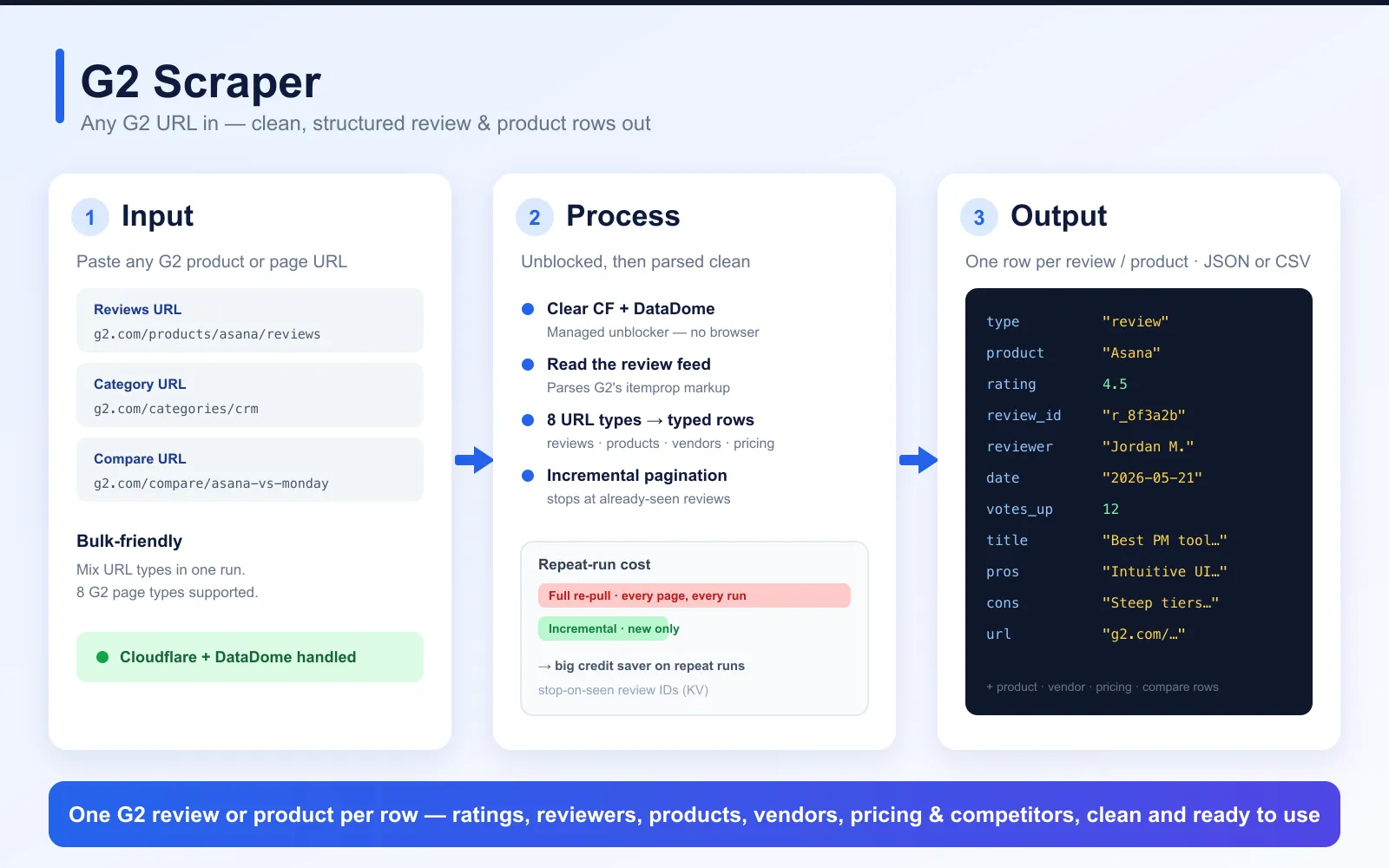
Turn G2.com into a structured dataset. Type a product name such as Slack, pick a category such as crm, or paste any G2 URL, and get reviews, product profiles, category rankings, competitor lists, vendor profiles, pricing tiers and head-to-head comparisons as clean rows in JSON, CSV or Excel.
What does G2 Scraper do?
G2 Scraper reads G2 pages for you and returns one row per item:
- Reviews for any product, with the reviewer's role and company size, star rating, publish date and the full Q&A text, plus one summary row per product with G2's pros and cons.
- Products from a G2 search, a category ranking or a competitor list: name, vendor, rating, review count, description, entry price and G2 awards.
- Product profiles, vendor profiles, pricing tiers and comparisons from the matching G2 pages.
You can start from a product name (the scraper finds the product and returns its reviews), a category slug, a product slug, or any of nine G2 URL types, and mix them in one run. Every row carries a type field (search rows use itemType: "Software"), so the dataset splits cleanly by row type.
Optional add-ons turn the reviews into analysis: a per-product review digest, an AI pain-point report, and vendor contact emails.
Why use this G2 scraper?
Most G2 actors on Apify do one thing: pull reviews for a product URL you already have. Here is what changes when you switch:
| What you're used to | What this scraper does |
|---|---|
| Paste a product URL, get reviews | Type a product name ("Slack", "HubSpot") and get its reviews. The scraper finds the product itself. URLs and slugs work too. |
| Reviews only | Nine G2 page types: reviews, search, categories, competitor lists, product details, vendor profiles, pricing tabs, compare pages and single reviews, mixed in one run |
| Filter by star rating | Star filter (starFilterValue + condition), plus sort order and a lookbackDays window for recent-only pulls |
| Re-scrape everything to catch new reviews | onlyNewReviews: incremental monitoring that returns only what's new since your last run |
| Raw reviews, analysis is your problem | Optional reviewInsights digest per product, or a full AI pain-point analysis that ranks complaint themes |
| Reviews stop at G2 | enrichEmails adds a vendor contact email from their own website; qualifyByPayment flags who takes money online |
| Runs die when G2 blocks | Managed anti-bot fetching for G2's Cloudflare and DataDome protection, with recent pages served from cache |
Your existing "product URL in, reviews out" workflow runs here unchanged: put the URL in startUrls and start. Everything else is opt-in.
Optional add-ons
AI pain-point analysis
Turn on painPointAnalysis and one AI pass per product clusters the complaints in its reviews into ranked themes and lists the features users keep asking for. Real run on Postman: Performance degradation and increasing bloat (severity 4, 30% of reviews), Steep learning curve for advanced features (30%), UI/UX complexity and feature bloat (20%); missing: lightweight mode, performance optimization. You get one painPointAnalysis row per product, built from up to 200 reviews. Paid Apify plans only, billed per product analyzed.
Review insights (no AI)
Turn on reviewInsights for a deterministic digest instead: one review_insights row per product with the rating breakdown and sentiment split, recurring complaint themes (bugs, pricing, support, missing features, onboarding, integrations), top terms in negative reviews, and feature-request snippets. Instant, billed per product analyzed.
Contact emails and payment qualification
Turn on enrichEmails and each result gets a contact email found on the vendor's own website, as contactEmail and contactWebsite columns plus a detailed emailEnrichment object. You pay only per email found, never for misses. Add qualifyByPayment to flag which vendors take money online (takesPayments, paymentProcessors such as Stripe, Shopify, PayPal or Paddle, and stripeLiveKey) at no extra cost.
How to use G2 Scraper
- Open the actor in the Apify Console and go to the Input tab.
- Fill in at least one of Search G2 by product or company name, G2 categories, Start URLs or Product slugs.
- Set Max Listings (per name, category or URL) and, for reviews, Max reviews per product.
- Optionally narrow the reviews (sort order, star filter, last N days) and turn on add-ons.
- Click Start. When the run finishes, open the Output tab and export the rows as JSON, CSV, Excel or HTML.
To monitor a product, save the input as a task with Only new reviews turned on and give it a schedule. Each run then returns only reviews it has not returned before.
Input
Input examples
Reviews of products by name:
Each name is matched to G2's top product for it, and the run log says which one ("HubSpot" → HubSpot Marketing Hub). To pick an exact product, use its slug, the part after /products/ in a G2 URL:
For G2's list of search results rather than reviews, paste a search URL in startUrls, e.g. https://www.g2.com/search?query=slack.
Every product in a G2 category, ranked:
Recent low-star reviews of one product, for churn and complaint research:
Several G2 page types in one run:
Input fields
What to scrape (fill in at least one)
| Field | Type | What it does |
|---|---|---|
searchQueries | array of strings | Product or company names. Each one is matched to G2's top product for that name and returns its reviews. |
categorySlugs | array of strings | Category slugs (crm), subcategory paths (crm/sales-acceleration) or full category URLs. Returns the ranked products. |
startUrls | array of URLs | Any of the nine supported G2 URL types. Bare slugs and regional hosts (fr.g2.com) are accepted. |
productSlugs | array of strings | Bare product slugs (postman). Each maps to that product's reviews page. |
Limits
| Field | Default | What it does |
|---|---|---|
maxItems | 10,000 | Rows per name, category or URL. Each one gets its own allowance, so 3 URLs × 100 = up to 300 rows. The run's maximum cost also bounds the total. |
maxReviews | maxItems | Review rows per product. |
Review filters (review pages only)
| Field | Default | What it does |
|---|---|---|
sortOrder | g2_default | g2_default, most_recent, most_helpful, highest_rated or lowest_rated. A ?order= in a pasted URL wins for that URL. |
starFilterCondition, starFilterValue | exactly, none | Star filter: exactly, minimum or maximum plus 1 to 5 stars. G2's buckets include half stars (the 4★ bucket spans 3.5 to 4.0). |
lookbackDays | none | Only reviews from the last N days. Switches to most-recent order and stops paging at the cutoff, so you pay for fewer pages. |
onlyNewReviews | false | Returns only reviews your earlier runs have not returned for the same product (the record is kept in your own Apify account). Built for scheduled monitoring. |
Add-ons (all off by default)
| Field | What it does |
|---|---|
reviewInsights | One deterministic review_insights digest row per product. Billed per product. |
painPointAnalysis | One AI painPointAnalysis row per product. Paid Apify plans only, billed per product. |
enrichEmails | Adds a vendor contact email from their website. Billed per email found. |
qualifyByPayment | Needs enrichEmails. Flags vendors that take payments online. No extra charge. |
Freshness, speed and network
| Field | Default | What it does |
|---|---|---|
useCachedData | true | Serves a page from our G2 database when we hold a recent copy: faster, and rows are marked with servedFromCache and dataAsOf. Turn off to force a live scrape. |
maxCacheAgeDays | 90 / 30 / 14 | Oldest cached copy to accept. Defaults are 90 days for vendors, 30 for products and 14 for reviews. |
pageConcurrency | 3 | List pages fetched in parallel. |
pageDelayMs | 0 | Pause between batches of pages, in milliseconds. |
slowMode | true | Extra warm-up and back-off between pages. |
maxConcurrency, minConcurrency, maxRequestRetries | 100, 1, 100 | Crawler concurrency and retry limits. |
proxy | Apify residential | Proxy settings. G2 blocks datacenter IPs, so keep residential. |
Supported G2 URLs
The G2.com Software Scraper handles nine URL patterns. Mix them freely in a single startUrls array.
1. Search Result URLs
Extract products matching a keyword query, with automatic pagination.
- Example:
https://www.g2.com/search?query=databricks - Example:
https://www.g2.com/search?query=crm+software - Output row shape:
itemType: "Software"(notypefield — historical schema)
2. Product Reviews URLs
Extract every review for a specific product. Walks G2's reviews_and_filters Turbo Frame endpoint with pagination. Emits one type: "review_summary" row up front (AI summary + top Pros/Cons with mention counts) followed by type: "review" rows for each individual review.
- Example:
https://www.g2.com/products/postman/reviews - Example:
https://www.g2.com/products/azure-databricks/reviews - Alias-redirect resolution: input slug may be a G2 alias (e.g.
/products/salesforce/reviewsresolves to/products/salesforce-customer-success/reviews); the scraper transparently follows. - Filter passthrough: append G2's own filter query params and they're forwarded verbatim. Examples:
https://www.g2.com/products/postman/reviews?filters[ratings]=5— lead with 5-starhttps://www.g2.com/products/postman/reviews?filters[company_size][]=Enterprise&order=most_recent- Whitelisted families:
filters[*],order,state,lang_iso,time,tag_ids[],media_type
- Output row shapes:
type: "review_summary"(one per URL, skipped when filters are used) +type: "review"(one per review)
3. Category Listing URLs
Walk an entire G2 category page (and any subcategory under it), ranked by G2 score. Each product row now carries a situationalAwards array — G2 Grid®-style quadrant winners ("Leader", "Highest Performer", "Easiest to Use", "Top Trending", "Best Free Software") for that category, pulled from the page's analytics markup.
- Example:
https://www.g2.com/categories/crm - Example:
https://www.g2.com/categories/crm/sales-acceleration - Output row shape:
type: "category_product"(withsituationalAwards: [...])
4. Competitor Lists URLs
Pull G2's curated "Top N Alternatives & Competitors" for a specific product. Fixed-size list (no pagination).
- Example:
https://www.g2.com/products/postman/competitors - Example:
https://www.g2.com/products/salesforce-sales-cloud/competitors/alternatives(canonical form — both are accepted and normalized) - Output row shape:
type: "competitor"
5. Product Detail URLs
Extract the full profile for a single product — one row per product. Includes the full marketing description (not just a snippet), all pricing tiers, screenshot URLs, vendor profile, and aggregate rating.
- Example:
https://www.g2.com/products/postman - Example:
https://www.g2.com/products/salesforce-sales-cloud - Output row shape:
type: "product"
6. Vendor / Seller Profile URLs
Extract a vendor's company profile and their entire product portfolio (rating + review count per product). One row per vendor, with an embedded products array — including the company's own website URL and LinkedIn page as rendered on the seller profile.
- Example:
https://www.g2.com/sellers/salesforce - Example:
https://www.g2.com/sellers/postman - Output row shape:
type: "vendor"
7. Pricing Tab URLs
Extract a product's structured pricing — per-tier prices (with currency), the G2-curated "Key Insights" summary paragraph, and the pricing FAQs (Q&A pairs).
- Example:
https://www.g2.com/products/postman/pricing - Example:
https://www.g2.com/products/slack/pricing - Output row shape:
type: "pricing"
8. Compare URLs
Head-to-head product comparison: pulls each product's metadata (name, vendor, aggregate rating, review count) plus the full per-criterion ratings table (Meets Requirements, Ease of Use, Ease of Setup, Ease of Admin, Quality of Support, etc.) with score + sample size for each side, and the list of alternatives G2 surfaces.
- Example:
https://www.g2.com/compare/postman-vs-mulesoft-anypoint-platform - Multi-way comparisons are also supported:
https://www.g2.com/compare/a-vs-b-vs-c - Output row shape:
type: "compare"
9. Single Review URLs
Fetch one specific review as a single type: "review" row — same shape as the bulk review rows, parsed from the page's schema.org microdata.
- Example:
https://www.g2.com/products/postman/reviews/postman-review-9104210 - Output row shape:
type: "review"(one row)
Input shortcuts
- Bare product slugs: skip URL building entirely — set
"productSlugs": ["postman", "hubspot-marketing-hub"](or paste a bare slug as a start URL) and each maps to that product's reviews page. - Regional domains:
fr.g2.com,de.g2.com, and any other regional G2 host are normalized towww.g2.comautomatically.
Paste any G2 URL — product, reviews, category, compare, vendor or search. The actor fetches it over plain HTTP (a managed unblocker clears Cloudflare + DataDome — no headless browser, no third-party CAPTCHA service), parses the page into typed rows (reviews, products, vendors, pricing, competitors, categories), and streams clean records to the dataset in JSON, CSV or Excel.
Output
The scraper writes nine row types to the dataset, distinguished by where the data came from:
| Source URL | Row marker | Description |
|---|---|---|
/search?query=... | itemType: "Software" | One row per product card in search results |
/products/{slug}/reviews | type: "review_summary" + type: "review" | One summary row (AI text + Pros/Cons) per URL, then one row per individual review |
/categories/{slug} | type: "category_product" | One row per product in a category listing (with situationalAwards: [...]) |
/products/{slug}/competitors | type: "competitor" | One row per competing product (Top N) |
/products/{slug} | type: "product" | One row per product detail page (full profile) |
/sellers/{slug} | type: "vendor" | One row per vendor with embedded products portfolio |
/products/{slug}/pricing | type: "pricing" | One row per product with pricing tiers + key insights + FAQs |
/compare/{a}-vs-{b} | type: "compare" | One row per comparison with per-criterion ratings |
opt-in: reviewInsights: true | rowType: "review_insights" | One deterministic digest row per product (rating breakdown, complaint themes, feature requests) |
opt-in: painPointAnalysis: true | rowType: "painPointAnalysis" | One AI analysis row per product (ranked pain-point themes + missing features) |
You can split the dataset by these markers downstream, or use the join keys (productSlug, productUuid, vendorId) to merge across row types.
Sample Search Result Row
URL: https://www.g2.com/search?query=databricks
Sample Review Row
URL: https://www.g2.com/products/postman/reviews
Sample Product Detail Row
URL: https://www.g2.com/products/postman
Sample Competitor Row
URL: https://www.g2.com/products/postman/competitors
Sample Category Product Row
URL: https://www.g2.com/categories/crm
Sample Vendor Row
URL: https://www.g2.com/sellers/salesforce
Sample Review Summary Row
URL: https://www.g2.com/products/postman/reviews (emitted once, before individual review rows)
Sample Pricing Row
URL: https://www.g2.com/products/postman/pricing
Sample Compare Row
URL: https://www.g2.com/compare/postman-vs-mulesoft-anypoint-platform
Output Fields Detailed Explanation
Common Fields (all row types)
scrapedAt(string): ISO 8601 timestamp of when this row was extracted.productName(string): Official product name on G2.productSlug/productUrl/reviewsUrl: URL components for cross-linking back to G2 or joining rows together.thumbImageUrl(string | null): Product logo URL from G2's CDN. Some category-page images load lazily as SVG placeholders — those resolve tonull.
Search-Specific Fields (itemType: "Software")
searchUrl(string): The G2 search URL used.query(string): Keyword that produced this result.resultRank(number): Position in the search results (1 = top).itemType(string): Almost always"Software"—"Service"occasionally.foundVia(string): Static"g2"source marker.isSponsored(boolean):trueif this is a paid promotion.pricingType(string | null): Pricing indicator like"Free Trial","Free", etc.productId/productUuid: G2's internal numeric ID and UUID.descriptionSnippet(string): First ~500 chars of the marketing description.vendorName/vendorId/sellerName/sellerUrl: Vendor profile data.ratingOutOfFive(number): 0-5 star rating (e.g.,4.5).ratingOutOfTen(number): Same rating normalized to 0-10.reviewCount(number): Total review count.relatedCategories(array of strings): Category names this product belongs to.categoriesDetailed(array of objects):{ id, name, url }for each category.
Review-Specific Fields (type: "review")
type(string): Always"review"for this row type.review_id(number): Yelp-style internal review identifier (numeric).review_title(string | null): Review headline (frequentlynull— many G2 reviews don't have a separate title).review_content(string): Main body of the review — concatenated from the "What do you like best" answer if a structured Q&A exists.review_question_answers(object | undefined): Structured Q&A pairs G2 collects from reviewers. Typical keys:"What do you like best about X?","What do you dislike about X?","What problems is X solving and how is that benefiting you?".review_rating(number): 1-5 star rating with half-star precision (e.g.,4.5). Note: numeric here, unlike the search row'sratingOutOfFivewhich is also numeric — review_rating is per-review, not aggregate.reviewer(object): Reviewer profile —reviewer_id(number | undefined): G2's stable reviewer identifier — dedupe/join reviews by the same personreviewer_name(string): "Suraj J." style abbreviated namereviewer_job_title(string): "Junior AI Engineer"business_size(string): "Small-Business(50 or fewer emp.)", "Mid-Market(51-1000 emp.)", "Enterprise(>1000 emp.)"
publish_date(string): ISO date the review was published (e.g.,"2026-05-04").video_review(boolean | undefined):truewhen the reviewer submitted a video review.product_slug/product_name: Join keys back to the product.product_id/product_uuid/vendor_id: G2's internal product and vendor identifiers — stable join keys across row types and runs.review_link(string): Direct URL to the individual review on G2.company_domain(string | null): The company/product's own web domain (e.g.,"postman.com") — the join key for matching G2 data against your CRM or enrichment stack. G2 never renders vendor websites on-page, so this is resolved from the product name via a guarded company-name lookup;nullwhen no confident match exists (never a wrong-company guess).company_website(string | null): Same ascompany_domain, as a full URL (e.g.,"https://postman.com").
Product-Specific Fields (type: "product")
type(string): Always"product"for this row type.productName(string): Official product name (e.g.,"Postman").productSlug(string): URL slug (e.g.,"postman").productUrl(string): Canonical product page URL.reviewsUrl/competitorsUrl(string): Convenience cross-links to the other URL types you can scrape for the same product.vendorName/vendorSlug/vendorUrl(string | null): Vendor / seller profile (e.g.,"Postman"→/sellers/postman).companyDomain/companyWebsite(string | null): The company's own domain and website URL (resolved from the product/vendor name; also present on search, category, competitor, vendor, pricing, and review-summary rows — review rows carry the snake_case twinscompany_domain/company_website).description(string): Full marketing description — typically 400-2000 chars. Sourced from[itemprop="description"]then<meta name="description">as fallback.ratingOutOfFive/ratingOutOfTen(number): Aggregate star rating from[itemprop="ratingValue"].reviewCount(number): Total review count from[itemprop="reviewCount"].pricingTiers(array of strings): Names of pricing tiers G2 displays (e.g.,["Free Plan", "Basic Plan", "Professional Plan"]). Extracted fromh3/h4headings inside the pricing section, filtered to known tier keywords (Plan, Tier, Pro, Enterprise, etc.).featuresText(string | null): Raw text dump of the features section (~2000 chars cap). Caller can split/parse downstream.images(array of strings): G2-CDN image URLs (logo, screenshots). Badges and award icons are filtered out.imageCount(number): Length ofimages.status(string):"SUCCEEDED"on a successful parse.
Note: categories aren't extracted from the product detail page because G2's nav menu mixes its global category list with the product's own categories. To get a product's categories, scrape its /products/{slug}/reviews URL (type: "review" rows don't carry them, but the search/category endpoints do) or use a /categories/{slug} listing.
Competitor-Specific Fields (type: "competitor")
type(string): Always"competitor"for this row type.sourceProductSlug(string): The slug of the product whose competitors were scraped (e.g.,"postman"). Lets you trace each row back to its source.competitorRank(number): Rank within the source product's competitors page (1 = top alternative). Numbers are clean 1..N — the source product itself is filtered out before ranking.productName/productSlug/productUrl/reviewsUrl: Standard product identifiers (same shape as in other row types).thumbImageUrl(string | null): Product logo URL. May benullfor lazy-loaded placeholders.descriptionSnippet(string): First ~600 chars of the product's marketing description.vendorName(string | null): Company that produces the product (e.g.,"Salesforce","Microsoft").ratingOutOfFive/ratingOutOfTen(number): Aggregate star rating.reviewCount(number): Total review count.entryLevelPrice(string | null): Pricing string when displayed ("$25.00 Per User Per Month","Free","Contact Us"),nullotherwise.
Category-Specific Fields (type: "category_product")
type(string): Always"category_product"for this row type.categorySlug(string): The category slug from the URL (e.g.,"crm"or"crm/sales-acceleration").page(number): Which paginated page this product was found on (1-based).position(number): G2-assigned rank position in the category (1 = highest-scoring).listType(string | null): G2's internal list classifier —"sponsored","featured", etc., ornullfor standard listings.isSponsored(boolean):trueif this listing is paid promotion.productId/productUuid/productName/productSlug/productUrl: Same as in other row types.productCategory/productCategoryId(string / number): Category name and G2's internal category ID.vendorId/vendorSlug/vendorName: Vendor profile.ratingOutOfFive(number): Star rating extracted from the<div class="stars stars-N">CSS class (N/2 = rating).ratingOutOfTen(number): Same rating normalized to 0-10.reviewCount(number): Total review count for the product.entryLevelPrice(string | null): Pricing string like"Starting at $25.00 Per User Per Month","$15.00","Free","Contact Us", ornullif pricing isn't displayed on the card.descriptionSnippet(string): First ~600 chars of the product's marketing description.
Vendor-Specific Fields (type: "vendor")
type(string): Always"vendor"for this row type.vendorName(string): Company name (e.g.,"Salesforce").vendorSlug(string): URL slug used by G2 (e.g.,"salesforce").vendorUrl(string): Canonical vendor page URL.linkedinUrl(string | null): The company's LinkedIn page URL, exactly as G2 renders it on the seller profile (e.g.,"https://www.linkedin.com/company/3185/").websiteUrl/websiteDomain(string | null): The company's own website as rendered on the seller page (e.g.,"https://www.salesforce.com/") and its bare domain ("salesforce.com").nullonly when G2 doesn't display a website for that seller.socialLinks(object | undefined): Any additionalseller_page_*external links G2 renders (keyed by network), for sellers that list more than website + LinkedIn.companyDomain/companyWebsite(string | null): Canonical join keys, consistent with every other row type — filled from the on-page website when present, otherwise resolved from the vendor name.description(string): About / company description, capped at 2000 chars. Falls back to<meta name="description">if no "About" section is present.companyDetails(object): Sidebar facts pulled from the "Details" panel. Each field can benullif G2 doesn't display it for that vendor.founded(string | null): Year founded (e.g.,"1999").hqLocation(string | null): Headquarters location (e.g.,"San Francisco, CA").ownership(string | null): Ownership / ticker (e.g.,"NYSE:CRM","Private").totalRevenue(string | null): Total revenue (USD mm), where shown.employees(string | null): LinkedIn employee count, where shown.phone(string | null): Contact phone number, where shown.
products(array of objects): The vendor's product portfolio. Merges the "Featured Products" + "All Products & Services" sections, deduped by slug. Each entry:productSlug(string)productName(string)productUrl(string) — links to/products/{slug}/reviewsratingOutOfFive(number) — extracted from thestars-NCSS class (N/2)reviewCount(number) — parsed from the "{N,NNN} reviews" text on the carddescriptionSnippet(string) — usually empty on vendor cards; use/products/{slug}for full marketing copy
productCount(number): Length ofproducts.totalReviewsAcrossProducts(number): Aggregate review count across all of the vendor's products. Sourced from the page title (Read N Reviews on G2) when present; falls back to summing each product'sreviewCount.status(string):"SUCCEEDED"on a successful parse.
Review-Summary-Specific Fields (type: "review_summary")
Emitted once at the start of each /products/{slug}/reviews walk (skipped when filters are supplied).
type(string): Always"review_summary".productSlug/productUrl: Identifiers for joining withtype: "review"rows.summaryText(string): G2's AI-generated paragraph summarizing the review corpus. Capped at 2000 chars.pros(array of{ label, mentions }): Top mentioned positives, sorted by mention count.cons(array of{ label, mentions }): Top mentioned negatives, sorted by mention count.aggregateRating(number | null): Average star rating across all reviews (e.g., 4.6).totalReviews(number | null): Total review count from the schema.org markup.
Pricing-Specific Fields (type: "pricing")
type(string): Always"pricing".productSlug/productName/productUrl/pricingUrl: Standard product identifiers + link to the pricing tab.tiers(array of objects): One entry per pricing edition G2 displays.tierName(string): e.g.,"Free Plan","Basic Plan","Enterprise Plan".price(number | null): Numeric price extracted from schema.org<meta itemprop="price">.nullfor "Contact Us"-style tiers.currency(string | null): ISO currency code (e.g.,"USD").rawPrice(string): Human-readable price chunk including billing cadence (e.g.,"$14 / 1 per user/month, billed annually").
tierCount(number): Length oftiers.priceMin/priceMax(number | null): Min/max numeric price across all tiers — useful for quick range filtering.currency(string | null): Currency forpriceMin/priceMax.keyInsights(string): G2's "Pricing Key Insights" paragraph (e.g., "X offers 4 pricing editions, starting from $0 to $49…"). Capped at 2000 chars.faqs(array of{ question, answer }): Pricing FAQs G2 displays at the bottom of the page, parsed from the schema.orgQuestion/acceptedAnswermarkup.faqCount(number): Length offaqs.
Compare-Specific Fields (type: "compare")
type(string): Always"compare".compareUrl(string): Canonical compare URL (G2 may reorder slug segments).combinedSlug(string): Slug section from the URL (e.g.,"postman-vs-mulesoft-anypoint-platform").products(array of objects): One entry per product in the comparison.productSlug/productName/productUrlvendorName(string | null)ratingOutOfFive(number) — aggregate G2 ratingreviewCount(number)
productCount(number): Length ofproducts.ratings(array of objects): One entry per ratings criterion shown on the page.criterion(string): e.g.,"Meets Requirements","Ease of Use","Ease of Setup","Quality of Support".perProduct(array): Aligned with theproductsarray. Each entry has:score(number | null): 0–10 score (e.g., 8.8).nullif G2 shows "Not enough data".sampleSize(number | null): Number of reviewers contributing to the score.note(string | null): Optional annotation like"won by default"or"Not enough data".
ratingsCount(number): Length ofratings.alternativesShown(array of{ productSlug, productName, productUrl }): Products G2 surfaces in the sidebar as alternative comparisons.
situationalAwards (on type: "category_product")
Array of strings — G2 Grid®-style quadrant winners for the source category. Possible values:
"Leader"— top-right quadrant (high market presence + high satisfaction)"Highest Performer"— top-left quadrant (high satisfaction)"Easiest to Use"— top of the easiest-to-use list"Top Trending"— fastest-growing in the category"Best Free Software"— leader among free-plan offerings
Most products have an empty array; only a handful per category carry awards. Source: G2 marks these via data-event-options analytics payloads ("Situational Best / X: Product Card Clicked").
How much does it cost to scrape G2?
The actor uses pay-per-event pricing, and Apify platform usage is included. Current prices (the Pricing tab on the actor page is always authoritative):
| Event | When it is charged | Free | Bronze | Silver | Gold and above |
|---|---|---|---|---|---|
| Result | Each row in the dataset (review, product, vendor and so on) | $1.75 / 1,000 | $1.65 / 1,000 | $1.55 / 1,000 | $1.50 / 1,000 |
| Actor start | Once per run, per GB of memory | $0.005 | $0.005 | $0.005 | $0.005 |
| Review insights | Per product, when reviewInsights is on | $0.02 | $0.02 | $0.02 | $0.02 |
| AI pain-point analysis | Per product, when painPointAnalysis is on | n/a | $0.05 | $0.05 | $0.05 |
| Contact email | Per email found, when enrichEmails is on | $0.001 | $0.001 | $0.001 | $0.001 |
| Product reviewed | Once per product reviews URL that needs live G2 pages (from November 8, 2026) | $0.003 | $0.003 | $0.003 | $0.003 |
Example: 500 reviews of one product on the Bronze plan cost 500 × $0.00165 + $0.005 + $0.003 ≈ $0.83. The product fee is charged whether or not your filters match any review, because G2 is still fetched; a reviews URL answered entirely from our cache is not charged. Adding review insights for that product adds $0.02. Free Apify accounts get up to 50 rows per run, enough to check the fields and the data on your own URLs.
Run it from code
Use the Apify API or one of the Apify clients. Replace <YOUR_API_TOKEN> with your token from Settings → API & Integrations in the Apify Console.
Node.js (npm install apify-client):
Python (pip install apify-client):
One HTTP call that runs the actor and returns the rows:
Use Cases
1. Competitive Vendor Shortlist
Walk a G2 category and rank vendors by review count + rating.
2. Customer-Voice Analysis on a Single Product
Pull every review for a product to feed into sentiment/NPS analysis.
3. Market Research Across Subcategories
Aggregate everyone in a niche category.
4. Brand Monitoring via Keyword Search
Track which products show up for specific search terms.
5. Competitor Discovery for a Specific Product
Pull G2's curated Top 10 alternatives to your product (or your competitor's).
6. Product Profile Extraction
Pull a single product's full profile (description, pricing, rating, screenshots) — useful as a feed source for product databases.
7. Full Competitor Deep-Dive
Mix all nine URL types — category overview, search peer set, curated competitor list, product profile, vendor portfolio, review feed, pricing tab, and a head-to-head compare — in a single run.
8. Vendor Portfolio Snapshot
Pull a vendor's full product portfolio in one row — company facts (HQ, ownership, phone) plus rating + review count for every product the vendor sells. Useful for competitive intelligence on multi-product vendors.
9. Pricing Intelligence
Pull structured pricing tiers + key insights for a set of competitors. Each row gives you per-tier price, currency, billing cadence, and G2's curated pricing FAQs.
10. Head-to-Head Comparisons
Pull G2's per-criterion comparison data (Meets Requirements, Ease of Use, Ease of Setup, Quality of Support, etc.) for product matchups — same data G2 publishes on its /compare/ pages.
11. Filtered Review Slice
Use G2's native filter syntax to grab just the slice of reviews you need — e.g., enterprise reviewers only, 5-star only, latest first.
12. G2 Grid® Quadrant Awards by Category
Walk a category to capture which products are G2's "Leader", "Highest Performer", "Easiest to Use", "Top Trending", and "Best Free Software" — the same labels G2 displays on its Grid® reports.
Filter the output by situationalAwards.length > 0 to surface only the awarded products.
Performance & Limits
- Pacing: list pages are fetched
pageConcurrencyat a time (default 3), with an optionalpageDelayMspause between batches and extra back-off whenslowModeis on. - Pagination depth: Tested cleanly to 100 pages on a single product reviews URL (1,000 reviews) with zero blocks.
- Memory: Each product row is ~1-3 KB; each review row is ~1-2 KB.
- Speed:
- Search / category: ~5-7 products per page, ~10s per page → ~30-40 products/min
- Reviews: ~10 reviews per page, ~10s per page → ~60 reviews/min
- Proxy Requirement: Residential proxies strongly recommended. Datacenter IPs are blocked on first request.
Error Handling
The scraper includes comprehensive error handling:
- Multi-Client TLS Race: Three independent HTTP clients (impers/impit/got-scraping) race in parallel — different TLS fingerprints survive different blocks.
- Session Pool with Rotation: Pre-warmed browser sessions with valid Datadome cookies, automatically rotated round-robin to stay under per-cookie rate limits.
- Legacy Fallback: If the session pool is empty, falls back to a DataDome-cookie service flow that races the three clients with fresh fingerprints.
- Exponential Back-off: Failed requests back off exponentially (10s → 15s → 22s → ...) with jitter. Hard short-circuit after 10 consecutive blocks to avoid retry storms.
- Automatic Retries: Failed requests retry up to
maxRequestRetriestimes. - Smart Pagination: Stops automatically when reaching the last page or when no results appear.
- Graceful Failures: Continues scraping even if individual pages fail.
Troubleshooting
No Results Returned
- Check the URL opens correctly in a browser — G2 occasionally redirects category slugs.
- Verify residential proxies are enabled.
- Lower
maxConcurrencyto1and try again.
Scraper Stops Early on Reviews
- Check the run's logs for
[fetchG2] anti-bot signalpatterns. If you see >5 in a row, the session pool is exhausted — the warmer schedule needs to fire to refresh it. - Set
slowMode: truefor tighter rate-limit avoidance.
Missing or Mangled Fields
entryLevelPriceisnullwhen G2 doesn't display pricing on the category card.review_titleis frequentlynull— G2's modern review layout doesn't have separate titles.thumbImageUrlisnullfor products whose images are still lazy-loaded SVG placeholders when the page renders.
Free tier
You can run this scraper on a free Apify account before paying anything:
| Free account | |
|---|---|
| Results per run | up to 50 |
| Cost | nothing — the free plan includes monthly platform credit |
That is enough to check the field list and the data quality against your own URLs. Paid plans lift the cap; see Apify pricing.
Support & Contact
For custom solutions, bulk scraping, or support:
- 📧 Email: muhamed.didovic@gmail.com
- 🌐 Website: https://muhamed-didovic.github.io/
- 🏪 Apify Store: Search for "G2.com Software Scraper"
- 💬 Apify Support: Contact through Apify platform
Explore More Scrapers
If you found this Apify Scraper useful, be sure to check out our other powerful scrapers and actors at memo23's Apify profile. We offer a wide range of tools to enhance your web scraping and automation needs across various platforms and use cases.
Legal & Ethical Use
- This scraper is intended for legitimate business and research purposes only.
- Respect G2.com Terms of Service.
- Use responsibly and ethically.
- Do not overload servers with excessive requests.
- Consider using data for analysis and research within legal boundaries.
FAQ
Q: How many products / reviews can I scrape per run? A: Tested cleanly to 1,000+ reviews per product in a single run. Total run capacity scales with how many fresh sessions the warmer has populated in the pool. Free Apify users have a per-run row cap.
Q: Do I need to provide DataDome cookies? A: No. The actor uses a self-managed session pool that pre-captures cookies via a headless browser warmer, refreshed every 10 minutes. The cookies are completely transparent to you.
Q: Can I mix all nine URL types in one run?
A: Yes. Put them in startUrls, alongside names, categories and slugs if you like. Each URL goes to the parser for its page type.
Q: How many competitors does each /competitors URL return?
A: G2 renders a fixed "Top N" (typically 9-10) per source product. There's no pagination — one run per source product gives you the complete curated list.
Q: Why is review_title always null?
A: G2's modern review layout merged the title with the "What do you like best" Q&A answer. The review_question_answers.{"What do you like best about X?"} field carries that content.
Q: How fresh is the data?
A: By default (useCachedData: true) a page is served from our G2 database when we hold a recent copy: within 14 days for reviews, 30 for products and 90 for vendors. Those rows carry servedFromCache and dataAsOf. Set maxCacheAgeDays lower for fresher data, or turn useCachedData off to fetch every page live.
🤖 For AI Agents & LLM Apps
Compact reference for AI agents calling this actor via the Apify MCP server or the Apify API (actor: memo23/g2-scraper).
Purpose: Scrapes G2.com into typed rows across nine URL kinds — search, product reviews, single review, categories, competitor lists, product detail, vendor profiles, pricing tabs, and head-to-head compare pages — over plain HTTP with a managed anti-bot unblocker (no headless browser needed on your side).
Minimal input:
Slug shortcut instead of URLs: { "productSlugs": ["postman"], "maxItems": 50 } — each slug maps to that product's reviews page.
Output: row shape depends on the source URL, discriminated by type (search rows use itemType: "Software") — review rows: review_id, review_title, review_content, review_question_answers, review_rating, reviewer {reviewer_name, reviewer_job_title, business_size}, publish_date, product_slug, review_link, company_domain, company_website; search/category/competitor/product rows: productName, productSlug, productUrl, vendorName, companyDomain, companyWebsite, ratingOutOfFive, ratingOutOfTen, reviewCount, descriptionSnippet, entryLevelPrice, situationalAwards; other types: review_summary (summaryText, pros, cons), vendor (companyDetails, products, linkedinUrl, websiteUrl, websiteDomain), pricing (tiers {tierName, price, currency, rawPrice}, keyInsights, faqs), compare (products, ratings per criterion). Every row type carries the company/product domain as a CRM-ready join key.
Behaviors an agent should know:
- Mix any of the nine URL types freely in one
startUrlsarray; each dispatches to its own parser. Bare product slugs and regional hosts (fr.g2.com, …) are normalized automatically. maxItemsis a per-input allowance (each name, category or URL gets its own);maxReviewscaps review rows per product (falls back tomaxItemswhen unset);lookbackDayskeeps only reviews from the last N days and stops paginating at the cutoff.- Review controls apply to review URLs only:
sortOrder(g2_default|most_recent|most_helpful|highest_rated|lowest_rated),starFilterCondition+starFilterValue; G2 filter params pasted directly in a URL win for that URL. - The
review_summaryrow is skipped when review filters are used;/competitorspages return a fixed Top ~10 list with no pagination. - Opt-in extras (all default
false):reviewInsights(deterministic digest per product),painPointAnalysis(AI, paid Apify plans only),enrichEmails+qualifyByPayment(contact email + payment-stack flags). - Billing (pay-per-event): $0.005 actor start per GB, $1.50 to $1.75 per 1,000 dataset rows depending on the Apify plan, $0.003 per product reviews URL fetched live (from November 8, 2026), $0.02 per product for review insights, $0.05 per product for AI pain-point analysis, $0.001 per contact email actually found (misses are never charged).
- Input by name works too:
{ "searchQueries": ["Slack"], "maxReviews": 50 }returns the reviews of G2's top product for that name;categorySlugsreturns a category's ranked products. For G2 search result rows, put ahttps://www.g2.com/search?query=...URL instartUrls.
More Review Scrapers
Need reviews from other platforms? Same author, same export format:
- Trustpilot — business & product reviews: apify.com/memo23/trustpilot-scraper-ppe
- Capterra — software reviews & product profiles: apify.com/memo23/capterra-scraper
- Gartner — enterprise software reviews: apify.com/memo23/apify-gartner-scraper-ppr
- Yelp — local business reviews & ratings: apify.com/memo23/yelp-scraper
🤖 Related MCP servers for AI agents
Building an AI agent, or using Claude, Cursor or ChatGPT? Skip the scraping setup — connect our hosted MCP servers (no API keys, billed per call):
- Reviews MCP Server — search companies, read real Trustpilot review texts, and pull multi‑platform ratings (Trustpilot + App Store + Google Play) straight from your assistant.
- Reddit MCP Server — search Reddit, browse subreddits, read comment threads.
- Email Finder & Verifier MCP — find and verify company emails.
- Video Transcripts MCP — full YouTube & TikTok transcripts.
⚠️ Disclaimer
This actor collects only publicly available information from G2.com. It does not log in, bypass authentication, or access private or personal data. You are responsible for ensuring your use of the scraped data complies with G2's Terms of Service, applicable robots directives, and all relevant laws and regulations (including data-protection laws such as GDPR and CCPA where personal data is involved). This is an independent tool and is not affiliated with, endorsed by, or sponsored by G2.com, Inc. "G2" and all related names and marks are trademarks of their respective owners and are used here for descriptive purposes only. Use this actor for lawful research, analytics, and market-intelligence purposes.
SEO Keywords
g2 scraper, g2.com scraper, g2 reviews scraper, g2 software reviews, g2 ratings scraper, g2 product data, g2 vendor data, g2 category scraper, g2 pricing scraper, g2 compare scraper, g2 competitor analysis, software reviews api, saas reviews scraper, b2b software data, software market research, product reviews scraper, review aggregator scraper, g2 crowd scraper, software comparison data, vendor intelligence
Built with ❤️ by Muhamed Didovic
Last Updated: October 2026


![Product Hunt [$0.80💰] Scraper · Launches, Emails & Web Text avatar](https://images.apifyusercontent.com/5gtV33TC-s4X7FWpIcrne6-RIkUr5ggrs0VG1NQqL-w/rs:fill:76:76/cb:1/aHR0cHM6Ly9hcGlmeS1pbWFnZS11cGxvYWRzLXByb2QuczMudXMtZWFzdC0xLmFtYXpvbmF3cy5jb20vbmduOHZSRVNUa3NleVdFNnAtYWN0b3ItUzY1OERFRENzSFBCWlNsR2EtNmdsWkJaUkVoai1wcm9kdWN0X2h1bnQucG5n.webp)