

Google Flights Scraper 💰$1/1K — Fares, Calendar & Booking
Pricing
from $0.70 / 1,000 flight rows
Google Flights Scraper 💰$1/1K — Fares, Calendar & Booking
[$1/1K rows] Google Flights scraper: fares, the full 100-150 itinerary list, price calendar up to a year, Explore destinations, layovers, CO2, booking options with seller links. Round trip, multi-city, batch routes. 50,000 flights = $50, no run or search fee.
Pricing
from $0.70 / 1,000 flight rows
Rating
4.9
(11)
Developer

Matvey
Maintained by CommunityActor stats
2
Bookmarked
654
Total users
482
Monthly active users
14 hours ago
Last modified
Categories
Share
Google Flights Scraper extracts flight offers from Google Flights by route and dates — the same itineraries, prices and price insights you see on the site, delivered as clean JSON: airline, flight numbers, price in any currency, stops and layovers, departure and arrival times, aircraft, legroom, CO₂ emissions, Google's "prices are low / typical / high" signal with a 60-day price history, and a booking token. One-way and round trip, up to 9 passengers with children and infants, any cabin class, and many routes in one run. No official Google Flights API is needed and no browser is used: the Actor talks to the JSON endpoint behind the page, so a search takes seconds and costs cents. Export the data, run it via API, schedule it, or plug it into n8n, Make, Zapier, Google Sheets or an AI agent through MCP.
$1 per 1,000 flight rows — no search fee, no proxy fee. From 4 November 2026 a run also costs $0.001 to start. Rated 4.9 by 11 buyers.
What is Google Flights Scraper?
Google Flights Scraper is a Google Flights API alternative for developers, travel businesses and price trackers. Give it an origin, a destination and a date (plus an optional return date), pick passengers and cabin class, and it returns up to ~150 itineraries per search with everything Google shows — including the "best flights" ranking, the price-level badge and the price history chart behind the Price insights panel.
- Full result list, not the first page: Google's own results endpoint returns 100–150 itineraries per route; the Actor returns them all (cap with
maxResults). - Real flight data: flight numbers, operating carrier, aircraft type, legroom, per-leg times and durations, layover airports and durations, CO₂ in kg and the deviation from the route's typical emissions.
- Price insights:
priceLevel(low / typical / high), the typical price range for the route and 60 days of price history — the data behind fare-drop alerts. - Passengers and cabin: adults, children, infants in seat or on lap; economy, premium economy, business, first.
- Filters Google applies server-side (max stops) and client-side (airlines to keep or drop, max price, max duration), plus sorting by price, duration or departure.
- Multi-city trips: any number of legs; the Actor follows Google's leg-by-leg pricing and returns complete itineraries with the total where Google can sell all legs as one ticket.
- Explore "anywhere": the cheapest destinations from an origin — city, country, price, airline, stops, duration and suggested dates — Google's Explore map as data.
- Round trips as complete combinations (optional): for the top outbound itineraries, the list of return flights Google offers — each with the total price for both directions — so you get outbound + return pairs, not just one half.
- Price calendar: the lowest fare for every departure date over up to a year (Google's date grid as data), with the five cheapest dates flagged — for round trips a grid of departure × return dates. Use
calendarOnlyto sweep dates or routes for cents. - Booking options (optional): for the top flights, who sells the ticket — the airline and travel agencies such as Trip.com, Expedia or Kiwi — at what price, with fees and a deep link to book.
- Batch: a list of routes in one run — a whole route map or a week of departure dates.
- Point of sale:
market(two-letter country) pluscurrencyreproduce what a shopper in that country sees — fares, sellers and booking links differ by market. - Pure HTTP: no headless browser, no rendering — plain requests, results in seconds. Residential proxies are on by default and are what the full 100–150 itinerary list needs; a datacenter proxy still works and returns the shorter page list of about 15.
What data can Google Flights Scraper extract?
| Field | Example |
|---|---|
price / currency / priceLabel | 92 / USD / "92 USD" (round trips: total for both directions) |
priceLevel / typicalPriceLow / typicalPriceHigh | typical / 50 / 110 — Google's price insight for the route and date |
isBestFlight / rank | true / 1 — Google's "Best flights" ranking |
airline / airlineCodes / flightNumbers | Jetstar / ["JQ"] / ["JQ86"] |
stops / layovers | 1 / [{ "airport": "KUL", "city": "Kuala Lumpur", "durationMinutes": 235 }] |
departAt / arriveAt / duration / totalDurationMinutes | 2026-10-15T15:05 / 2026-10-15T18:00 / "2 hr 55 min" / 175 |
legs[] | flight number, airline, operated-by, airports, times, duration, aircraft (Airbus A321neo), legroom (29 in), CO₂ per leg |
emissionsKg / emissionsVsTypicalPercent | 114 / -2 |
bookingToken | Google's token for the selected itinerary |
returnOptions[] / cheapestReturn / totalPrice (round trips with resolveReturnFlights) | [{ "flightNumbers": ["JQ89"], "departAt": "2026-10-19T10:00", "stops": 0, "totalPrice": 178, "bookingToken": "…" }, …] / the cheapest of them / 178 |
bookingOptions[] (with resolveBookingOptions) | [{ "seller": "Jetstar", "isAirline": true, "price": 92, "fees": [{ "currency": "IDR", "amount": 55000 }], "bookingUrl": "https://www.google.com/travel/clk/f?u=…" }, { "seller": "Trip.com", "price": 97, … }] |
bestBookingSeller / bestBookingPrice / airlineDirectPrice / bookingUrl | Trip.com / 97 / 92 / deep link of the cheapest option |
googleFlightsUrl | Link that reopens exactly this search on Google Flights — route, dates, passengers, cabin and stop limit included |
passengers / cabinClass / tripType | { adults: 2, children: 1 } / business / round_trip |
Every search also produces one search summary item: flights found, lowest price, price level, typical price range and the priceHistory array (date + price for the last 60 days) — ideal for trackers and dashboards.
How much does it cost to scrape Google Flights?
$1 per 1,000 flight rows. No fee per route searched, no fee per page, no proxy charge. Error rows and empty results are always free. From 4 November 2026 each run also pays $0.001 to start (Apify's standard start event, $0.0007 on Gold+) — so a tiny test run never costs us more than it earns. One run with many routes pays it once.
| Event | Price | Per 1,000 |
|---|---|---|
| Flight row (itinerary, price-calendar day or explore destination) | $0.001 | $1.00 |
| Run start (from 4 November 2026) | $0.001 | once per run |
| Route search, price calendar, retries, proxy | free | $0 |
Search as many routes and dates in one run as you like — you pay only for the rows you keep. A typical search returning 50 itineraries costs $0.05. The Apify Free plan ($5 monthly credit) covers about 5,000 itineraries a month. Bronze to Diamond Store tiers pay less per row, down to $0.70 per 1,000 — the discount lands automatically, no contract and no minimum.
Bulk export: what 50,000 flights actually cost
Measured 23 September 2026 on the public pricing of the most-used Google Flights Actors on Apify. Prices are the Free-plan tier and include every run, page and search fee each Actor charges (ours with the $0.001 run start from 4 November 2026).
- Batch job: 1,000 route searches returning ~50 itineraries each (50,000 rows), run 100 times.
- Daily monitoring: a schedule of ~18 runs a day pulling ~11,000 rows a day — about 330,000 rows and 540 runs a month.
| Actor | 50,000 rows, 100 runs | Daily monitoring, per month |
|---|---|---|
automation-lab/google-flights-scraper | $12.00 | $79 |
johnvc/Google-Flights-Data-Scraper-Flight-and-Price-Search | $30.60 | $202 |
| This Actor | $50.10 | $331 (down to $231 on Gold+) |
memo23/google-flights-scraper | $100.50 | $663 |
We are not the cheapest per row, and the table above says so. What the same money buys here is the
part that costs you time rather than credit: 100 of 100 flights returned on the head-to-head search,
zero failed runs, price level and the 60-day price history as flat columns, and a missing field or a
new limit shipped the same week you ask. memo23/google-flights-scraper moved from $1 to $2 per
1,000 results on 22 September 2026; switching from it roughly halves the bill. Put your route list
into routes, keep your schedule, and put many routes into one run — the $0.001 start fee is paid
once per run.
Two bulk templates are ready to run: 20 routes × 90 days of fares and 5 routes × 7 dates.
Some Actors in this category ask less per row — they answer one route and date per run, or bill Apify platform usage (compute and proxy) to your account on top, so compare on your own job. Here compute and residential proxy are included in the row price.
Beyond price, one run of this Actor replaces several: fares, the full 100–150 itinerary list, the price calendar for up to a year, Explore destinations, matched return flights and booking options with seller prices all come from the same input and land in one dataset.
Price and reliability against the whole Store — 27 October 2026
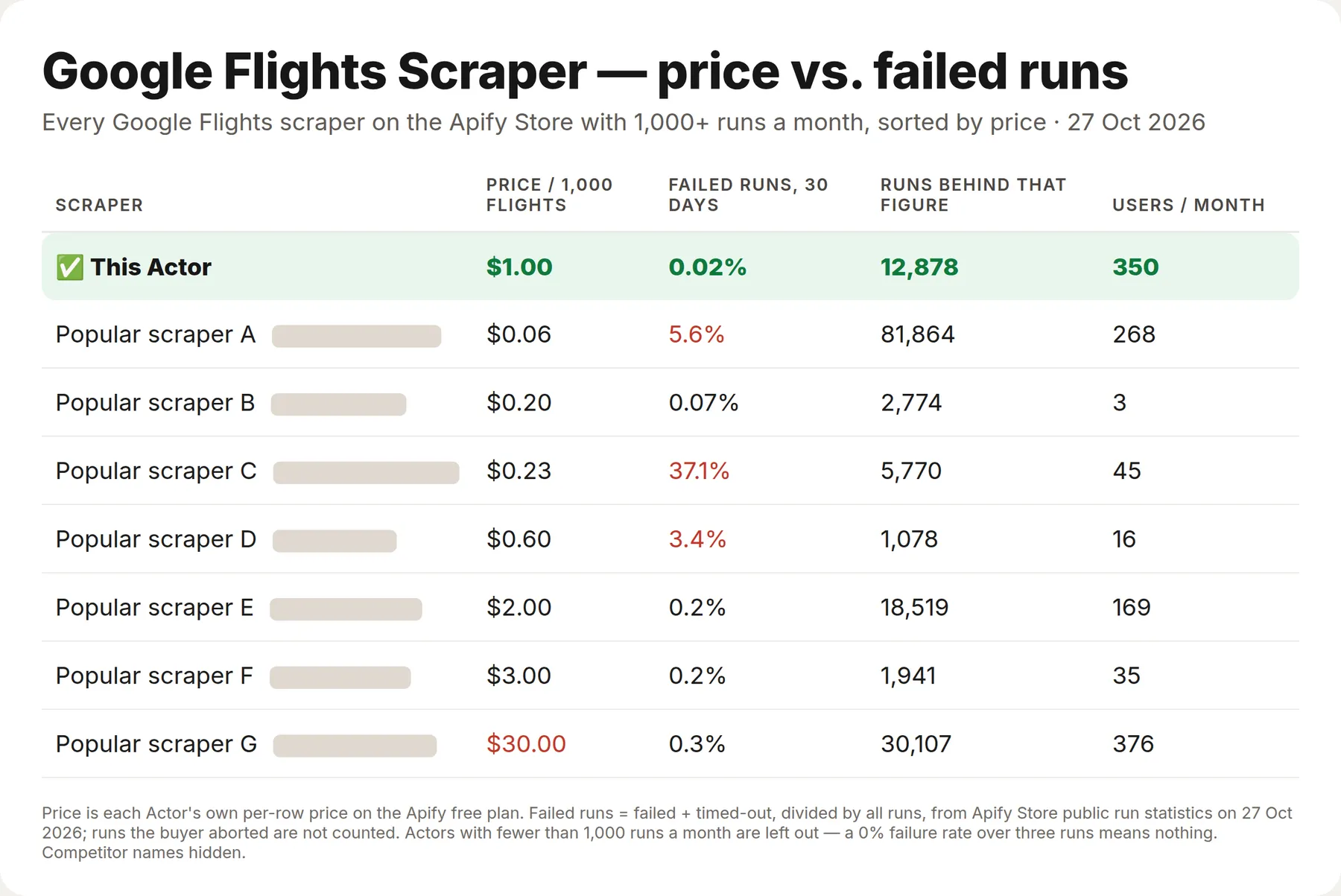
Every figure above comes from the Apify Store's own public pages — each Actor's listed price and its run statistics for the last 30 days — so you can check all of it yourself. Actors with fewer than 1,000 runs a month are left out: a 0% failure rate over three runs means nothing. Two scrapers are cheaper than this one; one of them failed 5.6% of its runs last month and the other 37.1%.
Tested head-to-head — 23 September 2026
We ran the five most-used Google Flights scrapers in the Store and this Actor on the same search (JFK → LAX, 18 Nov 2026, one way, up to 100 results), from a regular free-plan account.
| This Actor | Other Google Flights scrapers | |
|---|---|---|
| Flights returned | 100 | 0 – 101 |
| Cheapest fare found | $194 | $194 (same Google data) |
| Run time | 23 s | 7 – 30 s |
| Cost of the run | $0.10 | $0.004 – $0.21 |
| Cost per 1,000 flights | $1.00 | $0.06 – $30.00 (Store prices, 27 Oct 2026) |
| Price level + typical price range, Google Flights link, layovers, CO₂ | Yes, flat columns | Partly, or nested in one JSON blob |
| Failed runs | 0 | one returned 0 flights with a "Succeeded" status |
Every scraper sees the same fares, because they all read Google Flights. The difference is what you pay per row, how many rows you get, and whether the data drops straight into a spreadsheet.
Who this is not for
Said up front so you do not pay to find out:
- Booking a ticket. You get the price, the itinerary, a
bookingTokenand the seller links Google shows. The purchase happens on the airline's or the agency's own site — this Actor never buys anything. - Seat maps and baggage rules. Neither is in Google Flights' data, so neither is in ours. No seat availability, no fare conditions, no baggage allowance or fees.
- Live flight status. Delays, gates, terminals and actual departure times belong to a flight tracker. This is a search of what is on sale, not a board of what is in the air.
- Fares that never reach Google. Corporate deals, consolidator fares and airline-app-only prices are invisible here, because they are invisible on google.com/travel/flights.
If what you need is the price of a route on given dates, in any currency and from any market — that is exactly what this is.
What's new — 27 October 2026
- New row price: $1 per 1,000 rows ($0.001 per row), replacing $0.20 per 1,000. Announced 13 October and in force from today. Everything that was free stays free: route searches, price calendars, retries, residential proxy, error rows and empty results. Store tiers go down to $0.70 per 1,000 on Gold and above.
- Nothing to change in your runs — the new price applies automatically, and the input, output fields and limits are untouched.
What's new — 21 September 2026
- Pricing became a single event, charged per row. The per-search fee is gone. Route searches, price calendars, retries, residential proxy and run start are all free, and error rows have never been charged. (The row price set that day, $0.20 per 1,000, was replaced on 27 October — see above.)
- No fee for searching. Sweep a whole route map or a year of dates in one run and pay only for rows.
- Faster retries when Google throttles a request, with a clear reason on the row instead of a silent gap.
Using this Actor already? Nothing to change on your side — the new price applies automatically, and existing runs keep working. If a field is missing, a limit gets in your way, or you need a job this Actor does not cover yet, open an issue on the Actor page: we answer the same day and ship most requests within a week. Reviews are read, and they decide what gets built next.
Flights Google shows without a price — 5 October 2026
Some airlines keep part of their fares off Google Flights. Saudia (SV) on Saudi domestic routes is the clearest case: Google lists the flights, times and aircraft, but no fare and no sellers. Those rows now say so — priceUnavailable: true and a priceNote — instead of a bare price: null.
Tick Fill missing prices from KAYAK and the Actor runs our KAYAK Flights Scraper for the same search and copies KAYAK's fare onto the same flight (matched by flight number and departure time), in your currency. Filled rows carry priceSource: "kayak", the KAYAK seller and booking link. JED→MED on 12 Oct: all four Saudia nonstops priced (258.75–277.50 SAR). It runs only when a flight has no price; KAYAK rows are billed at KAYAK's row price.
When Google finds nothing, KAYAK answers — 30 October 2026
On some long-haul pairs Google Flights shows itineraries in a browser but returns none to a scraper. Siem Reap (SAI) → Greenville (GSP), 14 Mar ⇄ 9 Apr 2027: the browser lists 3-stop flights from $2,604, while the results Google hands back are empty. Before, such a search ended with "no flights, check the airport codes", although the codes were right.
Now, when Google returns no itinerary for a search, the Actor runs our KAYAK Flights Scraper for the same route, dates, passengers, cabin and stops, and returns KAYAK's flights in the same dataset, marked dataSource: "kayak", with the seller and the KAYAK link. Same search: 20 flights from $1,975. A free notice row says which searches were answered by KAYAK. KAYAK rows are billed by the KAYAK run at its row price and stay within your "Max cost per run"; this Actor charges nothing for them. It is on by default; untick KAYAK when Google finds nothing to get Google results only. Searches with infants, multi-city trips, "anywhere" searches and searches with filters KAYAK cannot apply (airlines, max price, duration, layover, time window) are not sent to KAYAK, so you never pay for rows that would be thrown away; the notice row says so.
How to scrape Google Flights with Google Flights Scraper
- Enter origin and destination as IATA codes (
DPS,SIN,LHR) and a departure date; add a return date for a round trip. - Set passengers, cabin class and, if needed, max stops, airlines, max price or duration.
- Click Start. Results appear in the Flights table, one row per itinerary. The price level, price history and Google's own lowest price are saved as the run's SEARCH_SUMMARY record, and appear in the Search summary table when you switch that option on.
- To track fares, add a Schedule and a webhook — or use the n8n / Make recipe below.
⬇️ Input
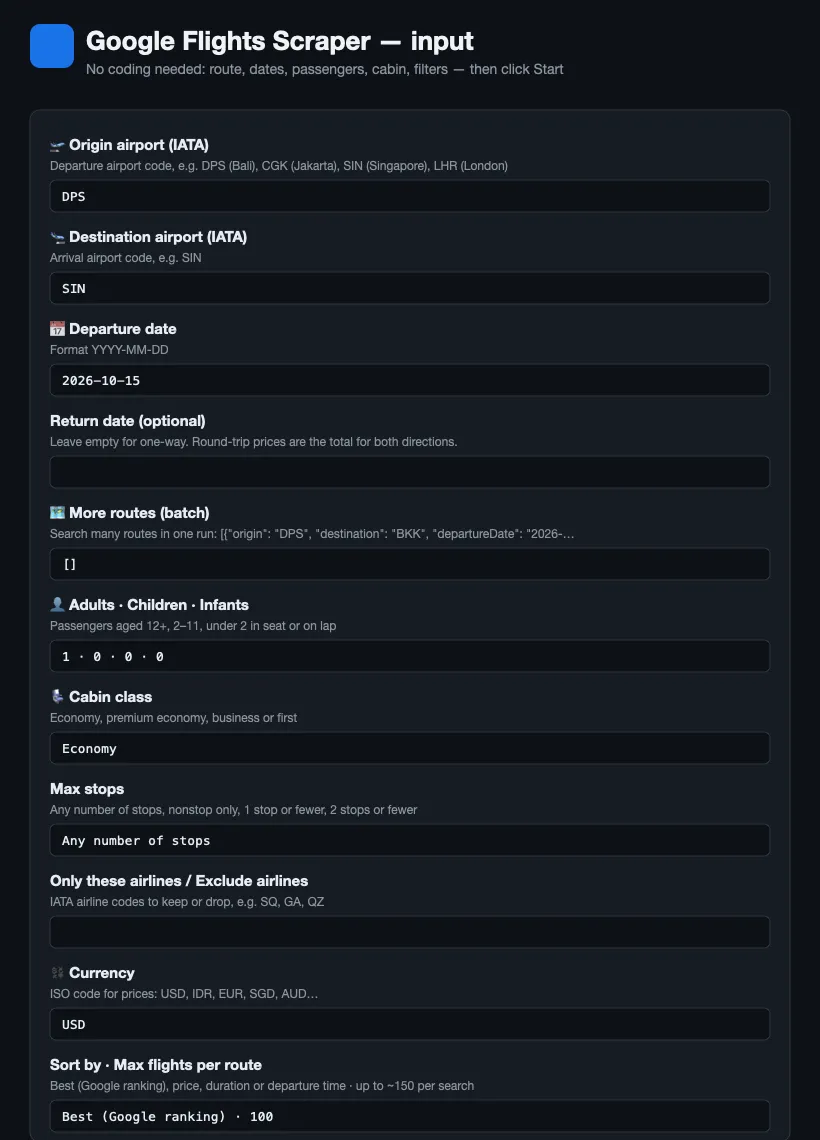
One-way search
Round trip, business class, two adults, at most one stop, cheapest first
Multi-city: Singapore → Bangkok → Phuket → Singapore
Returns complete itineraries (segments[] with the flights of every leg) and the total price — e.g. TG404 + PG271 + SQ725, 527 USD. When Google cannot sell the legs as one ticket it shows no total; the item then has priceUnavailable: true, exactly like the site.
Cheapest dates in the next two months (calendar only)
Returns 60 calendar_day items (date, lowest price, link) and a search item whose calendar.cheapestDates lists the five cheapest days — e.g. 49 USD on 2026-11-12. Add a returnDate to get a grid of departure × return dates with the trip length kept flexible around yours.
Many routes in one run (route map or date range)
| Field | Required | Description |
|---|---|---|
origin / destination | yes (or routes) | IATA airport codes |
departureDate / returnDate | yes / no | YYYY-MM-DD; leave returnDate empty for one-way |
routes | no | Array of {origin, destination, departureDate, returnDate} searched in one run |
multiCityLegs / maxMultiCityResolutions | no | Legs {origin, destination, date} of a multi-city trip; how many first-leg options to follow through (default 5) |
exploreAnywhere / maxDestinations | no | Cheapest destinations from origin instead of a fixed route (default off / 60) |
adults, children, infantsInSeat, infantsOnLap | no | Passengers (default 1 adult) |
cabinClass | no | economy (default), premium_economy, business, first |
maxStops | no | any (default), 0 nonstop, 1, 2 |
airlines / excludeAirlines | no | IATA airline codes to keep / drop |
maxPrice / maxDurationMinutes / maxLayoverMinutes | no | Caps on price, total duration and the longest layover |
departureTimeFrom / departureTimeTo / arrivalTimeFrom / arrivalTimeTo | no | Local time windows, HH:MM (e.g. depart between 06:00 and 12:00) |
resolveReturnFlights / maxReturnResolutions / maxReturnOptions | no | Round trips: fetch the return flights (with total prices) for the top N outbound itineraries (default off / 10 / 20) |
resolveBookingOptions / maxBookingResolutions | no | Fetch sellers, prices and booking links for the top N flights (default off / 10); round trips need resolveReturnFlights |
calendarDays / calendarOnly | no | Lowest fare per departure date for N days (up to 365); calendarOnly skips the flight list |
currency / language | no | Price currency (USD, IDR, EUR…) and language of names |
sortBy | no | best (Google ranking, default), price, duration, departure |
maxResults | no | Per route, default 100 |
includePriceInsights | no | Price level, typical range and history (default on) |
More ready-made examples
Each of these runs as a live example page — open it, change the route or the dates and press Start, no account setup needed.
| What it answers | Example page |
|---|---|
| Who sells a flight and for how much | who-sells-a-flight-cheapest |
| Prices for a family with children | flight-prices-for-a-family |
| Non-stop business class on a route | nonstop-business-class-fares |
| Round trip with the return legs attached | round-trip-fares-with-return-legs |
| Where can I fly cheaply from here | explore-cheapest-destinations |
| Compare one date across several routes | compare-flight-prices-across-routes |
| Bulk: lowest fare per day, 20 routes × 90 days (~1,800 rows, ~$1.80) | bulk-fare-calendar-many-routes |
| Bulk: 5 routes × 7 dates, 20 cheapest each (~700 rows, ~$0.70) | bulk-route-date-sweep |
Prices differ by the country the shopper is in, so every search accepts market — a two-letter country code next to currency — and returns the fares, sellers and booking links a buyer there actually sees.
Track airfare over time
Schedule the same input daily with monitor-style naming (one Task per route). Each run adds a search item with lowestPrice and priceLevel; compare with the previous run in your sheet or workflow and alert when priceLevel turns low or the lowest price drops below your threshold.
⬆️ Output
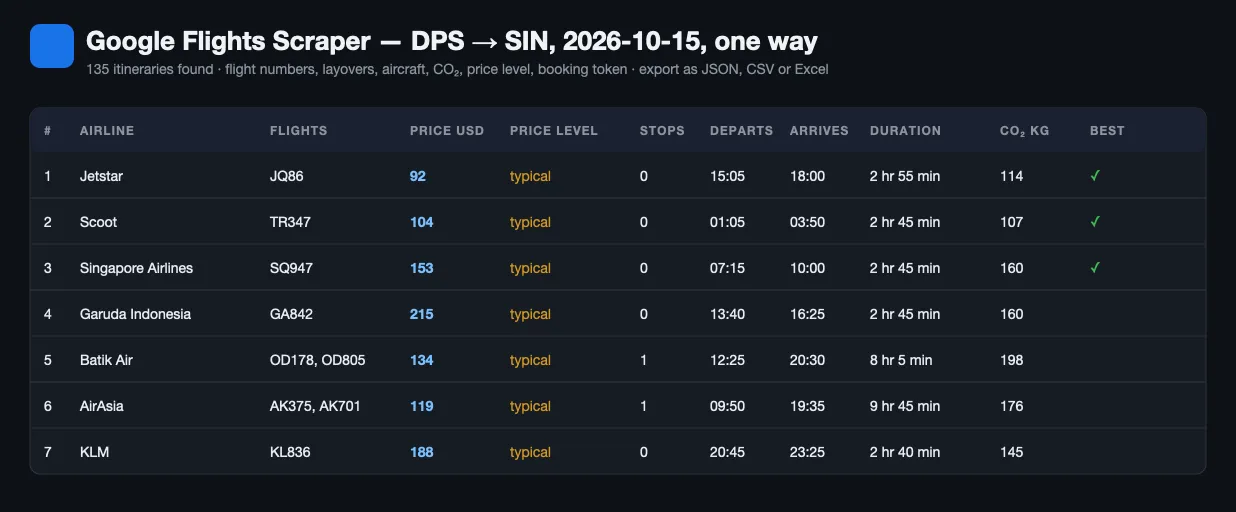
Flight
Price calendar day
Search summary
Every run writes one summary per search to the run's SEARCH_SUMMARY record in the key-value store. It is not a flight, so it is kept out of the results table by default; switch on Add the search summary row to get it as a type: "search" dataset row as well (added after the flights).
Times are local to each airport (no time zone suffix), exactly as Google displays them. Round-trip prices are the total for both directions for the outbound itinerary shown. A round trip with a stay longer than about a month returns far fewer itineraries than a short one: most airlines' round-trip fares cap the stay, so only carriers that sell one-ways stay priced. Search the two legs as one-way trips to see every airline. If a search fails after retries, an error item with the route and the reason is written instead of silently returning nothing.
Use cases for Google Flights data
Airfare price tracking and fare-drop alerts
Schedule the routes you care about; when priceLevel becomes low or lowestPrice drops, push a Slack or Telegram message with the googleFlightsUrl.
Travel agencies and OTAs
Quote clients with real flight numbers, layovers and cabin classes; compare airlines across dates with one batch run.
Route and pricing research
Build fare matrices per route, airline, day of week and booking lead time; use priceHistory and typicalPriceLow/High for benchmarks.
Sustainability reporting
emissionsKg per itinerary and per leg, with the deviation from the route's typical emissions.
Travel content, affiliates and AI agents
Feed "cheapest flights from X" pages, or let an agent answer "what is the cheapest nonstop DPS–SIN next month?" through MCP.
Integrations and Google Flights API
Run it as a Google Flights API through the Apify API with the JavaScript or Python client, or without code from n8n, Make, Zapier, Google Sheets, Slack and webhooks. It also works with the Apify MCP server, so Claude, Cursor or any MCP-capable agent can search flights as a tool.
Use it from Claude, Cursor or any MCP agent
Add the Apify MCP server to your agent and allow the lergassy/google-flights-scraper tool. Claude Desktop / Cursor (mcp.json):
Example prompts once connected: "Find the cheapest nonstop flights from Bali to Singapore on 15 October in USD", "Compare business-class fares DPS–LHR for 15 and 16 October for two adults, one stop max", "Are prices for CGK–KUL on 1 November low or high right now, and who sells the cheapest ticket?". The input schema is self-describing, so agents fill the fields without reading this page.
Fare-drop alert in n8n or Make
Schedule trigger (daily) → Apify "Run Actor" with your route → switch on Add the search summary row, filter type = search → IF priceLevel = low or lowestPrice < threshold → Slack / Telegram / email with googleFlightsUrl. The run-sync-get-dataset-items endpoint returns the items directly, so one HTTP Request node is enough.
🤖 For AI Agents & LLM Apps
Compact reference for agents calling this Actor through the Apify MCP server or the Apify API (lergassy/google-flights-scraper).
Purpose: returns live Google Flights itineraries for a route and dates — airline, flight numbers, price, stops and layovers, times, aircraft, CO₂ and booking options with seller prices — plus Google's own verdict on whether the fare is low or high for that route. Use it to answer "what is the cheapest way from Bali to Singapore next month", "is this fare a good deal" and "which dates are cheapest".
Minimal input:
Output: one row per itinerary — type, rank, origin, destination,
departureDate, returnDate, tripType, cabinClass, passengers, currency,
market, airline, airlineCodes, flightNumbers, price, priceLevel,
typicalPriceLow, typicalPriceHigh, isBestFlight, stops, layovers,
departAirport, departAt, arriveAirport, arriveAt, totalDurationMinutes,
duration, legs[] (per flight: flightNumber, airline, operatedBy, from,
to, departAt, arriveAt, durationMinutes, aircraft, legroom,
emissionsKg), emissionsKg, emissionsVsTypicalPercent, bookingToken,
googleFlightsUrl, resultsSource.
Each query also writes a summary with flightsFound, flightsReturned,
lowestPrice and the price band to the run's SEARCH_SUMMARY key-value record;
set includeSearchSummary: true to get it as a type: "search" dataset row too.
Booking options, cheapest-date calendars and explore destinations arrive as their
own row types when enabled.
Behaviors an agent should know:
- Airports are IATA codes (
DPS,SIN). City codes work where Google accepts them. City names (London) are not accepted: such a route is skipped with a freenoticerow naming the code to fix. - Renamed airports: the old code is translated to the one Google uses now (
PBI→DJT, West Palm Beach), so rows show the new code. Dates are ISO 8601, and areturnDateis what makes the search a round trip. priceLevelis the field that answers "is this cheap". Google compares the fare to what the route usually costs, andtypicalPriceLow/typicalPriceHighgive the band. Quote these instead of guessing from the price alone.currencydefaults to USD and is converted by Google, not by the Actor.market(two-letter country, e.g.US,ID,GB) sets the point of sale: fares, sellers and booking links differ by country, so pass the user's country when they intend to buy.maxResults(default 100) caps itineraries per query.routesruns several origin-destination pairs in one run, which is far cheaper than one run each.resolveBookingOptionsandresolveReturnFlightseach add fetches per itinerary; leave them off unless the user needs seller prices or matched return legs. They run 4 flights at a time and stop ~30 s before the run's time limit: the flights are always saved, and the search summary counts the ones left without these details (returnFlightsSkippedForTimeLimit,bookingOptionsSkippedForTimeLimit).calendarDaysturns on the cheapest-dates scan around the requested date;exploreAnywhereswitches to "where can I go for this budget" mode.resultsSourcesays whether the rows came from Google's internal API or from the rendered page. The API path returns far more itineraries; the page fallback runs automatically when the API refuses, so a smaller result set is expected there.- Fares move constantly. A row is a quote at the moment of the run, not a bookable price, and Google itself excludes some carriers.
❓ FAQ
Is it legal to scrape Google Flights?
The Actor reads publicly displayed prices and schedules without logging in, bypassing access controls or collecting personal data. Google's terms restrict automated access, and the legality of scraping public data depends on your jurisdiction and use; review the terms and consult a lawyer for commercial use.
Does Google Flights have a public API?
No. The old QPX Express API was shut down in 2018. This Actor is the practical Google Flights API replacement: the data comes from the same endpoint the Google Flights page uses.
How far ahead can I search?
About 11 months (~330 days) — that is as far as airlines load their schedules into Google Flights. For a later date the dataset gets one free notice row saying so, instead of an error. Not charged.
Can I use Google Flights Scraper with the Apify API?
Yes — see the API tab for ready-made snippets in JavaScript, Python and curl. Use run-sync-get-dataset-items to get flights back in one call.
Can I use it through an MCP server?
Yes. Connect the Apify MCP server to Claude, Cursor or another agent and call the Actor as a tool; the input schema is self-explanatory, so agents fill it correctly.
Can I integrate it with other apps?
n8n, Make, Zapier, Google Sheets, Slack, HubSpot and generic webhooks through Apify integrations, or the API from any language.
Which airports work?
Any IATA airport code Google Flights accepts (DPS, CGK, SIN, KUL, BKK, NRT, LHR, JFK…). City codes with several airports also work where Google supports them (e.g. LON, TYO).
How is this different from other Google Flights actors?
Most Google Flights scrapers parse the results page and return the first 15–50 itineraries with airline, price, stops and times. This Actor reads Google's results endpoint, so a search returns the full list (100–150 itineraries) with flight numbers, operating carrier, aircraft, legroom, layover airports, CO₂, Google's price-level badge and 60-day price history, plus an optional booking-options layer with sellers, fees and deep links. It separates infants on lap from infants in seat, ships a search summary item per route for trackers, and falls back to the results page automatically when Google refuses the endpoint — every item carries resultsSource so you know what you got.
Can I find the cheapest dates to fly?
Yes — set calendarDays (e.g. 60 or 365). The Actor returns the lowest fare for every departure date in that window as calendar_day items, flags the five cheapest, and puts calendar.cheapestDates on the search summary. For round trips it returns Google's departure × return grid, so you also see whether leaving a day earlier or staying a night longer is cheaper. Combine with calendarOnly and routes to sweep a whole route map for the cost of a few requests. A 120-day round-trip calendar takes about a minute; if the run's timeout ends the scan early, every day already fetched is saved and a free notice row says how many days were left.
Can I get booking links and seller prices?
Yes — turn on resolveBookingOptions. For the top maxBookingResolutions flights of each one-way search the Actor fetches Google's booking options: the airline and travel agencies, their prices in your currency and in the seller's local currency, any fees Google lists (e.g. credit-card surcharges), and a deep link. bestBookingPrice and airlineDirectPrice let you spot when an agency undercuts the airline. For round trips turn on resolveReturnFlights as well: booking options are then fetched for each outbound itinerary paired with its cheapest return (bookingOptionsFor says which pair).
Are round-trip prices per direction or total?
Total for both directions. By default each item is an outbound itinerary with the round-trip total Google shows for it. Turn on resolveReturnFlights to get, for the top outbound itineraries, Google's list of return flights with the total for each combination (returnOptions), the cheapest one (cheapestReturn, totalPrice) and — with resolveBookingOptions — the sellers and booking links for that outbound + return pair.
What do priceLevel and the typical range mean?
Google compares the current lowest fare with what this route usually costs for similar dates: low is below the typical range, typical inside it, high above. priceHistory gives the lowest fare seen on each of the last 60 days.
Why did a run return fewer flights than expected?
Google returns what it shows on the page: rare routes, far-out dates or strict filters (nonstop, a single airline) have few or no itineraries. Try maxStops: "any" or a different date.
How do multi-city trips work?
Google prices a multi-city trip leg by leg: you pick a flight for leg 1, then it shows leg 2 with running totals, and so on. The Actor automates that chain for the top maxMultiCityResolutions first-leg options, choosing the cheapest priced option on each later leg, and returns complete itineraries with segments[] and the total price. Mixed carriers that cannot be ticketed together have no total on Google either — those items carry priceUnavailable: true.
Can I search "anywhere" from my airport?
Yes — set origin and exploreAnywhere: true. You get Google's Explore results: destinations sorted by price with city, country, coordinates, airline, stops, duration and dates. Leave the dates empty for Google's flexible suggestions (one-week trips in the coming months), or set departureDate and returnDate to see what every destination costs on your dates.
Can I get the prices shown in another country?
Yes — set market to the buyer's two-letter country code (US, ID, GB, DE, AU…) and currency to match. Airlines and agencies file different fares per point of sale, so a Jakarta shopper and a London shopper can see different prices and sellers for the same flight; market reproduces that view, and every row records which market it came from.
Do I need proxies?
Yes for the full list. Google serves its results API (100–150 itineraries per search) only to residential IPs, so the default proxy setting is Apify Residential — a search transfers about 250 KB, a fraction of a cent. With datacenter proxies or no proxy the Actor falls back automatically to the server-rendered results page, which contains the first screen of results — up to ~40 itineraries ("best flights" plus the top of the list). The resultsSource field on every item tells you which path was used (api or page), and the Actor retries with a fresh IP when Google returns a block or consent page instead of results.
Can I scrape multiple routes in one run?
Yes — put them in routes. Passengers, cabin class, filters and sorting apply to every route; each route gets its own search summary item.
Ready-made Python scripts
Three short, working scripts — the cheapest day on a route, the cheapest destinations from
an airport, and who sells a given itinerary and for how much — are on GitHub:
lergassy/google-flights-api-examples.
Every output in that repository is a real run, so you can copy a script, set APIFY_TOKEN
and have flight data in a couple of minutes.
Run health
When a run ends with many error rows, the Actor sends its developer the counts (rows delivered, error types, run ID) so the cause gets fixed fast; your input and results are never sent.
Your feedback
Need another field (booking links, baggage, fare classes) or a feature (price calendar, "anywhere" search)? Open an issue in the Issues tab. If the scraper saved you money on a fare, a review helps other travelers find it.
You might also like
| Actor | What it does |
|---|---|
| Airbnb Scraper | Airbnb listings for any place and dates: nightly price, rating, beds, amenities, host |
| Agoda Reviews Scraper | Hotel reviews from Agoda, including the Booking.com reviews shown on Agoda |
| Tokopedia Reviews Scraper | Product reviews from any shop on Indonesia's largest marketplace |
| New Business Leads Monitor | Daily feed of newly registered US businesses and funded startups, with phone, email and lead score |
| Email Verifier & Phone Number Validator | Checks e-mails and phone numbers in bulk: deliverability, throwaway and role flags, numbering plan, US state and time zone |


