

HRS Hotel & Reviews Scraper
Pricing
from $5.00 / 1,000 hotels
HRS Hotel & Reviews Scraper
Scrape HRS.com hotels with every guest review — liked and disliked comments split apart, per-category scores, traveller segment, and the hotel's own published reply. Plus full profile: address, geo, stars, chain, contact email, amenities, images, sustainability. URL, ID, or all 181k hotels.
Pricing
from $5.00 / 1,000 hotels
Rating
5.0
(1)
Developer

Muhamed Didovic
Maintained by CommunityActor stats
0
Bookmarked
17
Total users
0
Monthly active users
5 days ago
Last modified
Share
HRS Hotel & Reviews Scraper — hotel profiles, ratings & guest reviews from hrs.com
Scrape HRS (hrs.com) hotels and their guest reviews. Each result is one hotel with its full profile — name, address, coordinates, star rating, chain, contact email and phone, 100+ amenities, image gallery, check-in times and sustainability figures — plus every review HRS publishes for it, with the positive and negative comment split apart, per-category scores, and the hotel's own published reply. Paste hotel URLs or IDs, or scrape straight from HRS's 181,000-hotel sitemap. Clean JSON/CSV out.
About review volume: HRS is a business-travel booking site, not a review platform. Most listed properties have a handful of numeric ratings and no written review at all — across a random sample of the sitemap, roughly 3% carried review text. Every review a hotel does have is returned in full. If you specifically want review content, switch on
onlyWithReviewsand the actor will skip past the empty properties for you. See the FAQ.
Why use this scraper?
- Every review, first request — the hotel page only ever displays three reviews, and the "show all" modal renders from data already in the page. This actor reads that payload directly, so you get the complete set with no pagination and no second round trip.
- Hotel replies included — HRS publishes management responses alongside guest feedback. They come through as
hotelReplyPositive/hotelReplyNegative, which is the half of the conversation most review scrapers drop. - Liked and disliked, separately — HRS asks guests what worked and what didn't as two fields. No sentiment model needed to tell them apart.
- Per-category scores twice over — the hotel's aggregate scores across 12 categories (cleanliness, value, breakfast, beds, bathroom, room size…), and the individual category votes inside each review.
- Scores broken out by traveller type — business, private, young couples, mature couples, families. Useful when your segment isn't the average one.
- Contact details on every hotel — the property's own email address and phone number, straight from the payload.
- 181,000 hotels reachable — no competitor accepts anything but a hotel URL. Switch on
scrapeAlland work through HRS's own sitemap instead of sourcing a URL list first. - Proxy included — HRS blocks datacenter IPs, so the actor routes through a built-in residential proxy at no extra charge. There is no challenge page to solve, so each hotel is still a single fast request.
Overview
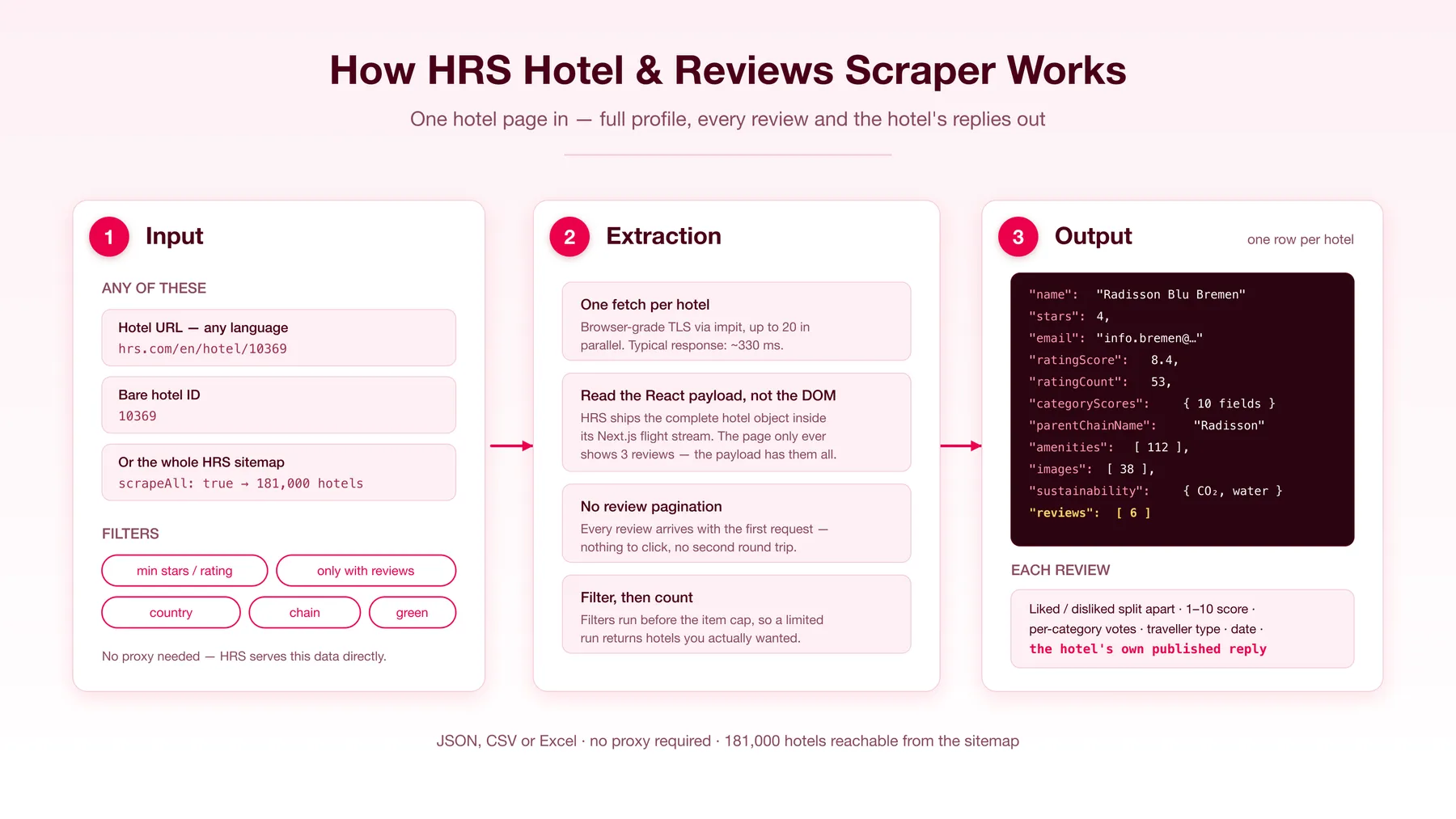
Give the actor HRS hotel URLs, bare hotel IDs, or nothing at all with scrapeAll switched on. For each hotel it makes one request, extracts the complete hotel object HRS embeds in the page, and returns a single clean row: identity, location, chain, contact, ratings, amenities, images, sustainability data, and the nested review list. Hotels arriving twice — say a pasted URL that also appears in the sitemap — are de-duplicated by hotel ID.
Supported inputs
| Input | Example | Result |
|---|---|---|
| Hotel URL | https://www.hrs.com/en/hotel/10369 | that hotel + all its reviews |
| Any language | https://www.hrs.com/fr/hotel/10369 | same hotel, normalized to English |
| German domain | https://www.hrs.de/de/hotel/10369 | same hotel |
| Bare hotel ID | 10369 | same hotel |
| Sitemap mode | { "scrapeAll": true } | works through all ~181,000 HRS hotels |
| Sitemap + filters | { "scrapeAll": true, "onlyWithReviews": true } | only hotels that have review text |
Use cases
- Reputation monitoring — track what business travellers say about your properties, and whether your team is replying.
- Competitive benchmarking — compare category scores against rival hotels in the same city, segmented by traveller type.
- Review-response auditing — measure reply rate and response tone across a portfolio; the hotel-reply fields make this directly countable.
- Hospitality market research — chain footprint, star distribution, amenity coverage, and renovation years across a country.
- Sustainability screening — filter to HRS Green Stay properties and pull their per-night carbon, water and waste figures.
- Hotel lead lists — name, address, coordinates, email and phone for every hotel in a market.
- AI/LLM training and RAG — structured review text with scores attached, ready for sentiment and aspect extraction.
How it works
- Resolve — every input form (URL in any language,
hrs.dedomain, or a bare ID) is normalized to a canonical English hotel URL. WithscrapeAll, hotel URLs are read from HRS's sitemap index instead. - Fetch — one request per hotel with browser-grade impit TLS, up to 20 in parallel. Requests go through the built-in residential proxy unless you set your own.
- Extract — HRS runs Next.js with the App Router, so the page data ships as an RSC flight payload split across
__next_fchunks. Those are reassembled and the hotel object is read straight out of it — richer and more stable than scraping rendered HTML. - Map — the payload becomes one flat record, with reviews nested under it and HRS's
$undefinedsentinels normalized tonull. - Filter — result-side filters are applied before the item cap, so a limited run returns that many hotels you actually wanted.
- Push — one dataset row per hotel, JSON, CSV or Excel.
Input configuration
Scrape the whole of HRS instead, keeping only well-rated German hotels that have review text:
| Field | Type | Default | Description |
|---|---|---|---|
startUrls | array | — | HRS hotel page URLs, any language or domain |
hotelIds | array | — | Bare HRS hotel IDs, one per line |
scrapeAll | boolean | false | Seed from HRS's sitemap instead of a URL list |
maxItems | integer | 100 | Hard cap on hotels collected — also your billing cap |
maxConcurrency | integer | 10 | Parallel hotel fetches |
proxy | object | built-in residential | Optional; leave unset (or 'No proxy') for the built-in residential proxy |
Filters
All filters are applied to the extracted data and run before maxItems is counted. Leave a filter empty to ignore it.
| Field | Type | Description |
|---|---|---|
minStars | integer | Minimum HRS star rating, 1–5 |
minRating | integer | Minimum guest rating on the HRS 1–10 scale |
minReviews | integer | Minimum number of guest ratings |
onlyWithReviews | boolean | Keep only hotels with at least one written review |
countries | array | ISO code or name — DE, DEU and Germany all work |
chains | array | Matched against chain and parent group, so Radisson catches Radisson Hotel Group |
amenities | array | Hotel must have all listed keywords, e.g. parking, sauna, conference |
greenStayOnly | boolean | Keep only HRS Green Stay properties |
Output overview
One row per hotel, with reviews nested inside it.
Key output fields
| Field | Type | Notes |
|---|---|---|
hotelId | number | HRS's stable numeric ID — the key to join runs on |
name, stars | string, number | Hotel name and HRS star rating (1–5) |
address, latitude, longitude | object, number | Full postal address plus coordinates |
email, phone | string | The property's own contact details |
chainName, parentChainName | string | Chain and its parent group |
ratingScore | number | Overall guest rating, 1–10 scale (not 1–5) |
ratingCount | number | Number of guest ratings — most carry no text |
recommendationRate | number | Percent of guests who recommend the hotel |
categoryScores | object | Aggregate scores across up to 12 categories |
ratingsByTravellerType | array | Same scores split by business / private / couples / families |
writtenReviewCount | number | How many reviews have comment text — often 0 |
reviews[] | array | Full review objects; see below |
reviews[].positiveComment / .negativeComment | string | What the guest liked / didn't, as separate fields |
reviews[].hotelReplyPositive / .hotelReplyNegative | string | The hotel's published response, usually null |
reviews[].categoryScores | object | That guest's own per-category votes |
amenities, roomAmenities | array | HRS amenity codes and readable room amenities |
images, imageCount | array, number | Full-size gallery URLs |
sustainability | object | Green Stay status and per-night carbon/water/waste |
distances | object | Distances to stations, airports, trade fairs, city centre |
FAQ
Why do so many hotels come back with zero reviews?
Because that's what HRS has. It's a corporate booking platform, so most of its 181,000 listings are small properties that have never been reviewed in writing — about 3% of a random sitemap sample carried review text. Use onlyWithReviews: true and the actor will fetch past the empty ones and only bill you for hotels that have content.
Does this get all the reviews, or just the first page? All of them. HRS embeds the complete review list in the page and the "show all reviews" button renders from that same data without making a request — so there is no page 2 to miss.
What scale are the ratings on?
1–10, not 1–5. stars is the separate 1–5 star classification.
Do I need a proxy? No, one is built in. HRS blocks datacenter IP ranges, including Apify's own servers, so the actor uses a residential proxy by default, and choosing 'No proxy' uses the same built-in proxy. Set Apify Proxy or your own proxy URLs only if you want to route through your own.
Can I get room prices? No. HRS prices rooms through a separate date-and-occupancy request that isn't part of the hotel page, so nightly rates are out of scope for this actor.
How do I scrape a whole country?
Set scrapeAll: true with countries: ["DE"] and a maxItems budget. The actor walks HRS's sitemap and keeps only matching hotels.
Can I run it incrementally?
Yes — the hotel page always carries the newest reviews, so re-running on the same hotelIds and diffing on reviews[].date gives you what's new.
Support
Found a bug or need a field that isn't here? Open an issue on the actor's Issues tab and it'll be looked at.
Additional services
Need this data pushed somewhere specific, or a scraper for a site not yet covered? Get in touch through the Apify platform.
Explore more scrapers
Other hotel and review scrapers in this collection: Booking.com Reviews, Agoda Reviews, TripAdvisor, Expedia, Trip.com, Choice Hotels, Google Reviews.
🤖 For AI Agents & LLM Apps
This actor is a clean data source for agent pipelines:
- Deterministic input — a bare hotel ID is a valid input, so an agent can go from a search result to structured data without URL construction.
- One call, complete record — hotel profile and full review history arrive together, so no follow-up calls or pagination state to manage.
- Pre-split sentiment —
positiveCommentandnegativeCommentare separate fields as published, removing a classification step before aspect extraction. - Scores attached to text — every review carries both an overall score and per-category votes, making it directly usable for supervised tasks and RAG citations.
- Stable joins —
hotelIdis HRS's own key, so runs over time diff cleanly.
⚠️ Disclaimer
This actor collects only publicly available information from hrs.com — data any visitor can see without logging in. It does not access private, personal, or authentication-protected content, and it does not attempt to bypass access controls. You are responsible for ensuring your use of the scraped data complies with HRS's terms of service, applicable copyright law, and data-protection regulations including the GDPR. Review text and reviewer display names may constitute personal data in some jurisdictions; process them accordingly and establish your own lawful basis before storing or republishing them.
SEO Keywords
HRS scraper, HRS.com scraper, HRS hotel scraper, HRS reviews scraper, HRS hotel reviews, hotel review scraper, hotel data extraction, hotel reviews API, guest review scraper, hotel ratings scraper, business travel data, hotel reputation monitoring, hotel review analysis, hospitality data scraping, hotel competitor analysis, German hotel data, hotel chain data, hotel email scraper, hotel contact extraction, hotel sustainability data, Green Stay hotels, hotel amenities data, travel data extraction, hotel market research, review sentiment data, hotel benchmarking, HRS API alternative, Apify hotel scraper
![PistonHeads.com [$1💰] | Full 208k catalogue | Real pagination avatar](https://images.apifyusercontent.com/N5yGW7wlseLIwvxB9V1DcTJVHEdFqV2MhaITdnhRlFM/rs:fill:76:76/cb:1/aHR0cHM6Ly9hcGlmeS1pbWFnZS11cGxvYWRzLXByb2QuczMudXMtZWFzdC0xLmFtYXpvbmF3cy5jb20vbmduOHZSRVNUa3NleVdFNnAtYWN0b3IteEpXSmV2d2I5dVBrZDdwU08tOHRWc0xnWEUzZi1waXN0b25oZWFkcy5wbmc.webp)

![Car & Classic [$1💰] | Full 46k catalogue | Beats 10k cap avatar](https://images.apifyusercontent.com/yR5ZcWq7huml1KRn39casUADIIm6kQumb9tA8E00od4/rs:fill:76:76/cb:1/aHR0cHM6Ly9hcGlmeS1pbWFnZS11cGxvYWRzLXByb2QuczMudXMtZWFzdC0xLmFtYXpvbmF3cy5jb20vbmduOHZSRVNUa3NleVdFNnAtYWN0b3ItbmRLcGNQOFNyWFNueW5Na3IteGE3RlJRTHRTVy1jYXJfYW5kX2NsYXNzaWMuanBlZw.webp)


![Collecting Cars [$3💰] | 33k SOLD prices + live bids avatar](https://images.apifyusercontent.com/Hbn_LDWbVTHAyPL8k_edq8GAZOEin7g5i4_bFf2WimM/rs:fill:76:76/cb:1/aHR0cHM6Ly9hcGlmeS1pbWFnZS11cGxvYWRzLXByb2QuczMudXMtZWFzdC0xLmFtYXpvbmF3cy5jb20vbmduOHZSRVNUa3NleVdFNnAtYWN0b3ItRm1EYVRESkEyWGNYU0s4N24tVkJhU3V5RENuYi1Db2xsZWN0aW5nX0NhcnMud2VicA.webp)


