

Instagram Hashtag Scraper · Recent, Top & Reels · Date Filter
Pricing
from $0.70 / 1,000 posts
Instagram Hashtag Scraper · Recent, Top & Reels · Date Filter
Instagram hashtag scraper with a Recent (newest-first) feed, plus Top and Reels. Filter by posted-after and posted-before dates, or videos only. Captions, likes, comments, plays, video URLs, creator handle, tagged accounts, optional reel audio. No login, deduped. From $0.70 per 1,000 posts.
Pricing
from $0.70 / 1,000 posts
Rating
4.0
(1)
Developer

Muhamed Didovic
Maintained by CommunityActor stats
0
Bookmarked
248
Total users
106
Monthly active users
3.8 hours
Issues response
3 hours ago
Last modified
Categories
Share
Instagram Hashtag Scraper
Turn any Instagram hashtag into a structured stream of posts and reels, from the Recent (newest-first) feed, Top posts, or Reels.
Paste a tag like coffee, #latteart, or a full explore URL, optionally set a posted-after / posted-before date filter, and get captions, engagement counts, play counts, video URLs, and creator handles — no login, no cookies, no account risk.
Why Use This Scraper?
- Top posts, Recent (newest-first), and Reels from any public hashtag, in one run
- Real engagement data — likes, comments, and play counts per post
- Direct video and thumbnail URLs, plus the creator's handle and profile picture
- Automatic deduplication — Instagram serves overlapping pages, this actor does not bill you twice for the same post
- Many hashtags per run, processed in parallel
- Flattened rows that drop straight into CSV, Excel, or a spreadsheet
- No login, no cookies, no session tokens — nothing to get your account flagged
Switching From Another Instagram Hashtag Scraper?
The complaint that follows people to this category is a results limit that does not hold — a run that stops early, returns a different count each time, or bills for posts it never delivered.
| What you need | How this Actor answers it |
|---|---|
Blocked mid-run with HTTP 429 and no results | It reads Instagram through a data API rather than scraping the site directly, so there is no rate-limit wall to hit — no 429, no half-empty run to pay for. |
maxPostsPerHashtag should mean what it says | Six runs across six hashtags, six caps hit exactly. 100 requested and 100 delivered on #coffee, #workout, #recipe, #travel and #dance; 20 requested and 20 delivered on #espresso. |
| Carousel posts counted once | A carousel is one row, not one row per slide. In 520 measured rows there were 44 carousels and 44 post IDs — no container-plus-item pair, so no paying twice for one post. |
| No duplicate posts inside a hashtag | 520 rows, 520 distinct post IDs within their hashtag. A post that appears in both Top and Reels is delivered, and charged, once. |
| Reels honouring the limit too | resultsType: "reels" paginates on the same counter as top. Asking for both splits the cap across the two lists, so 100 comes back as 50 top and 50 reels rather than 100 of one and none of the other. |
| Not paying for posts you did not receive | Billing is per delivered row, bounded by the run's charge limit. A run that returns nothing charges for no posts, and error rows are never charged. |
| Knowing when a hashtag simply has less | A tag with nothing to return comes back as an error row naming it and saying why, not as a silently shorter dataset. Speed for reference: 100 posts in 29 seconds, 400 across four hashtags in 52 seconds. |
No login, no cookies, no browser.
Overview
The Instagram Hashtag Scraper is built for social media managers, trend researchers, brand teams, and agencies who need structured post-level data from Instagram hashtags.
The output is post-shaped rows. Each row is one Instagram post or reel, tagged with the hashtag it was found under. If you scrape three hashtags, you get one flat dataset containing all posts from all three, each row carrying its own hashtag value so you can filter or pivot by tag.
A post genuinely tagged with two of your hashtags appears once per hashtag, because the row is scoped to the tag it was discovered under. Within a single hashtag, every post is unique.
Supported Inputs
Input types
| Input type | Pattern | Example |
|---|---|---|
| Bare tag name | word | coffee |
| Hash-prefixed tag | #word | #latteart |
| Explore URL | instagram.com/explore/tags/<tag>/ | https://www.instagram.com/explore/tags/espresso/ |
All three forms can be mixed in the same run. Tags are case-insensitive and are normalised to lowercase. Unicode tags (#café, #日本) are supported.
Copy-pasteable input
Unsupported inputs
- Profile URLs, post URLs, reel URLs — this actor takes hashtags only
- Private or restricted tags — Instagram serves nothing publicly for these
Use Cases
| Audience | What they use it for |
|---|---|
| Social media managers | Track which posts win on a branded or campaign hashtag |
| Trend researchers | Measure hashtag volume, format mix, and engagement over time |
| Brand teams | Monitor user-generated content and find brand mentions |
| Influencer agencies | Discover creators already posting in a niche, ranked by real engagement |
| Content strategists | Study the top-performing captions, formats, and reel lengths in a topic |
| Market researchers | Compare engagement across competing hashtags or product categories |
How It Works
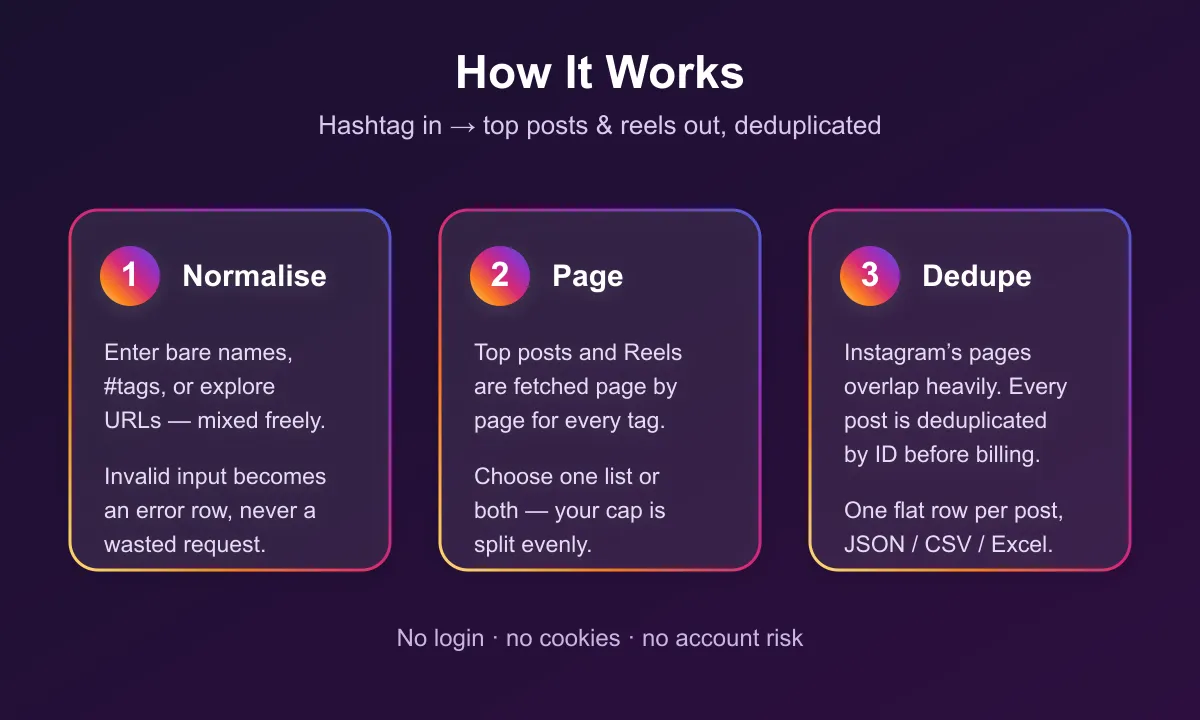
- Normalise the input — bare names,
#tags, and explore URLs all resolve to a clean tag name. Invalid input becomes an error row instead of a wasted request. - Look up the hashtag — confirms the tag exists and reports its total post count on Instagram. A missing tag returns a clear error row.
- Page the ranked lists — Top posts and/or Reels are fetched page by page.
- Deduplicate — Instagram's Top and Reels lists are live ranked sets whose pages overlap heavily. Every post is deduplicated by ID, so you are never charged twice for the same post, and paging stops as soon as the list stops producing anything new.
- Push flat rows — each post becomes one dataset row, ready for export.
Input Configuration
| Field | Type | Required | Default | Description |
|---|---|---|---|---|
hashtags | array | Yes | — | Hashtags to scrape. Bare names, #tags, or explore URLs. |
resultsType | string | No | top | top, reels, recent, or both. |
maxPostsPerHashtag | integer | No | unlimited | Cap on posts collected per hashtag. |
postedAfter | string | No | — | Keep only posts published on or after this date. YYYY-MM-DD or an ISO timestamp. |
postedBefore | string | No | — | Keep only posts published on or before this date. A bare YYYY-MM-DD includes the whole day. |
onlyVideos | boolean | No | false | Skip photo posts, return videos and reels only. |
includeAudio | boolean | No | false | Add the sound behind each reel: title, artist, audio id, duration, and whether Instagram marks it trending. Ten reels per request. |
When resultsType is both, maxPostsPerHashtag is split evenly across the two lists, so a cap of 50 returns roughly 25 top posts and 25 reels rather than 50 top posts and nothing else.
How far back a hashtag reaches
Instagram's Top and Reels lists are ranked by recency, not paged history, so how far back a run reaches is set by how busy the hashtag is — not by how hard you page. Measured 2026-08-28 at 100 posts per hashtag:
| Hashtag | Window covered by 100 posts |
|---|---|
#travel, #dance | under 1 day |
#workout | ~1.5 days |
#coffee | ~3.5 days |
#recipe | ~4.8 days |
Depth buys some history, but far less than it looks: #travel at 100 posts reached back 25 hours,
and at 600 posts still only 31 hours — every one of those 600 came from the same two calendar
days. If you need yesterday on a busy tag, raise maxPostsPerHashtag; if you need last month, no
setting will get there, because Instagram does not serve it.
postedAfter and postedBefore filter what those lists return. They cannot reach past the window
above. Posts excluded by the filter are never charged, and the run's status message reports how
many were skipped. If the whole requested range falls outside what a tag reaches, you get an error
row naming the window that was available rather than an empty dataset.
Example — top posts only, capped
Example — reels only, for video trend research
Output Overview
One dataset row per post. Every row identifies the hashtag it came from and which list it was found in (top or reels), then carries the post itself: identifiers and URL, media type, timestamp, caption, engagement counts, video metadata, and the creator's public profile fields.
Rows for hashtags that could not be scraped are returned as error rows carrying hashtag, error, and message — these are never charged.
Output Samples
Real row, produced from hashtags: ["latteart"] with resultsType: "both" (CDN URLs shortened):
Error row for a tag with nothing to scrape — misspelled, brand new, or restricted. Instagram reports a post count of 0 for all three, so the row names the tag rather than guessing which:
A tag Instagram says does have posts but which serves none back gets error: "no_posts_returned"
instead, and that run is reported as failed — an empty result there is not something the run can
prove is legitimate.
A tag whose posts all fall outside postedAfter / postedBefore gets
error: "date_range_out_of_reach", carrying the window the ranked list actually reached:
With Only videos on, a tag that has posts but no videos returns error: "no_videos". That is a
finished result: the run succeeds, and you are not charged for the skipped photos and carousels.
Key Output Fields
Source
hashtag, resultsType
Post identity
postId, shortCode, postUrl, mediaType, productType, takenAt
Content
With includeAudio on, reel rows also carry musicId, musicTitle, musicArtist, musicIsOriginalAudio, musicDurationMs and audioIsTrending. Photos and carousels have no sound and leave all six null.
caption, taggedUsernames, locationName, isPaidPartnership
Engagement
likeCount, commentCount, playCount
Media
thumbnailUrl, videoUrl, videoDuration
Creator
ownerUsername, ownerFullName, ownerId, ownerProfilePicUrl
Free Apify plan
On the free Apify plan, the first 3 posts of each run come back in full, so you can check the data. After that, rows keep the hashtag, list type, post id, shortcode, URL, media type, post date, owner, location, tagged users and audio details, while the media links (thumbnailUrl, videoUrl) are hidden, caption is cut to its first 3 characters, and the like, comment and play counts are rounded to their order of magnitude. A freePlanNote field marks those rows. Any paid Apify plan returns every field in full. The includeAudio add-on runs on paid Apify plans only; on the free plan the music and audio fields come back null.
FAQ
Can I get recent / chronological posts for a hashtag?
Yes. Set resultsType to recent. That uses Instagram's newest-first mixed feed (/v2/hashtag/medias/recent), not the empty v1 recent/chunk route. Depth is still a ranked-ish newest window, not a full archive.
How many posts can I get per hashtag?
Instagram's Top and Reels lists are ranked sets of limited depth, not full archives. Expect a few hundred posts per hashtag in practice. Setting maxPostsPerHashtag to 10,000 will not produce 10,000 rows — paging stops once the list stops returning new posts.
Why do I sometimes get fewer posts than I asked for?
Either the hashtag's ranked list ran out, or onlyVideos filtered out photo posts. Both are logged.
Is the same post ever returned twice? Not within a hashtag. Instagram's pages overlap heavily and the actor deduplicates by post ID, so you are never billed twice for the same post. A post tagged with two of your hashtags does appear once under each, because each row is scoped to its tag.
Does it return comments or the list of likers? No. This actor returns post-level data including comment and like counts. For comment text see the Instagram Comments Scraper, and for the people who liked a post see the Instagram Post Likers Scraper.
Do I need an Instagram account, login, or cookies? No. Nothing is authenticated and no session is used, so there is no account to get flagged.
What happens with a private or restricted hashtag? You get an error row explaining it, and you are not charged for it.
Support
Found a bug or need a field that is not there? Open an issue on the actor's Issues tab and it will be looked at.
Email: muhamed.didovic@gmail.com
Additional Services
Need a custom scraper, a tailored export format, or an integration into your own pipeline? Custom builds are available — get in touch at muhamed.didovic@gmail.com.
Explore More Scrapers
- Instagram Profile Scraper — profiles, posts and comments from any public account
- Instagram Stories & Highlights Scraper — active stories and permanent highlights
- Instagram Followers & Following Scraper — full follower and following lists
- Instagram Post Likers Scraper — who liked any public post or reel
- Instagram Comments Scraper — full comment threads with replies
- Instagram Similar Profiles & Lookalike Finder — accounts similar to any profile
- Instagram Reels Search & Viral Finder — find trending reels by keyword
Browse the full collection at apify.com/memo23.
🤖 For AI Agents & LLM Apps
Compact reference for AI agents calling this actor via the Apify MCP server or the Apify API (actor: memo23/instagram-hashtag-scraper).
Purpose: Scrapes public Instagram hashtags into post-level rows (Top posts and/or Reels), with automatic cross-page deduplication.
Minimal input:
Output: one dataset row per post — hashtag, resultsType, postId, shortCode, postUrl, mediaType, productType, takenAt, caption, likeCount, commentCount, playCount, videoDuration, isPaidPartnership, ownerUsername, ownerFullName, ownerId, ownerProfilePicUrl, thumbnailUrl, videoUrl, locationName, taggedUsernames, and (with includeAudio) musicId, musicTitle, musicArtist, musicIsOriginalAudio, musicDurationMs, audioIsTrending. Failed hashtags return {hashtag, error, message} instead.
Behaviors an agent should know:
- Always set
maxPostsPerHashtag. Uncapped runs page until Instagram stops returning new posts. - Instagram's ranked lists are shallow — expect a few hundred posts per tag, not thousands, regardless of the cap.
- With
resultsType: "both"the cap is split evenly between Top and Reels. resultsType: "recent"uses the newest-first mixed feed.bothis still Top + Reels only (recent is a separate mode).- Billing: one
postevent per post row delivered. Error rows are never charged. Duplicate posts within a hashtag are deduplicated before billing. - No login is used, so no authenticated-only fields (viewer state, private accounts) are available.
⚠️ Disclaimer
This Actor is an independent tool and is not affiliated with, endorsed by, or sponsored by Meta Platforms, Inc. or any of its subsidiaries. All trademarks mentioned are the property of their respective owners.
The scraper accesses only publicly available Instagram hashtag pages — no authenticated endpoints, paid features, or content behind the instagram.com login wall. Users are responsible for ensuring their use complies with instagram.com's Terms of Service, applicable data-protection law (GDPR, CCPA, etc.), and any contractual obligations of their own organization.
SEO Keywords
instagram hashtag scraper, scrape instagram hashtag, instagram hashtag API, instagram.com scraper, Apify instagram, hashtag posts scraper, instagram reels scraper, instagram top posts scraper, social media scraper, hashtag analytics data, instagram engagement data, instagram trend research, user generated content scraper, influencer discovery data, instagram content strategy, brand monitoring scraper, social listening data, instagram marketing intelligence, no login instagram scraper
![ForRentUniversity.com [$1.25💰] Scraper · Emails avatar](https://images.apifyusercontent.com/knob38rf08RjbTFOtyPTLKbUpJqNv69gLvD9GZvNHdY/rs:fill:76:76/cb:1/aHR0cHM6Ly9hcGlmeS1pbWFnZS11cGxvYWRzLXByb2QuczMudXMtZWFzdC0xLmFtYXpvbmF3cy5jb20vbmduOHZSRVNUa3NleVdFNnAtYWN0b3Itb2ZkQkJZZ0QzMndpZHZSemotT25mdk55NHJTQS1mcnUuanBlZw.webp)

![Collecting Cars [$3💰] | 33k SOLD prices + live bids avatar](https://images.apifyusercontent.com/Hbn_LDWbVTHAyPL8k_edq8GAZOEin7g5i4_bFf2WimM/rs:fill:76:76/cb:1/aHR0cHM6Ly9hcGlmeS1pbWFnZS11cGxvYWRzLXByb2QuczMudXMtZWFzdC0xLmFtYXpvbmF3cy5jb20vbmduOHZSRVNUa3NleVdFNnAtYWN0b3ItRm1EYVRESkEyWGNYU0s4N24tVkJhU3V5RENuYi1Db2xsZWN0aW5nX0NhcnMud2VicA.webp)


