

Instagram Reels Search & Viral Finder · No Login
Pricing
from $1.00 / 1,000 reel scrapeds
Instagram Reels Search & Viral Finder · No Login
Instagram Reels search with Boolean queries (AND, OR, NOT) plus date and engagement filters. Find trending reels by topic, or (#fitness OR "home workout") AND nutrition AND NOT giveaway. Filter by likes, views, comments, posted date. No login. Filtered-out reels are not charged.
Pricing
from $1.00 / 1,000 reel scrapeds
Rating
5.0
(2)
Developer

Muhamed Didovic
Maintained by CommunityActor stats
2
Bookmarked
1.9K
Total users
941
Monthly active users
4 hours ago
Last modified
Categories
Features
Share
Instagram Reels Search & Viral Finder

Find trending Instagram Reels by keyword or Boolean query — not just by profile. Search any topic and get back the reels ranking for it, each with play count, likes, comments, video URL, caption, audio, and creator. Operators: AND, OR, NOT, quotes, parentheses. No login, no cookies. Export as JSON, CSV, or Excel.
| Input | What you get |
|---|---|
Keywords / Boolean queries (queries) | Reels ranking for that topic or Boolean expression (AND/OR/NOT), misses not charged |
Creator profiles (usernames / handles) | Public reels for specific creators, with optional skipPinnedPosts and skipTrialReels |
Direct Reel links (reelUrls) | Full metrics (views, likes, comments, shares) + optional MP4 download & native subtitles |
Chained Apify dataset (datasetId) | Auto-extracts Reel URLs or creator handles from an earlier scraper run |
No login and no cookies. Search by keyword, not just by account.
Why Use This Scraper?
- Keyword and Boolean discovery —
AND/OR/NOT, quotes, parentheses, plus date and engagement floors. Match is caption, alt text, username, display name, location, or audio. Rows that fail are never billed. - Full engagement metrics — play count, likes, comments, shares, and video duration on every reel, so you can rank by what's actually performing.
- Creator + audio included — each reel carries its creator (username, verified) and audio, ready for influencer and trend research.
- Historical archive (opt-in) — every run adds the reels it finds to a permanent archive. Turn on
includeHistoricalto also get reels captured for the keyword on earlier runs that today's search no longer surfaces — reels that have since stopped trending, with their engagement metrics as captured. Coverage grows the more a keyword is run. - No account risk — no login, no cookies, no session handover.
- Fast — keeps going until the result cap you set.
How It Works
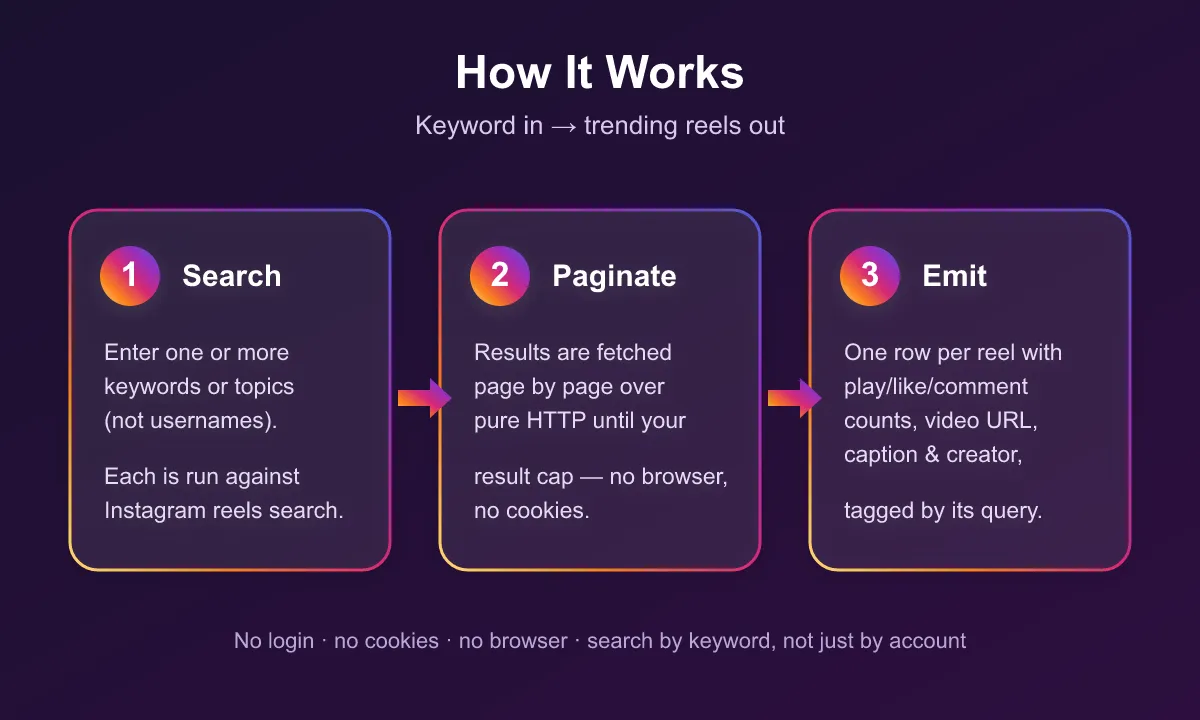
- Search — each keyword returns Reels for that topic.
- Paginate — results are fetched page by page until your
maxResultsPerQuerycap (or the results run out). - Filter — Boolean, language, date, and engagement checks run before charge. Misses are dropped, not billed.
- Emit — every kept reel is pushed to the dataset as its own row, tagged with the
queryit came from.
Input
| Field | Type | Required | Notes |
|---|---|---|---|
queries | array of strings | No* | Keywords or Boolean expressions (AND / OR / NOT, quotes, parentheses). Aliases accepted: query, search, searchQueries, searchHashtags, keywords. |
usernames | array of strings | No* | Public creator handles or profile URLs (nasa, @nasa, https://www.instagram.com/nasa/). Alias accepted: handles. |
reelUrls | array of strings | No* | Direct Instagram Reel URLs or shortcodes to fetch metrics, shares, downloads, or native subtitles for. |
datasetId | string | No* | Apify Dataset ID to chain from a prior run (auto-extracts Reel URLs or creator handles). |
maxResultsPerQuery | integer | No | Cap reels per keyword or profile (also caps direct reelUrls). Omit for as many as the source returns. |
sortBy | relevance | most_viewed | newest | most_liked | No | Default relevance (streams in upstream order). Other modes buffer up to 500 candidates, sort strictly descending, and bill only for the final kept rows. |
postedWithinDays | integer | No | Shorthand date filter: keep reels posted within the last N days (computes UTC oldestPostDate automatically unless oldestPostDate is set). |
oldestPostDate | string | No | Keep reels posted on or after this day (YYYY-MM-DD, inclusive). Empty = off. |
newestPostDate | string | No | Keep reels posted on or before this day (YYYY-MM-DD, inclusive). Empty = off. |
minimumViews | integer | No | Keep reels with at least this many plays. 0 = off. |
minimumLikes | integer | No | Keep reels with at least this many likes. 0 = off. |
minimumComments | integer | No | Keep reels with at least this many comments. 0 = off. |
skipPinnedPosts | boolean | No | On usernames profiles, skip reels pinned to the top of the profile. Default: false. |
skipTrialReels | boolean | No | Skip reels flagged by Instagram metadata as Trial Reels (clips_trial / trial_params). Default: false. |
watchlistId | string | No | Named Apify Key-Value Store remembering delivered shortcodes across scheduled runs. |
newReelsOnly | boolean | No | Skip reels already recorded in watchlistId (not emitted, not billed). Requires watchlistId. Default: false. |
includeDownloadedVideo | boolean | No | Download each kept reel's MP4 into the run's Apify Key-Value Store (25 MB cap per video) and attach downloadedVideoUrl. Default: false. |
includeTranscript | boolean | No | Extract Instagram's native subtitle/caption track (video_subtitles_uri SRT) when Instagram provides one, setting transcript, transcriptSrt, transcriptLocale, and transcriptSource. Lightweight (no Whisper ASR); reels without native subtitles return null. Default: false. |
compact | boolean | No | Emit a lean core subset of fields for spreadsheets and LLM pipelines. Default: false. |
excludeEmptyFields | boolean | No | Strip keys whose values are null, "", or empty arrays/objects. Default: false. |
includeHistorical | boolean | No | Also return archived reels for the keyword from earlier runs (ones the live search no longer surfaces), tagged source:"archive" with firstSeenAt/lastSeenAt. Default: false. |
englishOnly | boolean | No | Keep only reels whose caption reads as English (or is language-neutral, e.g. pure hashtags/emoji). Conservative heuristic — drops a reel only when the caption is confidently non-English. Filtered-out reels are never charged. Default: false. |
hashtagFeedType | top | recent | No | Hashtag feed order (fallback, or first-class when searchCoverage is comprehensive). Default top. |
contentType | reels_only | posts_and_reels | No | Default reels_only. Set posts_and_reels to also keep photo/carousel posts from Top search and hashtag feeds. |
searchCoverage | efficient | comprehensive | No | Default efficient (combined discovery strings). comprehensive also probes each positive term and matching hashtag feeds, then Boolean-filters and dedupes. |
strictBooleanSyntax | boolean | No | Reject implicit AND (bank NOT jobs must be bank AND NOT jobs) and unbalanced parens. Default false. |
*At least one of queries, usernames, reelUrls, or datasetId (or their aliases) is required.
Share counts included natively: Both
shareCountandsharesCountare populated directly from Instagram's upstream response on every run — no extra request or toggle needed.
Example input
Output Schema
One dataset row per reel.
When includeHistorical is on, archived reels carry three extra fields: source: "archive", firstSeenAt, and lastSeenAt (ISO timestamps for when the reel was first and last captured). Live search reels have no source field. If Instagram's keyword search returns nothing for a term (it screens some diet/body-image terms), the Actor pulls reels from the term's hashtag feed instead and tags those rows source: "hashtag".
Both live and archived reels expose videoUrl — Instagram's own CDN link, which expires after a few hours, so fetch the video promptly if you need the file itself.
Pricing
Pay-per-event — you're charged only for the reels you collect. Rates decrease with your Apify plan tier.
| Event | When it's charged | Rate (Free → Gold+) |
|---|---|---|
| Reel scraped | Once per reel row returned (live or archived) | $0.0015 → $0.001 |
No subscription, no per-run start fee. Historical reels (via includeHistorical) are charged at the same reel-scraped rate as live results.
Free Apify plan
On the free Apify plan, the first 3 reels of each run come back in full, so you can check the data. After that, rows keep the reel's id, shortcode, URL, post date, author (username, id, full name, verified flag), duration, music, location and the match fields, while the media links (videoUrl, thumbnailUrl, downloadUrl) are hidden, caption and accessibilityCaption are cut to their first 3 characters, and the play, like, comment and share counts are rounded to their order of magnitude. A freePlanNote field marks those rows. Any paid Apify plan returns every field in full.
Use Cases
| Audience | How they use it |
|---|---|
| Marketers / trend analysts | Track what's going viral for a topic and who's driving it |
| Influencer scouts | Surface rising creators posting high-performing reels in a niche |
| Content teams | Study top-performing hooks, formats, and audio for a subject |
| Researchers | Build topic-level datasets of short-video engagement |
FAQ
Do I search by keyword or by username? By keyword or Boolean expression — this Actor finds reels for a topic across all creators. For a single account's reels, use a per-profile Instagram scraper.
Does Boolean search work?
Yes. AND, OR, NOT, quotes, and parentheses are parsed. Instagram is searched with the positive terms; each saved reel must match the full expression in caption / username / audio (whole words). bank NOT jobs is read as bank AND NOT jobs. Reels that fail the expression are not charged.
Do I need to log in or provide cookies? No. It never asks for a login, password, or session.
I have an input saved for another Instagram keyword search actor. Will it run here?
Yes. An input with keywords and maxPosts runs as it is: keywords is read as queries and maxPosts as maxResultsPerQuery. With no limit given, such an input returns 20 results per keyword, and it returns posts as well as reels. Any cookies in it are not used, since the search needs no login. To get reels only, or more than 20 per keyword, send queries with contentType and maxResultsPerQuery.
How fresh are the results? Fetched live at run time from Instagram's own reels search ranking.
Why did a common term like "fat loss" or "weight loss" return nothing before?
Instagram screens certain diet/body-image search terms: instead of results, its search backend answers with a "Help is available" notice. In the app you can tap "Continue to search results"; an API caller can't, so the search comes back empty. The Actor now detects this and automatically serves reels from the term's hashtag feed (tagged source:"hashtag"). Default order is top; set hashtagFeedType: "recent" for newest-first on that fallback only. If recent is empty or missing for the tag, the Actor uses top so a screened term still returns reels. Adding a qualifier ("fat loss tips for women" instead of "fat loss") usually gets normal search results again.
Can I filter out non-English reels?
Yes — set englishOnly: true. Keyword search already skews English, but hashtag-feed results are global, so this matters most for screened terms served via the hashtag fallback. The filter is deliberately conservative: it drops a reel only when the caption is confidently non-English (non-Latin script, or clear foreign function words), and captions that are pure hashtags/emoji always pass. You're never charged for filtered-out reels.
Can I filter by date or engagement?
Yes. oldestPostDate / newestPostDate (YYYY-MM-DD, inclusive) and minimumLikes / minimumComments / minimumViews. They run after search, before charge — a reel that fails is not billed. A missing date or metric fails that bound when the bound is on.
Can I get reels that dropped out of the search?
Yes, if they were captured on an earlier run for that keyword. Every run adds its reels to a permanent archive; turn on includeHistorical to also return archived reels the live search no longer surfaces, tagged source:"archive". Coverage depends on what's already in the archive, so it pays to run a keyword regularly.
Notes & Limitations
- Results follow Instagram's search ranking for the keyword; exact ordering and volume vary by term.
- Instagram withholds keyword-search results for some sensitive terms (diet-related and similar). Those queries are served from the matching hashtag feed instead, tagged
source:"hashtag"— same fields, slightly different ranking. playCountis Instagram's own play/view metric and can differ from likes/comments.includeHistoricalreturns only reels already in the archive (captured on earlier runs). A keyword never run before has no history yet and returns nothing extra.
🤖 For AI Agents & LLM Apps
Purpose: Find Instagram Reels by keyword or Boolean query with engagement metrics and creator info.
Minimal tested input:
Boolean example: { "queries": ["(#fitness OR workout) AND nutrition AND NOT giveaway"], "maxResultsPerQuery": 50 }
Optional flags: includeHistorical: true also returns archived reels for the keyword from earlier runs (reels the live search no longer surfaces), tagged source:"archive" with firstSeenAt/lastSeenAt. Date/engagement: oldestPostDate, newestPostDate, minimumLikes, minimumComments, minimumViews (0 / empty = off; misses not charged). hashtagFeedType: top (default) or recent. contentType: "posts_and_reels" also keeps photo posts. searchCoverage: "comprehensive" probes each Boolean term plus hashtag feeds. strictBooleanSyntax: true rejects implicit AND.
Output: array of flat objects, one per reel. Fields: query, mediaPk, shortCode, url, playCount, likeCount, commentCount, videoDuration, videoUrl, thumbnailUrl, caption, takenAt, username, userId, userFullName, userIsVerified, musicTitle, musicArtist, downloadUrl, isAiGenerated, aiLabelSource, aiLabelText, aiDetectionMethod, aiLabelInfo. Archived rows (with includeHistorical) add source: "archive", firstSeenAt, lastSeenAt.
Behavior & billing: Pay-per-event, tiered — reel-scraped ($0.0015→$0.001 per reel, charged for both live and archived rows). No login or cookies required.
Support
Found a bug or need a field added? Open an issue on the Actor's Issues tab in Apify Console, or email muhamed.didovic@gmail.com.
⚠️ Disclaimer
This Actor scrapes only publicly available data and does not log into any Instagram account. Use it in compliance with Instagram's Terms of Use, applicable laws, and data-protection regulations (such as GDPR and CCPA). You are responsible for how you collect and use the data.
SEO Keywords
instagram reels scraper, instagram reels search, instagram boolean search, AND OR NOT instagram, search instagram reels by keyword, viral reels finder, instagram reels api, trending instagram reels, instagram reel engagement, instagram video scraper, instagram content discovery, instagram creator finder, no login instagram scraper, instagram reels export, apify instagram reels


