

Kaufland Seller Contact Scraper — Emails, Phone, VAT
Pricing
from $4.00 / 1,000 seller scrapeds
Kaufland Seller Contact Scraper — Emails, Phone, VAT
Turn any Kaufland search, product or shop URL into a lead list of the third-party sellers — legal name, address, VAT, phone and email from the impressum. Germany, Austria, Czechia, Slovakia, Poland, France and Italy. Every offer, not just the buy-box. Pure HTTP. JSON/CSV.
Pricing
from $4.00 / 1,000 seller scrapeds
Rating
0.0
(0)
Developer

Muhamed Didovic
Maintained by CommunityActor stats
0
Bookmarked
29
Total users
9
Monthly active users
4 hours ago
Last modified
Categories
Share
Turn any Kaufland.de keyword, product page or shop URL into a clean list of the third-party sellers behind those products — with the legal name, address, VAT, phone and email Kaufland publishes on each seller's impressum.
One unique seller row per shop. Every competing offer, not just the buy-box. Pure HTTP, no browser. JSON or CSV.
Why Use This Scraper?
- Companies, not products. Most Kaufland scrapers return catalog rows. This one returns the businesses selling them — the people you actually want to reach.
- Every offer, not just the buy-box. The product offers API returns all competing sellers in one call. The on-site "Weitere Angebote ansehen" button is UI only.
- Impressum-grade contact. German TMG / DSA listing: legal business name, address, email, phone, VAT and trade-register number when the seller published them.
- Emails deobfuscated. Kaufland prefixes published emails with a zero-width character plus a decoy letter. This actor strips that so you get
info@shop.de, notjinfo@shop.de. - Same shape as the Amazon seller actor. Keyword or URL in, one row per unique seller out. Mix search queries with product, shop and impressum URLs in one run.
- Opt-in email enrichment. For the few shops whose impressum has no email, resolve the legal name to a company website and scan it for a contact address.
Overview
Built for B2B lead generation, supplier discovery, brand-protection and competitor research on Kaufland Germany, Austria, Czechia, Slovakia, Poland, France and Italy. Search queries use the country input. A pasted URL uses the country in its host.
The dataset is seller-shaped. A search query, a product URL or a shop URL all resolve to unique seller rows — never one row per product and never one row per offer. If the same shop appears on three COSRX products, you get one row and sourceProductIds lists every product that led there.
This is not a product scraper. Titles, prices, EAN and stock are not in the output.
Supported Inputs
URL types
| URL type | Pattern | Example |
|---|---|---|
| Search results | /s/?search_value= | https://www.kaufland.de/s/?search_value=cosrx |
| Product page | /product/{id}/ | https://www.kaufland.de/product/407375906/ |
| Shop storefront | /shops/{name}/ | https://www.kaufland.de/shops/Smartpanther/ |
| Seller impressum | /shops/{name}/profile/?id_seller= | https://www.kaufland.de/shops/ROYALUXY/profile/?id_seller=84822966&type=imprint |
Copy-pasteable startUrls
Keyword / search mode
searchQueries and startUrls can run together. Each source is classified by path; you do not pick a mode.
Unsupported inputs
- Seller cockpit / login URLs
- Shortened or redirect URLs that do not land on
kaufland.de,.at,.cz,.sk,.pl,.fror.it - Product-catalog export (use a product scraper)
Use Cases
| Audience | Use case |
|---|---|
| Outbound / SDR teams | Build email-and-phone lists of Kaufland.de sellers in a niche or brand. |
| Sourcing / procurement | Find the legal entities behind a product, with VAT and trade-register numbers. |
| Brand protection | Enumerate every third-party shop offering a given product id, buy-box and beyond. |
| Marketplace intelligence | Map who sells a brand, from which country, and under which legal name. |
| Agencies | Deliver a client-ready seller contact file without writing a scraper. |
How It Works
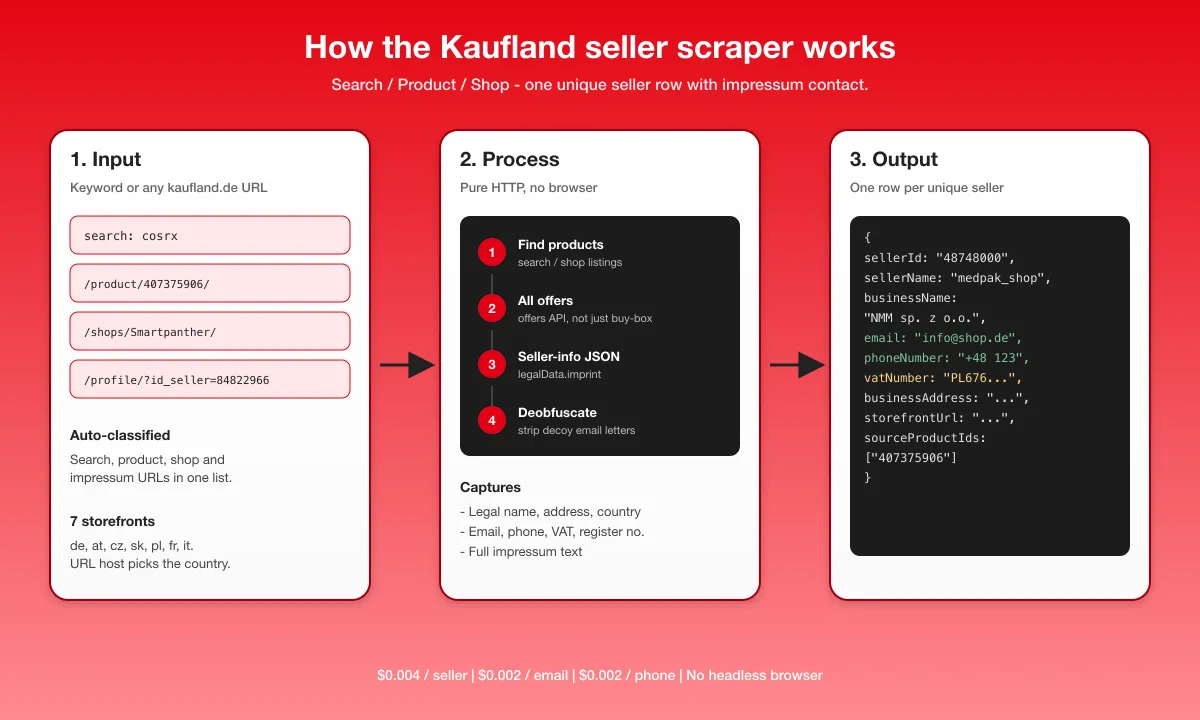
- Input — paste search queries and/or Kaufland.de URLs. Each URL is classified as search, product, shop or impressum.
- Find products — search and shop pages yield product ids; a product URL is used as-is.
- Read every offer —
GET /api/pdp-frontend/v1/{productId}/offersreturns all competing sellers in one JSON payload. - Parse the impressum —
GET /api/pdp-frontend/v1/{sellerId}/seller-infocarrieslegalData.imprint. Emails are deobfuscated. - Deduplicate — one row per unique seller. Optional website scan fills
contactEmailonly when the impressum had no email.
Input Configuration
| Field | Type | Required | Notes |
|---|---|---|---|
searchQueries | array<string> | no (or URLs) | Brand or keyword searches. Example: ["cosrx"]. Run on the country storefront. |
country | string | no | Storefront for the searches: de, at, cz, sk, pl, fr, it. Default de. Start URLs take their country from the host instead. |
startUrls | array<{ url }> | no (or queries) | Search, product, shop or impressum URLs on any supported Kaufland country host, mixed freely. |
maxItems | integer | no | Max sellers per search query / start URL. Two searches at 50 return up to 100 total. Prefill 50. Products to inspect are auto-derived; total spend is bounded by the run's max-charge limit. |
enrichEmails | boolean | no | Opt-in website scan for shops with no impressum email. Default false. |
qualifyByPayment | boolean | no | Requires enrichEmails. Flags sites that take payments online. Default false. |
concurrency | integer | no | Parallel fetches, 1–20. Default 8; clamped to the run's memory. |
Need at least one of searchQueries or startUrls.
Common scenarios
1. Brand keyword → seller leads
2. Every seller on one product
3. Mixed URLs + enrichment
Output Overview
Each dataset item is one unique Kaufland.de seller. Search, product and shop starts all emit this same row shape.
- Identity — seller id, shop name, storefront URL, impressum URL
- Legal — business name, address, country, VAT, trade-register number, full imprint text
- Contact — published email (deobfuscated) and phone when the impressum has them
- Provenance — source product ids and the URL that discovered the seller
- Optional enrichment —
contactEmail/contactWebsitewhenenrichEmailsis on and the impressum had no email
Sparse fields stay null when the seller did not publish them. That is a gap on Kaufland, not a dropped parse.
Output Samples
Product start (/product/407375906/)
Search start (cosrx)
Same seller shape. sourceUrl is the search page; sourceProductIds lists the product(s) that surfaced the shop.
Key Output Fields
Identity
sellerId,sellerName,marketplace(kaufland.de,.at,.cz,.sk,.pl,.fror.it)storefrontUrl,sellerUrl(impressum),isBusinessSeller
Legal / impressum
businessName,businessAddress,addressLines,addressCountryCodevatNumber,registrationNumber,imprint
Contact
email— published impressum email, deobfuscatedphoneNumber— published impressum phonecontactEmail/contactWebsite— filled by opt-in enrichment, or a copy ofemailwhen one was already on the page
Provenance
sourceProductIds,sourceUrl,scrapedAt
Pricing
Pay-per-event. A seller row is always billed. Email and phone are extra, and only when that field is actually present.
| Event | When | Price |
|---|---|---|
| Actor start | Once per GB of run memory | $0.005 |
| Seller scraped | Every unique seller row | $0.004 |
| Published email | Impressum contains an email | $0.002 |
| Published phone | Impressum contains a phone | $0.002 |
| Enriched email | Opt-in website scan found an email the impressum lacked | $0.002 |
A seller with email + phone costs $0.008. A seller with neither contact field costs $0.004. Published Kaufland emails are never billed as enrichment.
FAQ
Which Kaufland URLs are supported?
www.kaufland.{de,at,cz,sk,pl,fr,it} search (/s/?search_value=), product (/product/{id}/), shop (/shops/{name}/) and impressum (/profile/?id_seller=) URLs. Login pages are skipped.
Do I get product rows or seller rows?
Seller rows only. A product URL still emits one row per unique shop offering that product.
Will every seller have an email and a phone?
Most commercial shops publish both. Some impressums only have a name and address. VAT is also optional — a few EU sellers leave it off the page. Empty fields are not billed.
Does "view more sellers" need a browser?
No. The offers API returns the full competing-seller list.
What does a shop URL actually scrape?
The shop is resolved to its seller id. Listings on that shop can also surface competing offer merchants, the same way a product page does. Cap the run with maxItems if you only want the shop itself.
Are emails already on Kaufland charged as enrichment?
No. Impressum emails bill as seller-email. The contact-email event fires only when enrichment is on and the website scan finds an address the impressum lacked.
Other Kaufland countries?
Yes. country selects the storefront for search queries: de, at, cz, sk, pl, fr, it. A start URL ignores that field and uses its own host.
Can I mix search queries and URLs?
Yes. Each source is classified on its own.
Support
Found a bug or need a field added? Open an issue on the actor's Issues tab.
Additional Services
Need another marketplace in the same seller-row shape, a custom export, or a scheduled monitor on a brand? I do tailored work — open an issue or reach me via the memo23 store profile.
Explore More Scrapers
- Amazon Seller Contact Scraper — Emails, Phone, VAT & Ratings — the same one-row-per-seller pipeline across 18 Amazon marketplaces
- More e-commerce, directory and lead-generation actors on the memo23 store profile
🤖 For AI Agents & LLM Apps
Compact reference for AI agents calling this actor via the Apify MCP server or the Apify API (actor: memo23/kaufland-sellers-scraper).
Purpose: Turns a Kaufland keyword, product page, shop URL or impressum URL into one row per unique third-party seller with the published impressum (legal name, address, VAT, phone, email) on de, at, cz, sk, pl, fr and it.
Minimal input:
URL mode: { "startUrls": [{ "url": "https://www.kaufland.de/product/407375906/" }], "maxItems": 25 } — accepts search (/s/?search_value=), product (/product/{id}/), shop (/shops/{name}/) and impressum (/profile/?id_seller=) URLs.
Output: one row per unique seller — sellerId, marketplace, sellerUrl, sellerName, storefrontUrl, isBusinessSeller, businessName, registrationNumber, vatNumber, phoneNumber, email, businessAddress, addressLines, addressCountryCode, imprint, sourceProductIds, sourceUrl, scrapedAt, plus contactEmail / contactWebsite when enrichEmails is on.
Behaviors an agent should know:
maxItemsis per search / URL; the run total ismaxItems × number of sources, so raise it for deeper pulls or lower it to cap spend.startUrlsrun in addition tosearchQueries. Host must be a Kaufland storefront (de,at,cz,sk,pl,fr,it). Search queries usecountry(defaultde).- Output is seller-shaped, not product-shaped. Duplicate shops collapse to one row.
enrichEmails: trueis opt-in and only fills sellers with no impressum email.- Billing: $0.004 per seller row, $0.002 per published email, $0.002 per published phone; enrichment $0.002 only when a missing email is found off-site.
- Supported hosts: kaufland.de, .at, .cz, .sk, .pl, .fr, .it. Anything else is skipped.
⚠️ Disclaimer
This Actor is an independent tool and is not affiliated with, endorsed by, or sponsored by Kaufland Dienstleistung GmbH & Co. KG, Kaufland Stiftung & Co. KG, Schwarz Gruppe, or any of their subsidiaries. All trademarks mentioned are the property of their respective owners.
The scraper accesses only publicly available Kaufland storefront pages and public product/seller JSON — no authenticated endpoints, seller-cockpit data, or content behind a login wall. Users are responsible for ensuring their use complies with Kaufland's Terms of Service, applicable data-protection law (GDPR, ePrivacy, CCPA), and any marketing / anti-spam rules that apply to how they contact the businesses they find. You are responsible for how you use the scraped data.
SEO Keywords
kaufland scraper, kaufland.de scraper, kaufland seller scraper, kaufland seller email, kaufland impressum scraper, kaufland marketplace sellers, kaufland contact scraper, kaufland VAT number, kaufland händler kontaktdaten, kaufland seller phone, kaufland lead generation, kaufland supplier scraper, kaufland third-party sellers, marketplace seller contact scraper, german marketplace leads, B2B seller email scraper, ecommerce seller intelligence, kaufland JSON export, kaufland CSV export


![Collecting Cars [$3💰] | 33k SOLD prices + live bids avatar](https://images.apifyusercontent.com/Hbn_LDWbVTHAyPL8k_edq8GAZOEin7g5i4_bFf2WimM/rs:fill:76:76/cb:1/aHR0cHM6Ly9hcGlmeS1pbWFnZS11cGxvYWRzLXByb2QuczMudXMtZWFzdC0xLmFtYXpvbmF3cy5jb20vbmduOHZSRVNUa3NleVdFNnAtYWN0b3ItRm1EYVRESkEyWGNYU0s4N24tVkJhU3V5RENuYi1Db2xsZWN0aW5nX0NhcnMud2VicA.webp)
![ForRentUniversity.com [$1.25💰] Scraper · Emails avatar](https://images.apifyusercontent.com/knob38rf08RjbTFOtyPTLKbUpJqNv69gLvD9GZvNHdY/rs:fill:76:76/cb:1/aHR0cHM6Ly9hcGlmeS1pbWFnZS11cGxvYWRzLXByb2QuczMudXMtZWFzdC0xLmFtYXpvbmF3cy5jb20vbmduOHZSRVNUa3NleVdFNnAtYWN0b3Itb2ZkQkJZZ0QzMndpZHZSemotT25mdk55NHJTQS1mcnUuanBlZw.webp)


![Autotrader.com.au [$1💰] Australia Search & Details Scraper🇦🇺 avatar](https://images.apifyusercontent.com/pCkelbtHnioCVauMT6DM9tGYD81m-FmuhD-rXFDHMC4/rs:fill:76:76/cb:1/aHR0cHM6Ly9hcGlmeS1pbWFnZS11cGxvYWRzLXByb2QuczMudXMtZWFzdC0xLmFtYXpvbmF3cy5jb20vbmduOHZSRVNUa3NleVdFNnAtYWN0b3ItYWFINGlJOWIwc2dNNkNWeVMtanhmc2ZZeEVBWi1hdXRvdHJhZGVyLWF1cy5wbmc.webp)

![Trendyol [$0.5💰] Products · Prices · Reviews · Seller Emails avatar](https://images.apifyusercontent.com/cRzCnHdsziHFdoI-fVpwR1Ng5yzS2TbwwhLB-IzSzpo/rs:fill:76:76/cb:1/aHR0cHM6Ly9hcGlmeS1pbWFnZS11cGxvYWRzLXByb2QuczMudXMtZWFzdC0xLmFtYXpvbmF3cy5jb20vbmduOHZSRVNUa3NleVdFNnAtYWN0b3ItRlFnTll6UDE0bGt2N3FDZUctYU1Cc0gxdU55RS10cmVuZHlvbC1jb20tbG9nby1zcXVhcmUtdHJhbnNwYXJlbnQtcG5nLTUucG5n.webp)
