
Kmart Australia Scraper: Prices, Variants and Reviews
Pricing
from $1.50 / 1,000 products
Kmart Australia Scraper: Prices, Variants and Reviews
Scrape Kmart Australia by keyword, category, brand or product link. Current and was price, savings, seller, colours, sizes, barcodes, images, the original description, features, specifications and customer reviews.
Pricing
from $1.50 / 1,000 products
Rating
0.0
(0)
Developer

Muhamed Didovic
Maintained by CommunityActor stats
0
Bookmarked
2
Total users
1
Monthly active users
a day ago
Last modified
Categories
Features
Share
Kmart Australia Scraper: Prices, Variants, Descriptions and Reviews
Pull kmart.com.au product data from a search, a category or brand page, or a product link. Each product comes back as one row: current price and was price, saving, seller, colour, size, barcode, images, the original description split into features and specifications, and every colour and size variant. Customer reviews are optional rows of their own.
A category link stays on that category. Women's shoes return women's shoes, and a department such as /category/women/ returns that department.
Why Use This Scraper?
- Search, category, brand or one product. Paste a keyword, a kmart.com.au link, or the product id from the end of a product link.
- Prices you can compare. Current price, was price when the product is reduced, the dollar and percent saving, and a clearance flag.
- The copy from the product page. The original description, plus features, specifications, care and safety notes when Kmart lists them.
- Every variant on the same row. Colour, size, price, barcode and the states where that size is out of stock.
- Sellers you can limit. Kmart, Target and Officeworks by default. Marketplace products stay out unless you ask for them.
- Reviews when you want them. One row per review, tied back to the product. Off by default so a price check stays a price check.
Overview
Retail, marketplace and analytics teams use this to watch Kmart Australia prices, build a product catalog, or read what shoppers wrote. One run can mix searches and links. Products and reviews share one dataset and are split in the output views.
The actor reads public kmart.com.au product data. It does not sign in, and it does not read account, order or wishlist pages. It covers kmart.com.au only, not Kmart New Zealand and not the US Kmart site.
Supported Inputs
| Input | What it accepts |
|---|---|
| Search terms | towel, lego, womens shoes. A full kmart.com.au link in this box is read as that link. |
| Kmart links | Product, category, brand and search URLs. Filters already in the link (f.Shops=Kmart) are kept. |
| Product ids | 42442370 or a style id such as s176940. |
| Specials collection | Clearance, Catalogue, or Online exclusives. |
Example links:
- Search:
https://www.kmart.com.au/search/?searchTerm=towel - Category:
https://www.kmart.com.au/category/women/womens-shoes/ - Department:
https://www.kmart.com.au/category/women/orhttps://www.kmart.com.au/womens/ - Nested category:
https://www.kmart.com.au/category/home-and-living/home-office-and-stationery/?f.Shops=Kmart - Product:
https://www.kmart.com.au/product/madison-bath-towel-ocean-42442370/ - Style product:
https://www.kmart.com.au/product/womens-adidas-samba-sneakers-s176940/
Not supported: kmart.co.nz, a shopping-basket check, store-by-store stock, Click & Collect counts, and "only what changed since yesterday".
Use Cases
| Who | What they do with it |
|---|---|
| Retail and marketplace sellers | Watch Kmart, Target and Officeworks prices on the same site, and skip third-party marketplace listings. |
| Catalog teams | Build a product file with description, specs, barcodes and every colour and size. |
| Pricing analysts | Track was price, percent off and clearance. |
| Brand and research teams | Read review text, star rating and whether the buyer was verified. |
| Agencies | Deliver a client a category extract from a link they already have open. |
How It Works
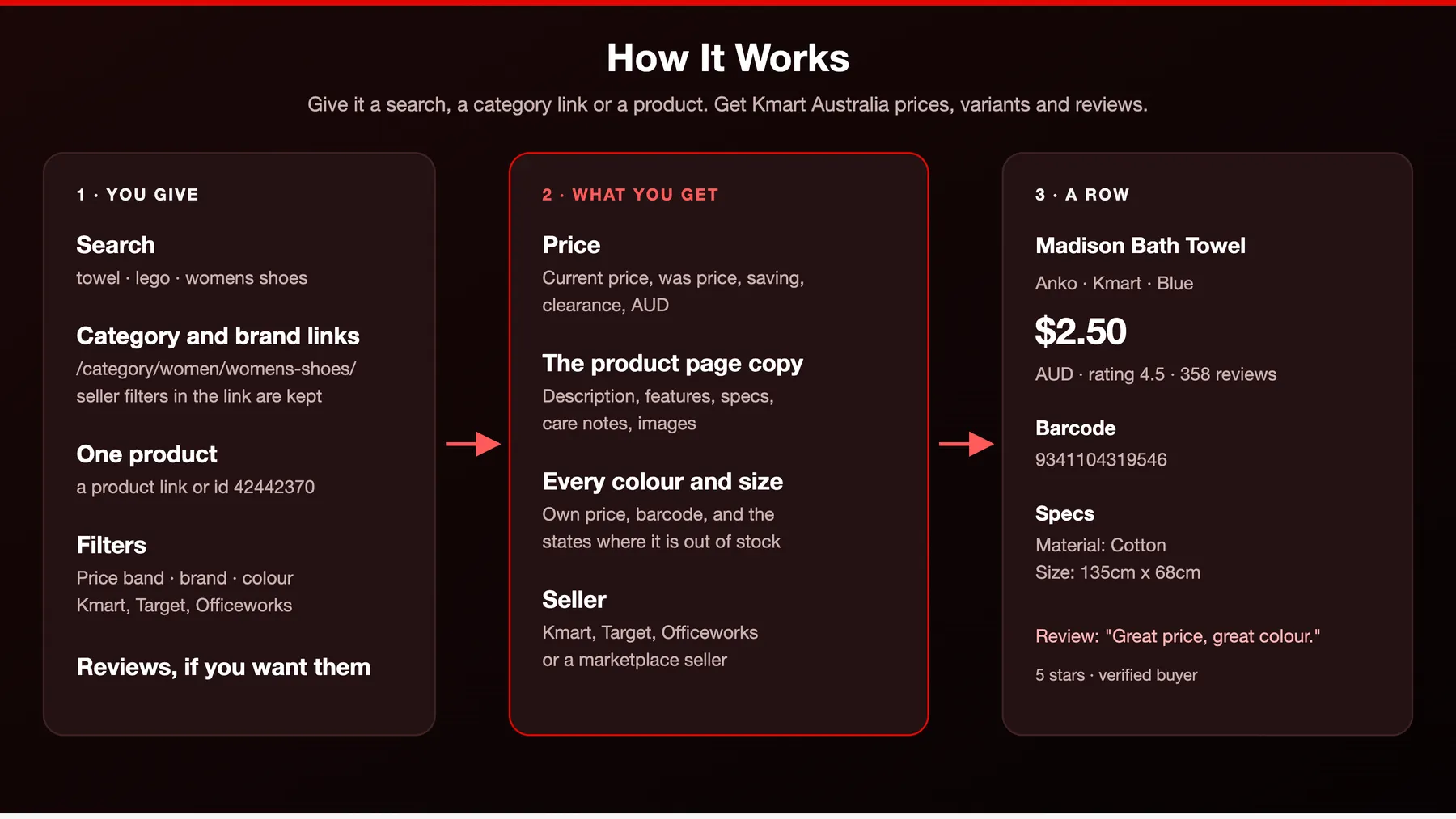
- Add one or more searches, category links, brand links or product ids.
- Set the order, a price band, a brand or colour, and which sellers to keep. Marketplace products are left out unless you opt in.
- Set Product cap. Use 0 only when you mean a full category. A page holds 100 products, and a large category can list up to about 10,000.
- Turn on Add customer reviews and set Review cap per product when you want review text. Leave it off for a price and catalog run.
- Run the actor and download the dataset as JSON, CSV or Excel. Products and reviews are separate views.
Input Configuration
| Field | Type | Default | What it does |
|---|---|---|---|
| Search words | list | bath towel | One search per line. A kmart.com.au link in this list is read as that link. |
| Kmart links | list | empty | Product, category, brand or search URLs. A sort or seller filter in the URL is kept. |
| Product ids | list | empty | The id at the end of a product link. Each returns that product. |
| Product cap | integer | 20 | Total products across the whole run. 0 means no cap, up to what that search or category lists. |
| Shops to keep | list | empty | Kmart, Target, Officeworks, Marketplace. When set, this replaces Include marketplace sellers. |
| Brand name | text | empty | Exact brand name as Kmart shows it, such as Anko. |
| Lowest price (AUD) | integer | empty | Keep products at or above this price. |
| Colour name | text | empty | Exact colour as Kmart shows it, such as Blue. |
| Result order | select | Best match | Best match, Newest, Price low to high, Price high to low, Most popular. |
| Category facet | text | empty | A category name, such as Bath Towel. For a whole category page, paste the link instead. |
| Highest price (AUD) | integer | empty | Keep products at or below this price. |
| Page cap per input | integer | 0 | Extra cap on pages for each search or category. 0 means no extra cap. |
| Include marketplace sellers | boolean | false | Also keep third-party marketplace products. |
| Review cap per product | integer | 20 | Cap when reviews are on. 0 turns reviews off. Maximum 1000. |
| Add customer reviews | boolean | false | Add one dataset row per review. |
| Specials aisle | select | Skip | Clearance, Catalogue, or Online exclusives. |
A category, with marketplace left out
Reduced towels between $5 and $15, newest first
One product and a single review
Output Overview
A product is one row with type set to product. Variants sit on that row. A review is a second row with type set to review, joined by productId.
wasPrice, savingsAmount and savingsPercent are filled only when the list price is higher than the selling price. promoLabel is Clearance or Special when that applies, otherwise null. inStockNationally is Kmart's own national-stock flag. A variant lists the states where that size is out of stock in outOfStockStates.
RUN_SUMMARY in the key-value store records each input, how many products it returned, and whether a lookup failed.
Output Samples
A product row (search towel, description shortened, one of two images kept):
A review row (same product, text shortened):
A style with many sizes, such as women's sneakers, is still one product row. variations holds each size, and parentId keeps the style id (P_S176940).
Key Output Fields
Price. price, currentPrice, wasPrice, savingsAmount, savingsPercent, isOnSpecial, promoLabel, currency, clearance.
Product. id, parentId, name, title, brand, url, images, apn, colour, size, freeShipping.
Seller and stock. seller, sellers, isMarketplace, inStockNationally, outOfStockStates.
Copy. description (original HTML), descriptionText, features, specifications, careInstructions, safetyWarnings.
Variants. variations[] with id, colour, secondaryColour, size, price, wasPrice, apn, seller, inStock, outOfStockStates, image, url.
Rating. averageRating, reviewCount on the product. Review rows add rating, title, text, author, createdAt, verifiedBuyer, upVotes, downVotes, incentivized, images.
FAQ
Does a category URL get searched as words?
No. https://www.kmart.com.au/category/women/womens-shoes/ returns that shoe category. https://www.kmart.com.au/category/women/ returns the women's department, the same range as /womens/.
Why are marketplace products missing?
They are excluded unless you turn on Include marketplace sellers or list Marketplace under Shops to keep. The default is Kmart, Target and Officeworks, which is the range Kmart shows as its own shops.
Where is the description?
On the product row, in description (as published) and descriptionText. Features, specifications, care and safety are filled when the product page has those headings. A short description with no headings stays in descriptionText only.
Can I get only products that dropped in price since yesterday? Not in this actor. Every run returns the products that match the search or link right now. Compare two datasets yourself if you need a change list.
Do you have stock in a particular store? No. You get the national stock flag and, on each variant, the states Kmart marks out of stock. There is no per-store quantity and no Click & Collect count.
What does a review cost if I leave the switch off? Nothing. Reviews are not read, and no review row is saved.
Support
Found a bug or a missing field? Open an issue on the actor's Issues tab and include the run link and the input.
Additional Services
Need a scheduled price file, a join against your own catalog, or fields this actor does not return? Send a note through the Issues tab with the output you want and how often you need it.
Explore More Scrapers
- Woolworths Australia Scraper: Woolworths prices, specials and a Coles comparison.
- Coles Australia Scraper: Coles prices, half-price specials and stock.
- Target Scraper: target.com prices, UPC, variants, store stock and reviews. This is the US site, not Target Australia. Target Australia products on kmart.com.au are included here when the seller is Target.
🤖 For AI Agents & LLM Apps
Compact reference for agents calling this actor through the Apify MCP server or the Apify API (actor: memo23/kmart-australia-scraper).
Purpose: kmart.com.au products with price, was price, seller, variants, description and optional reviews. Category links stay on that category.
Minimal input:
Output: one row per product (type product) with id, parentId, name, title, brand, price, currentPrice, wasPrice, savingsAmount, savingsPercent, isOnSpecial, promoLabel, currency, averageRating, reviewCount, colour, size, seller, sellers, isMarketplace, inStockNationally, outOfStockStates, apn, url, images, variations[{id, colour, size, price, apn, inStock, outOfStockStates}], description, descriptionText, features, specifications, careInstructions. One row per review (type review) when fetchReviews is true: productId, rating, title, text, author, createdAt, verifiedBuyer.
Behaviors an agent should know:
- Always set
maxItems. A category can list up to about 10,000 products. urlsandproductIdscan be combined withsearchTerms.modeis not required.- Marketplace listings are excluded unless
includeMarketplaceis true orsellersincludesMarketplace. fetchReviewsdefaults to false. Each review is its own billed row, up tomaxReviewsper product.- Billing: $0.005 actor start per GB of memory (512 MB by default), $0.0015 per product row, $0.0001 per review row. Apify bills the run's memory and time on top. A run at its spending limit stops after the last row it can pay for.
⚠️ Disclaimer
This Actor is an independent tool and is not affiliated with, endorsed by, or sponsored by Kmart Australia Limited, Wesfarmers Limited, or any of their subsidiaries. Kmart, Target, Officeworks and Anko are trademarks of their respective owners. All trademarks mentioned are the property of their respective owners.
The scraper reads only publicly available kmart.com.au product and review data. It does not log in and it does not read account pages, orders or any other content behind a login. Users are responsible for making sure their use complies with Kmart's terms of use, applicable data-protection law (GDPR, CCPA and others), and any contractual obligations of their own organization.
SEO Keywords
kmart australia scraper, kmart.com.au scraper, scrape kmart australia, kmart product scraper, kmart price tracker, kmart API, kmart reviews scraper, kmart clearance, kmart catalogue, Anko products, Target Australia products, Officeworks products, kmart barcode, APN lookup, Australian retail prices, ecommerce price monitoring, product variant data, product specifications, retail catalog data, marketplace price comparison, kmart category scraper, AUD price data


