
![Naver Blog Scraper — Search + Post Content + Cafe [$1.5💰] avatar](https://images.apifyusercontent.com/NsrdlR8wqoEzqfib_rVivd6gbjiEEU6y4hoW1XSIDGM/rs:fill:250:250/cb:1/aHR0cHM6Ly9hcGlmeS1pbWFnZS11cGxvYWRzLXByb2QuczMudXMtZWFzdC0xLmFtYXpvbmF3cy5jb20vbmduOHZSRVNUa3NleVdFNnAtYWN0b3ItZDBzeXF4UDQ2WXAyUU83aUctWHhvVGg3RUl4dS1uYXZlci5qcGVn.webp)
Naver Blog Scraper — Search + Post Content + Cafe [$1.5💰]
Pricing
from $1.50 / 1,000 naver rows
Naver Blog Scraper — Search + Post Content + Cafe [$1.5💰]
Naver Blog scraper — paste a keyword for blog search, a blog.naver.com post URL for full Korean post content, or a cafe ID for public cafe articles. Flat JSON rows, optional post-body enrichment, date filters. Pure HTTP, no login. $1.50/1k rows
Pricing
from $1.50 / 1,000 naver rows
Rating
0.0
(0)
Developer

Muhamed Didovic
Maintained by CommunityActor stats
0
Bookmarked
25
Total users
4
Monthly active users
3 days ago
Last modified
Categories
Share
Naver Blog Scraper — Blog Search + Post Content + Cafe Articles
Turn Naver Blog and public Naver Cafes into structured data.
Paste a keyword to search Naver's blog index, a blog.naver.com post URL to pull the full Korean post body, or a cafe ID to list a public cafe's articles — every query line is auto-classified, and every row is flat, UTF-8-clean JSON.
Why Use This Scraper?
- ✅ Three sources in one actor — blog keyword search, full post content, public cafe articles
- ✅ Paste keywords, post URLs, or cafe IDs together — each line auto-routed
- ✅ Optional post-body enrichment — attach full text, images, and tags to every search hit
- ✅ Korean-safe UTF-8 output end to end — no mojibake in titles, bodies, or nicknames
- ✅ Date-range filters and relevance / recency sorting for search
- ✅ No login or API key needed — fast runs, and proxies are optional
Overview
The Naver Blog Scraper is built for marketing and influencer agencies, brand-monitoring teams, SEO specialists, and researchers who need structured data out of Korea's dominant blogging and community platform.
The output is a stream of flat rows carrying a type discriminator: a keyword yields searchResult rows, a post URL yields one post row with the full body, and a cafe ID yields cafeArticle rows. Every row echoes the originating query, so mixed runs stay trivial to split downstream. Turn on includePostContent and each search result is upgraded in place with the post's body text, images, and tags.
Supported Inputs
Query types (auto-detected per line)
| Query type | Pattern | Example | Rows produced |
|---|---|---|---|
| Blog keyword search | free text (any language) | 맛집 or seoul cafe | one searchResult row per matching post |
| Full post content | blog.naver.com / m.blog.naver.com URL | https://blog.naver.com/someblog/223340163450 | one post row with the full body |
| Public cafe articles | cafeId:{clubId} or cafe URL | cafeId:10322296 or https://cafe.naver.com/joonggonara | one cafeArticle row per article |
Copy-pasteable input
Unsupported inputs
- ❌ Members-only / private cafe boards (only public cafe articles are returned)
- ❌ Naver Shopping, Maps, or Place data — those are separate, heavily protected surfaces
- ❌ Content behind a Naver login, and posts the author has set to private
Use Cases
| Audience | Use case |
|---|---|
| Influencer / blog-marketing agencies | Find relevant bloggers, verify sponsored posts went live, measure reach, track competitor campaigns |
| Brand & reputation teams | Monitor what Korean bloggers say about a brand; catch negative reviews early |
| SEO / content teams | Reverse-engineer what ranks in Naver search; keyword and content-gap research |
| Market researchers | Aggregate blog mentions of a product or topic for trend and sentiment analysis |
| Community analysts | Track discussion volume and topics across public Naver Cafes |
How It Works
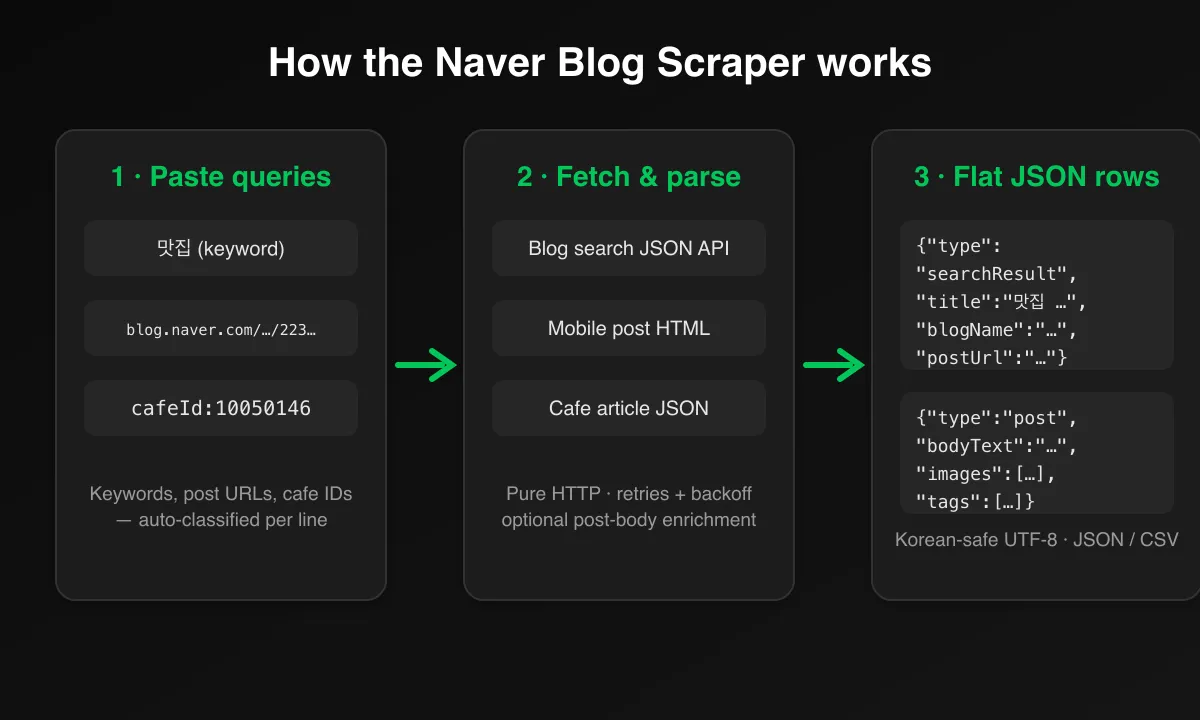
- Input — add any mix of keywords, post URLs, and cafe IDs, one per line
- Classify — each line is auto-routed: free text → blog search JSON API, post URL → mobile post page, cafe ID → cafe article API
- Fetch — the actor calls Naver's open endpoints over plain HTTP with polite concurrency, retries, and back-off
- Enrich (optional) — with
includePostContent, each search result also fetches its mobile post page for body text, images, and tags - Output — flat, typed, UTF-8 JSON rows land in the dataset, exportable as JSON, CSV, Excel, or XML
Input Configuration
Input fields
| Field | Type | Required | Notes |
|---|---|---|---|
queries | array<string> | yes | One query per line; each auto-classified (see Supported Inputs) |
includePostContent | boolean | optional | Enrich each search result with full body text, images, tags. Roughly doubles requests. Default false |
orderBy | string enum | optional | Search sort: sim (relevance) or recentdate (newest). Default sim |
from | string (date) | optional | Search mode only: results published on/after YYYY-MM-DD |
to | string (date) | optional | Search mode only: results published on/before YYYY-MM-DD; empty = up to now |
maxItems | integer | optional | Global cap on rows across all queries. Default 100 |
maxConcurrency | integer | optional | Parallel requests, default 3, hard cap 10 — Naver scores IP reputation, keep it low |
proxy | object | optional | Off by default. Enable Apify residential proxies if you hit blocks or CAPTCHA responses |
Common scenarios
1. Blog search, newest first, enriched with full post bodies
2. Date-sliced harvest (get past Naver's ~1,000-result cap)
3. Public cafe article list
Output Overview
Every row is flat and carries type, query, and scrapedAt, plus:
- searchResult rows — post URL, title, snippet, blogId, logNo, author nickname, blog name, publish date, thumbnail URLs, and
totalCountfor the query. WithincludePostContent, alsobodyText,bodyImageUrls, andtags. - post rows — post URL, blogId, logNo, title, author, publish date, full
bodyText,bodyImageUrls, andtags. - cafeArticle rows — cafe ID and name, article ID and URL, subject, board (menu) name, writer nickname, read/comment/like counts, write date, and whether the article has images.
Output Samples
Keyword query → searchResult row (trimmed)
Post URL query → post row (trimmed)
Cafe query → cafeArticle row
Key Output Fields
Common
type,query,scrapedAt
Blog search result
postUrl,title,snippet,blogId,logNo,gdidauthorName,blogName,blogUrl,postDate,thumbnailUrls,totalCount
Blog post
title,authorName,publishedAt,bodyTextbodyImageUrls,tags,mobilePostUrl
Cafe article
cafeId,cafeName,articleId,articleUrl,subject,menuNamewriterNickname,maskedMemberId,readCount,commentCount,likeCount,writeDate,hasImage
FAQ
Do I need a proxy?
Usually not — Naver's blog search API and mobile post pages are open and work without a proxy from most IPs. But Naver does score IP reputation, so if you run at high volume and start seeing blocks or CAPTCHA responses, enable Apify residential proxies in the proxy input.
How does the actor decide which mode to run?
By the shape of each query line: a blog.naver.com/m.blog.naver.com URL fetches full post content, cafeId: or a cafe.naver.com URL lists cafe articles, and anything else is a blog keyword search. Mix all three in one run.
Why do I only get about 1,000 results for a popular keyword?
Naver caps every blog search query at roughly 1,000 reachable results. To harvest more, sort by recentdate and split the run into from/to date ranges — each slice returns its own up-to-1,000 window.
What does includePostContent cost me?
It fetches each search result's mobile post page for the full body, which roughly doubles the number of requests per run. Keep maxItems modest when it's on, and expect longer runtimes.
Can I scrape private or members-only content?
No. The actor reads only public blog posts and public cafe articles. Members-only cafe boards, private posts, and anything behind a Naver login are out of scope.
Does it handle Korean text correctly?
Yes — the entire pipeline is UTF-8, so Korean titles, post bodies, tags, and cafe nicknames come through intact with no mojibake.
Does this scrape Naver Shopping, Maps, or Place reviews?
No. Those surfaces use different, heavily protected endpoints and are not covered by this actor.
Support
- For issues or feature requests, please use the Issues tab on the actor's Apify Console page.
- Author's website: https://muhamed-didovic.github.io/
- Email: muhamed.didovic@gmail.com
Additional Services
- Need Naver Place / Maps / Shopping coverage, comment threads, or scheduled monitoring? Those are bigger builds — drop a line and I'll scope them.
- Custom output shapes, private builds, or direct API access (no Apify fee, just a usage fee): muhamed.didovic@gmail.com
Explore More Scrapers
If you found this useful, you might also like:
- Internet Archive Scraper — Wayback snapshots, library search, and item metadata
- Trustpilot Scraper — company reviews at scale
- VRBO Scraper — vacation rentals with calendar, rates, and full reviews
Full list at apify.com/memo23.
🤖 For AI Agents & LLM Apps
Compact reference for AI agents calling this actor via the Apify MCP server or the Apify API (actor: memo23/naver-blog-scraper).
Purpose: Scrape Naver Blog and public Naver Cafes — each query line is auto-classified into a blog keyword search, a full post-content fetch, or a public cafe article list, emitting flat UTF-8 rows.
Minimal input:
queries also accepts post URLs (https://blog.naver.com/{blogId}/{logNo}) and cafe IDs (cafeId:10322296 or a cafe.naver.com URL). Optional from / to (YYYY-MM-DD) filter search-mode results by publish date.
Output: every row carries type, query, scrapedAt. searchResult rows add postUrl, title, snippet, blogId, logNo, gdid, authorName, blogName, blogUrl, postDate, thumbnailUrls, totalCount. post rows add title, authorName, publishedAt, bodyText, bodyImageUrls, tags, mobilePostUrl. cafeArticle rows add cafeId, cafeName, articleId, articleUrl, subject, menuName, writerNickname, maskedMemberId, readCount, commentCount, likeCount, writeDate, hasImage.
Behaviors an agent should know:
queriesmixes all three types in one run; each line is routed by its shape.- Always set
maxItems(default 100). Naver caps each blog search at ~1,000 reachable results — sortrecentdateand slicefrom/todate ranges to harvest more. includePostContentenriches search results with body/images/tags but roughly doubles request count.- Keep
maxConcurrencylow (hard cap 10) — Naver scores IP reputation. Proxy is off by default; enable Apify residential on blocks/CAPTCHAs. - Pay-per-event billing — see the Pricing tab on the actor page.
⚠️ Disclaimer
This Actor is an independent tool and is not affiliated with, endorsed by, or sponsored by NAVER Corporation or any of its subsidiaries. All trademarks mentioned are the property of their respective owners.
The scraper accesses only publicly available data on blog.naver.com and public Naver Cafe boards — no authenticated endpoints, no members-only boards, and no content behind the Naver login. Users are responsible for ensuring their use complies with NAVER's Terms of Service, applicable data-protection law (South Korea's PIPA, GDPR, CCPA, etc.), and any contractual obligations of their own organization. Please keep concurrency low to respect Naver's infrastructure.
SEO Keywords
naver blog scraper, scrape naver blog, naver blog API, blog.naver.com scraper, naver cafe scraper, naver blog search, korean blog scraper, naver blog crawler, naver post content extraction, naver blog data, korea influencer marketing data, naver blog monitoring, korean social media scraper, naver SEO research, blog review scraper, korean market research data, naver cafe articles, Apify naver, naver blog CSV export, korea brand monitoring
![ForRentUniversity.com [$1.25💰] Scraper · Emails avatar](https://images.apifyusercontent.com/knob38rf08RjbTFOtyPTLKbUpJqNv69gLvD9GZvNHdY/rs:fill:76:76/cb:1/aHR0cHM6Ly9hcGlmeS1pbWFnZS11cGxvYWRzLXByb2QuczMudXMtZWFzdC0xLmFtYXpvbmF3cy5jb20vbmduOHZSRVNUa3NleVdFNnAtYWN0b3Itb2ZkQkJZZ0QzMndpZHZSemotT25mdk55NHJTQS1mcnUuanBlZw.webp)

![Collecting Cars [$3💰] | 33k SOLD prices + live bids avatar](https://images.apifyusercontent.com/Hbn_LDWbVTHAyPL8k_edq8GAZOEin7g5i4_bFf2WimM/rs:fill:76:76/cb:1/aHR0cHM6Ly9hcGlmeS1pbWFnZS11cGxvYWRzLXByb2QuczMudXMtZWFzdC0xLmFtYXpvbmF3cy5jb20vbmduOHZSRVNUa3NleVdFNnAtYWN0b3ItRm1EYVRESkEyWGNYU0s4N24tVkJhU3V5RENuYi1Db2xsZWN0aW5nX0NhcnMud2VicA.webp)


