
![Internet Archive Scraper — Wayback + Search + Metadata [$1.5💰] avatar](https://images.apifyusercontent.com/1nCDN_RV_vwH2nWjHK28vLHFBQ7m8ghUKlUAr1iSQcI/rs:fill:250:250/cb:1/aHR0cHM6Ly9hcGlmeS1pbWFnZS11cGxvYWRzLXByb2QuczMudXMtZWFzdC0xLmFtYXpvbmF3cy5jb20vbmduOHZSRVNUa3NleVdFNnAtYWN0b3ItOUo5UmNFdGhDcEtYM3hEeDMtNUVQN1dMeVZUai1pbnRlcm5ldF9hcmNodmllLnBuZw.webp)
Internet Archive Scraper — Wayback + Search + Metadata [$1.5💰]
Pricing
from $1.50 / 1,000 archive rows
Internet Archive Scraper — Wayback + Search + Metadata [$1.5💰]
Internet Archive all-in-one scraper — paste a URL or domain for Wayback snapshot history, a keyword for library search, or an item ID for full metadata + file lists. Date filters, availability checks, flat JSON rows. Pure HTTP via open APIs, no browser, no proxies. $1.50/1k rows.
Pricing
from $1.50 / 1,000 archive rows
Rating
0.0
(0)
Developer

Muhamed Didovic
Maintained by CommunityActor stats
0
Bookmarked
29
Total users
1
Monthly active users
2 days ago
Last modified
Share
Internet Archive Scraper — Wayback Machine + Library Search + Item Metadata

The fastest way to turn archive.org into structured data. Paste a URL or domain for its full Wayback Machine snapshot history, a keyword to search the Internet Archive library (books, movies, software, music), or an item ID for complete metadata + file lists — every query is auto-classified, no mode switches, no configuration.
Why Use This Scraper?
- ✅ Four data sources in one actor — Wayback snapshots, library search, item metadata, closest-snapshot lookups
- ✅ Paste anything: URLs, bare domains, keywords, item IDs — each line auto-routed to the right API
- ✅ Date-range filters for both snapshot history and library search
- ✅ Flat JSON rows ready for CSV / spreadsheet export — no nested-array digging
- ✅ No proxies needed and none charged — archive.org's APIs are open, so runs are fast and cheap
- ✅ Duplicate-snapshot collapsing for clean domain-history timelines
Overview
The Internet Archive Scraper is built for SEO specialists, researchers, digital archivists, and developers who need structured data from archive.org without stitching together four different APIs.
The output is a stream of flat rows, and the row shape follows the query type: a domain query yields snapshot rows, a keyword yields search-result rows, an item ID yields one item row, and a snapshotOf: lookup yields one availability row. All rows carry a type discriminator and echo the originating query, so mixed runs stay easy to split downstream.
Supported Inputs
Query types (auto-detected per line)
| Query type | Pattern | Example | Rows produced |
|---|---|---|---|
| Domain history | bare domain | example.com | one row per Wayback snapshot of the whole host |
| URL history | full URL | https://example.com/page | one row per snapshot of that exact URL |
| Path prefix | trailing /* | example.com/blog/* | snapshots of everything under the path |
| Wayback URL | web.archive.org/web/... | https://web.archive.org/web/2020/https://example.com | snapshot history of the embedded URL |
| Library search | free text | nasa apollo mission | one row per matching archive.org item |
| Item metadata | item URL or item: prefix | https://archive.org/details/InformationM or item:InformationM | one metadata row with the full file list |
| Closest snapshot | snapshotOf:URL[@YYYYMMDD] | snapshotOf:example.com@20200601 | one availability row with the nearest archived copy |
Copy-pasteable input
Unsupported inputs
- ❌ Content that was excluded from the Wayback Machine by the site owner (robots-excluded domains return no snapshots)
- ❌ Borrow-only / lending-library book content (metadata is returned, but not restricted file downloads)
- ❌ Full-text passages from inside books or videos — rows describe items and files, not their inner content
Use Cases
| Audience | Use case |
|---|---|
| SEO teams | Audit a domain's history before buying it; recover content from expired domains; track competitor site changes over the years |
| Researchers | Bulk-export library holdings on a topic — books, films, recordings — with dates, collections, and download counts |
| Legal / compliance teams | Document what a page said on a specific date with a citable snapshot URL |
| Digital archivists | Inventory item collections with full metadata and file-level detail (formats, sizes, checksums) |
| Developers | Feed snapshot timelines or library metadata into apps without writing four API clients |
How It Works
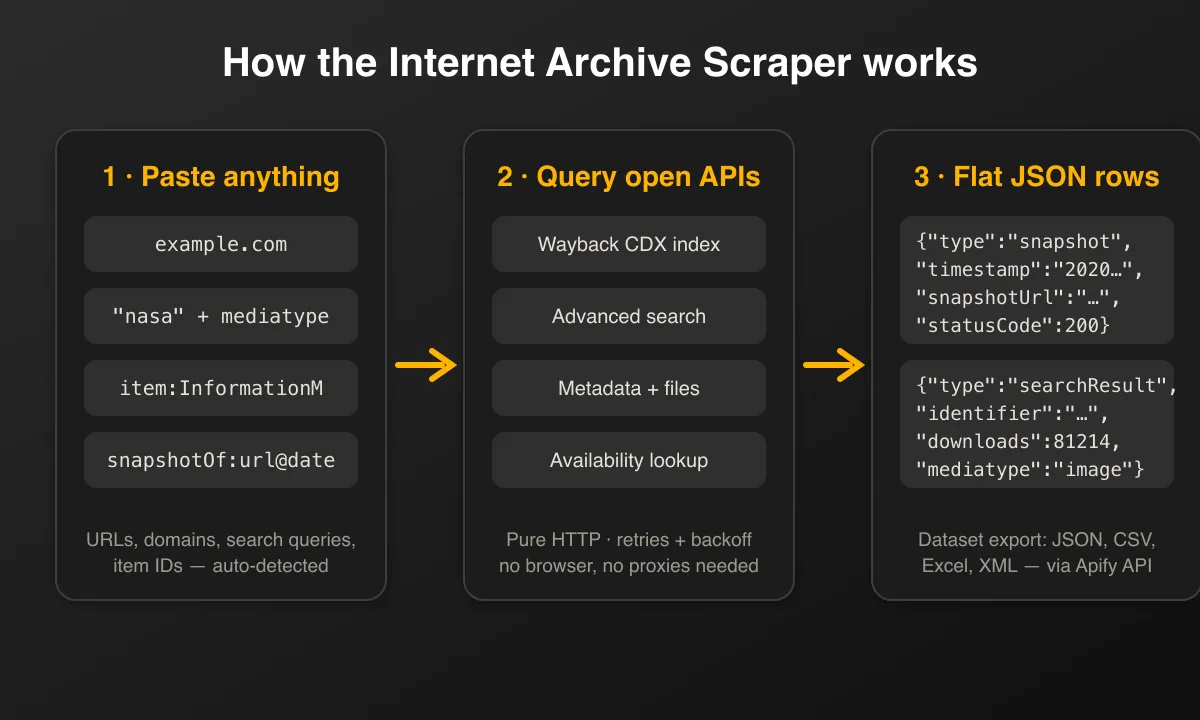
- Input — add any mix of URLs, domains, keywords, item IDs, or
snapshotOf:lookups, one per line - Classify — each line is auto-routed: URL/domain → Wayback CDX index, free text → library search, item ID → metadata API,
snapshotOf:→ availability API - Fetch — the actor calls archive.org's open APIs over plain HTTP with polite concurrency, retries, and back-off
- Filter — date ranges, mediatype, sort order, and duplicate-collapsing are applied server-side where the API supports it
- Output — flat, typed JSON rows land in the dataset, exportable as JSON, CSV, Excel, or XML
Input Configuration
Input fields
| Field | Type | Required | Notes |
|---|---|---|---|
queries | array<string> | yes | One query per line; each auto-classified (see Supported Inputs) |
from | string (date) | optional | Range start; snapshot timestamps in CDX mode, publicdate in search mode. Defaults to 1996-01-01 |
to | string (date) | optional | Range end; empty = up to now. Also the target date for snapshotOf: without @date |
mediatype | string enum | optional | Search mode only: texts, movies, audio, image, software, data, web, collection, etree |
collapseSnapshots | boolean | optional | CDX mode only: collapse consecutive identical-content snapshots. Default false |
searchSort | string enum | optional | Search mode only: downloads desc/asc, publicdate desc/asc, date desc/asc, titleSorter asc. Empty = relevance |
maxItems | integer | optional | Global cap on rows across all queries. Default 100 |
maxConcurrency | integer | optional | Parallel queries, default 2, hard cap 5 — archive.org is a nonprofit, be kind |
Common scenarios
1. Full snapshot history of a domain, deduplicated
2. Most-downloaded NASA images added since 2020
3. What did a page look like on a given date?
Output Overview
Every row is flat (no nested objects except small arrays like collections) and carries:
type—snapshot,searchResult,item, oravailabilityquery— the input line that produced the row, for easy grouping- Snapshot rows — timestamp, ISO date, original URL, ready-to-open
snapshotUrl, MIME type, HTTP status, content digest, size - Search-result rows — identifier, item URL, title, mediatype, creator, dates, downloads, size, collections, subjects, plus
totalFoundfor the whole query - Item rows — full metadata (title, description, publisher, license, collections) plus file count and per-file download URLs, formats, sizes, and MD5 checksums
- Availability rows — whether an archived copy exists near the requested date, and the closest snapshot's URL, timestamp, and status
Output Samples
Domain query → snapshot row
Keyword query → search-result row
Item query → metadata row (trimmed)
snapshotOf: query → availability row
Key Output Fields
Common
type,query,scrapedAt
Snapshot (CDX)
timestamp,snapshotDate,originalUrl,snapshotUrlmimeType,statusCode,digest,contentLength
Search result
identifier,itemUrl,title,mediatype,creator,descriptiondate,year,publicDate,addedDatedownloads,itemSizeBytes,collections[],subjects[],totalFound
Item metadata
identifier,title,description,publisher,licenseUrl,languagefilesCount,files[]— per-filename,format,size,md5,downloadUrl
Availability
available,requestedTimestamp,snapshotUrl,snapshotTimestamp,snapshotStatus
FAQ
Do I need proxies?
No. The actor uses archive.org's open, unauthenticated APIs — there is no anti-bot wall, so nothing about proxies appears in the input and no proxy costs are added to your runs.
How does the actor know which mode to use?
Each query line is classified by shape: anything URL- or domain-like goes to the Wayback CDX index, item: prefixes and archive.org item URLs go to the metadata API, snapshotOf: goes to the availability API, and everything else is a library search. You can mix all four in one run.
Why did my snapshotOf: lookup return available: false for a page I know is archived?
Archive.org's availability endpoint is occasionally flaky — the identical query can return empty once and succeed minutes later, both with HTTP 200. Re-run the query, or use the domain/URL history mode (CDX) instead, which is reliable and returns every snapshot rather than just the closest one.
How many results can a library search return?
Standard pagination is capped by archive.org at around 10,000 results per query. For bigger harvests, split the query with from/to date ranges. totalFound on each row tells you the full match count.
What does maxItems limit exactly?
It is a global budget across all queries in the run, not per query. If one domain's snapshot history fills the cap, later queries in the list are skipped — the run log shows how many queries were processed.
Can I download the actual files or page content?
Rows include ready-to-use URLs (snapshotUrl for archived pages, per-file downloadUrl for item files), but the actor deliberately does not download file contents — it delivers the structured index so you fetch only what you need.
Can I scrape borrow-only books or private collections?
No. The actor reads public metadata and public snapshot indexes only. Restricted-access content (lending-library books, darked items) is out of scope.
Why do some snapshot rows have statusCode: null?
Those are warc/revisit records — the Wayback crawler noted the content was unchanged rather than storing a new copy. The digest still identifies the content version.
Support
- For issues or feature requests, please use the Issues tab on the actor's Apify Console page.
- Author's website: https://muhamed-didovic.github.io/
- Email: muhamed.didovic@gmail.com
Additional Services
- Need deep pagination beyond 10k results, extra CDX filters (status code, MIME type), or scheduled domain-history monitoring? Drop a line — custom builds are quick on this codebase.
- Custom output shapes, private builds, or direct API access (no Apify fee, just a usage fee): muhamed.didovic@gmail.com
Explore More Scrapers
If you found this useful, you might also like:
- Trustpilot Scraper — company reviews at scale for reputation research
- Glassdoor Scraper — employer reviews, salaries, and interview data
- VRBO Scraper — vacation-rental properties with calendar, rates, and full review history
Full list at apify.com/memo23.
🤖 For AI Agents & LLM Apps
Compact reference for AI agents calling this actor via the Apify MCP server or the Apify API (actor: memo23/internet-archive-scraper).
Purpose: Turn archive.org into structured data — Wayback snapshot history, library search, item metadata + file lists, and closest-snapshot lookups — with every query line auto-classified.
Minimal input:
queries accepts any mix of bare domains (example.com), full URLs, path prefixes (example.com/blog/*), free-text keywords, item ids (item:InformationM), and snapshotOf:URL@YYYYMMDD lookups — one per line, mixed freely.
Output: one flat row per unit, tagged by type (snapshot / searchResult / item / availability) and echoing query. Snapshot rows carry timestamp, snapshotDate, originalUrl, snapshotUrl, mimeType, statusCode, digest, contentLength. Search rows carry identifier, itemUrl, title, mediatype, creator, date, publicDate, downloads, itemSizeBytes, collections[], subjects[], totalFound. Item rows carry full metadata plus filesCount and files[] (name, format, size, md5, downloadUrl). Availability rows carry available, requestedTimestamp, snapshotUrl, snapshotTimestamp, snapshotStatus.
Behaviors an agent should know:
- Always set
maxItems— it is a global cap across all queries, not per query; a large domain history can fill the budget and skip later queries. - Query mode is auto-detected per line; no mode field to set.
from/tofilter snapshot timestamps (CDX) orpublicdate(search);mediatypeandsearchSortapply to search mode;collapseSnapshotsdedupes consecutive identical snapshots in CDX mode. maxConcurrencydefaults to 2 and is hard-capped at 5 — archive.org is a nonprofit; keep it low.- No proxies are used or charged.
snapshotOf:availability can be flaky (occasional falseavailable: false); prefer domain/URL history mode for reliability. - Public metadata and public snapshot indexes only — no borrow-only/lending content, restricted collections, or file-content downloads (only ready-to-use URLs).
- Pay-per-event billing — see the Pricing tab on the actor page.
⚠️ Disclaimer
This Actor is an independent tool and is not affiliated with, endorsed by, or sponsored by the Internet Archive (a 501(c)(3) non-profit) or any of its projects, including the Wayback Machine. All trademarks mentioned are the property of their respective owners.
The scraper accesses only publicly available data via archive.org's open APIs — no authenticated endpoints, no restricted-access collections, and no content behind the archive.org login. Users are responsible for ensuring their use complies with archive.org's Terms of Use, the licenses attached to individual items, applicable data-protection law (GDPR, CCPA, etc.), and any contractual obligations of their own organization. Please keep concurrency low — the Internet Archive is a nonprofit library.
SEO Keywords
internet archive scraper, archive.org scraper, wayback machine scraper, scrape wayback machine, wayback machine API, archive.org API, CDX API scraper, website history scraper, domain history checker, snapshot history export, expired domain research, old website content recovery, archive.org search export, internet archive metadata, digital library data, web archive data extraction, SEO domain audit, historical website data, Apify internet archive, wayback snapshots CSV
![ForRentUniversity.com [$1.25💰] Scraper · Emails avatar](https://images.apifyusercontent.com/knob38rf08RjbTFOtyPTLKbUpJqNv69gLvD9GZvNHdY/rs:fill:76:76/cb:1/aHR0cHM6Ly9hcGlmeS1pbWFnZS11cGxvYWRzLXByb2QuczMudXMtZWFzdC0xLmFtYXpvbmF3cy5jb20vbmduOHZSRVNUa3NleVdFNnAtYWN0b3Itb2ZkQkJZZ0QzMndpZHZSemotT25mdk55NHJTQS1mcnUuanBlZw.webp)

![PistonHeads.com [$1💰] | Full 208k catalogue | Real pagination avatar](https://images.apifyusercontent.com/N5yGW7wlseLIwvxB9V1DcTJVHEdFqV2MhaITdnhRlFM/rs:fill:76:76/cb:1/aHR0cHM6Ly9hcGlmeS1pbWFnZS11cGxvYWRzLXByb2QuczMudXMtZWFzdC0xLmFtYXpvbmF3cy5jb20vbmduOHZSRVNUa3NleVdFNnAtYWN0b3IteEpXSmV2d2I5dVBrZDdwU08tOHRWc0xnWEUzZi1waXN0b25oZWFkcy5wbmc.webp)

![Collecting Cars [$3💰] | 33k SOLD prices + live bids avatar](https://images.apifyusercontent.com/Hbn_LDWbVTHAyPL8k_edq8GAZOEin7g5i4_bFf2WimM/rs:fill:76:76/cb:1/aHR0cHM6Ly9hcGlmeS1pbWFnZS11cGxvYWRzLXByb2QuczMudXMtZWFzdC0xLmFtYXpvbmF3cy5jb20vbmduOHZSRVNUa3NleVdFNnAtYWN0b3ItRm1EYVRESkEyWGNYU0s4N24tVkJhU3V5RENuYi1Db2xsZWN0aW5nX0NhcnMud2VicA.webp)

![Car & Classic [$1💰] | Full 46k catalogue | Beats 10k cap avatar](https://images.apifyusercontent.com/yR5ZcWq7huml1KRn39casUADIIm6kQumb9tA8E00od4/rs:fill:76:76/cb:1/aHR0cHM6Ly9hcGlmeS1pbWFnZS11cGxvYWRzLXByb2QuczMudXMtZWFzdC0xLmFtYXpvbmF3cy5jb20vbmduOHZSRVNUa3NleVdFNnAtYWN0b3ItbmRLcGNQOFNyWFNueW5Na3IteGE3RlJRTHRTVy1jYXJfYW5kX2NsYXNzaWMuanBlZw.webp)
![Handelsregister.de [$8💰] German Company Registry avatar](https://images.apifyusercontent.com/KgKGCeLeSWEoHI6V5NiA6P4lpjAVi4OtWdqjGEIoQxM/rs:fill:76:76/cb:1/aHR0cHM6Ly9hcGlmeS1pbWFnZS11cGxvYWRzLXByb2QuczMudXMtZWFzdC0xLmFtYXpvbmF3cy5jb20vbmduOHZSRVNUa3NleVdFNnAtYWN0b3Itb0F2Y09hM2EwUDN4cUh3TmQtbGhnZ2N3ajIwby1oYW5kbGVyZWcucG5n.webp)
![Europages [$6💰] B2B Company Data + Emails & VAT IDs avatar](https://images.apifyusercontent.com/wz09jINlk8Vak8_v_-pJg3T5XihmtQuLw4MkXX2tPyw/rs:fill:76:76/cb:1/aHR0cHM6Ly9hcGlmeS1pbWFnZS11cGxvYWRzLXByb2QuczMudXMtZWFzdC0xLmFtYXpvbmF3cy5jb20vbmduOHZSRVNUa3NleVdFNnAtYWN0b3ItZUtUWWlhVU9tbzFrZEQ0N0QtcHpFVENCNVpzWi1ldXJvcGFnZXMucG5n.webp)

