

TikTok Comments Scraper · Replies & Commenters · $0.49/1K
Pricing
from $0.49 / 1,000 comments
TikTok Comments Scraper · Replies & Commenters · $0.49/1K
TikTok comments scraper for any public video, slideshow, share link or whole profile: comment text, likes, reply count, date, language and the commenter's handle, nickname and profile link. Optional threaded replies and comment keywords. No login or cookies. $0.49 per 1,000 comments.
Pricing
from $0.49 / 1,000 comments
Rating
5.0
(1)
Developer

Muhamed Didovic
Maintained by CommunityActor stats
0
Bookmarked
29
Total users
0
Monthly active users
2 days ago
Last modified
Categories
Features
Share
Paste TikTok video links or profile usernames and get every comment back as a row: the text, likes, reply count, posting date, detected language, and who wrote it (handle, nickname, IDs and profile link). Works on videos, photo slideshows, share links and whole profiles (their newest videos, with an optional date limit). Threaded replies and a per-video summary of what commenters keep saying are one switch away.
No TikTok account, login or cookies. $0.49 per 1,000 comments. Export as JSON, CSV or Excel, or call it from your code, n8n, Make, Zapier or an AI agent over MCP.
Why Use This Scraper?
- Every row is a different comment. Rows are deduplicated by comment ID, so 1,000 rows means 1,000 distinct comments.
- Threaded replies. Switch on
includeRepliesand each reply arrives as its own row, taggedisReplywith aparentCommentIdthat points at the comment it answers. - Language on every comment. TikTok's detected language code (
en,es,pt…) lets you narrow a global comment section to the market you care about. - Who wrote it. Handle, nickname, numeric ID,
secUidand a ready profile link, so commenters feed straight into a profile or follower lookup. - What the creator endorsed.
isPinnedByAuthorandisLikedByAuthorshow which comments the creator pinned or liked. - What people keep saying.
includeCommentKeywordsadds one row per video with the phrases that come up most, each with sample comments. - Whole profiles. List usernames and the comments on each one's newest videos come back, with a video count, a "since" date and pinned videos optional.
- Photo slideshows and share links.
/photo/posts andvm.tiktok.com,vt.tiktok.comandtiktok.com/t/links work as pasted. - Your account is never involved. Nothing to log in to, no cookies to export, no risk to your own TikTok profile.
Overview
For brand and social teams, researchers, creators, agencies and anyone building on what TikTok audiences say.
The dataset holds one row per comment, top-level or reply. For each video, pasted or taken from a profile, the comment list is read until it ends or your cap is reached. With replies on, the thread under every comment that has replies is added. With keywords on, one rowType: "commentKeywords" row per video sums up the recurring phrases. A video or profile that cannot be read (private, deleted, comments off, no such account) becomes one error item and the run moves on.
Supported Inputs
| Input | Example |
|---|---|
| Video URL | https://www.tiktok.com/@user/video/7069503422751362346 |
| Photo slideshow URL | https://www.tiktok.com/@user/photo/7623684573985066273 |
| Share link | https://vm.tiktok.com/ZMxxxxxx/, https://vt.tiktok.com/ZSxxxxxx/, https://www.tiktok.com/t/ZTxxxxxx/ |
| Bare video ID | 7069503422751362346 |
Profile (in profiles) | khaby.lame, @khaby.lame or https://www.tiktok.com/@khaby.lame |
Mix formats freely, one per line:
Profiles go in profiles, each read for its newest videos:
Not supported: hashtag pages, search results and live streams. Paste the video links instead. Private or deleted videos, and videos with comments turned off, return an error item and the run continues.
Use Cases
| Who | What they do with it |
|---|---|
| Brand and social teams | Read what people say under your videos and your competitors', by language |
| Market researchers | Collect unprompted opinion at scale for sentiment and topic analysis |
| Creators | Find the most-liked questions worth answering in the next video |
| Agencies and influencer marketers | Check whether a creator's audience is real, engaged and on-topic |
| E-commerce teams | Spot purchase questions and complaints under product videos |
| Moderation and archiving | Keep a full record of a comment section with timestamps |
How It Works
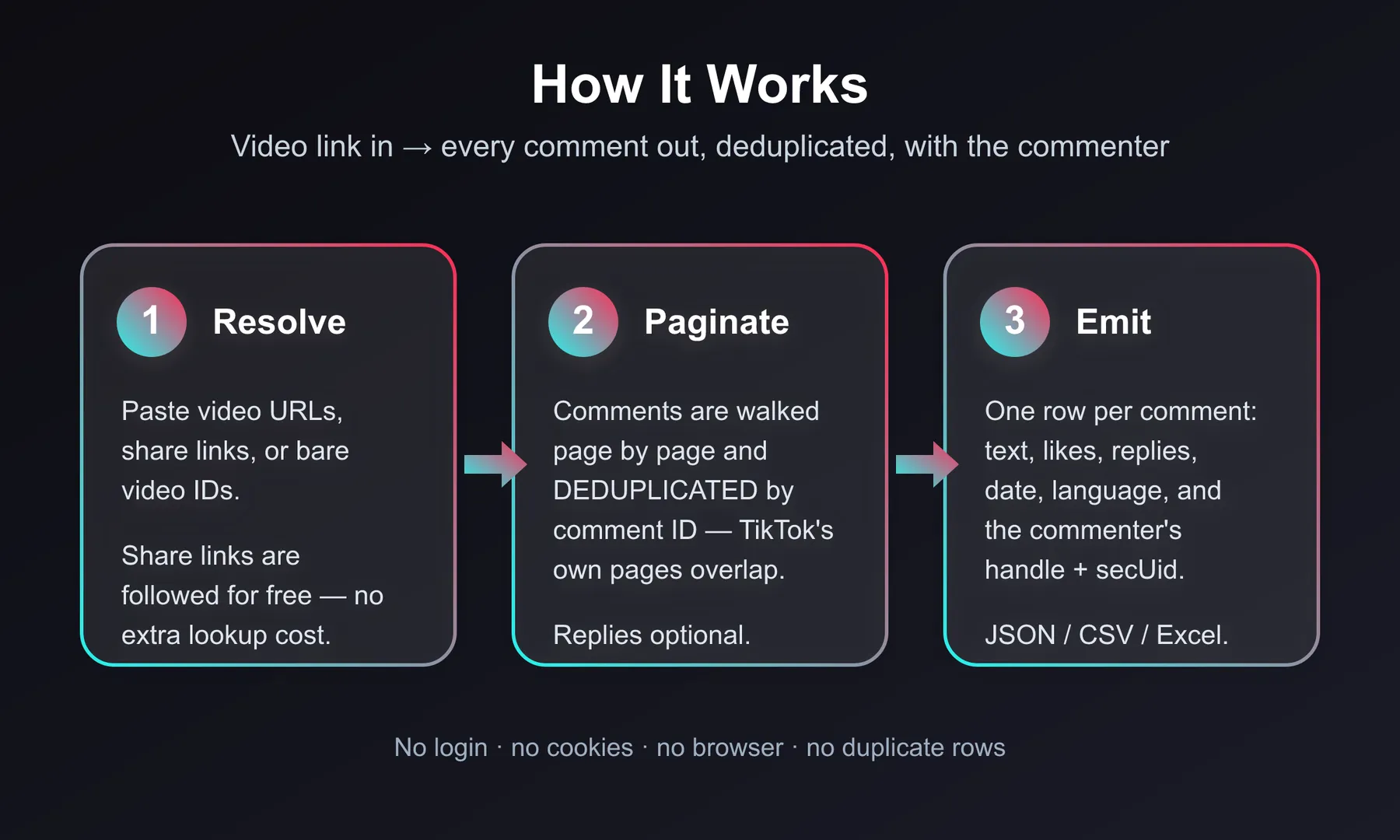
- You paste video, slideshow or share links (or bare IDs), or profile usernames.
- Share links are opened to find the video they point at, and each profile's newest videos are listed.
- The video's comments are collected up to your Max comments per video, with duplicates dropped.
- With replies on, the replies under each comment are added as their own rows.
- Rows land in the dataset as they are collected; download them as JSON, CSV or Excel, or read them over the API.
Input Configuration
Input fields
| Field | Type | Required | Default | What it does |
|---|---|---|---|---|
videos | array of strings | One of the two | — | Video, slideshow or share links, or bare video IDs |
profiles | array of strings | One of the two | — | Usernames or profile links; each profile's newest videos are read |
includeReplies | boolean | No | false | Also collect replies, as rows with isReply: true. Paid plans only |
includeCommentKeywords | boolean | No | false | Add one rowType: "commentKeywords" row per video with the recurring phrases. Billed as its own event, only when keywords come back. Paid plans only |
maxVideosPerProfile | integer | No | 10 | How many of each profile's newest videos to read (1 to 200) |
profileVideosSince | string | No | — | Leave out profile videos older than a date (2026-11-01) or a span (30 days, 2 weeks, 3 months) |
includePinnedVideos | boolean | No | true | Switch off to leave out videos a creator pinned to the top of the profile |
maxCommentsPerVideo | integer | No | 2000 | Most top-level comments per video. Your spend cap. The form suggests 100 for a first run |
maxRepliesPerComment | integer | No | 50 | Most replies per comment when replies are on |
Common scenarios
A quick look at one video:
A full comment section with replies:
Comments on everything two creators posted in the last 30 days, pinned videos left out:
What commenters keep saying across three videos:
Call it from code, n8n or an AI agent
From Python, with the apify-client package:
One HTTP call that waits for the run and returns the rows:
- AI agents (Claude, Cursor, VS Code, ChatGPT): add the Apify MCP server at
https://mcp.apify.com/?tools=memo23/tiktok-comments-scraperwith your Apify token, and the agent gets a tool that takes TikTok links and returns their comments. - n8n, Make, Zapier: use the Apify node or app, pick this actor, and map
textandlikeCountinto your next step.
Output Overview
Each row is one flat comment, top-level or reply, with the video it belongs to, the comment's own numbers and the commenter. A reply carries the same fields with isReply: true and parentCommentId set. A keywords row (rowType: "commentKeywords") has videoId, videoUrl, keywordCount and keywords[], each with keyword, sampleCount and up to 5 sampleComments. A video that could not be read gives one item with video, error and message.
Output Samples
A comment on a photo slideshow (real row from a run):
Key Output Fields
The comment
| Field | Meaning |
|---|---|
commentId | Unique comment ID; rows are deduplicated on it |
text | The comment |
likeCount / replyCount | Likes on the comment, and how many replies it has |
createTime | When it was posted (ISO 8601) |
language | TikTok's detected language code |
isHighPurchaseIntent | TikTok's flag for comments that read as buying interest |
isPinnedByAuthor / isLikedByAuthor | Whether the video's creator pinned or liked it |
Thread and video
| Field | Meaning |
|---|---|
isReply / parentCommentId | Whether the row is a reply, and which comment it answers |
videoId / videoUrl | The video the comment belongs to |
The commenter
| Field | Meaning |
|---|---|
commenterUsername / commenterNickname | Handle and display name |
commenterId / commenterSecUid | TikTok's numeric and secure IDs for the account |
commenterVerified / commenterProfileUrl | Verified badge, and a link to the profile |
Free Apify plan
Runs on the free Apify plan read 1 video (the first pasted link, or else the newest video of the first profile) and up to 60 comments, every one of them in full: text, likes, reply count, date, language and the commenter. Replies (includeReplies) and comment keywords are paid-plan features, so free runs return top-level comments only. Any paid Apify plan lifts the video and comment limits.
FAQ
Do I need to log in or provide cookies?
No. Your TikTok account is never used.
Will I get duplicate comments?
No. Each comment ID appears once per run, so the row count is the number of distinct comments.
How many comments can I get from one video?
As many as TikTok shows for it. maxCommentsPerVideo defaults to 2,000 per video when you leave it out; set it higher for a full sweep or lower to cap cost.
In what order do comments come back?
In the order TikTok serves them to a visitor, which mixes popular and recent comments. Sort by likeCount or createTime after export.
Are replies included?
Only with includeReplies on (paid plans). Each reply is its own row linked by parentCommentId. Runs with replies take longer and return more rows.
Can I get comments from a whole profile?
Yes. Put usernames or profile links in profiles. Each profile's newest videos are read, up to maxVideosPerProfile (default 10), optionally only those posted since profileVideosSince, and without pinned videos when includePinnedVideos is off. A private or missing account returns one error item with profile, error and message.
Can I get comments from a hashtag or a search?
Not directly. Run a TikTok hashtag or search scraper and paste its video URLs into videos.
What happens with a private or deleted video?
It returns one error item explaining why, and the run continues with your other videos.
What does it cost?
$0.49 per 1,000 comment rows, plus a $0.00005 start fee per run. Comment keywords are $0.005 per video that returns them. No subscription.
Support
Found a bug or need a field added? Open an issue on the actor's Issues tab in Apify Console, or email muhamed.didovic@gmail.com.
Additional Services
Need comments from a list of creators on a schedule, a sentiment summary on top, or delivery into your own database? Custom builds are available; get in touch at muhamed.didovic@gmail.com.
Explore More Scrapers
- TikTok Followers & Following Scraper: followers, following and suggested accounts with per-account stats
- TikTok Hashtag Scraper: every video posted under a hashtag, with engagement stats
- TikTok Search Scraper: TikTok's search results for any keyword
- Social Video Transcript Scraper: captions and AI transcripts for TikTok and Instagram videos
- The full catalogue: memo23 on Apify Store
🤖 For AI Agents & LLM Apps
Quick reference for agents calling this actor through the Apify MCP server or the Apify API (actor: memo23/tiktok-comments-scraper).
Purpose: comments, and optionally replies, from public TikTok videos, photo slideshows or the newest videos of whole profiles, one row per comment.
Minimal input:
Output: one dataset row per comment: videoId, videoUrl, commentId, isReply, parentCommentId, text, likeCount, replyCount, createTime, language, isPinnedByAuthor, isLikedByAuthor, isHighPurchaseIntent, commenterUsername, commenterNickname, commenterId, commenterSecUid, commenterVerified, commenterProfileUrl. Optional rowType: "commentKeywords" rows: videoId, keywords [{keyword, sampleCount, sampleComments}].
Behaviors an agent should know:
- Always set
maxCommentsPerVideo; left out, it is 2,000 per video. Withprofiles, also setmaxVideosPerProfile(default 10). - Rows are deduplicated by
commentId. Order follows TikTok, not likes or date. - An unreadable video is one item with
video,error,message; an unreadable profile one withprofile,error,message. The run continues. - Billing: $0.49 per 1,000 rows plus $0.00005 per run; keywords $0.005 per video that returns them.
- Free Apify plan: 1 video and 60 full rows per run, no replies or keywords.
⚠️ Disclaimer
This Actor is an independent tool and is not affiliated with, endorsed by, or sponsored by ByteDance Ltd., TikTok or any of their subsidiaries. All trademarks mentioned are the property of their respective owners.
The scraper reads only publicly available TikTok comments: no login, no private accounts and no content behind TikTok's sign-in. Users are responsible for making sure their use complies with TikTok's Terms of Service, applicable data-protection law (GDPR, CCPA, etc.), copyright in the comments they republish, and any contractual obligations of their own organisation.
SEO Keywords
tiktok comments scraper, scrape tiktok comments, tiktok comments api, export tiktok comments, tiktok comments to csv, tiktok comment replies scraper, tiktok comments no login, tiktok video comments download, tiktok slideshow comments, tiktok profile comments, tiktok commenter list, tiktok comment analysis, tiktok sentiment analysis data, tiktok audience research, tiktok social listening, tiktok brand monitoring, tiktok comment keywords, tiktok influencer vetting, tiktok ugc research, social media comment scraper, Apify tiktok comments


