

U-Haul Truck Rental Quotes — Locations & Availability
Pricing
from $10.00 / 1,000 scraped items
U-Haul Truck Rental Quotes — Locations & Availability
Scrape U-Haul truck rental locations and availability by zip code from uhaul.com — location name, address, phone, hours, distance, and equipment. Enter zip codes or results-page URLs. JSON or CSV out.
Pricing
from $10.00 / 1,000 scraped items
Rating
0.0
(0)
Developer

Muhamed Didovic
Maintained by CommunityActor stats
0
Bookmarked
2
Total users
1
Monthly active users
3 hours ago
Last modified
Categories
Share

U-Haul Truck Rental Quotes — Locations & Availability
Find U-Haul truck rental locations near any US zip code. Enter zip codes or results-page URLs and the actor returns one row per location: name, address, phone, hours, distance, and available equipment.
Why use this U-Haul Truck Rental Quotes scraper
- Search by zip code — no manual URL list needed.
- Full location details — address, phone, hours, distance.
- Equipment availability per location.
- Optional detail-page enrichment for richer data.
- Residential proxy support — U-Haul blocks datacenter IPs.
Overview
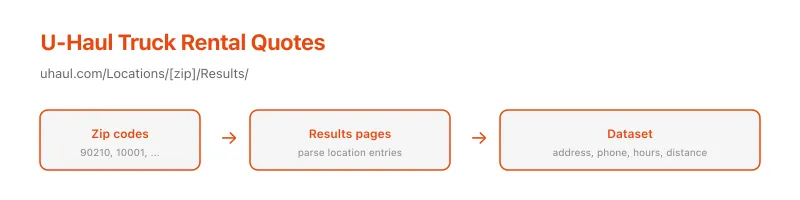
U-Haul's location search lives at www.uhaul.com/Locations/<zip>/Results/. Each results page lists nearby locations with availability and contact details. This actor fetches results pages for the zip codes you provide and parses the location entries into clean records.
Supported inputs
| You provide | Example |
|---|---|
| A zip code | 90210 |
| A results-page URL | https://www.uhaul.com/Locations/90210/Results/ |
| A list of zip codes | ["90210", "10001", "60601"] |
Use cases
- Build a U-Haul locations dataset for a region or nationwide.
- Compare truck availability across zip codes.
- Find the nearest U-Haul location for a given address.
- Feed a moving-cost calculator or aggregator.
- Monitor location openings and closures.
How it works
- You supply zip codes or results-page URLs.
- The actor fetches each results page (
/Locations/<zip>/Results/). - It parses location entries from the HTML.
- Optionally, it fetches each location's detail page for richer data.
- Results are written to the dataset as one row per location.
Input configuration
| Field | Type | Default | Description |
|---|---|---|---|
startUrls | array | — | Results-page URLs or 5-digit zip codes. |
zipCodes | array | — | Alternative: a list of 5-digit zip codes. |
fetchDetails | boolean | false | Fetch each location's detail page for richer data. |
maxItems | integer | 1000 | Maximum locations to scrape. |
maxConcurrency | integer | 10 | Parallel page fetches. |
proxy | object | residential | Residential proxy required — U-Haul blocks datacenter IPs. |
Output overview
Each dataset item is a normalized location:
| Field | Description |
|---|---|
locationId | U-Haul location ID. |
locationUrl | Location detail page URL. |
name | Location name. |
address | Street address. |
city / state / zipCode | Address components. |
phone | Location phone number. |
hours | Operating hours. |
distance | Distance from the search zip (miles). |
equipmentAvailable | List of available equipment types. |
latitude / longitude | Location coordinates (from detail pages). |
Notes
- Residential proxy required. U-Haul resets TCP connections from datacenter IPs. The actor uses the Apify residential proxy by default.
- The results-page parser uses multiple selector strategies to handle different page versions.
- Set
fetchDetails: truefor richer data (coordinates, full hours) at the cost of more requests.


![PagesJaunes Scraper [$0.90/1K💰] | French B2B Leads & Phones avatar](https://images.apifyusercontent.com/lBJdt4RqbUYUehICeFv66EX2vBUjwme9g1jO8GfA3-E/rs:fill:76:76/cb:1/aHR0cHM6Ly9hcGlmeS1pbWFnZS11cGxvYWRzLXByb2QuczMudXMtZWFzdC0xLmFtYXpvbmF3cy5jb20vZHRSN3FuVGJRck5pU0NtajctYWN0b3ItdEFxaUpkTW5aN2VpV2FWZHgtTHFjc3FYRGo3WS1pbWFnZXNfJTI4MjAlMjkucG5n.webp)


