

YouTube Transcript Scraper — SRT/VTT + Whisper AI Fallback
Pricing
from $5.00 / 1,000 transcripts
YouTube Transcript Scraper — SRT/VTT + Whisper AI Fallback
Extract YouTube transcripts as plain text, timestamped JSON, SRT or VTT from videos, Shorts, live replays and whole channels. Opt-in Whisper AI transcribes caption-less videos. Lists every caption track, any language, and bills only new uploads on a schedule. Pay only for delivered transcripts.
Pricing
from $5.00 / 1,000 transcripts
Rating
5.0
(3)
Developer

Muhamed Didovic
Maintained by CommunityActor stats
0
Bookmarked
44
Total users
13
Monthly active users
10 hours ago
Last modified
Share
YouTube Transcript Scraper — SRT, VTT, JSON & Plain Text with Whisper AI Fallback
Turn any YouTube video or Short into a clean transcript in one run. Every row carries the full text, timestamped segments, ready-made SRT and VTT subtitle files, and the video's core metadata (title, channel, views, duration, description). When a video has no captions at all, the optional Whisper AI fallback downloads the audio and transcribes it with speech-to-text — something caption-only scrapers simply return empty for.
How it works
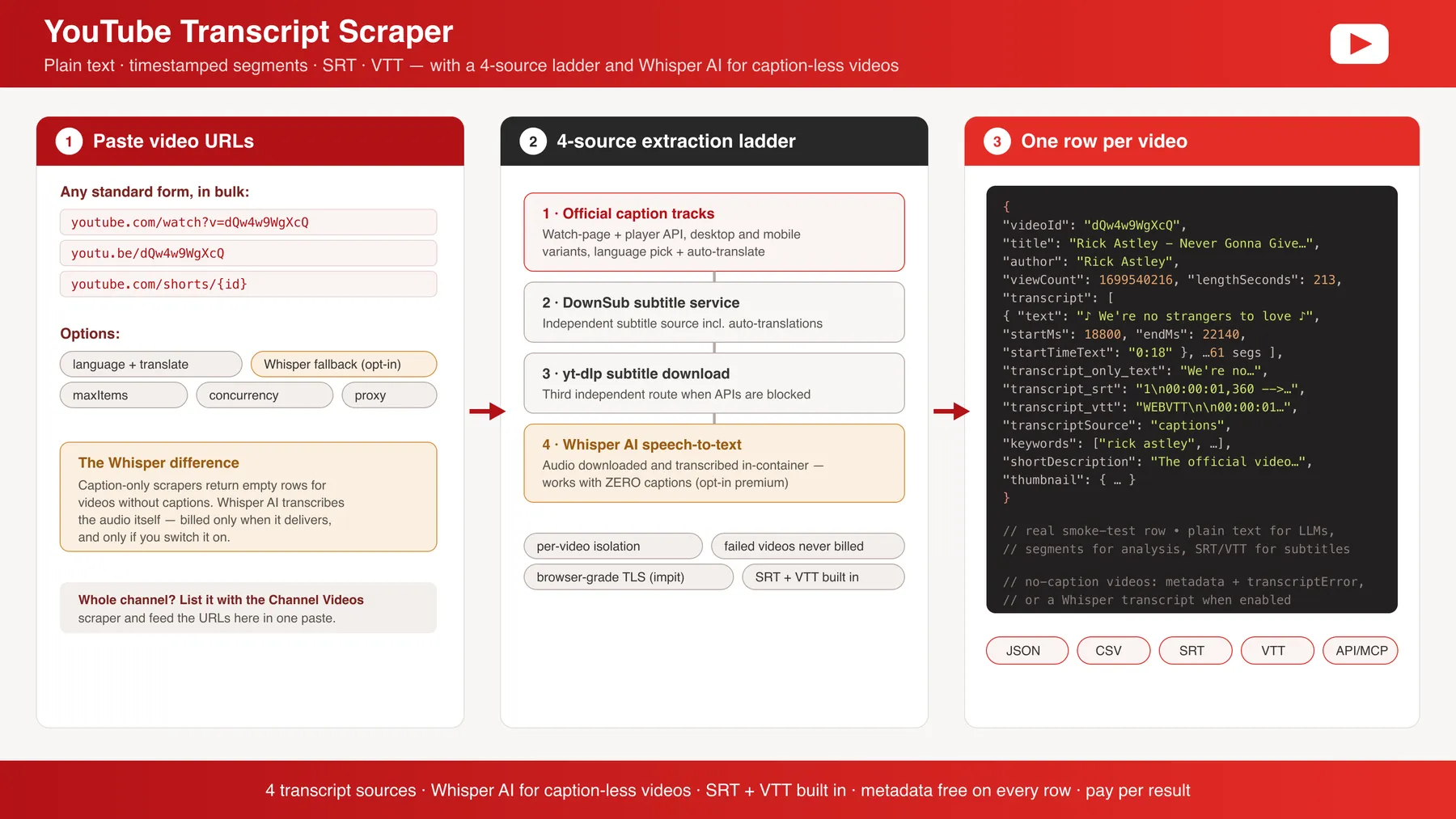
✨ Why use this scraper?
- Fallback ladder — YouTube's caption track (desktop, then mobile), then two transcript libraries, then yt-dlp subtitle download, then Whisper AI speech-to-text. One source being blocked or missing doesn't kill your run.
- Whisper AI for caption-less videos — the differentiator: videos with no captions still come back transcribed (opt-in, billed as a separate premium event so you never pay it unknowingly).
- Every format in one row — plain text for LLM pipelines, timestamped JSON segments for analysis, SRT and VTT for subtitle workflows. No post-processing.
- Language selection with auto-translate — request
en,de,es… and where the exact track is missing, YouTube's translated track is used when available. - Metadata included free — title, channel and @handle, publish date, view count, duration, keywords, description and thumbnails ride along on every transcript row.
- Every caption track listed —
availableCaptionTracksnames each language YouTube has for the video and whether a person wrote it or it is auto-generated, so you can pick the track yourself. - Live stream replays work — paste the
youtube.com/live/…link as-is. A stream that is still live, or ended so recently that YouTube has not published its captions, is reported aslive_not_readyand not charged. - Bulk-friendly — paste hundreds of URLs; failed videos are isolated and never billed.
- The hook on every row —
hook3sis the first 3 seconds of speech andhookStartSecondssays when the talking starts, so openers compare side by side without reading transcripts. - Chain any YouTube scraper — pass a finished run's
datasetId(or paste rows indatasetItems) and every video or channel link in those rows is transcribed; the row shape does not matter. - Scheduled runs bill only what is new — name a
watchlistIdand switch onnewItemsOnly; a video transcribed on an earlier run is left out, and a channel walk transcribes only its new uploads. - Every miss on the record — asked = delivered + reported. A video that could not be transcribed is in the run's
ERRORSrecord with a reason and what to change, not billed as a row, and the status line reconciles the count.
🎯 Use cases
| Who | What they do with it |
|---|---|
| AI & LLM builders | Feed clean plain-text transcripts into RAG pipelines, summarizers, and agents (MCP-friendly output). |
| Content & SEO teams | Repurpose videos into articles, show notes, and quote pulls; mine competitor channels for topics. |
| Researchers & analysts | Build searchable corpora from talks, interviews and news coverage, with timestamps intact. |
| Subtitle & localization teams | Get SRT/VTT straight from the source, plus translated tracks where YouTube offers them. |
| Media monitoring | Track what's being said about brands and people across YouTube at scale. |
📥 Supported inputs
| Input | Example |
|---|---|
| Standard video URLs | https://www.youtube.com/watch?v=dQw4w9WgXcQ |
| Short links | https://youtu.be/dQw4w9WgXcQ |
| Shorts | https://www.youtube.com/shorts/{id} |
| Live stream replays | https://www.youtube.com/live/{id} |
| Channel | https://www.youtube.com/@handle/videos — walked newest first up to maxItems |
| Chained dataset | datasetId: "nGkT…" — the default dataset of a finished YouTube scraper run; rows are deep-scanned for video and channel links |
| Pasted rows | datasetItems: [ { "url": "https://youtu.be/…" } ] |
Not supported: private, members-only or age-gated videos. A stream still in progress has no captions yet; it is reported, not charged. For a playlist, list its videos with the YouTube Channel Videos scraper and pass that run's datasetId.
🔄 How a run works
- Each URL is resolved to its video ID and fetched with browser-grade TLS.
- The caption track in your requested language is located (auto-translate applied when needed).
- If captions are missing or blocked, the ladder steps down: mobile caption track → transcript libraries → yt-dlp subtitles → (opt-in) Whisper AI speech-to-text.
- Segments are normalised to timestamped JSON and rendered to SRT and VTT.
- One row per video is pushed — transcript, formats, and metadata together.
⚙️ Input parameters
| Field | Type | Default | Notes |
|---|---|---|---|
startUrls | array | — | Video/Shorts/channel URLs, any standard form |
datasetId | string | — | Default dataset of a finished YouTube scraper run; every video or channel link in its rows is transcribed |
datasetItems | array | — | Rows pasted from a scraper instead of chaining by id |
watchlistId | string | — | Named memory for scheduled runs; videos transcribed under this id are remembered |
newItemsOnly | boolean | false | Leave out videos already on the watchlist. Needs watchlistId |
language | string | default | Caption language code (en, de, …); default = the video's original track |
whisperFallback | boolean | false | Whisper AI speech-to-text for caption-less videos — billed per transcribed video as a premium event |
maxItems | integer | 100 | Hard cap on billed transcript rows |
maxConcurrency | integer | 10 | Parallel video fetches |
proxy | object | Automatic | Paid-plan runs use the actor's built-in premium residential pool automatically |
📊 Output overview
One row per transcribed video. The transcript appears three ways — transcript (timestamped segments), transcript_only_text (plain text), and transcript_srt / transcript_vtt (ready-to-save subtitle files) — alongside the video's metadata and the spoken hook. A video that could not be transcribed produces no row and no charge; it is listed in the run's ERRORS record with the reason (see below).
🧾 What was not delivered, and why
Every video the run set out to transcribe ends as a dataset row with a transcript or as an entry in the run's ERRORS record (key-value store), never neither, and never as a billed row without a transcript. The record is written on every run, with an empty items list when everything was delivered, so an integration can read it unconditionally. Each entry carries a reason, a plain-language detail with what to change, and a retryable flag:
reason | What happened | Re-run as-is? |
|---|---|---|
no_captions | No caption track and whisperFallback is off | Switch on whisperFallback |
no_speech | No captions, and Whisper heard only music, silence or noise | No |
too_long | No captions, and the video is longer than Whisper's 30-minute cap | No |
live_not_ready | A live stream still in progress, not started yet, or ended in the last day before YouTube published captions | Later: captions usually appear a few hours after the stream ends |
unavailable | Private, removed, members-only or age-gated | No |
login_required | YouTube asked the fetch to sign in | Yes |
rate_limited | YouTube throttled the fetch | Yes, in a few minutes |
fetch_failed | Another transport failure | Yes |
The status line carries the same arithmetic, for example "Delivered 48 of 50 videos. 2 not delivered and not charged: 2 no captions and no Whisper fallback — see the ERRORS record." Videos the watchlist left out are counted separately and never charged. A run that delivers nothing because every fetch failed on YouTube's side is marked FAILED so it stands out in your run list.
🔁 Coming from another YouTube transcript scraper?
What users of other transcript actors report on their issue boards, and what this one does about it:
| Reported elsewhere | Here |
|---|---|
| Live video links fail with "impossible to retrieve video ID" | youtube.com/live/… links are read as-is; a stream still in progress is reported as live_not_ready, not billed |
| "No captions found" and an empty result | Opt-in Whisper transcribes caption-less videos up to 30 minutes; a video left untranscribed is named in ERRORS with a reason and never billed |
| Charged for empty results | A row is written, and billed, only when it carries a transcript |
| Want only a channel's new videos each day | watchlistId + newItemsOnly: a scheduled run transcribes and bills only uploads it has not seen |
| Want the publish date in the output | publishDate and uploadDate on every row |
| Want the whole transcript as one string, no timestamps | transcript_only_text |
| Want to see which caption tracks exist before choosing | availableCaptionTracks lists every language and whether it is auto-generated |
| Requested language ignored, always English | language returns the transcript in the language you ask for (checked with de and fr on an English video) |
📦 Output sample
Real trimmed row from a live run:
🗂 Key output fields
| Field | Meaning |
|---|---|
transcript[] | Timestamped segments: text, startMs, endMs, startTimeText |
transcript_only_text | The whole transcript as one plain string — LLM-ready |
transcript_srt / transcript_vtt | Complete subtitle files as strings — save and use directly |
transcriptSource | Which ladder step produced it (timedtext / youtube-transcript / yt-dlp / whisper) |
availableCaptionTracks[] | Every caption track on the video: languageCode, name, kind (manual or auto-generated), isTranslatable |
publishDate / uploadDate | When the video was published |
channelHandle | The channel's @handle, from its profile link |
liveBroadcastDetails | Start and end time for a video that was a live stream |
hook3s / hookStartSeconds | The first 3 seconds of speech, and when speech starts; a music-only opening reads as the caption marker (for example [♪♪♪]) |
videoId, title, author, channelId | Video identity |
viewCount, lengthSeconds, keywords, shortDescription, thumbnail | Metadata that rides along free |
❓ FAQ
What happens with videos that have no captions?
Without whisperFallback they produce no row and no charge, and the ERRORS record lists them as no_captions. With whisperFallback: true, the audio is downloaded and transcribed by Whisper speech-to-text — billed as a separate premium event per video, only when it actually produces a transcript. Over music or silence Whisper tends to invent filler ("Thank you.", "♪"); a result made only of that counts as no transcript, so the video is listed as no_speech and neither the row nor Whisper is charged. Whisper handles videos up to 30 minutes long.
Which languages are supported?
Any language YouTube has a caption track for. Set language to a code like de or es; when that exact track is missing, YouTube's auto-translated track is used where available.
Can I transcribe a whole channel or playlist?
A channel URL (youtube.com/@handle/videos) is walked newest first up to maxItems. For playlists or search results, run the matching scraper and pass its dataset id in datasetId; every video link in the rows is transcribed. On a schedule, add a watchlistId with newItemsOnly so only new uploads are transcribed and billed.
Do I need to configure proxies?
No. Runs on a paid Apify plan go through the actor's built-in premium residential pool automatically — YouTube throttles datacenter IPs aggressively, and this keeps success rates high at volume with zero setup. Free-plan runs use Apify's automatic proxy, and the proxy input lets them supply their own.
Do failed videos cost me anything?
No. A video without a transcript produces no row, so nothing is billed for it; it is named in the ERRORS record instead. Whisper is only charged when it delivers text.
💬 Support
Found a bug or missing a field? Open an issue on the actor's Issues tab in Apify Console — issues are answered within 1–2 business days.
🛠 Additional services
Need scheduled transcript archives, a merged multi-platform transcript feed (YouTube + TikTok + Instagram + Loom), or delivery straight to your database? Custom builds and SLAs available — contact me through the actor page.
🔎 Explore more scrapers
Same developer, same stack: Video & Audio Transcriber (Whisper), Instagram Transcript Scraper, YouTube Comments, YouTube Search — and the full portfolio at memo23 on Apify Store.
🤖 For AI Agents & LLM Apps
Built for machine consumption: transcript_only_text drops straight into a context window; timestamped segments support citation and chaptering; stable field names across every row. Pair with the Video Transcripts MCP Server to expose transcripts as a tool in agent frameworks. Keep maxItems low per call for cost control; every row is self-contained.
⚠️ Disclaimer
This Actor is an independent tool and is not affiliated with, endorsed by, or sponsored by YouTube or Google LLC. All trademarks mentioned are the property of their respective owners.
The scraper accesses only publicly available video pages and caption data — no login, no age-gated, members-only or private content. Users are responsible for ensuring their use complies with YouTube's Terms of Service, copyright law as it applies to transcript content, applicable data-protection law (GDPR, CCPA, etc.), and any contractual obligations of their own organisation.
SEO Keywords
youtube transcript scraper, youtube transcript api, extract youtube transcript, youtube captions scraper, youtube subtitles downloader, srt from youtube, vtt from youtube, youtube video to text, youtube transcription tool, whisper youtube transcription, transcribe youtube videos without captions, youtube transcript for llm, youtube rag pipeline, bulk youtube transcripts, youtube caption extractor, video to text api, youtube shorts transcript, youtube transcript json, apify youtube transcript, pintostudio alternative, youtube-transcript-scraper alternative
![Car & Classic [$1💰] | Full 46k catalogue | Beats 10k cap avatar](https://images.apifyusercontent.com/yR5ZcWq7huml1KRn39casUADIIm6kQumb9tA8E00od4/rs:fill:76:76/cb:1/aHR0cHM6Ly9hcGlmeS1pbWFnZS11cGxvYWRzLXByb2QuczMudXMtZWFzdC0xLmFtYXpvbmF3cy5jb20vbmduOHZSRVNUa3NleVdFNnAtYWN0b3ItbmRLcGNQOFNyWFNueW5Na3IteGE3RlJRTHRTVy1jYXJfYW5kX2NsYXNzaWMuanBlZw.webp)

![PistonHeads.com [$1💰] | Full 208k catalogue | Real pagination avatar](https://images.apifyusercontent.com/N5yGW7wlseLIwvxB9V1DcTJVHEdFqV2MhaITdnhRlFM/rs:fill:76:76/cb:1/aHR0cHM6Ly9hcGlmeS1pbWFnZS11cGxvYWRzLXByb2QuczMudXMtZWFzdC0xLmFtYXpvbmF3cy5jb20vbmduOHZSRVNUa3NleVdFNnAtYWN0b3IteEpXSmV2d2I5dVBrZDdwU08tOHRWc0xnWEUzZi1waXN0b25oZWFkcy5wbmc.webp)


![Autotrader.com.au [$1💰] Australia Search & Details Scraper🇦🇺 avatar](https://images.apifyusercontent.com/pCkelbtHnioCVauMT6DM9tGYD81m-FmuhD-rXFDHMC4/rs:fill:76:76/cb:1/aHR0cHM6Ly9hcGlmeS1pbWFnZS11cGxvYWRzLXByb2QuczMudXMtZWFzdC0xLmFtYXpvbmF3cy5jb20vbmduOHZSRVNUa3NleVdFNnAtYWN0b3ItYWFINGlJOWIwc2dNNkNWeVMtanhmc2ZZeEVBWi1hdXRvdHJhZGVyLWF1cy5wbmc.webp)


