

YouTube Video Downloader — MP4/MP3, Subtitles, Bulk
Pricing
from $24.00 / 1,000 video download 720ps
YouTube Video Downloader — MP4/MP3, Subtitles, Bulk
Download YouTube videos & Shorts as MP4 (360p-4K) or MP3 audio, in bulk, by URL or ID. Residential proxy included and never billed to you: no proxy line on your invoice, ~$0.0035 platform usage per video. Subtitles as VTT, full metadata, shareable links. Only successful downloads are charged.
Pricing
from $24.00 / 1,000 video download 720ps
Rating
0.0
(0)
Developer

Muhamed Didovic
Maintained by CommunityActor stats
0
Bookmarked
419
Total users
270
Monthly active users
4 days ago
Last modified
Categories
Share
YouTube Video Downloader — MP4, MP3 & Subtitles [Pay Per Download]
Download YouTube videos and Shorts as MP4 (360p up to 4K) or extract MP3 audio — in bulk, by URL or video ID. Every download comes with full metadata, a shareable file link, and optional VTT subtitles. You are only charged for successful downloads — failures cost nothing.
Built for content teams, archivists, AI/ML pipelines, and anyone who needs YouTube media as actual files instead of links that expire.
Why Use This Downloader?
- Residential proxy and platform usage included — YouTube blocks datacenter IPs, so every download needs residential. Ours is included, and so are compute and data transfer: your bill is the flat per-download fee and nothing else
- Works out of the box — that proxy is on by default, so your first run doesn't die on YouTube's "sign in to confirm you're not a bot" wall
- Pay per download, never for failures — a video that can't be downloaded is a free error row, not a charge
- Any link format — watch URLs, Shorts, embeds, live-VOD links, youtu.be short links, YouTube Music URLs, or bare 11-character video IDs
- Quality control — pick 360p, 480p, 720p, 1080p, 1440p, 2160p 4K, or best available
- MP3 audio mode — extract audio only; smaller, faster, ideal for transcription pipelines
- Subtitles included — save captions or auto-generated subtitles as clean VTT files with their own links
- Metadata-only mode — pre-check a list of videos (title, duration, views) for a fraction of a cent each before committing to downloads
- Bulk-ready — hundreds of links per run, duplicates removed automatically, 1–5 parallel downloads
- Age-restricted support — supply your own YouTube cookies to unlock age-restricted or members-only videos
- Automatic retries — each video is retried several different ways before the actor gives up, automatically
- Never hangs, never a surprise bill — every download has a hard timeout, so one stuck video can't freeze the run or quietly run up cost; it's killed, billed as a free error, and the run moves on. You pay a flat fee per successful video, so the most a run can cost is capped before you start it
- Deliver to your own bucket — optionally upload every file straight to your own S3, DigitalOcean Spaces, Cloudflare R2, Wasabi, Backblaze B2, or MinIO bucket; the returned link points at your storage, not Apify's
Coming from another YouTube downloader?
The complaints users file against YouTube download actors, and how this one is built to avoid them:
| The complaint elsewhere | What this Actor does instead |
|---|---|
| "Sign in to confirm you're not a bot" | Works out of the box with the default settings. For age-restricted or members-only videos there's a youtubeCookies field on top. |
| "Most videos not downloading / just won't download" | Each video is retried several different ways before the actor gives up. And when a video genuinely can't be fetched, it costs $0 — failures are never charged. |
| "The run gets stuck at 100% / runs forever / racked up a huge surprise bill" | Every download attempt has a hard timeout (perVideoTimeoutSecs, default 180s). A stuck video is killed, marked as a free error, and the run moves on — so one bad video can't freeze the run for hours. Cost is a flat fee per successful video, never per megabyte and never per retry, so a run's maximum charge is bounded before you press Start. |
| "Not getting an MP4 / not the format I asked for" | Output is explicit: MP4 at your chosen resolution cap (video+audio merged with ffmpeg into one playable file) or MP3 audio. What you select is what lands in the row, named in quality/format fields, with the delivered frame size in resolution. |
| "The run 'succeeded' but I got nothing" | A run that downloads zero videos is reported as a failure, loudly — never a green run wrapping an empty dataset. |
| "Surprise per-MB fees on saved files" | Event pricing is a fee per successful video ($0.02–0.05 by quality, $0.02 MP3), plus $0.006 per 10 MB above the first 50 MB from 25 November 2026. Residential proxy, compute and data transfer are included, so there is no platform-usage line on your bill, and failed videos cost nothing. |
| "Direct download links stopped working" | Files are stored in your run's key-value store with stable HTTPS links that survive as long as your storage retention — not IP-locked CDN URLs that expire in hours. |
Overview
This actor takes a list of YouTube video URLs or IDs and produces one dataset row per video containing the video's metadata (title, channel, duration, views, upload date), the download details (quality, format, file size), and stable links to the downloaded files stored in the run's key-value store.
It is a downloader, not a search tool — you supply the video links. To discover videos first (by search query, channel, or Shorts feed), pair it with the scrapers listed in Explore More Scrapers; their output plugs directly into this actor's input.
Supported Inputs
| Input type | Example |
|---|---|
| Watch URL | https://www.youtube.com/watch?v=jNQXAC9IVRw |
| Shorts URL | https://www.youtube.com/shorts/IbkzTfJCFjk |
| Short link | https://youtu.be/z9rdrNrkvDY |
| Embed / live URL | https://www.youtube.com/embed/jNQXAC9IVRw |
| YouTube Music URL | https://music.youtube.com/watch?v=jNQXAC9IVRw |
| Bare video ID | jNQXAC9IVRw |
Extra URL parameters (?si=, &t=10s, ?feature=share) are handled automatically. Duplicate videos in the list are downloaded only once.
Not supported: playlist URLs, channel URLs, and search-result URLs (feed those to the companion scrapers first and pass the resulting video URLs here). Live streams that are currently airing cannot be downloaded until they finish.
Use Cases
| Who | What for |
|---|---|
| Content & social media teams | Archive campaign videos, repurpose content across platforms |
| AI / ML engineers | Build audio/video datasets; MP3 mode feeds Whisper-style transcription directly |
| Journalists & researchers | Preserve evidence and sources before videos disappear |
| Marketing agencies | Competitor creative analysis, ad-library building |
| Educators | Offline copies of reference material |
| Media monitoring | Automated capture of brand mentions in video form |
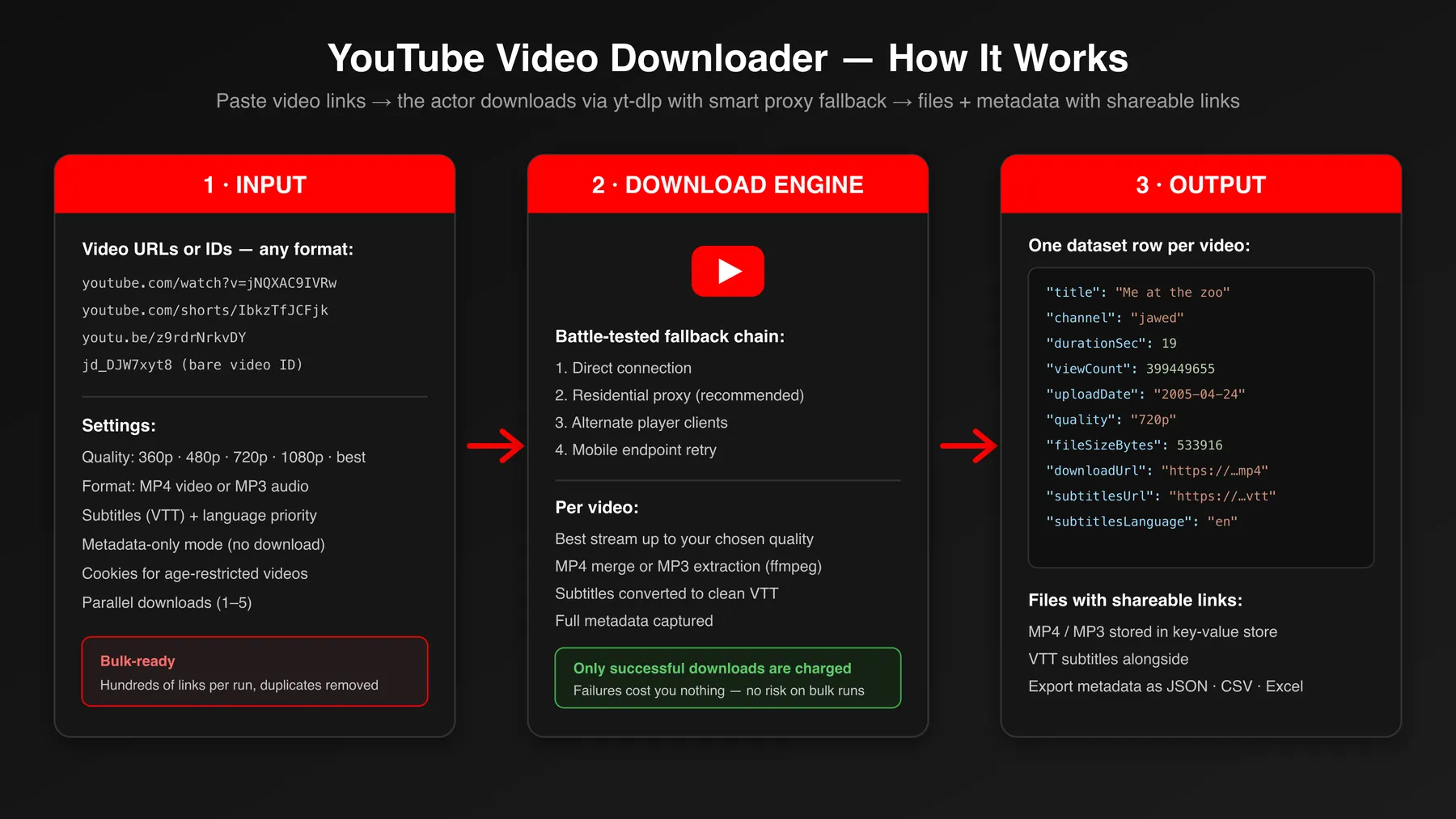
How It Works
- Paste video links — any mix of watch/Shorts/youtu.be URLs or bare IDs, one per line.
- Pick quality and format — MP4 at your chosen resolution cap, or MP3 audio-only.
- The engine downloads each video, retrying failed downloads automatically, and merges streams with ffmpeg.
- Files are stored in the run's key-value store with stable, shareable HTTPS links.
- One row per video lands in the dataset — metadata, file size, download link, subtitles link — exportable as JSON, CSV, or Excel.
Input Configuration
| Field | Type | Default | Description |
|---|---|---|---|
videoUrls | array | — (required) | YouTube video URLs (incl. YouTube Music) or bare 11-char video IDs. Free Apify plans process the first 3 per run |
quality | string | 720p | Max resolution: 360p, 480p, 720p, 1080p, 1440p, 2160p, best. Measured on the short side, so a vertical Short at 720p is 720x1280. Up to 1080p the file is H.264 for the widest playback. Ignored for MP3 |
format | string | mp4 | mp4 (video) or mp3 (audio-only extraction) |
downloadSubtitles | boolean | false | Also save subtitles/auto-captions as a VTT file |
subtitleLanguages | array | ["en"] | Subtitle language codes in priority order — the first one the video actually has is the one saved (en matches en-US), and subtitlesLanguage reports which |
transcriptionAndSubtitle | boolean | false | Subtitles plus a plain-text transcript built from the caption file (transcriptUrl + inline transcriptText). Reads YouTube's existing captions — a video with captions disabled returns no transcript, there is no speech recognition here. Billed as one subtitles download |
metadataOnly | boolean | false | Skip the media download, return only metadata rows. Caption files are the exception: with a subtitle toggle on they are still fetched, stored and charged |
maxMinutes | integer | — | Skip videos longer than this many minutes, after a metadata check and before any media is downloaded. Not charged |
maxMegabytes | integer | 300 when empty | Skip videos whose estimated file is larger than this many MB, before download. When this and maxMinutes are both empty, files over 300 MB are skipped; set a higher number to download larger files. A video with no size estimate is still downloaded. Not charged |
youtubeCookies | string | — | cookies.txt content (Netscape format) for age-restricted videos |
proxy | object | included | Leave empty: the included residential proxy is what gets past YouTube's datacenter-IP block. Apify Proxy settings are ignored; enter proxy URLs only to route through proxies of your own |
maxConcurrency | integer | 2 | Parallel downloads (1–5) |
perVideoTimeoutSecs | integer | 180 | Max seconds for a single download attempt before it's killed and the next strategy is tried. On the default proxy, the first route may keep a download that is still receiving data for up to 10 minutes. Stops a stuck video from hanging the whole run; a timed-out video is a free error row. Also bounds the upload of the finished file, with a 15-minute floor — raise it for multi-GB 4K transfers |
filenameTemplateParts | array | [] | Compose the stored filename from title, videoId, channel, date, quality. Parts are joined in the order the array holds them — the Console records the order you tick them; rearrange on the JSON tab. Empty keeps the current video-<videoId>-<timestamp>.mp4 naming |
storageType | string | apify | Where files go: apify (this run's key-value store), s3, azure, or gcs — fill in only that backend's fields below |
storeInKVStore | boolean | false | When files go to your own bucket, also keep a copy in the key-value store (kvStoreUrl, kvStoreSubtitlesUrl, kvStoreTranscriptUrl). A failed mirror never affects the copy in your own bucket |
s3Bucket | string | — | Target bucket. Required when storageType is s3 |
s3Region | string | auto | Bucket region, e.g. eu-central-1. AWS rejects a bucket addressed with the wrong region, so left empty the Actor asks S3 where the bucket is and uses the answer. Ignored when s3Endpoint is set |
s3Endpoint | string | — | Leave empty for AWS S3. For S3-compatible providers set the endpoint, e.g. https://nyc3.digitaloceanspaces.com (Spaces) or https://<account>.r2.cloudflarestorage.com (R2) |
s3AccessKeyId | string (secret) | — | Access key for the bucket |
s3SecretAccessKey | string (secret) | — | Secret key for the bucket |
s3Path | string | — | Optional key prefix, e.g. youtube/exports. Used by all three cloud backends, not just S3 |
s3Acl | string | — | Optional canned ACL, e.g. public-read to make objects publicly downloadable. S3 only — Azure and GCS ignore it and return 7-day signed links instead |
azureConnectionString | string (secret) | — | Azure storage-account connection string. Required when storageType is azure. Links come back signed with a 7-day read-only SAS when the string carries an account key |
azureContainerName | string | — | Target container (3–63 chars, lowercase, single hyphens). Required when storageType is azure |
googleCloudBucketName | string | — | Target bucket. Required when storageType is gcs. Links come back as 7-day V4 signed read URLs — no ACL is set |
googleCloudServiceKey | string (secret) | — | Service-account key JSON (raw or base64). Required when storageType is gcs; needs Storage Object Creator on the bucket |
Typical download run (proxy defaults to residential — nothing to configure):
Cheap pre-check before a big batch:
Audio for a transcription pipeline:
Deliver files straight to your own S3-compatible bucket:
Pricing — What a Download Really Costs
This actor uses pay-per-event pricing with no platform-usage charges. Compute, data transfer and the residential proxy are all included, so the event fees below are your whole bill:
- Per successful download: $0.02–0.05 per video depending on quality (the lower of the cap you asked for and the resolution delivered, so a 720p upload is never billed as 4K), $0.02 per MP3, $0.005 per subtitle file, $0.002 per metadata row. Failed downloads are never charged.
- Large files (from 25 November 2026): $0.006 per started 10 MB above the first 50 MB of each delivered file. Clips, Shorts and most videos under about 20 minutes at 480p stay under 50 MB and pay nothing extra; a 1-hour video at 480p (about 170 MB) adds $0.072. Set
maxMegabytesto skip files above a size you choose. - Per run: $0.02 when the run starts, once per GB of memory (one event at the default memory).
- Apify Store discounts: on the video, MP3, subtitle and metadata events, Silver plans pay 10% less, Gold and higher plans 20% less. The large-file event is the same for every plan.
So a typical 720p clip costs $0.03. Long videos also pay the large-file event, because every extra megabyte goes through a residential proxy billed by the gigabyte. You can also cap any run with Apify's maximum-charge limit.
Output Overview
Each video produces exactly one dataset row: identity (videoId, url), metadata (title, channel, channelUrl, durationSec, uploadDate, viewCount), download details (quality, resolution, format, fileSizeBytes), file links (downloadUrl, subtitlesUrl, subtitlesLanguage), and storageTarget, which names where the files actually went. The transcript and key-value-store-mirror columns appear only when you switch those features on, so a default run's rows carry no permanently empty columns. Failed videos produce the same row shape with an error field and null file links — and no charge.
Files live in the run's key-value store by default; the downloadUrl is a direct HTTPS link you can open, share, or feed to another system. Point storageType at your own S3, Azure or Google Cloud bucket and downloadUrl becomes a link to that bucket instead. A download that succeeds but cannot be delivered at all is reported with storageError and the Storage upload failed: prefix on error, so a misconfigured bucket never looks like a missing video — and it is not charged. When only part of the delivery fails — a mirror copy, or a caption file after the video itself landed — storageError says so on its own and error stays unset, because the file is there and the row must not read as empty.
Output Samples
Successful 720p download with subtitles (from a real run):
Metadata-only row (metadataOnly: true — no file, $0.002):
Key Output Fields
| Group | Fields |
|---|---|
| Identity | videoId, url |
| Video metadata | title, channel, channelUrl, durationSec, uploadDate, viewCount |
| Download details | quality (the cap you asked for), resolution (the frame actually delivered, e.g. 1280x720; MP4 only), format, fileSizeBytes |
| File links | downloadUrl, subtitlesUrl, subtitlesLanguage |
| Transcript | transcriptUrl, transcriptSource (captions, auto-captions, or null when no metadata said which), transcriptText (inline, truncated at 20k chars) — present only when transcriptionAndSubtitle is on |
| Delivery | storageTarget, plus kvStoreUrl / kvStoreSubtitlesUrl / kvStoreTranscriptUrl when storeInKVStore is on |
| Diagnostics | error (nothing was delivered — every file link is null and the row is not charged), storageError (delivery trouble: beside error when nothing landed, on its own when the main file landed and a mirror or caption file did not) |
FAQ
Which URLs work? Individual video links only — watch, Shorts, embed, youtu.be, or bare IDs. Playlists and channels are not expanded; use the companion channel/search scrapers to get video URLs first.
Why is residential proxy on by default?
YouTube blocks requests from datacenter IP ranges with a "sign in to confirm you're not a bot" wall, so every proxied attempt runs first and a direct connection is kept only as a last resort, for the case where the proxy itself is unavailable. Each attempt is pinned to a single exit IP, because YouTube ties a media URL to the address that requested it and a rotating proxy makes the file download 403 after the metadata already succeeded. The proxy is included in the per-download price (see Pricing above). Apify Proxy settings in the input are ignored; to route through proxies of your own, enter their URLs in the proxy field.
How long do the file links live? Files sit in the run's key-value store and follow your account's storage retention (default 7+ days depending on plan). Download or transfer files you want to keep long-term.
Can it download age-restricted or members-only videos?
Supply youtubeCookies (exported from a logged-in browser session in Netscape format) and the actor passes them to the download engine. Members-only content requires a membership on the supplying account.
What about currently-live streams? Not supported while live. Once the stream ends and becomes a regular video, it downloads normally.
Does it charge for failed videos?
No. Failures produce an error row and zero event charges, and the proxy bandwidth a failed attempt burned is on us, not on you.
Is 4K supported?
Yes — set quality to 2160p (or 1440p for QHD, or best for the highest stream the video offers). 4K files are large (often 500 MB+), so for long videos raise perVideoTimeoutSecs to give the transfer time to finish.
Support
- For issues or feature requests, please use the Issues section of this actor.
- If you need customization or have questions, feel free to contact the author:
- Author's website: https://muhamed-didovic.github.io/
- Email: muhamed.didovic@gmail.com
Additional Services
Need something tailored? Custom output formats, delivery to your S3/GCS bucket, scheduled bulk archiving, integration with your transcription pipeline, or a private variant of this actor — all possible. Get in touch via the contacts above.
Explore More Scrapers
Pair this downloader with the rest of the YouTube toolkit — their output feeds straight into videoUrls:
- YouTube Search & Video Metrics Scraper — find videos by search query, get analytics-ready rows
- YouTube Shorts Scraper — pull Shorts feeds by channel
- YouTube Comments Scraper — comments with replies for any video
- YouTube Channel Videos Details Scraper — full channel video inventories
- Video Transcripts MCP Server — plain-text transcripts for AI agents
- YouTube Transcript Scraper with Whisper AI Fallback — SRT/VTT/JSON transcripts with translation
🤖 For AI Agents & LLM Apps
Compact reference for AI agents calling this actor via the Apify MCP server or the Apify API (actor: memo23/youtube-video-downloader).
Purpose: Download individual YouTube videos/Shorts as MP4 (360p–4K) or MP3 audio by URL or ID, with metadata, VTT subtitles, and shareable file links; only successful downloads are charged.
Minimal input (residential proxy is applied by default — no proxy field needed):
Cheap pre-check variant: { "videoUrls": ["jNQXAC9IVRw"], "metadataOnly": true } returns metadata rows only, no download.
Output: one row per video — videoId, url, title, channel, channelUrl, durationSec, uploadDate, viewCount, quality, resolution, format, fileSizeBytes, downloadUrl, subtitlesUrl, subtitlesLanguage, storageTarget, plus transcriptUrl/transcriptSource/transcriptText when the transcript toggle is on; failed videos carry error and null file links.
Behaviors an agent should know:
- There is no maxItems field — the length of
videoUrlsis the effective cap; duplicates are deduped. Keep lists bounded since you pay per successful download. - Individual videos only — playlist, channel, and search URLs are not expanded, and currently-live streams can't be downloaded until they finish.
- Residential proxy is included and applied automatically (YouTube blocks datacenter IPs), so omit
proxy. Apify Proxy settings are ignored; pass"proxy": {"proxyUrls": [...]}only to use proxies of your own. Quality accepts360p–2160porbest; YouTube Music and live-VOD URLs are valid inputs. metadataOnly: trueis a cheap pre-check ($0.002/row);format: "mp3"is $0.02 per file;youtubeCookies(Netscape format) unlocks age-restricted/members-only videos.- Billing: pay-per-event only — $0.02–0.05/video, $0.02/MP3, $0.005/subtitle, $0.002/metadata row, from 25 November 2026 $0.006 per 10 MB above the first 50 MB of a file, $0.02 per run start per GB of memory; failures never charged. No platform-usage charges: compute, data transfer and residential proxy are included. Silver plans pay 10% less on the per-file events, Gold and higher 20% less; the large-file event has no discount.
⚠️ Disclaimer
This actor is an independent tool and is not affiliated with, endorsed by, or sponsored by YouTube or Google LLC. "YouTube" and related trademarks are the property of Google LLC and are used here solely to describe the tool's function.
The actor processes only publicly accessible content. You are responsible for how you use the downloaded material: respect YouTube's Terms of Service, copyright law, and the content creators' rights in your jurisdiction. Downloading copyrighted content for redistribution without permission is illegal in most countries. Use of this tool for personal archiving, research, and other fair-use purposes is the intended scope. Comply with applicable data-protection regulations (GDPR, CCPA) where relevant.
SEO Keywords
youtube video downloader, download youtube videos, youtube mp4 downloader, youtube to mp3, youtube shorts downloader, bulk youtube downloader, youtube downloader api, download youtube subtitles, youtube video to mp4, youtube audio extractor, youtube downloader for developers, youtube archive tool, download youtube videos in bulk, youtube video backup, yt video download api, youtube content archiving, youtube dataset builder, video download automation, youtube media pipeline, download youtube shorts mp4, youtube music downloader, 4k youtube downloader, youtube downloader no sign in bot check


![Car & Classic [$1💰] | Full 46k catalogue | Beats 10k cap avatar](https://images.apifyusercontent.com/yR5ZcWq7huml1KRn39casUADIIm6kQumb9tA8E00od4/rs:fill:76:76/cb:1/aHR0cHM6Ly9hcGlmeS1pbWFnZS11cGxvYWRzLXByb2QuczMudXMtZWFzdC0xLmFtYXpvbmF3cy5jb20vbmduOHZSRVNUa3NleVdFNnAtYWN0b3ItbmRLcGNQOFNyWFNueW5Na3IteGE3RlJRTHRTVy1jYXJfYW5kX2NsYXNzaWMuanBlZw.webp)

![PistonHeads.com [$1💰] | Full 208k catalogue | Real pagination avatar](https://images.apifyusercontent.com/N5yGW7wlseLIwvxB9V1DcTJVHEdFqV2MhaITdnhRlFM/rs:fill:76:76/cb:1/aHR0cHM6Ly9hcGlmeS1pbWFnZS11cGxvYWRzLXByb2QuczMudXMtZWFzdC0xLmFtYXpvbmF3cy5jb20vbmduOHZSRVNUa3NleVdFNnAtYWN0b3IteEpXSmV2d2I5dVBrZDdwU08tOHRWc0xnWEUzZi1waXN0b25oZWFkcy5wbmc.webp)


![Collecting Cars [$3💰] | 33k SOLD prices + live bids avatar](https://images.apifyusercontent.com/Hbn_LDWbVTHAyPL8k_edq8GAZOEin7g5i4_bFf2WimM/rs:fill:76:76/cb:1/aHR0cHM6Ly9hcGlmeS1pbWFnZS11cGxvYWRzLXByb2QuczMudXMtZWFzdC0xLmFtYXpvbmF3cy5jb20vbmduOHZSRVNUa3NleVdFNnAtYWN0b3ItRm1EYVRESkEyWGNYU0s4N24tVkJhU3V5RENuYi1Db2xsZWN0aW5nX0NhcnMud2VicA.webp)

