

Zumper Scraper: Rental Listings, Rent Changes and Contacts
Pricing
from $2.50 / 1,000 property listing rows
Zumper Scraper: Rental Listings, Rent Changes and Contacts
Zumper scraper for rental listings in any US or Canadian city: rent, beds, baths, square feet, address, photos, amenities, agent and phone. Search by city or paste a Zumper link, filter by rent and bedrooms, and schedule it for new listings and rent drops only. JSON, CSV, Excel.
Pricing
from $2.50 / 1,000 property listing rows
Rating
1.0
(1)
Developer

Muhamed Didovic
Maintained by CommunityActor stats
0
Bookmarked
36
Total users
1
Monthly active users
14 hours ago
Last modified
Categories
Features
Share
Export Zumper rental listings for any US or Canadian city: rent, bedrooms, bathrooms, square feet, address, photos, amenities, fees, the managing agent or brokerage and their phone. Type a city or paste any Zumper link, add rent and bedroom filters if you like, and get one clean row per rental. Put it on a schedule and it returns only new listings and rent changes, with the previous price.
| You give | You get |
|---|---|
A city: Chicago, IL, Austin TX, new-york-ny | Every rental Zumper shows for that city, one row each, up to your limit |
A Zumper search link, e.g. zumper.com/apartments-for-rent/chicago-il/2-beds/under-3000 | The same results a renter sees with those filters |
A building or listing link, e.g. zumper.com/apartment-buildings/p12453/... | One full row for that building or unit |
| Rent, bedroom, bathroom, size or pet filters | Applied on top of every city and link |
| Change tracking on a schedule | Each row marked new, price_drop, price_increase or unchanged; unchanged rows can be left out and are then not billed |
No Zumper account or API key needed. Export as JSON, CSV or Excel, or read it from the API.
Why use this Zumper scraper?
- Spreadsheet-ready columns first. Every row starts with flat columns (
minPrice,maxPrice,minBedrooms,address,city,zipcode,agentName,phone,url...) so a CSV export opens cleanly. The full listing record follows for anyone who needs every unit, fee and photo. - Rent-change alerts built in. Turn on Only new or changed listings, schedule the run daily, and each run returns just the listings that are new or changed rent since the last one, with
previousMinPriceandpriceChange. Unchanged listings are skipped before they are fetched, so they cost nothing. - Search by city, not only by link. Type
Chicago, ILand the city is found for you. Filters for rent, bedrooms, bathrooms, square feet and pets work on cities and links alike. - Building pages with every floor plan. A building row carries its floor plans, unit count, fees, pet policy, amenities, leasing office phone and website.
- Contact emails on request. Switch on email lookup and the actor looks for the property manager's or brokerage's email on their own website. You pay only when one is found.
- Low price per row. Pay per listing delivered, with a hard stop at your Max listings.
How it works
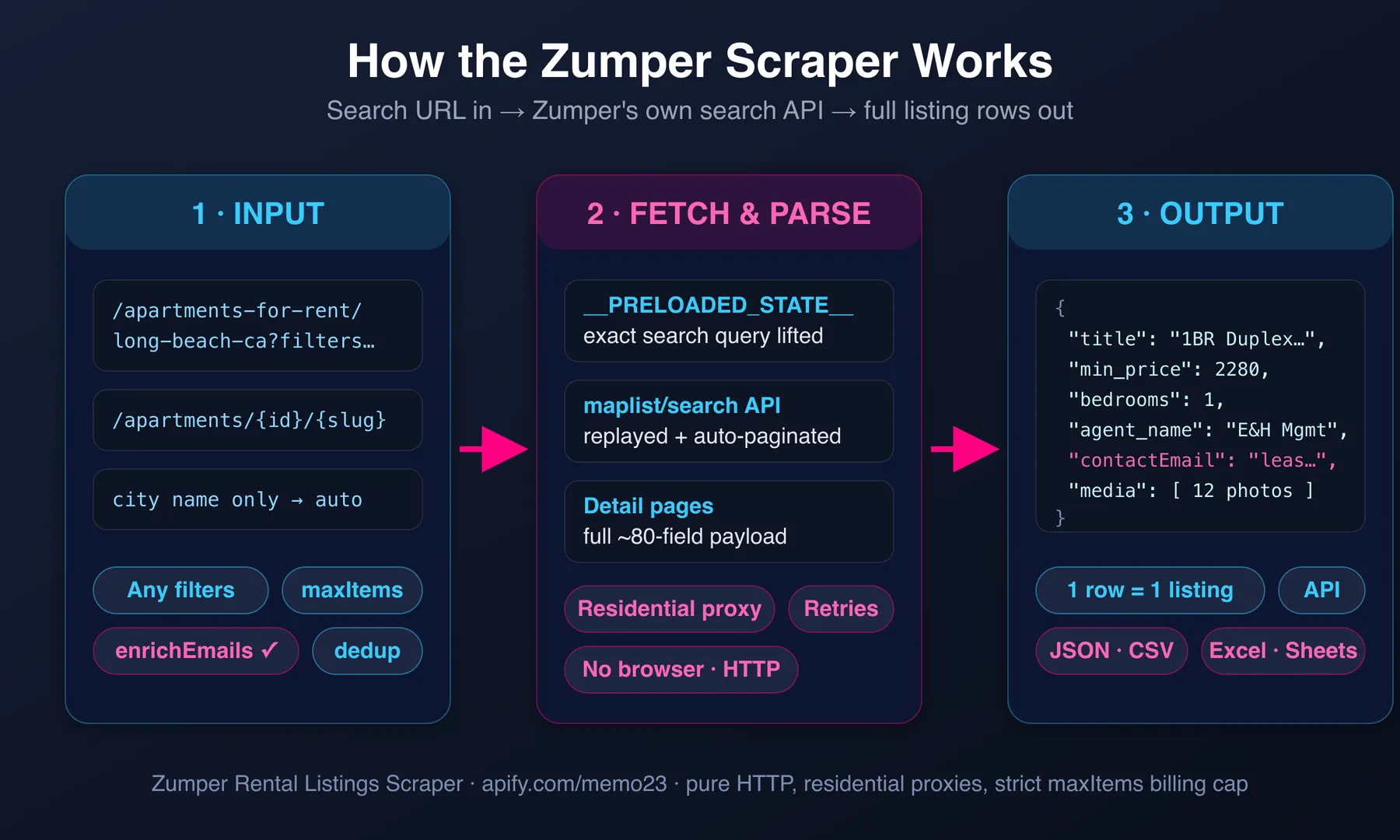
- You give a city or a link. Cities become Zumper searches. Search links keep the filters in their address, and the filter fields in the input are added on top.
- The actor reads every result page of the search until it reaches Max listings, then opens each listing to collect the full record.
- With change tracking on, each listing's rent is compared with the previous run of the same monitor. With Only new or changed listings, unchanged ones are dropped before they are opened.
- Rows land in your dataset as they are collected. Download them or connect them to Google Sheets, a webhook, Make, Zapier or your own code.
Input
| Field | Type | Default | What it does |
|---|---|---|---|
startUrls | array of URLs | - | Zumper search, building or listing links. Filters in a search link are kept. |
locations | array of strings | - | Cities to search: Chicago, IL, Austin TX, new-york-ny. Use this, startUrls, or both. |
maxItems | integer | 10 | Listings to return per run. With change tracking, how many search results are checked. |
minRent / maxRent | integer | - | Monthly rent range in dollars. |
minBedrooms / maxBedrooms | integer | - | Bedroom range; 0 includes studios. |
minBathrooms | integer | - | At least this many bathrooms. |
minSquareFeet / maxSquareFeet | integer | - | Floor space range. |
petFriendly | boolean | false | Only listings that accept pets. |
trackChanges | boolean | false | Add changeType, previousMinPrice, previousMaxPrice, priceChange, firstSeenAt to every row. |
onlyChanges | boolean | false | Leave out listings whose rent did not change since the last run of this monitor. Turns on trackChanges. |
monitorName | string | default | Keeps separate watch lists apart. Use one name per city or saved search. |
enrichEmails | boolean | false | Look up a contact email for the manager or brokerage. |
storeName | string | - | Older option: skip every listing this named store has seen before. |
maxConcurrency, minConcurrency, maxRequestRetries | integer | 10, 1, 10 | Speed and retry settings. The defaults suit almost every run. |
proxy | object | built-in | Leave as is unless you need your own proxy. |
Example: two cities, 2+ bedrooms under $3,000
Example: daily alert for new listings and rent drops
Save this as a task and schedule it once a day.
The first run returns everything as new and remembers it. Each later run returns only new listings and the ones whose rent changed. Set Max listings high enough to cover the whole search, so every run checks the same set.
Output schema
One row per building or listing. The flat columns come first, the full record after them.
Key output fields
| Field | Meaning |
|---|---|
minPrice, maxPrice | Monthly rent range in USD (CAD for Canadian cities). For a building, the range across its matching floor plans. |
minBedrooms, maxBedrooms, minBathrooms, maxBathrooms | Bedroom and bathroom range. 0 bedrooms is a studio. |
minSquareFeet, maxSquareFeet | Floor space range, when the listing states it. |
listingType | building for an apartment building page, listing for a single unit or house. |
agentName, brokerageName, phone, website | Who rents it out and how to reach them, as shown on Zumper. |
changeType | new, price_drop, price_increase or unchanged compared with the previous run of the same monitor. |
priceChange | Change in minPrice since the previous run, in dollars. Negative means cheaper. |
entity.data | The complete Zumper record: fees, pet policy, lease terms, media, floor plans and more. |
Pricing
Pay per event: you pay for listings delivered, not for time.
| Event | When it is charged | Price |
|---|---|---|
| Actor start | Once per run | $0.005 |
| Property listing row | Each listing saved to the dataset | $0.0025 |
| Contact email found | Only with enrichEmails, only when an email is found | $0.05 |
1,000 listings cost about $2.50. With Only new or changed listings on, unchanged listings are not saved and not billed, so a daily alert on a quiet city costs cents.
FAQ
Which areas does it cover? Every city Zumper lists in the United States and Canada.
Can I use the filters from the Zumper website?
Yes. Set the filters on zumper.com and copy the address from your browser. Links like /chicago-il/2-beds/under-3000/pet-friendly keep their filters. Forms like ?beds=2&max-price=3000 and /1-bedroom are understood too.
How do I get only new listings and rent changes?
Turn on Only new or changed listings, give the monitor a name, and schedule the run. The first run returns everything as new. After that each run returns only listings that are new or whose rent changed. The memory is kept in a key-value store named zumper-scraper-monitor in your own Apify account, one record per monitor name.
What counts as a change? A different lowest or highest rent than the previous run. A listing that disappears from Zumper is not reported.
Why is a row a building and not a single apartment?
Zumper groups many apartments under a building page. That row has the rent and bedroom range across the building's floor plans, and the floor plans themselves under units and entity.data.floorplan_listings.
Does Max listings cap the bill? Yes. The run stops collecting once it reaches the number, and you are billed only for rows saved.
How good is the email lookup? Best effort. When the listing links the manager's own website, that site is searched first; otherwise the company is looked up by name. Directory and marketplace links are ignored. Rows are always delivered, with or without an email, and you pay only for emails found.
Is it legal to scrape Zumper? The actor collects public listing data that any visitor can see without logging in. Read the Disclaimer below; how you use the data is your responsibility.
Support
- Report problems or ask for features in the Issues tab.
- Contact the author:
- Website: https://muhamed-didovic.github.io/
- Email: muhamed.didovic@gmail.com
Additional Services
Need Zumper data merged with other rental sites, delivered to your database or Google Sheets on a schedule, or a custom field added? Get in touch; custom actors and integrations are available.
Explore More Scrapers
- Apartments.com Scraper (US + Canada, w/ EMAILS)
- Redfin Scraper: Listings + Agent Database (Email & Phone)
- Realtor.com Agents Scraper
- Zillow Agents Scraper (w/ Email)
- Crexi Commercial Real Estate Scraper
🤖 For AI Agents & LLM Apps
Quick reference for agents calling this actor through the Apify MCP server or the Apify API (actor: memo23/zumper-scraper, id 3JtQCLqNeJYxezlsd).
Purpose: US and Canada rental listings from Zumper.com, one row per building or unit, with optional rent-change tracking between runs and optional contact-email lookup.
Minimal input (tested):
Inputs: startUrls (Zumper search, building or listing URLs) and/or locations (city names). Filters: minRent, maxRent, minBedrooms, maxBedrooms, minBathrooms, minSquareFeet, maxSquareFeet, petFriendly. Monitoring: trackChanges, onlyChanges, monitorName. Extras: enrichEmails, storeName.
Flat output fields: listingId, buildingId, listingType, title, url, address, formattedAddress, city, state, zipcode, neighborhood, latitude, longitude, minPrice, maxPrice, previousPrice, minBedrooms, maxBedrooms, minBathrooms, maxBathrooms, minSquareFeet, maxSquareFeet, unitCount, dateAvailable, listedAt, updatedAt, amenities, buildingAmenities, agentName, brokerageName, phone, website, imageCount, description, scrapedAt; with monitoring: changeType, previousMinPrice, previousMaxPrice, priceChange, firstSeenAt, previousSeenAt; with enrichEmails: contactEmail, contactWebsite, emailEnrichment. The full record follows under entity, units and related keys.
Behaviors:
- Always set
maxItems(default 10). A run never returns more rows than that. onlyChanges: truecan return 0 rows when nothing changed; the run status message then says so. That is a success, not an error.monitorNamescopes the change memory; reuse the same name on every scheduled run of one search.- Billed per row saved ($0.0025) plus $0.005 per run; emails $0.05 each, only when found.
⚠️ Disclaimer
This Actor is an independent tool and is not affiliated with, endorsed by, or sponsored by Zumper, Inc. or its subsidiaries (including PadMapper). All trademarks mentioned are the property of their respective owners.
The scraper collects only publicly visible data from Zumper.com, the rental listings any logged-out visitor can see. Use of this Actor must comply with Zumper's Terms of Service and all applicable laws, including data-protection regulations (GDPR, CCPA and others). Users must:
- Not use collected data to violate anyone's privacy
- Use contact emails only for lawful business outreach that complies with anti-spam laws (CAN-SPAM, CASL, GDPR)
- Not republish listing content in breach of copyright
We do not store collected data; the Actor writes it to your own Apify dataset for your authorized use.
SEO Keywords
zumper scraper, zumper rentals, zumper rental listings scraper, zumper apartment scraper, zumper api alternative, zumper data export, zumper csv export, rental listings scraper, apartments for rent data, rent price tracker, rent change alerts, new rental listings alert, rental market data, rent comps, apartment rent analytics, property manager leads, brokerage contact emails, real estate lead generation, US rentals scraper, Canada rentals scraper, padmapper listings, apartment building data, rental inventory monitoring, apify scraper


