
Antler Scraper
Pricing
from $2.50 / 1,000 results
Antler Scraper
Scrape data on Antler portfolio companies from the Antler directory. Export scraped data, schedule via API, and integrate with other tools or AI workflows.
Pricing
from $2.50 / 1,000 results
Rating
0.0
(0)
Developer

Michael G
Maintained by CommunityActor stats
0
Bookmarked
13
Total users
2
Monthly active users
a day ago
Last modified
Categories
Share
What does Antler Scraper do?
Antler Scraper allows you to extract data about companies from the Antler portfolio directory: company image, company name, description, location, sector, year, and website.
About Antler
Antler is a global early-stage VC and startup generator that backs founders from day zero. Today, Antler portfolio includes over 1,100 companies across six continents, spanning stages from inception through Series C, and covering sectors such as B2B software, FinTech, ConsumerTech, and more.
Because of this, the Antler portfolio is one of the best public sources for discovering high-quality early-stage startups, regional startup ecosystems, market segments, and company websites.
Company data fields
| Field Name | Type | Description |
|---|---|---|
| Company Image | String (URL) | Company image URL |
| Company Name | String | Company name |
| Description | String | Short company description |
| Location | String | Company location |
| Sector | String | Company sector/industry |
| Year | Int | Portfolio entry year |
| Website | String (URL) | Company website |
Why scrape Antler?
- Lead generation: discover startups by geography, sector, and keyword.
- Market research: analyze startup activity across countries and industries.
- Startup discovery: explore Antler-backed companies in one structured dataset.
- Ecosystem mapping: track where Antler-backed startups are being built.
- Website collection: gather company websites for outreach or enrichment workflows.
- Finding inspiration: browse startup ideas, positioning, and categories.
Example Input
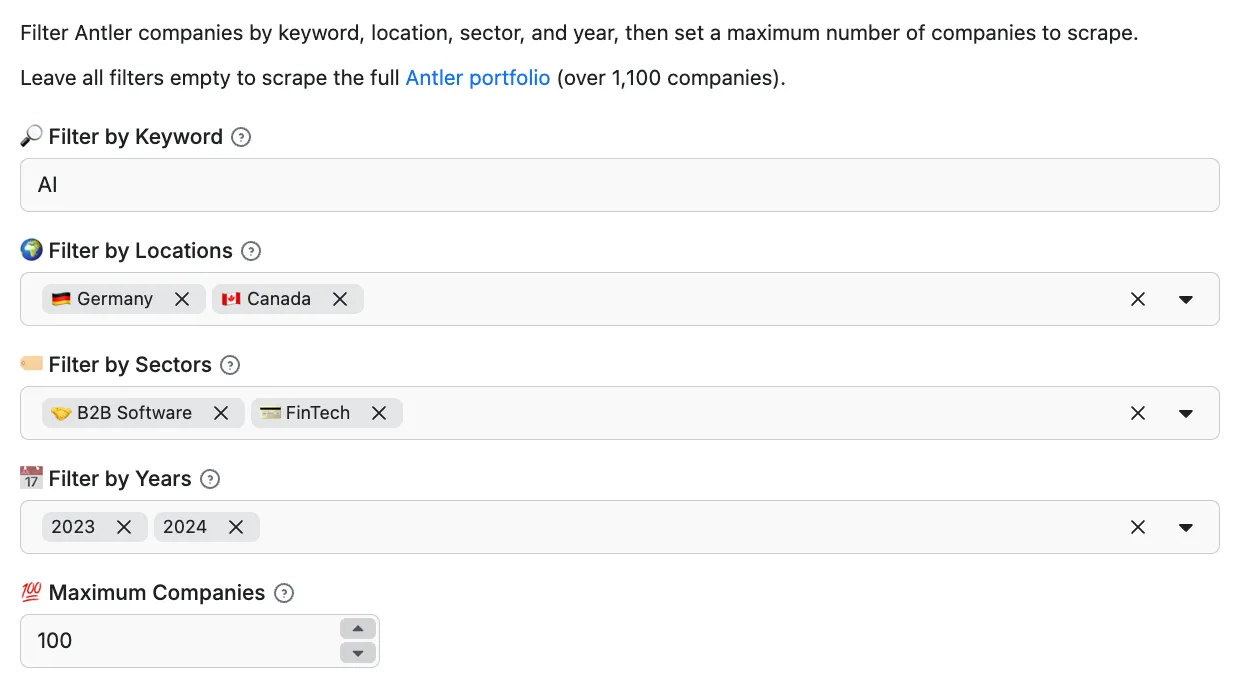
And here's the same, just in JSON.
Output sample
The results will be wrapped into a dataset which you can find in the Storage tab. Note that the output is organized in a table for viewing convenience. Here's an example of some of the output:
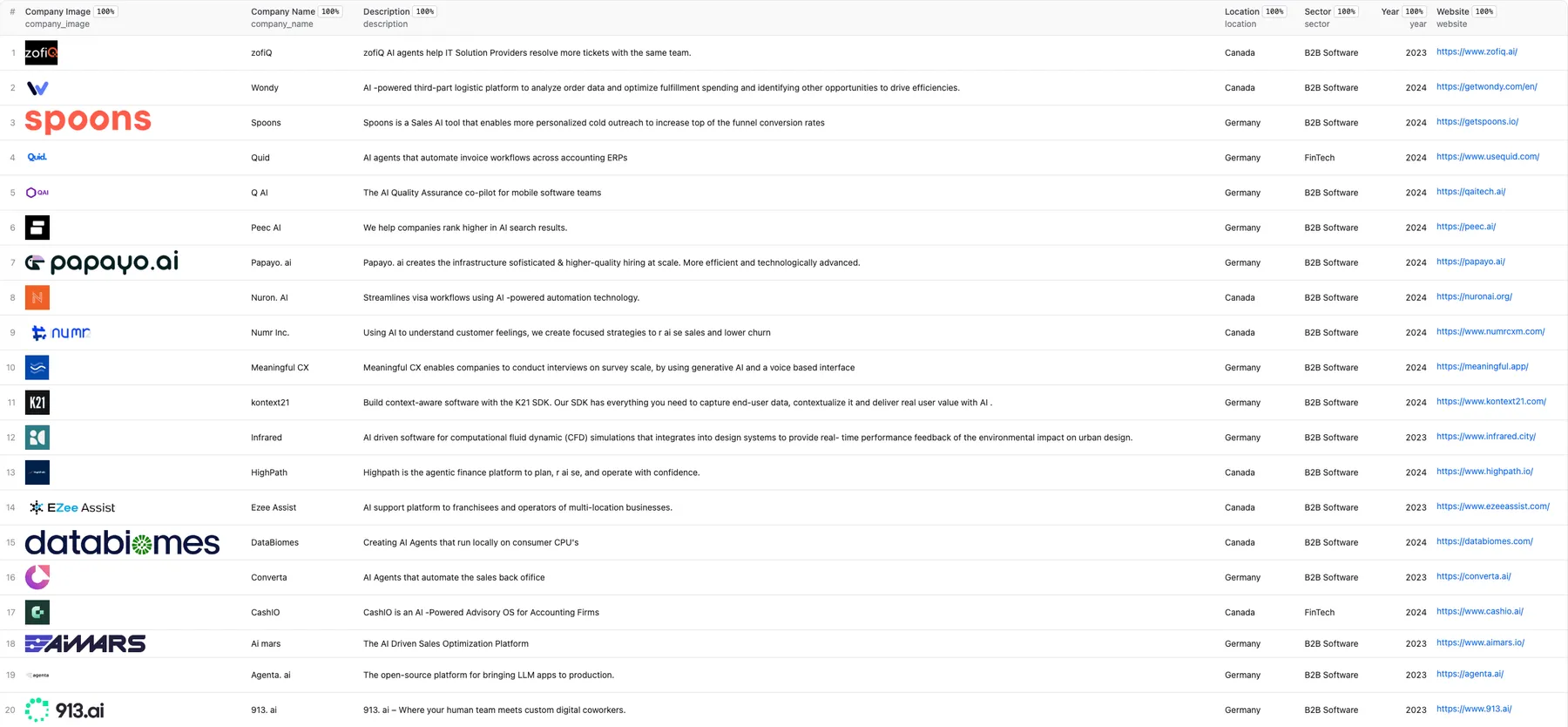
By clicking on the green Export button, you can download the dataset in XML, CSV, Excel, HTML, or JSON. See an example of a JSON file:
How do I use Antler Scraper?
The Antler Scraper is designed to help you easily extract company data from the web, even if you have no prior scraping experience. Follow these steps to scrape data from Antler portfolio directory:
- Enter your filters: Select keyword, locations, sectors, and years in the input fields.
- Set the limit: Optionally define the maximum number of companies you want to scrape.
- Run the Scraper: Click "Start" and wait for the data extraction to complete.
- Export your data in Excel, CSV, JSON, HTML, or via API.
The Actor applies filters directly through Antler visible portfolio UI, including the Search field and dropdown filters for Location, Sector, and Year.
Features
- Keyword Search: Filter companies using Antler built-in Search field.
- Location Filtering: Scrape companies from selected countries and regions.
- Sector Filtering: Focus on specific startup sectors such as B2B Software, FinTech, or ConsumerTech.
- Year Filtering: Narrow results by Antler year.
- Maximum Companies: Limit the total number of companies returned in a run.
How much does Antler Scraper scraping cost?
This scraper uses the Pay-per-result pricing model, so your costs can be easily calculated: it will cost you $5 to scrape 1,000 search results, which is $0.005 per item. Apify provides you with $5 in free usage credits every month on the Apify Free plan, allowing you to scrape up to 50 search results from the Antler portfolio directory for free using those credits.
For regular data extraction, consider upgrading to the $29/month Starter plan, which can get you up to 5,800 search results every month.
Integrations and Antler Scraper
Antler Scraper can be connected with almost any cloud service or web app thanks to integrations on the Apify platform. You can integrate with Make, n8n, Zapier, Apollo, Clay, Slack, Airbyte, GitHub, Google Sheets, Google Drive, and more.
Your feedback
We're always working on improving the performance of our Actors. If you've got any technical feedback for Antler Scraper or simply found a bug, please create an issue on the actor's Issues tab in Apify Console.


