
Eventbrite Events Scraper & Discovery
Pricing
from $1.05 / 1,000 event records
Eventbrite Events Scraper & Discovery
Scrape public Eventbrite events by city, category and date: name, time, venue, address, free or paid, price range, URL and organizer. Not affiliated with Eventbrite.
Pricing
from $1.05 / 1,000 event records
Rating
0.0
(0)
Developer

Muhammet Mustafa Dincer
Maintained by CommunityActor stats
0
Bookmarked
3
Total users
2
Monthly active users
2 days ago
Last modified
Categories
Security
Limited permissionsShare
What is Eventbrite Events Scraper & Discovery?
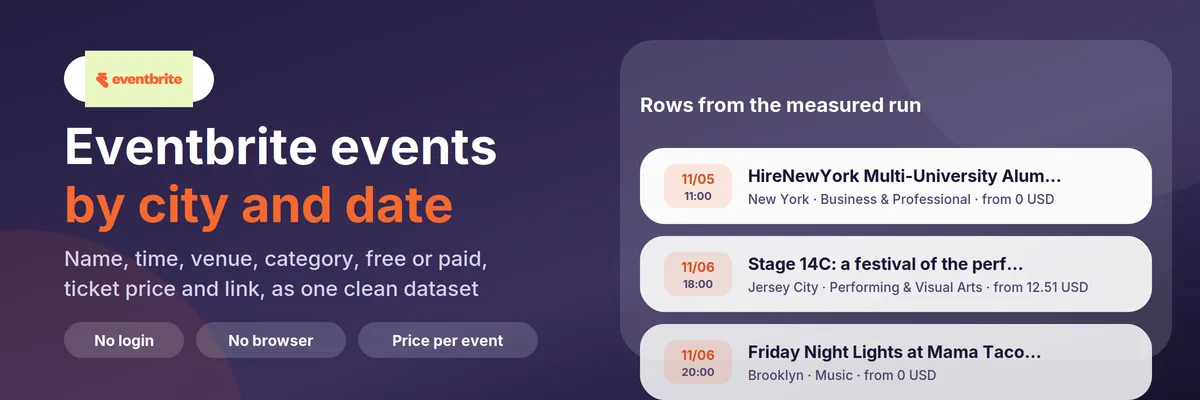
Eventbrite Events Scraper & Discovery is an Apify Actor that reads Eventbrite's public event discovery pages and returns the events as one clean dataset. Name a city, optionally a category, a date range or a price filter, and you get one row per event: title, start and end time, venue with address and coordinates, category and subcategory, free or paid, the ticket price range, the public event URL, and — only if you ask for it — the organizer's public display name.
It needs no login, no API key and no browser. It reads the same public pages anyone can open in a browser, at a gentle request rate, and it stops when Eventbrite shows a bot challenge instead of trying to get around one.
Quick answer: when should you (or an AI agent) pick this Actor?
Pick this Actor when you want a list of what is happening in a city or a region: events for a newsletter or a city guide, a conference calendar for a date window, "what is on in Berlin next week", a lead list of event organizers for local outreach, a price survey of ticket prices in a category, or a tool that lets an AI agent answer "what events are in New York this weekend" with real data instead of guessing.
Pick something else when you need the full text of every event description, attendee or ticket-holder data, or events from Meetup, Lu.ma, Dice or Ticketmaster. This Actor reads Eventbrite only, and it returns public listing data, not ticket sales or attendee information.
Defaults that work: send {"cities": ["new-york", "berlin"]} and you get 200 events split across the two cities, sorted soonest first, with prices. For a narrower run send {"cities": ["berlin"], "categories": ["music"], "startDate": "2026-12-01", "endDate": "2026-12-31"}.
At a glance
| Does | Reads Eventbrite's public discovery pages for a list of cities, with optional category, price, keyword and date filters, and returns one row per event |
| Input | cities (required, up to 10). Optional: categories, price, sortBy, startDate, endDate, searchQuery, excludeKeywords, maxEvents, maxPagesPerSearch, includePriceDetails, includeOrganizer |
| Output | One row per event with recordType: "event": name, startAt, endAt, venue name, address, city, country, coordinates, category, subcategory, format, isFree, priceMin, priceMax, priceCurrency, url, summary, image. Plus one summary row per search with recordType: "search" |
| Needs | No login, no API key, no browser. Apify Proxy is optional and normally not needed |
| Speed | A page holds 20 events. 60 events from two cities with prices took 40 seconds; 737 events without prices took 76 seconds |
| Pricing | Pay per event. Free plan: $0.001 per run, $0.0015 per event, $0.002 per discovery page read. Search rows and filtered-out events are free |
| Does not | Return attendee data, emails, phone numbers or ticket-holder information; read other event platforms; bypass a bot challenge; return full event descriptions |
Key terms used in this README
- Discovery page: the public
/d/...page where Eventbrite lists events for a place, for examplehttps://www.eventbrite.com/d/germany--berlin/all-events/. This is the page the Actor reads. - Place slug: Eventbrite's name for a place in the URL, for example
germany--berlinorny--new-york. You do not need it:berlinandnew-yorkwork, and the Actor follows Eventbrite's redirect to the canonical slug. - Event row: a dataset row with
recordType: "event". One public event, flat and self-contained. - Search row: a dataset row with
recordType: "search". One per city and category in the run, with the URL that was read, how many events Eventbrite reports and the outcome when something went wrong. - Price enrichment: opening each event page once to read the ticket price range. List pages do not carry prices, so this is the only way to get them; it costs one extra request per event.
- Free event: an event whose most expensive published ticket is 0. Eventbrite lists many events at "from $0" because they have a free ticket type next to paid ones; those are reported as paid with
priceMin: 0.
What can you use it for?
City guides and newsletters
Pull everything happening in a city over the next two weeks, sorted soonest first, and drop the rows you do not want with excludeKeywords. The summary, imageUrl and url fields are enough to build a listing page.
Conference and meetup calendars for a date window
Set startDate and endDate to a fixed window, for example the week of a trade show, and combine it with categories: ["business"] to get the business events in that city in that week. Events that span several days are kept when they overlap the window.
Ticket price research
With includePriceDetails on, every row carries priceMin, priceMax and priceCurrency as published. Group by category or format to see what a concert, a workshop or a conference costs in a city. Nothing is converted between currencies and nothing is estimated: you get the number Eventbrite shows.
Organizer and lead research
Turn on includeOrganizer to get the public organizer display name and profile URL for each event. That is how you find the people and companies running events in a niche. It is off by default because many Eventbrite organizers are private individuals.
AI agents and MCP
Give an agent a tool that answers "what is on in Lisbon this weekend" with real rows: name, time, venue, price and link. Every row is flat and has the same fields, so the agent can filter and cite without knowing Eventbrite's page structure.
Event monitoring for a venue or a brand
Run it on a schedule for your city and category, keep the dataset history and compare runs to see which events are new and which have disappeared. The eventId is stable, so it works as the deduplication key.
How does it work?
- Each entry in
citiesbecomes one or more searches. With no categories set that is one search per city; with N categories it is N searches per city. The run refuses an input that would need more than 25 searches. - For each search the Actor builds the discovery URL the same way Eventbrite links it:
/d/<place>/<price>--<category>--events/, withpage,q,start_dateandend_datein the query string. A category search without a price filter walks both thefree--andpaid--bands, because that is the only URL shape where Eventbrite applies a real category filter. - It reads the page and takes the events out of the data block Eventbrite embeds in the HTML. Nothing is guessed from the visual layout, so a cosmetic redesign does not break the fields.
- Your date window and
excludeKeywordsare applied. Events that fail the filters are dropped before they are written, so they are not charged. - If
includePriceDetailsis on, each remaining event page is read once for the ticket price range, the currency, the price status and the availability. - Rows are written sorted by start time, and a search row records what happened: the URL, the number of events Eventbrite reports, how many came back, how many pages were read and how many events the filters dropped.
How to scrape Eventbrite events (step by step)
- Open the Actor and type one or more cities in Cities, one per line:
berlin,new-york,istanbul,london. A country-qualified slug such asgermany--berlinor a full discovery URL also works. - Leave Categories empty for the broadest result, or pick one or more, for example
music. - Optionally set Price, Starting from, Up to, Keyword or Exclude keywords.
- Set Max events to what you actually need. This is the main cost control; 30 is a good test size.
- Click Start. Open the Output tab and use the Events view, or download the dataset as JSON, CSV or Excel.
- If a search comes back empty, open the
searchUrlfrom the search row in your browser. If the city name was wrong you will see it there; if Eventbrite shows a bot check, wait and run again later.
How to filter by price and date
- Price uses Eventbrite's own filter, which is part of the URL (
free--eventsorpaid--events), so you only pay for events that match. It is not a post-filter. - Categories need the price band in the URL to work at Eventbrite.
/d/<place>/music/looks like a category page but is really a text search for the word "music" and returns food and holiday events too. Onlyfree--music--eventsandpaid--music--eventssend a real category tag, so a category search at any price reads both bands and merges them. That is two requests instead of one per page, and the Actor says so in the run log. Verified on a Berlin music run: 24 of 24 rows wereMusic. - Starting from and Up to are sent to Eventbrite as
start_dateandend_dateand are applied again after the download. An event that starts before the window but runs into it is kept. - Keyword goes to Eventbrite's own search box (
q=). It matches loosely, which is why Exclude keywords exists: it is a plain case-insensitive substring check on the name, summary, category and venue, applied after the download so excluded events are not charged.
Input
| Field | Type | Default | What it does |
|---|---|---|---|
cities | list of text | new-york, berlin | Places to search: a city name, a place slug or a discovery URL. Up to 10 entries |
categories | list of text | empty (all) | Eventbrite categories, for example music, business, food-and-drink. Each extra category multiplies the searches |
price | choice | any | any, free or paid, using Eventbrite's own price filter |
sortBy | choice | date | date sorts the events that were read soonest first. eventbrite keeps Eventbrite's own order |
startDate | text | empty | YYYY-MM-DD. Only events that have not ended before this date |
endDate | text | empty | YYYY-MM-DD. Only events that start on or before this date |
searchQuery | text | empty | A word or phrase Eventbrite should match, for example jazz |
excludeKeywords | list of text | empty | Drop events whose name, summary, category or venue contains any of these words. Not charged |
maxEvents | number | 200 | Events per search. The main cost control. Max 20,000 |
maxPagesPerSearch | number | 3 | Discovery pages per search, 20 events each. Max 49 |
includePriceDetails | yes/no | yes | Read each event page once for the price range, currency and availability. One extra request per event |
includeOrganizer | yes/no | no | Add the public organizer display name and profile URL |
requestsPerSecond | number | 1 | Request rate. Max 3. 1 per second is the safe setting; a measured run at 2.5 hit HTTP 429, and the Actor never retries a bot challenge |
proxyConfiguration | proxy | off | Optional; normally not needed |
Output
Every run writes one dataset with two kinds of rows. Filter on recordType.
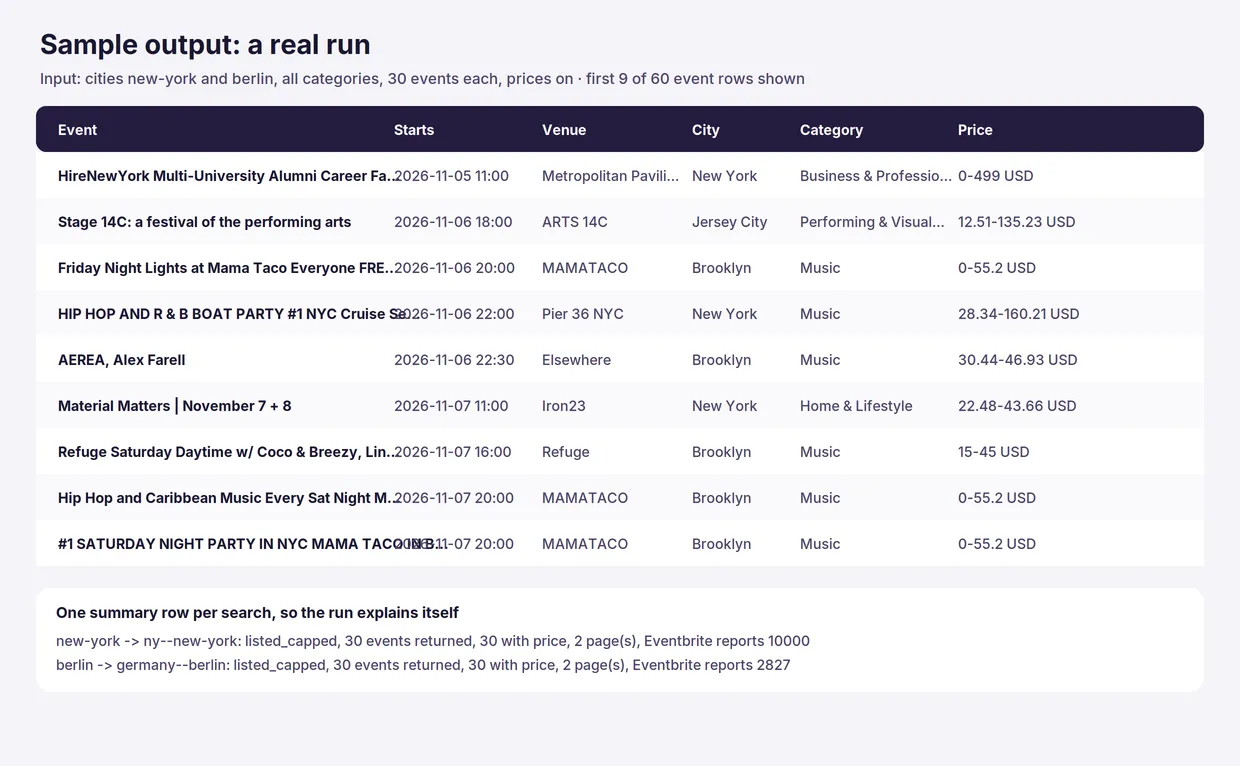
Event row. A real row from a measured run on New York:
Search row. One per city and category, so a run explains itself:
Field notes:
startAtandendAtare ISO 8601 with the event's own UTC offset, for example-05:00in New York winter. Sorting or importing into a calendar keeps the local wall-clock time the organizer meant. These values were checked against the machine-readable event data Eventbrite publishes on the event page itself.startDateandendDateare the plain local dates Eventbrite lists, which is what you want for a "which day is it on" filter.isFreeistrueonly when the highest published ticket price is 0. An event with a free ticket type next to paid ones haspriceMin: 0,isFree: false.isFree,priceMin,priceMax,priceCurrencyandticketAvailabilitystaynullwhenincludePriceDetailsis off, or when the event page could not be read. Nothing is estimated.organizerNameandorganizerUrlstaynullunlessincludeOrganizeris on.eventsOnEventbriteis what Eventbrite reports for that search; it is capped at 10,000 by Eventbrite itself for very large cities, so treat it as a floor.- Search
statusvalues:listed,listed_partial,listed_capped,no_matches,budget_reached,not_found,blocked,http_error,network_error,invalid_response.
How much does it cost to scrape Eventbrite events?
You pay per event. The Free plan prices are below; paid Apify plans get lower prices per event.
| Event | When | Free plan price |
|---|---|---|
| Actor start | once per run | $0.001 |
| Event record | each event written to the dataset | $0.0015 |
| Search page | each discovery page read (20 events) | $0.002 |
Search rows, events dropped by your filters, and pages that could not be read are free.
Examples
- 200 events over three pages: $0.001 + 200 × $0.0015 + 3 × $0.002 = $0.307.
- 1,000 events: $0.001 + 1,000 × $0.0015 + 50 × $0.002 = $1.60.
- A weekly city guide of 50 events: about $0.08 per run.
Set a maximum cost per run in the run options to cap spending. The Actor checks the remaining budget before each page, stops cleanly at the limit and says so in the run summary and in the search row.
Measured cost. Two runs on this Actor, measured on 2026-11-03:
| Run | Events | Pages | Compute | Charges |
|---|---|---|---|---|
| 2 cities, prices on | 60 | 4 | 0.0055 CU | 1 start + 4 pages + 60 events |
3 cities, prices off, maxEvents: 400 | 737 | 37 | 0.0106 CU | 1 start + 37 pages + 737 events |
Both are well inside the target: 1,000 events with prices costs about $1.60 in event charges and roughly $0.02 of platform compute, so compute is under 2% of the revenue. Compute grows slowly with the number of pages, not with the price of the run.
The 737-event run also produced the one honest caveat about speed: at 2.5 requests per second Eventbrite started answering HTTP 429 after around 37 pages. That is why the default is now 1 request per second, and why a 429 stops the run with a clear message instead of hammering the site.
Eventbrite Events Scraper compared with other approaches
| This Actor | A single-city Eventbrite scraper | An events API aggregator | Your own script | |
|---|---|---|---|---|
| Multiple cities in one run | Yes, one dataset | Usually one city per run | Yes, with a paid key | Whatever you write |
| Category, price and date filters | Yes, in the URL, so you do not pay for what you exclude | Varies | Yes | You build them |
| Ticket price range | Yes, from the event page, one request each | Often not | Usually yes | You build it |
| Organizer names | Optional, off by default | Often sold as the main feature, sometimes with emails | Usually yes | You build it |
| Personal data in output | No, by design | Often includes contacts | Varies | Depends on you |
| Login, key or browser | None | None or a browser | An API key and a monthly fee | None |
| Maintenance | Handled by the Actor | Handled by the Actor | Handled by the vendor | Yours |
Most Eventbrite Actors in the Apify Store charge between $0.001 and $0.02 per event. This one sits in the lower half of that range and adds the price range and availability that the cheapest ones leave out. The reason to pick it is the combination of city, category, price and date filtering with a full event row for a low per-event price, not an exclusive feature.
Tips for best results
- Start with 30 events to see the shapes of the data before you pay for a large run.
- Use
price: "free"when you only want free events; that filter runs at Eventbrite, so paid events never appear in your bill. - Leave
includePriceDetailsoff for a cheap, fast city list. Turn it on only when the price matters. - Keep
includeOrganizeroff unless you have a reason to collect organizer names; it also keeps person-shaped data out of your dataset. - Sorting has a limit. Eventbrite has no working date-sort parameter, so
sortBy: "date"sorts the events the Actor actually read. WithmaxEventsbelow the full result count you get the soonest of that slice, not the soonest in the city. RaisemaxPagesPerSearchif that matters. - Name the city the way Eventbrite does if a name is ambiguous.
parisworks, butparis--texasandfrance--parisare different places; use the discovery URL when you are unsure. - Watch the search rows. A
no_matchesstatus means the filters were too tight, not that the Actor failed.
Limits and good to know
- Eventbrite only. Meetup, Lu.ma, Dice, Ticketmaster and Facebook Events are not read.
- Listing data, not full descriptions. Eventbrite's discovery pages carry the summary, not the long description. The Actor does not open pages for the description, so it stays cheap.
- At most 10,000 events per search. Eventbrite caps its own result count there and exposes 49 pages of 20. Use narrower date windows or more categories to go deeper.
- Prices are what Eventbrite publishes as an aggregate range, not a per-ticket-type breakdown. Fees, taxes and sold-out ticket types are not separated.
- Online events appear in the same lists with
isOnline: trueand an empty venue; useexcludeKeywords: ["online"]if you only want physical events. - Bot challenges are not bypassed. If Eventbrite shows a verification page, the search row says
blockedand the run tells you. The Actor does not change identity or use a browser to get past a challenge. - Results change between runs. Eventbrite's discovery order depends on its own ranking, so two runs can return different slices of a large city. Deduplicate on
eventId, or turn ononlyNewso a later run of the same city, category and price skips events this Actor already delivered. Those skipped events are not charged. The discovery pages are still read, so search pages are still charged.
Use it from AI agents, the API and code
Apify MCP server (ChatGPT, Claude, Cursor and other MCP clients). Connect https://mcp.apify.com, then:
search-actorswith a short query such asEventbrite events.fetch-actor-detailsformmdincer/eventbrite-events-finderto read the input schema.call-actorwith the input below and a spending cap incallOptions.get-dataset-itemswith the returned dataset ID.call-actorreturns the dataset ID, not the rows.
To give an MCP client this Actor as its own tool (no search step), connect https://mcp.apify.com?tools=mmdincer/eventbrite-events-finder.
JavaScript
Python
HTTP (one request, returns the rows)
The synchronous endpoint waits for the run to finish, so use it for a small run. For many cities, start the run asynchronously and read the dataset when it ends.
Automation recipes
Weekly city guide by email or Slack. Save the input as a task with a weekly schedule. In a webhook on Run succeeded, fetch the run's dataset and keep rows where recordType is event; build the message from name, startAt, venueName, priceMin and url.
Google Sheets calendar. Fetch the dataset as CSV (/v2/datasets/{id}/items?format=csv) after each run and append it to a sheet. startAt imports as a date and time in most spreadsheet tools because it carries the offset.
Zapier or Make. Use Apify as the trigger for a finished task run, add the step that gets dataset items, filter on recordType equal to event, then send the rows to your app. See the Apify Zapier integration and the Apify Make integration.
Price survey. Run the same city and category monthly with includePriceDetails on and keep the history. priceMin, priceMax and priceCurrency compare directly because they are the numbers Eventbrite publishes.
Scheduling. Save your input as a task (for example berlin-music-weekly, Mondays at 06:00) and add a schedule in the Apify Console.
Is it legal to scrape Eventbrite?
The Actor reads only pages that anyone can open in a browser without an account, and it reads them at a gentle rate (two requests per second by default, one per second by default, never more than three). It backs off when Eventbrite answers 429 and stops the run instead of insisting. It does not log in, does not read attendee, buyer or ticket-holder data, returns no emails or phone numbers, and keeps organizer names off by default so a dataset does not become a list of private individuals. It also stops instead of bypassing a bot challenge.
This is a grey area, and you should know it before you run it. Eventbrite's Terms of Service state that you may not "scrape, crawl, or employ any automated means to extract data from the Sites" and may not use Site Content for commercial purposes. The Actor does not have Eventbrite's permission, and its use is not a licence from Eventbrite. The published pages are public and Eventbrite does not put this data behind a login, which is why the tool exists, but the terms are stricter than the technical access. Whether your specific use is acceptable depends on your jurisdiction and your purpose; it is not legal advice and you are responsible for your own use.
We remove this Actor on request. If Eventbrite or a rights holder asks us to stop, the Actor is unpublished the same day. Contact the Actor owner through the Apify profile page.
Rate and behaviour. The Actor honours robots.txt for the paths it uses, keeps a single request in flight, defaults to one request per second, backs off when it sees a 403 or 429, and gives up rather than retrying a verification page. A measured run at 2.5 requests per second was rate-limited after about 37 pages, which is why the default is lower. Pages that cannot be read are reported in the search row and are not charged.
Trademarks. Not affiliated with Eventbrite. This Actor is an independent tool, not endorsed or sponsored by Eventbrite Inc. "Eventbrite" and the Eventbrite logo belong to Eventbrite Inc. and are used only to say which site the Actor reads.
FAQ
How do I scrape Eventbrite events for a city?
Put the city in Cities, for example berlin or new-york, set Max events and click Start. You get one row per event with the name, time, venue, address, category, price and URL. Add a category or a date range to narrow it.
Do I need an Eventbrite API key?
No. Eventbrite closed its public event search API in December 2019, so this Actor reads the public discovery pages instead. No key, no login and no account are needed.
How do I get only free events?
Set Price to free. The filter runs at Eventbrite, so paid events are never read or charged. Do not use a keyword search for "free": many paid events mention the word in their title.
Why is an event with a $0 ticket marked as paid?
Because it has paid tickets too. Eventbrite publishes "from $0" when any ticket type is free, so the Actor looks at the highest price instead: priceMax above 0 means the event sells tickets. The row still shows priceMin: 0, so you can spot the free tier.
Why are prices empty in my output?
Either Add price range and ticket status is off, or the event page could not be read. Prices only come from the event page, never from the list. Turn the option on and check eventsEnriched in the search row.
Which cities can I use?
Any place Eventbrite has a discovery page for: city names, country-qualified slugs such as germany--berlin, and full discovery URLs all work. online is also a valid place for online events. An unknown place returns not_found in the search row.
How many events can I get per run?
maxEvents per search, up to 20,000, and up to 49 pages of 20 events per search. Eventbrite itself stops at 10,000 results per search, so for very large cities use a narrower date window or more categories.
Can I search several cities at once?
Yes, up to 10 cities. Each city and category pair is one search, and the dataset keeps searchCity and searchCategory on every row so you can tell them apart.
Does it return the full event description?
No. The discovery pages carry a short summary, which is returned as summary. Reading full descriptions would mean one extra request per event for a much larger payload.
Does it return organizer emails or attendee lists?
No, and it never will. The Actor returns the public organizer display name only when you turn Include organizer name on, and it never reads attendee, buyer or ticket-holder data.
Can I sort by date?
Yes, sortBy: "date" sorts the events the Actor read from soonest to latest. Eventbrite has no working date-sort parameter, so this is a sort of what was collected, not of the whole city. Raise maxPagesPerSearch to collect more before sorting.
What happens if Eventbrite blocks the request?
The search row gets status: "blocked" and a message, and the run summary warns you. The Actor does not try to get around the check. Wait and run again later, or lower requestsPerSecond (1 is the default for this reason).
How much does a run cost?
A 200-event run over three pages is about $0.31 on the Free plan; 1,000 events about $1.60. Set a maximum cost per run to cap it.
Do the category filters really filter?
Yes, and it took a specific URL shape to get there. Eventbrite's bare /d/<place>/music/ page looks like a category page but is really a text search for the word "music", so it returns food and holiday events too. Only /d/<place>/free--music--events/ and /d/<place>/paid--music--events/ send a real category tag, so a category search at any price reads both bands and merges them. A Berlin music run returned 24 of 24 rows in Music. If Eventbrite ever answers without the category tag, the search row says listed_partial with a warning instead of pretending the rows are all in that category.
Why did I get fewer events than I asked for?
Check the search row. eventId duplicates, your date window, excludeKeywords, the page limit and the end of Eventbrite's result list all reduce the count. eventsFilteredOut tells you how many your filters removed.
Can I use the output commercially?
That depends on Eventbrite's terms and your jurisdiction, not on the Actor. Read the legal section above and take your own advice before you build a commercial product on the data.
What if Eventbrite changes its pages?
The Actor reads the structured data block Eventbrite embeds for search engines, not the visual layout, so ordinary redesigns do not break it. A real change would show up as invalid_response in the search row; open an issue on the Actor page and it gets fixed.


