

Shopify Price Tracker & Stock Monitor - New Products
Under maintenancePricing
from $2.10 / 1,000 detected changes
Shopify Price Tracker & Stock Monitor - New Products
Under maintenanceShopify price tracker and stock monitor. Each run compares the store's public catalog with the last run and returns only what changed: new products, price drops and increases, sell-outs, restocks, removals. Pay per change. No login or browser. No stock quantities. Not affiliated with Shopify.
Pricing
from $2.10 / 1,000 detected changes
Rating
0.0
(0)
Developer

Muhammet Mustafa Dincer
Maintained by CommunityActor stats
0
Bookmarked
2
Total users
1
Monthly active users
an hour ago
Last modified
Categories
Security
Limited permissionsShare
What is Shopify Store Monitor?
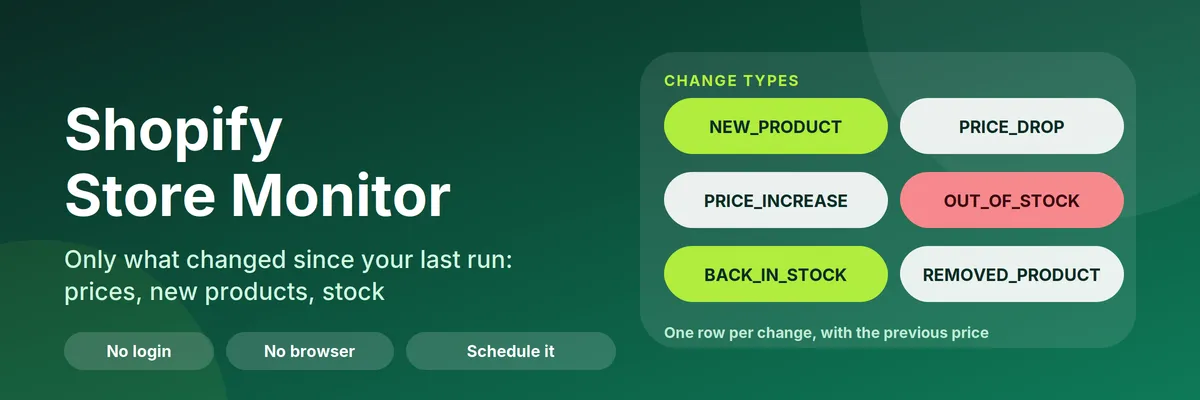
Shopify Store Monitor is an Apify Actor that tracks public Shopify stores and returns only what changed since your last run: new products, price drops, price increases, sold-out products, restocks and removed products. Enter one or more store domains, click Start, and from the second run on you get one row per detected change instead of another full catalog dump.
It works as a Shopify price tracker, a Shopify stock monitor, a restock alert and a new product alert in one tool. It needs no login, no browser and no API key. It reads the catalog that every Shopify store publishes at /products.json, so a store with 1,000 products is checked in a few seconds. You pay a small fee per store checked and a fee per detected change, not per catalog product.
Quick answer: when should you (or an AI agent) pick this Actor?
Pick Shopify Store Monitor when the goal is to notice changes in one or more Shopify stores over time: competitor price monitoring, restock and sell-out alerts, new product launches, or a supplier catalog watch. Run it on a schedule and read only the change rows.
Pick something else when you need exact stock quantities, sales or revenue estimates, reviews, store owner contacts, full product descriptions, or stores that are not built on Shopify. This Actor does not return any of those.
Defaults that work: send {"stores": ["allbirds.com"]}. The first run saves a baseline and returns no changes. Run the same input again later to receive the changes. Keep the same monitorName between runs, because runs with the same name compare against each other.
At a glance
| Does | Compares each store's public catalog with the previous run and returns only the differences. A second mode lists all products of a store as they are now |
| Input | stores (required, up to 200 domains or URLs). Optional: mode, changeTypes, minPriceChangePercent, keyword filters, monitorName |
| Output | One row per detected change: changeType, title, price, previousPrice, priceChangePercent, available, url, variantChanges, detectedAt. One summary row per store |
| Change types | NEW_PRODUCT, PRICE_DROP, PRICE_INCREASE, OUT_OF_STOCK, BACK_IN_STOCK, REMOVED_PRODUCT |
| Needs | No login, no API key, no browser. Apify Proxy is optional |
| Speed | About 250 products per request. A store with 1,000 products takes a few seconds |
| Pricing | Pay per event. Free plan: $0.001 per run, $0.002 per 1,000 products checked, $0.003 per detected change. A run without changes costs only the start and scan fees |
| Does not | Stock quantities, sales or revenue estimates, reviews, store owner contacts, product descriptions or full-size image lists |
Key terms used in this README
- Baseline: the saved snapshot of a store's catalog from the previous run. The first run of a store only saves a baseline.
- Detected change: one new product, price change, sell-out, restock or removed product found by comparing the current catalog with the baseline. Each detected change is one billable event and one
changerow. - Change row: a dataset row with
recordType: "change". It is flat and self-contained, so it can be sent to a webhook as it is. - Store row: a dataset row with
recordType: "store". One per store and run, with the outcome (status) and the number of products and changes. - Watchlist: a named baseline, set with
monitorName. Use one watchlist per purpose, for examplecompetitorsandsuppliers.
What can you use it for?
Competitor price monitoring
Add the stores of your competitors and schedule a daily run. You get a PRICE_DROP or PRICE_INCREASE row only when a price moves, with previousPrice, price and priceChangePercent. Set minPriceChangePercent to 1 to 5 to ignore moves of a few cents.
Restock and sell-out alerts
Watch a store or a single collection and report OUT_OF_STOCK and BACK_IN_STOCK. Stock is a yes/no flag: a product is out of stock when none of its variants can be bought. Hourly runs make sense for limited drops.
New product and launch tracking
Report every NEW_PRODUCT that a brand adds, and every REMOVED_PRODUCT it drops. Use Only watch products matching to follow one product line.
Supplier and dropshipping catalog watch
Keep a separate watchlist for your suppliers to learn when an item is delisted, goes out of stock or changes cost. A separate monitorName keeps these baselines apart from your competitor watchlist.
Data for spreadsheets, repricing tools and alerts
Every change row has the store, product, URL, old and new price and old and new availability. Send the rows to Google Sheets, a repricing script, a Slack channel or your own database. See the automation recipes below.
How does it work?
- First run (baseline). The Actor downloads the store's catalog and saves a compact snapshot in a named key-value store in your own Apify account (
shopify-store-monitor-state). You get one store row per store with statusbaseline_saved. A baseline run is charged only the start fee and the catalog scan fee, never a change fee. If the run is not allowed to create that named store, it does not crash. Apify's automated store test uses a token that answers the create call with HTTP 403 (insufficient-permissions). The Actor then writes the snapshot to this run's default key-value store and still checks the catalog. That copy is not kept for the next run, so the check is a first baseline. A run that can create the named store keeps using it. - Next runs (compare). The Actor downloads the catalog again, compares it with the baseline and writes one change row per detected change. Then it saves the new baseline.
- Schedule it. Put the Actor on a daily or hourly schedule in the Apify Console, or call it from your own system. Every run reports the changes since the previous run.
Use the Watchlist name field to keep several independent watchlists on the same stores.
What changes does it detect?
changeType | Meaning |
|---|---|
NEW_PRODUCT | A product that was not in the previous baseline |
PRICE_DROP | At least one variant got cheaper. price and previousPrice show the variant with the biggest move; variantChanges lists all |
PRICE_INCREASE | At least one variant got more expensive (same fields) |
OUT_OF_STOCK | The product had at least one variant in stock before and has none now |
BACK_IN_STOCK | The product had no variant in stock before and has at least one now |
REMOVED_PRODUCT | A product that is no longer in the public catalog (deleted, unpublished or hidden) |
One product can produce several rows in one run, for example a price drop and a restock. Use Minimum price change (%) to ignore tiny price moves.
How to monitor a Shopify store (step by step)
- Open the Actor and click Try for free.
- Enter one or more store domains, for example
allbirds.com. A collection URL such ashttps://allbirds.com/collections/menswatches only that collection. - Keep Mode on
Changes since the last runand click Start. This first run saves the baseline. - Run it again later, or open Schedules and run it every day. Download the results from the Output tab or read them through the API.
To see all products of a store instead, set Mode to Snapshot (full product list). Snapshot mode does not compare and does not save anything.
Input
| Field | What it does |
|---|---|
stores | Store domains or URLs, one per line. Collection URLs are supported. Up to 200 per run |
mode | changes (default) or snapshot |
changeTypes | Which changes to report. Changes you leave out are not charged and are not reported later |
minPriceChangePercent | Ignore price moves smaller than this percentage |
includeKeywords, excludeKeywords | Watch only matching products, or skip matching ones (title, brand, type, tags). Changing them saves a new baseline |
monitorName | Name of the saved baseline, to keep separate watchlists |
maxProductsPerStore | Product limit per store (default 5,000, maximum 50,000) |
includeVariants | Snapshot mode: add SKU, price and availability of every variant |
respectRobotsTxt | On by default: stores whose robots.txt disallows the catalog are skipped and not charged |
requestsPerSecond | Speed per store (default 2) |
proxyConfiguration | Optional Apify Proxy |
Output
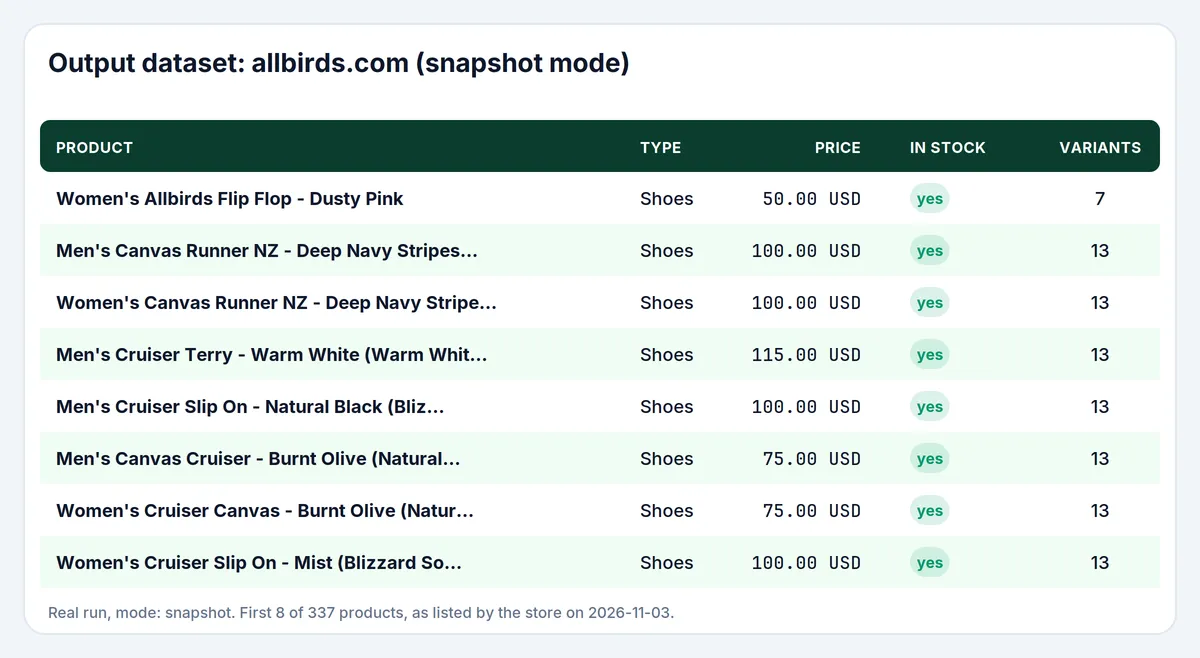
Real run, mode snapshot, store allbirds.com. First 8 of 337 products.
The default dataset has three kinds of rows, told apart by recordType: change, store and product (snapshot mode only). Field names and changeType values are treated as a stable contract: new fields can be added, but existing names are not renamed without a version bump and a note in the changelog.
A change row (values are illustrative):
Key fields of a change row:
| Field | Type | Meaning |
|---|---|---|
recordType | string | Always change for a detected change |
changeType | string | One of the six change types above |
store | string | Store domain, or domain/collections/handle when a collection is watched |
title, vendor, productType, url | string | Product title, brand, type set by the store and public product page |
price, previousPrice | number | Price after and before the change (price changes only for previousPrice) |
priceChangePercent | number | Signed percentage, rounded to two decimals. Negative for a price drop |
available, previousAvailable | boolean | true when at least one variant can be bought |
variantChanges | array | The variants that changed, with old and new values |
detectedAt | string | ISO 8601 time the change was detected |
Every run also writes one store row per store, with status (baseline_saved, no_changes, changes_found, or a failure code such as not_shopify, access_denied, blocked_by_robots), the number of products read and the number of changes:
In snapshot mode every product is a recordType: "product" row with title, vendor, productType, price, maxPrice, compareAtPrice, available, variantsCount, tags, createdAt, publishedAt, updatedAt and, with Include variants, the variant list. A run summary (stores checked and failed, changes delivered, warnings) is saved under the key RUN_SUMMARY in the run's key-value store.
How much does it cost to monitor a Shopify store?
This Actor uses pay-per-event pricing. You pay only for the events below. Platform usage is included. Prices per event on the Apify free plan (higher plans get lower prices):
| Event | FREE | BRONZE | SILVER | GOLD |
|---|---|---|---|---|
| Actor start (per run) | $0.001 | $0.001 | $0.001 | $0.001 |
| Catalog scan (per 1,000 products checked, at least one per store, changes mode) | $0.002 | $0.00175 | $0.00158 | $0.0014 |
| Detected change (changes mode) | $0.003 | $0.00263 | $0.00237 | $0.0021 |
| Product record (snapshot mode) | $0.0008 | $0.0007 | $0.00063 | $0.00056 |
Examples on the free plan:
- One store with about 340 products, checked daily, no changes: $0.001 + $0.002 = $0.003 per run, about $0.09 per month.
- The same store checked every hour, no changes: 24 runs × $0.003 = $0.072 per day, about $2.16 per month.
- The same store with 5 changes in a run: $0.003 + 5 × $0.003 = $0.018.
- 20 stores with about 1,000 products each, nothing changed: $0.001 + 20 × $0.002 = $0.041 per run.
- Snapshot of 1,000 products: 1,000 × $0.0008 + $0.001 = $0.801.
You are charged per detected change, not per catalog product, so a big store with a few changes stays cheap. Stores that fail (not Shopify, hidden catalog, blocked by robots.txt) are not charged. You can cap any run with the run's maximum cost: when the cap is reached the Actor stops cleanly and keeps the old baseline for the unfinished store, so no change is lost.
Shopify Store Monitor compared with other approaches
| Shopify Store Monitor | Product scraper plus your own comparison | Manual checks | |
|---|---|---|---|
| Output | Only the changes, one row each | Every product on every run; you build the diff | Whatever you notice |
| Baseline | Saved for you in your Apify account | You store and compare previous runs | None |
| Billing | Small fee per store and per detected change | Usually per product row on every run | Your time |
| Best for | Ongoing monitoring on a schedule | One-off exports and large catalog analysis | A single product, once |
| Stock quantities | No (yes/no per variant only) | Depends on the tool | Not visible to visitors either |
Use Snapshot mode of this Actor when you just need a one-off list of a store's products. Use Changes mode when you want to be told what moved.
Tips for best results
- Run the first check once, then schedule it. A baseline is needed before changes can be found.
- Set Minimum price change (%) to 1 to 5 if a store adjusts prices by cents.
- Use Only watch products matching to follow one product line and keep runs smaller.
- For very large stores, raise Max products per store. When a store is cut off at the limit, removed-product detection is switched off for that run, because products beyond the limit would look removed.
- Use one Watchlist name per purpose. Changing the stores in a watchlist is fine: new stores get a baseline, existing ones keep theirs.
Limits and good to know
- Only stores that publish
/products.jsonwork. Some stores turn it off, put the store behind a password, or block automated requests; they appear asnot_shopifyoraccess_deniedrows and cost nothing. - Stock is a yes/no flag per variant. Shopify does not publish stock quantities in the public catalog, so the Actor reports
OUT_OF_STOCKwhen no variant can be bought andBACK_IN_STOCKwhen one can again. - A product that disappears from the catalog is reported as
REMOVED_PRODUCT. The store may have deleted it, unpublished it or hidden it; the Actor cannot tell which. - A catalog that comes back completely empty after a saved baseline is reported as
empty_catalogand does not mark every product removed. An empty list is often a password page or a region redirect, and charging a removal for each product would bill a glitch. The previous baseline is kept. The store row says why nothing was listed, including when your filters matched no product (no_matches). - The baseline is stored in your account in a named key-value store (
shopify-store-monitor-state). Deleting that store starts new baselines. A run that is refused permission to create the named store (HTTP 403) uses this run's default key-value store instead, finishes the check, and does not keep that snapshot for the next run. - Prices are numbers in the store's currency (
currencyis read from the store's public shop info and can benull). - Runs read the public catalog only: no cart, no checkout, no customer data, no admin access.
Use it from AI agents, the API and code
Apify MCP server (ChatGPT, Claude, Cursor and other MCP clients). Connect https://mcp.apify.com, then follow these steps:
search-actorswith a short query such asShopify price tracker.fetch-actor-detailsformmdincer/shopify-store-monitorto read the input schema.call-actorwith the input below and a spending cap incallOptions.get-dataset-itemswith the returned dataset ID.call-actorreturns the dataset ID, not the rows.
The first call for a store only saves a baseline, so tell the user that changes appear from the second call. Keep monitorName the same between calls. This Actor uses limited permissions, so it is not blocked from the MCP server.
To give an MCP client this Actor as its own tool (no search step), connect https://mcp.apify.com?tools=mmdincer/shopify-store-monitor.
JavaScript
Python
HTTP (one request, returns the rows)
The synchronous endpoint waits for the run to finish, so use it for a few stores. For many stores, start the run asynchronously and read the dataset when it ends.
Automation recipes
Slack or email alert through a webhook. In the Apify Console open Integrations (or Webhooks) and add a webhook on Run succeeded. In your handler fetch the run's dataset (the webhook payload contains the run, including defaultDatasetId) and keep the rows where recordType is change. Send one message per row, for example: PRICE_DROP: {title} {previousPrice} -> {price} ({priceChangePercent}%) {url}.
Zapier. Create a Zap with Apify as the trigger for a finished Actor or task run, add an Apify step that fetches the run's dataset items, filter for recordType equal to change, then add a Slack, Gmail or Google Sheets step. See the Apify Zapier integration.
Make. Add the Apify module that runs an Actor (or watches for a finished run), then the module that gets dataset items, filter on recordType equal to change and route the bundles to your app. See the Apify Make integration.
Google Sheets or a database. Fetch the dataset as JSON or CSV with the API (/v2/datasets/{id}/items?format=csv) after each run and append the change rows. The changeType and detectedAt columns make filtering and pivot tables easy.
Scheduling. Save your input as a task (for example competitors, daily at 08:00) and add a schedule in the Apify Console. Keep the same monitorName so every run compares with the previous one.
Is it legal to monitor public Shopify stores?
The Actor reads only the product catalog that each store publishes to every visitor at /products.json and the store's public shop info. It does not log in, does not use any Shopify API or account, and does not collect personal data. By default it also reads each store's robots.txt and skips stores that disallow the catalog path. Store owners can still have their own terms of use, and Shopify's own terms restrict automated access to Shopify's services; you are responsible for using the results in line with the terms of the stores you monitor and with the laws that apply to you. This Actor is an independent tool and is not affiliated with, endorsed by or sponsored by Shopify Inc. or any store it reads. All trademarks belong to their owners.
Trademarks. Not affiliated with, endorsed by, or sponsored by Shopify. Trademarks belong to their respective owners. The Shopify name and logo are used only to say which platform the Actor reads; the icon shows the Shopify mark for the same purpose.
FAQ
How do I track price changes on a Shopify store? Enter the store domain, run the Actor once to save a baseline, then run it again on a schedule. Every price move appears as a PRICE_DROP or PRICE_INCREASE row with the old and new price.
How do I get Shopify restock alerts? Set changeTypes to OUT_OF_STOCK and BACK_IN_STOCK, schedule the Actor and send the rows to a webhook, Slack or email. A product counts as back in stock when at least one variant can be bought again.
Can I monitor competitor Shopify stores? Yes. Add the competitor domains to stores and give the watchlist a name such as competitors. Only public catalog data is read.
Does it need an API key, cookies or a login? No.
Why did my first run return no changes? The first run of a store saves the baseline and returns a baseline_saved store row. Changes appear from the next run with the same monitorName.
How often should I run it? As often as you need the alerts. Daily is common for price monitoring; hourly can make sense for restock alerts on drops. Each run only compares with the previous run.
How is this different from a Shopify scraper? A scraper returns the whole catalog on every run. This Actor compares each run with the previous one and returns only the detected changes, which is what you pay for. If you need the full catalog once, use Snapshot mode.
Can I watch just one collection? Yes, enter a collection URL such as https://store.com/collections/sale.
Can I get all products instead of changes? Yes: set Mode to Snapshot (full product list).
Does it show stock quantities? No. Shopify's public catalog only says whether a variant can be bought.
Does it work for stores that are not on Shopify? No. WooCommerce, Magento and marketplace listings are not supported.
What happens when a run stops at its maximum cost? Stores that were not finished keep their old baseline, so their changes are reported in the next run.
Why is a store listed as not_shopify or access_denied? The store has no public /products.json, sits behind a password page, or refuses automated requests. Try again later, lower requestsPerSecond, or enable Apify Proxy.
Can an AI agent use this Actor? Yes. It works through the Apify MCP server, the Apify API and the Apify clients; see "Use it from AI agents, the API and code". Set a maximum charge per run.
How do I report a problem or ask for a feature? Open an issue in the Issues tab and include a link to your run.


