

Shopify Price & Stock Delta Monitor
Pricing
from $2.00 / 1,000 delta results
Shopify Price & Stock Delta Monitor
Monitor Shopify stores via products.json for MAP compliance, repricing, competitor price drops, stock changes, and clean delta feeds with optional Slack/Discord alerts.
Pricing
from $2.00 / 1,000 delta results
Rating
0.0
(0)
Developer

Nikita S
Maintained by CommunityActor stats
0
Bookmarked
3
Total users
1
Monthly active users
3 months ago
Last modified
Categories
Share
Track Shopify product catalog changes and get a clean feed of price, stock, new product, removed product, MAP-compliance, and high-severity price-drop deltas.
This Actor is for e-commerce teams, agencies, resellers, price analysts, and automation builders who need competitor monitoring without building a custom monitoring backend.
Three jobs this Actor does:
- Competitor price-drop alerts — detect 20%+ drops, rank them as
high, and trigger a dedicatedprice_drop_alertevent. - MAP / repricing checks — monitor public Shopify competitors for price moves below expected thresholds and feed the rows into Sheets, n8n, Make, or BI.
- Catalog change feed — track new products, removed products, restocks, sold-out variants, and sale starts/ends.
Pricing: Pay Per Event. $0.002 per emitted delta row is already scheduled. v0.3 also emits a price_drop_alert hook for 20%+ drops and a near-zero apify-actor-start hook, but Apify blocks another pricing-table change until 2026-08-06; those extra hooks are code-ready and will become billable after the platform gate allows the pricing update. First run emits the full baseline (e.g. ~2,500 rows for a mid-size Shopify store) — about $5 per store for the first snapshot, then fractions of a cent per day for typical daily changes. No monthly minimums.
Current build: 0.3.0 (delta_result Pay Per Event pricing starts on 2026-07-21T23:43:19Z; v0.3's extra pricing events are pending Apify's one-month pricing-change cooldown). See ./CHANGELOG.md for the full version history.
Maintainer: DataFlow LV (Latvia-based data automation). Apify: stellar_ballet_0bu.
Visual demo: Shopify Delta Monitor
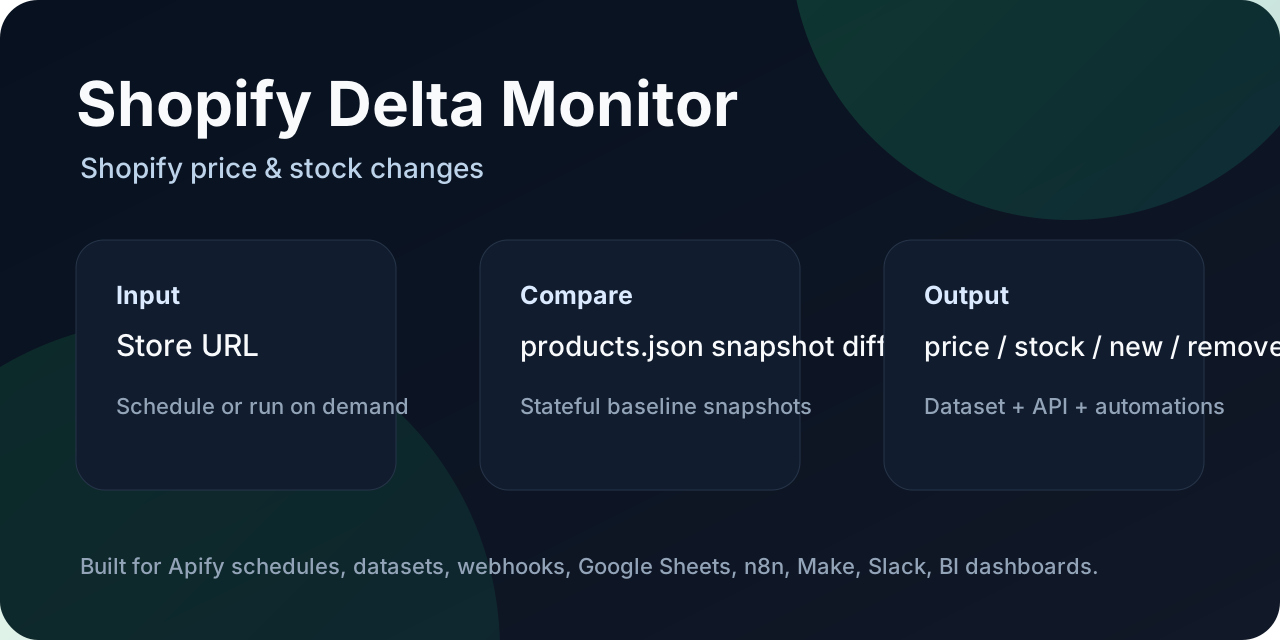
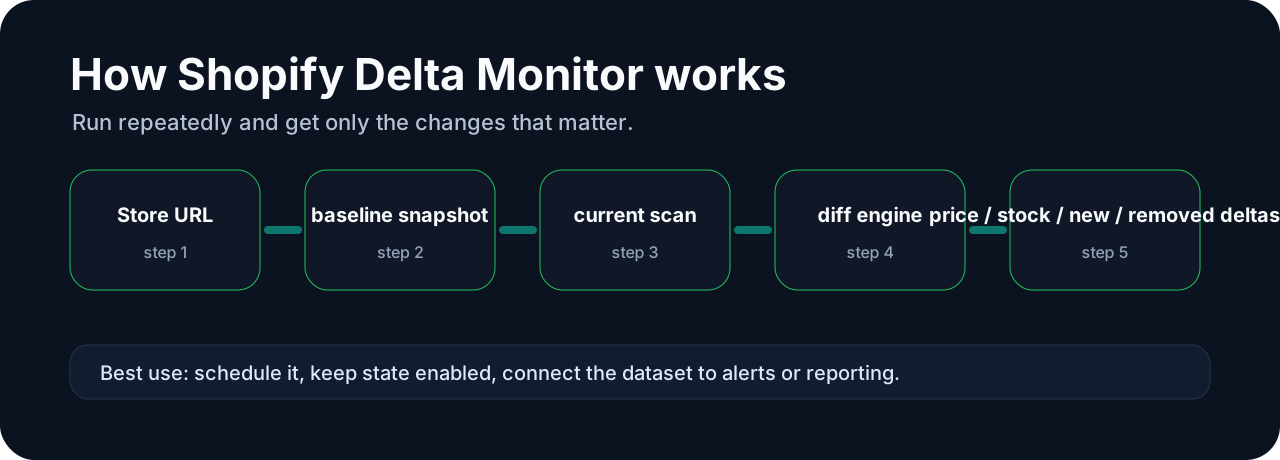
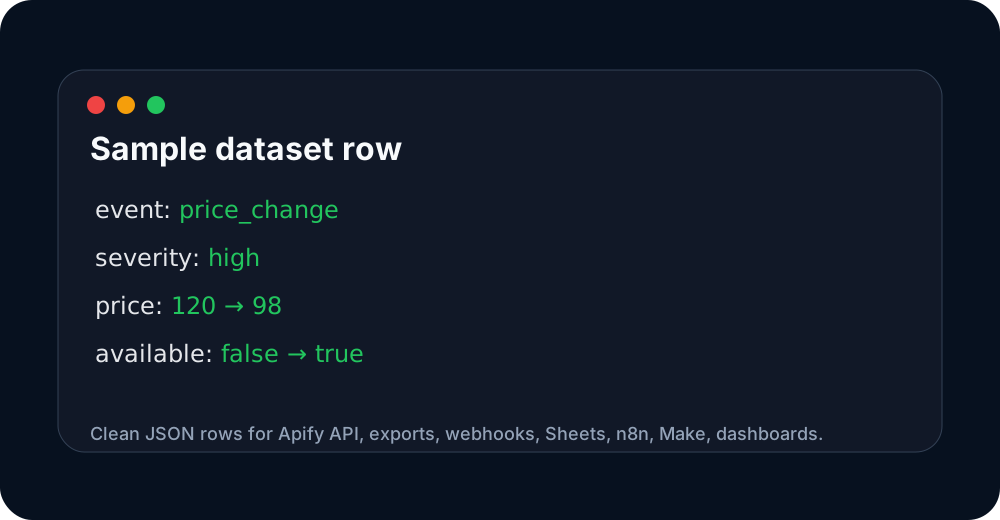
These images are hosted in a persistent Apify key-value store so the Store README has stable, clickable visual previews.
Why use this Actor?
Most Shopify scrapers return a full catalog every run. That is useful once, but noisy for monitoring.
This Actor is built for recurring runs:
- run once to create a baseline snapshot;
- schedule it daily or hourly;
- receive only what changed;
- classify changes as named events like
price_change,restock,sold_out,new_product,removed_product,sale_started, andsale_ended; - rank rows with
event_severity(low,medium,high) so workflows can filter only serious price drops, stock-outs, and MAP/repricing events; - optionally send one Slack or Discord alert summary per run;
- connect the delta feed to Google Sheets, Airtable, n8n, Make, Slack, email alerts, or a BI dashboard.
Typical use cases
- Monitor competitor price changes.
- Detect sold-out and restocked variants.
- Track new products and removed products.
- Feed Shopify catalog changes into a reporting workflow.
- Build a lightweight price intelligence or merchandising alert system.
What it does
For each Shopify store URL, the Actor:
- Reads the public
/products.jsoncatalog endpoint. - Flattens products and variants into clean dataset rows.
- Compares the current snapshot with the previous run.
- Emits rows with
status:new,changed,removed,unchanged, orerror. - Saves the latest snapshot in a named Apify key-value store when
persistStateis enabled.
Input example
Input fields
| Field | Description |
|---|---|
storeUrls | Shopify store URLs. The Actor uses the host and reads /products.json. |
maxPagesPerStore | How many /products.json pages to fetch. Each page can contain up to 250 products. |
onlyChanged | If true, unchanged rows are skipped. New, changed, removed, and error rows are still emitted. |
persistState | If true, the Actor saves the latest snapshot and uses it as the baseline next time. |
stateStoreName | Named Apify key-value store for snapshots. |
stateKey | Optional snapshot key override. Leave empty to use one key per store host. |
previousItems | Optional manual previous snapshot rows for one-off comparisons or migration. |
minPriceChangePct | Minimum absolute price-change percentage required for a price_change event. |
alertsEnabled | Send a webhook summary after the run if a Slack or Discord webhook is provided. |
slackWebhookUrl | Optional Slack incoming webhook URL. |
discordWebhookUrl | Optional Discord webhook URL. |
alertTopLimit | Number of top changes included in the alert summary. |
Output example
One dataset row represents one product variant delta:
The Actor also writes a SUMMARY key-value-store record:
How to use it as a monitor
- Run the Actor once with
persistState: trueto create the baseline snapshot. - Schedule it from Apify Console.
- Keep
onlyChanged: trueso future runs emit only deltas. - Send the dataset output to Google Sheets, Slack, Airtable, n8n, Make, or your API.
Integration ideas
- Apify schedule → Google Sheets: daily product change log.
- Apify webhook → n8n → Slack: alert when a competitor changes price or restocks.
- Dataset API → BI dashboard: price and availability trend reporting.
- Agency workflow: monitor 3–5 competitor Shopify stores for a client and send a weekly change report.
Ready-made workflow assets
The Actor repository includes example assets you can copy into your own workflow:
examples/n8n-shopify-delta-to-slack.json— starter n8n workflow: run Actor → check deltas → send Slack alert.examples/google-sheets-template.csv— column layout for Google Sheets.examples/client-report-template.md— simple weekly report structure for agencies and e-commerce teams.docs/sample-dataset.md— real example output: first-run baseline (2,489 rows) + repeat-run stateful delta (0 rows) from a live Allbirds run.
Run it from Claude / Cursor / VS Code via MCP
The Actor is available through the Apify MCP server, so you can ask your AI assistant to "monitor this Shopify store and email me the deltas" instead of wiring it manually.
Add this to your MCP client config (for example claude_desktop_config.json):
Once connected, the assistant can discover this Actor and trigger runs with a plain prompt like "Run Shopify Delta Monitor on https://www.allbirds.com and show me the new products and price drops." The remote MCP server at https://mcp.apify.com works the same way without a local install.
Slack / Discord alert preview
When alertsEnabled is on and a webhook URL is provided, the Actor sends one compact summary after the run:
Webhook URLs are configured as secret input fields.
Limitations
- Works only for Shopify stores exposing public
/products.json. - It does not bypass login, paywalls, CAPTCHA, Cloudflare, or other anti-bot systems.
- Inventory precision depends on what the Shopify catalog exposes;
availableis a boolean, not guaranteed stock quantity. - Users are responsible for checking target-store terms and lawful use.
Best first run
Use a small test first:
Run it twice. The first run creates the baseline; the second run should return only real changes.
FAQ
What changed in v0.3?
Rows now include event_severity, and 20%+ price drops trigger a separate price_drop_alert event. The Store positioning now targets MAP-compliance, repricing checks, and serious price-drop monitoring — the use cases with clearer willingness to pay.
Does it work on any Shopify store?
On every Shopify store that exposes the public /products.json endpoint. The vast majority do, including all default themes. Custom-locked catalogs or stores behind Cloudflare bot protection will return an error row.
Can it monitor non-Shopify sites? No. This Actor is Shopify-specific on purpose — the wedge is a clean stateful delta, not a generic scraper.
How accurate is the stock signal?
available is the same boolean Shopify exposes in the public catalog. It is not a warehouse count, and stores that use strict inventory apps may mask stock-outs. If you need exact quantities, this Actor is the wrong tool.
Does it need login, cookies, or a headless browser? No. The Actor reads the same public JSON endpoint the store's own theme uses. No CAPTCHA bypass, no anti-bot evasion, no PII scraping.
How do I get the data into Google Sheets / n8n / Slack?
Either consume the dataset via the Apify API, or pass previousItems from one run into the next, or wire a webhook on the dataset. The examples/ folder has a starter n8n workflow and a Sheets CSV template.
Can I monitor multiple stores in one run?
Yes. Pass an array of store URLs in storeUrls. The Actor creates one snapshot key per host by default, so they don't interfere.
Why is the first run so much more expensive than later runs?
The first run emits every variant as a new_product row (the baseline). Subsequent runs emit only the deltas. This is by design — you pay for the data, not for crawling.
What's the difference vs. shopify-discount-scanner and similar Actors?
That Actor is price+stock-only and bundles Slack/Discord alerts into the same code path. This Actor uses a named event taxonomy (price_change, restock, sold_out, new_product, removed_product, sale_started, sale_ended), persists state in your own Apify key-value store, and treats the delta feed as a primary deliverable (output schema + SUMMARY record) rather than a side effect. Use whichever fits your workflow.
Support
- Issues and feature requests: open a GitHub issue on the Actor's repository, or message DataFlow LV via the Apify Console Actor page.
- Custom integrations (Sheets, n8n, Make, Slack, custom webhooks) and agency retainers: contact via the Apify Console Actor page.
Quick start
- Open this Actor in Apify Console.
- Paste one or more Shopify store URLs into the input.
- Keep
persistStateenabled for scheduled monitoring. - Run once to create the baseline snapshot.
- Run again on a schedule to receive only delta rows.
- Export the dataset to CSV/JSON, or send it to Google Sheets, n8n, Make, Slack, Discord, or a webhook.
Sample output
Use this sample dataset to see the output shape before running it yourself:
- Sample dataset: https://console.apify.com/storage/datasets/uvIVdB6EoysJkzTbP
The important fields for automation are event, events, event_severity, status, and changes. Filter for event_severity = high when you only want alerts that deserve immediate attention.
Pricing and cost expectations
This Actor is designed for scheduled monitoring and delta-only outputs. It avoids charging or processing unchanged rows where possible. Pay-Per-Event pricing is scheduled/used for meaningful emitted deltas such as new items, removed items, price changes, stock changes, URL changes, or pricing-plan changes depending on the Actor.
Start with a small input list first. Once the baseline looks correct, schedule recurring runs and set a reasonable max charge limit in Apify.
Which monitor should I use?
This Actor is part of a focused monitoring portfolio. Pick the narrowest Actor that matches your source:
| Source you have | Use this Actor | Best for |
|---|---|---|
| Shopify store | Shopify Delta Monitor | Shopify competitor price/stock/sale monitoring |
| WooCommerce store | WooCommerce Delta Monitor | WooCommerce Store API product deltas |
| Product page URLs with Schema.org JSON-LD | Schema.org Product Delta Monitor | Magento, BigCommerce, custom stores, marketplaces |
| Product feeds / APIs / CSV / XML | Product Feed Delta Monitor | Supplier feeds, affiliate feeds, Google Merchant exports |
| sitemap.xml | Sitemap Delta Monitor | SEO, content ops, RAG indexing queues |
| SaaS pricing pages | SaaS Pricing Page Monitor | Plan/price/feature changes on public pricing pages |
All monitors are built for scheduled runs, stateful comparisons, delta-only outputs, and workflow automation via Google Sheets, n8n, Make, Slack, Discord, or webhooks.


