
Shopify Size Availability Checker for Fashion Ads
Pricing
from $0.80 / 1,000 audited products
Shopify Size Availability Checker for Fashion Ads
Find Shopify products whose best-selling sizes are out of stock before promoting them in Google Shopping. Audit broken size runs by color and fit and export a ranked CSV. $0.80 per 1,000 audited products plus $0.001 per standard run.
Pricing
from $0.80 / 1,000 audited products
Rating
0.0
(0)
Developer

Monkey D. Scraping
Maintained by CommunityActor stats
0
Bookmarked
2
Total users
1
Monthly active users
3 days ago
Last modified
Categories
Features
Share
Your black bestseller is still live on Shopify. A shopper clicks your Google Shopping ad, opens the size selector and finds that both L and XL are sold out. Which other styles in this campaign have the same problem?
Paste the Shopify collection you promote and enter your best-selling sizes. This size availability checker finds broken size runs by color and fit and returns a ranked CSV of styles to review. A paid-media buyer can use it before increasing a Shopping or Performance Max budget. A merchandiser can use the same list to choose the colorway to feature in a collection.
Before increasing your Google Shopping budget
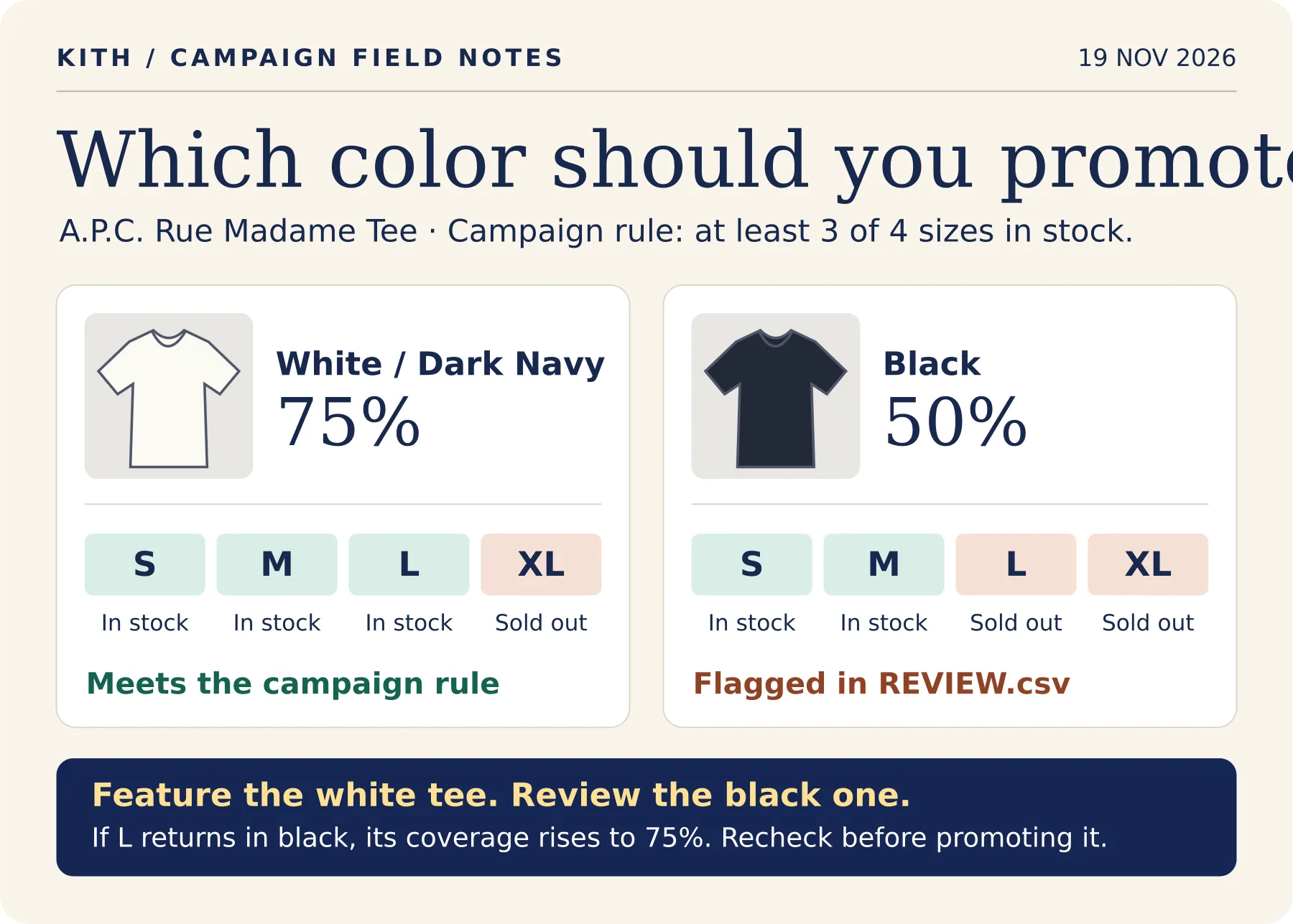
Suppose you manage Shopping ads for a clothing retailer and want to feature the Rue Madame tee this weekend. Both colors have a buy button. Your campaign targets shoppers who wear S through XL, and you want at least three of those four sizes available in the color shown in the ad.
- Set the buying rule. Paste the collection URL, enter S, M, L and XL, and set minimum coverage to 75%. Choose core sizes from your own sales history. If both M and L are essential, use just those two sizes and a 100% threshold.
- Read the exception. In the Kith observation above, the black tee appears in
REVIEW.csv. ItssoldOutSizesfield lists L and XL. The white/dark navy tee meets the threshold even though XL is sold out. Open the product links to confirm availability before acting. - Change the promotion in your campaign tool. Match the black colorway to its offers in your feed. You might feature white/dark navy in the campaign creative, or review the black offers for exclusion. The Actor supplies the shortlist; your team controls the feed and ads.
- Check again after a restock. Repeat the audit with the same inputs. If L returns in black while S and M remain available, coverage rises to 75%. Confirm its new
healthyrow in the full dataset before putting that color back into rotation.
$0.80 per 1,000 audited products plus $0.001 per standard run. The price of one product covers all its size, color and fit combinations. The five-product example below costs $0.005 when all five products yield results.
Try it on a collection
- Open Input and click Start with the prefilled Kith collection, or paste a collection URL from a Shopify store you follow.
- Open Size coverage to see the sizes available for each style and option group.
- Download Merchandising review queue (CSV) from the run output. Open the first product link to review the group with the lowest coverage.
Choose your assortment and sizes
| Input | What to enter |
|---|---|
sources | Required. Enter 1–10 public Shopify store, collection or product URLs. A store URL checks its catalog. A collection URL narrows the assortment. A product URL checks one style. |
coreSizes | The sizes you want shoppers to find. Defaults to S, M, L and XL. Enter up to 40 labels. For shoes, use labels from the storefront, such as ["39", "40", "41", "42"]. Use separate runs for different sizing systems. |
minimumCoverage | Percentage of requested sizes that must be available for a group to count as healthy. Choose 1–100. The default is 75, so three out of four is healthy. |
maxProductsPerSource | The maximum number of products to examine per source, from 1 to 1,000. The prefilled example uses five. Omitting this field uses 20. |
Read the audit
Coverage is the percentage of distinct target sizes available to order. If one product comes in black/slim, black/regular and navy/regular, each combination gets a separate row. A product with only a size option gets one row. Availability reflects what a shopper can order at the time of the run, including backorders the store accepts.
| Status | Meaning |
|---|---|
healthy | The group meets or exceeds your coverage threshold. |
at_risk | Coverage falls below your threshold and at least one requested size belongs to the observed assortment. |
sold_out | The store lists every requested size for this group and marks all of them unavailable. |
no_target_sizes | None of your requested sizes appear in this group's observed assortment. Check the labels if the store uses another sizing system. |
unverified | Availability could not be established for at least one requested size. The row retains confirmed sizes and leaves coveragePercent empty. |
The dataset includes the product title, ID and page URL, option names and values, status, percentage and observation time. Each target size appears in one of four lists. availableSizes and soldOutSizes give confirmed orderability. unlistedSizes identifies target sizes absent from that group's assortment. unknownSizes identifies sizes that need verification.
The review CSV contains up to 100 sold_out or at_risk groups ranked by lowest coverage. At equal coverage, a confirmed sellout comes first. Use this as a shortlist for your campaign or collection review. The dataset holds all reported groups.
The run summary shows status counts, the total number of review candidates and the number included in the CSV. It also shows products read, audited, duplicated or skipped for each source. Products need an identifiable size option to produce audit rows.
Pricing
Each distinct product that produces one or more audit rows costs $0.0008. This includes products reported as no_target_sizes or unverified. Overlapping sources from the same storefront count the same product once per run. Skipped products and sources that return no audit rows incur zero product charges. The standard run start costs $0.001, including when the review queue is empty.
| Audited products in one standard run | Total |
|---|---|
| 5 | $0.005 |
| 100 | $0.081 |
| 1,000 | $0.801 |
Examples use the default 256 MB setting. Standard run platform usage is included.
Questions from merchandising teams
How can I use this with Shopping campaigns? Start with the collection featured in your ads. Set the sizes your audience buys, then use the CSV to review products whose advertised color or fit has low coverage. Your team decides which products to keep, replace or pause.
Can I compare coverage week over week? Save your inputs as an Apify task and schedule it. Join successive datasets on groupKey and order by observedAt. Keep the same storefront, core sizes and threshold for comparable snapshots. Apify schedules
How can I get the rows through the API? Save the example input as audit-input.json and set your Apify account token in the APIFY_TOKEN environment variable. This request runs the audit and returns the size-coverage rows as JSON. Apify API reference
Related Actors
- Export a product catalog with variant prices, SKUs and availability. Shopify Product Scraper
- Compare prices and seller offers for a product across Google Shopping. Google Shopping Price Tracker & Seller Monitor
简体中文 · Shopify 核心尺码与断码检查
输入 Shopify 店铺、商品系列或商品网址,再选择顾客常买的尺码。工具按颜色、版型等组合计算可下单的核心尺码占比,并区分已售罄、未列出和暂时无法确认的尺码。下载 REVIEW.csv 可优先查看覆盖率最低的款式,方便在投放广告或调整陈列前复核。每 1,000 件有检查结果的商品收费 0.80 美元,标准运行每次另收 0.001 美元。一个商品的所有颜色和版型都包含在同一次商品计费中。
繁體中文 · Shopify 核心尺碼與缺碼檢查
輸入 Shopify 商店、商品系列或商品網址,再選擇顧客常買的尺寸。工具會依顏色、版型等組合計算可下單的核心尺寸比例,並區分已售罄、未列出及暫時無法確認的尺寸。下載 REVIEW.csv 可優先查看尺寸最不齊全的款式,供廣告投放或商品陳列團隊複核。每 1,000 件有檢查結果的商品收費 0.80 美元,每次標準執行另收 0.001 美元。同一商品的所有顏色與版型均包含在該商品的費用內。


