

AI Web Scraper: Web Page to JSON with OpenAI or Claude
Pricing
from $15.00 / 1,000 page extracteds
AI Web Scraper: Web Page to JSON with OpenAI or Claude
AI web scraper that turns any web page into structured JSON. Give URLs and the fields you want (or a JSON schema) and your own OpenAI, Claude, Grok or OpenRouter key extracts validated rows, with auto-retry on bad JSON. Pay only for pages that match.
Pricing
from $15.00 / 1,000 page extracteds
Rating
0.0
(0)
Developer

Jason
Maintained by CommunityActor stats
0
Bookmarked
2
Total users
1
Monthly active users
19 hours ago
Last modified
Categories
Share
Turn any public web page into clean, validated JSON using your own OpenAI, Anthropic (Claude), xAI (Grok) or OpenRouter API key. Give it URLs, list the fields you want (or paste a JSON schema), and get one row per page with the fields filled in.
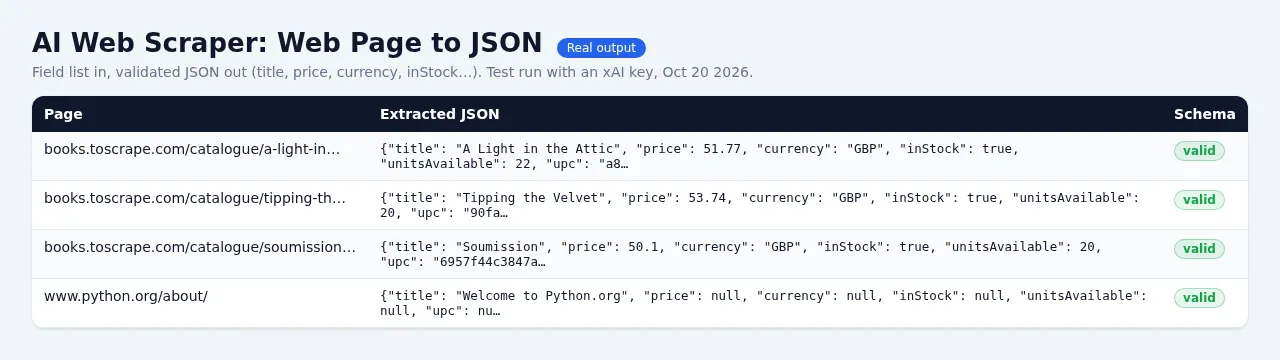
Bring your own AI key. This Actor does not include AI tokens. You add your own API key and pay your AI provider directly, at their price, for the tokens you use. A typical product or article page costs about $0.001–0.004 in tokens with a small model such as gpt-4o-mini, gpt-4.1-mini or grok-4.20-non-reasoning. No key? You still get a free preview (see below).
Price
$15 per 1,000 pages extracted ($0.015 per page), plus Apify's tiny $0.00005 run-start fee.
You are charged only for pages whose AI answer was valid JSON that matched your schema (schemaValid: true).
Never charged: free preview rows, pages that failed to load, were blocked or had no text, AI errors (invalid key,
no credit, rate limit, timeout), answers that still didn't match your schema after the automatic retry, and input mistakes.
Your AI provider bills you separately for tokens. Compared with the most popular AI web scraper on the Apify Store ($20–30 per 1,000 pages with AI included), you usually pay less in total with a small model, you choose the model, and you see the exact token usage on every row. With a large model (gpt-4o, Claude Sonnet) your token bill is higher.
What you get
- Field list or JSON schema: type
price: number - price in USD, or paste a full JSON Schema (draft 2020-12). - Lists: turn on Extract ALL matching items to get every product, job or listing on a page as
{"items": [...]}. - Validation you can trust: every answer is checked against your schema. If the JSON is broken or a field has the
wrong type, the model is asked once more with the exact errors. Each row reports
schemaValidandvalidationErrors. - Your model, your choice: OpenAI, Anthropic, xAI (Grok) or OpenRouter (hundreds of models). The provider is detected from
the key (
sk-,sk-ant-,xai-,sk-or-). - Grok strict structured output: with an xAI key your schema is sent as a strict JSON-schema response format, so Grok's answer is constrained to your schema (with automatic fallback to JSON mode + validation if a schema feature isn't supported).
- Token cap: long pages are trimmed to Max page tokens (default 12,000) so a giant page can't blow up your AI bill.
Rows show
truncated: truewhen this happens. - Clean input for the model: pages are converted to Markdown with menus, footers and cookie banners removed.
- Crawl depth 1 (optional): also extract the same-site pages linked from your start URLs, up to Max pages.
- Concurrency with automatic retries on rate limits (HTTP 429, honouring Retry-After), timeouts and server errors.
- Spending cap respected: no AI call is made for a page that your "Maximum cost per run" could not cover, so you never pay tokens for pages we can't deliver.
- Key safety: the key is a secret input (stored encrypted by Apify), sent only in the request header to your AI provider, redacted from every error message, and never logged or written to the results.
Free preview (no key)
Run it without a key and you get, for the first 2 URLs, a free row per page with basic facts found without AI:
title, meta description, headings, links, email addresses and JSON-LD structured data. Preview rows are labeled
status: "preview", preview: true and are never charged. Add your key to get your own fields.
Input example
All items on a page:
Output example (illustrative)
Row status values: ok (charged), preview, schema_invalid, ai_auth_error, ai_no_credit, ai_model_not_found,
ai_rate_limited, ai_timeout, ai_api_error, fetch_http_error, fetch_timeout, fetch_error, blocked_by_site,
blocked_url, no_content, unsupported_content, input_error, charge_limit_too_low — all except ok are free.
The run's OUTPUT record summarises pages extracted and charged, failures by reason, AI tokens used and any pages not processed.
Limits (honest)
- Pages are fetched over plain HTTP without a browser or proxy: sites that build content with JavaScript only, or sit behind
Cloudflare/DataDome bot checks, return
no_contentorblocked_by_site(free). Server-rendered pages (most shops, blogs, news, docs, job boards) work well. - PDFs, images and logins are not supported. Adult sites and private network addresses are refused.
- The AI can still misread a page. Validation guarantees the shape of the data, not that every value is right; spot-check important fields, and use Instructions to steer the model.
FAQ
Which model should I use? Start with the default (gpt-4o-mini / claude-haiku-4-5 / grok-4.20-non-reasoning). Use a bigger model only for messy pages.
Do you see or keep my key? No. It's a secret input, used only for the request to your provider, never logged or stored in results.
What if my key is wrong? The run stops after the first rejected request with a clear ai_auth_error row and finishes
successfully. Nothing is charged.
Can I use it from n8n, Make, Zapier or the API? Yes, like any Apify Actor; pass the key in the apiKey input field.


