

Google News Scraper & Keyword News Alerts Monitor
Pricing
from $0.75 / 1,000 news articles
Google News Scraper & Keyword News Alerts Monitor
Google News scraper for any keyword or topic. Get headlines, real publisher URLs, dates, snippets and images in any language or country, from the last hour to the last year. Monitor mode returns only new articles for scheduled news alerts.
Pricing
from $0.75 / 1,000 news articles
Rating
0.0
(0)
Developer

Jason
Maintained by CommunityActor stats
0
Bookmarked
2
Total users
1
Monthly active users
3 days ago
Last modified
Categories
Share
Track any keyword, brand, person or topic on Google News and get one clean row per article: headline, real publisher URL (not a news.google.com redirect), source, publish time, snippet, image and author. Run it once for research, or schedule it as a news alert that returns only articles you have not seen before.
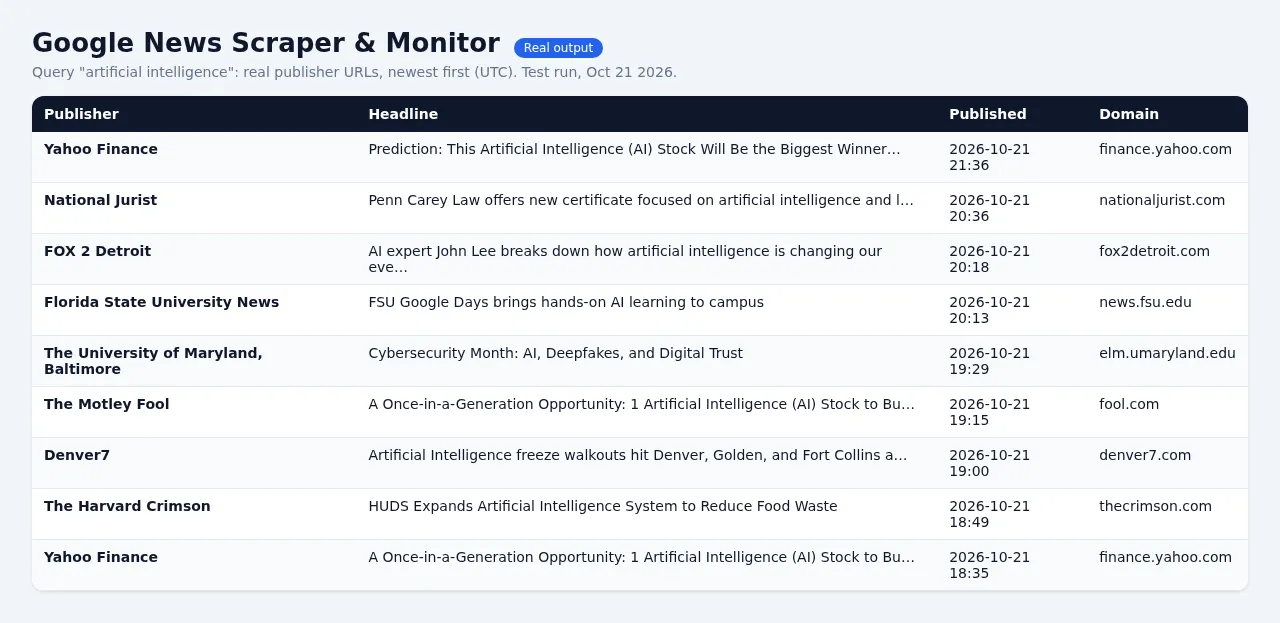
- Many searches per run. Up to 500 keywords and 8 Google News topics in one run, with no 5-query cap.
- Google search operators work:
"exact phrase",OR,-exclude,site:reuters.com,intitle:. - Any language and country edition:
en-US,en-GB,de-DE,es-419/MX,fr-FR,pt-BR,ja-JPand more. - Strict time windows from the last hour to the last year, or a custom date range. Articles outside the window are dropped, even when Google returns them, and you are never charged for them.
- More than 100 articles per keyword. Google gives about 100 per search; above that, the Actor walks your time window day by day (up to 5,000 per keyword).
- "New articles only" monitor mode remembers what earlier runs returned, so a scheduled daily or hourly run gives you just the fresh news. Perfect for Slack, email, Zapier, Make or n8n alerts.
- Duplicates merged across keywords: one row per article, with every keyword that matched.
- Fast and light. Pure HTTP (RSS), no browser and no proxy needed. 100 articles with real URLs usually take a few seconds.
What you get for each article
| Field | Example |
|---|---|
title | Nvidia beats estimates as data center sales jump (the " - Source" suffix is removed) |
url | https://www.reuters.com/technology/... (the real publisher URL) |
urlResolved | true (false means the Google News link was kept) |
source / sourceDomain | Reuters / reuters.com |
publishedAt | 2026-10-20T15:32:07Z (ISO 8601, UTC) |
snippet | the article's description from the publisher page |
imageUrl / author | preview image and author, when the publisher provides them |
query / matchedQueries | the keyword(s) that found the article |
isNew | true if no earlier run of this monitor returned it |
rank | position in the Google News feed |
googleNewsUrl, articleId | the original Google News link and ID |
relatedCoverage | for topic feeds: other outlets covering the same story |
language, country, scrapedAt, detailsStatus | context |
Pricing
Pay per article saved. No subscription, and no charge for runs that find nothing.
| Apify plan | Price per 1,000 articles |
|---|---|
| Free / Starter | $3.00 ($0.003 per article) |
| Scale | $2.80 |
| Business and up | $0.75 |
Plus a tiny $0.00005 start fee per run. Articles outside your time window, excluded sources, duplicates and (in monitor mode) articles you already received are not charged. Example: a daily alert for 10 keywords that finds 40 new articles a day costs about $3.60 a month on the free plan. You can set a maximum cost per run; the Actor stops cleanly when it is reached.
Input example
Set up a news alert in 2 minutes
- Enter your keywords and pick a time window a bit longer than your schedule (for example, run daily with "Last 2 days").
- Set Mode to New articles only.
- Click Schedule and choose daily or hourly.
- Add an integration (Slack, email, Google Sheets, Zapier, Make, n8n or a webhook) to receive each run's new articles.
The memory is kept per set of keywords + language + country in a named key-value store, so different monitors never mix. Set a Monitor ID if you want to edit keywords without starting fresh.
Output summary
Every run also writes an OUTPUT record with a status for each keyword (ok, no_results, no_results_in_window, rate_limited, invalid_query), how many articles were found, dropped as out-of-window or excluded, skipped as already seen, and how many URLs were resolved. If a run finds nothing, the status message explains why, and no rows (and no article charges) are created.
Good to know
- Google News search returns up to about 100 articles per keyword per request. For very niche keywords, there may simply be fewer articles.
snippet,imageUrlandauthorcome from the publisher's page meta tags. A few publishers block automated requests; those rows still have the title, real URL, source and date, withdetailsStatusshowing the reason. Turn off "Add snippet, image and author" for maximum speed.- Only public headline metadata is collected; the Actor does not copy article text. Respect the publishers' terms when you reuse content.
FAQ
Can I use it from n8n, Make, Zapier or my own code? Yes. Call the Actor through the Apify API or an integration and read the dataset. API calls that don't set mode run as a monitor (new articles only).
Why did my run return 0 articles? Either there is no news for your keywords in that window, or (in monitor mode) everything was already returned by an earlier run. The status message and OUTPUT record say which. You are only charged the start fee.
Can I get articles older than a year? Use "Published after/before" with a custom date range.


![Google News Scraper [only $0.7/1K] avatar](https://images.apifyusercontent.com/Twu1TG04ITI_hwjby-GKjS3ch9YgJ3AaSAGKR67WRFo/rs:fill:76:76/cb:1/aHR0cHM6Ly9hcGlmeS1pbWFnZS11cGxvYWRzLXByb2QuczMudXMtZWFzdC0xLmFtYXpvbmF3cy5jb20vUmVkNnNHSEFOa0x6b3NzdkUtYWN0b3ItemVOd3Z2dk5VNnpWMWFra1MtMTBnTFVnUzdoSS1nb29nbGVfbmV3c19zY3JhcGVyX2Zhc3QucG5n.webp)


