

Google Trends Scraper: Interest Over Time & Related Queries
Pricing
from $2.25 / 1,000 trends results
Google Trends Scraper: Interest Over Time & Related Queries
Google Trends scraper and API. Get interest over time, interest by region and city, top and rising related queries and topics, up to 5-keyword comparisons and Trending Now searches for any country and time range. Failed keywords are free.
Pricing
from $2.25 / 1,000 trends results
Rating
0.0
(0)
Developer

Jason
Maintained by CommunityActor stats
0
Bookmarked
2
Total users
1
Monthly active users
2 days ago
Last modified
Categories
Share
Get Google Trends data as clean JSON, CSV or Excel: interest over time, interest by country / state / city / metro, top and rising related queries (incl. Breakout), related topics, comparisons of up to 5 keywords on one scale, any country, time range, category and Web / News / Images / YouTube / Shopping search, plus Trending Now (daily trending searches with search volume and news links).
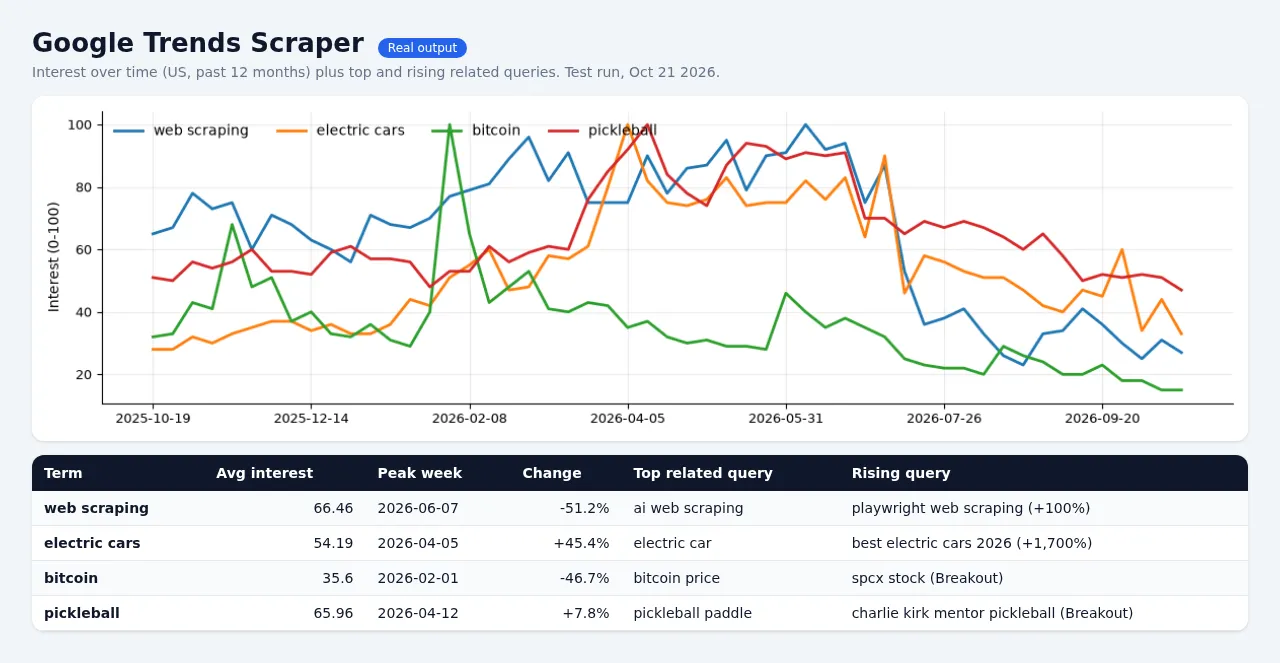
Built for one thing above all: it finishes, every time. No endless runs, no 20-minute waits with an empty dataset. If Google rate-limits a keyword, the scraper slows down, rests the connection, retries from a fresh IP, and if it still can't get the data in time you get a free row that says why, never a hung run or a charge for nothing.
Why switch
| This scraper | apify/google-trends-scraper | |
|---|---|---|
| Price | $2.25 per 1,000 results (one keyword = one result) | $3.00 per 1,000 results (Free plan) |
| Platform usage (compute, proxy) | Included in the price | Paid by you on top |
| Failed / no-data keywords | Free row with the reason | Runs often time out or abort |
| Hard time limit per keyword | Yes (default 120 s, then a free error row) | Recent reviews: "ran for 20 minutes didn't return anything" |
| Interest over time + summary stats | Yes, plus average, peak, peak date, latest value, change % | Timeline + averages |
| Interest by region | Country, region/state, city, US metro (DMA), low-volume regions | Subregion, city |
| Related queries (top + rising) | Yes, with Breakout flag and a "contains your keyword" flag to filter spam | Yes |
| Related topics (top + rising) | Yes (when Google provides them) | Yes |
| Compare up to 5 keywords on one scale | Yes ("coffee, tea, matcha") | Yes ("Multiple terms" option) |
| Search type | Web, News, Images, YouTube, Shopping as a simple dropdown | Only via pasted URLs |
| Trending Now (daily trends) | Yes, any country | No (separate actor) |
| Paste Google Trends URLs | Yes | Yes |
| Spreadsheet-friendly flat layout | Yes (one row per date / region / query) | Nested only |
| Respects your max cost per run | Yes, and tells you if the cap is below one result | Yes |
Last 30 days on the Apify Store, the leading Trends scraper finished successfully in only about 56% of runs (thousands timed out or were aborted). This one is designed so a run always ends with data or an honest explanation.
Pricing
Pay per result: $0.00225 per keyword result ($2.25 per 1,000), plus a tiny $0.00005 start fee per run.
- One keyword = one result, with all its data: the full timeline, regions, related queries and topics.
- A 5-keyword comparison = 5 results.
- One Trending Now search = one result.
- Free: keywords with no data, invalid input, rate-limited or timed-out keywords, and every detail row in the flat layout.
- Platform usage is included. You pay only the price above.
Example: tracking 200 keywords every week costs about $1.80 a month.
How to use
- Type your keywords, one per line. Put several on one line separated by commas to compare them.
- Pick a location (empty = worldwide), time range, category and search type.
- Click Start. A single keyword usually takes 5 to 15 seconds.
Input examples
One keyword, US, last 12 months (the default):
Compare 3 drinks worldwide over 5 years, YouTube searches, flat rows for Excel:
City-level interest in a custom date range, category Food & Drink (71):
What is trending right now in the US, UK and India:
Google Trends URLs work too (their own geo, date, category and search type are used):
Time ranges
now 1-H, now 4-H, now 1-d, now 7-d, today 1-m, today 3-m, today 12-m, today 5-y, all (2004 to now), or a custom range YYYY-MM-DD YYYY-MM-DD.
Output
One row per keyword (default layout):
Free explanation row (not charged):
Trending Now row:
The flat layout writes one summary row per keyword (charged) followed by free detail rows with recordType = interestOverTime, interestByRegion, relatedQueryTop, relatedQueryRising, relatedTopicTop or relatedTopicRising, ready for Excel, Google Sheets, Looker Studio or a database.
A run summary (counts, retries, settings) is saved in the key-value store as OUTPUT.
Good to know
- Values are relative (0-100), exactly like trends.google.com. 100 is the peak for the chosen keyword(s), place and time. Compare keywords on one line to put them on the same scale.
- Google samples its data, so a value can differ by about one point between two requests. That is normal and happens on the website too.
- Related topics: Google currently returns an empty topics list for many searches (also on its own website) and never shows topics for comparisons. When that happens, the topics fields are empty lists and you are still charged only once for the keyword.
- Spam filter for related queries (on by default). Google Trends itself, also on trends.google.com, mixes a shared pool of unrelated "Breakout" queries (for example "how to cook pasta" or "learn golang" under "electric cars") into many keywords' related queries. By default we remove queries with no connection to your keyword and list them in
relatedQueriesRemoved(withrelatedQueriesRemovedCount), so nothing is hidden. Each kept query hasrelevance:term(contains your keyword),topic(shares a word with your keyword's related searches, e.g. "toyota" for "electric cars") orpopular(strong volume in Google's top list). SetrelatedQueriesModetorawto get Google's lists unchanged, with every query labelled, includingoff_topic. The filter is a heuristic: a few genuine but unusual rising queries (for example a person's name) can land inrelatedQueriesRemoved. - Rate limits: Google limits how fast anyone can query Trends. This scraper paces its requests, backs off when Google says "too many requests", rests that connection and retries from a fresh Apify datacenter IP, and retries rate-limited keywords once more at the end of the run. It does not solve CAPTCHAs or disguise itself. For very large batches, schedule several smaller runs.
- Location codes:
US,GB,DE, states likeUS-CA, metros likeUS-NY-501. Empty = worldwide. - Time zone:
timezoneOffsetMinutesworks like Google'stzparameter: minutes behind UTC (300 = New York in winter).
FAQ
Is scraping Google Trends legal? This actor reads publicly available, aggregated, non-personal Trends statistics through Google's normal public endpoints, at a polite pace. You are responsible for how you use the data and for complying with Google's terms in your jurisdiction.
Can I use it through the API, Make, Zapier or n8n? Yes. Any Apify integration works, and the input is plain JSON.
Something looks wrong? Open an issue on the Issues tab with the run link. We answer fast.


