

Airbnb Vs Hotel Cost Comparator
Pricing
from $1.90 / 1,000 results
Airbnb Vs Hotel Cost Comparator
Compare the real all-in cost of a short-term rental against a hotel for the same destination and dates, fees included, and get a plain-language recommendation on which is actually cheaper.
Pricing
from $1.90 / 1,000 results
Rating
0.0
(0)
Developer

MrDoe
Maintained by CommunityActor stats
0
Bookmarked
2
Total users
1
Monthly active users
25 days ago
Last modified
Categories
Share
What does Airbnb-vs-Hotel Cost Comparator do?
Airbnb-vs-Hotel Cost Comparator takes a destination and your travel dates and pulls real, current listings from both a short-term-rental source and a hotel-booking source, computes the real total cost for the whole stay on each side, and tells you which is actually cheaper - not just which has the lower nightly rate shown on the search page. You give it a destination, check-in, and check-out date; it gives you back the median total cost on each side, the per-night equivalents, and a plain-language recommendation.
It is built for travellers deciding between a short-term rental and a hotel for a trip, and for anyone who has been burned before by a rental's cleaning and service fees turning a "cheaper" nightly rate into the more expensive option once the total is added up.
Why use Airbnb-vs-Hotel Cost Comparator?
- Real total cost, not nightly rate - each side is compared on the full price for your whole stay.
- Same dates, same destination - both sources are queried for your exact check-in, check-out, and guest count.
- Median across several real listings - not a single cherry-picked comparison.
- A clear recommendation with real numbers behind it - which option is cheaper, and by roughly how much.
- Sample listings included - see a handful of the actual rentals and hotels behind the numbers.
- Multiple destinations per run - compare several trip options in one go.
What makes this different
Search sites show you a nightly rate and let you do the math on fees yourself - and rental fees in particular are often only revealed after you click into a specific listing. This Actor pulls real current listings from both sides for your exact dates and guest count, works out the real total for the whole stay on each one, and compares the medians directly - so "which is cheaper" reflects what you would actually pay, not just the number shown first.
How it works

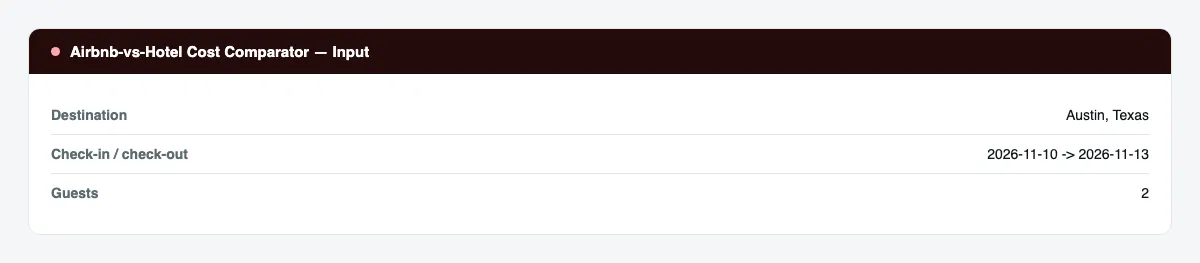
- Your input - a destination, check-in date, check-out date, and number of guests.
- The Actor compares it - real current rental listings and real current hotel listings for those exact dates, and works out the real total cost for the whole stay on each.
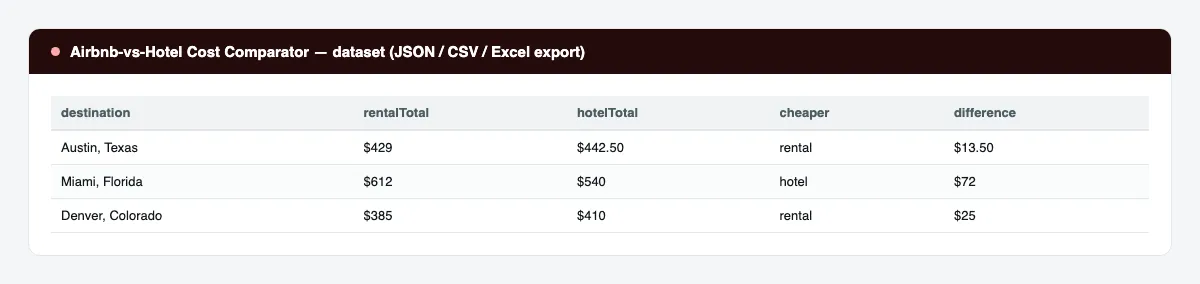
- Your output - one dataset row per destination: the median total on each side, the per-night equivalents, which is cheaper, and a written recommendation. Export to JSON, CSV, or Excel.
What data can you extract?
| Field | Description |
|---|---|
destination | The destination you searched. |
checkin / checkout | Your travel dates. |
adults | Guest count used for the search. |
nights | Number of nights, computed from your dates. |
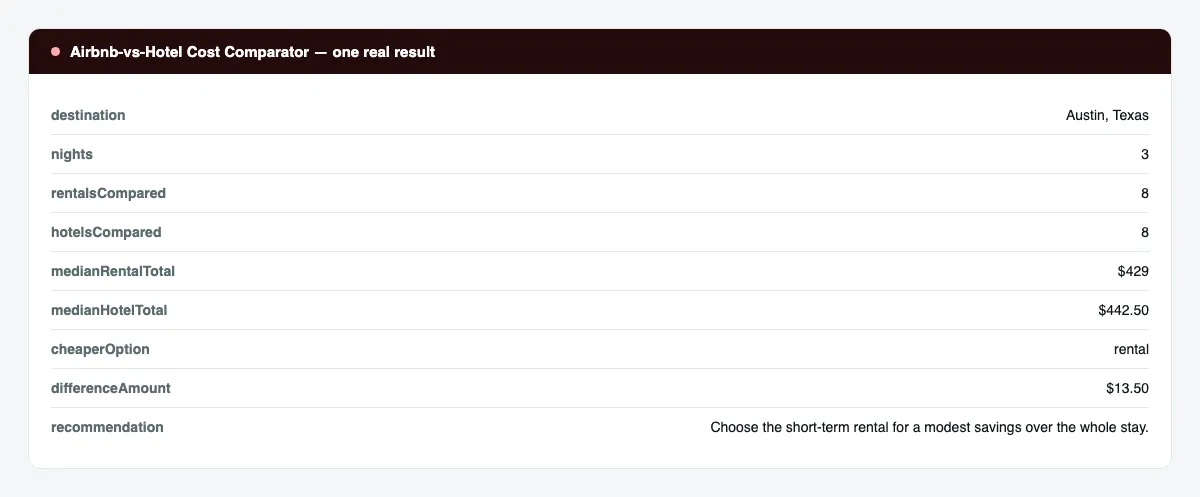
rentalsCompared / hotelsCompared | How many real listings were found on each side. |
medianRentalTotal / medianHotelTotal | The median real total cost for the whole stay, each side. |
medianRentalPerNight / medianHotelPerNight | The same totals, divided into a per-night figure. |
cheaperOption | rental, hotel, or unknown if one side had no data. |
differenceAmount | The real dollar difference between the two medians. |
sampleRentals / sampleHotels | A handful of the actual listings behind the numbers. |
recommendation | A one-sentence recommendation. |
reasoning | 2-3 sentences explaining the recommendation using the real numbers. |
caveats | Honest notes, e.g. a thin sample on one side. |
enrichmentConfidence | How confident the written recommendation is: high, medium, or low. |
enrichmentStatus | Whether the written recommendation was produced, and if not, why. |
scrapedAt | ISO timestamp of the run. |
How to use Airbnb-vs-Hotel Cost Comparator
- Open the Actor in the Apify Console.
- In Trips, add one entry per destination and date range you want compared.
- Set Listings per side if you want a wider or narrower sample.
- Press Start.
- When the run finishes, open the Dataset tab and export to CSV, JSON, or Excel.
Input Parameters
| Parameter | Type | Required | Default | Description |
|---|---|---|---|---|
trips | array | Yes | one example trip | One { destination, checkin, checkout, adults? } per trip. |
maxItems | integer | No | 3 | Stop after this many trip comparisons. |
maxListingsPerSide | integer | No | 8 | How many rentals and how many hotels to compare per trip. Range 3-15. |
openRouterApiKey | string (secret) | No | - | Optional key for the written recommendation. Without it, every real number is still returned. |
proxyConfiguration | object | Yes | Apify Proxy (residential) | Proxy settings. A proxy is required; residential is strongly recommended. |
Output Data
One dataset item per trip. Real sample record:
Usage Examples
- Trip planning - decide between a rental and a hotel before you start browsing individual listings.
- Multi-destination comparison - run several candidate destinations in one batch and see where a rental has the bigger edge.
- Budget check - get a realistic all-in number for a trip budget spreadsheet.
- Group trips - compare the per-person math of a larger rental against multiple hotel rooms by adjusting guest count.
Tips for Best Results
- Use a specific, real destination name your target city or neighborhood is known by.
- Compare with the guest count you'll actually travel with - rental pricing especially can shift with occupancy.
- Widen
maxListingsPerSidefor a steadier median in a market with widely varying listings. - Treat
differenceAmountalongsiderentalsCompared/hotelsCompared- a difference built on very few listings deserves a second look at the sample listings themselves.
Known Limitations
- Rental totals are computed from the nightly rate and stay length shown on the search results page; a small number of rental-specific fees may not be captured if a listing doesn't expose them at the search-result stage.
- Hotel totals reflect the price and stay length shown by the hotel source at search time and can exclude taxes the property collects at check-in.
- Both sides reflect availability and pricing at the moment you run the Actor - prices for both rentals and hotels change frequently.
- The written recommendation's phrasing reflects the default no-cost model and should be read alongside the real median numbers, not in place of them.
Integrations
Connect the dataset to Google Sheets, Airtable, Make, Zapier, or n8n; call the Actor from the Apify API; trigger it with webhooks; or schedule recurring runs from the Apify Console.
Export Formats
JSON, CSV, Excel, and XML, from the Dataset tab or the Apify API.
Frequently Asked Questions
Is the total cost guaranteed to match what I'd pay at checkout?
No. It's a real, current total computed from the listings found at the time you ran the Actor - always confirm the exact total on the listing itself before booking.
What if one side has very few or no results for my destination?
The comparison still runs; cheaperOption becomes "unknown" if either side has no data, and the caveats explain why.
Can it run without a written recommendation?
Yes. Without a key for the recommendation step, you still get every real median, per-night figure, and sample listing - the recommendation fields are simply left blank.
Can it export to Google Sheets?
Yes. Connect the dataset to the Google Sheets integration or pull it from the API.
Support
Questions and bug reports: use the Issues tab on the Actor's Console page. Include the input you ran and the run ID.
Legal / Responsible Use
Prices and availability change constantly; treat this Actor's output as a planning aid, not a live quote. You are responsible for complying with the target platforms' terms of use and for confirming the final price directly on the listing before booking.



