
Economic Calendar: CPI, Jobs, PPI, JOLTS & FOMC Dates
Pricing
from $4.00 / 1,000 results
Economic Calendar: CPI, Jobs, PPI, JOLTS & FOMC Dates
Official US economic release calendar: CPI, nonfarm payrolls, PPI, JOLTS, FOMC rate decisions and minutes, with actual and prior values after release. From BLS and the Fed. No key.

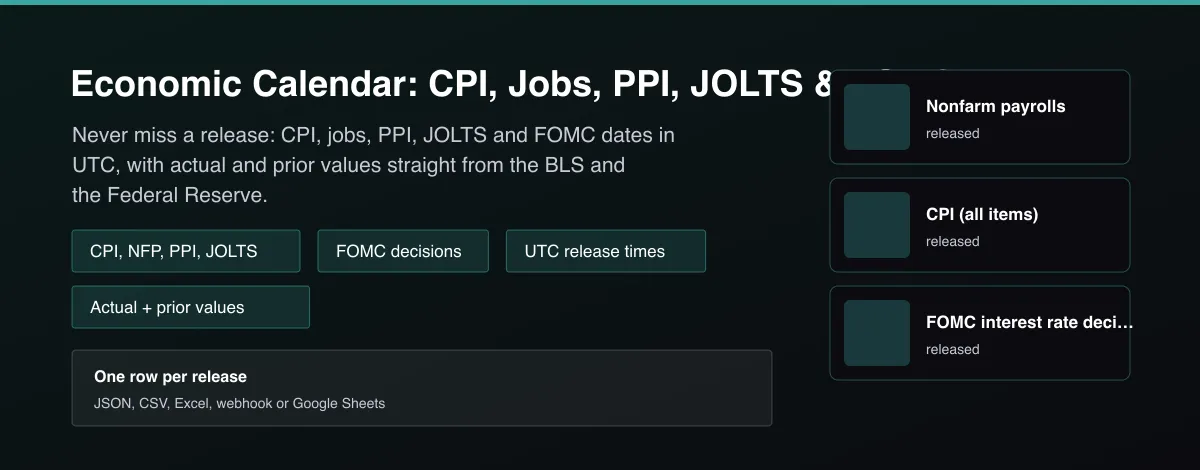
What does Economic Calendar: CPI, Jobs, PPI, JOLTS & FOMC Dates do?
Economic Calendar Tracker returns the official schedule of major US economic releases, one row per event: consumer price index (CPI), nonfarm payrolls (NFP), producer price index (PPI), job openings (JOLTS), FOMC interest rate decisions and FOMC minutes, plus employment cost, productivity and real earnings dates. Release times are in UTC. Once an event has happened the row carries the actual value and the prior value, for example CPI year over year, the monthly payroll change, or the new federal funds target rate. Dates and values come from the Bureau of Labor Statistics and the Federal Reserve.
Why use Economic Calendar: CPI, Jobs, PPI, JOLTS & FOMC Dates?
- Official sources only: BLS release calendar and data, and the Federal Reserve FOMC calendar and statements.
- Times are converted to UTC, including daylight saving, so schedules line up with your systems.
- Actual and prior values are attached after release, with the reference month, so you can join them to other data.
- Delta mode returns only events whose status or value changed, ideal for release alerts.
- No API key required; an optional free BLS key raises the data limit.
What makes this different
Most calendar scrapers copy a commercial site. This Actor reads the official BLS and Federal Reserve calendars and data, computes the headline numbers (CPI year over year, payroll change, target rate) itself, and marks every row scheduled or released.
Who can use the Economic Calendar Tracker and how?
- Macro and swing traders: know exactly when CPI, jobs and FOMC land, and receive the actual as soon as it is out.
- Bot and algo developers: gate strategies around high-impact releases with a clean UTC schedule.
- Options traders: plan around event volatility using release times and prior values.
- Analysts and journalists: pull historic release dates and headline numbers for reports.
- Fintech developers: power an economic calendar widget or alert feature through the Apify API.
- Portfolio managers: build a macro dashboard with actual versus prior values.
- Researchers: study market reactions with exact release timestamps.
- Data teams: feed a warehouse with a reliable official release schedule.
How it works
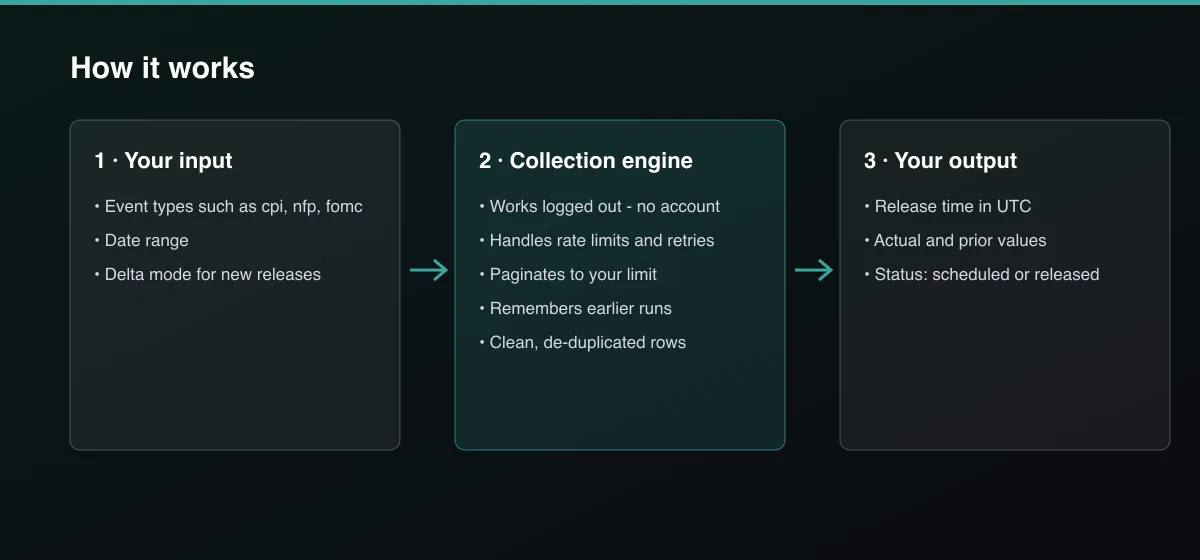
- Your input — choose the event types and a date range.
- The Actor collects it — the Actor reads the official BLS and Federal Reserve calendars and, for released events, the published data.
- Your output — you get one row per event with the UTC time, status, actual and prior values.
What data can you extract?
The dataset has 20 fields per row:
| Field | Type | Description |
|---|---|---|
event_type | string | cpi, nfp, ppi, jolts, eci, productivity, real_earnings, fomc or fomc_minutes. |
event_name | string | Readable event name. |
scheduled_at | string | Release time (ISO 8601, UTC). |
reference_period | string | Month the release describes (YYYY-MM), null for FOMC decisions. |
actual_value | number | Headline value once released, null before. |
forecast_value | number | Always null: no official forecast exists. |
prior_value | number | Value of the previous release. |
unit | string | What the values mean, for example percent year over year. |
status | string | scheduled, released or released_value_pending. |
actual_mom_pct | number | CPI month-over-month change in percent. |
unemployment_rate_pct | number | Unemployment rate for NFP rows. |
target_range_lower_pct | number | Lower bound of the fed funds target range for FOMC rows. |
change_bps | number | Rate change in basis points for FOMC rows. |
includes_projections | boolean | True when the FOMC meeting has projection materials. |
date_estimated | boolean | True when a minutes date is estimated. |
source_url | string | Link to the official source. |
fetch_path | string | How the row was read: official_calendar, official_calendar_and_api or official_calendar_and_statement. |
source | string | bls.gov or federalreserve.gov. |
scraped_at | string | Collection time (ISO 8601). |
actor_version | string | Output schema version. |
How to use Economic Calendar: CPI, Jobs, PPI, JOLTS & FOMC Dates
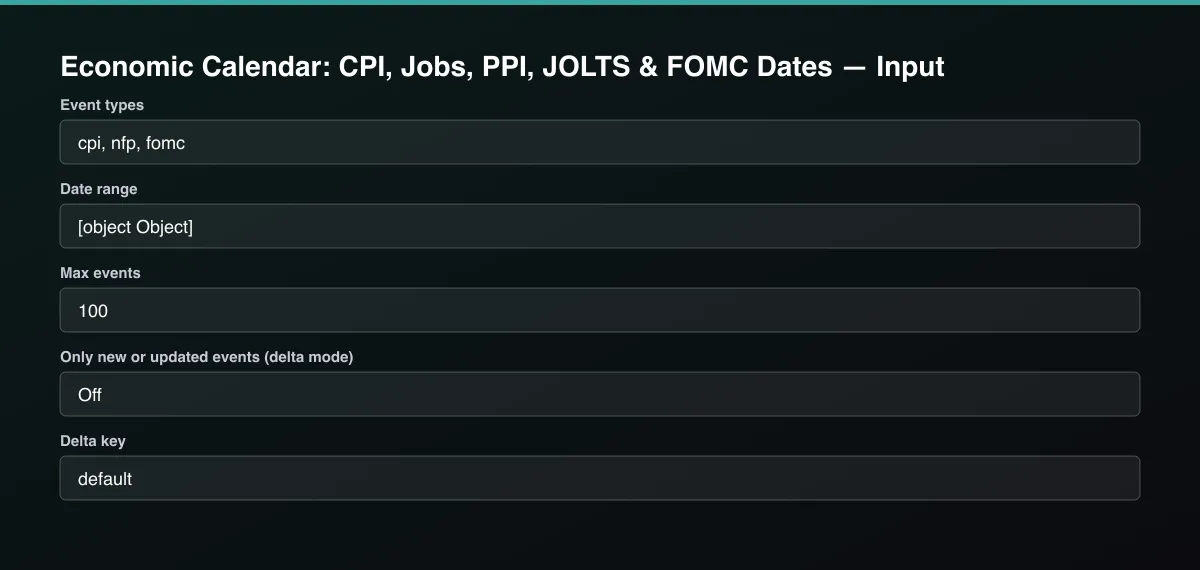
- Open the Actor and go to the Input tab.
- Choose Event types such as
cpi,nfpandfomc, optionally set a Date range, and run. The default window is 30 days back and 60 days ahead. - Optionally set filters and a Max results limit.
- Click Start. A default run finishes in under a minute.
- Open the Output tab, then download the dataset or connect it to your tools.
Input Parameters
| Parameter | Type | Required | Default | Description |
|---|---|---|---|---|
eventTypes | array | No | ["cpi","nfp","fomc"] | Releases to return: cpi, nfp, ppi, jolts, eci, productivity, real_earnings, fomc, fomc_minutes. |
dateRange | object | No | {} | From and to dates (YYYY-MM-DD). Default is 30 days back and 60 days ahead, so you get recent actuals and upcoming dates. |
maxItems | integer | No | 100 | Maximum number of events returned. Set 0 for no limit. |
blsApiKey | string | No | — | Optional free key from the Bureau of Labor Statistics. It raises the daily limit for actual and prior values. |
deltaMode | boolean | No | false | Return and bill only events whose status or actual value changed since the last run with the same delta key, for example a release that just happened. |
deltaStateKey | string | No | "default" | Name of the tracked stream. |
proxyConfiguration | object | No | {"useApifyProxy":false} | Optional proxy. Official government sites work without one. |
Output Data
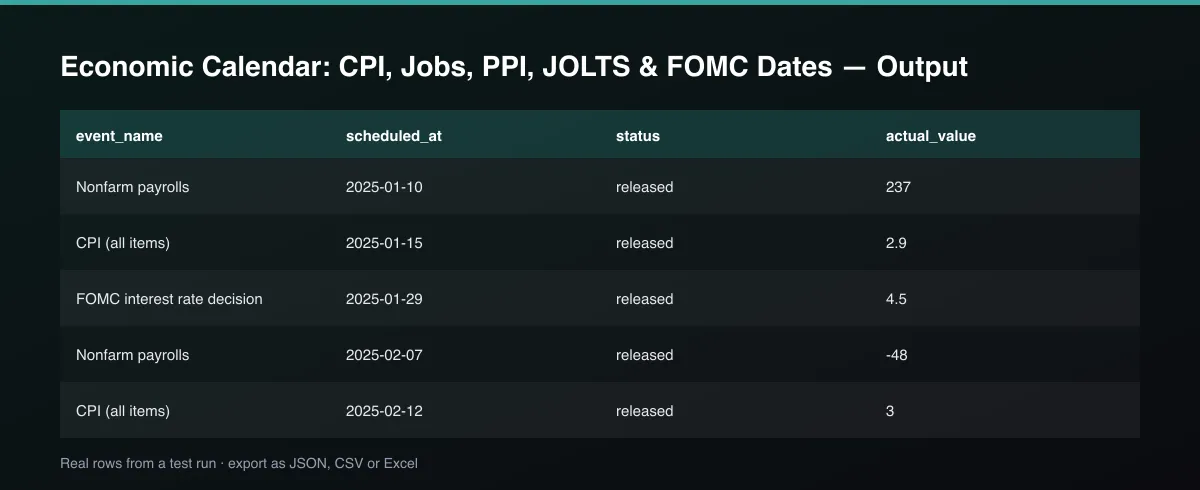
scheduled_at is the release time in UTC. status is scheduled, released, or released_value_pending when the release time has passed but the data service has not returned the value. actual_value and prior_value use the unit field: CPI is percent year over year (with actual_mom_pct too), NFP is the monthly change in thousands of jobs (with unemployment_rate_pct), PPI is percent month over month, JOLTS is job openings in thousands, FOMC is the upper bound of the target range in percent (with change_bps). forecast_value is always null because no official source publishes forecasts.
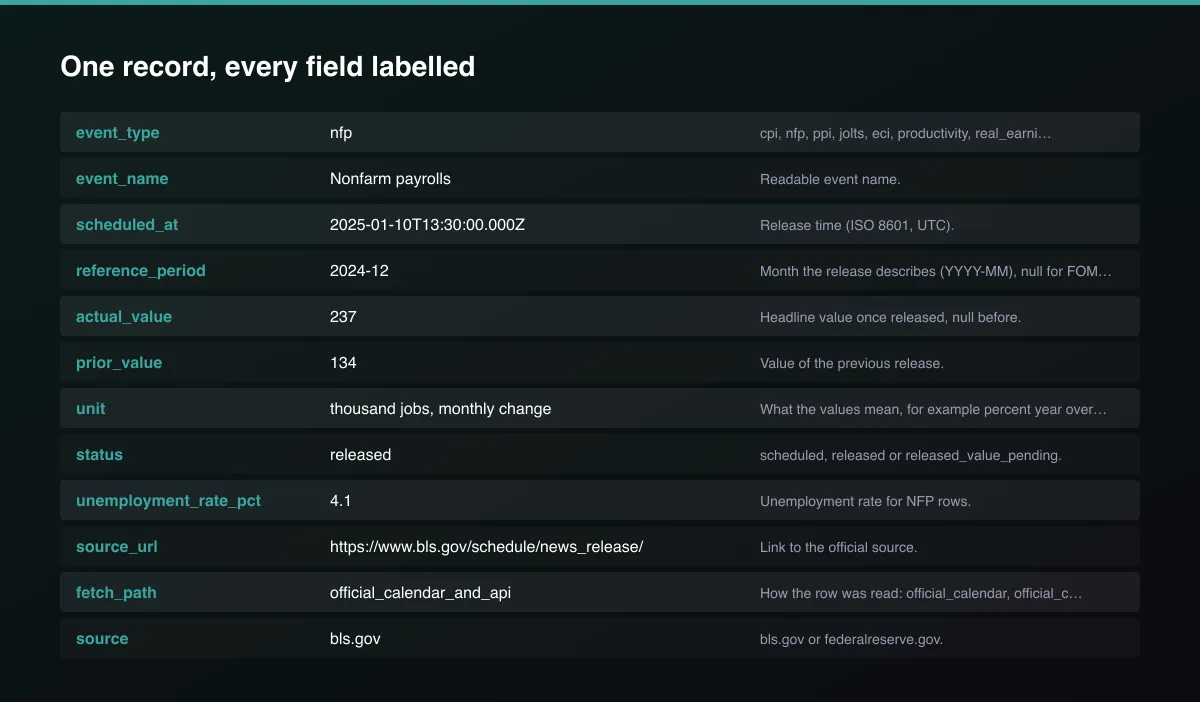
A real dataset item:
How to read and use the results
- Filter status = scheduled for what comes next.
- Compare actual_value with prior_value for the direction of change.
- Use reference_period to know which month a release describes.
- Treat released_value_pending as a short delay: run again a little later.
- Read change_bps on FOMC rows for the size of a rate move.
- Automate: schedule with delta mode and send each newly released row to Slack or a webhook.
Usage Examples
CPI, jobs and Fed decisions around now
Every 2026 release of the main indicators
Release alerts (only what changed)
Tips for Best Results
- Schedule the Actor every 15 minutes on release days with delta mode on to catch each release as it happens.
- Join on event_type plus reference_period to line actuals up with other datasets.
- Use the fomc row's change_bps to see the size of each rate move.
- An optional free BLS key avoids daily limit errors on shared IPs.
- Default is 5 results for a fast test. Set the max to 0 to return everything available.
Reliability by mode
| Mode | Status | Needs login or key? | Notes |
|---|---|---|---|
| CPI, NFP, PPI, JOLTS dates | ✅ | No | Official BLS calendar. |
| Actual and prior values for those | 🟡 | Optional BLS key | Free data service has a daily limit; dates still work without it. |
| FOMC decisions and rates | ✅ | No | Fed calendar and statements. |
| FOMC minutes dates | 🟡 | No | Estimated when not yet published; flagged. |
| Employment cost, productivity, real earnings | 🟡 | No | Dates only, no values. |
| Forecast values | ❌ | - | Not published by any official source. |
| GDP, PCE, retail sales | ❌ | - | Not covered yet. |
✅ works as described, 🟡 works with caveats, ❌ not supported.
Only new records (delta mode)
Turn on Only new or updated events (delta mode) and set a Delta key. Each scheduled run returns, and bills, only events whose status or actual value changed, so a release that just happened is delivered once.
Known Limitations
- Forecast (consensus) values are not published by the BLS or the Fed, so forecast_value is null. A commercial forecast feed is not included.
- Only BLS and Federal Reserve events are covered: no GDP, PCE or retail sales yet.
- The BLS data service allows a limited number of unregistered requests per day; when it is unavailable, rows keep their dates and status but actual and prior values are null.
- Values are the latest revised figures from the BLS data service, not the first print; first-release and revised numbers can differ.
- Estimated minutes dates (three weeks after the meeting) are flagged with date_estimated.
- Release times can be moved by the agencies; run the Actor again for the latest schedule.
- The BLS calendar this Actor reads covers roughly the current and previous year; earlier dates return no events.
Integrations
Run it from the Apify API, on a schedule, or from a webhook. Send results straight to Google Sheets, Make, Zapier, Slack or your own database with Apify's built-in integrations.
Export Formats
Download the dataset as JSON, CSV, Excel, XML, HTML table or RSS from the Output tab or the API.
Frequently Asked Questions
Where does the data come from?
The Bureau of Labor Statistics release calendar and public data service, and the Federal Reserve FOMC calendar and policy statements. These are official public sources, not scraped commercial sites.
Does it need an API key?
No. An optional free BLS key raises the daily limit for actual and prior values.
Are forecasts included?
No. Consensus forecasts are commercial data; the field exists for compatibility and is always null.
What timezone are the times in?
UTC. The agencies publish New York times; the Actor converts them with daylight saving.
How do I get the next CPI release date?
Run with event type cpi; the first row with status scheduled is the next release.
Am I charged for failed results?
No. You are only charged for events written to the dataset.
Do I need an account or login?
No. The Actor reads public government sources and needs no account.
Am I charged for failed runs or empty results?
You are only charged for results that are actually written to the dataset.
Can I run it on a schedule?
Yes. Create a Task with your input and add a schedule in Apify Console. With monitor mode on, each scheduled run returns only what changed since the previous one.
Changelog
- 2026-09-26: First release: CPI, NFP, PPI, JOLTS, ECI, productivity, real earnings, FOMC decisions and minutes with actual and prior values.
Enterprise and custom work
Need higher volumes, a custom output schema, dedicated scheduling or a no-breaking-changes commitment for a production pipeline? Open an issue on the Actor page and describe your use case. Bulk terms and custom builds are available.
Support
Questions or a missing field? Open an issue from the Issues tab on this Actor's page and it will be looked at.
Legal / Responsible Use
This Actor reads public data from the Bureau of Labor Statistics and the Federal Reserve. Automated requests identify themselves as the BLS asks. You are responsible for how you use the data; it is not financial advice and not affiliated with either agency.


