

Formula 1 Results, Qualifying & Standings
Pricing
from $1.00 / 1,000 results
Formula 1 Results, Qualifying & Standings
Formula 1 race results, qualifying times, race calendar and driver and constructor championship standings for any season: positions, points, grid, fastest laps, session times. Data back to 1950. No login.
Pricing
from $1.00 / 1,000 results
Rating
0.0
(0)
Developer

MrDoe
Maintained by CommunityActor stats
0
Bookmarked
1
Total users
0
Monthly active users
a day ago
Last modified
Categories
Share
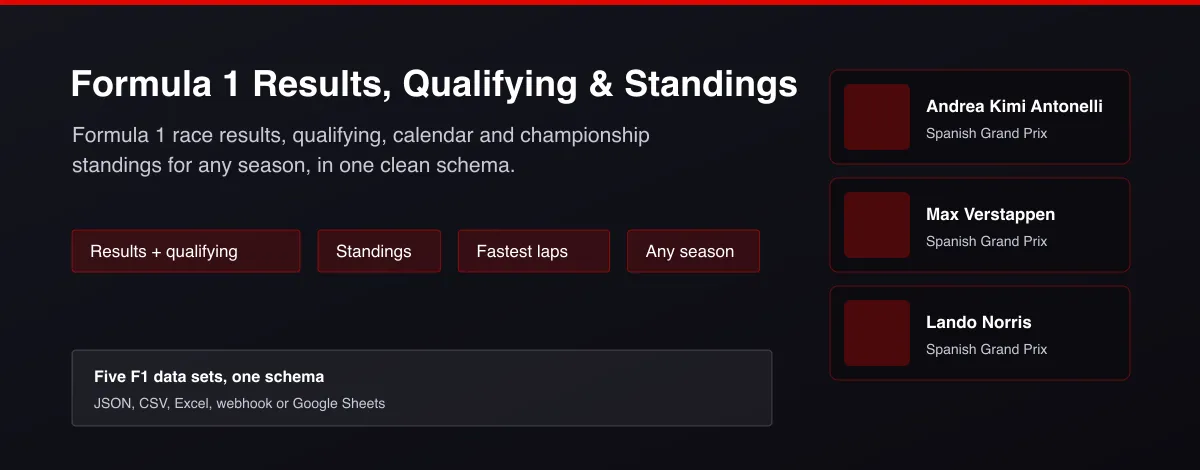
What does Formula 1 Results, Qualifying & Standings do?
Formula 1 Results, Qualifying & Standings returns official Formula 1 data as clean rows for any season back to 1950. Choose race results, qualifying, the race calendar, driver standings or constructor standings, pick a season and optionally a round such as the last race. Each row has the race, circuit and date, driver or team, finishing or qualifying position, grid slot, laps, points, status, race time, fastest lap in seconds, and Q1 to Q3 times for qualifying.
Quick start (3 steps)
- Open the Actor on Apify and click Try for free. No coding needed.
- Choose what you want in the input form (defaults already work - just press Start).
- Download the results as JSON, CSV or Excel, connect them to Google Sheets, or call the Actor as a live API (see below).
Where and how can you use Formula 1 Results, Qualifying & Standings?
Formula 1 Results, Qualifying & Standings gives you clean, structured data you can use in apps, spreadsheets, bots, dashboards and AI tools. Typical uses:
| Use case | Who it is for | How to do it |
|---|---|---|
| Championship trackers | F1 fans and site owners | Show driver and constructor standings after every round. |
| Fantasy F1 and prediction games | Game creators | Use qualifying grids and past results to score picks. |
| Data analysis and dashboards | Analysts and students | Load any season back to 1950 into Sheets, Python or BI tools. |
| Betting models | Quant bettors | Feed finishing order, grid slot and fastest laps into your model. |
| Race-day bots | Community admins | Post results to Discord or Telegram right after the flag. |
| AI assistants | Developers using LLMs | Answer "who won the last race?" with live data. |
Works with: Google Sheets, Excel, Make, Zapier, n8n, Airtable, Slack, Discord, Telegram, webhooks, Python, JavaScript, cURL, and any AI agent that can call an HTTP API or an MCP tool.
Use it as a live API (Actor Standby)
Need an instant answer instead of starting a run? This Actor also works as an always-on HTTP endpoint (Apify Actor Standby). Send a request, get JSON back in seconds - ideal for a Formula 1 results API, apps and automations.
Endpoint
cURL
Python
JavaScript
You can also POST a JSON body with the same fields as the Actor input. The response always looks like { "count": 1, "items": [ ... ] }; if something is wrong with your request you get a clear error message.
Standby vs. normal run - which should I use?
| Standby API | Normal run | |
|---|---|---|
| Best for | Apps, bots, chat assistants, quick lookups | Scheduled jobs, bigger exports, datasets |
| Speed | Answers in seconds | Starts a fresh run each time |
| Output | JSON in the response | Dataset (JSON, CSV, Excel, XML) |
| Scheduling | Call it whenever you like | Apify Schedules and Tasks |
Parameters at a glance
| Parameter | Type | Default | What it does |
|---|---|---|---|
dataType | string | "results" | Which Formula 1 data to return. |
season | string | - | Four-digit year, for example 2026. Leave empty for the current season. |
round | string | "last" | A round number such as 5, or "last" for the most recent race. For race results and qualifying, leave empty to return every round of the season. For standings it shows... |
maxRows | integer | 5 | Maximum number of rows to return. Default is 5 for a quick test; set 0 to return everything available. |
Arrays can be passed as a comma-separated list in the URL, for example ?leagues=nba,nhl.
Example result
Ready-made Tasks
This Actor ships with ready-to-run Tasks for the most common searches - open the Tasks tab, pick one, and press Start. Clone any Task to change the input and schedule it.
Why use Formula 1 Results, Qualifying & Standings?
- Five data sets in one Actor and one schema, so joins are simple.
- Any season back to 1950, or just the last race.
- Fastest laps converted to seconds and qualifying times per session.
- Standings after any round for championship tracking.
- Works logged out; no key needed.
What makes this different
Most F1 data tools cover only the latest race. This Actor returns results, qualifying, calendar and both championship tables for any season in a single flat schema, with fastest laps in seconds, ready for models and dashboards.
How it works
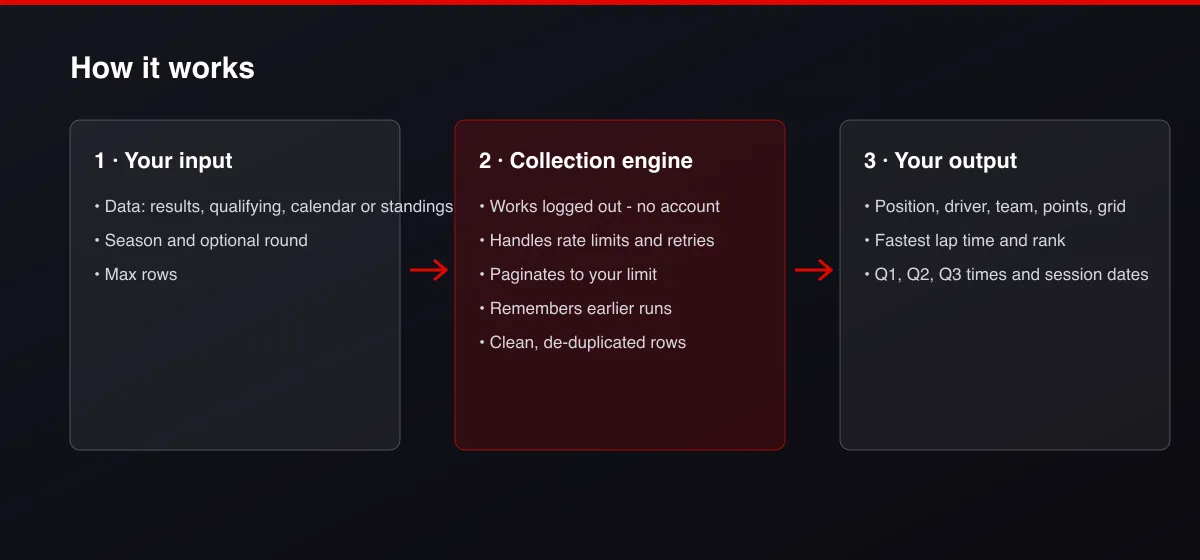
- Your input — choose the data set, a season and an optional round such as last.
- The Actor collects it — the Actor reads the official results feed and pages through it.
- Your output — you get one clean row per driver, team or session.
What data can you extract?
The dataset has 29 fields per row:
| Field | Type | Description |
|---|---|---|
dataType | string | results, qualifying, schedule, driver-standings or constructor-standings. |
season | number | Season year. |
round | number | Round number. |
raceName | string | Grand Prix name. |
circuit | string | Circuit name. |
locality | string | Circuit city. |
country | string | Circuit country. |
date | string | Race date. |
startTime | string | Race start (ISO 8601). |
driverId | string | Driver identifier. |
driverName | string | Driver full name. |
driverCode | string | Three-letter driver code. |
driverNumber | number | Permanent race number. |
nationality | string | Driver nationality. |
team | string | Constructor name. |
position | number | Finishing, qualifying or championship position. |
grid | number | Starting grid slot. |
laps | number | Laps completed. |
points | number | Points scored. |
wins | number | Wins in the championship. |
status | string | Finished, +1 Lap, retirement reason. |
raceTime | string | Race time as published. |
fastestLapRank | number | Fastest-lap rank. |
fastestLapTime | string | Fastest lap as published. |
fastestLapSeconds | number | Fastest lap in seconds. |
q1 | string | Q1 time. |
q2 | string | Q2 time. |
q3 | string | Q3 time. |
sessions | object | Session start times for a race weekend. |
How to use Formula 1 Results, Qualifying & Standings
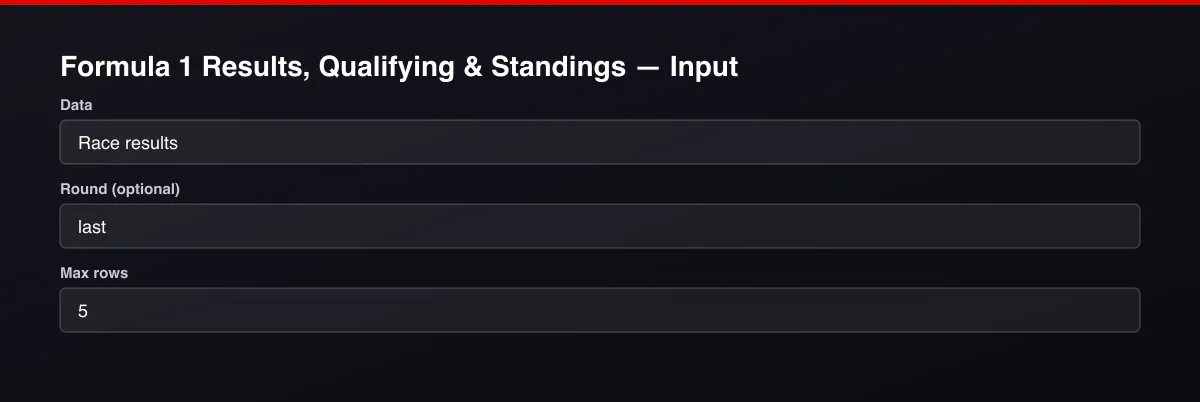
- Open the Actor and go to the Input tab.
- Choose the Data you want, optionally set a Season and a Round such as
last, and press Start. - Optionally set filters and a Max results limit.
- Click Start. A default run finishes in under a minute.
- Open the Output tab, then download the dataset or connect it to your tools.
Input Parameters
| Parameter | Type | Required | Default | Description |
|---|---|---|---|---|
dataType | string | No | "results" | Which Formula 1 data to return. |
season | string | No | — | Four-digit year, for example 2026. Leave empty for the current season. |
round | string | No | "last" | A round number such as 5, or "last" for the most recent race. For race results and qualifying, leave empty to return every round of the season. For standings it shows the table after that round. |
maxRows | integer | No | 5 | Maximum number of rows to return. Default is 5 for a quick test; set 0 to return everything available. |
proxyConfiguration | object | No | {"useApifyProxy":false} | Optional. The data is public and works without a proxy. |
Output Data
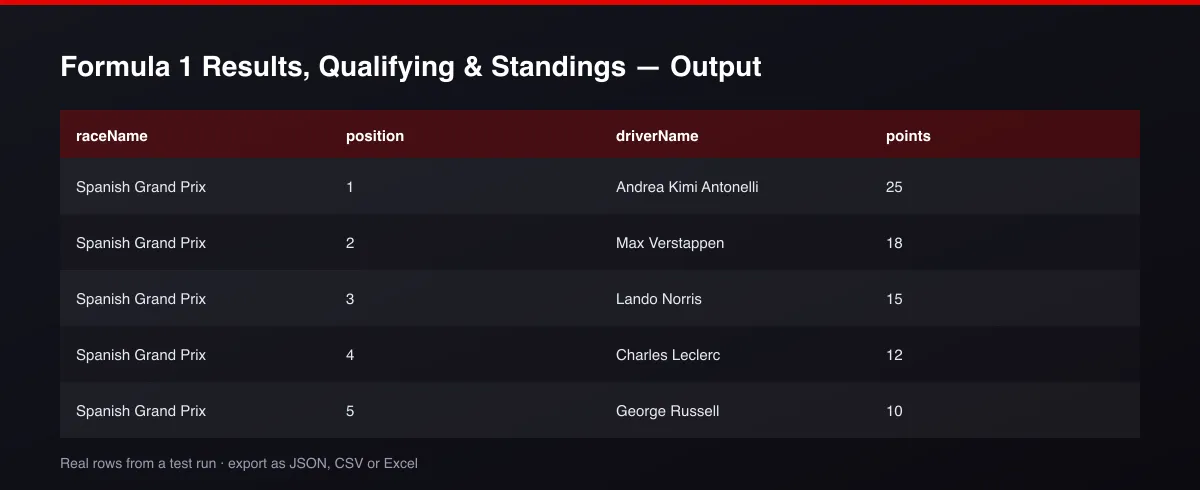
dataType says which data set a row belongs to; fields that do not apply are null. Times are strings as published; fastestLapSeconds is numeric. Points and positions are numbers.
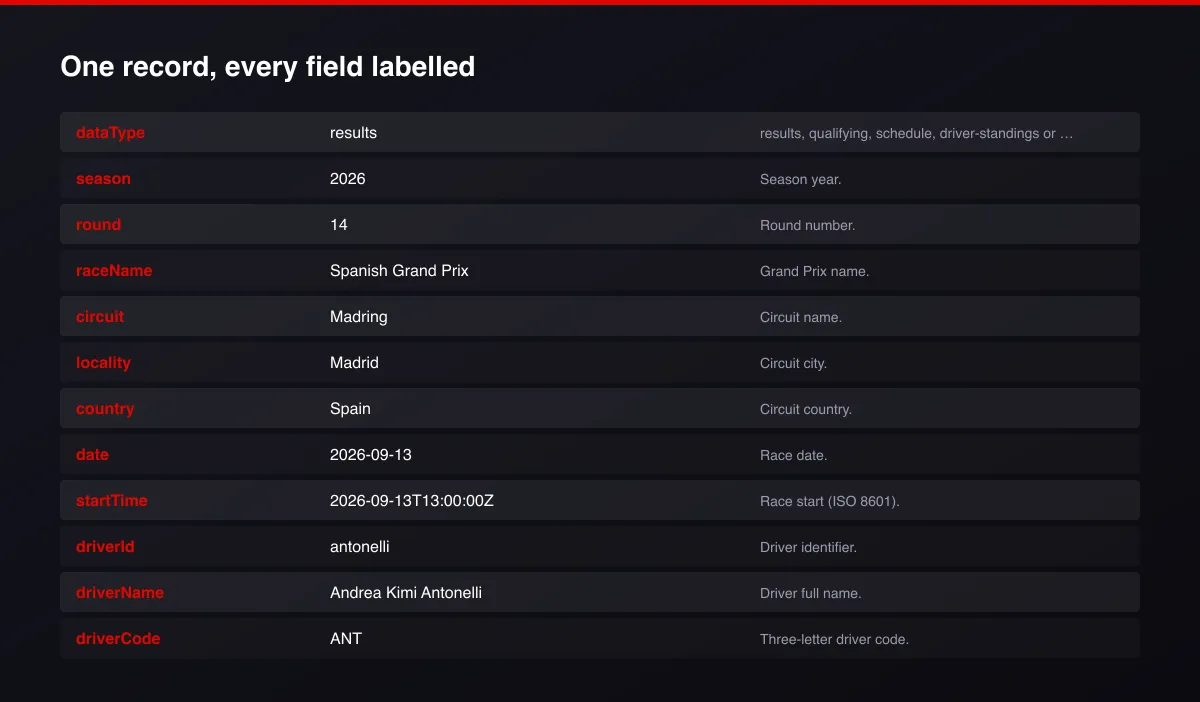
A real dataset item:
Usage Examples
Last race results
Driver championship table
Full 2025 race calendar
Tips for Best Results
- Leave Round empty for results or qualifying to get every round of a season.
- Use the standings after a specific round to see how the championship evolved.
- Schedule it after each race weekend.
- Default is 5 results for a fast test. Set the max to 0 to return everything available.
Known Limitations
- Results appear shortly after a session ends.
- Qualifying Q1 to Q3 times exist only for sessions that had those stages.
- Sprint results are not included.
- The data feed limits request rates; very large multi-season pulls should be split across runs.
Integrations
Run it from the Apify API, on a schedule, or from a webhook. Send results straight to Google Sheets, Make, Zapier, Slack or your own database with Apify's built-in integrations.
Export Formats
Download the dataset as JSON, CSV, Excel, XML, HTML table or RSS from the Output tab or the API.
Frequently Asked Questions
Does it need an account or API key?
No. It reads a public results feed.
Which seasons are covered?
Every Formula 1 season from 1950 to the current one.
Am I charged for failed results?
No. You are only charged for rows written to the dataset.
Do I need an account or login?
No. The Actor reads public results data and needs no account or key.
Am I charged for failed runs or empty results?
You are only charged for results that are actually written to the dataset.
Can I run it on a schedule?
Yes. Create a Task with your input and add a schedule in Apify Console. With monitor mode on, each scheduled run returns only what changed since the previous one.
Can I use this Actor as an API?
Yes. Call the endpoint shown in Use it as a live API with your Apify token. You get JSON in the response, no run to manage.
Can I connect it to Google Sheets, Make, Zapier or n8n?
Yes. Use the Apify integrations for each tool, or call the endpoint from any HTTP module. Scheduled Tasks can push fresh data to your sheet or workflow automatically.
Can an AI assistant use it?
Yes. Any agent that can call an HTTP endpoint or use Apify Actors as tools can call it and read the JSON result.
Support
Questions or a missing field? Open an issue from the Issues tab on this Actor's page and it will be looked at.
Legal / Responsible Use
You are responsible for using the data in line with the data provider's terms and applicable law. Formula 1 is a trademark of its owners; this Actor is not affiliated with Formula 1.


