

Hiring-Signal Buyer Intent
Pricing
from $130.00 / 1,000 buyer-intent report returneds
Hiring-Signal Buyer Intent
Turn a company's open roles into buyer-intent signals: ranked software and service categories the company is likely evaluating, with an intent score and the evidence roles behind each signal.
Pricing
from $130.00 / 1,000 buyer-intent report returneds
Rating
0.0
(0)
Developer

MrDoe
Maintained by CommunityActor stats
0
Bookmarked
2
Total users
1
Monthly active users
16 days ago
Last modified
Categories
Features
Share

What does Hiring-Signal Buyer Intent do?
Hiring-Signal Buyer Intent reads a company's currently open job roles and turns them into buyer-intent signals: the categories of software, tools, and services the company is most likely evaluating or buying right now. For each company it returns the full list of open roles, a breakdown by department and location, an overall intent score from 0 to 100, a hiring-velocity read, and a ranked list of buying signals - each with the evidence roles behind it and a short rationale. You give it a list of company websites, careers pages, or public job-board URLs; it gives you one structured intent report per company.
It is built for sales, marketing, and revenue teams that use hiring activity as a trigger for outbound and account prioritization.
Why use Hiring-Signal Buyer Intent?
- Signals, not just job data - other tools give you a list of jobs; this one tells you what the hiring means for your pipeline.
- Evidence attached - every buying signal names the exact roles it is based on, so your team can trust and act on it.
- Ranked and scored - an intent score and ordered signal list let you prioritize accounts in seconds.
- Clean, structured output - one row per company, consistent field names, ready for CSV or your CRM.
- Simple input - paste domains or careers URLs; the Actor finds the roles.
- Automatable - schedule weekly runs over your target accounts and watch the intent score move.
What makes this different
Job-posting scrapers stop at the raw listing. This Actor adds the interpretation layer sales teams actually need: it classifies each open role as a demand signal for a spend category (hiring a Revenue Operations Manager points to CRM and sales-tooling spend; several Data Engineer openings point to data-warehouse and pipeline spend; a Head of Information Security points to security and compliance tooling), then rolls those into a per-company intent score and a ranked signal list with evidence. The analysis uses a no-cost default model, so the per-result cost stays low.
How it works

- Your input - a list of company websites, careers pages, or public job-board URLs.
- The Actor collects it - it finds each company's open roles, normalizes them, then classifies the whole set into buying signals and an intent score.
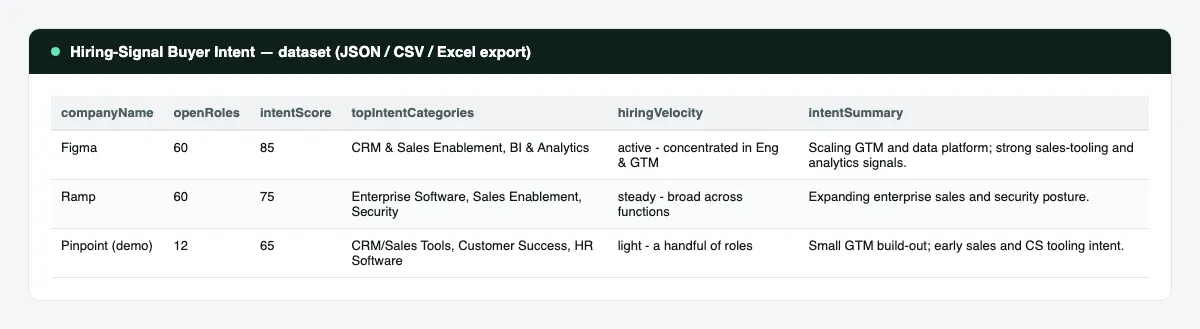
- Your output - a dataset with one intent report per company: open roles, departments hiring, ranked buying signals, top intent categories, and the score. Export to JSON, CSV, or Excel, or read it from the API.
What data can you extract?
| Field | Description |
|---|---|
domain | The company's domain or board identifier. |
careersUrl | The careers page or job board that was read. |
companyName | Company name. |
totalOpenRoles | Number of open roles found. |
departmentsHiring | List of { department, openRoles } counts. |
topLocations | Most common role locations. |
notableRoles | Distinct role titles found. |
buyingSignals | Ranked list of { category, likelihood, evidenceRoles, rationale }. |
topIntentCategories | The 3-5 strongest spend categories, as a flat list. |
intentSummary | One or two sentences summarizing what the hiring implies. |
intentScore | Overall buyer-intent strength, 0 to 100. |
hiringVelocity | Short phrase describing hiring pace and spread. |
rolesSample | Up to 60 roles with title, location, department, url, postedAt. |
enrichmentConfidence | The analysis's own confidence: high, medium, or low. |
enrichmentStatus | Whether the analysis was produced, and if not, why. |
scrapedAt | ISO timestamp of the run. |
How to use Hiring-Signal Buyer Intent
- Open the Actor in the Apify Console.
- In Companies, paste one company website, careers page, or job-board URL per line.
- Set Max companies and Max roles per company.
- Press Start.
- When the run finishes, open the Dataset tab and export to CSV, JSON, or Excel, or connect it to your workflow.
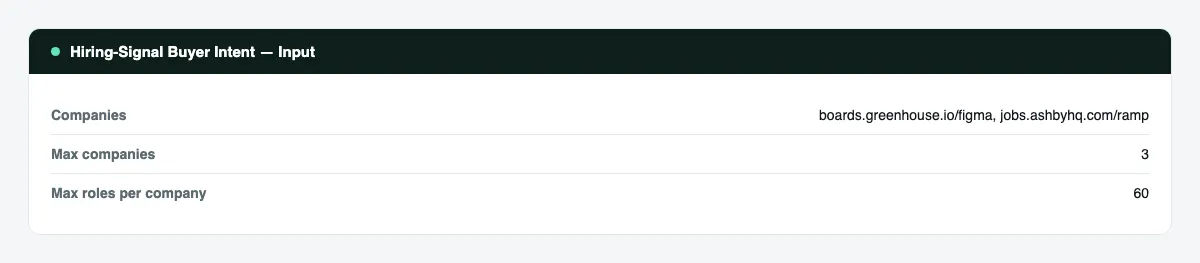
Input Parameters
| Parameter | Type | Required | Default | Description |
|---|---|---|---|---|
startUrls | array | Yes | Figma job board | One entry per company: a website, careers page, or job-board URL. |
maxItems | integer | No | 3 | Stop after this many intent reports. |
maxRolesPerCompany | integer | No | 60 | Cap on roles read and analysed per company. Range 1-400. |
openRouterApiKey | string (secret) | No | — | Optional key for the analysis service. Without it, open roles are still returned and the analysis fields are left empty. |
proxyConfiguration | object | Yes | Apify Proxy | Proxy settings. A proxy is required; the default uses Apify Proxy. |
Output Data
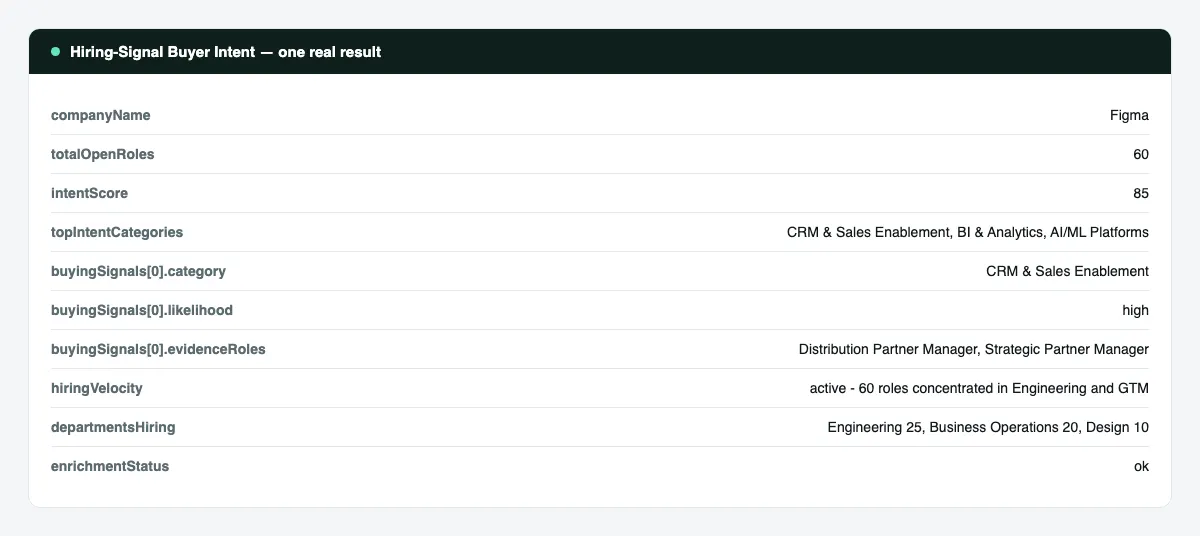
One dataset item per company. Real sample record:
Usage Examples
- Prioritize an account list - feed 100 target-account domains, sort the output by
intentScore, and work the top 20 first. - Category-specific prospecting - run your ICP list and filter
topIntentCategoriesfor the category your product sits in. - Weekly trigger monitoring - schedule a run over key accounts and alert when a new signal appears in
buyingSignals. - Territory planning - use
departmentsHiringandtopLocationsto see where an account is investing.
Tips for Best Results
- A direct careers page or public job-board URL gives the most complete role list; a homepage works too but relies on finding the careers link.
- Raise
maxRolesPerCompanyfor large enterprises so the analysis sees the full hiring picture. - Provide an analysis service API key for the intent fields; the raw roles work without one.
- The signal quality depends on how descriptive the role titles are - vague titles produce lower-confidence signals.
Known Limitations
- The Actor reads publicly listed roles only. Roles behind a login or shown only after a search are not included.
- Companies that publish very few or very generic titles get a low
intentScoreand lowenrichmentConfidence. - Buying signals are inferences from hiring, not confirmed purchases.
postedAtanddepartmentare null when the source does not provide them.- The analysis quality reflects the default no-cost model and can be terse on small role sets.
- Sites that block all automated access return a role list of zero with an
enrichmentStatusexplaining why.
Integrations
Connect the dataset to Google Sheets, Airtable, Make, Zapier, or n8n; call the Actor from the Apify API; trigger it with webhooks; or schedule recurring runs from the Apify Console.
Export Formats
JSON, CSV, Excel, and XML, from the Dataset tab or the Apify API.
Frequently Asked Questions
Do I need an account or login?
No. The Actor reads only publicly listed roles and never logs in anywhere.
Which companies can it read?
Any company whose roles are public: a careers page, or a hosted job board. Paste the website, the careers URL, or the board URL.
How many roles does it analyse per company?
Up to maxRolesPerCompany (default 60, maximum 400). The full count found is always reported in totalOpenRoles.
Why is the intent score low for some companies?
Because the open roles are few, generic, or not procurement-adjacent. A low score is a real result, not an error.
What are buying signals based on?
Only the open roles found for that company. Each signal lists the specific roles it was inferred from.
Am I charged for failed results?
You are charged for intent reports written to the dataset. Companies that fail before a report is written are not charged.
How fresh is the data?
Roles are read live at run time. Re-run to refresh.
Can it export to Google Sheets?
Yes. Connect the dataset to the Google Sheets integration or pull it from the API.
Does it handle duplicate companies?
Yes. Companies are keyed by domain or board identifier; a duplicate entry is analysed once.
Support
Questions and bug reports: use the Issues tab on the Actor's Console page. Include the input you ran and the run ID.
Legal / Responsible Use
You are responsible for complying with the target websites' terms of use, applicable law, and responsible data-use requirements. Job-role data is generally not personal data, but where a listing includes a named contact you are responsible for meeting any applicable privacy and data-protection obligations (for example GDPR) for personal data you collect and store.


