

OddsPortal Tipster ROI Tracker & Community Predictions
Pricing
from $0.01 / actor start
OddsPortal Tipster ROI Tracker & Community Predictions
Tipster ROI leaderboard from OddsPortal: monthly stats per user, low-sample flags, top community predictions and match vote splits. Private profiles handled. No login.

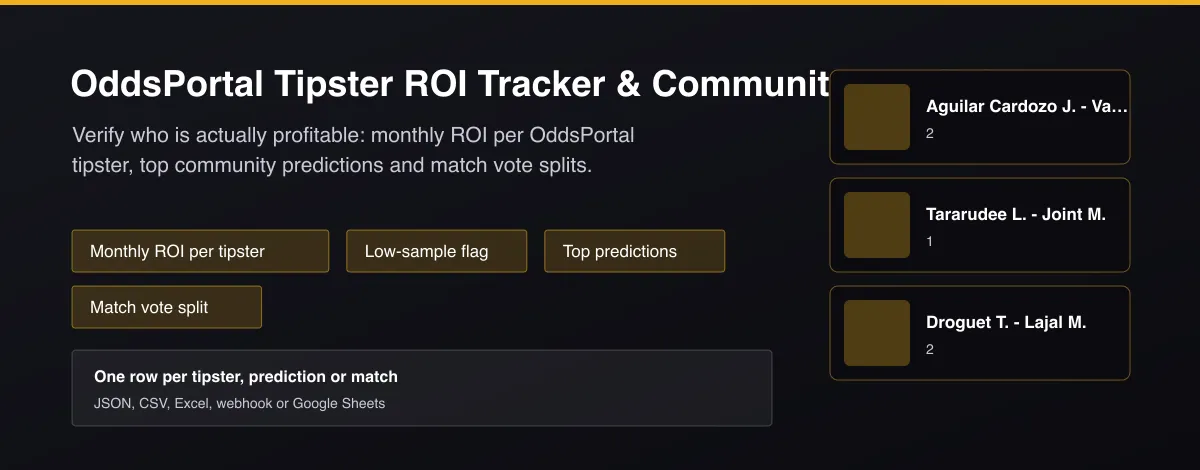
What does OddsPortal Tipster ROI Tracker & Community Predictions do?
OddsPortal Tipster ROI Tracker reads the public community pages of OddsPortal and returns three kinds of results: monthly ROI statistics for tipsters, the community's top predictions for the next 7 days, and the vote split of a single match. Give it several usernames, or ask for the top N users of the ROI leaderboard, and it returns one row per tipster so you can sort and filter by ROI yourself. Tipsters with too few picks are flagged with low_sample_size, and private profiles are returned as header-only rows instead of errors.
Why use OddsPortal Tipster ROI Tracker & Community Predictions?
- One row per tipster across many usernames, ready to sort by ROI.
- Small samples are flagged, so a 100% ROI on three picks is not mistaken for skill.
- Private profiles are a valid result, with the public header fields and empty stats.
- Top predictions and match vote splits come with the same clean schema.
- Works without an account or login.
What makes this different
Paid tipster sites sell track records behind a subscription. This Actor turns OddsPortal's public tipster profiles and leaderboard into a sortable ROI table with an explicit small-sample flag, which is the part most scrapers leave out.
Who can use the OddsPortal Tipster Tracker and how?
- Bettors: check whether a tipster you follow is actually profitable, month by month, before you follow their picks.
- Tipster marketplaces and blogs: build a ranked, filterable ROI table with a small-sample flag.
- Data teams: collect community vote splits as a sentiment feature for sports models.
- Content creators: publish the day's most popular community predictions.
- Researchers: study crowd wisdom versus closing odds using vote shares.
How it works
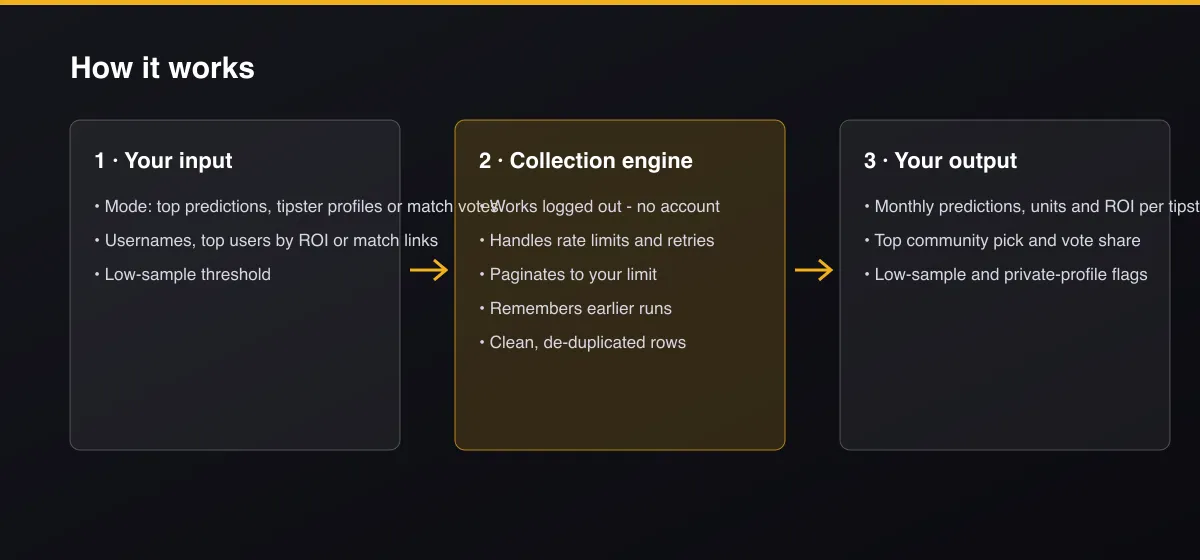
- Your input — choose a mode and enter usernames, a top-users count or match links.
- The Actor collects it — the Actor opens the public OddsPortal community pages and reads the numbers.
- Your output — you get one row per tipster, prediction or match with the low-sample flag where it applies.
What data can you extract?
The dataset has 27 fields per row:
| Field | Type | Description |
|---|---|---|
username | string | Tipster username. |
member_since | string | Date the user joined (YYYY-MM-DD). |
country | string | Country of the tipster, or the country/region of a top prediction. |
privacy | string | public or private. |
overall_roi_pct | number | Overall ROI shown on the profile header. |
monthly_stats | array | Per month: month, total_predictions, units_won, units_lost, profit_units, roi_pct. |
total_predictions | number | All-time number of predictions, null for private profiles. |
recent_predictions | array | Recent picks: match, market, pick, pick_odds, result. |
low_sample_size | boolean | True when total picks are below the threshold. |
profile_url | string | Link to the public profile. |
sport | string | Sport of a top prediction. |
league | string | League of a top prediction. |
match | string | Home team - away team. |
home_team | string | Home team. |
away_team | string | Away team. |
kickoff_utc | string | Kickoff time (ISO 8601, UTC). |
market | string | Market the votes are for, for example 1X2. |
outcomes | array | Outcomes with odds and community vote percentage. |
top_pick | string | Outcome with the highest community vote share. |
top_pick_vote_pct | number | Vote share of the top pick in percent. |
match_id | string | OddsPortal event id. |
vote_share_pct | array | Match votes: outcome and vote_pct. |
match_url | string | Link to the match. |
source | string | Data source. |
scraped_at | string | Collection time (ISO 8601). |
actor_version | string | Output schema version. |
fetch_path | string | Which route served the row: always browser for this Actor. |
How to use OddsPortal Tipster ROI Tracker & Community Predictions
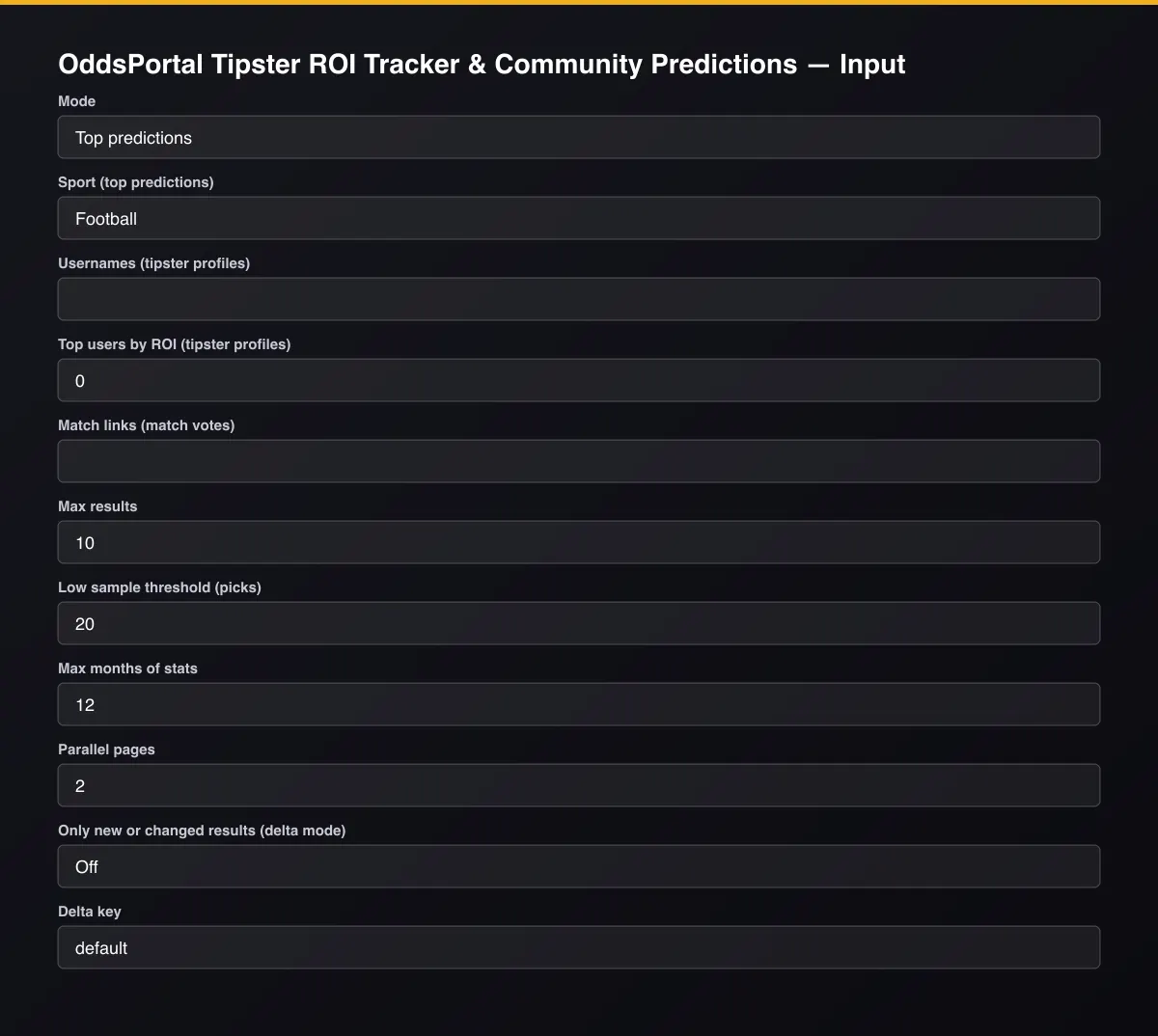
- Open the Actor and go to the Input tab.
- Choose a Mode, then enter Usernames (or a Top users count) for tipster profiles, a Sport for top predictions, or Match links for votes.
- Optionally set filters and a Max results limit.
- Click Start. A default run finishes in under a minute.
- Open the Output tab, then download the dataset or connect it to your tools.
Input Parameters
| Parameter | Type | Required | Default | Description |
|---|---|---|---|---|
mode | string | No | "top_predictions" | Top predictions lists the community's most popular picks for the next 7 days, user profile returns tipster ROI stats, match votes returns the community vote split of one match. |
sport | string | No | "football" | Sport for top predictions mode. |
usernames | array | No | [] | OddsPortal usernames or profile links, one per line. One result per tipster, so you can sort by ROI. |
topUsers | integer | No | 0 | Also add the top N users of the public ROI leaderboard (0 for none, up to 200). |
matchUrls | array | No | [] | OddsPortal match links, one per line. |
maxItems | integer | No | 10 | Maximum number of results. Default is 10 for a quick test; set 0 for no limit. |
minSampleSize | integer | No | 20 | Tipsters with fewer total picks than this get low_sample_size: true, because their ROI is mostly noise. |
maxMonths | integer | No | 12 | How many months of monthly stats to return per tipster. |
maxConcurrency | integer | No | 2 | Pages read in parallel. Keep it low to stay polite to the site. |
deltaMode | boolean | No | false | Return and bill only results not delivered by an earlier run with the same delta key: new predictions, tipsters whose numbers changed, or changed vote splits. |
deltaStateKey | string | No | "default" | Name of the tracked stream. Use a different key per watchlist. |
proxyConfiguration | object | No | {"useApifyProxy":false} | Residential proxies are recommended for tipster profiles: the site rejects most datacenter addresses. |
Output Data
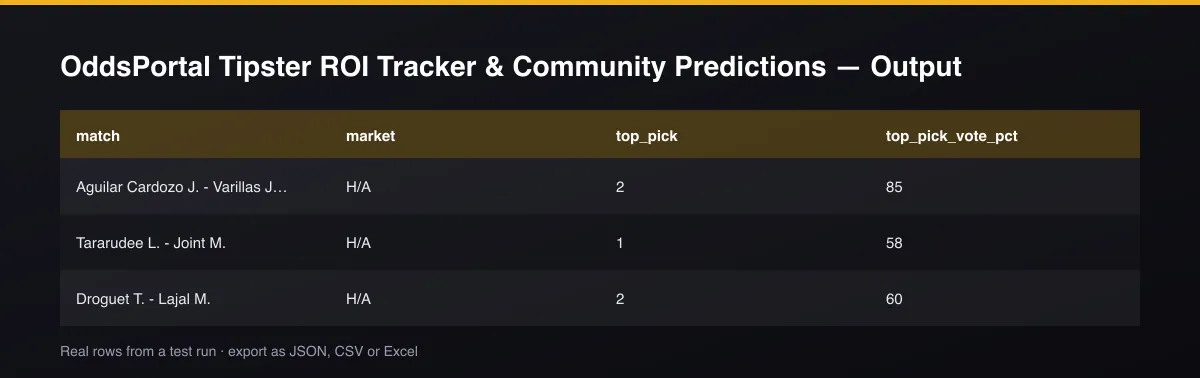
Tipster rows have monthly_stats with units_won, units_lost, profit_units and roi_pct per month, exactly as OddsPortal reports them (units, not win and loss counts). low_sample_size is true when total picks are below your threshold. Private profiles have privacy: private, empty stats and null totals. Top prediction and match vote rows carry the community vote split; only percentages are shown by the site, not vote counts.
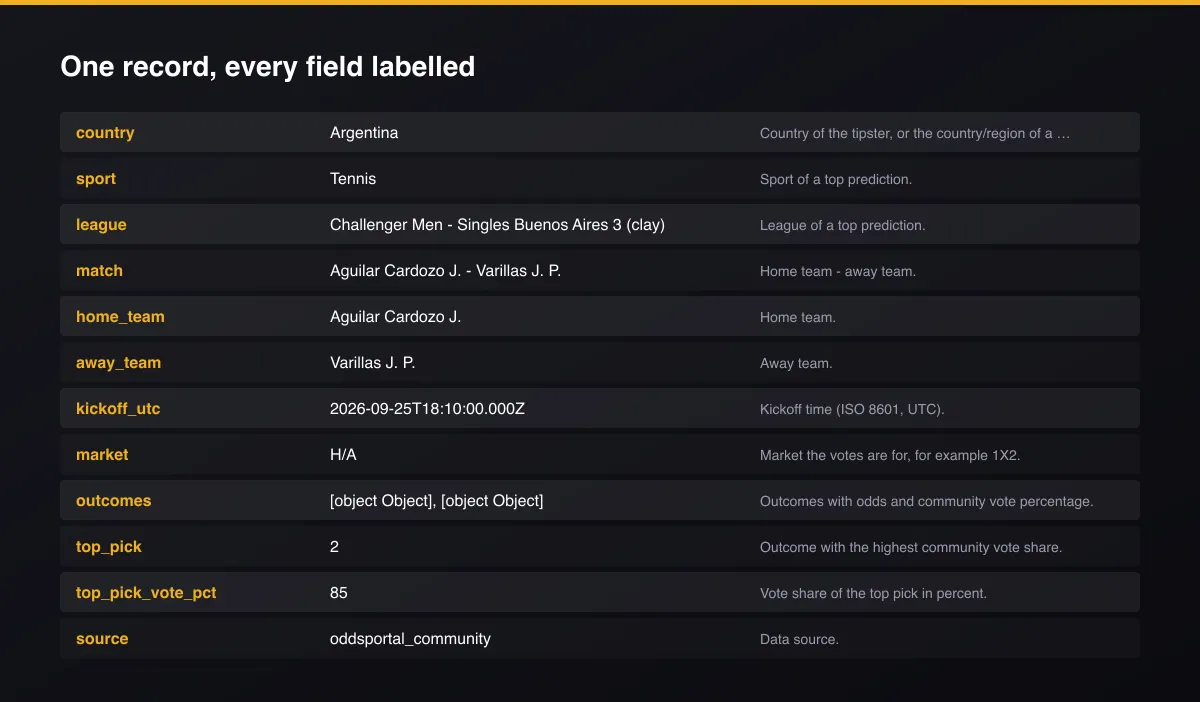
A real dataset item:
How to read and use the results
- Sort tipsters by overall_roi_pct, then drop rows where low_sample_size is true.
- Read monthly_stats for consistency: one great month is not a track record.
- Private profiles return only the header; there is nothing else to read.
- Community votes are percentage splits; the top pick is the outcome with the most votes.
Usage Examples
Community top predictions for football
Compare several tipsters by ROI
Top 10 users of the ROI leaderboard
Only tipsters whose numbers changed
Tips for Best Results
- Sort the dataset by overall_roi_pct and filter out low_sample_size rows.
- Many top-ROI users keep their profile private; those return a header-only row.
- Schedule top predictions daily to keep a history of community picks.
- Raise the low sample threshold for a stricter view.
- Default is 5 results for a fast test. Set the max to 0 to return everything available.
Reliability by mode
| Mode | Status | Needs login or key? | Notes |
|---|---|---|---|
| Top predictions | ✅ | No | Fixed 7-day list, no pagination. |
| Public tipster profiles | ✅ (residential proxy recommended) | No | Monthly stats and recent picks. |
| Private tipster profiles | 🟡 | No | Header fields only, by design. |
| Leaderboard (Top users) | ✅ | No | Top N by ROI from the public leaderboard. |
| Match vote split | 🟡 | No | Percentages only; counts are not published. |
| Pick results (won/lost) | ❌ | - | Not shown reliably; upcoming picks are pending, others null. |
| Datacenter IPs without a proxy | ❌ | - | Use residential proxies on the platform. |
✅ works as described, 🟡 works with caveats, ❌ not supported.
Only new records (delta mode)
Turn on Only new or changed results (delta mode) and set a Delta key. Each scheduled run returns, and bills, only predictions not delivered before, tipsters whose totals or latest-month ROI changed, or match vote splits that moved.
Known Limitations
- For personal research use. OddsPortal's terms of use restrict automated access, so use the Actor at your own risk and keep the request volume low.
- On the Apify platform, use residential proxies: the site rejects most datacenter addresses for profile and match pages.
- The site shows tipster stats as units, so won and lost counts are not available; the Actor returns units_won, units_lost and profit_units.
- Vote data is a percentage split per outcome. Vote counts are not published, so only the split and the top pick are returned.
- Prediction results (won or lost) are not shown reliably on profiles; upcoming picks are marked pending and finished ones have a null result.
- Private profiles expose only the header fields.
- The top predictions list is a fixed list for the next 7 days with no pagination.
- The site can change its layout; the Actor logs a clear warning when a page cannot be read.
Integrations
Run it from the Apify API, on a schedule, or from a webhook. Send results straight to Google Sheets, Make, Zapier, Slack or your own database with Apify's built-in integrations.
Export Formats
Download the dataset as JSON, CSV, Excel, XML, HTML table or RSS from the Output tab or the API.
Frequently Asked Questions
Where does the data come from?
The public community pages of OddsPortal: user profiles, the ROI leaderboard, the top predictions page and the community vote on match pages. It is scraped from publicly rendered pages, not an official API. No login is used.
Does it need an account or API key?
No. It reads only public pages and never logs in.
What does low_sample_size mean?
The tipster has fewer total picks than the threshold (20 by default). Their ROI is mostly noise, so the row says so instead of ranking it silently.
What happens with a private profile?
You get the username, country, member since date, privacy: private and the overall ROI shown on the header, with empty stats. It is not treated as an error.
Am I charged for failed results?
No. You are only charged for results that are written to the dataset.
How do I find profitable tipsters on OddsPortal?
Run tipster profiles with Top users set to the number you want, sort by overall_roi_pct, and ignore rows flagged low_sample_size.
Do I need an account or login?
No. The Actor reads public pages only and never logs in.
Am I charged for failed runs or empty results?
You are only charged for results that are actually written to the dataset.
Can I run it on a schedule?
Yes. Create a Task with your input and add a schedule in Apify Console. With monitor mode on, each scheduled run returns only what changed since the previous one.
Changelog
- 2026-09-26: Added delta mode, per-mode pricing tiers and the fetch_path field.
- 2026-09-25: First release: top predictions, tipster profiles with low-sample flag, match vote splits.
Enterprise and custom work
Need higher volumes, a custom output schema, dedicated scheduling or a no-breaking-changes commitment for a production pipeline? Open an issue on the Actor page and describe your use case. Bulk terms and custom builds are available.
Support
Questions or a missing field? Open an issue from the Issues tab on this Actor's page and it will be looked at.
Legal / Responsible Use
For personal research use. OddsPortal's terms of use restrict automated access to the site, and you are responsible for complying with them and with applicable law. The Actor reads publicly rendered pages only, never bypasses a login or paywall, and is not affiliated with OddsPortal. This is not betting advice.


