Outreach Personalization Assistant
Pricing
from $160.00 / 1,000 prospect draft returneds
Outreach Personalization Assistant
Reads a prospect's public LinkedIn profile and company website and drafts a personalized cold-email opener grounded in real details, with the source for each personalization hook and a 'do not send' flag when the data is too thin.
Pricing
from $160.00 / 1,000 prospect draft returneds
Rating
0.0
(0)
Developer

MrDoe
Maintained by CommunityActor stats
0
Bookmarked
2
Total users
1
Monthly active users
14 days ago
Last modified
Categories
Features
Share
What does Outreach Personalization Assistant do?
Outreach Personalization Assistant reads a prospect's public LinkedIn profile and their company's website and drafts a personalized cold-email opener grounded in real, specific details. For each prospect it returns a set of subject-line options, a 2-4 sentence opener that references a genuine observation about the person or company, a list of personalization hooks with the source for each, a suggested angle that ties your offer to what the prospect cares about, a soft call to action, and - when the available information is too thin to personalize honestly - a "do not send" reason instead of a fabricated opener. You give it a list of prospects and a short description of what you offer; it gives you one draft per prospect.
It is built for founders, SDRs, and recruiters who want personalization at volume without inventing details.
Why use Outreach Personalization Assistant?
- Fact-grounded - it uses only details it actually found; it never invents a mutual connection, a recent event, or a quote.
- Sources attached - every personalization hook cites where it came from (LinkedIn headline, company blog, careers page).
- Honest fallback - thin profiles get a "do not send" flag, not a generic-but-fake opener.
- More than an opener - subject lines, a suggested angle, and a call to action too.
- Clean, structured output - one row per prospect, consistent field names, ready for your sequencer.
- Volume friendly - draft for a whole list in one run.
What makes this different
Most personalization tools paste a job title into a template. This Actor reads the prospect's LinkedIn profile and several pages of their company's site, pulls the specific, verifiable details, and writes an opener around one real observation - then shows you the source for each hook so you can trust it. If it cannot find enough to personalize, it tells you so. The drafting uses a no-cost default model, so the per-result cost stays low.
How it works

- Your input - a list of prospects with a LinkedIn URL and/or a company URL, plus a short description of what you offer.
- The Actor collects it - it reads the public LinkedIn profile and the company website, then drafts an opener from what it found.
- Your output - a dataset with one draft per prospect: subject lines, the opener, personalization hooks with sources, a suggested angle, and a call to action. Export to JSON, CSV, or Excel.
What data can you extract?
| Field | Description |
|---|---|
name | The prospect's name. |
role | The prospect's role or headline. |
company | The prospect's company. |
linkedinUrl / companyUrl | The URLs that were read. |
linkedinHeadline | The prospect's LinkedIn headline. |
linkedinAbout | The prospect's LinkedIn "about" text, when public. |
education | Schools listed on the profile. |
companyDescription | The company's own description. |
pagesRead | The exact pages the draft was based on. |
subjectLines | Two to four subject-line options. |
opener | The personalized opener. |
personalizationHooks | List of { hook, source }. |
suggestedAngle | How to connect your offer to what the prospect cares about. |
callToAction | A soft, specific call to action. |
doNotSendReason | Filled only when the information was too thin to personalize honestly. |
enrichmentConfidence | Draft confidence: high, medium, or low. |
enrichmentStatus | Whether the draft was produced, and if not, why. |
scrapedAt | ISO timestamp of the run. |
How to use Outreach Personalization Assistant
- Open the Actor in the Apify Console.
- In Prospects, add one entry per prospect, for example
{"name": "Jane Doe", "linkedinUrl": "https://www.linkedin.com/in/janedoe", "companyUrl": "acme.com"}. - In What you offer, write one or two sentences about your product or service.
- Set Max prospects.
- Press Start.
- When the run finishes, open the Dataset tab and export to CSV, JSON, or Excel.
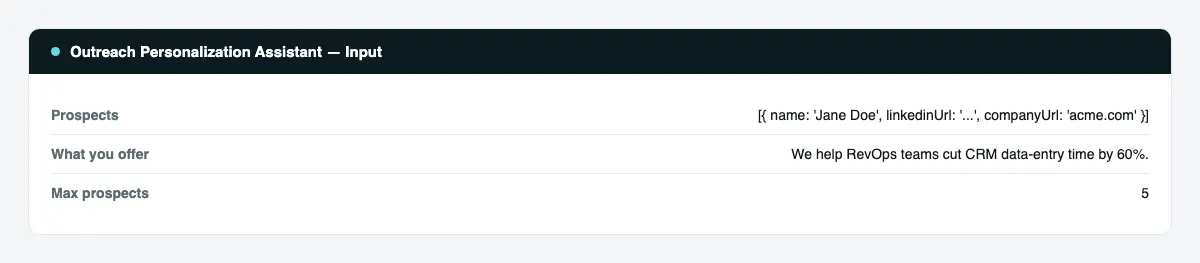
Input Parameters
| Parameter | Type | Required | Default | Description |
|---|---|---|---|---|
prospects | array | Yes | one example prospect | One { name?, role?, company?, linkedinUrl?, companyUrl? } per prospect. Each needs a LinkedIn URL or a company URL. |
offer | string | No | — | One or two sentences about what you offer. |
companyPages | integer | No | 4 | Pages of each company site to read, including the homepage. Range 1-8. |
maxItems | integer | No | 5 | Stop after this many drafts. |
openRouterApiKey | string (secret) | No | — | Optional key for the drafting service. Without it, only the scraped details are returned. |
proxyConfiguration | object | Yes | Apify Proxy | Proxy settings. A proxy is required; the default uses Apify Proxy. |
Output Data
One dataset item per prospect. Real sample record:
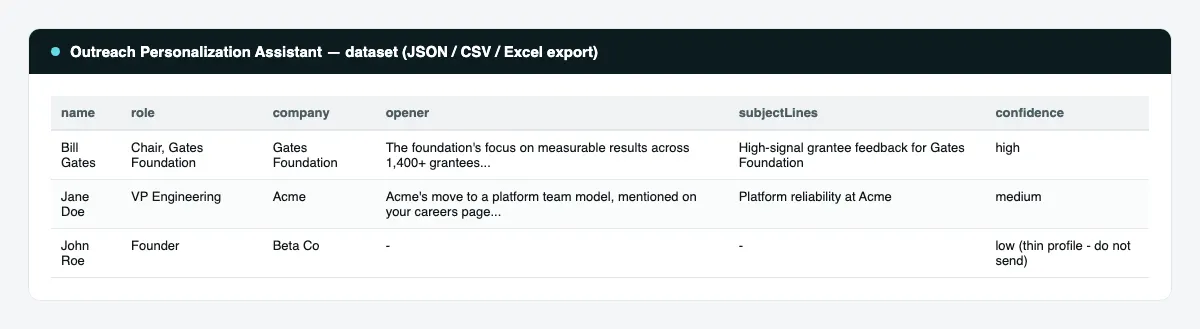
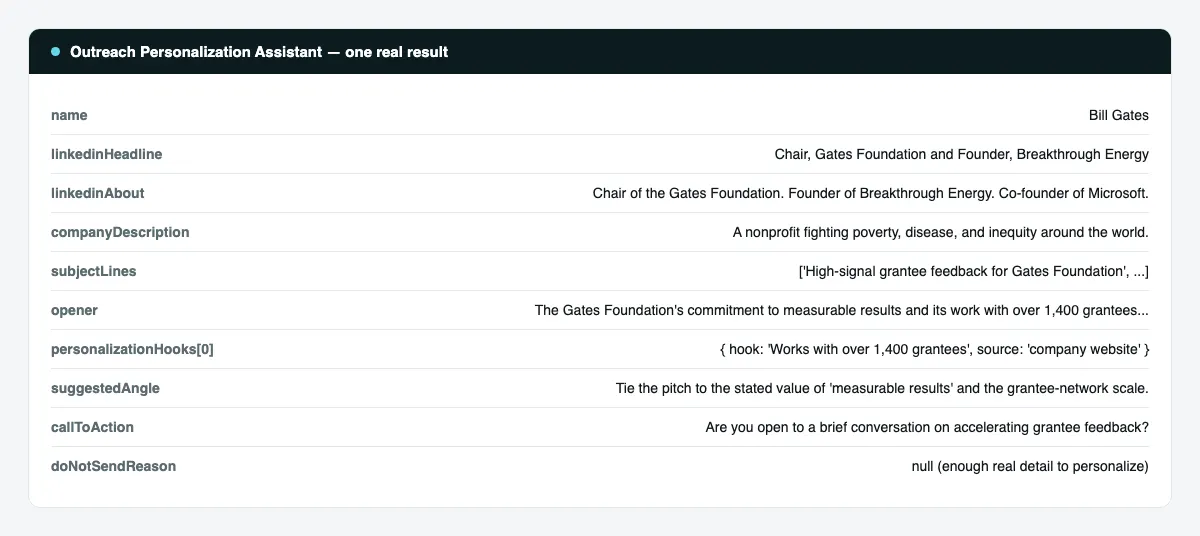
Usage Examples
- Warm up a sequence - draft openers for your first 50 prospects, then paste each into your email tool's first step.
- SDR handoff - give a new rep a personalized starting point for every account.
- Recruiting outreach - describe the role in
offerand get an opener grounded in the candidate's background. - Quality check - review the
doNotSendReasoncolumn to see which prospects need manual research first.
Tips for Best Results
- Provide both a LinkedIn URL and a company URL for the richest draft.
- Write a specific
offer- "we cut CRM data-entry time by 60% for RevOps teams" beats "we do sales automation". - Always read the opener before sending; treat it as a strong first draft, not a finished email.
- Provide a drafting service API key for the opener; the scraped details are returned without one.
Known Limitations
- LinkedIn shows less to logged-out visitors, so the profile detail is limited to the public headline, about text, and listed education.
- If a company site is thin or JavaScript-only, the draft leans on the LinkedIn profile alone.
- The Actor writes an opener, not a full email - you add the pitch body and signature.
- The draft quality reflects the default no-cost model and should always be reviewed before sending.
- It never invents details, so a prospect with almost no public footprint gets a "do not send" flag rather than a draft.
Integrations
Connect the dataset to Google Sheets, Airtable, Make, Zapier, or n8n; call the Actor from the Apify API; trigger it with webhooks; or schedule recurring runs from the Apify Console.
Export Formats
JSON, CSV, Excel, and XML, from the Dataset tab or the Apify API.
Frequently Asked Questions
Do I need an account or login?
No. The Actor reads public pages and never logs in anywhere.
Does it work without a LinkedIn URL?
Yes, if you provide a company URL. The draft then personalizes from the company's site.
Will it make up a detail if it can't find one?
No. It uses only what it found and flags "do not send" when there is not enough to personalize honestly.
Is the output a full email?
No. It is a personalized opener plus subject lines, an angle, and a call to action. You add the body and signature.
Am I charged for failed results?
You are charged for drafts written to the dataset, including prospects flagged "do not send".
How fresh is the data?
Profiles and company pages are read live at run time.
Can it export to Google Sheets?
Yes. Connect the dataset to the Google Sheets integration or pull it from the API.
Does it handle duplicate prospects?
Each entry is processed once per run.
Support
Questions and bug reports: use the Issues tab on the Actor's Console page. Include the input you ran and the run ID.
Legal / Responsible Use
You are responsible for complying with the target sites' terms of use, anti-spam law (such as CAN-SPAM and GDPR/PECR), and responsible outreach practices. This Actor processes personal data from public profiles; you are responsible for meeting any applicable privacy and data-protection obligations for the personal data you collect, store, and use for outreach, and for honouring opt-out requests.