
Manga Colorizer — AI Comic Page Coloring
Pricing
from $80.00 / 1,000 lite 1k colorized pages
Manga Colorizer — AI Comic Page Coloring
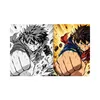
Colorize black-and-white manga and comic pages with AI while preserving panels, line art, speech bubbles, text, and composition.
Pricing
from $80.00 / 1,000 lite 1k colorized pages
Rating
0.0
(0)
Developer

Muhammad Afzal
Maintained by CommunityActor stats
0
Bookmarked
8
Total users
1
Monthly active users
2 days ago
Last modified
Categories
Share
Manga Colorizer is an Apify Actor that colorizes black-and-white manga, comic, and webtoon pages with AI image models for creators, publishers, and fans who hold the rights to their pages. It keeps panels, line art, speech bubbles, and lettering in place. It saves each colorized page as an image file and returns its download URL, model, resolution, and dimensions as JSON, CSV, or Excel.
Free-plan limit: hosted Apify free-plan users get one lifetime image-generation trial (one picture and one model request) because every page is generated by a paid AI image model. Later free-plan generations are rejected before any model call; the default sample preview does not use the trial. Paid Apify plans can colorize up to 10 pages per run.
What does the manga colorizer do?
- Colorizes up to 10 public PNG, JPEG, or WebP page URLs per run on paid plans, one page at a time.
- Instructs the model to add color only, preserving composition, panel borders, line art, screentones, speech bubbles, lettering, and character identity.
- Offers six color styles (
natural,vibrant,pastel,anime,cinematic,custom) plus up to 1,000 characters of extra color direction. - Lets you choose a low-cost Lite 1K model or a standard model with 1K and 2K output.
- Matches the closest supported aspect ratio (1:1, 2:3, 3:2, 3:4, 4:3, 4:5, 5:4, 9:16, 16:9).
- Saves every image to the run's key-value store, writes one dataset row per delivered page, and records status, warnings, and charged events in an
OUTPUTsummary. - Returns a bundled, previously generated sample preview for the default input, with no model call and no image charge.
- Rejects private-network, localhost, credential-bearing, and non-standard-port URLs, and files over 10 MB or 40 megapixels.
Which AI image models does it use?
model input | OpenRouter model ID (as of October 2026) | Resolution | Charge event |
|---|---|---|---|
| Nano Banana 2 Lite (default) | google/gemini-3.1-flash-lite-image | 1K | colorized-page-lite-1k |
| Nano Banana 2 | google/gemini-3.1-flash-image | 1K or 2K | colorized-page-standard-1k or colorized-page-standard-2k |
The Actor owner pays model costs inside the event price, so you do not need an OpenRouter, Google, or other API key. Only these two models are accepted; any other value is rejected before a model call.
What data does it return?
| Field | Type | Description |
|---|---|---|
sourceUrl | string | Image URL supplied in the input (builtin://manga-colorizer-sample for the built-in sample). |
outputKey | string | Key of the colorized image in the run's key-value store. |
outputUrl | string | API URL for downloading the colorized image. |
style | string | Color style applied. |
model | string | OpenRouter image model that generated the image. |
resolution | string | Requested resolution tier, 1K or 2K. |
sourceWidth | integer | Source image width in pixels. |
sourceHeight | integer | Source image height in pixels. |
outputWidth | integer | Generated image width in pixels. |
outputHeight | integer | Generated image height in pixels. |
format | string | File extension: png, jpg, or webp. |
providerCostUsd | number or null | Model cost in USD as reported by OpenRouter; null when not reported. |
chargeEvent | string | Event charged for this row; none for the sample preview. |
eventPriceUsd | number | Price of that event in USD for this run. |
createdAt | string | ISO 8601 time the result was saved. |
samplePreview | boolean | Present and true only on the bundled sample preview row. |
Use cases
- Manga artists and doujin creators generate color drafts and palette references for their own pages.
- Webtoon and comic studios explore color directions quickly before final hand coloring.
- Publishers and licensed localization teams produce color variants of pages they hold rights to for promotion.
- Educators and hobbyists colorize public-domain comics for classes, exhibitions, or personal projects.
- Developers and AI agents add black-and-white comic to color conversion to an automated pipeline through the API.
When to use it and when not to
Use it when you need fast AI comic colorization of a few pages at a time, want to compare several palettes, or need downloadable color files inside an automated workflow.
Do not use it for:
- Pages you do not own or have permission to modify.
- Private, login-protected, or local-network image URLs, or SVG, GIF, and PDF files.
- More than 10 pages per run, or pixel-exact archival restoration.
- Translating or editing text. The Actor does not translate; to read text from pages, use Image OCR Scraper.
- Old photographs. Use Vintage Photo Restorer.
How to use Manga Colorizer
- Open Manga Colorizer in Apify Console.
- Add public PNG, JPEG, or WebP page URLs to Manga page image URLs, or leave the list empty to see the sample preview.
- Choose a Color style and, optionally, add Additional color direction, such as character hair colors.
- Choose AI image model and Output resolution (2K requires Nano Banana 2).
- Click Start, then open
outputUrlin the dataset or the image files in the key-value store.
| Field | Type | Default | Description |
|---|---|---|---|
imageUrls | array of strings | [] | 1–10 public image URLs (free plan: 1). Empty with all other defaults returns the sample preview; empty with changed settings colorizes the built-in sample page live. |
style | string | natural | natural, vibrant, pastel, anime, cinematic, or custom. |
customInstructions | string | "" | Up to 1,000 characters; required when style is custom. |
model | string | google/gemini-3.1-flash-lite-image | Lite (1K only) or google/gemini-3.1-flash-image. |
resolution | string | 1K | 1K or 2K; 2K requires the standard model. |
Output example
Use it via API, MCP, and AI agents
Run synchronously and receive the dataset rows in one HTTP call:
Synchronous calls wait up to 300 seconds, so start batches of several pages as asynchronous runs. With the JavaScript client:
For Claude, ChatGPT, Cursor, and other MCP clients, add the Apify MCP server with this Actor as a tool: https://mcp.apify.com?tools=muhammadafzal/manga-colorizer.
The Apify platform also connects runs to Make, Zapier, n8n, Google Sheets, webhooks, and scheduled runs.
How much does it cost?
The Actor uses pay-per-event pricing. Active prices (in effect since 20 September 2026; no price change is scheduled):
| Event | FREE | BRONZE | SILVER | GOLD | PLATINUM | DIAMOND |
|---|---|---|---|---|---|---|
colorized-page-lite-1k (primary) | $0.100001 | $0.0975 | $0.095 | $0.08 | $0.08 | $0.08 |
colorized-page-standard-1k | $0.100001 | $0.0975 | $0.095 | $0.08 | $0.08 | $0.08 |
colorized-page-standard-2k | $0.140001 | $0.1365 | $0.133 | $0.112 | $0.112 | $0.112 |
apify-actor-start | $0.006251 | $0.006094 | $0.005938 | $0.005 | $0.005 | $0.005 |
Each page is saved and its dataset row written before its event is charged. The start event is charged per started GB of allocated memory: one event up to 1 GB, which covers the default of 512 MB. Apify platform usage is included in these prices.
Worked examples at the default 512 MB:
- BRONZE, one Lite 1K page: $0.006094 + $0.0975 = $0.103594.
- GOLD, ten Standard 2K pages: $0.005 + 10 × $0.112 = $1.125.
The default sample preview incurs only the start event. Failed downloads, rejected inputs, and model errors incur no page event (the start event still applies), and the run stops before a page whose event would exceed your maximum charge per run.
Limits and reliability
- Free plan: one lifetime generation trial per user. A model request that fails still uses the trial, because the provider may already have billed it.
- Paid plans: up to 10 unique URLs per run; duplicates are removed.
- Source images: public HTTP or HTTPS only, 30-second download timeout, at most three redirects, 10 MB and 40 megapixels.
- Model requests time out after 120 seconds. Paid runs retry once after an HTTP 408, 429 rate-limit, or 5xx server response; free-plan runs never retry.
- A provider quota error or account rejection stops the run; remaining pages are not attempted or charged.
- Output dimensions follow the closest supported aspect ratio, not the exact source size.
- AI colorization varies between runs, and models can occasionally alter small details or text despite the preservation prompt. Review every page before publishing.
FAQ
Do I need an OpenRouter or Google API key? No. The Actor owner pays model costs, which are included in the event price.
Can I upload images from my computer? The input accepts URLs. Host the page at a public HTTPS link you control, then paste that link.
Which model should I choose? Start with Nano Banana 2 Lite for low-cost 1K drafts. Use Nano Banana 2 when you need 2K output.
Why do colors differ between runs?
Image generation is not deterministic. Use the custom style or extra color direction to pin character and background colors.
Will it change speech bubbles or lettering? The prompt instructs the model to keep all text and bubbles unchanged, but generative models can still alter small details, so check text before publishing.
Can I colorize copyrighted manga? Only pages you own or are licensed to modify, or public-domain works. You are responsible for rights clearance.
Can I run it on a schedule or from Make or Zapier? Yes. Use Apify schedules, webhooks, or the Make, Zapier, and n8n integrations.
Related Actors
- Image OCR Scraper: extracts text from public images, such as lettering on comic pages.
- Vintage Photo Restorer: repairs faded and scratched photographs rather than line art.
- Coloring Book Generator: creates black-and-white line-art pages from a theme.
- MyAnimeList Scraper: collects public anime and manga titles, scores, and rankings.
Legal and responsible use
Upload only pages you own, have a license to modify, or that are in the public domain. Colorizing a copyrighted manga, comic, or webtoon does not transfer or create rights to it, and you are responsible for copyright, personality-rights, and platform-policy compliance. Source images and generated results are sent to the image model provider for processing, so avoid pages containing sensitive personal information.
Support
Report bugs or request features on the Issues tab of the Actor page. Include the run ID and the OUTPUT summary, never your API token or private image URLs. Feedback is welcome.


