

Mastodon Keyword & Mention Monitor
Pricing
from $500.00 / 1,000 daily monitoring of one watches
Mastodon Keyword & Mention Monitor
Watch Mastodon hashtags, keywords and accounts. Scheduled runs remember what they already saw and deliver only NEW matching posts, with optional webhook alerts (Discord, Slack, generic) and a digest mode. Built on the documented Mastodon API.
Pricing
from $500.00 / 1,000 daily monitoring of one watches
Rating
0.0
(0)
Developer

Muhammad Zuhaib Zahid
Maintained by CommunityActor stats
0
Bookmarked
2
Total users
1
Monthly active users
a month ago
Last modified
Categories
Security
Limited permissionsShare
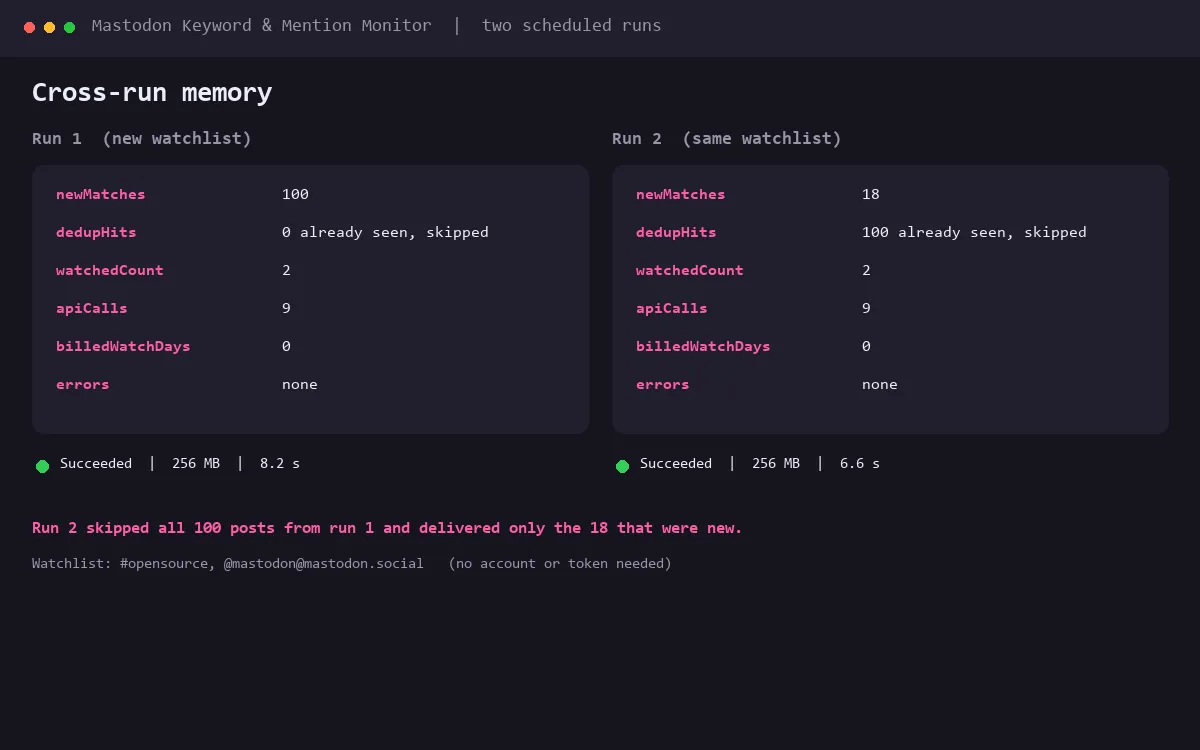
Watch Mastodon hashtags, keywords and accounts on a schedule. Each run remembers exactly which posts it has already seen and delivers only the NEW matches, so you can poll every few minutes without seeing the same post twice.
Built entirely on the documented Mastodon REST API. No scraping, no unofficial endpoints.
What it does
- Hashtag watches work with zero setup: every new post under a hashtag, straight from the public timeline endpoint.
- Keyword watches do full-text search across the instance:
"exact phrase",-exclusions, plain terms. They need a free access token from your own Mastodon account (Preferences, Development, New application, scope read:search). - Account watches deliver every new post by one account (public lookup + statuses).
Handles look like
user@instanceor a profile URL. - Cross-run memory: seen posts are stored between runs; a scheduled run emits only posts that are genuinely new. Reblogs are credited to the original post, so the same post never arrives twice.
- Webhook alerts: post each batch (or each match) to Discord, Slack, or your own receiver as ready-to-use payloads.
- Digest mode: write one summary item per run instead of one item per match, if you would rather read one post than many.
- Filters: minimum favourites, languages, exclude replies, exclude reblogs, per-watch caps, look-back window.
- Any instance: default https://mastodon.social; point
instanceat any server that exposes the standard Mastodon API. The run preflights the instance and fails with a clear message if it is unreachable.
Quick start
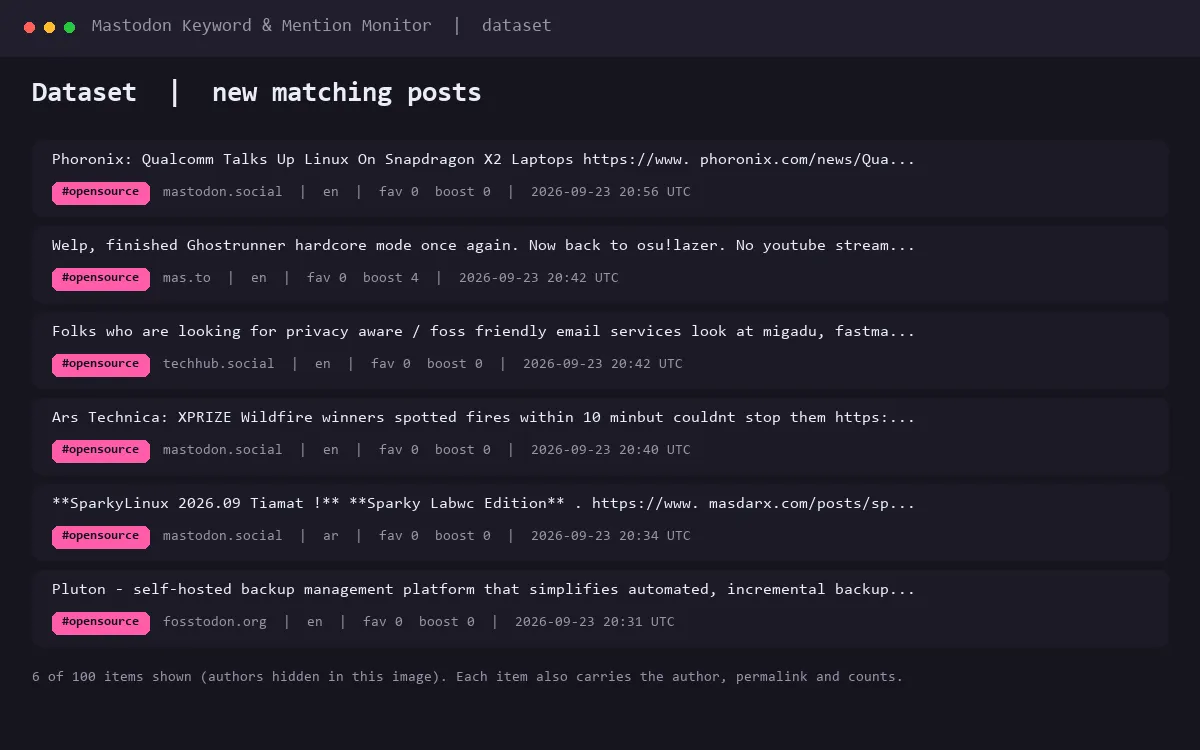
- Run the actor with the default input. It watches the hashtag
opensourceand the official@mastodonaccount (both work with no account and no token), and writes matching posts to the dataset plus a run-stats summary. - Open the Input panel and replace the watchlist with your own hashtags, keywords and accounts.
- Open the actor's Schedule tab and set an interval (15 minutes is a good start).
Keep the look-back window (
sinceMinutes) a bit longer than your interval.
Access token (only for keyword watches)
Hashtag and account watches need no account at all. Full-text keyword search on Mastodon requires an access token: on your server open Preferences, Development, New application (scope read:search), create it, and paste it into the input's secret field. The token is stored only in your own actor input and is sent only to your instance's API.
Pricing (pay per event)
One event, one price:
| Event | Price | When |
|---|---|---|
| watch-monitored-day | $0.50 | once per watch, per UTC day, on the first run that scans it successfully |
| apify-actor-start | $0.00005 | platform default, per GB per run |
- The first day of every new watch is free. Add a watch, see exactly what it finds, and decide before anything is charged.
- The number of posts never changes the price. A quiet day and a day with three hundred new posts cost the same, because you are paying for the watch being kept.
- Run it as often as you like. Hourly costs the same as daily: the day is charged once per watch.
- A watch that fails is never charged. If your instance is unreachable, or a keyword watch has no token, that watch costs nothing for that day.
So four watches on any schedule cost $2 a day, about $60 a month, whatever the volume.
Input reference
See the Input schema on the right for every field with descriptions and prefilled examples. The default input is a working configuration.
Troubleshooting
- "Keyword watches need an access token": keyword search is token-only on Mastodon. Create the token (see above) or switch those watches to hashtag watches, which are token-free. One misconfigured watch never stops the others.
- 429 rate limit: the documented ceiling is 300 requests per 5 minutes; a normal monitor uses a handful of calls per run. The actor retries with backoff and fails with a clear message only if the limit persists. Authenticating with a token gets its own, higher limits.
- Instance unreachable: check the
instancefield for typos; the run preflights /api/v1/instance before anything else and tells you exactly what failed. - No matches but the hashtag is active: check the look-back window (
sinceMinutes): only posts newer than the window are considered. Raise it to cover your schedule gap. - Webhook fails: the URL must be a public http(s) endpoint; private and local addresses are rejected by design. Delivery failures are logged in the run-stats errors list and never break the run.
Privacy
Your access token is stored only in your own Actor input (use the secret field) and is sent only to your Mastodon instance. Webhook URLs are sent only the alert payloads described above. The actor stores only post IDs and timestamps between runs.


