

Shopify Price, Restock & New Product Monitor
Pricing
from $10.00 / 1,000 change detecteds
Shopify Price, Restock & New Product Monitor
Watch any list of Shopify stores and get only what changed: price moves, sale starts and ends, back in stock, out of stock, new and removed products, and variant changes. Webhook alerts to Discord, Slack or your own endpoint.
Pricing
from $10.00 / 1,000 change detecteds
Rating
0.0
(0)
Developer

Muhammad Zuhaib Zahid
Maintained by CommunityActor stats
0
Bookmarked
2
Total users
1
Monthly active users
a month ago
Last modified
Categories
Security
Limited permissionsShare
Watch any list of Shopify stores on a schedule and get only what changed: price moves, sale starts and ends, back in stock, out of stock, new and removed products, variant changes and merchandising edits.
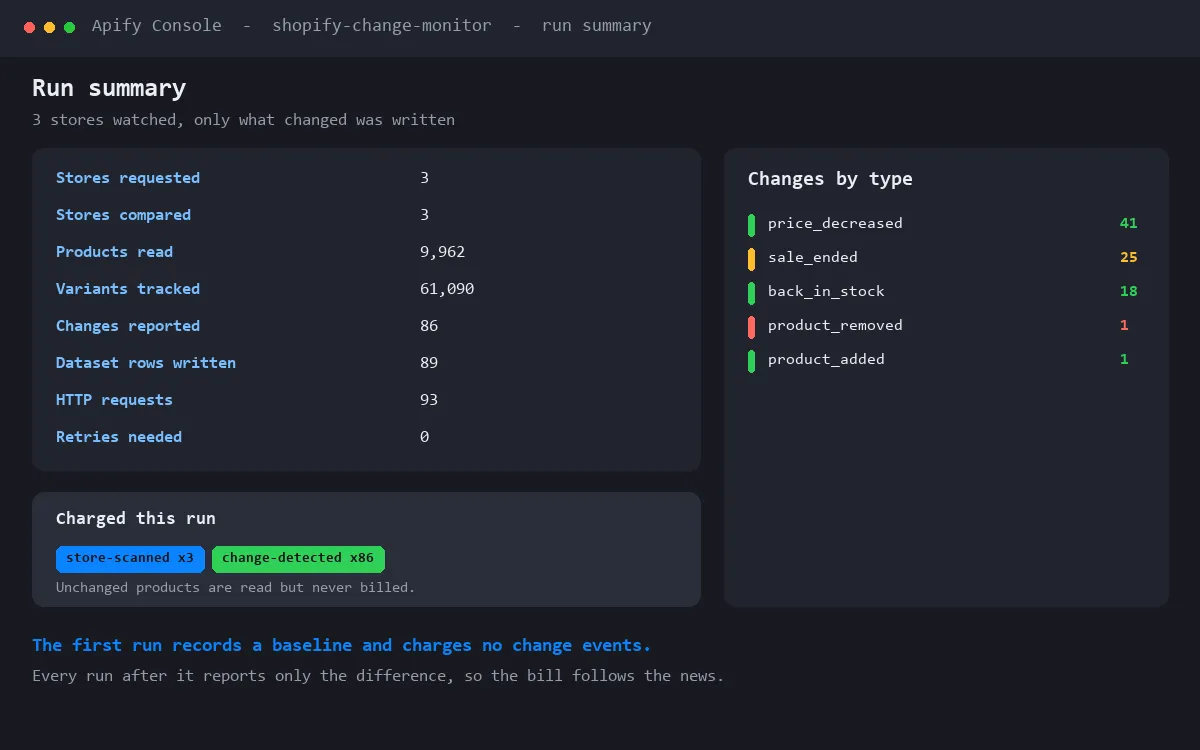
Most Shopify actors re-read the whole catalogue every run and bill you for every product. If you watch a 5,000 product store daily, that is 150,000 rows a month to find the few hundred things that actually moved. This one remembers the catalogue between runs and writes only the difference, so you pay for signal instead of paying to re-read a shelf that did not move.
What it detects
Price and promotion
| Change | What it means |
|---|---|
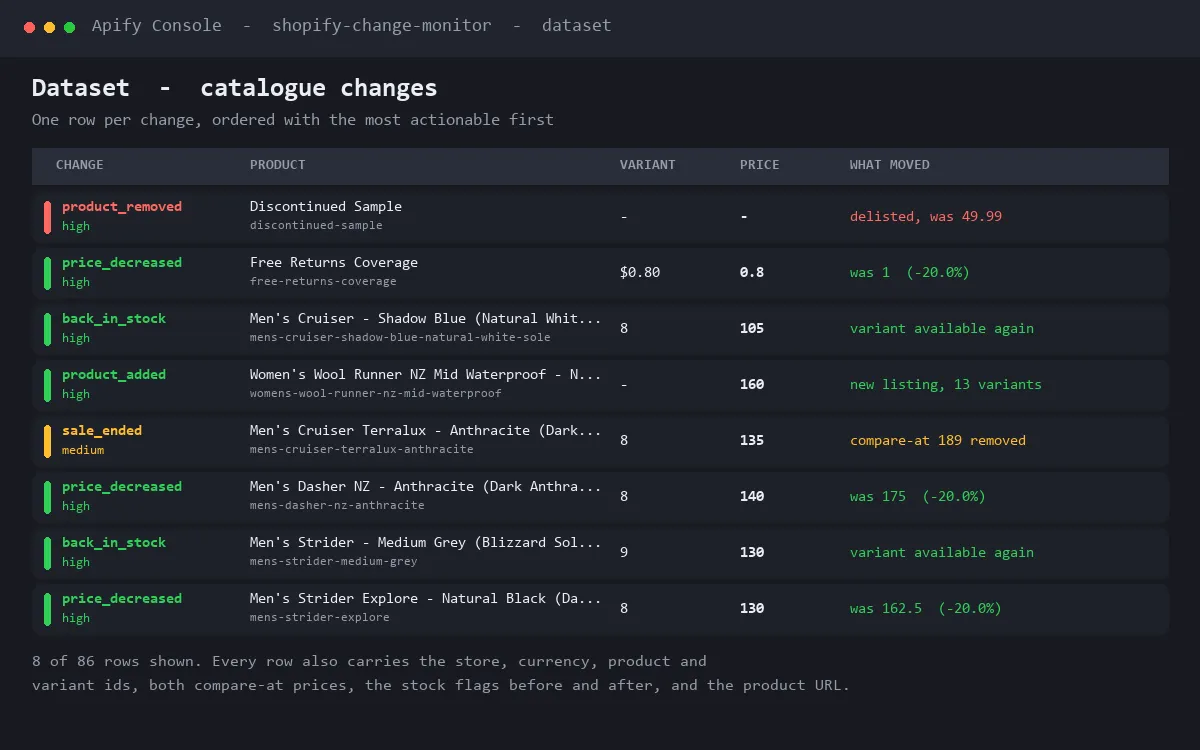
price_decreased / price_increased | The variant price moved, with the absolute and percentage move |
sale_started | A compare-at price appeared above the price, with the discount percentage |
sale_ended | The compare-at price was removed |
discount_deepened / discount_reduced | Still on sale, but the gap changed |
Stock
| Change | What it means |
|---|---|
back_in_stock | That exact variant went from unavailable to available |
out_of_stock | That exact variant sold out |
partial_sellout | The product was fully available and some sizes or colours have now gone |
Catalogue
| Change | What it means |
|---|---|
product_added / product_removed | A listing appeared or disappeared |
variant_added / variant_removed | A size, colour or option was added or dropped |
published / unpublished | The product was hidden or brought back |
Merchandising and SEO
title_changed, description_changed, tags_changed, vendor_changed, product_type_changed,
handle_changed, sku_changed, images_changed. A handle change rewrites the public product URL,
so it is worth knowing about if you link to competitor pages.
Who uses it
- Direct to consumer brands watching competitor pricing and promotions.
- Resellers and dropshippers hunting restocks, price drops and new arrivals.
- Buyers and retailers watching supplier catalogues for availability.
- Agencies reporting on a client's competitive set.
- Analysts tracking discount depth and out of stock rates across a category.
How it works
- Give it one or more Shopify store domains. A bare domain, a full URL or a myshopify handle all work.
- The first run records a baseline of the catalogue and reports no changes. This is deliberate: a brand new watch list is not news, and you are not billed change events for it.
- Every run after that compares the live catalogue with what it remembers and writes only the difference.
- Set a schedule, daily or hourly, and it becomes a standing watch.
Only public storefront JSON is read. No API key, no login, no proxy and no browser. It is fast and cheap to run, and it does not touch any path that Shopify's robots.txt disallows.
Output
Three kinds of row, each tagged with recordType.
change, one per change, flat so it exports cleanly to CSV and Excel:
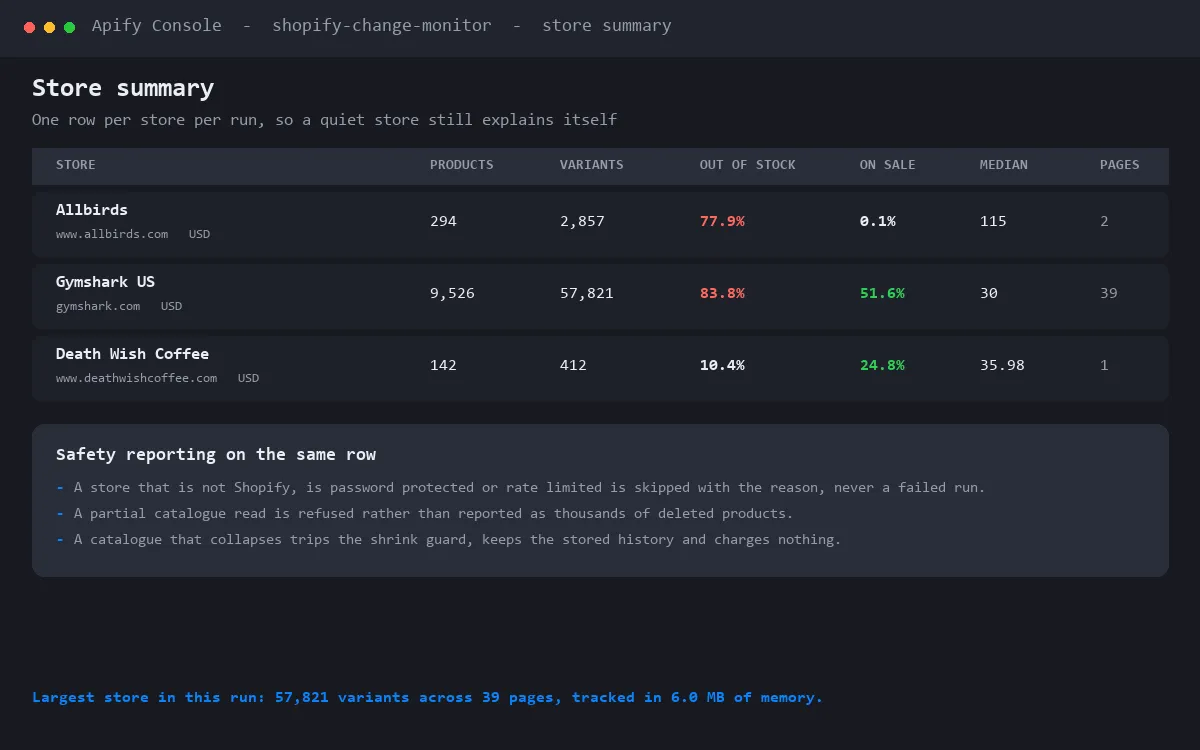
store_stats, one per store per run: catalogue size, variant count, out of stock share, on sale
share, price range, pages read, and the reason for any skip or guard.
digest, one per store per run when digest mode is on, carrying the change list inside it.
Trust and safety
Change detection can be dangerously wrong in ways that cost you money, so three rules are built in.
- A partial read is never treated as a deletion. If a page of the catalogue fails, the run keeps the previous memory, writes no change events and records the error on the store row. Without this, one bad network moment on a 5,000 product store would report 3,250 deleted products and bill you for every one of them.
- A collapsed catalogue trips a shrink guard. If a store answers with far fewer products than last time, the comparison is refused rather than inventing thousands of removals. A genuine mass delisting is picked up on the next run once the smaller catalogue is stable.
- Caps stop a surprise bill. A storewide promotion can flip every product at once.
maxChangesPerStoreandmaxChangesPerRunbound what is reported and charged, keeping the most actionable changes and counting the rest on the store row.
Prices are compared as integer amounts, so 10.00 and 10.0 are the same price. A missing
compare-at price is read the same whether the store writes null, an empty value or zero, so sale
flags do not flap on a product nobody touched.
A store that is not Shopify, is password protected or is rate limited is skipped with a plain reason on its own row. One bad entry in your list never fails the run.
Alerts
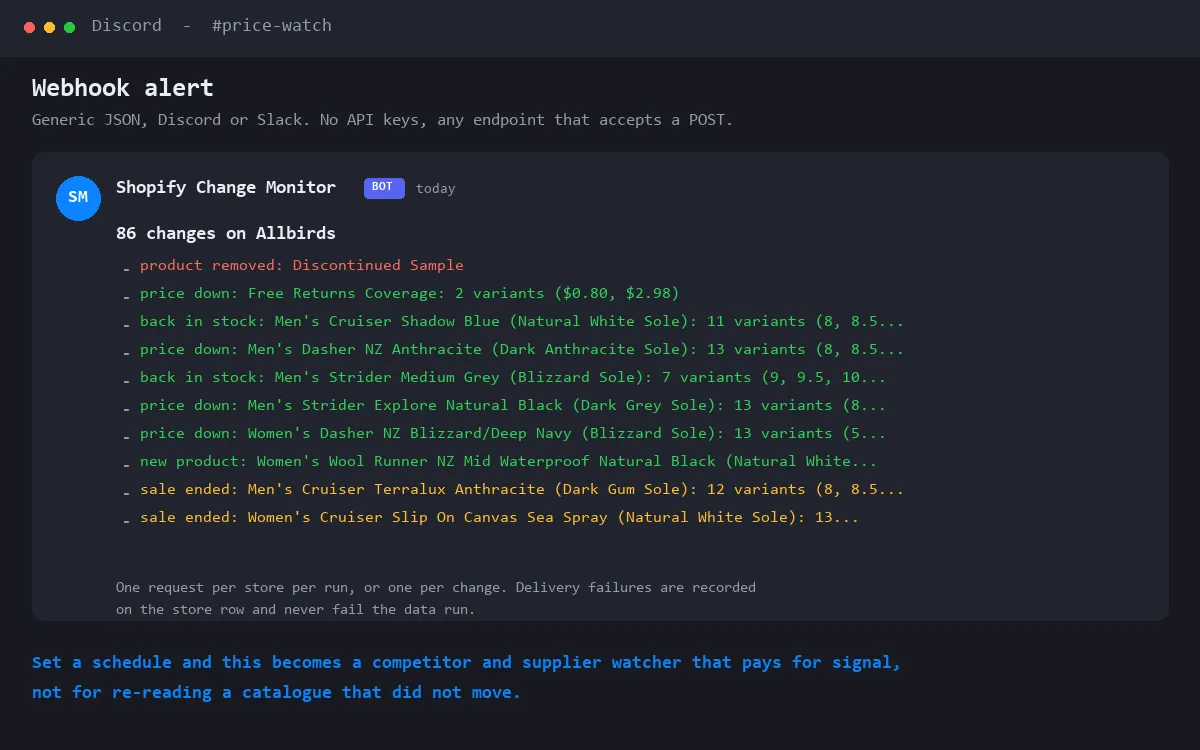
Set webhookUrl and every batch of changes is POSTed as JSON. Choose generic for a full envelope,
or discord or slack for a short readable message their incoming webhooks accept directly. Works
with n8n, Make, Zapier or your own endpoint. Changes to the same product are grouped into one line,
so a shoe restocking ten sizes reads as one item rather than ten.
Delivery failures are recorded on the store row and never fail the data run.
Controlling cost and noise
changeTypesreports only the types you care about. This is the main lever: only what you keep is charged.minPricePercentandminPriceAbsoluteignore small price moves.includeKeywords,excludeKeywords,productTypes,vendorsandtagsnarrow to part of a catalogue.maxChangesPerStoreandmaxChangesPerRunare the hard ceilings.digestwrites one row per store instead of one per change. It reduces rows and alerts, not the bill: detection is the work, so changes are still charged.
Pricing
| Event | Price | When |
|---|---|---|
| Actor start | $0.00005 | Once per run, the platform default, so frequent scheduling stays cheap |
| Store scanned | $0.002 | Per store per run, only after the catalogue was read cleanly |
| Baseline product | $0.0002 | First run only, to record the starting point. A 5,000 product store costs $1.00 once |
| Change detected | $0.01 | Per change reported. The main cost, and the only one that scales with news |
A quiet day costs almost nothing. Nothing is charged for a store that was skipped, guarded or read incompletely.
Notes and limits
- Identity is the Shopify id. If a merchant deletes and recreates a product or variant it comes back with a new id, so it is reported as added rather than as a restock.
- If a store changes its currency, price and sale events are held for that run because the numbers are not comparable, and the store is rebaselined.
maxProductsPerStoredefaults to 10,000. Raise it for very large catalogues.- Catalogue timestamps are not compared. Shopify updates them for reasons that never reach the storefront, so comparing them would report constant changes that are not real.


