AI Image Generator API: GPT Image 2 & Nano Banana Pro
Pricing
Pay per event
AI Image Generator API: GPT Image 2 & Nano Banana Pro
AI image generator and text-to-image API: GPT Image 2, 2.5, 2.6 and Nano Banana Pro, up to 4K, with image editing from reference images. Real-time Standby API or bulk runs, from $0.06 per image at any size. No API key needed, failed images are free.
Pricing
Pay per event
Rating
0.0
(0)
Developer

newpo
Maintained by CommunityActor stats
0
Bookmarked
105
Total users
86
Monthly active users
4 hours ago
Last modified
Categories
Features
Share
AI Image Generator: GPT Image 2, GPT Image 2.6 and Nano Banana Pro, pay per image
AI Image Generator turns text prompts into images with GPT Image 2, GPT Image 2.5, GPT Image 2.6 and Gemini 3 Pro Image (Nano Banana Pro). Paste one prompt or a thousand, pick a size up to 4K, and get one dataset row per image with a link to the file. Add reference images to edit photos or combine a product, a logo and a background into one picture.
You don't need an OpenAI or Google API key. You pay one flat price per image at any size or quality, from $0.06, and failed images are free. A paid Apify plan is required: runs from free plans stop right away without generating or charging anything.
Sample images
Made by this Actor with the input shown (JPEG output). Each cost one image price.
| Image | Model, price and prompt |
|---|---|
 | GPT Image 2 · $0.06 Studio product photo of a matte ceramic coffee mug in sage green on a light oak table, soft window light, shallow depth of field, minimal Scandinavian style |
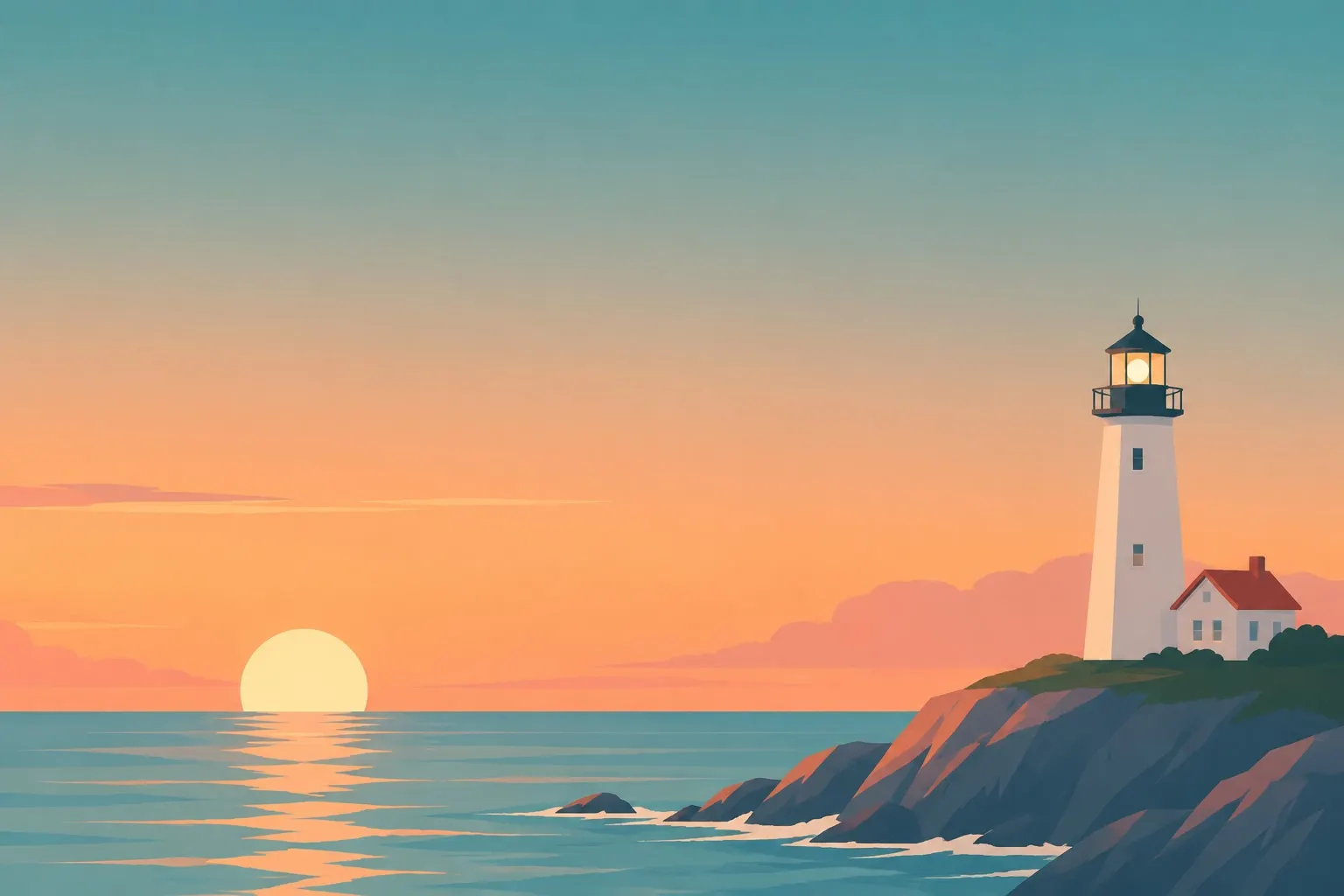 | GPT Image 2 · $0.06 Minimalist flat illustration of a lighthouse on a rocky coast at dusk, pastel peach and teal palette, lots of empty sky for a headline |
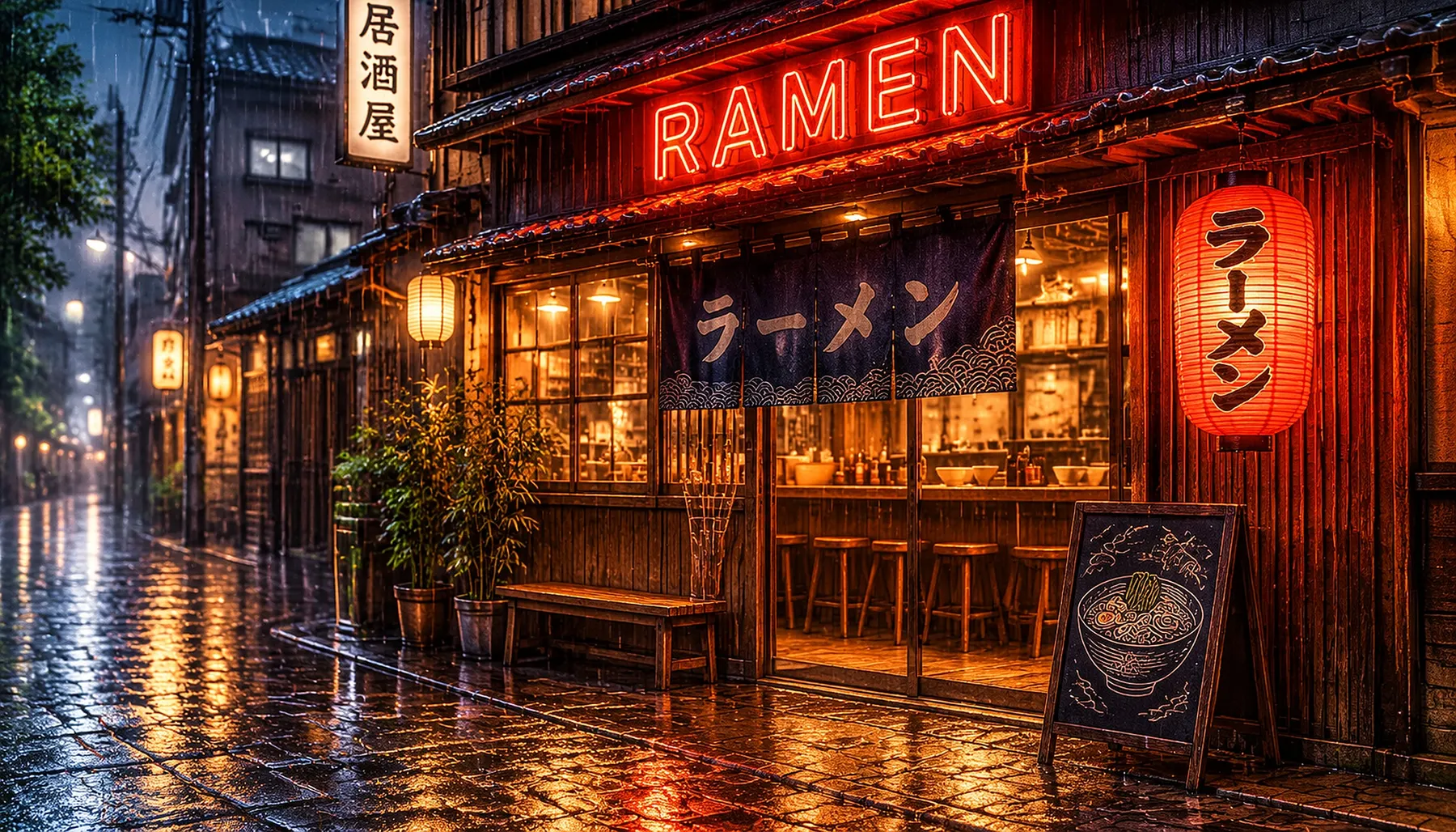 | GPT Image 2.6 Flare · $0.08 A cozy Japanese ramen shop at night in the rain, neon sign that reads "RAMEN", warm light spilling onto wet cobblestones, cinematic photo |
Why this image generator
- 💵 One flat price per image. A 4K wallpaper costs the same as a 1024×1024 thumbnail. You see the price before you start.
- 🆓 Failed images are free. You're charged only for images that were generated and saved. Refused prompts, timeouts and errors cost nothing.
- 📦 Bulk prompts. Up to 1,000 prompts per run and up to 10 images per prompt. Several images are generated at once.
- 🖼️ Image editing and reference images. Up to 16 reference images per prompt: put your product in a new scene, keep a character's look, or restyle a photo.
- 📐 Any size up to 4K. Square, 3:2, 2:3, 16:9, 9:16 (stories and reels), or a custom size up to 3840×2160.
- 🔒 Your spending limit is respected. The Actor never starts more images than your maximum cost per run allows.
- 🔗 Links that work. Every image is saved to a key-value store and linked from its dataset row. Download it, or save to a named store to keep it.
Pricing
One price per image, the same for every size and quality. Generations and edits cost the same.
| Tier | Models | Price per image |
|---|---|---|
| Standard | GPT Image 2 (default), GPT Image 2.5 Flare, GPT Image 2.5 Sunburst | $0.06 |
| Premium | GPT Image 2.6 Flare (default), GPT Image 2.6 Sunburst | $0.08 |
| Pro | Gemini 3 Pro Image / Nano Banana Pro (default), Gemini 3.1 Flash Image / Nano Banana 2 | $0.10 |
Examples:
| Job | Cost |
|---|---|
| 1 product shot, 1024×1024, Standard | $0.06 |
| 50 blog hero images, 1536×1024, Standard | $3.00 |
| 20 prompts × 4 variations, 4K, Premium | $6.40 |
| 10 Nano Banana Pro edits with 3 reference images each | $1.00 |
Apify adds a tiny start fee per run ($0.00005). Set Maximum cost per run in the run options to cap a run: the Actor stops starting new images when the next one would go over, and the skipped prompts are listed in the dataset.
How to use it
- Enter your prompts, one per line.
- Pick a tier, or a specific model.
- Pick a size and the number of images per prompt.
- Optional: add reference image URLs to edit or combine pictures.
- Click Start. Each image usually takes 30 seconds to 2 minutes; prompts run in parallel.
- Open the Images tab in the output, or download the dataset as JSON, CSV or Excel.
Input example
Editing with reference images:
Input fields
| Field | What it does |
|---|---|
prompts | One or more prompts (up to 1,000). |
tier | standard ($0.06), premium ($0.08) or pro ($0.10). Picks the tier's default model. |
model | Optional: a specific model. The price follows the model's tier. |
size | auto, 1024x1024, 1536x1024, 1024x1536, 1824x1024 (16:9), 1024x1824 (9:16), 2048x2048, 2560x1440, 1440x2560, 3840x2160, 2160x3840. |
customSize | Any WIDTHxHEIGHT: both sides multiples of 16, long side up to 3840 px and at most 3× the short side, 0.66 to 8.3 megapixels. |
quality | auto, low, medium, high. GPT Image 2 only, same price. |
imagesPerPrompt | 1 to 10 variations per prompt, each charged. |
referenceImageUrls | Up to 16 public PNG, JPEG or WebP URLs (50 MB total). Turns each prompt into an edit. |
outputFormat | png (default), jpeg or webp. |
transparentBackground | Ask for a transparent background (PNG or WebP). |
keyValueStoreName | Optional named key-value store to keep the images after the run's data retention period. |
Output
One dataset row per image:
A prompt that fails gets a row with status: "failed", the reason in error, and chargedUsd: 0. The run's
OUTPUT record sums it up: images made, failures and the amount charged.
Use cases
- E-commerce product photos: packshots on white, lifestyle scenes and seasonal variants from one product photo.
- Marketing and social media: ad creatives, blog hero images, thumbnails, 9:16 story and reel backgrounds.
- Bulk content: hundreds of illustrations from a spreadsheet of prompts, one run.
- Design mock-ups: logos, icons and stickers on a transparent background, posters with readable text.
- Automation: call it from the Apify API, Make, Zapier, n8n or an AI agent (MCP) and get image links back.
Tips for good prompts
- Say the subject, setting, style, lighting and camera or medium: "studio product photo, soft box light, 50 mm".
- Put text you want in the image in quotes: a poster that says "Grand Opening".
- With reference images, say what to take from each: "the logo from image 1 on the shirt in image 2".
- GPT Image models are strong at text in images and following detailed instructions; Nano Banana Pro is strong at photorealism and editing.
Limits
- Images take about 30 seconds to 2 minutes each. Large batches run several images at once.
- Up to 10 images per prompt, 16 reference images, 1,000 prompts per run.
- Prompts are checked by the models' safety systems. Adult, violent or otherwise disallowed content is refused (and not charged).
- Reference image URLs are checked before anything is generated: a dead link or a non-image URL fails the run at once, naming the URL, and nothing is charged.
- Only use reference images you have the right to use.
- Images in the run's default store are deleted after your Apify plan's data retention period. Download them or use
keyValueStoreName.
FAQ
Do I need an OpenAI or Google API key? No. The model cost is included in the price per image.
Does it work on the free Apify plan? No. Image generation costs real money per image and free-plan runs are not billed, so the Actor stops at the start with a message (nothing generated, nothing charged). Upgrade your Apify plan, or use Lovely Router directly.
Am I charged for failed images? No. Only images that were generated and saved are charged.
Does a bigger size cost more? No. Every size and quality costs the same.
Can I use the images commercially? You own what you create, subject to the model providers' usage policies.
Can I use it from code? Yes. Use the Apify API or client (apify-client for JavaScript or Python), or the Actor's MCP tool.
Powered by Lovely Router: want these models in your own code? Its Images API serves GPT Image 2, 2.5 and 2.6 through the OpenAI SDK at a flat price per image.