

Website Tech Stack Audit — Bulk BuiltWith Alternative API
Pricing
from $100.00 / 1,000 tech stack records
Website Tech Stack Audit — Bulk BuiltWith Alternative API
Detect any website's tech stack — frameworks, analytics, CDN, CMS, ecommerce platforms. Build competitive intelligence reports.
Pricing
from $100.00 / 1,000 tech stack records
Rating
0.0
(0)
Developer

NexGenData
Maintained by CommunityActor stats
0
Bookmarked
11
Total users
0
Monthly active users
10 days ago
Last modified
Categories
Share
Same product as Wappalyzer Replacement (nexgendata/wappalyzer-replacement) — this actor now runs the same fingerprint engine and returns the same fields.
Tech Stack Detector — Wappalyzer & BuiltWith Alternative
Point it at a domain, get the technology stack back. A curated catalog of 251 named technology fingerprints (CMS, analytics, frameworks, payment, hosting, ad-tech — the ones that matter for lead qualification and competitive research), each with the evidence that matched, a version where the site exposes one, and a confidence score. Bulk input, one row per domain analysed — built as a drop-in for teams whose Wappalyzer/BuiltWith plan lapsed.
Developer drop-in: a direct Wappalyzer/BuiltWith replacement for detecting a site's tech stack in code.
📊 Sample Output
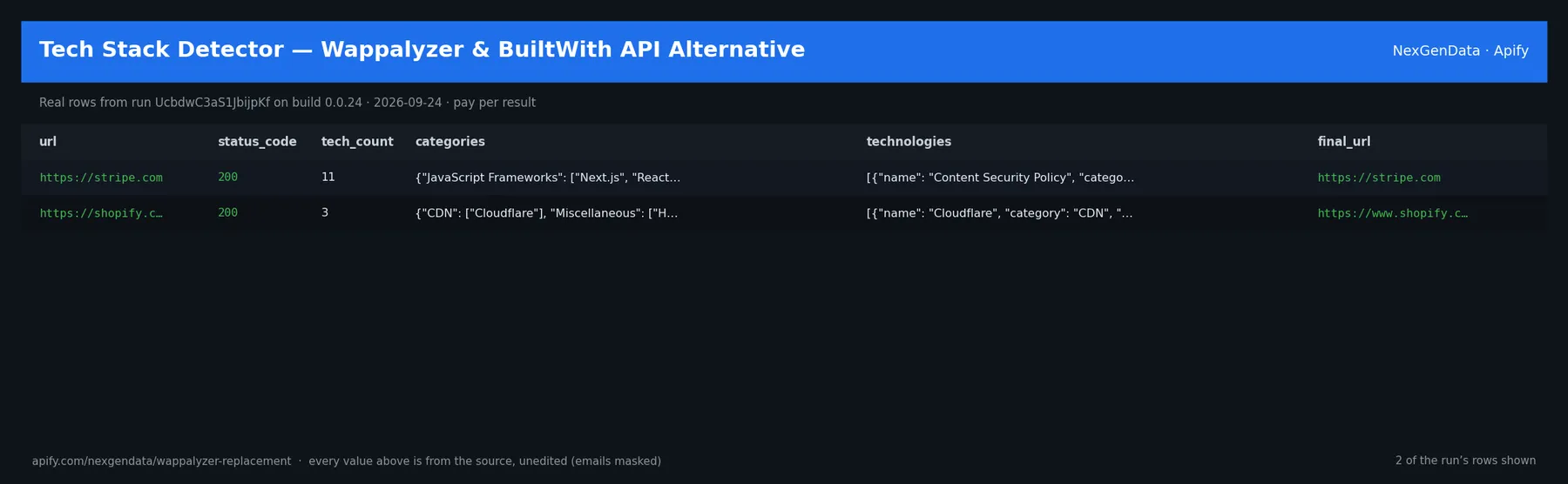
url | status_code | tech_count | final_url | tech_names | category_list |
|---|---|---|---|---|---|
| https://stripe.com | 200 | 11 | https://stripe.com | Content Security Policy, Google Analytics 4, HSTS, Next.js, Nginx, No… | JavaScript Frameworks, Web Servers, Analytics, Databases, Miscellaneo… |
| https://shopify.com | 200 | 3 | https://www.shopify.com/ | Cloudflare, HSTS, HTTP/3 | CDN, Miscellaneous, Security |
Real rows from run UcbdwC3aS1JbijpKf on build 0.0.24 (2026-09-24), unedited apart from masked emails/phones and shortened long text; fields the source does not publish are empty.
⚙️ Sample inputs
This is the Store example input — the same input Apify's automated check runs — so it is proven to return rows on the current build. Paste it into the input form, or send it through the API, CLI or a schedule:
🔧 Input reference
| Field | Type | Default | What it does |
|---|---|---|---|
urls | ['array', 'string'] | ["https://stripe.com", "https://shopify.com"] | One or more website URLs to detect tech stack on. Accepts bare hosts ('example.com') or full URLs ('https://example.com/path') — scheme is auto-added if missing. Also accepted und… |
categories_filter | array | [] | Optional: only return technologies whose category is in this list. Examples: 'CMS', 'Analytics', 'CDN', 'Ecommerce', 'JavaScript Frameworks', 'Payment Processors'. Leave empty to… |
include_confidence | boolean | true | When true, each detected technology includes a 0–100 confidence score. Header matches score 100, script-src matches 90, HTML-body matches 85, implied-only techs score 60. |
include_versions | boolean | true | When true, attempts to parse semantic version numbers out of matched headers, script URLs, and HTML. Example: '/react@18.2.0/' ⇒ version '18.2.0'. Version is null when no reliable… |
timeout_seconds | integer | 15 | Per-URL HTTP request timeout. Range 3–60. Increase for slow sites or if you are analyzing heavy pages that need longer download time. |
startUrls | array | [] | Alias of urls. Accepts plain URL strings or {url: ...} dict items. |
domains | array | [] | Alias of urls. Bare hostnames work too — scheme is auto-added. |
websites | array | [] | Alias of urls. |
targetUrls | array | [] | Alias of urls. |
url | string | "" | Alternative — a single URL when you only need one. Comma-separated values are auto-split. |
🧾 JSON sample record
One real record from run UcbdwC3aS1JbijpKf (emails/phones masked, long text shortened):
💰 Pricing
| Event | Price (USD) | When it is charged |
|---|---|---|
Tech stack record (apify-default-dataset-item) | $0.1 | Full tech stack detection (headers + HTML + script-src) for one domain |
Pay-per-event: you pay only for what the run delivers. A run that delivers nothing bills no result events (only the actor-start event, when the actor defines one). Example: a run that delivers 100 results costs 100 × $0.1 = $10.00 plus the start fee.
🔗 Related Actors
More from the NexGenData Leads, contacts & enrichment family:
- Shopify Store Detector — Tech, Theme & App Detection API
- SSL Certificate Checker — Bulk Expiry & Chain Monitor
- TikTok Creator Email Finder — Influencer Contact API
- Website Email Extractor — Bulk Contact Scraper
- Yellow Pages Scraper — Local Business Leads API
- YouTube Creator Contact Finder — Channel Email & Links API
30 more in this family on the NexGenData Store page.
📊 What you get
Clean JSON output (9 fields):
url— Urlstatus_code— Status codetech_count— Tech countcategories— Categoriestechnologies— Technologiesscan_time_ms— Scan time msfinal_url— Final urltech_names— Tech names
Pricing: $0.1 per site (Pay-Per-Event) — about 10 per $1. Live prices are in the Pricing table below.
🤖 Use with AI agents
Point Claude, the OpenAI Agents SDK, an n8n flow or any MCP-aware client at it.
Sample agent prompt:
Agentic payments (x402): Supports agentic payment via x402 — call this actor with USDC, no API key required.
🔗 Related tools — Tech-stack detection
A NexGenData utility actor.


