

Lighthouse Bulk Checker — Performance at Scale
Pricing
from $100.00 / 1,000 lighthouse audits
Lighthouse Bulk Checker — Performance at Scale
Run Lighthouse audits on hundreds of URLs simultaneously. Get performance, SEO, accessibility & best practices scores. Monitor Core Web Vitals across your entire domain. Pay per audit.
Pricing
from $100.00 / 1,000 lighthouse audits
Rating
0.0
(0)
Developer

NexGenData
Maintained by CommunityActor stats
0
Bookmarked
40
Total users
4
Monthly active users
18 days ago
Last modified
Categories
Share
Google Lighthouse Checker
Get real Google Lighthouse scores for any URL — performance, accessibility, best practices, and SEO — plus Core Web Vitals metrics (LCP, FCP, CLS, TBT, Speed Index, TTI).
Under the hood this actor calls the Google PageSpeed Insights (PSI) API, which runs the exact same Lighthouse engine on Google's own servers and returns the results as JSON. That means you get authentic Lighthouse output without running a local Chromium browser — so runs finish in seconds and use minimal compute.
📊 Sample Output
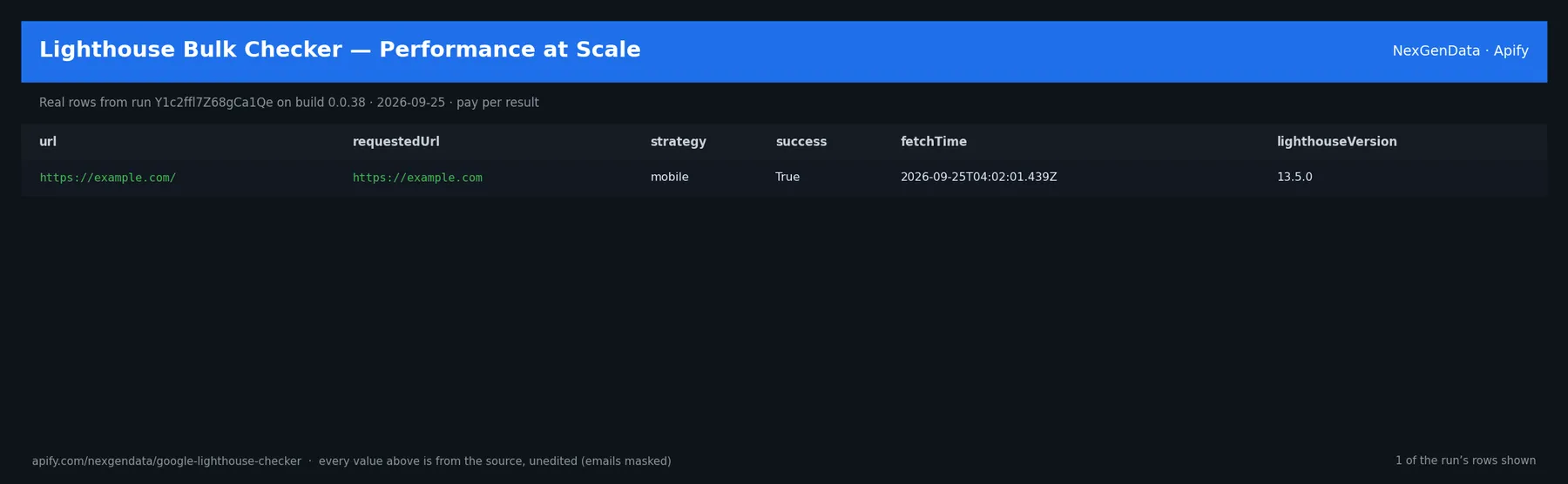
url | requestedUrl | strategy | fetchTime | lighthouseVersion | source |
|---|---|---|---|---|---|
| https://example.com/ | https://example.com | mobile | 2026-09-25T04:02:01.439Z | 13.5.0 | google-pagespeed-insights |
Real rows from run Y1c2ffl7Z68gCa1Qe on build 0.0.38 (2026-09-25), unedited apart from masked emails/phones and shortened long text; fields the source does not publish are empty.
🧾 JSON sample record
One real record from run Y1c2ffl7Z68gCa1Qe (emails/phones masked, long text shortened):
💰 Pricing
| Event | Price (USD) | When it is charged |
|---|---|---|
Actor Start (apify-actor-start) | $5e-05 | Charged when the Actor starts running. Number of events charged depends on Actor memory (one event per GB, minimum one event). |
Lighthouse audit (apify-default-dataset-item) | $0.1 | Single result in the default dataset. |
Pay-per-event: you pay only for what the run delivers. A run that delivers nothing bills no result events (only the actor-start event, when the actor defines one). Example: a run that delivers 100 results costs 100 × $0.1 = $10.00 plus the start fee.
🔗 Related Actors
More from the NexGenData Data APIs family:
- FINMA + MAS + SFC Enforcement Records API
- Google Ads Transparency Competitor Ad Intelligence
- Google Search Scraper — SERP Results & Web Search API
- Google SERP Scraper — Rankings & Keywords
- Google Shopping Scraper — Product Prices & Sellers API
- Kuaishou Trending Tracker — 快手热榜 Hot Board API
27 more in this family on the NexGenData Store page.
How It Works
- You provide a list of URLs and a device strategy (mobile or desktop).
- For each URL the actor calls Google PageSpeed Insights: Google runs Lighthouse and returns the audit.
- The actor parses the Lighthouse result and emits one dataset row per URL with the category scores and key metrics.
No local browser, no Node.js, no Chromium — just Google's real Lighthouse data over a fast HTTP call.
Input Parameters
| Parameter | Type | Description |
|---|---|---|
urls | array | URLs to audit |
categories | array | Any of: performance, accessibility, best-practices, seo |
device | string | mobile or desktop (PSI strategy) |
maxRequests | integer | Max URLs to audit (1–100) |
api_key | string (optional override) | Google PSI API key. Normally leave this blank — the key is supplied by the platform through the PAGESPEED_API_KEY environment variable. Google's anonymous keyless quota is exhausted (verified: HTTP 429 "Quota exceeded for quota metric 'Queries'"), so a key is required. |
Output
One row per URL, for example:
Scores are 0–100. Metrics carry Lighthouse's displayValue, raw numericValue, and per-audit score. Scores are never fabricated: only URLs that produced a real Lighthouse result become dataset rows. A URL that does not respond, or that Lighthouse cannot audit, is skipped, listed in the ERRORS key-value record, and not charged.
Pricing
- Result (
apify-default-dataset-item): $0.10 per audited URL — one row per URL that returned a real Lighthouse result. - Actor start (
apify-actor-start): $0.00005 per event (one event per GB of run memory, minimum one).
No monthly fee. Skipped URLs, blocked runs and empty runs cost nothing beyond the start event. A 10-URL audit costs $1.00.
Notes
- Data comes straight from Google's Lighthouse via PageSpeed Insights, so scores match what you'd see at pagespeed.web.dev for the same URL.
- The API key comes from the platform. The actor reads
PAGESPEED_API_KEYfrom the environment; theapi_keyinput is only an override. If neither is set, the run succeeds with 0 rows and tells you which variable to set — nothing is charged. - Fail-fast URL precheck. Each URL is probed before a PSI call is spent on it, so unreachable hosts never burn quota and never bill.
- Blocks fail loudly. If PageSpeed Insights refuses the run (quota, auth or outage) after retries, the run ends FAILED with the reason in the status message rather than finishing green with no data.
- Local Lighthouse is a fallback only, used solely when the run has at least 2048 MB of memory and the Lighthouse CLI is present. The actor runs comfortably at the 256 MB minimum on the PSI path.


