

SEO Audit Crawler — Technical SEO Site Audit
Pricing
from $33.50 / 1,000 page auditeds
SEO Audit Crawler — Technical SEO Site Audit
Crawl a website and audit every page: status codes, redirects, titles, meta descriptions, H1s, canonicals, noindex, hreflang, schema, missing alt text, broken pages and links. One row per page with its issues, plus a site summary. Part of NexGen Signal — data tools and official-source data products
Pricing
from $33.50 / 1,000 page auditeds
Rating
0.0
(0)
Developer
NexGen Signal
Maintained by CommunityActor stats
0
Bookmarked
2
Total users
1
Monthly active users
20 hours ago
Last modified
Categories
Share
🧭 SEO Audit Crawler — Technical SEO Site Audit
Crawl a website and get a technical SEO audit of every page: status code and redirect chain, title and meta description with lengths, H1s and H2 count, canonical (and whether it points to the page itself), meta robots and X-Robots-Tag with an indexable flag, lang, viewport, Open Graph and Twitter tags, hreflang, schema.org types, images without alt, internal / external / nofollow links, word count, page size and download time.
Each page row lists its issues in plain words (missing title, title over 60 characters, missing meta description, more than one H1, noindex, canonical points elsewhere, thin content, images without alt, slow response, broken external links when you turn that check on). A SITE_REPORT record sums the issues across the site and lists broken internal pages with the pages that link to them, and duplicate titles and descriptions.
The unit of output is one page audited, including 4xx and 5xx pages. Links that are skipped (robots.txt, not HTML) are not billed.
Who buys this and for what job
- SEO consultants and agencies auditing client sites and tracking fixes run after run.
- Site owners and developers finding broken pages, redirect chains and missing tags before a launch.
- Content teams spotting thin pages and duplicate titles.
- Analysts feeding page-level SEO data into dashboards.
Buyers usually search for this as "SEO audit", "site audit crawler" or "broken link checker".
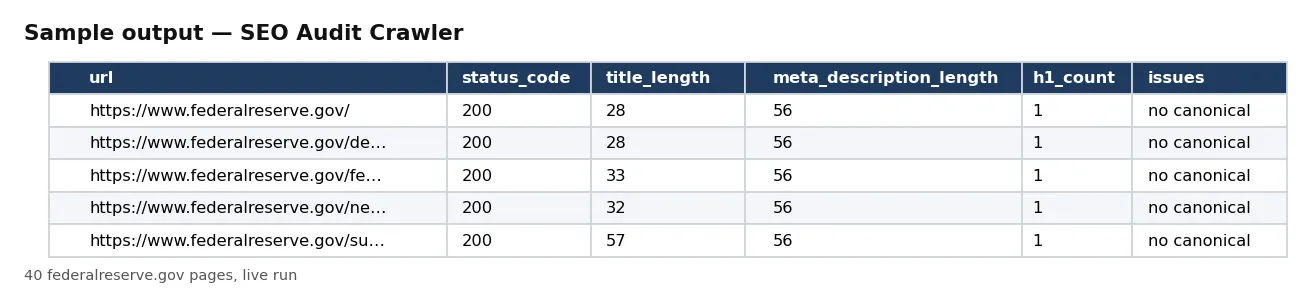
📊 Sample Output
| url | status_code | title_length | meta_description_length | h1_count | issues |
|---|---|---|---|---|---|
| https://www.federalreserve.gov/ | 200 | 28 | 56 | 1 | no canonical |
| https://www.federalreserve.gov/default.htm | 200 | 28 | 56 | 1 | no canonical |
| https://www.federalreserve.gov/feeds/feeds.htm | 200 | 33 | 56 | 1 | no canonical |
| https://www.federalreserve.gov/newsevents/calendar.htm | 200 | 32 | 56 | 1 | no canonical |
| https://www.federalreserve.gov/subscribe.htm | 200 | 57 | 56 | 1 | no canonical |
Rows from live run jyZFG1qNTMzPxp2so on Apify (40 pages of federalreserve.gov). Notice the most common issue: the pages carry no canonical tag.
✅ What you get
Every field of each record:
record_id,url,final_url,status_code,redirect_chain,depth,found_on— the page, its answer and redirects, how deep it is and where it was found.content_type,bytes,load_ms— type, HTML size and download time.title,title_length,meta_description,meta_description_length— the snippet tags.meta_robots,x_robots_tag,indexable,canonical,canonical_is_self— indexing signals.lang,has_viewport,h1,h1_count,h2_count,word_count— page basics.og_title,og_description,og_image,twitter_card,hreflang,structured_data_types— social, language and schema tags.images_total,images_missing_alt,internal_links,external_links,nofollow_links,broken_external_links— images and links.issues,issue_count,crawled_at— issues found on the page and when it was crawled (UTC).
⚙️ Sample inputs
A 10-page sample audit (the Store example)
Start page plus pages it links to and the sitemap lists.
One section only, with broken-link check
Crawl the news section and check its external links.
Full site including subdomains
Skips paginated and search URLs.
Input fields:
| Field | Meaning |
|---|---|
startUrls | sites to audit (up to 100); the crawl stays on each site. |
maxPages | stop after this many audited pages (default 100). Each audited page is billed. |
maxDepth | clicks from the start page (default 10). |
useSitemaps | also queue sitemap pages (default true). |
includeSubdomains | crawl subdomains too (default false). |
includeUrlPatterns, excludeUrlPatterns | regular expressions for URLs to crawl or skip. |
checkExternalLinks | test external links once each (default false). |
🧾 JSON sample record
🔧 How it works
The crawl runs 5 pages at a time, breadth first, and honours a site's robots.txt crawl-delay. Files such as images, PDFs and scripts are not crawled; pages that are not HTML are counted and not billed. www and non-www count as the same site.
Every run reads each host's robots.txt first: a path it disallows is skipped, listed in the run receipt and never charged. Only public internet addresses are fetched (no private, loopback or cloud-metadata addresses, checked again on every redirect). No logins, no CAPTCHA solving, no proxies.
Delivery is pushed first and charged after. SITE_REPORT holds the site summary; RUN_RECEIPT lists each start URL's outcome, page outcomes with counts, the robots.txt and sitemap results, and the delivered and charged counts.
💰 Pricing example
Per page delivered, no start fee, no monthly charge:
| Apify plan | Price per page |
|---|---|
| Free | $0.05 |
| Bronze | $0.045 |
| Silver | $0.04 |
| Gold, Platinum, Diamond | $0.0335 |
- 10 pages: $0.50 on the Free plan, $0.335 on Gold.
- 500 pages: $25.00 on Free, $16.75 on Gold.
- 5,000 pages: $250.00 on Free, $167.50 on Gold.
Coverage and size. Proof runs on 17 Oct 2026: 40 federalreserve.gov pages audited in about 7 seconds with 759 more pages queued; 8 NASA pages with their external links checked in about 10 seconds. Pages built only by JavaScript are audited as the server sends them.
⚖️ Legal & ToS
Audit sites you own or are allowed to crawl. Every run reads each host's robots.txt first: a path it disallows is skipped, listed in the run receipt and never charged. Only public internet addresses are fetched (no private, loopback or cloud-metadata addresses, checked again on every redirect). No logins, no CAPTCHA solving, no proxies.
❓ FAQ
Does it render JavaScript? No. It audits the HTML the server sends, as most search-engine first passes do.
Is a 404 page billed? Yes: it is an audited page, and it is listed in SITE_REPORT with the pages that link to it.
Can I audit only some pages? Yes, with includeUrlPatterns, excludeUrlPatterns, maxDepth and maxPages.
🆘 Troubleshooting
- Only a few pages audited — Check maxPages, maxDepth and your patterns; pages linked only by JavaScript are not found.
- No pages audited — The start URL was blocked by robots.txt or was not HTML; see RUN_RECEIPT.
- SOURCE UNAVAILABLE — The start URLs could not be reached after retries. Nothing was charged.
🔗 Related Actors
- Website Performance Audit — Lighthouse scores and web vitals per page
- Website Tech Stack Detector — what a site is built with
- Website Contact Scraper — contact details from website lists
🏢 About NexGen Signal — data tools and official-source data products on Apify. Browse the catalog: apify.com/nexgensignal
⭐ Found this useful?
If this actor saved you time, a rating on its Apify Store page helps other buyers find it.
Part of NexGen Signal — data tools and official-source data products.


