

App Store Rankings Tracker — Top Charts by Country
Pricing
from $1.34 / 1,000 ranking snapshots
App Store Rankings Tracker — Top Charts by Country
Track Apple App Store chart rankings (top-free/top-paid) by country and category — position, app, developer. Honest not_observed/source_blocked states, never a fake null. Apple charts only.
Pricing
from $1.34 / 1,000 ranking snapshots
Rating
0.0
(0)
Developer
NexGen Watch
Maintained by CommunityActor stats
0
Bookmarked
1
Total users
0
Monthly active users
2 days ago
Last modified
Share
📱 📈 App Store Rankings Tracker — Top Charts by Country
Growth and ASO teams pay for stable chart snapshots and position-change alerts by market — a reliable daily read on where apps sit in Apple's top charts.
Output is one None row per result; billing is pay-per-event, the value event being one ranking snapshot (a $0.02 start fee per run, then $0.002 per ranking snapshot). Source: play.google.com.
No login, no API key and no CAPTCHA solving are involved: the source is read logged-out.
Use cases by team
- Growth: Track where you and competitors rank in top-free / top-paid charts each day.
- ASO teams: Correlate ranking movement with metadata and keyword changes.
- Market intel: Spot new entrants breaking into a category's top chart.
- Leadership: Get a clean daily ranking snapshot for the standup without manual checks.
📊 Sample Output
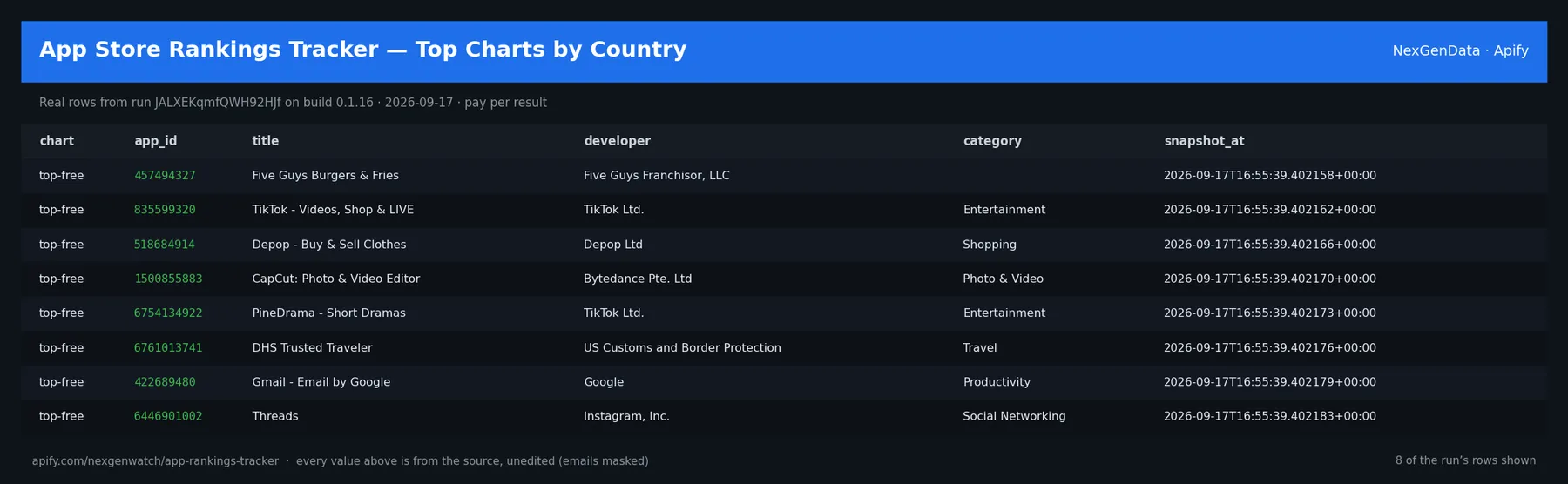
Real rows from run JALXEKqmfQWH92HJf on build 0.1.16 (2026-09-17), the same input as the Quick start below — every value is as the source published it (emails masked, long text shortened):
| chart | app_id | title | developer | category | snapshot_at |
|---|---|---|---|---|---|
| top-free | 457494327 | Five Guys Burgers & Fries | Five Guys Franchisor, LLC | 2026-09-17T16:55:39.402158+00:00 | |
| top-free | 835599320 | TikTok - Videos, Shop & LIVE | TikTok Ltd. | Entertainment | 2026-09-17T16:55:39.402162+00:00 |
| top-free | 518684914 | Depop - Buy & Sell Clothes | Depop Ltd | Shopping | 2026-09-17T16:55:39.402166+00:00 |
| top-free | 1500855883 | CapCut: Photo & Video Editor | Bytedance Pte. Ltd | Photo & Video | 2026-09-17T16:55:39.402170+00:00 |
| top-free | 6754134922 | PineDrama - Short Dramas | TikTok Ltd. | Entertainment | 2026-09-17T16:55:39.402173+00:00 |
| top-free | 6761013741 | DHS Trusted Traveler | US Customs and Border Protection | Travel | 2026-09-17T16:55:39.402176+00:00 |
| top-free | 422689480 | Gmail - Email by Google | Productivity | 2026-09-17T16:55:39.402179+00:00 | |
| top-free | 6446901002 | Threads | Instagram, Inc. | Social Networking | 2026-09-17T16:55:39.402183+00:00 |
The run finished with the status message: SUCCEEDED: emitted 25 item(s)
✅ What you get
Each row is flat JSON with these fields (from the dataset schema and the sample run; a field the source does not publish for a given row is null):
store(string/null) — Output field: storecountry(string/null) — Output field: countrychart(string/null) — Output field: chartposition(number/null) — Output field: positionapp_id(string/null) — Output field: app_idtitle(string/null) — Output field: titledeveloper(string/null) — Output field: developercategory(string/null) — Output field: categoryicon_url(string/null) — Output field: icon_urlsource_url(string/null) — Output field: source_urlsnapshot_at(string/null) — Output field: snapshot_atprevious_status(object/null) — Output field: previous_status
What you get
- Deterministic Apple top-chart snapshots by country, chart, and category
- Position, app ID, title, developer, category, and icon per chart entry
- A 12-field record with
previous_statusso you can see movement at a glance - Source URL and snapshot timestamp on every row
- Optional watch mode that emits only position changes on later runs
⚙️ Sample inputs
1. Quick start — the Store example (this is what the sample above came from)
The sample run charged exactly: 1 × $0.02 apify-actor-start + 25 × $0.002 ranking-snapshot + 0 × $0.10 watch-check = $0.07 on the Free tier — every delivered row was billed.
2. A smaller, narrowed run
Caps the run at 5 rows — about $0.03 on the Free tier ($0.02 start + 5 × $0.002).
3. Watch mode on a schedule
The first run seeds a private baseline and emits zero deltas; every later run emits one row per change, billed at $0.002 each.
🧾 JSON sample record
One real record from run JALXEKqmfQWH92HJf, exactly as it lands in the dataset (emails masked, long text shortened):
🔧 How it works
Source. The actor reads play.google.com — endpoints: https://play.google.com/store/apps. Public pages and feeds only; nothing behind a login.
Transport. Requests go through Apify residential proxy.
Watch semantics. Snapshot mode (watch_mode: false) returns a preview. Watch mode keys every record on a source-native id, stores a private baseline in a named key-value store, and on each later run emits one delta row per change (new / changed / removed). A blocked fetch is never diffed, so a source outage cannot show up as a mass removal.
Terminal states. A run ends NORMAL, CAPPED (your cap was reached), PARTIAL (something was withheld and the message says what), GENUINE_EMPTY (the source was read and truly had nothing in scope) or BLOCKED (the source refused or changed shape — the run FAILS loud and bills nothing). A zero-row run is never reported as a silent success.
Charging. Each ranking snapshot is charged at the moment it is pushed (ranking-snapshot); a row that fails to charge is not delivered, so the dataset count always equals the charged count.
How it works
Choose stores, countries, charts, and (optionally) categories. It captures deterministic Apple Marketing Tools chart snapshots — the same request yields the same ordered snapshot. Google Play chart requests fail loudly rather than guessing, because no stable official public chart feed has been evidenced. Public surfaces only.
Compliance & honest limits
- Apple charts only for now — Google Play chart requests fail loudly because no stable public feed has been evidenced (no fabricated data).
- Public chart surfaces only; no login, CAPTCHA, paywall, or access-control defeating.
- A source-confirmed empty result is
SUCCEEDED-0: GENUINE_EMPTY; exhausted retries fail and truncated runs arePARTIAL.
About
Part of the NexGenData App Intelligence cluster — the daily ranking pulse that pairs with metadata and keyword tracking. Built by NexGenData. Questions or need a custom feed? Open an issue on the Actor page.
Preview vs Watch mode
- Preview (watchMode = false): a one-shot snapshot of the current chart positions — emitted and charged per
ranking-snapshotrecord. Use it to see the charts right now; it keeps no baseline. - Watch (watchMode = true): change detection — the actor keeps a private baseline and emits only the
ranking-snapshotrows that moved since the last run under the same baseline key, plus onewatch-checkper run. Use it on a schedule to be told only what changed.
What is not done. No login, no cookie or CAPTCHA bypass, no private or personal-account data, no browser automation.
⏰ Set it on a schedule
A single run is a snapshot. The value is the feed: open the actor in Apify Console → Schedules → Create new, add this actor with input 3 above (watch_mode: true), and pick a cadence:
- Daily —
0 7 * * *(07:00 UTC): catch changes within a day. - Weekly —
0 7 * * 1: a Monday digest.
Each run is independent; keep the same input on the schedule so the results stay comparable. Schedules can also POST results to a webhook (Console → Integrations).
💰 Pricing example
| Event | Free | Bronze | Silver | Gold |
|---|---|---|---|---|
Actor Start (apify-actor-start) | $0.02 | $0.02 | $0.02 | $0.02 |
Ranking snapshot (ranking-snapshot) | $0.002 | $0.0018 | $0.0016 | $0.0013 |
Watch check (watch-check) | $0.10 | $0.09 | $0.08 | $0.07 |
Worked at the live Free-tier price (watch mode, one delta per change):
- 8 ranking snapshots: $0.02 start + 8 × $0.002 = $0.04
- 25 ranking snapshots: $0.02 start + 25 × $0.002 = $0.07
A run that delivers zero rows charges the $0.02 start fee only. A BLOCKED run (source refused) fails loud and charges no value event. The start fee is charged once per GB of run memory; the default run memory is 1024 MB.
Yield on the sample run: SUCCEEDED: emitted 25 item(s). max_items is a hard ceiling on what is delivered and billed, never a target.
⚖️ Legal & ToS
This actor reads public, logged-out pages and feeds published by play.google.com. It collects only what the source publishes to any visitor, identifies itself, and does not access accounts, private data or anything behind authentication. Use the output in line with the source's terms and your local law; the intended use is B2B research and monitoring.
❓ FAQ
Q: Do I need an API key or a login?
A: No. The source (play.google.com) is read logged-out; the input schema has no key field and the actor carries no secrets.
Q: Why did my run return 0 rows?
A: Read the run's status message. GENUINE_EMPTY means the source was read and had nothing in scope for your input (in watch mode the first run always seeds the baseline and returns zero deltas); BLOCKED means the source refused and the run failed without billing a value event — retry later or narrow the input. A zero-row run bills the start fee only.
Q: How many rows can one run return?
A: Up to max_items (default 25). Raise the cap for a bigger run; you pay per delivered row.
Q: What does watch mode remember between runs?
A: A private baseline of source-native record ids in a named key-value store. Each later run diffs the live source against it and emits only changes.
Q: How fresh is the data?
A: Every run reads the source live at run time; nothing is cached between runs except the watch baseline. Put it on a schedule for a continuous feed.
Q: What formats can I export?
A: The dataset downloads as JSON, CSV, Excel, XML or RSS from the run's Dataset tab or the Apify API, and any run can push to a webhook or integration.
Q: How is this different from the other app store intelligence actors?
A: Same output shape and billing model; this one covers play.google.com. The siblings under Related Actors cover the other sources or slices — run several on one schedule for a combined feed.
🆘 Troubleshooting
- Run FAILED with BLOCKED → the source refused the request or changed its page shape → nothing was billed beyond the start fee; retry after a while, and if it persists open an Issue with the run id.
- Status says CAPPED → your cap (
max_items) was reached → raise it for a bigger run. - Input validation error on start → a field is outside the schema's allowed values → start from the Quick start block and change one field at a time.
- Run TIMED-OUT → a very wide request on a slow day → raise the run timeout in Run options or narrow the input; what was delivered before the timeout is still in the dataset.
- First watch run shows no deltas → expected: it seeds the baseline; changes appear from the second run.
🔗 Related Actors
- 📱 App Store & Google Play Metadata Scraper — One Schema — Scrape public Apple App Store and Google Play app metadata by app ID — title, developer, description, category, price, rating, rating count, version,…
- 🔑 ASO Keyword Rank Tracker — App Store & Google Play — Track App Store and Google Play keyword rankings for your apps — position within a searched depth, with a SERP fingerprint. Not-found-within-depth is…
- 🤖 Google Play Reviews Scraper — Ratings, Text & Replies — Scrape public Google Play reviews for any app — rating, text, thumbs-up, version, developer response, and date. Watch mode returns only new reviews.…
- 🍎 Apple App Store Reviews Scraper — Ratings, Text & Dates — Scrape public Apple App Store reviews for any app by ID — rating, text, version, author, developer response, and date. Watch mode returns only new re…
- 🏢 About NexGenData — NexGen Watch is NexGenData's fleet of 256 public monitoring and lookup actors built on official sources, pay-per-result. Browse the catalog at apify.com/nexgenwatch.
⭐ Found this useful?
If this actor saved you a manual check, a quick review on the Apify Store helps other teams find it. Feature request or a source that changed? Open it from the Issues tab — every one is read.


