
App Review Competitive Report — Head-to-Head Comparison
Pricing
from $16,750.00 / 1,000 competitive reports
App Review Competitive Report — Head-to-Head Comparison
Stop paying $50–100+/month for a review-intelligence subscription to compare your app against the competition.
Pricing
from $16,750.00 / 1,000 competitive reports
Rating
0.0
(0)
Developer
NexGen Watch
Maintained by CommunityActor stats
0
Bookmarked
2
Total users
1
Monthly active users
3 days ago
Last modified
Categories
Security
Limited permissionsShare
📑 App Review Competitive Report — Head-to-Head Comparison
Compare 2 to 5 apps from the App Store and Google Play in one run. The actor reads each app's public reviews and returns one report per app — sentiment split, average rating, top themes, ranked complaints, feature requests and a month-by-month trend — plus one head-to-head summary that names the leader on each measure and ranks the apps overall. Built by NexGen Watch on Apify.
Pay per report, no subscription: a $0.05 start fee per run, then $25.00 per competitive report on the Free tier, however many reviews it reads. Source: itunes.apple.com and play.google.com, read logged-out with no login or API key.
Who buys this
Buyers usually search for competitor app reviews or app review intelligence.
- Product, ASO and app-marketing teams tracking competitor app reviews.
- Analysts and agencies benchmarking competitors with app review intelligence.
- Data teams feeding app data into dashboards and BI.
📊 Sample Output
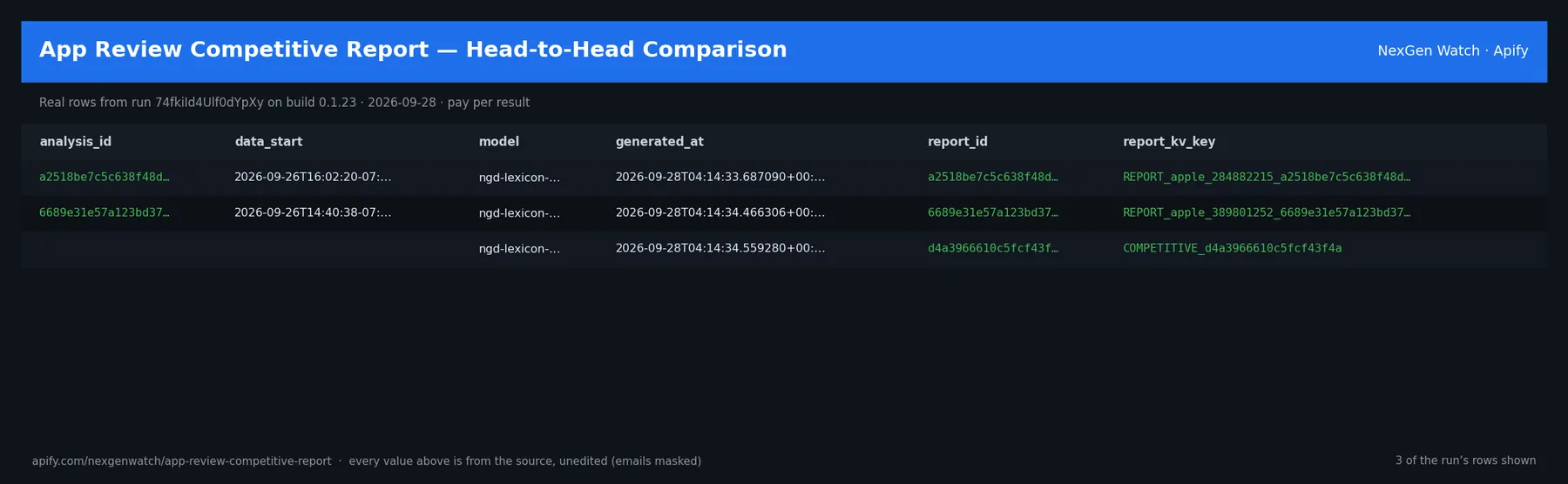
Real result from run yuD9ynRtLfaLYRgim on build 0.1.35 (2026-10-27) — sample input 2 below: Spotify vs Pandora on Google Play plus Spotify on the App Store, 50 public reviews each. One app_report row per app:
| app | store | reviews analyzed | positive % | negative % | avg rating | top theme |
|---|---|---|---|---|---|---|
Spotify (com.spotify.music) | google_play | 50 | 68 | 24 | 3.86 | music |
Pandora (com.pandora.android) | google_play | 50 | 48 | 34 | 3.18 | music |
Spotify (iOS) (324684580) | apple | 50 | 72 | 24 | 3.94 | songs |
…and one competitive_summary row comparing them: 3 apps, 150 reviews; winners — most positive sentiment: Spotify (iOS); highest average rating: Spotify (iOS); highest sentiment score: Spotify (iOS); fewest complaints: Spotify (iOS); overall ranking Spotify (iOS) → Spotify → Pandora.
The run finished with the status message: SUCCEEDED: emitted 4 item(s) (the image above is from an earlier 2-app App Store run).
✅ What you get
Each run returns one app_report row per app you compared plus one competitive_summary row with the head-to-head verdict. Every row is flat JSON; a field that does not apply to a row type is null. The same reports are also saved as readable Markdown briefs in the run's key-value store (COMPETITIVE_<id> for the comparison, REPORT_<store>_<app_id>_<id> per app).
Per-app rows (record_type: app_report)
review_count(number/null) — Number of public reviews analyzed for an app_report row.data_start(string/null) — Earliest review date in the window.data_end(string/null) — Latest review date in the window.data_freshness(string/null) — Most recent review timestamp.sentiment_positive_pct(number/null) — Share of positive reviews.sentiment_neutral_pct(number/null) — Share of neutral reviews.sentiment_negative_pct(number/null) — Share of negative reviews.sentiment_counts(object/null) — Raw sentiment label counts.average_sentiment_score(number/null) — Mean ngd-lexicon-v1 sentiment score.average_rating(number/null) — Mean star rating.themes(array/null) — Top theme clusters for an app (term + mentions).complaint_clusters(array/null) — Raw complaint phrase clusters.trend_buckets(array/null) — Per-month sentiment buckets.developer_response_coverage_pct(number/null) — Share of reviews with a developer response.examples(array/null) — Sample classified reviews.app_id(string/null) — The app an app_report row covers.store(string/null) — apple or google_play.country(string/null) — Storefront country code.feature_requests(object/null) — Extracted feature requests: count, share, phrases, examples.complaint_ranking(array/null) — Ranked complaint clusters with share and example.trend(object/null) — Current-vs-prior-period trend with deltas and direction.company_label(string/null) — Display label for the app in the competitive report.
The head-to-head row (record_type: competitive_summary)
app_count(number/null) — Number of apps compared.total_reviews(number/null) — Total public reviews analyzed across all apps.relative_sentiment(array/null) — Sentiment leaderboard ranking the compared apps.shared_vs_unique_themes(object/null) — Themes shared across apps vs unique to each app.shared_vs_unique_complaints(object/null) — Complaints shared across apps vs unique to each app.winner_by_dimension(object/null) — Leading app on each comparable dimension.overall_ranking(array/null) — Composite head-to-head ranking of the apps.skipped_targets(array/null) — Targets that yielded no reviews or failed, excluded from the comparison.
On every row
analysis_id(string) — e.g.a2518be7c5c638f48da9method(string/null) — Analysis method description.model(string/null) — Analysis model id (ngd-lexicon-v1).generated_at(string/null) — Report generation timestamp.partial(boolean/null) — True if the run skipped an app or hit a budget/delivery cap.report_id(string/null) — Deterministic report id (hash of the analyzed inputs).report_markdown(string/null) — Rendered markdown summary of the report.report_kv_key(string/null) — Key-value store key holding the markdown report.record_type(string/null) — app_report (one per compared app) or competitive_summary (the head-to-head record).apps(array/null) — Per-app roster embedded in the competitive_summary record.
⚙️ Sample inputs
How to run it
- Open the actor and click Try for free (or call it through the Apify API).
- In targets, add 2 to 5 apps: the App Store numeric id or the Google Play package name, the store (
appleorgoogle_play), and optionally a country and a label for each app. - Set max_reviews (public reviews read per app, up to 1,000) and max_themes if you want more or fewer theme clusters.
- Click Start. The run reads each app's public reviews, builds one report per app and the head-to-head summary.
- Open the Output tab: one
app_reportrow per app plus onecompetitive_summaryrow. Export as JSON, CSV or Excel, or read the Markdown briefs in the run's key-value store.
You can also start from one of the published tasks (for example Spotify vs Pandora) with the inputs already filled in.
Input fields
targets(required) — 2 to 5 apps to compare. Each is an object:app_id(App Store numeric id, or Google Play package name likecom.spotify.music),store(appleorgoogle_play), optionalcountry(defaultus),language(Google Play only, defaulten) andcompany_label(the name shown in the report).max_reviews(optional, default 1000) — Public reviews read per app, 1–1000. More reviews = steadier themes and sentiment.max_themes(optional, default 12) — Theme and complaint clusters kept per app, 1–50.proxy_configuration(optional, default Apify Proxy on) — Proxy settings for the store requests; a fresh session is used on every retry.
Examples
1. Quick start — the Store example: Spotify vs Pandora on Google Play, 10 reviews each
The sample run (M8eoH8wJYdD1g4aPd, Oct 31) charged exactly: 1 × $0.05 apify-actor-start + 1 × $25.00 competitive_report = $25.05 on the Free tier — every delivered row was billed.
Raise max_reviews (up to 1,000 per app) for a fuller read; the price is per report, not per review.
2. Cross-store comparison — Google Play and the App Store in one report (the Sample Output above came from this input)
Charged $0.05 start + $25.00 for the one report = $25.05 on the Free tier.
3. A full 5-app landscape, different countries, deeper read
Still one report: $0.05 start + $25.00 on the Free tier, however many reviews it reads.
🧾 JSON sample record
The competitive_summary row from the sample run above, shortened (lists cut, … marks removed parts):
🔧 How it works
Source. The actor reads itunes.apple.com, play.google.com — endpoints: https://itunes.apple.com/lookup, https://play.google.com/store/apps/details. Public pages and feeds only; nothing behind a login.
Transport. Requests go through Apify residential proxy.
Terminal states. A run ends NORMAL, CAPPED (your cap was reached), PARTIAL (something was withheld and the message says what), GENUINE_EMPTY (the source was read and truly had nothing in scope) or BLOCKED (the source refused or changed shape — the run FAILS loud and bills nothing). A zero-row run is never reported as a silent success.
Charging. Each competitive report is charged at the moment it is pushed (competitive_report); a row that fails to charge is not delivered, so the dataset count always equals the charged count.
Method — deterministic, transparent, model-included
Analysis runs the ngd-lexicon-v1 engine: a transparent lexicon plus a rating prior — the identical engine used across the review-intelligence actors, so scores are comparable app-to-app. It is fully deterministic — the same reviews always produce the same competitive report. No external LLM, no API key to bring, no "AI" black box. The model is included in the price.
Notes
- Public, logged-out data only. No login, no private endpoints.
- Cost-bounded: memory/time caps, a bounded per-page request-attempt budget, and a hard per-app review/output cap.
- An app that returns no public reviews is skipped and listed under
skipped_targets; the report still runs as long as at least 2 apps have data.
What is not done. No login, no cookie or CAPTCHA bypass, no private or personal-account data, no browser automation.
💰 Pricing example
| Event | Free | Bronze | Silver | Gold |
|---|---|---|---|---|
Actor Start (apify-actor-start) | $0.05 | $0.05 | $0.05 | $0.05 |
Competitive report (competitive_report) | $25.00 | $22.50 | $20.00 | $16.75 |
Worked at the live Free-tier price:
- 3 competitive reports: $0.05 start + 3 × $25.00 = $75.05
- 25 competitive reports: $0.05 start + 25 × $25.00 = $625.05
- 100 competitive reports: $0.05 start + 100 × $25.00 = $2,500.05
A run that delivers zero rows charges the $0.05 start fee only. A BLOCKED run (source refused) fails loud and charges no value event. The start fee is charged once per GB of run memory; the default run memory is 1024 MB.
Yield on the sample run (sample input 2): SUCCEEDED: emitted 4 item(s) — 3 per-app rows + 1 head-to-head row, one report charged.
⚖️ Legal & ToS
This actor reads public, logged-out pages and feeds published by itunes.apple.com, play.google.com. It collects only what the source publishes to any visitor, identifies itself, and does not access accounts, private data or anything behind authentication. Use the output in line with the source's terms and your local law; the intended use is B2B research and monitoring.
❓ FAQ
Q: Do I need an API key or a login?
A: No. The source (itunes.apple.com, play.google.com) is read logged-out; the input schema has no key field and the actor carries no secrets.
Q: Why did my run return 0 rows?
A: Read the run's status message. GENUINE_EMPTY means the source was read and had nothing in scope for your input; BLOCKED means the source refused and the run failed without billing a value event — retry later or narrow the input. A zero-row run bills the start fee only.
Q: How fresh is the data?
A: Every run reads the source live at run time; nothing is cached between runs. Put it on a schedule for a continuous feed.
Q: What formats can I export?
A: The dataset downloads as JSON, CSV, Excel, XML or RSS from the run's Dataset tab or the Apify API, and any run can push to a webhook or integration.
Q: How is this different from the other premium report actors?
A: Same output shape and billing model; this one covers itunes.apple.com, play.google.com. The siblings under Related Actors cover the other sources or slices — run several on one schedule for a combined feed.
Q: Can I run it on a schedule?
A: Yes. In Apify Console open Schedules, add this actor with your input and pick a cadence (for example weekly). Each run is a fresh, independent report.
Q: Why per report instead of a subscription?
A: You pay only in the weeks you need a competitive read — one report already covers up to 5 apps head-to-head.
Q: Are there rate limits?
A: The actor paces itself against the source; there is no per-buyer limit beyond your Apify plan's concurrency.
🆘 Troubleshooting
- Run FAILED with BLOCKED → the source refused the request or changed its page shape → nothing was billed beyond the start fee; retry after a while, and if it persists open an Issue with the run id.
- Fewer rows than expected → the source had fewer items in scope → widen the input.
- Input validation error on start → a field is outside the schema's allowed values → start from the Quick start block and change one field at a time.
- Run TIMED-OUT → a very wide request on a slow day → raise the run timeout in Run options or narrow the input; what was delivered before the timeout is still in the dataset.
🔗 Related Actors
- App Review Deep Report — Sentiment, Themes & Complaints — Stop paying $50–100+/month for a review-intelligence subscription you use a few times
- ASO Audit Report — App Store Listing Health & Keyword Coverage — Mobile growth / ASO agencies auditing a client app's store listing before a keyword or creative push, and PMs benchmarking their listing against cate…
- EDGAR Diligence Report — Per-Issuer SEC Filing Brief — Per-issuer SEC/EDGAR diligence in one run — material 8-K events, filing history, and risk factors as structured findings plus a rendered markdown bri…
- Grant Funding Report — NIH Awards & Grants.gov Window — Research-development offices and grant consultancies sizing a funder's activity in a topic area, and life-science BD teams tracking award concentrati…
- 🏢 About NexGen Watch — NexGen Watch is a catalog of more than 300 public data actors built on official sources, pay-per-result. Browse the catalog at apify.com/nexgenwatch.
⭐ Found this useful?
If this actor saved you a manual check, a quick review on the Apify Store helps other teams find it. Feature request or a source that changed? Open it from the Issues tab — every one is read.


