

LinkedIn Jobs Scraper — Filters, Full Descriptions, No Login
Pricing
from $33.50 / 1,000 public job postings
LinkedIn Jobs Scraper — Filters, Full Descriptions, No Login
Scrape LinkedIn jobs without login: search by keyword, location, company or a pasted LinkedIn search URL; filter by posting age, Easy Apply, job type, seniority, remote; full descriptions, salary, applicants, company page. Pay per job.
Pricing
from $33.50 / 1,000 public job postings
Rating
0.0
(0)
Developer

NexGen Watch
Maintained by CommunityActor stats
0
Bookmarked
1
Total users
1
Monthly active users
8 hours ago
Last modified
Categories
Share
Scrape LinkedIn jobs without an account: search by keyword and location, by company, or paste a LinkedIn job-search URL, and get one clean row per job — title, company, location, posting date, salary, seniority, employment type, applicant count, company page and the full job description (text and HTML). Filter by posting age (down to the hour), Easy Apply, under-10-applicants, job type, seniority level, remote/hybrid/on-site and title words. Pay only for the jobs delivered.
- No login, no cookies. Public job pages only; nothing from profiles or people.
- Every filter is real. LinkedIn's public search ignores job-type, seniority and workplace filters, so this scraper reads each job's own page and delivers only matches — you are not billed for the rest.
- Paste a search URL. Any
linkedin.com/jobs/searchlink works; its filters are read from the URL. - Up to 1,000 jobs per run, de-duplicated by LinkedIn job id, paged correctly (10 cards per page).
- Watch mode for schedules: only new, changed and removed jobs after the first run.
Billing: $0.02 per run start, then $0.05 per delivered job (job_record). Jobs skipped by a filter are not billed.
Who uses this
- Recruiters and staffing agencies pulling LinkedIn job postings for target roles, companies or regions.
- Job boards and aggregators adding LinkedIn jobs as structured rows with descriptions.
- Sales and labour-market teams using new postings (by seniority, by company) as hiring signals.
📊 Sample Output
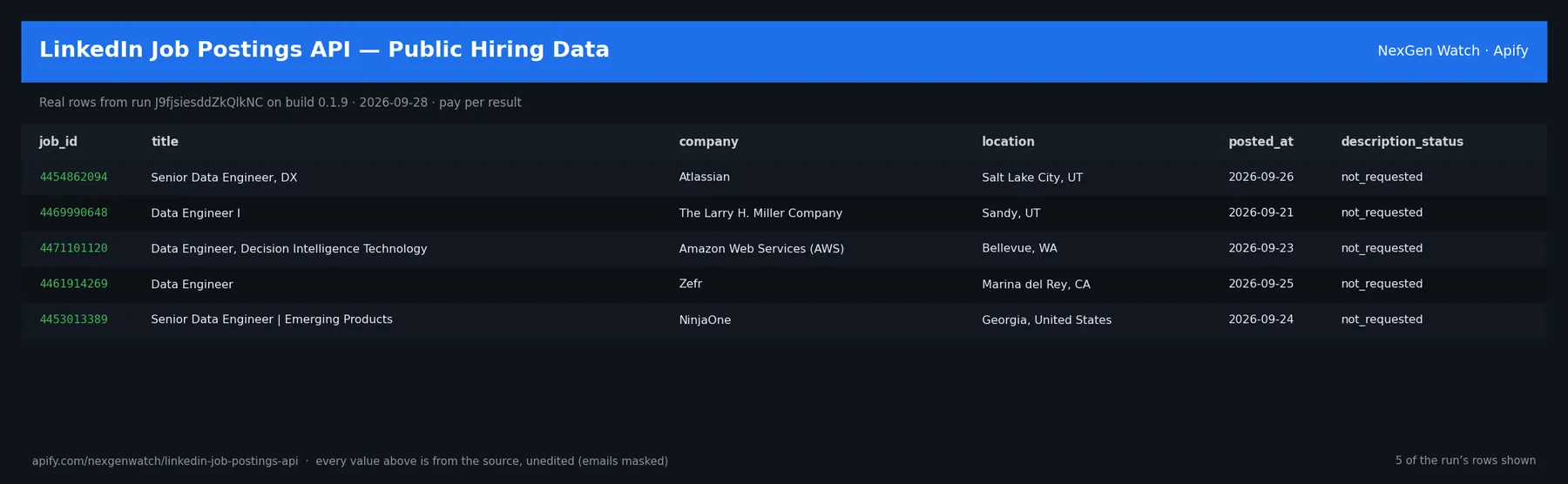
Real rows from run CBOVCaA3Rf3De02iK on build 0.1.23 (2026-10-18), the Quick start input below — every value is as LinkedIn published it (long text shortened):
| job_id | title | company | location | seniority_level | employment_type | applicants |
|---|---|---|---|---|---|---|
| 4454862094 | Senior Data Engineer, DX | Atlassian | Salt Lake City, UT | Mid-Senior level | Full-time | Over 200 applicants |
| 4471101120 | Data Engineer, Decision Intelligence Technolo… | Amazon Web Services (AWS) | Bellevue, WA | Not Applicable | Full-time | Over 200 applicants |
| 4480549774 | Software Data Engineer | Booz Allen Hamilton | Honolulu, HI | Not Applicable | Full-time | Be among the first 25 applicants |
| 4470007458 | Data Engineer | VAS | Madison, WI | Not Applicable | Full-time | Over 200 applicants |
| 4470209501 | Data Engineer II | Honeywell Aerospace | Phoenix, AZ | Not Applicable | Full-time | Over 200 applicants |
The run finished with the status message: Delivered 5 public job_record(s).
✅ What you get
One flat JSON row per job (a field LinkedIn does not publish for a job is null):
job_id— LinkedIn's numeric job id (stable key, used for de-duplication and watch mode).title,company,company_url,company_logo— role and employer as published.location,workplace_type_inferred— place as published; remote / hybrid / on-site inferred from the public text (LinkedIn does not label it publicly).posted_at,posted_text— posting date, and the age text shown ("12 hours ago").salary_text,salary_min,salary_max,salary_currency,salary_period— salary when LinkedIn shows one, parsed into numbers.seniority_level,employment_type,job_function,industries— the "job criteria" from the job page.applicants— applicant count text from the job page ("Over 200 applicants").easy_apply— true when you filtered on Easy Apply.description,description_html,description_status— the full public description as text and HTML (ok,empty,block,gone,not_requested).job_url,source_url,observed_at,query— provenance.change_type,changed_fields,first_seen,detected_at— watch-mode fields (new_job / updated_job / removed_from_public_search).
⚙️ Sample inputs
1. Quick start — the Store example
About $0.27 on the Free tier ($0.02 start + 5 × $0.05).
2. Contract and temporary roles, remote, posted in the last 24 hours
Job-type and workplace filters are checked on each job's page, so the run reads more cards than it delivers; set a longer run timeout for big pulls.
3. One employer, senior roles, Easy Apply, from a pasted LinkedIn search URL
f_C is the company id, f_E the seniority codes, f_EA Easy Apply — all read from the URL. You can also pass companyIds, experienceLevels and easyApply as fields.
4. Title words, excluding what you don't want
5. Watch mode (changes only, for a schedule)
The first run seeds a private baseline and emits zero rows; every later run emits one row per new, changed or removed job, billed at $0.05 each.
🧾 JSON sample record
One real record from run CBOVCaA3Rf3De02iK, as it lands in the dataset (long text shortened):
🔧 How it works
Source. Public, logged-out LinkedIn job search (/jobs-guest/jobs/api/seeMoreJobPostings/search) and public job pages (/jobs-guest/jobs/api/jobPosting/<id>). robots.txt is read on every run.
Filters. Posting age, Easy Apply, under-10-applicants, company ids, geoId and distance are sent to LinkedIn's search. Job type, seniority and workplace type are not honoured by LinkedIn's public search (verified), so the scraper reads each job's page and keeps only matches; skipped jobs are not billed. Title include/exclude and company-name filters are applied to the cards before any page is read.
Paging. LinkedIn's public search returns 10 cards per page; the scraper steps by the cards it actually received, retries an empty first page once, and stops at your maxResults, at the end of results, or at the run's time budget (sized from the run timeout).
Transport. Plain HTTPS from the Apify platform with an identified NexGenWatchBot/1.0 user agent, paced at about one request per second. If LinkedIn rate-limits (HTTP 429/403) the retry goes through Apify's residential proxy when your plan includes it; nothing solves CAPTCHAs or walls.
Watch mode. Keyed on job_id; a private baseline in a named key-value store; one delta row per change; a blocked or incomplete read never commits a new baseline.
Terminal states. NORMAL, PARTIAL (something withheld — the message says what), GENUINE_EMPTY (searched, nothing matched), BLOCKED (LinkedIn refused the first page — the run fails and bills no job). A zero-row run never looks like a silent success.
Charging. Each job is charged at the moment it is pushed; a row that cannot be charged is not delivered, so dataset count always equals billed count.
Honest limits. LinkedIn's public result window is not a full census and can change without notice. Workplace type is inferred from text, not a LinkedIn label. removed_from_public_search means the job left this public query twice; it does not prove the requisition closed. No accounts, cookies, profiles, applicant or people data, CAPTCHA solving or paywall circumvention.
⏰ Optional: run it on a schedule
Open the actor in Apify Console → Schedules → Create new, add this actor with watchMode: true (or postedWithinHours: 24 for a daily snapshot), and pick a cadence — daily 0 7 * * *, weekly 0 7 * * 1. Schedules can POST results to a webhook (Console → Integrations).
💰 Pricing example
| Event | Free | Bronze | Silver | Gold |
|---|---|---|---|---|
Actor Start (apify-actor-start) | $0.02 | $0.02 | $0.02 | $0.02 |
Public job posting (job_record) | $0.05 | $0.045 | $0.04 | $0.0335 |
- 5 jobs: $0.02 + 5 × $0.05 = $0.27
- 100 jobs: $0.02 + 100 × $0.05 = $5.02
- 1,000 jobs: $0.02 + 1,000 × $0.05 = $50.02
A run that delivers zero rows charges the start fee only; a BLOCKED run bills no job. The start fee is per GB of run memory (default 512 MB).
⚖️ Legal & ToS
Reads public, logged-out pages published by www.linkedin.com to any visitor, keeps to robots rules checked each run, identifies itself with a contact User-Agent, and touches nothing behind authentication. Use the output in line with LinkedIn's terms and your local law; the intended use is B2B research and recruiting analytics.
❓ FAQ
Q: Do I need a LinkedIn account, cookies or an API key? A: No. Everything is read logged-out; the input has no key field.
Q: I set jobTypes / experienceLevels and got fewer rows than maxResults. A: LinkedIn's public search ignores those filters, so each job's page is checked and only matches are delivered. The run scans up to 5× your cap (at least 50, at most 600 cards) and the status message says how many were skipped. Widen the search or raise the run timeout for more.
Q: Can I give it a LinkedIn search URL?
A: Yes — startUrls. Keywords, location, geoId, distance, posting age, company, Easy Apply, job type, seniority and workplace codes are read from the URL.
Q: Why remote/hybrid "inferred"?
A: LinkedIn's public pages do not carry a workplace-type label. It is inferred from the title, location and description, and named workplace_type_inferred so you know.
Q: How many rows can one run return?
A: Up to maxResults (1-1,000). With descriptions on, allow roughly 1-2 seconds per job and raise the run timeout for big pulls.
Q: What does watch mode remember? A: A private baseline of job ids and tracked fields in a named key-value store; later runs emit only changes. Older saved queries keep their existing baseline.
Q: What formats can I export? A: JSON, CSV, Excel, XML or RSS from the run's Dataset tab or the API; any run can push to a webhook.
🆘 Troubleshooting
- Run FAILED with BLOCKED → LinkedIn refused the first page → nothing billed beyond the start fee; retry later, and if it persists open an Issue with the run id.
- Status says PARTIAL → read the message: a job page was blocked, the time budget ran out, or the run's max charge was hit.
- Input validation error → a value is outside the allowed list (see the field descriptions); change one field at a time from the Quick start.
- Run TIMED-OUT → a big pull with descriptions → raise the run timeout in Run options or lower
maxResults; rows delivered before the timeout are kept. - First watch run shows no deltas → expected: it seeds the baseline.
🔗 Related Actors
- Workday Jobs Scraper — open roles across Workday career sites.
- JazzHR Jobs Scraper, Jobvite Jobs Scraper, Teamtailor Jobs Scraper — employer career boards on other ATS systems.
- 🏢 About NexGen Watch — a catalog of more than 300 public-data actors built on official and public sources, pay-per-result: apify.com/nexgenwatch.
⭐ Found this useful?
A quick review on the Apify Store helps other teams find it. Feature request or a source that changed? Open it from the Issues tab — every one is read.


![LinkedIn Jobs API & Scraper [NO COOKIES] ✅ avatar](https://images.apifyusercontent.com/NKfvWcCujNjiTmEWKy2pbPm5S3PwlphrBPipDzNxcVk/rs:fill:76:76/cb:1/aHR0cHM6Ly9hcGlmeS1pbWFnZS11cGxvYWRzLXByb2QuczMudXMtZWFzdC0xLmFtYXpvbmF3cy5jb20vc0NDU2R3bm1LTUoxUTJzVG4tYWN0b3ItekI2UXhSRDZHalNpVGZ2MlYtdFBwamJhSFBxTi1TcGFyc2VfaW5zdHJ1bWVudGF0aW9uX19kaXJlY3RfbHlyaWNzX191cmJhbl9yZWFsaXNtX195b3V0aGZ1bF9y.webp)


