

LinkedIn Profile & Company Search (X-ray, No Account)
Pricing
from $2.00 / 1,000 profiles
LinkedIn Profile & Company Search (X-ray, No Account)
Find LinkedIn profiles and companies by job title, location, company and keywords with Google X-ray search, then read each public page: experience, education, About, posts, company size and HQ. No LinkedIn account, no cookies, no browser. Pay per row found.
Pricing
from $2.00 / 1,000 profiles
Rating
0.0
(0)
Developer

Tauqeer Abbas
Maintained by CommunityActor stats
0
Bookmarked
2
Total users
1
Monthly active users
10 days ago
Last modified
Categories
Security
Limited permissionsShare
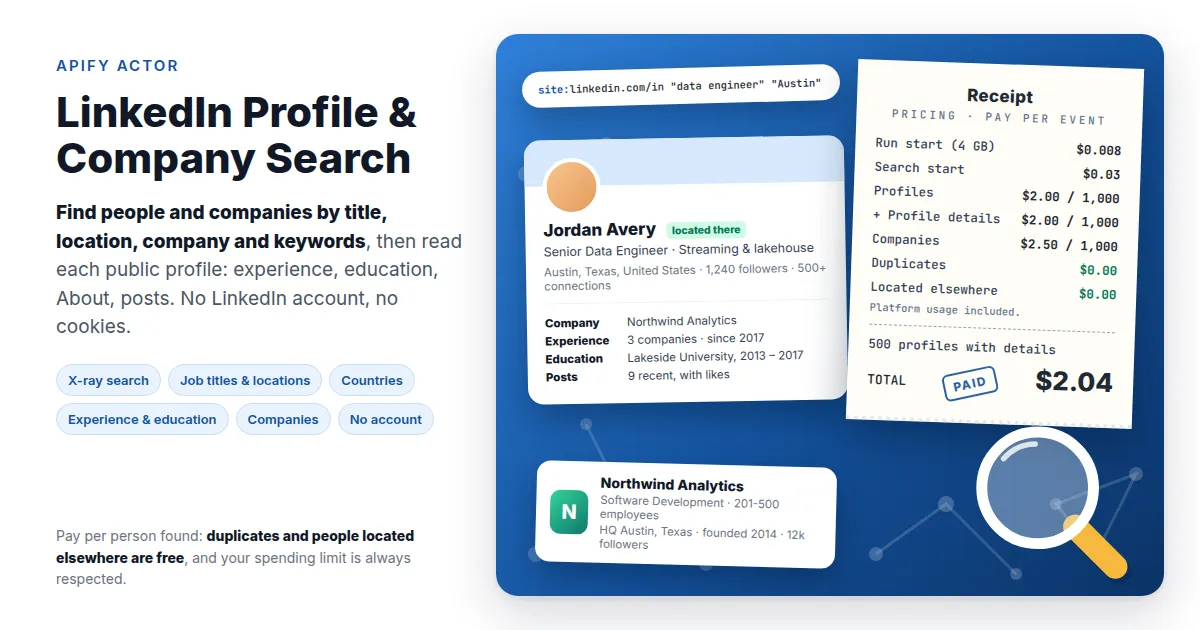
Find LinkedIn profiles and companies by job title, location, company and keywords, then read each public page: current company, experience, education, About, followers, posts and websites; for companies, size, industry, headquarters, specialties, locations and similar companies.
No LinkedIn account, no cookies. Searches run on Google ("X-ray search", the recruiters' trick:
site:linkedin.com/in "data engineer" "Austin"What it does
| Input | Rows |
|---|---|
| Job titles, locations, companies, keywords (people) | one row per person found: name, headline, current company, location, followers, connections, experience, education, About, posts, websites |
| Keywords, locations, countries (companies) | one row per company: industry, size, employees on LinkedIn, headquarters and address, type, founded, specialties, website, followers, About, locations, similar and affiliated pages |
| Your own Google queries | the same, for any X-ray query you already use |
| LinkedIn URLs (profiles, companies) | the public page of each |
Why this one
- Pay per person found, not per search page. No fee for search pages that bring nothing new, and duplicates are never charged.
- More results than one search allows. Google stops after about 300 results a search. The actor splits your search into one per title, location, company and country, runs them side by side and removes duplicates, so synonyms and nearby cities add new people instead of repeats.
- Country filter that means the country. Pick countries by code (
GB,DE,IN,PK...) and the search covers LinkedIn's site for that country, so "UK" can't turn into Ukraine. - The headline LinkedIn hides. Public pages rarely show a member's headline; Google's result does. Each row merges both: Google's headline with the page's location, company, education and About.
- No account risk, ever. No login, no cookies, no session to burn.
- Reliable search pages. Google's default results now often ignore
site:; the actor asks for Google's Web results, which keep it, so every page stays on LinkedIn.
Input examples
Data engineers in Austin and Round Rock (two title variants):
Product managers in the UK and Germany who mention fintech:
Fintech companies in Austin:
Profiles and companies by URL:
Output
One row per profile or company; dataType says which. search holds the
Google result a row came from (query, position, title, snippet), and
hydrated says whether the public page was read.
Profile (dataType: "profile"):
| Field | Example |
|---|---|
name, first_name, last_name | Jane Doe |
headline | Senior Data Engineer at Acme (from Google) |
company, current_companies | Acme |
location, country | Austin, Texas, United States; US |
followers, connections | 576, 500+ |
about | the first ~250 characters of About |
experience | company, company URL, location, dates where shown |
education | school, school URL, degree, years |
posts, articles | URL, date, text, likes |
websites, services, projects, languages | as listed |
url, public_id, image | https://www.linkedin.com/in/jane-doe |
Company (dataType: "company"): name, industry, size,
employees, headquarters, address, type, founded, specialties,
website, followers, about, tagline, logo, locations, people
(a few employees LinkedIn shows), similar, affiliated, posts, url.
Pricing
Pay per row: platform usage is included, so you never pay Apify compute or proxy traffic on top.
| Event | Price |
|---|---|
| Run start | $0.002 per GB of memory ($0.008 at the default 4 GB) |
| Search start (once per run that searches) | $0.03 |
profile (a person found) | $2.00 / 1,000 |
profile-details (their public page read) | $2.00 / 1,000 |
company (with its page) | $2.50 / 1,000 |
Example: 500 data engineers in Austin with details = $0.008 + $0.03 + 500 × $0.002 + 500 × $0.002 = $2.04.
People located outside your locations (with Only people located there), duplicates and profiles that aren't public are never charged. Runs with LinkedIn URLs only don't pay the search start. Turn off Read each profile's public page to pay only for what Google shows. Your spending limit is always respected.
Good to know
- What public pages don't show. Without an account LinkedIn hides
experience titles of most members (the companies are there), skills,
and contact details; About is cut at ~250 characters; some entries
are masked (
****). This actor doesn't log in, so it doesn't have them. - Search results come from Google's copy and can lag a profile's latest change; the public page (read by default) corrects company and location.
- About 300 results a search. Add titles, locations or countries to find more: each combination is searched on its own.
- Profiles that aren't public are skipped with a note in the log and aren't charged.
Use it from your tools
Run it from the Apify API, Make, Zapier, n8n or Google Sheets, or call it from AI agents through the Apify MCP server. Export to JSON, CSV, Excel or HTML.


