

Threads Scraper — Posts, Search, Profiles & Views, No Login
Pricing
from $1.35 / 1,000 posts
Threads Scraper — Posts, Search, Profiles & Views, No Login
Meta Threads scraper, no login: posts, replies, reposts, profiles, keyword and hashtag search, view counts on every post. Usernames, keywords and links in one run; alerts to Slack, Discord or Telegram. A Threads API alternative from $1.35 per 1,000 posts, no start fee.
Pricing
from $1.35 / 1,000 posts
Rating
0.0
(0)
Developer

NoLogin API
Maintained by CommunityActor stats
0
Bookmarked
11
Total users
6
Monthly active users
3 days ago
Last modified
Categories
Features
Share
Threads Scraper turns Meta Threads into clean rows without a login: an account's posts, replies and reposts paged through its history, every reply under a post (300 in 16 s, 1,281 on a 2,606-reply post), profiles with followers, bio links and contacts, keyword and #hashtag search, a post with its replies, and account discovery by keyword. Every post carries view counts, likes, replies, reposts, quotes, shares, media, links and the reply context. Usernames, keywords and any Threads links go in one run. From $1.35 per 1,000 posts, no start fee, error rows are free — a fast Threads API alternative for brand monitoring, creator research, lead generation and AI agents.
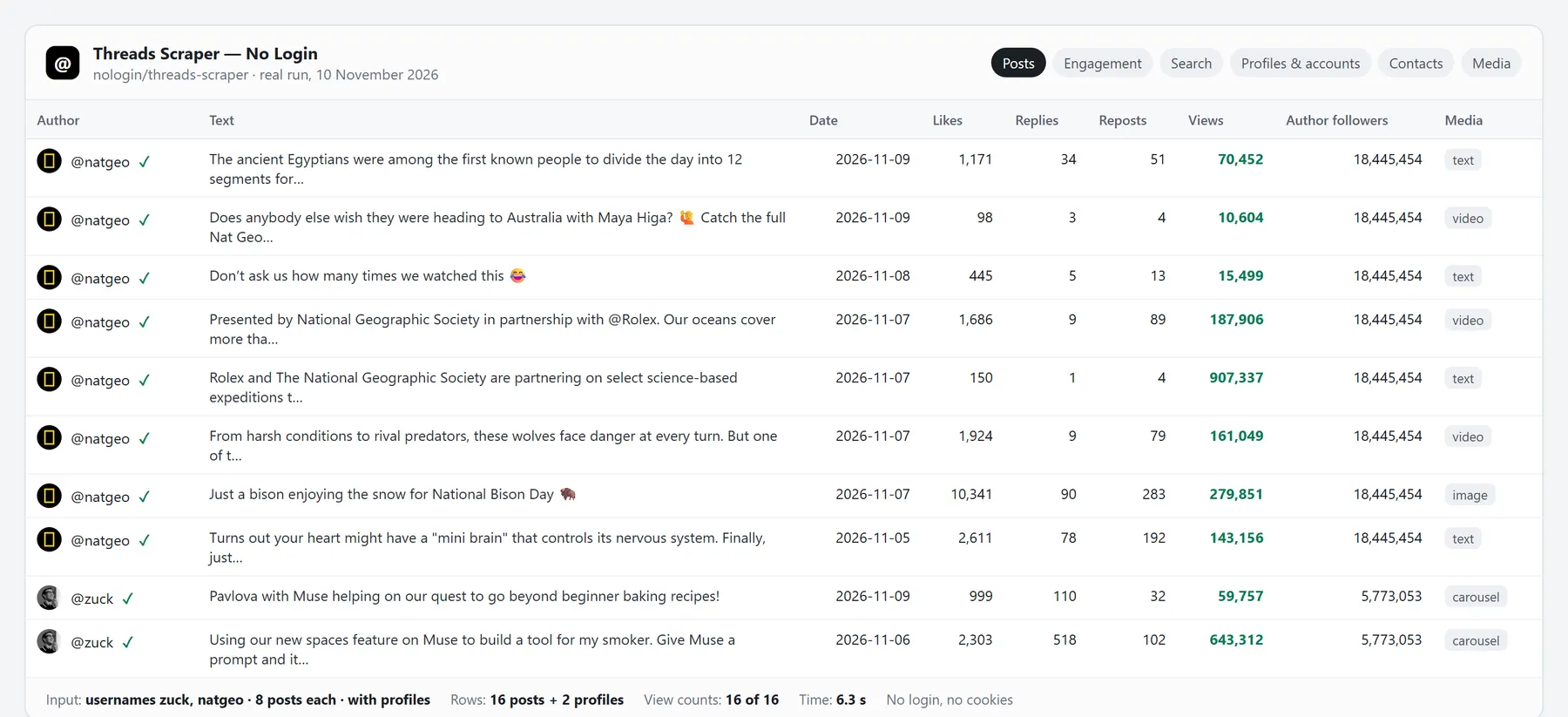 A real run, 10 November 2026: 2 accounts, 16 posts with view counts (16 of 16) and 2 profiles collected in 6.3 s.
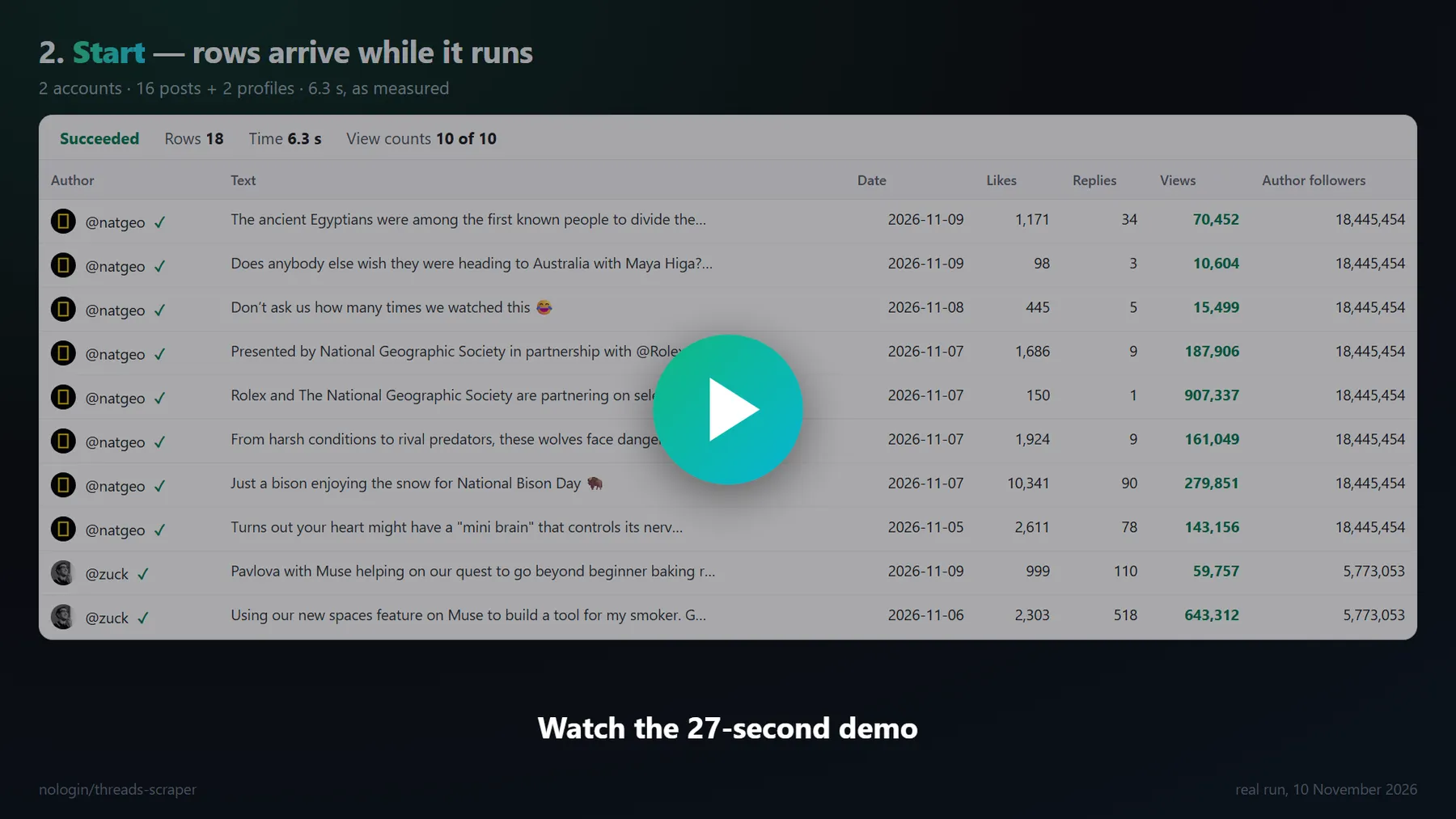 Watch the 27-second demo — every row in it comes from a real run.
Facts, checked on the Apify Store (10 November 2026)
| This Actor | Popular no-login Threads Actor | Most-used Threads Actor | |
|---|---|---|---|
| Lowest price per 1,000 posts | $1.35 | $1.40 | $2.50 |
| Fee per run | none | none | up to $0.08 |
| Hourly monitoring: fees per month | $3.24 | $3.60 (from 23 November) | $14.40 in start fees |
| View counts filled (2 accounts × 20 posts) | 40 of 40 | 40 of 40 | "when available" |
| Replies of one post | 1,281 of a 2,606-reply post; 300 in 16 s | "the first ~25" | a separate Actor |
| Replies under every found post, replies to replies | one switch, depth 1–5 | — | a separate Actor |
| Posts for "ai agents" in one search run | 3,000 of 3,000 asked (11 Nov) | 75 (their README, 8 Nov) | — |
| Search a past date range | yes — any day of the last 2 years (3,408 posts for "nike" on 10 Nov 2025) | date filter on the newest posts | — |
| Author followers + engagement on every post, any mode | one switch | — | — |
| Fields in a post row | 75 — all of theirs + 19 | 56 | — |
| Usernames and keywords in the same run | yes | one mode per run | one mode per run |
| New posts to Slack, Discord, Telegram, webhook | built in | a second Actor | no |
| Ready-made table views of the results | 6 | 3 | 5 |
| Usernames or keywords per run | up to 5,000 | — | 20 |
Tested side by side (10 November 2026)
The saved input of a real run of a popular no-login Threads Actor was sent to this Actor the same day; only the results are compared.
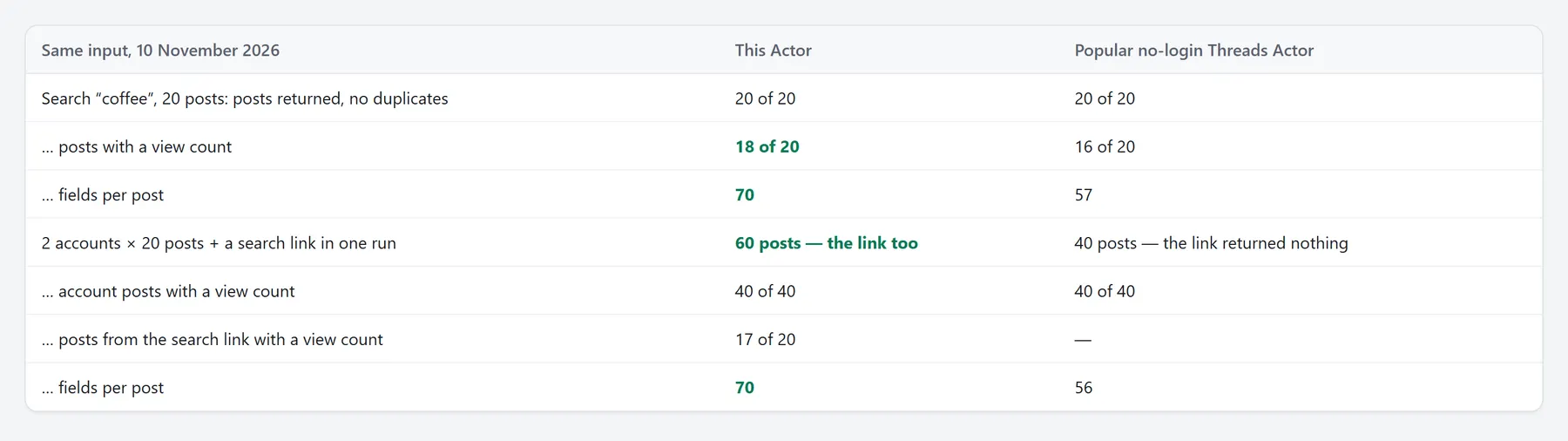
| Same input | This Actor | Popular no-login Threads Actor |
|---|---|---|
| Search “coffee”, 20 posts: posts returned, no duplicates | 20 of 20 | 20 of 20 |
| … posts with a view count | 18 of 20 | 16 of 20 |
| … fields per post | 70 | 57 |
| 2 accounts × 20 posts + a search link in one run | 60 posts — the link too | 40 posts — the link returned nothing |
| … account posts with a view count | 40 of 40 | 40 of 40 |
| … posts from the search link with a view count | 17 of 20 | — |
| … fields per post | 70 | 56 |
What is Threads Scraper?
A no-login scraper for Threads by Meta (threads.com, formerly threads.net). It reads exactly what Threads shows a logged-out visitor, so no Threads or Instagram account, no cookies and no session of yours is ever used — nothing of yours can get restricted. You give it usernames, keywords, #hashtags or links; it returns flat JSON rows you can download as JSON, CSV or Excel, send to Google Sheets, or read from the Apify API.
| Job | Input | Rows |
|---|---|---|
| Posts / Replies / Reposts | usernames | paged through the account's history; replies carry the post they answered |
| Profiles | usernames | followers, bio, bio links, e-mails and phones from the bio, Instagram link, latest post, creator stats (average likes, replies, reposts, engagement rate, posts per week) |
| Search inside one account | from:zuck ai as a keyword | the account's posts that contain every word |
| Search | keywords, #hashtags | top + recent, expanded wordings, topic tags and date windows, all from many IPs at once — 3,000 posts for "ai agents" in one run; any day of the last two years (3,408 posts for "nike" on one day a year ago) |
| Thread | post links | the post and all its replies, paged (top and recent merged), replies to replies on request; a reply's link also brings the posts above it |
| Replies under every post | any of the above | one switch adds the replies of every post found |
| Find accounts | keywords | every wording and topic tag from many IPs — 84 accounts for "coffee roaster" (a visitor sees 30), with full profiles and the date of the latest post |
What data can you scrape from Threads?
Post rows — 75 fields
- Content:
text,createdAt,url,code,id,language,mediaType,images,videos,imageUrl,videoUrl,carouselCount,hashtags,mentions,urls,linkPreview,topicTag,music,aiLabel,isEdited,isPinned,isPaidPartnership,location; with Save photo and video files alsomediaStoredUrl— a permanent link to the saved file (storedUrlon each image and video). - Engagement:
likeCount,replyCount,repostCount,quoteCount,shareCount,viewCount; on account posts alsoauthorFollowerCountandengagementRate(likes + replies + reposts + quotes ÷ followers). - Author:
username,userId,fullName,isVerified,profilePicUrl,profileUrl. - Conversation:
isReply,replyToUsername,replyToUserId,rootPostUsername,parentPostId,parentPostUrl,threadId,positionInThread,threadLength,quotedPost,repostedPost, on repliesreplyLevel,isLikedByPostAuthor(the post's author liked this reply) andisPinnedReply, and in Replies moderepliedToPost— the post the account answered; on repostsrepostedByandrepostedAt(when it was reposted). - Where it came from:
source(posts, search-top, search-recent…),query,searchVariant(the wording that found it),containsKeyword,sourceUsername,scrapedAt.
Profile rows — 29 fields
username, fullName, followerCount, isVerified, isPrivate, biography, bioLinks, websiteUrl, emails and phones found in the bio, instagramUrl, profilePicUrl, profileTags, latestPostAt, latestPostUrl, latestPostText, query (the keyword that found the account), and creator stats from the latest 12 posts: avgLikes, avgReplies, avgReposts, avgQuotes, avgEngagementRate, postsPerWeek, statsPosts.
Error rows — always free
A username that does not exist, a private account or an unreadable link returns one row with error (not_found, private, bad_input…) and a plain message. If your filters removed everything, the row says which filter removed how many posts. None of them is charged.
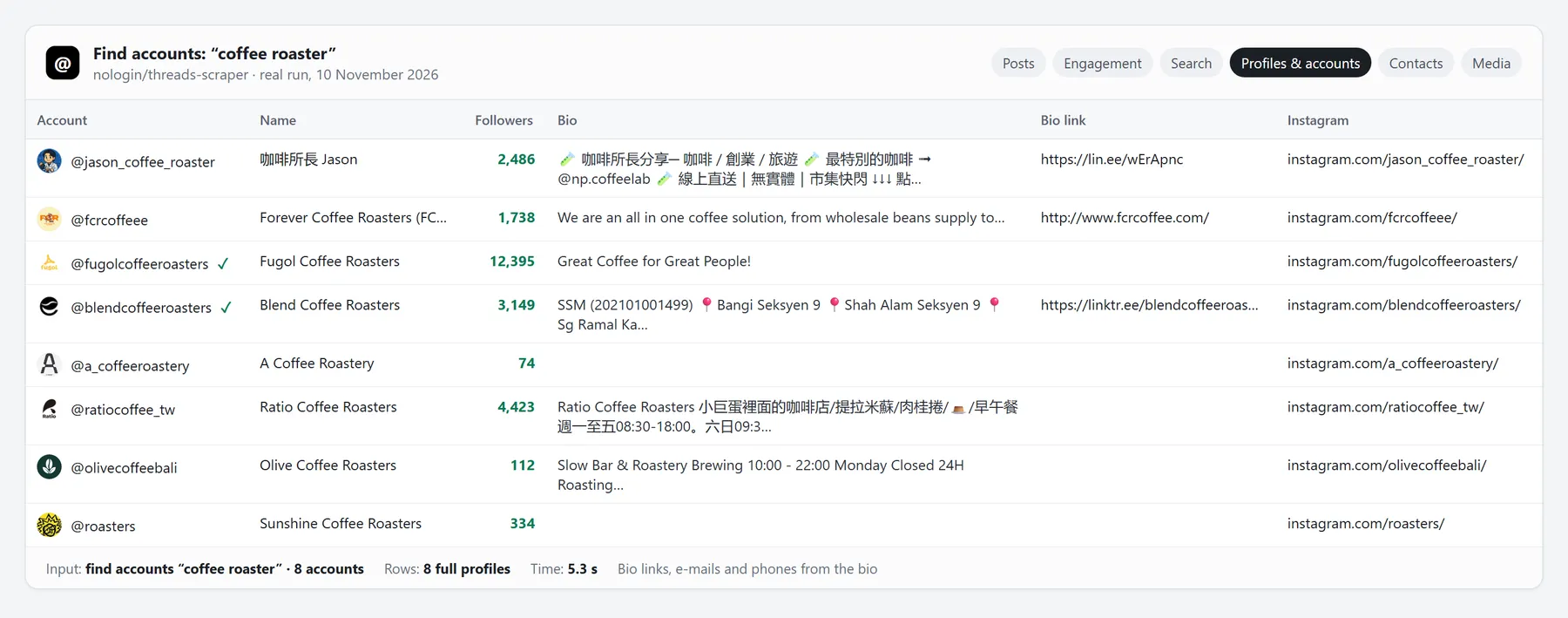 Find accounts, "coffee roaster": 8 full profiles in 5.3 s (real run, 10 November 2026).
How to scrape Threads without login
- Click Try for free — the Apify free plan works, and gets the full result.
- Put usernames (
zuck,@natgeoor a profile link), keywords or #hashtags, or any Threads links into the form. Mix them freely: each goes to the right job. - Set Posts per account or keyword and, if you like, filters — dates, languages, likes, views, words to keep or drop. Dropped posts are not charged.
- Click Start. Rows appear while the run works.
- Download JSON, CSV or Excel, open one of the 6 table views, or connect the dataset to Google Sheets, n8n, Make, Zapier or your code.
How much does it cost to scrape Threads?
Pay per row. No subscription, no start fee, no charge for errors or filtered-out posts.
| Row | Free | Starter | Scale | Business |
|---|---|---|---|---|
| Post (posts, replies, reposts, search, thread) | $2.45 | $1.95 | $1.65 | $1.35 |
| Profile | $3.95 | $2.45 | $2.15 | $1.85 |
| Account match (Find accounts without full profiles) | $2.45 | $1.95 | $1.65 | $1.35 |
Monitoring run: $0.0045 per run (only with a Monitoring name). Saved photo or video file: $4.95 per 1,000 files (only with Save photo and video files; a file that fails is free). There is no browser in this Actor, so it runs on 256 MB and the platform part of the bill is tiny.
| Job | This Actor | Most-used Threads Actor |
|---|---|---|
| 1,000 posts (Starter plan) | $1.95 | $2.52 |
| 50,000 posts in 100 runs (Starter plan) | $97.50 | $127.00 |
| Hourly monitoring, fees for a month | $3.24 | $14.40 |
Set Maximum rows in the run and a run never costs more than that number of rows. On the free plan nothing is cut — you get every row you ask for, paid from Apify's monthly free credit.
Input
Every field of the form (compatibility fields of other Threads Actors are accepted too, see Switching below):
| Field | Default | What it does |
|---|---|---|
What to get mode | posts | The default job for usernames and keywords. Links are routed by themselves, so one run can mix accounts, posts and searches. |
Usernames usernames | zuck | zuck, @natgeo or a profile link. |
Keywords or #hashtags keywords | — | Search and Find accounts: AI agents, #nba. from:zuck ai searches one account's posts. |
Post links postUrls | — | A post with its replies. Share links work too. |
Any Threads links startUrls | — | Profile, post, search or tag links — each goes to the right job. |
Posts per account or keyword maxPosts | 100 | A cap per account or keyword. Posts, replies and reposts are paged through the account's history. |
Replies per post maxRepliesPerPost | 100 | How many replies to collect under each post — paged, top and recent merged, no duplicates. Used by post links and by Replies under every post. |
Reply depth replyDepth | 1 | 1 — replies to the post; 2 — also the replies to those replies; up to 5 levels. |
Accounts per keyword maxUsersPerKeyword | 20 | Find accounts mode: how many accounts per keyword. |
Maximum rows in the run maxItems | 10000 | A hard cap on rows — and so on the cost of the run. |
Search result pages searchTypes | top, recent, tags | Which Threads results to combine for each keyword: top and recent; 'tags' also searches the #hashtag form and the keyword's topic tag pages (Coffee Time, Coffee Lovers… for coffee). |
Expand each keyword expandQueries | on | Also search singular/plural, with and without #, joined words and the keyword's topic tags, all from many IPs at once, repeated while new posts come — 10–15× the ~20 posts a visitor sees. Accounts: every wording too. A phrase Threads shows nothing for is searched word by word, keeping posts with every word. |
Only posts that contain the keyword strictKeywordMatch | off | Keep only posts whose text or topic tag actually contains the keyword (every word of it). |
Only posts after postedAfter | — | 2026-11-01, 7 days or 24 hours — every mode. In search the period itself is searched, window by window (any day of the last two years). |
Only posts before postedBefore | — | Same formats. |
Languages languages | — | en, es, ja… or english, japanese. |
Keep only posts containing filterKeywords | — | Any of these words. |
Drop posts containing excludeKeywords | — | None of these words. |
Minimum likes minLikes | 0 | Drop posts with fewer likes. Dropped posts are not charged. |
Minimum replies minReplies | 0 | Drop posts with fewer replies. |
Minimum reposts minReposts | 0 | Drop posts with fewer reposts. |
Minimum views minViews | 0 | Posts without a public view count are kept. |
Minimum author followers minAuthorFollowers | 0 | Keep only posts whose author has at least this many followers. |
Only verified authors onlyVerified | off | Keep only posts by verified accounts. |
Skip replies excludeReplies | off | Skip replies — keep only original posts. |
Media types mediaTypes | — | Keep only these kinds of posts. Empty = all. |
Only posts with a link onlyWithLinks | off | Keep only posts with an outside link or a link preview. |
Drop posts without a language dropUnknownLanguage | off | Drop posts Threads gives no language for (very short posts, emoji only). |
View counts includeViews | on | Read from each post's page, at no extra charge. Off — the fastest bulk runs. |
Save photo and video files saveFiles | off | Download every photo and video of the posts into this run's storage — a permanent link in each row (mediaStoredUrl, and storedUrl on each item of images and videos). Threads' own media links expire within days. $4.95 per 1,000 files; a file that fails is free. |
Replies under every post includeReplies | off | Posts, Replies, Reposts and Search: also return the replies under every post found (up to Replies per post, Reply depth levels). Each reply is a post row. |
Author followers on every post authorFollowers | off | Every post row gets its author's followers and the engagement rate — in search, replies, reposts and threads too (account posts always have them). One profile per new author. |
Add a profile row per account includeProfile | off | Posts, Replies and Reposts: also return the account's profile row (followers, bio, contacts). |
Full profiles when finding accounts includeProfileDetails | on | Followers, bio links, e-mails and phones (a Profile row). Off — cheaper Account match rows. |
Monitoring name monitoringStoreName | — | Use the same name in every scheduled run — each run returns only posts you haven't received, and reads only posts newer than the last run. |
Send new rows to webhookUrl | — | A Slack, Discord or Telegram bot link, or any URL (JSON) — new rows of the run are posted there when it ends. |
Examples
The last 200 posts of two accounts, with their profiles:
Posts from the last 7 days with at least 100 likes:
English brand mentions, every hour, only new ones, straight to Slack:
Accounts with contacts for a niche:
A post with all its replies and the replies to them:
The last 20 posts of an account with the replies under each:
Everything at once — one run:
Output
One row per post, profile or error, in the run's dataset. A real post row (10 November 2026, shortened):
A profile row:
An error row (free):
Table views in the run's Output tab: Posts, Engagement, Search, Profiles & accounts, Contacts and Media. The run also saves a SUMMARY record: totals, free rows and why.
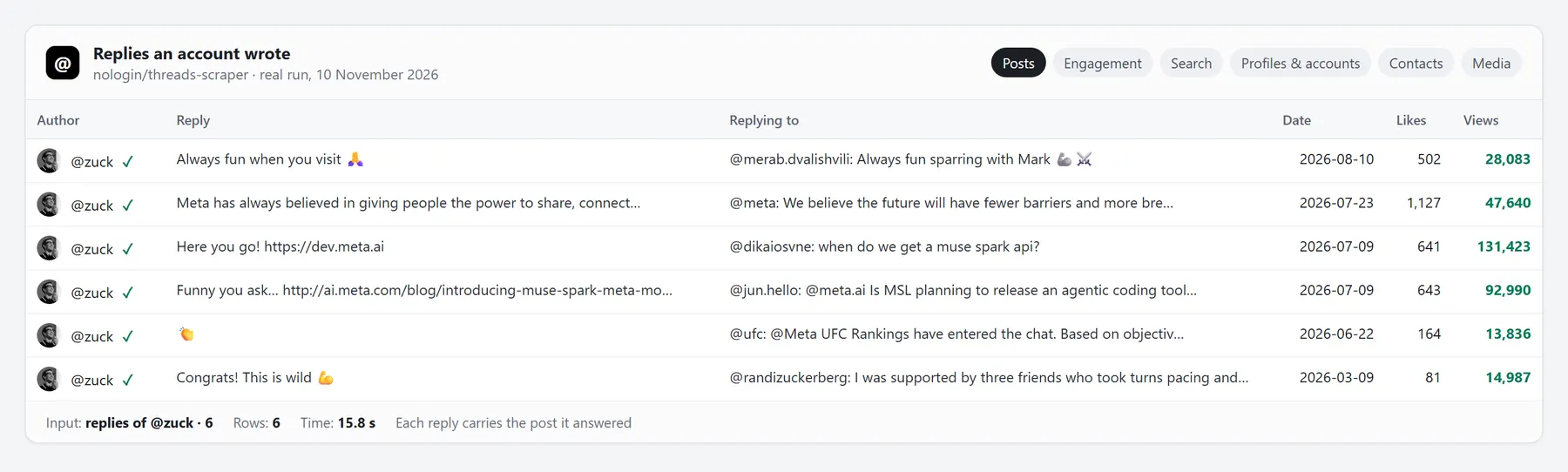 Replies mode: each reply carries the post it answered (real run, 10 November 2026).
Search on Threads: what a visitor sees, and how we get more
Threads shows a logged-out visitor one page of results per wording and result type (~20 posts), and ranks them differently for every IP. This Actor reads top and recent results and, with Expand each keyword on, also the singular/plural forms, the #hashtag form, the joined words and the keyword's topic tags (for "coffee": Coffee Time, Coffee Lovers, Coffee Shop…, ~20 more posts each) — all at once, every request from its own IP — and repeats that from new IPs while it still brings new posts. Then it goes back in time window by window: Threads answers a fresh page for every date window (3 hours, cut into hours where they are full), back two years — 3,000 posts for "ai agents" and 2,000 for "coffee" in one run, merged and deduplicated (10 November 2026). With Only posts after / before the windows cover exactly your range: 3,408 posts for "nike" on one day a year ago, where a plain search shows only the newest posts. A phrase Threads shows nothing for is searched word by word, keeping only posts with every word. Then your filters apply: Only posts that contain the keyword, Languages, minimum likes / replies / reposts / views, minimum author followers, verified only, media type, only posts with a link, no posts without a language, words to keep and words to drop. Every search row says which result page and which wording found it (source, searchVariant) and whether it really contains your keyword (containsKeyword).
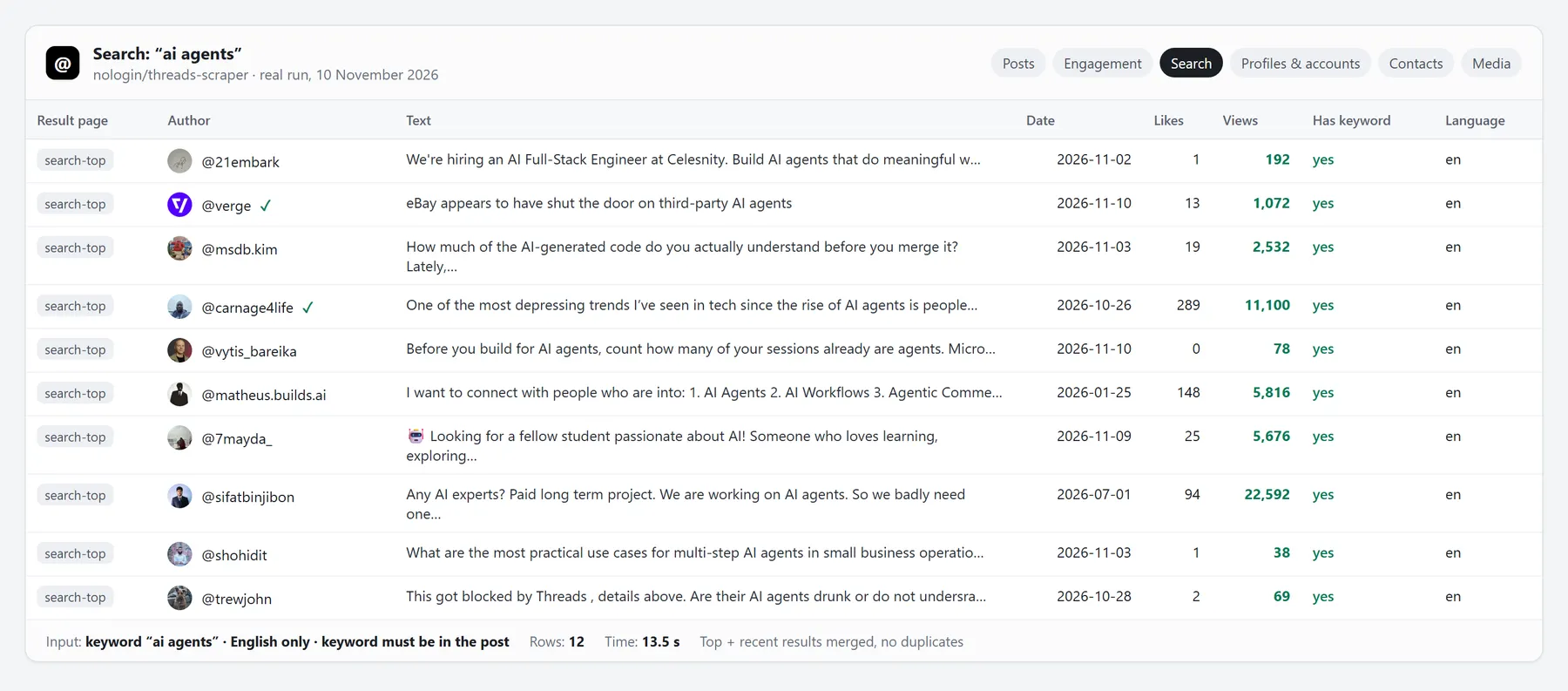 Search, "ai agents", English, keyword must be in the post: 12 posts in 13.5 s (real run, 10 November 2026).
Monitoring and alerts
Give the run a Monitoring name and schedule it (hourly, daily — Apify Schedules). Each run returns only posts you haven't received, reads only posts newer than the last run (fast and cheap), and posts the new rows to Slack, Discord, Telegram or any webhook URL from the same run — no second Actor. Fees: $0.0045 per run ($3.24 a month hourly) plus the new rows.
Use cases
Brand and competitor monitoring
Keywords with strict match, a language and minimum likes, every hour, only new posts, alerts in Slack.
Creator and influencer research
An account's whole post history with views, likes, replies and reposts; author followers and engagement rate on each post — sort by engagement in the Engagement view.
Lead generation
Find accounts by niche keyword; each profile row brings bio links, e-mails and phones from the bio and the Instagram link.
Trends and sentiment
Expanded hashtag search with topic tags and Threads' own language on every row — ready for a spreadsheet or an LLM.
Conversation analysis
A post with all its replies (paged, top and recent merged) and the replies to them, each linked to its parent; an account's replies with the post they answered; the replies under every post of an account or a search.
AI agents and RAG
Flat rows with stable id and url, exact caps (maxPosts, maxItems) so an agent can budget, and free error rows that say what went wrong.
Switching from another Threads Actor
Saved input of the two most popular Threads Actors works as is — change only the Actor name. Their field and mode names are read like ours:
| Their input | Read as |
|---|---|
max_posts | maxPosts |
post_links | postUrls |
search_filter | searchTypes |
search_language | languages |
start_date | postedAfter |
end_date | postedBefore |
mode: user | mode: posts |
mode: user_replies | mode: replies |
mode: user_reposts | mode: reposts |
mode: profiles | mode: users |
mode: post_link | mode: thread |
Fields such as maxPosts, postedAfter, postedBefore, languages, minLikes, includeViews and monitoringStoreName have the same names here.
Threads API: Python, JavaScript, cURL, n8n, Make, MCP
Python
JavaScript
cURL — run and get the rows in one call:
No code: Google Sheets, n8n, Make, Zapier and webhooks through Apify integrations. AI agents: add this Actor to the Apify MCP server and call it from Claude, Cursor or any MCP client.
Instant API (Standby) — no run to start
The Actor also works as an always-on web API: send a request, get the rows back in the answer, without waiting for a run to start. Same input fields, same prices per row; the server sleeps after 3 idle minutes and wakes on the next call.
POST the JSON input instead of query parameters for anything longer. The answer is JSON: items (the rows), count, summary and message. Lists in the query are comma-separated. A request returns what it has after 240 s (set returnWithinSecs lower for faster partial answers).
Limits, stated plainly
- Only what Threads shows a logged-out visitor. Private accounts return a free error row. Followers and following lists are not public and are not offered.
- Search depth: Threads serves a visitor one page per wording, result type and date window; this Actor reads thousands of them (3,000 posts for "ai agents" on 10 November 2026). A narrow keyword simply has fewer posts. Threads' own search by author and exact phrase are login-only; here
from:account wordsreads that account's posts (up to 2,000 deep) and keeps the ones with every word, and Only posts that contain the keyword does the exact part. - View counts come from each post's own page (only the part that holds the number is read). A post seconds old may have none yet — then
viewCountisnull, never a guess. Turn View counts off for the fastest bulk runs. - Author followers and engagement rate are always filled on account posts; in search, replies, reposts and threads switch on Author followers on every post (one profile per new author).
- Read only: the Actor never posts, likes, follows or messages.
FAQ
Do I need a Threads account, cookies or a login?
No. Nothing of yours is used, so nothing of yours can be restricted.
Does it work on the free Apify plan?
Yes, with the full result — no row cap. Apify's monthly free credit pays for about 2,000 posts.
How many posts can I get from one account?
As many as Threads shows a visitor: the Actor pages through the account's posts, replies or reposts up to Posts per account or keyword (up to 100,000).
Can I get all replies of a post — and the replies to those replies?
Yes. Replies are paged — the most liked first for a small ask, newest-first paging for a big one (it goes deepest): 300 replies in 16 s, 1,281 of a post's 2,606 (all Threads serves a visitor) on 10 November 2026. Reply depth 2–5 adds the replies to replies; every reply carries replyLevel, isLikedByPostAuthor and isPinnedReply. Replies under every post does the same for every post an account or a search returns.
How many posts can one keyword give?
Far more than the ~20 Threads shows a visitor: wordings × top/recent × the keyword's topic tags, each from its own IP, then date windows back in time — 3,000 for "ai agents" and 2,000 for "coffee" on 10 November 2026 (we stopped there). Narrow keywords give fewer; they are simply all there is.
Can I search posts from a past period?
Yes — set Only posts after and Only posts before: the search runs inside that period window by window (any day of the last two years), not just over the newest posts. 3,408 posts for "nike" on 10 November 2025 — every wording and topic tag in every hour.
How fast is it?
Measured on 10 November 2026 (collection time, without the Apify start): 100 posts with view counts in 11 s; an account's whole history of 1,873 posts in 101 s; 60 accounts with full profiles in 12 s; a post with 300 replies in 25 s; 200 search posts in 7 s.
Why did search return fewer posts than I asked for?
Threads shows a visitor a limited number of results per keyword. Keep Expand each keyword on, add related keywords and both result pages (top and recent) for more.
Can I get only English (or Japanese, Spanish…) posts?
Yes — Languages takes codes (en, ja) or words (english, japanese). Every row also carries language.
Can I filter by date?
Yes, in every mode: 2026-11-01, 7 days or 24 hours in Only posts after and Only posts before.
Am I charged for duplicates, errors or filtered-out posts?
No. One post is one row and one charge per run; error rows and filtered-out posts are free. With a Monitoring name, posts you already received are not returned again.
Can I download the photos and videos?
Yes — switch on Save photo and video files. Every photo and video of the posts goes into the run's storage and each row gets a permanent link (mediaStoredUrl; storedUrl on each item of images and videos), while Threads' own media links expire within days. $4.95 per 1,000 files; a file that fails is free.
How do I get only new posts every hour?
Set a Monitoring name, add a Send new rows to link if you want alerts, and schedule the run hourly.
Can I run it from Python, n8n, Make or an AI agent?
Yes — see the API section above. Every Apify integration works with this Actor.
What happens when Threads changes its site?
Runs are watched; a change is fixed fast and issues are answered the same day.
Support
Open an Issue on this page — answered the same day. A short review helps other buyers find the Actor.


