

Posts — 5 Platforms
Pricing
from $2.00 / 1,000 successful tiktok posts
Posts — 5 Platforms
Refresh views, likes and available engagement metrics from Instagram, TikTok, Facebook, YouTube and X (Twitter) post URLs. One JSON/CSV dataset for campaign reporting and analytics. No social login or proxy setup. Pay per successful snapshot; missing metrics stay null.
Pricing
from $2.00 / 1,000 successful tiktok posts
Rating
5.0
(1)
Developer

Webspool
Maintained by CommunityActor stats
2
Bookmarked
24
Total users
11
Monthly active users
8 days ago
Last modified
Categories
Share
Five platforms. One integration. We handle the infrastructure.
Refresh public Instagram, TikTok, Facebook, YouTube and X post metrics through our independently hosted SIN backend.
Our purpose-built, browserless HTTP collectors do the scraping on our infrastructure. The lightweight Apify Actor submits your requests and delivers the results—no customer-managed scraping browsers, proxies, or social accounts.
Predictable pricing: $1 per 1,000 successful Instagram, TikTok or X snapshots, and $2 per 1,000 Facebook or YouTube snapshots. Actor platform usage is included. Invalid, failed and unavailable posts have no successful-result charge.
Built for recurring campaign monitoring, with consistent fields, observation timestamps and explicit availability states. Refresh on demand or through scheduled workflows, subject to run limits, available capacity and upstream platform restrictions.
Operational visibility—not just promises
The dashboard below shows SIN processing 410,143 account and post snapshots during the displayed seven-day window, with a 98.2% provider-outcome success rate and 5-second worker p95 latency.
These are internal, aggregate operating measurements—not an uptime SLA, a guarantee for every platform, or the completion time of a full Apify run.
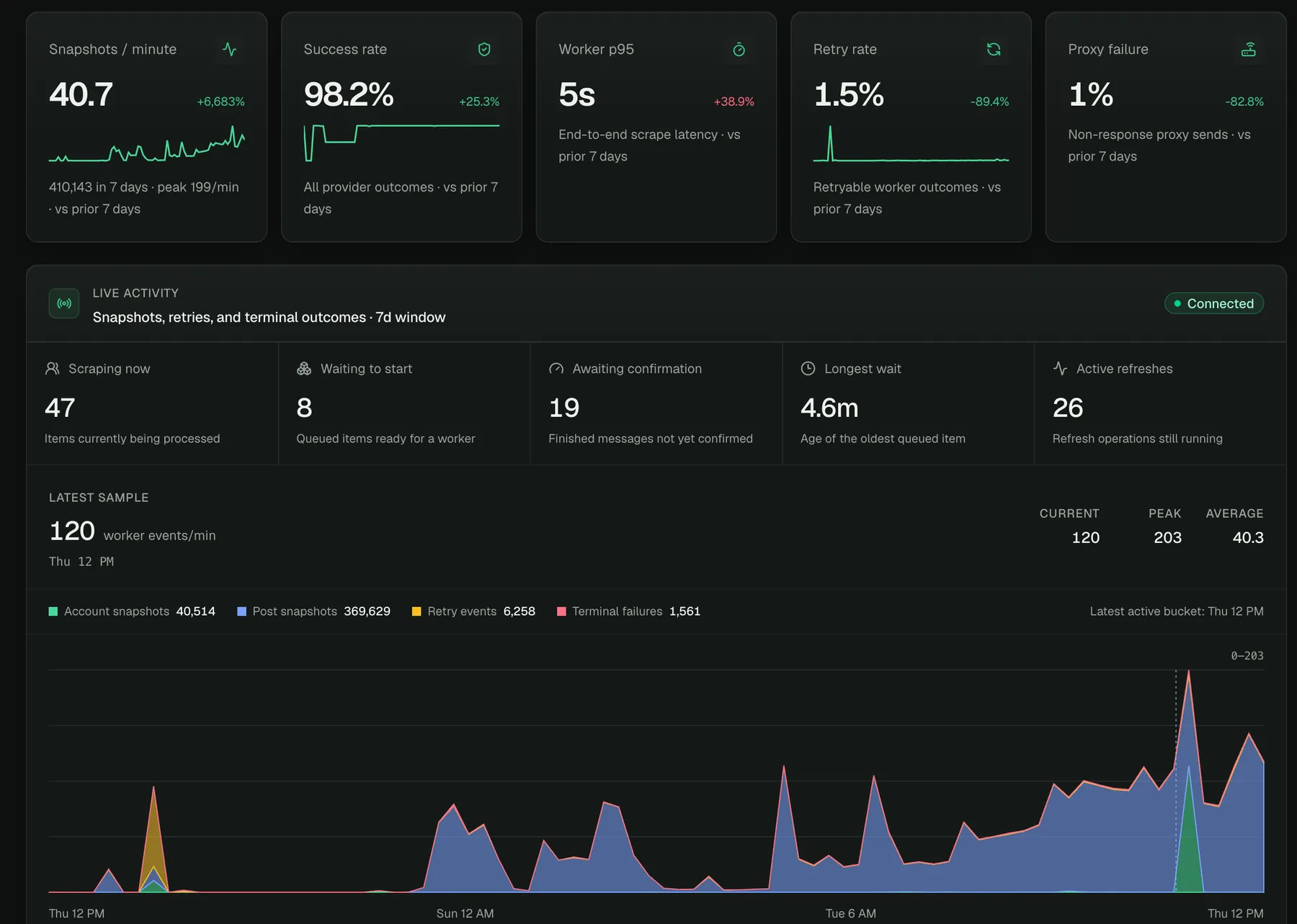
Dashboard supplied September 10, 2026. This is a historical operating snapshot, not a live status feed or a comparative speed benchmark.
What this Actor does
This is a known-post metrics refresher, powered by SIN. It does not search for posts, crawl profiles, collect comments, download video, or access private content. Platform changes and access restrictions can affect individual results; unsupported metrics are null, never made-up zeros.
Use it to update an influencer campaign spreadsheet, feed a social analytics dashboard, or compare available engagement metrics across a list of public posts. One dataset uses the same field names across platforms, so your application does not need five different output parsers.
Quick start
- Click Try for free or open the Actor in Apify Console. Result charges still follow the Pricing tab.
- Paste a few public post URLs, set a small result limit and your run spending limit, then click Start.
- Open the run's dataset to inspect results. Export JSON, CSV or Excel; inspect
statusandobservedAtbefore using the metrics.
Add your Instagram /p/, /reel/ or /tv/ URLs; TikTok /video/ or /photo/ URLs; Facebook post/reel/video URLs; YouTube video/Shorts URLs; and X/Twitter /status/ URLs to the same list. Use expanded post URLs, not profile pages or opaque share links such as vm.tiktok.com or fb.watch.
The Actor accepts up to 1,000 input URLs per run. Duplicate canonical posts within that run are removed before processing and charged only once. maxResults caps unique input outcomes, including invalid/unavailable outcomes. Inputs beyond that limit are not processed. Run order is retained in the final summary; the dataset streams completed results as they arrive.
| Input platform | Accepted post URL shapes |
|---|---|
instagram.com/p/CODE/, /reel/CODE/, /tv/CODE/ | |
| TikTok | tiktok.com/@handle/video/ID, /photo/ID |
| Expanded post, reel or video URLs | |
| YouTube | youtube.com/watch?v=ID, /shorts/ID |
| X / Twitter | x.com/handle/status/ID, twitter.com/handle/status/ID |
Pricing
Only successfully delivered, newly observed post results with at least one usable metric generate a platform result event:
| Platform | Per successful post | Per 1,000 successful posts |
|---|---|---|
| $0.001 | $1.00 | |
| TikTok | $0.001 | $1.00 |
| $0.002 | $2.00 | |
| YouTube | $0.002 | $2.00 |
| X / Twitter | $0.001 | $1.00 |
Invalid URLs, failures, unavailable/deleted/private posts, and timed-out outcomes have no successful-result charge. A fresh result may have some null metrics and is still chargeable when at least one metric is present; the Actor does not promise every metric for every post. No separate SIN account or subscription is needed. The pricing tab and the prices attached to your run are authoritative.
The Actor checks your Apify run spending limit before admitting more work and before charging. If the remaining budget cannot cover the next post, remaining inputs receive budget_exceeded. A repeated request in a new run is a new refresh and can be charged again; resuming the same interrupted run preserves billing identities.
For example, 200 successful posts from each platform (1,000 total) generate $1.40 in result charges. This is a cost example, not a promise that every input succeeds. Actor platform usage is included in this Actor's pricing; your Apify subscription and account limits still apply.
Output
Results appear in the default dataset, available as JSON, CSV, or Excel using Apify's export controls. The default key-value store's OUTPUT record contains the run summary and canonical deduplicated result list.
Illustrative output (not a claim about a particular live post):
observedAtis when SIN observed the data, not the Actor start time. Fresh successful results must have an observation timestamp at or after their refresh was requested.precisioncarries the scraper's explicit evidence when available, such asexact,exact_embedded_counts, ordisplay_rounded.nullmeans precision was not explicitly established; it is not an exactness guarantee.- Missing, hidden, unsupported, negative, and unsafe-integer metrics become
null. A genuine reported zero stays zero. imageUrlis the post image or video thumbnail when available, otherwisenull. Only the matching SIN storage URL is returned, for bothimageUrland profileprofileImageUrl. The Actor waits up to 30 seconds per refresh batch or recent-post page for storage, within its remaining runtime budget. Pending or failed storage yieldsnullwithout losing valid metrics; platform CDN URLs are never a fallback. Older runs may omit this additive field; failures and unavailable results do not return old images.statusissucceeded,unavailable,failed,invalid,timed_out,budget_exceeded, orcanceled.availabilityseparately distinguishesavailable,deleted,not_found,private, andunavailablewhen confirmed.- Unavailable results do not substitute old metrics and pretend they are current. A failed scrape is not automatically called deleted.
- Malformed inputs retain their
inputIndex, but their URL isnullto avoid accidentally echoing credentials or arbitrary private strings. resultIdis stable within one run. If a network interruption leaves an ambiguous dataset append, deduplicate exports by this ID or use theOUTPUTrecord.
Timing and limitations
SIN processes small batches with modest read concurrency. The Actor waits up to ten minutes total before returning timed_out outcomes; set an Apify run timeout of at least 12 minutes to leave time for final delivery. Provider throttling, inaccessible content, and incomplete platform responses can still occur. No fixed speed or success-rate guarantee is implied.
Aborting a run stops new submissions and polling. Work already admitted to SIN may finish there: SIN currently has no public operation-cancellation endpoint. This Actor does not schedule recurring refreshes.
Use this Actor only for content you are authorized to collect, and comply with applicable law and platform requirements. Results can contain public creator identifiers and captions; handle exported data responsibly. Use the Actor's Issues tab for support and include the Apify run URL, not credentials or private data.
Use the API or connect your workflow
Open this Actor's API tab for ready-made API requests and SDK examples. Use the same urls and maxResults JSON shown above; the authentication there is your Apify token, not a social account or SIN key. Keep tokens out of shared code and support messages.
For a spreadsheet workflow: collect campaign post links, run the Actor, export CSV, and join results to your sheet by url. Preserve the observation time when comparing repeated runs. This Actor returns snapshots, not a built-in campaign history or engagement-growth calculation.
Which Actor should I use?
- Already have post URLs? You are in the right place for post metrics.
- Need bios and follower counts? Use Social Media Profile Scraper.
- Need the actual comment text, not just a count? Use Social Media Comments Scraper.
- Have account URLs and need recent posts? Use Recent Posts Scraper for Instagram, TikTok and X.
Support
Built by NooEsc, powered by SIN. Open the Issues tab with your run URL, platform, and expected versus actual result. Never post tokens, cookies or private data. Start with a small sample to confirm the fields you need before scaling up.


