

Broken Link Checker & 404 Finder for Websites
Pricing
from $0.68 / 1,000 checked links
Broken Link Checker & 404 Finder for Websites
Crawls a site's static HTML, checks every link, image, script and stylesheet it finds, and reports broken links, redirect chains, redirect loops and mixed content, with the referring pages needed to fix each one.
Pricing
from $0.68 / 1,000 checked links
Rating
0.0
(0)
Developer

Shyheim Ulrickson
Maintained by CommunityActor stats
0
Bookmarked
2
Total users
1
Monthly active users
3 days ago
Last modified
Categories
Share
Use it to find every broken link, image, script and stylesheet on your site, with the exact pages to edit, and get alerted when something new breaks.
Cost: $0.80 per 1,000 links checked plus $1 per 1,000 pages crawled. That is about $0.85-0.92 per 1,000 links on the sites we tested.
Why this one
- Monitor mode. On a schedule it reports only links that are newly broken, changed status, or recovered, instead of the same full list every day.
- No false alarms from bot walls. A Cloudflare challenge, captcha or 429 is reported as
blocked, never asbroken. - Actionable rows. Every finding lists its referring pages and anchor text, and each unique link is checked once even if it appears on 500 pages.
Sample output (real run on info.cern.ch, Oct 19, 2026):
| url | status | statusCode | anchorText | sourcePageCount |
|---|---|---|---|---|
| http://home.web.cern.ch/topics/birth-web | broken | 404 | Learn about the birth of the web | 1 |
| http://info.cern.ch/hypertext/WWW/TheProject.html | mixed_content | 200 | Browse the first website | 11 |
| http://line-mode.cern.ch/www/hypertext/WWW/TheProject.html | mixed_content | 200 | Browse the first website using the line-mode browser simulator | 1 |
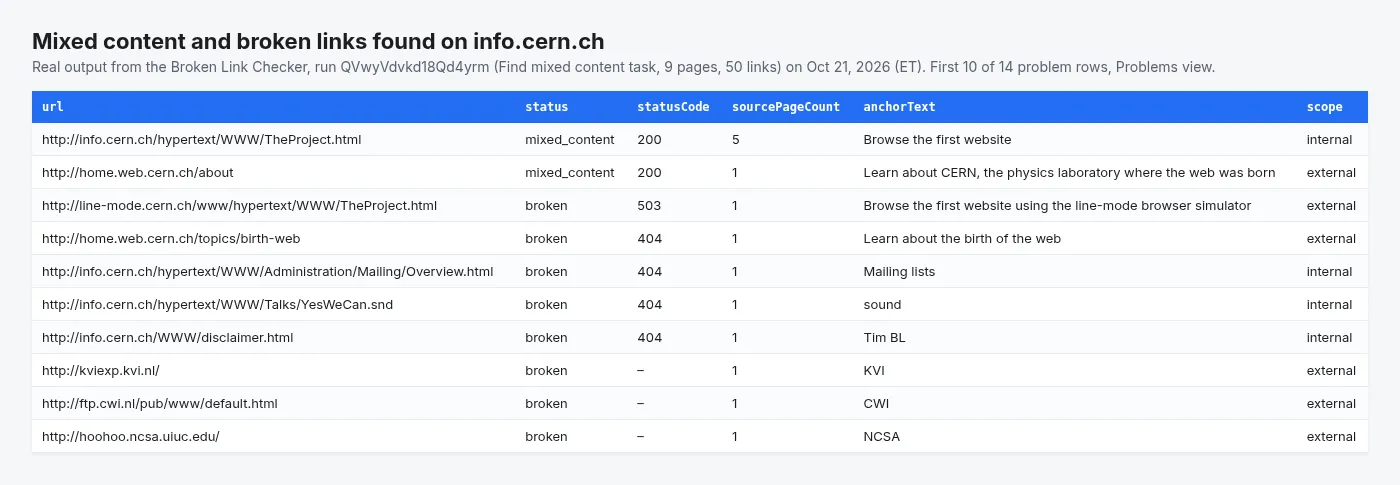
Real output from the Find mixed content and insecure HTTP links example task on info.cern.ch (Oct 21, 2026).
Crawl a site, check every link on it, and get back a list of what is broken and exactly which pages to edit to fix it.
Not just <a href>: images, scripts and stylesheets are checked too, because a 404 on a logo or a stylesheet is a visible defect that most link checkers miss entirely. Each result carries the referring pages and the anchor text used, so a finding is actionable without hunting for where the link lives.
What does this broken link checker do?
- Crawls static HTML. Breadth-first from your start URLs, or seeded from your sitemap. No JavaScript rendering, which keeps runs fast and cheap.
- Checks every unique link once. A footer link on 500 pages is one request, not 500. The row still records all 500 referring pages.
- Follows redirects by hand, up to 10 hops, and reports the whole chain — so you can see that
/oldreaches/newthrough four hops, or that two URLs point at each other forever. - Tells "broken" apart from "we were not allowed to look". A Cloudflare challenge or a captcha is reported as
blocked, never asbroken. This Actor does not attempt to get past bot protection. - Finds mixed content. An
http://image or script on anhttps://page is a real defect browsers block, even though the URL itself answers 200. - Monitor mode. On a schedule, report only links that are newly broken or that changed status, including ones that recovered.
How to check a website for broken links
- Enter your homepage in Start URLs, or your sitemap (or just your domain) in Sitemap URL or domain to cover every listed page.
- Set Max pages to crawl and Max links to check to cap the cost of the run.
- Leave Check external links on to test outbound links too, or turn it off for a fast internal-only QA pass.
- Click Start. Broken links, redirect chains and mixed content appear in the Problems view, each with the pages that link to it.
- For ongoing monitoring, turn on Only report new or changed problems, save the input as a task and add a nightly schedule.
Example tasks: pre-launch QA and 404 monitoring
Ready-made configurations you can copy and run in one click:
- Pre-launch broken link check: internal links, images and scripts only, for a fast QA pass before release.
- Nightly 404 monitor for your website: reports only links that newly broke or recovered since the last run.
- Find mixed content and insecure HTTP links:
http://assets and links onhttps://pages after an HTTPS migration.
How are broken links classified?
| Status | Meaning |
|---|---|
ok | 2xx or 3xx, at most one redirect, nothing else wrong. |
broken | 4xx, 5xx, DNS failure, or a connection that could not be made. |
redirect_chain | Reached a final URL, but took more hops than your threshold. |
redirect_loop | Came back to a URL it had already visited, or ran past the hop limit. |
mixed_content | An http:// link or asset referenced from an https:// page. |
blocked | A bot challenge, a captcha, a 429, or a path robots.txt disallows. The link is not known to be broken. |
timeout | No response inside the timeout. |
A single redirect is treated as normal by default, because http to https and adding a trailing slash are everyday behaviour, not defects. Raise Redirects before a link counts as a chain if your site legitimately redirects twice.
Why does this link checker avoid false alarms?
Most of the work in this Actor goes into not crying wolf:
| Problem with naive link checkers | What this one does |
|---|---|
| Reports every Cloudflare 403 as a dead link | Challenges are fingerprinted from headers, challenge cookies and body markers, and reported as blocked. A plain 404 served through Cloudflare is still correctly reported as broken. |
Reports links as dead because the server refuses HEAD | A 405, 403 or 404 answer to HEAD triggers one GET retry before the link is called broken. |
Counts /page#intro and /page#setup as two links | Fragments are dropped, and tracking parameters such as utm_*, gclid and fbclid are stripped, so one page is one link. |
| Hammers one small origin server with 20 parallel requests | Per-host concurrency defaults to 2, independent of overall run concurrency. |
| A bad night at your origin wipes the monitoring baseline | Monitor mode refuses to overwrite the baseline when a run checked nothing, when too many pages failed, or when most links were blocked. |
| Treats a rate-limited 429 as a dead link | 429 is blocked: it tells you nothing about whether the link works. |
Which pages count as "your site"?
By default, only the exact hostnames you started from. Starting at info.cern.ch does not adopt line-mode.cern.ch or home.web.cern.ch — those are separate properties run by other people, and they come back as external.
Matching on the registrable domain instead would be wrong more often than it is right. On shared hosts it is actively dangerous: alice.github.io and bob.github.io share github.io but belong to different people, and the same goes for myshopify.com, substack.com and every other platform that gives customers a subdomain. A domain-wide default would quietly crawl strangers' sites.
When your site genuinely spans www, blog and shop, set Treat subdomains as the same site (includeSubdomains: true).
One case is handled for you either way: if a start URL redirects to another host, that host is adopted automatically. A site that sends example.com to www.example.com would otherwise have every one of its own pages classified as external. Only the URLs you named get this treatment — a redirect found deeper in the crawl, say to a CDN, does not widen the scope.
Every seed counts as your site, including URLs that came from your sitemap. The hosts in play are listed in RUN_SUMMARY under scope.inScopeHosts.
Scope affects two things: which pages are crawled (when sameDomainOnly is on) and whether a link is checked at all (when checkExternal is off). It never changes whether a link is reported as broken.
Broken link checker input examples
Minimum viable input:
Whole-site check seeded from the sitemap:
A nightly monitor that only reports what changed:
Internal links only, for a fast pre-release gate:
A site spread across several subdomains:
Turn
respectRobotsoff only for a site you own and are authorised to crawl in full. It never affects bot protection: challenges and captchas are always reported asblocked, never bypassed.
Key settings
| Field | Default | Notes |
|---|---|---|
startUrls | — | Pages to crawl from. Give these, sitemapUrl, or both. With neither, the run is the 5-page demo crawl described under includeOkLinks instead of failing. |
sitemapUrl | — | Sitemap URL, or a bare domain to have the sitemap discovered through robots.txt. Indexes, gzip, text and RSS all work. |
maxPages | 500 | Pages fetched and parsed. Breadth-first, so truncation still spans the site. |
maxDepth | 3 | Link depth from the start URLs. 0 checks only the start pages. |
sameDomainOnly | true | Keeps the crawl on your own hosts. |
includeSubdomains | false | Exact hostnames only by default. See below. |
checkExternal | true | Off-site links are checked but never crawled into. |
respectRobots | true | Leave on unless you own the site. Applies to pages and to every link check, internal and external: a link (or a redirect hop) that a host's robots.txt disallows for this Actor is never requested and is reported as blocked. |
concurrencyPerHost | 2 | In-flight requests against any one host. |
requestsPerSecond | 8 | Global ceiling for the whole run. |
onlyNewProblems | false | Monitor mode. |
includeOkLinks | false | Turn on for a full inventory instead of just problems. The Console form prefills it on, with a demo crawl of quotes.toscrape.com (a long-running public practice site for crawlers with no robots.txt restrictions) capped at 5 pages and 50 links, about $0.05, so the first run shows what rows look like. An empty input runs the same demo. Switch it off to see only problems. |
What data do you get for each broken link?
One row per unique link. A real result from a live run against info.cern.ch:
A broken link with its redirect chain:
By default the dataset holds only links that need attention. Set Include working links for a full inventory.
The dataset ships five views: Problems, Broken links, Redirects, Blocked, and Changes since last run.
Run summary
RUN_SUMMARY in the key-value store holds the whole-run picture, including links that were checked but not written:
worstBrokenLinks is ranked by how many pages reference each link. A dead link in the site footer and a dead link in one old blog post are both one fix, but the footer one is worth doing first.
errorsByHost exists so that one unreachable third party reads as a single cause rather than as fifty unrelated broken links.
Use cases for a website link checker
- Pre-release QA gate. Crawl staging with
checkExternal: falseand fail the release if anything internal is broken. - Scheduled site monitoring. Run nightly with
onlyNewProblemsand get told only what changed. - Content audits after a migration. Find every link still pointing at the old URL structure, and every chain the redirect map introduced.
- HTTPS migration cleanup.
mixed_contentrows are exactly the assets still loading overhttp. - SEO housekeeping. Redirect chains waste crawl budget and leak link equity; this finds them with the full hop list.
- Site health suite. Pair it with the Sitemap URL Extractor with Change Tracking to find new pages, then check only those for broken links.
Limitations and known issues
- No JavaScript rendering. Links injected at runtime by a framework are invisible to this Actor. For a client-rendered single-page app, point it at your sitemap instead, or use a rendering crawler.
- External links produce most of the noise. Large sites frequently challenge or rate-limit automated requests. Those come back as
blocked, which is honest but not actionable — check theblockedBycolumn before chasing anything. blockeddoes not mean working. It means unknown. If a link matters, open it in a browser.HEADis not universally supported. The Actor falls back toGET, but a server that answers both with 403 will be reported as broken even if a browser can load it.- Subdomains are not your site unless you say so. If your content lives on
wwwand you started at the apex without a redirect between them, turn onincludeSubdomainsor the crawl will stop at the first page. - Monitor mode's first run reports everything. There is no baseline yet; the comparison starts on run two.
- Renaming
stateStoreNameorstateKeystarts a fresh baseline. - Public pages only. Nothing behind a login is crawled, no credentials are sent, and no personal data is collected — links and anchor text only.
mailto:andtel:links are skipped rather than recorded. robots.txtis honoured by default, with longest-match Allow/Disallow resolution. An unreachablerobots.txtmeans no restrictions, as the standard prescribes.
How much does it cost to check a website for broken links?
| Event | Price | Charged when |
|---|---|---|
| Actor start | $0.00005 | Once per run (per GB of memory). |
page-crawled | $0.001 ($1 per 1,000) | One page was fetched and parsed for links successfully. |
link-checked | $0.0008 ($0.80 per 1,000) | One unique link was checked. |
Apify subscribers on the Bronze, Silver and Gold plans pay 5%, 10% and 15% less per event; the Pricing tab shows the price for your plan.
A page that failed to load is not charged. link-checked bills once per unique URL no matter how many pages reference it, so a dead footer link on 500 pages is one charge, not 500.
When the run reaches your maximum total charge it stops cleanly, recording the reason in RUN_SUMMARY rather than failing. RUN_SUMMARY.charging shows the units of work performed next to the units actually billed.
FAQ
How do I get alerted only when something new breaks?
Turn on monitor mode (onlyNewProblems) and schedule the Actor (Console > Schedules). The first run sets a baseline; later runs report only links that newly broke, changed status or recovered.
Why is a link marked blocked instead of broken?
The server answered with a bot challenge, a captcha, a 429 or a robots.txt rule, so the link's real status is unknown. Open it in a browser if it matters. The Actor never tries to get past bot protection.
Does it check images, scripts and stylesheets?
Yes. Assets are checked alongside <a href> links, and http:// assets on https:// pages are flagged as mixed_content.
Does it render JavaScript?
No. It reads static HTML, which keeps runs fast and cheap. For a client-rendered site, seed the crawl from your sitemap with sitemapUrl.
Can I export the results or send them to Slack?
Yes. Download the dataset as CSV, Excel or JSON, or use Apify's integrations (Slack, Google Sheets, Zapier, Make, n8n, webhooks) to send each scheduled run's problems where your team works.
Related Actors from opendatalabs
- Sitemap URL Extractor with Change Tracking: list every URL in a site's sitemaps and see which pages were added, changed or removed since the last run.
- Grants.gov Grant Opportunity Monitor: a daily feed of new US federal grants and deadline changes.
Feedback and support
This Actor is new and actively maintained. If a run fails, a field is missing, or a result looks wrong, please open an issue on the Issues tab with the run ID. We read and reply to every issue, and suggestions for new filters or fields are very welcome.


