

Sitemap URL Extractor with Change Tracking
Pricing
from $0.21 / 1,000 urls
Sitemap URL Extractor with Change Tracking
Extracts every URL from a site's sitemaps (indexes, gzip, text and feed formats included) and reports which URLs were added, removed or re-dated since the previous run.
Pricing
from $0.21 / 1,000 urls
Rating
0.0
(0)
Developer

Shyheim Ulrickson
Maintained by CommunityActor stats
0
Bookmarked
2
Total users
1
Monthly active users
3 days ago
Last modified
Categories
Share
Use it to get every URL a website lists in its sitemaps, and see which pages were added, changed or removed since your last run.
Cost: $0.25 per 1,000 URLs, plus $0.001 per sitemap file read. A 100-URL test run costs about $0.03.
Why this one
- Change tracking built in. Most sitemap extractors give you a one-off list. Change mode keeps a baseline between runs and labels every URL
added,changedorremoved, so a daily schedule returns only what moved. - Built not to fail. A sitemap that times out or returns 403 becomes a data row and a counter, not a failed run. Transient errors are retried with backoff, and a bad night at the origin cannot wipe your baseline.
- Finds the sitemaps for you through
robots.txtand common locations, including nested indexes and.xml.gzfiles.
Sample output (real run on crawlee.dev, Oct 20, 2026):
| url | changefreq | priority | sourceSitemap | discoveredVia |
|---|---|---|---|---|
| https://crawlee.dev/blog | weekly | 0.5 | https://crawlee.dev/sitemap.xml | robots.txt |
| https://crawlee.dev/blog/archive | weekly | 0.5 | https://crawlee.dev/sitemap.xml | robots.txt |
| https://crawlee.dev/blog/authors | weekly | 0.5 | https://crawlee.dev/sitemap.xml | robots.txt |
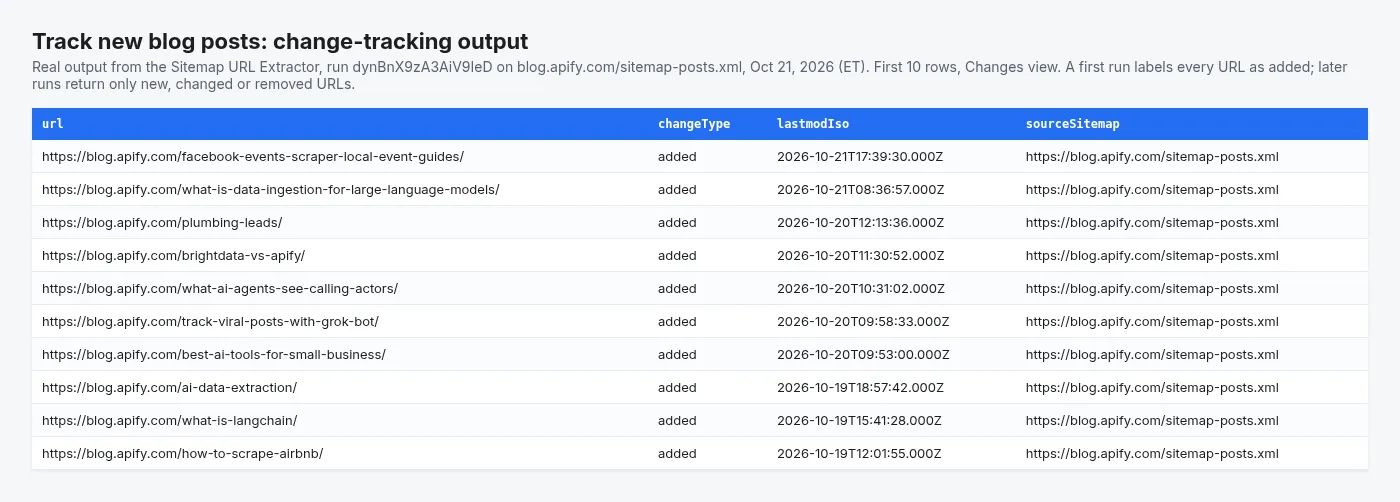
Real change-tracking output from the Track new blog posts example task (Oct 21, 2026).
Pull every URL out of a website's sitemaps, then find out what changed since the last time you looked.
Give it a domain and it discovers the sitemaps through robots.txt, walks sitemap indexes, unpacks gzip, and returns one row per URL with lastmod, changefreq, priority and the sitemap each URL came from. Switch on change tracking and it also tells you which URLs are new, which have been removed, and which have a changed lastmod since the previous run.
What can this sitemap extractor do?
- Finds sitemaps for you. Hand it
example.comand it readsrobots.txtfirst, which is the only discovery mechanism the sitemap protocol actually specifies. Ifrobots.txtdeclares nothing, it probes twelve common locations (/sitemap.xml,/sitemap_index.xml,/wp-sitemap.xml, the.gzvariants, and more). - Handles every sitemap shape. Sitemap indexes nested several levels deep,
.xml.gzfiles, plain-text URL lists, and RSS/Atom feeds. Namespaced XML, hreflang alternates, image/video extensions and news sitemaps are all parsed. - Tracks changes between runs. Change mode keeps the previous URL set in a named key-value store, which survives from run to run, and labels each URL
added,changed,removedorunchanged. - Checks for broken links, optionally. A cheap
HEADper URL (falling back toGETwhere a server rejectsHEAD) addsstatusCode,statusOkandredirectedTo. - Finishes the run. A sitemap that times out or 403s is reported as a row of data and a run-summary counter, not as a failed run. A target only fails the run if every target fails.
How to extract all URLs from a sitemap
- Enter one or more domains (
example.com) or direct sitemap URLs in Domains or sitemap URLs. The Actor finds the sitemaps throughrobots.txtfor you. - Pick a Run mode: Snapshot lists every URL; Change tracking returns only URLs added, changed or removed since the previous run.
- Set Max URLs per target to cap cost, then click Start.
- Download the results as CSV, Excel or JSON from the Output tab, or read them through the Apify API.
- To monitor a site, save the input as a task and add a schedule (Console > Schedules). Each run then returns only what moved.
Example tasks: monitor competitors and track new pages
Ready-made configurations you can copy and run in one click:
- Monitor a competitor's new pages: added and removed URLs on a schedule.
- Track new blog posts on a website: new posts from a blog's post sitemap, with dates.
- Export every URL in a website's sitemap: a full URL list ready for CSV or Excel.
Why is this sitemap scraper reliable?
Reliability is the point of this Actor, so a few things work differently from the usual sitemap scraper:
| Problem | What this Actor does |
|---|---|
| CDN returns 403/503 for some sitemaps | Retries only transient errors, with exponential backoff and jitter, honouring Retry-After. A 404 fails immediately instead of burning four timeouts. |
| A bad day at the origin wipes your baseline | Change mode refuses to overwrite the baseline when a run extracts zero URLs, or when more than a configurable share of sitemaps failed. Without that guard, one bad night makes the next run report your entire site as "added". |
lastmod reformatting creates fake changes | lastmod is compared on a normalised ISO-8601 value, so 2026-10-13, 2026-10-13T00:00:00Z and 2026-10-13T00:00:00+00:00 are the same date, not three changes. |
| Hitting a URL limit returns one section of the site | Sitemaps are walked breadth-first, so a truncated run still spans the whole site. |
A sitemap served as .xml.gz with no encoding header | Gzip is detected from the file's magic number, not from a header the server may not send. |
Sitemap extractor input examples
Minimum viable input:
A scheduled competitor monitor:
A sitemap-wide link check:
Key settings
| Field | Default | Notes |
|---|---|---|
targets | — | Bare domains or direct sitemap URLs, mixed freely. Left empty, the run is a 100-URL demo on crawlee.dev (about $0.03) instead of failing. |
mode | snapshot | changes enables run-to-run diffing. |
stateStoreName | sitemap-change-tracker-state | Named key-value store holding the baseline. One store per monitoring job; targets are separate keys inside it. |
outputChangeTypes | added, changed, removed | Add unchanged for a full labelled snapshot. |
checkUrlStatus | false | Adds a HEAD request per URL. |
maxUrlsPerTarget | 1000 | Breadth-first, so truncation still spans the site. The default keeps a run around $0.25 per target at $0.00025 per URL, and the Console form is prefilled with 100 so a first test run costs cents. Raise it (up to 5,000,000) for a full inventory. |
maxSitemapsPerTarget | 500 | Large stores publish hundreds of child sitemaps. |
respectRobotsTxt | true | Checks the sitemap path against robots.txt before fetching. |
requestsPerSecond | 5 | Global token-bucket ceiling. |
onlyUrlsModifiedSince | — | YYYY-MM-DD. URLs with no lastmod are kept. |
Full descriptions for every field are in the Input tab.
What data can you extract from a sitemap?
One row per URL. Snapshot mode:
Change mode adds the diff fields:
With checkUrlStatus on, every row also carries statusCode, statusOk and, where relevant, redirectedTo or statusError.
The dataset ships three views: URL overview, Changes since last run, and Link check.
A RUN_SUMMARY record is written to the default key-value store with per-target counts, the sitemap failure rate, discovery notes, change counts, and whether the baseline was updated.
Use cases for sitemap change tracking
- Competitive content intelligence. Schedule it daily in change mode against a competitor's domain and get a feed of every page they published, retired or re-dated.
- SEO audits and migrations. Inventory every indexable URL, spot sitemap entries that 404, and diff a staging sitemap against production before cutover.
- RAG and LLM ingestion. Use the URL list as a seed set, then re-run in change mode so you only re-embed what actually changed.
- E-commerce monitoring. Discover new product URLs the moment they enter the sitemap.
- Feeding a page audit. Chain the output into a Core Web Vitals or accessibility Actor and only audit the URLs that changed.
Limitations and known issues
- Only what the sitemap says. This Actor reads sitemaps; it does not crawl pages. A page missing from the sitemap is invisible to it, and
lastmodis a publisher-supplied hint that some CMSs set to the build time of every page. Whenlastmodis unreliable on a site,changeType: "changed"will be noisy — rely onaddedandremovedthere. - First run in change mode reports everything as
added. There is no baseline yet. That is expected; the comparison starts on run two. - Change tracking needs a named key-value store. The default store is scoped to a single run. If you rename
stateStoreName, you start from a fresh baseline. - Sites behind aggressive bot protection may refuse. Those sitemaps come back as
blockedin the run summary rather than being retried indefinitely. The Actor does not attempt to evade bot protection. maxUrlsPerTargetandmaxSitemapsPerTargetare real ceilings. When a run is truncated, the run summary says so.- Public data only. Sitemaps are published for crawlers. No login, no personal data, and
robots.txtis honoured by default.
How much does it cost to extract sitemap URLs?
| Event | Price | Charged when |
|---|---|---|
| Actor start | $0.00005 | Once per run (per GB of memory). |
sitemap-file | $0.001 | One sitemap document was fetched and parsed successfully. |
url-record | $0.00025 ($0.25 per 1,000) | One URL was written to the dataset. |
Apify subscribers on the Bronze, Silver and Gold plans pay 5%, 10% and 15% less per event; the Pricing tab shows the price for your plan.
A sitemap that 404s, times out or is blocked costs a request but produces nothing, so it is not charged. In change-tracking mode url-record bills only for the rows you actually receive — the unchanged URLs the Actor read and deliberately did not emit are free.
When the run reaches your maximum total charge it stops cleanly: it writes the rows it could pay for, skips any remaining targets, and records the reason in RUN_SUMMARY rather than failing. RUN_SUMMARY.charging shows the units of work performed next to the units actually billed.
FAQ
How do I get only new or removed pages every day?
Set Run mode to change tracking and schedule the Actor (Console > Schedules). The first run saves a baseline and reports every URL as added; from the second run on you get only added, changed and removed rows, and pay only for those.
Can I export the sitemap to CSV or Excel?
Yes. Every run's dataset downloads as CSV, Excel, JSON or XML from the Output tab, or through the Apify API.
Why are some URLs marked changed on every run?
Some CMSs set lastmod to the build time of every page. On those sites rely on added and removed, which do not depend on lastmod.
Does it crawl my pages?
No. It reads only the sitemaps a site publishes (found through robots.txt and common locations), which is why it is fast and cheap. Pages missing from the sitemap are not discovered.
Can I send the results to Google Sheets, Slack or my own app?
Yes. Use Apify's integrations (Google Sheets, Slack, Zapier, Make, n8n, webhooks) or call the Actor from the API, so a scheduled run can push new URLs wherever you need them.
Related Actors from opendatalabs
- Broken Link Checker & 404 Finder for Websites: crawl a site and find broken links, images, redirect chains and mixed content. Give it your sitemap with Sitemap URL or domain to check every page it lists.
- Grants.gov Grant Opportunity Monitor: a daily feed of new US federal grants and deadline changes.
Feedback and support
This Actor is new and actively maintained. If a run fails, a field is missing, or a result looks wrong, please open an issue on the Issues tab with the run ID. We read and reply to every issue, and suggestions for new filters or fields are very welcome.


