

Telegram Group Scraper — Bio, Phone & Premium MCP Server
Under maintenancePricing
from $1.00 / 1,000 results
Telegram Group Scraper — Bio, Phone & Premium MCP Server
Under maintenanceExtract ALL members from ANY Telegram supergroup — phone numbers, bios, premium status, last seen & language. 3x faster parallel bio fetching, auto-resume, FloodWait handling. Native MCP Server for AI Agents. Pay-per-result $1/1k members. Actively maintained in 2026.
Pricing
from $1.00 / 1,000 results
Rating
0.0
(0)
Developer

opportunity-biz
Maintained by CommunityActor stats
1
Bookmarked
25
Total users
2
Monthly active users
2 months ago
Last modified
Categories
Share
Telegram Group Members Scraper — Bio, Premium, Last Seen & More — Native MCP Server 🚀
Extract all members from any Telegram supergroup — username, bio, premium status, last seen, language code, verified/scam flags, and more.
This is an actively maintained Telegram group members scraper built with Telethon using the Telegram User API — the only API that gives you full access to group members and their complete profiles.
Pay-per-result pricing — no monthly subscription. Pay only for what you use.
Now with Native MCP Server — connect directly via the Model Context Protocol (Streamable HTTP) without external proxies. Perfect for AI Agents, LangChain, n8n, and Claude Desktop.
⚠️ Important: This Actor works only with supergroups — groups where you can see the member list inside the Telegram app. It does not work with broadcast channels (like @telegram or news channels). If you can tap "Members" in the group info screen, it will work.
📊 Output Example
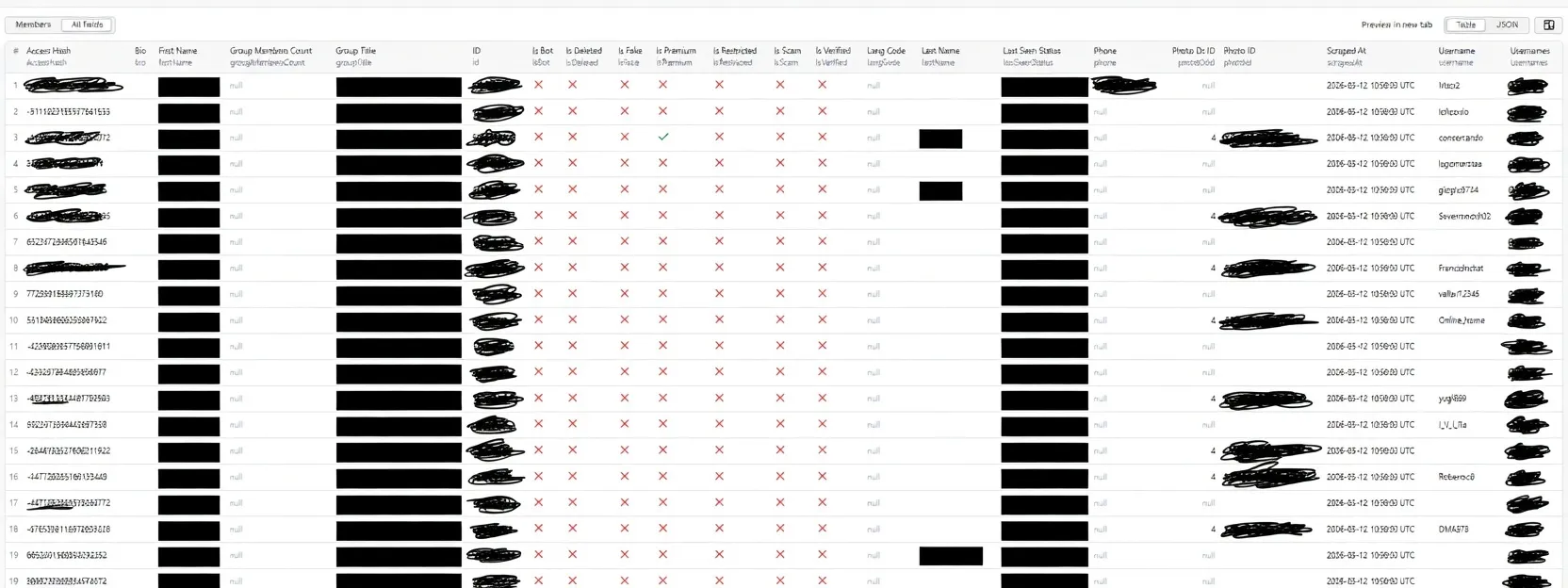
Real output from a live run — 500+ members extracted with username, bio, premium status and last seen.
🔑 Why User API — Not Bot API
Most Telegram scrapers on the market (including popular ones on this Store) are built on the Telegram Bot API. This Actor is fundamentally different: it uses the Telegram User API (MTProto), the same protocol used by the official Telegram app.
This is not a minor technical detail — it determines what data you can access:
| Capability | Bot API (other scrapers) | User API (this Actor) |
|---|---|---|
| List all group members | ❌ Bots cannot see the member list | ✅ Full member list |
bio / profile description | ❌ Not accessible | ✅ Available with fetchBio: true |
phone number | ❌ Not accessible | ✅ When visible by the user |
lastSeenStatus | ❌ Not accessible | ✅ 5 distinct statuses |
isPremium | ❌ Not accessible | ✅ |
isVerified, isScam, isFake | ❌ Not accessible | ✅ |
langCode | ❌ Not accessible | ✅ |
accessHash (for direct messaging) | ❌ Not accessible | ✅ |
groupMembersCount (accurate) | ❌ | ✅ via GetFullChannelRequest |
The Bot API was designed for building chatbots, not for data extraction. Telegram intentionally restricts bots from reading member lists to protect user privacy. The User API, used by the official Telegram clients, has no such restriction — it's how the app itself works.
The practical result: with this Actor you get a complete, enriched member dataset. With a bot-based scraper, you get a partial list with almost no profile data.
✨ What Makes This Different
| Feature | This Actor | Other scrapers |
|---|---|---|
| Based on User API (not Bot API) | ✅ | ❌ Usually Bot API |
bio field (profile description) | ✅ fetchBio: true | ❌ Never available |
groupTitle + groupMembersCount | ✅ | ❌ Usually missing |
lastSeenStatus | ✅ | ❌ Usually missing |
isPremium / isVerified / isScam | ✅ | ❌ Usually missing |
accessHash (for direct contact) | ✅ | ❌ Usually missing |
scrapedAt timestamp | ✅ | ❌ Usually missing |
| Exclude bots / deleted accounts | ✅ | ❌ |
Resume from page (startPage) | ✅ | ❌ |
| Auto-Resume on crash (checkpoint) | ✅ | ❌ |
| 3 speed modes (Fast / Balanced / Safe) | ✅ | ❌ |
| Parallel bio fetching (up to 10x faster) | ✅ | ❌ |
| FloodWait auto-handling | ✅ | ❌ |
| Run statistics (speed, elapsed, errors) | ✅ | ❌ |
| SOCKS5 proxy support | ✅ | ❌ |
| Agent layer (webhooks, diff, alerts) | ✅ | ❌ |
| Native MCP Server (Streamable HTTP) | ✅ | ❌ |
| MCP / AI Agent compatible | ✅ | ❌ |
| Clear error for broadcast channels | ✅ | ❌ |
| Actively maintained (2026) | ✅ | Varies by actor |
Speed Modes
| Mode | Bio speed (500 members) | Concurrency | Risk |
|---|---|---|---|
| ⚡ Fast | ~2 min | 10 parallel bios | Low-moderate |
| ⚖️ Balanced (default) | ~8 min | 5 parallel bios | Very low |
| 🛡️ Safe | ~20 min | 2 parallel bios | Minimal |
Without bio (fetchBio: false), all modes complete in roughly the same time (~30 seconds for 500 members).
Auto-Resume (Checkpoint)
If your run is interrupted (timeout, crash, manual stop), the Actor saves progress every 200 members to Apify's key-value store. If you Resurrect the interrupted run (Apify Console → Resurrect), it automatically continues from the last checkpoint — no data lost, no need to start from scratch. Note: this resumes the same run; starting a brand-new run begins fresh.
MCP Server Competitive Comparison
| Aspect | agentx/telegram-member-scraper | truefetch/telegram-group-member | This Actor (opportunity-biz/telegram-group-scraper) |
|---|---|---|---|
| MCP Type | ❌ No native MCP | ❌ No native MCP | ✅ Native MCP Server (Streamable HTTP) |
| MCP Categories | Not categorized | Not categorized | ✅ MCP_SERVERS category |
| MCP Tools | ❌ Not exposed as tools | ❌ Not exposed as tools | ✅ 5 MCP tools (scrape, check, diff, alerts, workflow) |
| Standby Mode | ❌ | ❌ | ✅ Always-on Standby mode |
| Protocol Compliance | ❌ | ❌ | ✅ 16/16 MCP protocol tests passing |
| Bio (profile) | ❌ Not available | ✅ Available | ✅ Parallel bio fetching (up to 10x faster) |
| Phone numbers | ❌ Not available | ✅ When visible | ✅ When visible |
| Speed modes | ❌ | ❌ | ✅ 3 modes (Fast/Balanced/Safe) |
| Auto-resume on crash | ❌ | ❌ | ✅ Checkpoint-based (every 200 members) |
| FloodWait handling | ❌ | ❌ | ✅ Automatic retry |
| Max members | 10,000,000 | 10,000+ | ✅ 50,000 per run |
| Agent layer (webhooks, alerts) | ❌ | ❌ | ✅ Webhook + diff + alert rules |
| Pricing per result | From $0.0008 | From $0.00055 | $0.001 ($1/1k members) |
| Start cost | $0.01 per run | $0.01 per run | $0.00005 per run (200x cheaper) |
| 22 data fields | Basic (5 fields) | 18 fields | ✅ Full profile incl. accessHash, scam/fake/restricted flags, photoId, photoDcId, usernames, groupTitle, groupMembersCount |
💡 Key insight: Our Actor is the only Telegram group member scraper on the Apify Store with a Native MCP Server. Competitors in the "MCP Servers" category (e.g.
khadinakbar/telegram-channel-scraper) scrape channel messages, not group members — completely different use case.
vs Legacy Competitors
| Aspect | data_dino/telegram-group-scraper | This Actor |
|---|---|---|
| Pricing | $15/month flat fee | Pay-per-result: ~$1 per 1,000 members |
| Bio field | ❌ Not available | ✅ Parallel fetching, up to 10x faster |
| Phone numbers | ❌ Not available | ✅ When visible |
| Premium/Verified/Scam/Fake | Partial | ✅ All flags |
| Language code | ❌ | ✅ |
| Auto-resume on crash | ❌ | ✅ Checkpoint-based |
| Speed modes | ❌ | ✅ 3 modes (Fast/Balanced/Safe) |
| Flood wait handling | ❌ Crashes on rate limit | ✅ Automatic retry |
| Error messages | Generic | ✅ Specific (broadcast, private, etc.) |
| Agent mode (webhook) | ❌ | ✅ |
| Native MCP Server | ❌ | ✅ |
💡 Our pricing advantage: At $1/1,000 members, scraping 10,000 members costs ~$9. With data_dino at $15/month, you pay $180/year even if you only run once.
🧠 Native MCP Server
This Actor is a Native MCP Server — it speaks the Model Context Protocol (MCP) directly over Streamable HTTP, without relying on external proxies like mcp.apify.com.
Why Native MCP is Better
| Aspect | Native MCP Server (this Actor) | MCP Proxy (mcp.apify.com) |
|---|---|---|
| Latency | Direct — no proxy hop | Higher — routed through external service |
| Reliability | Self-contained — no third-party dependency | Depends on proxy availability |
| Deployment | Single push — works immediately | Requires proxy registration |
| Standby mode | Always on, instant response | Cold start via proxy |
| Custom routes | ✅ Full control (readiness probe, etc.) | ❌ Limited |
| OpenAPI schema | ✅ Auto-generated | ❌ Not available |
Available MCP Tools
| Tool | Description |
|---|---|
scrape_telegram_members | Extract members from any Telegram supergroup — phone, bio, premium, last seen, language & more |
check_telegram_group | Quickly check if a group exists and return metadata without full scrape |
compute_member_diff | Compare members from two runs to detect new members |
evaluate_alert_rules | Evaluate keyword/trend alert rules against member data |
run_agent_workflow | Full agentic workflow: scrape + diff + alerts + webhook in one call |
Connecting to the MCP Server
The MCP endpoint is available at https://<USERNAME>--<ACTOR_NAME>.apify.actor/mcp.
Authentication: Pass your Apify API token in the Authorization: Bearer <TOKEN> header.
Example: List available tools
Example: Scrape members
Readiness probe
Connecting from AI Clients
Claude Desktop (MCP config):
LangChain / n8n / Custom Agents: Use any MCP client library to connect. The endpoint follows the standard MCP specification with Streamable HTTP transport.
🚀 Use Cases
- Lead generation — export members of niche crypto, trading, or marketing groups
- Community analysis — understand group demographics and activity levels
- Sales outreach — find premium members and verified accounts in your industry
- AI Agent workflows — Native MCP Server for direct integration with AI Agents
- Research — track group growth over time using
groupMembersCount+scrapedAt
📋 Input
| Field | Type | Required | Description |
|---|---|---|---|
groupUrl | string | ✅ | Group @username or t.me/... link (supergroup only) |
sessionString | string | ✅ | Telethon StringSession (generate locally, see below) |
maxMembers | integer | — | Max members to extract (default: 1000, max: 50000) |
startPage | integer | — | Start page to resume interrupted runs (default: 1). Ignored if enableResume: true |
enableResume | boolean | — | Auto-save progress every 200 members; resume by Resurrecting the same run (default: true) |
scrapingMode | string | — | Speed/safety trade-off: fast, balanced (default), or safe |
fetchBio | boolean | — | Fetch each member's bio. ⚠️ Slow: ~2–20 min per 500 members depending on mode. Default: false |
excludeBots | boolean | — | Skip bot accounts (default: false) |
excludeDeleted | boolean | — | Skip deleted accounts (default: true) |
proxyIp | string | — | SOCKS5 proxy IP |
proxyPort | integer | — | SOCKS5 proxy port |
proxyUsername | string | — | Proxy username |
proxyPassword | string | — | Proxy password |
webhookNotificationUrl | string | — | [Agent mode] URL for structured JSON webhook after each run |
previousRunId | string | — | [Agent mode] Previous run ID to diff against (detect new members) |
alertRules | array | — | [Agent mode] Custom rules for keyword/trend alerts in webhook |
fetchBio: performance by scraping mode
| Mode | 500 members w/ bio | Extra API calls | Ban risk |
|---|---|---|---|
| ⚡ Fast | ~2 minutes | 500 | Low-moderate |
| ⚖️ Balanced (default) | ~8 minutes | 500 | Very low |
| 🛡️ Safe | ~20 minutes | 500 | Minimal |
| Bio disabled | ~30 seconds | 0 | None |
Enable fetchBio only when you specifically need profile descriptions (e.g. for lead qualification or persona analysis).
scrapingMode explained
| Mode | Page delay | Bio concurrency | Bio delay | Best for |
|---|---|---|---|---|
fast | 0.5s | 10 | 0.3s | Small groups, low ban risk |
balanced | 1.0s | 5 | 1.0s | Most use cases (default) |
safe | 2.0s | 2 | 2.0s | Large groups, sensitive accounts |
Without fetchBio, the mode only affects the delay between pages (0.5s / 1.0s / 2.0s).
🔐 How to Get Your Credentials (5 minutes, one time only)
This Actor requires three values: api_id, api_hash, and sessionString. You only need to do this once — the session string never expires unless you explicitly log out.
Step 1 — Get your API ID and API Hash (2 minutes)
- Open my.telegram.org in your browser
- Log in with your Telegram phone number (you'll receive a confirmation code in the Telegram app)
- Click "API development tools"
- Fill in the form — App title and Short name can be anything (e.g.
MyApp/myapp) - Click "Create application"
- You will see your
api_id(a number like12345678) andapi_hash(a string likea1b2c3d4e5f6...)
Copy both values and keep them safe. You'll paste them into the script below.
⚠️ Do not share your
api_idandapi_hashpublicly. They are tied to your Telegram account.
Step 2 — Generate your Session String (2 minutes)
You need Python installed on your machine. If you don't have it, download it from python.org — the installer takes about 2 minutes.
Install Telethon (run once in your terminal / command prompt):
Create a file called gen_session.py and paste this code:
Run it:
Telegram will ask for your phone number and then send a confirmation code to your Telegram app. After you enter it, the script prints your session string — a long string starting with 1BV... or similar.
Copy the entire session string and paste it into the sessionString field in the Actor input.
Step 3 — Paste into Actor input
sessionString→ paste the long string from Step 2groupUrl→ paste the @username or t.me/... link of the group you want to scrape- All other fields are optional
That's it. Click Run and your dataset will be ready in seconds.
✅ The session string never expires. You generate it once and reuse it for every future run. It only becomes invalid if you manually log out from that session in Telegram Settings → Devices.
How to check if a group is a supergroup
Open the group in the Telegram app → tap the group name → if you see a "Members" section with a list of users, it's a supergroup and this Actor will work. If you only see a subscriber count with no member list, it's a broadcast channel and this Actor cannot scrape it.
📦 Output Fields
Each item in the dataset contains:
Note:
biois only populated whenfetchBio: true. All other fields are always present.About
phoneandlangCode: Telegram only exposes a member's phone number when their privacy settings allow it (typically mutual contacts), so for most membersphoneisnull.langCodeis likewise only occasionally available. Treat both as bonus fields when present, not guaranteed columns.
Run Statistics
After every run, the Actor saves performance statistics to the key-value store under the __STATS__ key. You can retrieve them for monitoring:
⚙️ Technical Notes
- Built with Python 3.11 and Telethon — no Apify SDK (avoids SDK conflicts)
- Uses User API (MTProto + StringSession), not a bot token — required to read group members and profile data
groupMembersCountfetched viaGetFullChannelRequest— accurate even as a non-admin member- Works only on supergroups, not broadcast channels
biois fetched via a separateGetFullUsercall per member — enable withfetchBio: true- Parallel bio fetching — uses
asyncio.Semaphorefor controlled concurrency (up to 10 simultaneous requests in Fast mode) - FloodWait handling —
FloodWaitErroris caught automatically, the Actor waits the required time and retries. No crashes on rate limits. - Checkpoint auto-resume — progress saved every 200 members to the run's key-value store. If the run is interrupted, Resurrect the same run (with
enableResume: true) to continue from the last checkpoint. - Error messages — specific errors for broadcast channels, private groups, invalid usernames, expired invite links, and admin-only groups
- Supports SOCKS5 proxy for IP rotation or geo-restricted access
- Practical limit ~10,000 members/group: Telegram caps offset-based member enumeration at roughly 10,000 members per group (verified). Groups smaller than that are fully extracted; for larger groups you get up to ~10,000 regardless of
maxMembers. This is a Telegram-side limit, not an Actor limit. - If a group has privacy restrictions, some members may not be visible — this is a Telegram limitation
- Native MCP Server runs in Standby mode; falls back to batch mode for one-off runs
💳 Pricing
- Model: Pay-per-result (PAY_PER_EVENT)
- Price: $1.00 per 1,000 members extracted
- Example: Scraping 10,000 members costs ~$9.00
vs Competitors
| Actor | Model | 10k members cost | Notes |
|---|---|---|---|
| This Actor | Pay-per-result | ~$9 | No recurring fees |
| data_dino/telegram-group-scraper | $15/month | $15 (or more if >1 month) | Flat fee regardless of usage |
| i-scraper/telegram-groups-scraper | $0.0003/msg | N/A | Scrapes messages, not members |
| mikolabs/telegram-group-scrapers | $0.02/msg | N/A | Scrapes messages via web preview |
Much cheaper than flat-rate competitors charging $25/month regardless of usage. Pay only for the data you need.
🤝 Support & Maintenance
This Actor is actively maintained by opportunity-biz. Issues are answered within 24 hours. If you find a bug or need a feature, open an issue on GitHub.


