

PACER RSS Docket Monitor — New Federal Court Filings
Pricing
from $2.40 / 1,000 matching filings
PACER RSS Docket Monitor — New Federal Court Filings
Monitor new federal court filings from the public PACER RSS feeds of 140+ federal courts (district, bankruptcy, appeals and more): new complaints, bankruptcies, motions and orders, filtered by party name, case number or entry type, with links to the docket. No PACER account. Pay per docket entry.
Pricing
from $2.40 / 1,000 matching filings
Rating
0.0
(0)
Developer

Owlabee
Maintained by CommunityActor stats
0
Bookmarked
1
Total users
1
Monthly active users
9 hours ago
Last modified
Categories
Security
Limited permissionsShare
PACER RSS docket monitor: watch the public PACER RSS feeds of 140+ federal courts (district, bankruptcy, appeals, Claims and International Trade) and get new complaints, bankruptcies, motions and orders as JSON, filtered by party name, case number or entry type, each with a link to the docket. No PACER account or login is needed; schedule it for a running feed of new federal court filings.
Renamed on 2026-11-08: this Actor's address changed from
owlabee/federal-court-docket-monitortoowlabee/pacer-docket-monitor. Saved tasks, schedules, webhooks and integrations keep working, because they point to the Actor's ID, which did not change. Calls by the old name keep working until 2027-11-08 through a forwarder at owlabee/federal-court-docket-monitor, which runs this Actor with the same input and copies the results into its own run. Please still update anything that calls it by name: API URLs (owlabee~pacer-docket-monitor), MCP tool lists (owlabee/pacer-docket-monitor) and bookmarks.
What it does
Every federal district and bankruptcy court running CM/ECF publishes a free, public RSS feed of its docket activity from the last 24 hours: case number, case title (the parties), the docket entry text, the document number with a link, and the filing time. This Actor reads those feeds for the courts you pick, normalizes every entry into the same JSON shape, filters them by party name, case number, case type, entry type, keyword or bankruptcy chapter, and in monitor mode flags only what is new since your last run. You get new complaints naming a company, new Chapter 11 petitions in Delaware or the Southern District of New York, every motion and order in a case you are watching, or a district's whole day of filings, within an hour of docketing and without a PACER account.
It is built for litigation-intelligence and legal-marketing teams, journalists, compliance and research teams, and AI agents that need federal docket activity as structured data. Results land in an Apify dataset you can download as JSON, CSV or Excel, read over the API, push to a webhook, or query from an agent through the Apify MCP server.
The feeds are the courts' own public endpoints (https://ecf.<court>.uscourts.gov/cgi-bin/rss_outside.pl, and https://ecf.<court>.uscourts.gov/n/beam/servlet/TransportRoom?servlet=RSSGenerator for the courts of appeals). Besides the district and bankruptcy courts, the Actor reads the Court of Federal Claims, the Court of International Trade and the courts of appeals that publish a feed. No login, no PACER fees, no proxies, no browser. Documents are linked, never downloaded.
The same new-since-last-run feed pattern for federal grants and contract notices is Grants.gov API & SAM.gov Scraper — Federal Grants Feed.
Why this Actor
| This Actor | Typical scraper in this category | Do it yourself | |
|---|---|---|---|
| Data sources covered | The public CM/ECF RSS feeds of all 188 federal district and bankruptcy courts, the Court of Federal Claims, the Court of International Trade and the 13 courts of appeals, with all, all-district, all-bankruptcy, all-appellate, all-national and state aliases and a dated per-court coverage table | A search API over archived dockets, or a feed reader with a short court list | One feed parser plus a court registry you maintain yourself |
| Modes | Live feed export with party, case number, case type, entry type, keyword and chapter filters; newCasesOnly; monitor mode with a 72 hour seen-entry memory | Historical search by query and date range, or raw feed pass-through | Parse, filter, dedupe and remember entries yourself |
| Output fields | One record per docket entry: court, case number as published and normalized, title, case type, bankruptcy chapter, trustee, office, entry text and category, document number and link, docket link, filing time, matchedFilters, isNew | Case-level search hits with nature of suit and parties, typically hours to days behind the court | Whatever you parse out of the RSS title and description strings |
| Pricing unit | Per court feed checked, plus per docket entry (unfiltered) or per matching filing (filtered); an error item costs the same as a feed check | Per record returned, sometimes plus an API token you bring for the archive it wraps | Your time plus compute; the feeds are free |
| Proxies or browsers needed | None, and no PACER account | Some need your own account or API key | None, but about 30 courts refuse datacenter requests either way |
| Agent / MCP ready | Yes: pay-per-event, limited permissions, pin link, prompts and a call example below | Some ship as MCP servers | You write and host the tool definition |
| Limits | Each feed covers the trailing 24 hours only; no nature of suit, judge or full party list; some courts publish a subset of entry types or no feed | Archives lag the courts; feed readers rarely say which courts work | The same feed limits apply |
- Within an hour of docketing, not days: the courts regenerate their feeds every 30 to 60 minutes, and an hourly schedule in monitor mode catches every new entry exactly once.
- Filters combine the way a litigation team thinks: party AND entry type AND new cases only means "a case was opened against or by Acme", and
matchedFilterson every record shows why it matched. - Bankruptcy fields are parsed from what the court prints in front of the entry text (chapter, trustee, office), so a Chapter 7 or Chapter 11 feed needs no regex on your side.
- Honest coverage: the tables below say which of the 203 courts answered, published a subset or refused in a dated probe, and the Actor still tries any court you name.
- A court that is down is one charged error item; the run and the other courts continue, and
notifyOnlyOnResultskeeps your webhook quiet when nothing matched.
How to use
- Enter the Courts to watch: CM/ECF codes such as
nysd(S.D.N.Y.),deb(Bankr. D. Del.),txwd,ca4(Fourth Circuit),cofc(Court of Federal Claims), orall,all-district,all-bankruptcy,all-appellate,all-national, or a state code likeNY. The coverage tables below list all 203 courts. - Optionally narrow with Party / case title keywords (company or person names), Case numbers, Case types, Entry types, Entry text keywords, Bankruptcy chapters or New cases only. With no filter you get every entry in the feed, newest first.
- Click Start, or save the input as a Schedule (hourly works well) with Only new since last run on and a Webhook URL to get alerts.
Quick start input
The same input the Store runs in its daily automated test, so it is cheap and always available; paste it into the JSON tab of the input form or send it as the body of an API or MCP call:
Ready-to-run inputs
Three inputs you can paste as they are; each validates against the input schema.
New Chapter 7 petitions in the District of Delaware bankruptcy court
Hourly alert: new civil cases naming a party in New York's federal courts, only ones not seen before (schedule hourly; the first run is the baseline)
Every motion and order in one case
Backfill: the last 30 days of dockets in the Northern District of California from the RECAP archive, plus today's feed (the historical pass is paced at one archive page every 12 s, so 100 dockets take about a minute)
Input
| Field | Type | Required | Description |
|---|---|---|---|
courts | string[] | yes | CM/ECF court codes (nysd, deb, txsb, ca4, cadc, cofc, cit …), all, all-district, all-bankruptcy, all-appellate, all-national, or two-letter state codes. Explicitly named courts are always tried; the aliases expand to courts whose feed was live at the last probe. all and the state codes cover the district and bankruptcy courts only, as before; add all-appellate or all-national for the others |
partyKeywords | string[] | no | Keep entries whose case title contains any of these (case-insensitive substring, or /regex/flags) |
caseNumbers | string[] | no | Keep entries in these cases; 1:26-cv-03810, 26-cv-3810 and 26-11511 all work, and for an appeal 25-2171 or 2025-1535 |
caseTypes | string[] | no | civil, criminal, bankruptcy, adversary, multidistrict, other |
entryTypes | string[] | no | complaint, petition, answer, motion, order, judgment, notice, appeal, discovery, hearing, plan, claim, brief, other (heuristic, see FAQ) |
entryKeywords | string[] | no | Keep entries whose docket text contains any of these (substring or /regex/) |
bankruptcyChapters | string[] | no | 7, 9, 11, 12, 13, 15 |
newCasesOnly | boolean | no | Keep only document number 1 of a case (complaint, petition, indictment, notice of removal) |
maxEntriesPerCourt | integer | no | Cap per court per run, newest first, after filtering (default 5000) |
maxResults | integer | no | Cap across all courts per run (default 100000) |
onlyNewSinceLastRun | boolean | no | Monitor mode: emit only entries not seen in a previous run, flagged isNew (default false) |
stateStoreName | string | no | Named key-value store holding the seen-entry memory (default federal-court-docket-monitor-state) |
webhookUrl | string | no | POST target for the run summary, emitted entries (max 1,000) and error items |
notifyOnlyOnResults | boolean | no | Call the webhook only when something was produced (default true) |
includeHistorical | boolean | no | Also read dockets filed in the last historicalSinceDays days from the RECAP archive via the Free Law Project's CourtListener API, same record shape, source: "courtlistener-recap" (default false). Needs courtListenerApiKey |
historicalSinceDays | integer | no | How far back the historical pass looks, 1 to 365 days (default 30) |
maxHistoricalPerCourt | integer | no | Cap on archive dockets per court per run, newest first, 1 to 1000 (default 100); a docket yields one record per archived entry, up to three, or one docket-level record |
courtListenerApiKey | string | for includeHistorical | Token of a free CourtListener account. CourtListener's API refuses anonymous requests (as of 2026-11-07), so without it the historical pass is skipped, uncharged, with a warning in the log and the run summary. Sent only to courtlistener.com, never logged |
Filter groups are combined with AND; values inside a group with OR. partyKeywords: ["Acme"] with entryTypes: ["complaint"] and newCasesOnly: true means "a new case was opened against or by Acme".
Output example
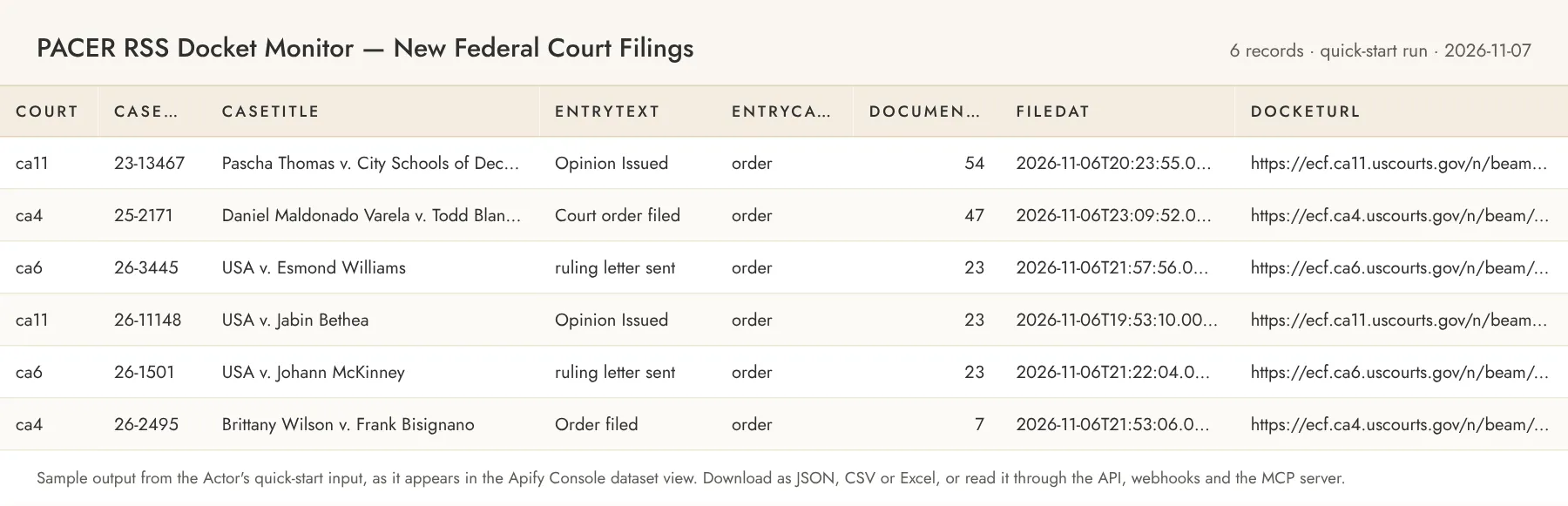
One dataset item per docket entry:
Records from the historical pass have source: "courtlistener-recap", a recapUrl that opens the docket or entry on CourtListener, entryId of the form recap:cand:75022928:1, PACER links built from the archive's PACER ids, and the docket-level details the live feeds lack: parties, natureOfSuit, cause, assignedTo, dateTerminated, attachmentNumber, recapDocketId and moreEntriesInArchive (true when the archive holds more than the three entries a search result carries). A docket the archive has no entry for yet is one record with documentNumber: null and likelyNewCase: true.
Bankruptcy entries additionally carry what the court publishes in front of the entry text: bankruptcyChapter (7, 9, 11, 12, 13 or 15), trustee and office; adversary proceedings have caseType: "adversary". matchedFilters is present only when filters are set, isNew only in monitor mode. documentUrl opens the document on PACER (PACER's own fees apply there); docketUrl opens the case docket. filedAt is null when a court publishes an impossible timestamp (a few do); pubDateRaw keeps the original string.
Error items look like { "recordType": "error", "court": "cacd", "error": "HTTP_503", "errorMessage": "…", "feedUrl": "…" } with codes UNKNOWN_COURT, FEED_UNREACHABLE, HTTP_<status>, FEED_EMPTY, FEED_MALFORMED or COURT_FAILED. They are charged at the court-feed rate, because the request was made; the run itself succeeds.
The run's SUMMARY record (default key-value store) lists, per court, the HTTP status, the entry types the feed advertises, entries in the feed, new/seen/matched/emitted counts and any error.
If the output saves you time, a review on the Store page helps other buyers find this Actor; the Store invites you to leave one after you have run it a few times.
Alerts and delivery
Feeds cover the trailing 24 hours, so this Actor is meant to run on a schedule; this is how new filings reach you.
- Schedule in the Console. Save the input (with
onlyNewSinceLastRun: true) as a Task, then create a schedule under Schedules (hourly is the recommended cadence, at least daily to miss nothing) and attach the Task. Use onestateStoreNameper schedule when different filters watch the same courts. - The Actor's own webhook. Set
webhookUrland the Actor POSTs one JSON document when the run finishes (10 second timeout, two retries; a failed delivery is recorded aswebhookDelivered: falsein theSUMMARYrecord and never fails the run). WithnotifyOnlyOnResultsat its defaulttruethe POST happens only when at least one docket entry or error item was produced; set it tofalsefor a heartbeat on every run. The body is the run summary (actor,runId,courts,courtsWithErrors,feedEntries,matched,entriesEmitted,errorItems,produced,filtersActive,monitor,perCourtwith HTTP status, advertised entry types, feed, new, seen, matched and emitted counts per court,charges,limitReached,startedAt,finishedAt) plusitems, the first 1,000 emitted docket entries in dataset shape,itemsTruncatedwhen the run produced more, anderrorswith the error items. - Apify run webhooks. On the Actor's Integrations tab add a webhook for run events such as
ACTOR.RUN.SUCCEEDED,ACTOR.RUN.FAILEDorACTOR.RUN.TIMED_OUT; Apify POSTs the run id and the default dataset id to your URL, which is all your own code needs to fetch the items. - Slack, Make, Zapier, Google Sheets, email. The same Integrations tab lists Apify's ready-made integrations: a Slack message when a run finishes, Make and Zapier modules that start runs and read the dataset, an export of each run's dataset to a Google Sheet, and an email notification. They are configured per Actor or per task, without code.
- API and dataset endpoints. Start a run with
POST https://api.apify.com/v2/acts/owlabee~pacer-docket-monitor/runs, read the newest results withGET https://api.apify.com/v2/acts/owlabee~pacer-docket-monitor/runs/last/dataset/items?format=json(alsocsvorxlsx, andfieldsto pick columns), or read any run's dataset athttps://api.apify.com/v2/datasets/<datasetId>/items. For short runsrun-sync-get-dataset-itemsstarts the run and returns the items in one call. A Slack integration onACTOR.RUN.SUCCEEDEDplusnotifyOnlyOnResultsis the simplest "new lawsuit naming us" alert.
Pricing
Pay per event. You only pay for what the Actor produces; set a maximum cost per run in the run options to cap spend.
| Event | Price | Notes |
|---|---|---|
Court feed check (court-feed-run) | $0.005 | Per court feed fetched per run, whether or not anything matched; error items for failing courts are charged at this rate instead |
Docket record (docket-entry-scraped) | $0.001 | Per docket entry saved when no filter is set |
Matching filing (case-matched) | $0.003 | Per docket entry saved when filters are set; charged instead of the docket-entry event |
| Actor start | $0.00005 | Apify platform event |
Examples: 1,000 unfiltered entries from one court ≈ $1.005. Watching 20 courts every hour for new filings naming your clients, with about 30 matches a day ≈ 20 × 24 × $0.005 + 30 × $0.003 ≈ $2.49/day. In monitor mode the first run is a baseline and is charged for every entry it emits; later runs charge only new entries.
Store pricing discounts: users on the Scale plan (Silver) pay 10% less per event, Business (Gold) 20% less.
Limits and fair use
- Each feed covers the trailing 24 hours only. Schedule the Actor at least daily to miss nothing; hourly is a good default (the courts regenerate feeds every 30–60 minutes). Requests more often than every 15 minutes are discouraged.
- One request per court per run with a 20 s deadline that includes the one retry on 429/5xx and the download; a
Retry-Afterlonger than 10 s is not waited for. Five courts are fetched in parallel; a run over all live courts takes about a minute plus about 20 s for each court that does not answer. - Time budget per court. Each court gets a 60 s budget (the 20 s request deadline is the binding limit in practice). A court that stalls, times out or refuses is abandoned and produces one
FEED_UNREACHABLE(orTIME_BUDGET) error item, charged like every error item; the other courts continue. - Historical pass rate limit. The CourtListener API allows 5 requests per minute, 50 per hour and 125 per day by default, and anonymous requests share that allowance with everyone else calling from the same IP addresses, so the historical pass runs one court at a time at one page (20 dockets) every 12 s, with a 20 s deadline per page, a 60 s idle budget per court, and one charged
RECAP_UNAVAILABLEorRECAP_TIME_BUDGETerror item for a court whose pass produced nothing (for example when the shared daily allowance is used up and the API answers 429). The pass needs a free CourtListener account token (courtListenerApiKey): CourtListener's API refuses anonymous requests as of 2026-11-07, so without a token the pass is skipped and nothing is charged for it. With a default account, plan on about 100 dockets per court and a handful of courts per run. - Coverage differs per court. Of the 188 district and bankruptcy courts, 94 publish every entry type, 41 publish a subset (typically complaints, motions and orders), 23 answer with no entries and 30 do not answer datacenter requests (mostly California, Oklahoma, Nevada, Minnesota and Missouri), at the sweep of 2026-10-17. Of the 15 national and appellate courts probed on 2026-11-07, 8 publish entries and 7 circuits publish none. The Actor still tries every court you name and reports what happened.
- Nature of suit, party lists, judges and the full docket text are not in the feeds. The case title carries the lead parties ("Smith v. Acme Corp et al"), so a party that is not first-named may be missing; the docket link has the rest.
- The Court of International Trade's feed titles carry only the case number (
1:26-cv-05040/A), no party names, sopartyKeywordscannot match its entries; filter it by case number or entry text. entryTypesis a heuristic over the entry text (courts label the same event differently); for precision useentryKeywords.- The seen-entry memory keeps 72 hours per court (up to 30,000 entries), enough because a feed never carries anything older than a day.
- Memory: a run over all courts fits in 512 MB. Default run memory is 512 MB.
Court coverage
203 courts: the 188 district and bankruptcy courts (sweep of 2026-10-17), and the Court of Federal Claims, the Court of International Trade and the 13 courts of appeals (probe of 2026-11-07). Live feeds: 143 of 203.
District and bankruptcy courts (sweep of 2026-10-17)
Live feeds: 135 of 188 (94 full, 41 partial); 23 answer with no entries; 30 unreachable from datacenter IPs. Entries in the trailing 24 h at probe time: 86,956.
| State | District court feeds | Bankruptcy court feeds |
|---|---|---|
| AK | akd (unreachable) | akb all |
| AL | Middle almd all · Northern alnd (no entries) · Southern alsd all | Middle almb answer, appeal, court, motion, order, caseupld, … · Northern alnb (unreachable) · Southern alsb all |
| AR | Eastern ared order, order-cr, motion · Western arwd all | Eastern areb all · Western arwb all |
| AZ | azd all | azb all |
| CA | Central cacd (unreachable) · Eastern caed (unreachable) · Northern cand (unreachable) · Southern casd (unreachable) | Central cacb (unreachable) · Eastern caeb all · Northern canb all · Southern casb all |
| CO | cod motion, order | cob all |
| CT | ctd all | ctb (unreachable) |
| DC | dcd all | dcb all |
| DE | ded all | deb all |
| FL | Middle flmd all · Northern flnd (no entries) · Southern flsd all | Middle flmb answer, appeal, court, motion, order, misc, … · Northern flnb all · Southern flsb all |
| GA | Middle gamd order, order-cr · Northern gand (no entries) · Southern gasd (no entries) | Middle gamb answer, appeal, court, motion, order · Northern ganb (unreachable) · Southern gasb order |
| GU | gud (no entries) | gub (no entries) |
| HI | hid cmp, order, order-cr | hib appeal, motion, order, misc |
| IA | Northern iand motion · Southern iasd all | Northern ianb answer, appeal, court, motion, order · Southern iasb all |
| ID | idd allx, motion | idb answer, appeal, court, motion, order |
| IL | Central ilcd all · Northern ilnd order, order-cr, motion, cmp · Southern ilsd motion, order, order-cr, cmp, charge-cr | Central ilcb all · Northern ilnb (unreachable) · Southern ilsb all |
| IN | Northern innd all · Southern insd adr, answer, appeal, appeal-cr, charge-cr, cmp, … | Northern innb answer, appeal, motion, notice, order, plan · Southern insb all |
| KS | ksd all | ksb all |
| KY | Eastern kyed (no entries) · Western kywd all | Eastern kyeb all · Western kywb all |
| LA | Eastern laed (unreachable) · Middle lamd (unreachable) · Western lawd all | Eastern laeb answer, appeal, court, misc, motion, order · Middle lamb all · Western lawb (unreachable) |
| MA | mad answer, appeal, appeal-cr, charge-cr, cmp, detention-cr, … | mab answer, appeal, caseupld, claims, cmp, crbatch, … |
| MD | mdd (no entries) | mdb all |
| ME | med order, order-cr | meb (no entries) |
| MI | Eastern mied answer, appeal, appeal-cr, charge-cr, cmp, motion, … · Western miwd order, order-cr, motion | Eastern mieb (unreachable) · Western miwb (no entries) |
| MN | mnd (unreachable) | mnb (unreachable) |
| MO | Eastern moed (unreachable) · Western mowd order, order-cr, motion | Eastern moeb all · Western mowb (unreachable) |
| MP | nmid (no entries) | nmib (no entries) |
| MS | Northern msnd (no entries) · Southern mssd all | Northern msnb (unreachable) · Southern mssb (unreachable) |
| MT | mtd all | mtb answer, appeal, court, motion, order |
| NC | Eastern nced all · Middle ncmd all · Western ncwd all | Eastern nceb (no entries) · Middle ncmb all · Western ncwb answer, appeal, court, motion, order |
| ND | ndd (no entries) | ndb all |
| NE | ned (unreachable) | neb all |
| NH | nhd all | nhb answer, appeal, court, motion, order, auditor, … |
| NJ | njd all | njb answer, appeal, court, motion, order, misc, … |
| NM | nmd (no entries) | nmb (unreachable) |
| NV | nvd (unreachable) | nvb (unreachable) |
| NY | Eastern nyed (no entries) · Northern nynd cmp, order, order-cr, motion · Southern nysd adr, answer, appeal, appeal-cr, charge-cr, cmp, … · Western nywd (no entries) | Eastern nyeb all · Northern nynb all · Southern nysb all · Western nywb answer, appeal, court, motion, order, misc, … |
| OH | Northern ohnd cmp, order, order_cr, motion, charge_cr · Southern ohsd all | Northern ohnb all · Southern ohsb all |
| OK | Eastern oked (unreachable) · Northern oknd (no entries) · Western okwd (unreachable) | Eastern okeb (unreachable) · Northern oknb (unreachable) · Western okwb (unreachable) |
| OR | ord all | orb answer, appeal, court, motion, order, trustee, … |
| PA | Eastern paed all · Middle pamd (no entries) · Western pawd order, order-cr, motion, cmp | Eastern paeb all · Middle pamb all · Western pawb all |
| PR | prd all | prb all |
| RI | rid all | rib all |
| SC | scd all | scb all |
| SD | sdd all | sdb all |
| TN | Eastern tned all · Middle tnmd order, order-cr, motion · Western tnwd all | Eastern tneb all · Middle tnmb all · Western tnwb all |
| TX | Eastern txed all · Northern txnd order, order-cr, charge-cr, cmp, answer · Southern txsd all · Western txwd all | Eastern txeb answer, appeal, auditor, caseupld, claims, cmp, … · Northern txnb all · Southern txsb all · Western txwb all |
| UT | utd order, order-cr, motion | utb all |
| VA | Eastern vaed (no entries) · Western vawd all | Eastern vaeb (unreachable) · Western vawb answer, appeal, court, motion, order |
| VI | vid order, order-cr | vib (no entries) |
| VT | vtd all | vtb all |
| WA | Eastern waed all · Western wawd all | Eastern waeb all · Western wawb all |
| WI | Eastern wied all · Western wiwd all | Eastern wieb answer, appeal, court, misc, motion, order, … · Western wiwb all |
| WV | Northern wvnd all · Southern wvsd (no entries) | Northern wvnb all · Southern wvsb all |
| WY | wyd all | wyb all |
"all" means the court publishes every docket entry type; a list shows the CM/ECF entry types it publishes; no entries means the endpoint exists but was empty; unreachable means it did not answer from a datacenter IP. Courts in the last two groups are left out of the all and state aliases but can be named explicitly.
National courts (probe of 2026-11-07)
| Court | Code | Feed | Entries at probe |
|---|---|---|---|
| Court of Federal Claims | cofc | all | 494 |
| Court of International Trade | cit | answer, appeal, cmp, misc, motion, notice, order | 257 |
Both use the same feed as the district courts, so their records look the same, with courtType: "national" and state: null. all-national selects both; cfc and uscfc are accepted for cofc. Court of Federal Claims cases include bid protests, tax refund suits and takings claims against the United States; its vaccine cases have the type code vv and caseType: "other". Court of International Trade titles carry no party names, and the /A some of its case numbers end in is kept in caseNumber as published.
Courts of appeals (probe of 2026-11-07)
The appellate feeds carry orders, opinions and judgments only. They never list new appeals or briefs, so they are for following an appeal you already know about ("every order in 25-2171"), not for spotting new ones. Each record has the same shape as a district record, with these differences:
courtTypeis"appellate"andstateis null;courtNamereads "U.S. Court of Appeals for the Fourth Circuit".caseNumberis the appeal number as published (25-2171);caseTypeCodeis null unless the number carries a type suffix (24-1234-cv), socaseTypeis usually"other".caseIdandentrySequenceare null;entryIdis built from the appeal number and the entry id in the feed (ca4:25-2171:1002091821).entryCategoryisorderfor orders and opinions andjudgmentfor judgments; useentryKeywords: ["opinion"]to keep opinions alone.likelyNewCaseis always false, sonewCasesOnlydrops every appellate entry.- A circuit whose feed answers "not configured for feed" produces one
FEED_EMPTYerror item when named.
| Circuit | Code | Feed at probe | Entries at probe |
|---|---|---|---|
| First | ca1 | not configured | 0 |
| Second | ca2 | orders, opinions (no entries on a Saturday) | 0 |
| Third | ca3 | not configured | 0 |
| Fourth | ca4 | orders, opinions, judgments | 63 |
| Fifth | ca5 | not configured | 0 |
| Sixth | ca6 | orders, opinions, judgments | 65 |
| Seventh | ca7 | not configured | 0 |
| Eighth | ca8 | not configured | 0 |
| Ninth | ca9 | not configured | 0 |
| Tenth | ca10 | opinions | 7 |
| Eleventh | ca11 | opinions | 5 |
| D.C. | cadc | orders, opinions, judgments | 23 |
| Federal | cafc | orders, opinions, judgments | 4 |
all-appellate selects the six circuits with entries (ca4, ca6, ca10, ca11, cadc, cafc). The probe ran on a Saturday, so the Second Circuit, whose feed is configured, had nothing to show; name ca2 explicitly to watch it. Every order, opinion and judgment in one appeal:
Related Actors
Other pay-per-event Actors from the same account, all limited-permission and agent-friendly:
- Grants.gov API & SAM.gov Scraper — Federal Grants Feed — the same "new since last run" feed pattern for Grants.gov and SAM.gov.
- License Verification API — TDLR, DBPR, DORA, WA DOH, NPI — verify the licenses of parties and professionals you find in dockets.
- Website Change Monitor — Sitemap Monitor & Page Diff — watch a court's or a company's website for changes alongside its docket.
Guide and code examples
- Guide: PACER RSS Feeds: Monitor New Federal Court Filings, covering the source, its fields and limits, and curl and MCP examples.
- Guide: PACER RSS Feeds by Court: All 203 Federal Courts Listed, the dated list of every court feed and the entry types each publishes.
- Guides with ready inputs: Patent Case Alerts: D. Del., E.D. Tex. and W.D. Tex. Dockets, New Chapter 11 and Chapter 7 Filings from PACER RSS Feeds and S.D.N.Y. Securities and Class Action Complaint Alerts.
- No-code recipe: Get New PACER Docket Entries in Slack with Zapier, step by step with Apify's official Zapier app and a ready input.
- Runnable examples (curl, Python, Node.js and an MCP config): owlabee/owlabee on GitHub.
Use from AI agents (MCP)
Pin this Actor in the Apify MCP server with one link: https://mcp.apify.com?tools=owlabee/pacer-docket-monitor, or let the agent find it with the search-actors tool. It is pay-per-event with limited permissions, so agents can discover it, inspect the input schema with fetch-actor-details and pay per run through agentic payments. Prompts that map directly onto the input:
- "Which new lawsuits were filed in the Southern District of New York today naming a bank? Give me case number, title and the docket link."
- "Alert me every hour to new Chapter 11 petitions filed in Delaware (deb) and SDNY Bankruptcy (nysb) — only ones not seen before, POSTed to my webhook."
- "List every motion and order filed in case 1:26-cv-03810 since yesterday, with document numbers and links."
The agent receives the same dataset records shown in the output example above.
To call it from an agent that already has the Apify MCP server connected, copy this tool call and change only the input object (shown with the quick-start input; any input that validates in the Console works here too). The server returns the run's dataset items, and its per-call maximum total charge (maxTotalChargeUsd) caps spend the same way the run option does in the Console.
FAQ
Does this need proxies, a PACER account or an API key? No. The RSS feeds are public, unauthenticated endpoints that the courts publish for anyone, and they answer datacenter requests (except the courts marked unreachable above). Nothing is downloaded from PACER itself.
How is cost controlled? Set maxEntriesPerCourt, maxResults and the run's maximum total charge. Each entry is charged the moment it is saved and the run stops cleanly when a limit is reached; in monitor mode, entries held back by a cap are emitted on the next run instead of being lost.
How does "only new since last run" work? Per court the Actor remembers the id of every entry it has processed (docket entry plus event label) in the named key-value store. On the next run only unseen entries are emitted, flagged isNew: true. The first run is a baseline. Delete the store, or use a new stateStoreName, to start over.
Can an AI agent use this? Yes; see "Use from AI agents (MCP)" above for the pin link and example prompts. Schedules and webhooks work the same way from the Console or the API.
What happens when a court's feed is down or empty? The court produces one error item (FEED_UNREACHABLE, HTTP_503, FEED_EMPTY, FEED_MALFORMED) and the run continues with the other courts; the run does not fail.
Why does the same docket entry appear twice? Some courts attach two event labels to one entry (for example "Order" and "~Util - Set Hearings" on the same document). Both are published, with the same entryId and different entryText; entryKey tells them apart.
Why is caseNumber sometimes missing a type code, or carrying extra letters? Bankruptcy courts number cases "26-11511" without a code and several append judge initials or the chapter ("26-44611-elm13"). The Actor keeps the number as published, puts a normalized form in caseNumberShort, and reads the chapter from the suffix when no "Chapter:" prefix is given.
Can it tell me the nature of suit, the judge, or all the parties? Not from the feed. Use docketUrl to open the docket on PACER for those details.
Can I get past dockets, not just new filings? Yes. Create a free CourtListener account, put its API token in courtListenerApiKey, turn on includeHistorical, and the Actor also reads the dockets filed in the last historicalSinceDays days (default 30, up to 365) for each court from the RECAP archive via the Free Law Project's CourtListener API, newest first, up to maxHistoricalPerCourt dockets per court (default 100, up to 1,000). The records have the same shape as live entries, marked source: "courtlistener-recap" with a recapUrl, and your filters apply to them; plain party keywords, case numbers, chapters and entry keywords are also sent to the archive's search so the pages you page through are mostly hits. They are charged at the same per-record rate as live entries, the pages themselves are free, and a docket already emitted from the live feed in the same run (or, in monitor mode, in an earlier run) is not emitted again. The archive holds what RECAP users and the Free Law Project have fetched from PACER, so a quiet case may show only its opening entry; moreEntriesInArchive tells you when CourtListener has more than the three entries a search result carries. Coverage is per court, not per feed, so it also works for courts whose live feed is unreachable.
Can I try it for free? Yes. The Apify free plan comes with monthly platform credit, and the quick-start input above costs a few cents per run, so you can test it on your own inputs before paying anything.
How do I find this Actor again? Bookmark it on the Store page (the bookmark icon next to the title); bookmarked Actors are listed in your Console, and the Store page shows new versions as they ship.
Support
Questions, bugs or a source you'd like added? Open an issue on the Actor's Issues tab, or email jacob@owlabee.com.
If this Actor is useful to you, a quick review on its Store page helps other people find it.
Changelog
- 2026-11-08 — Renamed from
owlabee/federal-court-docket-monitortoowlabee/pacer-docket-monitorso the address matches what people search for. Input, output and pricing are unchanged; calls by Actor ID, saved tasks and schedules are unaffected. Calls to the old address are forwarded here until 2027-11-08 by a forwarder Actor atowlabee/federal-court-docket-monitorthat charges nothing itself; update API URLs and MCP tool lists before then. - 2026-11-07 — Courts of appeals (13 circuits, 6 with entries at the probe), the Court of Federal Claims and the Court of International Trade, with
all-appellateandall-nationalaliases.all,all-district,all-bankruptcyand the state codes keep their scope. Same events and per-record rates. - 2026-10-27 — README: comparison table, ready-to-run inputs for Chapter 7 filings in one district and new civil cases matching a party, alerts and delivery, MCP call example, changelog.
- 2026-10-25 — Pricing round: event titles pluralized and Store discount tiers for the Scale and Business plans described; applied in the Console on 2026-10-26.
- 2026-10-23 — 60 second budget per court, 20 second request deadline including the one retry and the download,
FEED_UNREACHABLEandTIME_BUDGETerror items charged at the feed-check rate, worst-case margin tests. Listing: SEO fields, MCP section, quick start, task examples (new SDNY lawsuits, Chapter 11 petitions in Delaware and SDNY); Related Actors use the new display titles. - 2026-10-19 — Published on the Store with its task examples.
- 2026-10-17 — First release: 188-court registry from a live sweep, party, case, type, keyword and chapter filters, monitor mode, webhook with
notifyOnlyOnResults.
Legal
Not a consumer report. Not for employment, credit, insurance, housing or tenant-screening decisions. This Actor reads only the public, unauthenticated RSS feeds the United States federal courts publish for their CM/ECF dockets; it does not log in to PACER, download documents, or bypass any access control. The data is public court record metadata. The Actor and its output are not legal advice and do not establish an attorney-client relationship; docket text is published by the courts as entered by filers and clerks and may contain errors. Case titles contain the names of individuals: this Actor is not a consumer reporting agency, its output must not be used for employment, credit, insurance, housing or tenant screening decisions (FCRA), and it is not a background-check tool. Use the data in compliance with applicable law and the courts' terms.


