
Podcast RSS Scraper — Episodes, Transcripts & Apple Podcasts
Pricing
from $0.24 / 1,000 episodes
Podcast RSS Scraper — Episodes, Transcripts & Apple Podcasts
Scrape podcast RSS feeds, Apple Podcasts URLs or search terms into show and episode records (title, pubDate, duration, audio URL, chapters, Podcasting 2.0 transcripts) with optional transcript text. Pay per episode ($0.0003), feed ($0.01) and transcript ($0.005).
Pricing
from $0.24 / 1,000 episodes
Rating
0.0
(0)
Developer

Owlabee
Maintained by CommunityActor stats
0
Bookmarked
2
Total users
1
Monthly active users
2 days ago
Last modified
Categories
Features
Share
Podcast RSS scraper: turn podcast RSS feeds, Apple Podcasts links or search terms into show and episode JSON with title, publish date, duration, audio URL and chapters, and pull Podcasting 2.0 transcripts as text when a feed publishes them. No browser, no login.
What it does
Podcast RSS Feed Scraper turns any podcast feed into clean, structured JSON. Give it RSS/Atom feed URLs, Apple Podcasts show URLs or plain search terms (search:the daily), and it returns one show record per feed (title, description, author, owner email when published, artwork, categories, explicit flag, episode count, website, Podcasting 2.0 podcast:guid, funding links, locked flag) and one episode record per item (GUID, title, show notes as plain text, ISO publish date, duration in seconds, season/episode numbers, episode type, audio URL/type/size, artwork, link, chapters URL, <podcast:transcript> links, person count).
It parses the RSS 2.0, iTunes and Podcasting 2.0 namespaces with a fast XML parser (no browser, no proxies), handles the odd feed (non-standard namespace prefixes, missing GUIDs, MM:SS vs HH:MM:SS vs seconds durations, HTML show notes) and resolves Apple Podcasts links and search terms through Apple's public iTunes Lookup/Search API, so you never need to hunt for the feed URL yourself.
Opt-in discovery and lookup inputs (added 2026-11; existing inputs and defaults behave exactly as before):
charts:usorcharts:gb/technology: the shows in Apple's top-shows chart for a country (10, 25, 50 or 100 withchartLimit, default 25), optionally narrowed to one genre, each resolved to the publisher's own RSS feed and scraped like any other feed. The chart is a discovery input only: records carrychart(which chart the show came from) and the Apple link, never the rank.fyyd:<term>andgpodder:<term>: the top result of a fyyd.de or gpodder.net directory search (good for German-language and open-source shows), with up to four other matches indirectoryAlternativesand the directory credited indirectoryon every record.- Podcast Index GUIDs (
pi:<guid>or a bare GUID): resolved to the publisher's feed with your own free Podcast Index API key and secret (podcastIndexApiKey,podcastIndexApiSecret, stored as secret inputs). - Fetch chapters (
fetchChapters): downloads each episode's Podcasting 2.0 JSON chapters file and attacheschapters(start time, end time, title, image, link, table-of-contents flag).
Turn on Fetch transcripts to download each episode's transcript file (plain text, WebVTT, SRT, JSON or HTML, max 2 MB) and get transcriptText with cue timestamps stripped and speakers labelled, plus a transcriptWords count — ready for search, summarization, RAG pipelines or LLM analysis. Turn on Only new episodes since the last run to use it as a monitor: the Actor remembers which episode GUIDs it has seen per feed and returns only new ones, optionally POSTing them to a webhook.
Built for podcast analytics and discovery tools, newsrooms and research teams tracking shows, marketers monitoring competitor and sponsor mentions, and AI agents that need episode metadata and transcripts on demand. Results are available as JSON, CSV, Excel, through the API, webhooks and the Apify MCP server.
Want summaries instead of raw transcripts? Podcast Episode Summarizer (AI) — Transcript to Summary takes the same feed, Apple Podcasts and search: inputs and writes an abstract, chapters and notable quotes per episode.
Why this Actor
| This Actor | Typical scraper in this category | Do it yourself | |
|---|---|---|---|
| Sources covered | RSS and Atom feeds, Apple Podcasts show links, bare Apple IDs, search: terms and show web pages with an autodiscovery link, all in one list | Either the Apple directory or feed URLs, rarely both | Your own XML parser plus a directory lookup |
| Modes | One-off listing, transcript download, and a new-episodes-only monitor with a webhook | Listing only | Listing; you keep track of what you have seen |
| Output fields | A show record (owner, categories, podcastGuid, funding, locked flag, episode count) and an episode record (GUID, plain-text show notes, ISO date, duration in seconds, season and episode numbers, audio URL, size and type, chapters, transcript links, transcriptText, transcriptWords) | Episode title, date and audio URL | Whatever your parser keeps |
| Pricing unit | Per episode record, per feed fetched and per transcript downloaded; nothing per minute | Per episode or per show, sometimes per directory search | Server time and feed-quirk debugging |
| Proxies or API keys | None; Apple's public lookup and search endpoints need no key | Sometimes a directory API key | None |
| Agent / MCP ready | Yes: pin link, three prompts and a copy-paste call-actor block below | Sometimes | No |
| Limits | Feeds up to 30 MB, transcripts up to 2 MB, published <podcast:transcript> files only (no audio transcription) | Often a per-run episode cap | Whatever you build and maintain |
- One input list, three kinds of entries. Mix feed URLs, Apple links and
search:terms; the Actor resolves each one and tells you how (resolvedVia). - Transcripts as text, not files. WebVTT, SRT, JSON and HTML transcripts come back as clean
transcriptTextwith speaker labels, ready for search or an LLM. - Monitoring that pays only for news. With
onlyNewSinceLastRuna daily run of twenty shows costs twenty feed events plus the new episodes, and the webhook carries just those episodes. - Odd feeds handled. Non-standard namespace prefixes, missing GUIDs and the three duration formats are normalized so your pipeline sees one shape.
- Nothing to configure. No proxy, token or browser; paste feeds and start.
How to use
- Enter your Feeds (one per line): feed URLs, Apple Podcasts URLs (
https://podcasts.apple.com/us/podcast/…/id1200361736), bare Apple IDs orsearch:<show name>. - Optionally set Max episodes per feed, turn on Fetch transcripts or Only new episodes since the last run, and add a Webhook URL.
- Click Start. Show and episode records appear in the dataset as each feed is parsed; download them or connect via API/MCP. For monitoring, schedule the Actor and keep
onlyNewSinceLastRunon.
Quick start input
The same input the Store runs in its daily automated test, so it is cheap and always available; paste it into the JSON tab of the input form or send it as the body of an API or MCP call:
Ready-to-run inputs
Complete inputs for three common jobs; paste one into the JSON tab and change the feeds.
An Apple Podcasts link (resolved to the public feed through Apple's lookup endpoint):
A search-term run (the top match with a public feed is used; the other matches land in searchAlternatives on the show record):
Discovery from Apple's charts, with chapters (the top 25 US technology shows, newest 5 episodes each, chapter lists inline):
A monitor run with transcripts (schedule it; the first run is the baseline, later runs return only new episodes and POST them to the webhook):
Input
| Field | Type | Required | Description |
|---|---|---|---|
feeds | string[] | yes | Feed URLs, Apple Podcasts URLs, Apple IDs or search:<term> entries, one per line. A show web page with an RSS autodiscovery link also works. Opt-in: charts:<country>[/<genre>], fyyd:<term>, gpodder:<term>, Podcast Index GUIDs (pi:<guid>) |
maxEpisodesPerFeed | integer | no | Newest-first cap on episode records per feed (default 100) |
includeShowRecord | boolean | no | Write one recordType: "show" item per feed (default true) |
fetchTranscripts | boolean | no | Download the best available <podcast:transcript> per episode and attach transcriptText/transcriptWords (default false) |
fetchChapters | boolean | no | Download each episode's <podcast:chapters> JSON file (max 1 MB, 10 s deadline) and attach chapters; charged per file requested (default false) |
onlyNewSinceLastRun | boolean | no | Return only episodes not seen in earlier runs; the first run is a baseline (default false) |
stateStoreName | string | no | Key-value store holding the seen-episode GUIDs per feed (default podcast-rss-scraper-state) |
maxConcurrency | integer | no | Parallel transcript downloads, 1–10 (default 5); same-host requests are spaced ≥ 500 ms |
maxSecondsPerFeed | integer | no | Time budget for one feed, 60–21,600 s (default 1,800) |
chartLimit | integer | no | Shows read from Apple's chart per charts: input: 10, 25, 50 or 100, other values rounded up (default 25) |
webhookUrl | string | no | POST target for the run summary and, with onlyNewSinceLastRun, the list of new episodes |
podcastIndexApiKey, podcastIndexApiSecret | string (secret) | no | Your own Podcast Index API key and secret, used only to resolve GUID inputs to a feed URL during the run. Never logged or stored; no owlabee key is ever used |
Output example
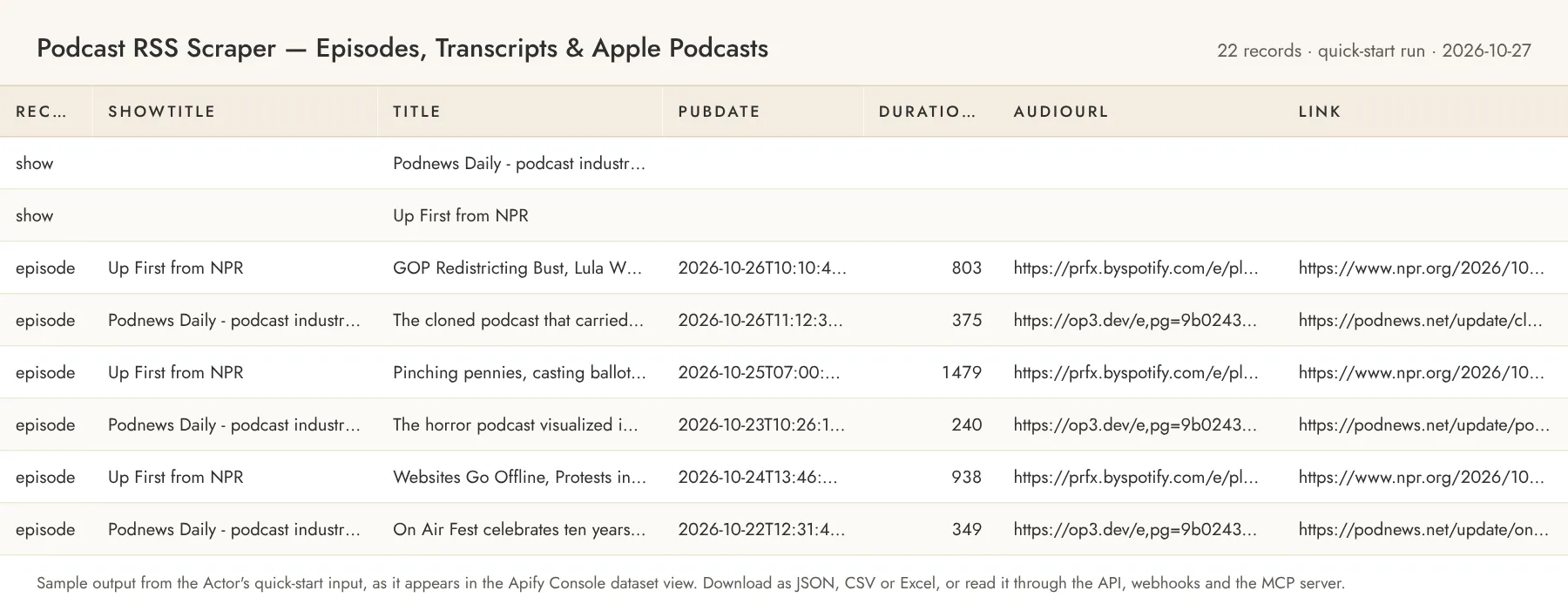
A show record:
An episode record (with fetchTranscripts: true; the transcript* fields are absent otherwise):
Optional episode fields (season, chaptersUrl, imageUrl, link, durationSeconds, …) are present only when the feed provides them. Shows resolved through Apple carry appleId, appleUrl and, for search: inputs, searchAlternatives (the other top matches with their feed URLs). With onlyNewSinceLastRun each episode carries isNew: true and the show record carries newEpisodes and baseline.
With fetchChapters on, an episode that publishes a chapters file also carries (or chaptersError instead):
Shows found through charts: carry resolvedVia: "apple-charts", chart ("us/technology"), appleId and appleUrl; shows found through fyyd: or gpodder: carry resolvedVia: "fyyd-search" or "gpodder-search", directory ({ "name": "fyyd", "homepage": "https://fyyd.de", "showUrl": "…" }, also on each of that feed's episodes) and directoryAlternatives; GUID inputs resolved with your key carry resolvedVia: "podcast-index".
Error items look like { "recordType": "error", "input": "…", "error": "FEED_FAILED", "errorMessage": "HTTP 404 for …" } (codes: FEED_FAILED, APPLE_ID_NOT_FOUND, APPLE_NO_FEED_URL, APPLE_LOOKUP_FAILED, SEARCH_NO_RESULTS, ITUNES_SEARCH_FAILED, GUID_RESOLUTION_UNAVAILABLE, INVALID_INPUT, and for the opt-in inputs INVALID_CHART, CHART_FAILED, PODCAST_INDEX_AUTH_FAILED, PODCAST_INDEX_FAILED, GUID_NOT_FOUND, EMPTY_SEARCH, DIRECTORY_SEARCH_FAILED) and are charged at the show rate, because the work to discover the problem was done. A transcript that cannot be downloaded leaves the episode record intact with a transcriptError field.
If the output saves you time, a review on the Store page helps other buyers find this Actor; the Store invites you to leave one after you have run it a few times.
Alerts and delivery
- Schedules. Create a schedule in the Apify Console (hourly, daily, weekly or a cron expression) with
onlyNewSinceLastRun: true; each run appends only the new episode records to its dataset. - The Actor's own
webhookUrl. After every run the Actor POSTs one JSON document to the URL you set:actorandrunId, afeedsarray with each feed's resolution, episode, transcript and error counts,totalEpisodes,totalNewEpisodes(monitor runs),totalTranscripts, thechargessummary,limitReachedandfinishedAt. In monitor mode it also carriesnewEpisodes, up to 500 entries withfeedUrl,showTitle,episodeGuid,title,pubDate,linkandaudioUrl, plusnewEpisodesTruncatedwhen there were more. Delivery has a 10 s timeout and two retries; a failing endpoint never fails the run and is recorded aswebhookDelivered: falsein the run'sSUMMARYkey-value record. - Apify integrations. On the Actor's Integrations tab you can attach Slack, Make, Zapier, Google Sheets, email or a generic Actor webhook that fires on run events (
ACTOR.RUN.SUCCEEDED,ACTOR.RUN.FAILED,ACTOR.RUN.TIMED_OUT) and carries the run and dataset ids, so any downstream tool can pull the items. - API and dataset endpoints. Start a run and wait for its items in one call with
POST https://api.apify.com/v2/acts/owlabee~podcast-rss-scraper/run-sync-get-dataset-items?token=<APIFY_TOKEN>(the input JSON as the body), or start it asynchronously withPOST /v2/acts/owlabee~podcast-rss-scraper/runsand readGET /v2/datasets/{datasetId}/items?format=json(alsocsv,xlsx) when it finishes. The run'sSUMMARYrecord is atGET /v2/key-value-stores/{storeId}/records/SUMMARYand includeswebhookDeliveredwhen a webhook was set.
Pricing
Pay per event. You only pay for what the Actor produces; set a maximum cost per run in the run options to cap spend.
| Event | Price | Notes |
|---|---|---|
| Episode | $0.0003 | Per episode record |
| Fetched feed | $0.01 | Per feed the run attempts, charged once: the show record is pushed with this event, as are error items for feeds that could not be resolved or fetched and the feed-status item of a run with nothing to emit; with includeShowRecord off the event is charged without a record |
| Fetched transcript | $0.005 | Per transcript download attempted (on top of the episode event); unreachable transcripts are recorded with transcriptError and charged too |
| Fetched chapters | $0.002 | Per <podcast:chapters> file requested when fetchChapters is on (on top of the episode event); files that time out (10 s deadline), are blocked or are not valid JSON are recorded with chaptersError and charged too |
| Actor start | $0.00005 | Apify platform event |
Example: 1,000 episodes from one feed ≈ $0.30 + $0.01 for the feed ≈ $0.31; 100 transcripts ≈ $0.50 (plus $0.03 for their 100 episode records). A daily monitor of 20 shows with onlyNewSinceLastRun that finds 5 new episodes a day ≈ $0.2015/day (20 feeds + 5 episodes). Episodes without a <podcast:transcript> tag never incur the transcript event. With fetchChapters on, 100 episodes that publish chapters ≈ $0.20 for the chapters on top of $0.03 for the episodes. A charts:us input costs one $0.01 fetched-feed event for the chart itself, then each of its shows is a normal feed ($0.01 plus its episodes): the default 25-show chart with 5 episodes each ≈ $0.01 + 25 × ($0.01 + 5 × $0.0003) ≈ $0.30. fyyd:, gpodder: and Podcast Index GUID lookups are part of the feed event (no extra charge).
Store pricing discounts: users on the Scale plan (Silver) pay 10% less per event, Business (Gold) 15–20% less.
Limits and fair use
- Feeds are fetched with plain HTTP from Apify datacenter IPs, up to 30 MB each (the largest public feeds with 3,000+ episodes are about 20 MB), with a 20 s timeout and at most ~2 requests per second per host. Transcripts are capped at 2 MB each.
- Each feed has a time budget (
maxSecondsPerFeed, default 1,800 s) and an idle limit of 60 s without a saved episode (a transcript host that keeps timing out does not count as progress). When either runs out, the feed's remaining episodes are not saved; what was saved is kept and charged, and a feed that cannot be downloaded in time returns oneTIME_BUDGETerror item, charged like the other error items. WithincludeShowRecordoff, a feed that yields no episodes (nothing new, or empty) returns onefeed-statusitem charged as a show record, so the download is never free. Default run memory is 512 MB. - Only
<podcast:transcript>files published in the feed are downloaded; the Actor does not transcribe audio. When several formats are offered it picks, in order, plain text, WebVTT, SRT, JSON, HTML. - Apple Podcasts URLs and
search:terms are resolved through Apple's public iTunes Lookup/Search API (no key needed, rate-limited to about 20 requests per minute, so resolving many Apple inputs is slower than passing feed URLs). Shows that Apple lists without a publicfeedUrl(Apple-exclusive or subscription shows) produce anAPPLE_NO_FEED_URLerror item. Podcast Index GUIDs need your own Podcast Index key and secret; without them they produceGUID_RESOLUTION_UNAVAILABLE(a wrong key givesPODCAST_INDEX_AUTH_FAILED, an unknown GUIDGUID_NOT_FOUND). Apple lookups and chart reads are cached for the run (and for 24 hours in your own state store when monitor mode is on) and spaced 3 s apart to stay under Apple's limit. charts:reads Apple's public chart feed (rss.marketingtools.apple.com) and resolves every show with one batched iTunes lookup; chart shows without a public feed are counted in the run'sSUMMARY(charts[].showsWithoutFeed), a chart or genre with no usable show returns one chargedchart-statusitem, and an invalid chart spec anINVALID_CHARTerror item. Shows already in the same run are not fetched twice.fyyd:andgpodder:run one search request per input (at most five results kept, requests spaced 2 s apart). They are directory lookups, not a way to copy the directories. A directory that refuses or fails the request gives one chargedDIRECTORY_SEARCH_FAILEDitem; gpodder.net answered HTTP 403 to our check from a cloud IP on 2026-11-09, so preferfyyd:orsearch:until it is confirmed reachable from Apify.fetchChapterssupports the JSON chapters format (application/json+chapters) only; other formats are recorded asCHAPTERS_NOT_JSONinchaptersError. Up to 500 chapters per episode.maxEpisodesPerFeedcuts newest-first. WithonlyNewSinceLastRun, the baseline run records the whole feed as seen (it returns the newest episodes up to the cap; older ones are history, not news); on later runs, new episodes beyond the cap are left for the next run rather than silently dropped. The seen-GUID set per feed is capped at 5,000 episodes.- Only public data is accessed: feeds, transcript files and Apple's public catalogue. No login, no proxies, no personal data beyond what the publisher puts in the feed (
ownerEmailis included only when the feed publishes it).
Related Actors
Other pay-per-event Actors from the same account, all limited-permission and agent-friendly:
- PDF to Markdown for RAG — DOCX, OCR & Chunks — convert the PDFs and DOCX files linked from show notes into Markdown and RAG chunks.
- Bluesky Monitor & Scraper — Posts, Keywords, Followers — posts, profiles and followers for the shows and hosts you track.
- Website Change Monitor — Sitemap Monitor & Page Diff — sitemap and content change feed for podcast and network websites.
Guide and code examples
- Guide: Podcast RSS Feed Scraper: Episodes and Transcripts as JSON, covering the source, its fields and limits, and curl and MCP examples.
- Runnable examples (curl, Python, Node.js and an MCP config): owlabee/owlabee on GitHub.
Use from AI agents (MCP)
Pin this Actor in the Apify MCP server with one link: https://mcp.apify.com?tools=owlabee/podcast-rss-scraper, or let the agent find it with the search-actors tool. It is pay-per-event with limited permissions, so agents can discover it, inspect the input schema with fetch-actor-details and pay per run through agentic payments. Prompts that map directly onto the input:
- "Get the last 20 episodes of The Daily (search:the daily) with publish dates, durations and audio URLs, and tell me the average episode length this month."
- "Download the transcripts of this week's Podnews Daily episodes from https://podnews.net/rss and summarize every story that mentions Spotify or YouTube."
- "Watch these 10 podcast feeds every morning and send a webhook with any new episode's title, link and show notes — only new episodes since the last run."
The agent receives the same dataset records shown in the output example above.
Copy this block to call it through the Apify MCP server with the quick-start input; the agent gets the dataset items back in the tool result and can follow up with get-dataset-items for larger runs:
FAQ
Does this need proxies or an API key? No. Feeds, transcript files, chapters files, the iTunes Lookup/Search API, Apple's chart feed, fyyd and gpodder.net are public endpoints read over plain HTTP from Apify's standard infrastructure. The only key the Actor can use is your own optional Podcast Index key, for GUID inputs.
How is cost controlled? Cost = episodes × $0.0003 + feeds × $0.01 + transcripts × $0.005 + chapters files × $0.002 (only with fetchChapters). Limit episodes with maxEpisodesPerFeed, leave fetchTranscripts off unless you need the text, use onlyNewSinceLastRun for recurring runs so you pay only for new episodes, and set the run's maximum total charge; the Actor stops cleanly when it is reached.
Can I pass an Apple Podcasts link or just the show name? Yes. https://podcasts.apple.com/…/id123456789 (or the bare ID) is resolved with the iTunes Lookup API; search:show name uses the iTunes Search API and takes the top match with a public feed, recording the other matches in searchAlternatives on the show record so you can pick a different one next time.
What formats of transcripts are supported? Plain text, WebVTT (text/vtt), SRT (application/srt, application/x-subrip), Podcasting 2.0 JSON (application/json) and HTML. Timestamps, cue numbers, styling tags and repeated rolling-caption lines are removed; speaker names from <v> tags, Name: prefixes or JSON speaker fields are kept as Name: … labels.
Does it keep Apple's chart ranks? No. A charts: input is a way to find shows; the dataset holds the shows' own feed data plus the chart label and the Apple link. Use the chart on Apple's site for rankings.
How does monitoring work? With onlyNewSinceLastRun the Actor stores the episode GUIDs of each feed in the key-value store named by stateStoreName. The first run is a baseline that returns the newest episodes up to maxEpisodesPerFeed; later runs return only episodes with GUIDs not seen before and POST them to webhookUrl if set. Use a different stateStoreName to keep independent monitors.
Can an AI agent use this? Yes; see "Use from AI agents (MCP)" above for the pin link and example prompts. Schedules and webhooks work the same way from the Console or the API.
What happens on errors? A feed that cannot be resolved, fetched or parsed produces an error item with a clear code instead of failing the whole run; other feeds in the same run are unaffected. Transcript problems are recorded per episode in transcriptError.
Can I try it for free? Yes. The Apify free plan comes with monthly platform credit, and the quick-start input above costs a few cents per run, so you can test it on your own inputs before paying anything.
How do I find this Actor again? Bookmark it on the Store page (the bookmark icon next to the title); bookmarked Actors are listed in your Console, and the Store page shows new versions as they ship.
Support
Questions, bugs or a source you'd like added? Open an issue on the Actor's Issues tab, or email jacob@owlabee.com.
Changelog
- 2026-11-09 — Opt-in sources, all defaults unchanged:
charts:<country>[/<genre>]discovery from Apple's top-shows chart (chartLimit),fyyd:andgpodder:directory search with attribution, Podcast Index GUID resolution with your own key, andfetchChapterswith the newchapters-fetchedevent ($0.002). Apple lookups are now cached and Apple artwork and preview fields are never kept. - 2026-10-27 — README: comparison table, ready-to-run inputs, alerts and delivery, MCP call example, changelog.
- 2026-10-25 — Pricing round (in the Console from 2026-10-26): the per-feed event replaces the per-show event and is charged once per feed attempted, event titles pluralized, Store discount tiers for the Scale and Business plans; figures in the pricing table.
- 2026-10-23 — Per-feed time budget (
maxSecondsPerFeed) with an idle limit, request deadlines that include retries, chargedTIME_BUDGETandfeed-statusitems so no download is free, and a unit-economics test. - 2026-10-23 — Store listing: title now names Apple Podcasts, SEO fields, quick start input, MCP section, search-term task example.
- 2026-10-18 — Published on the Apify Store with pay-per-event pricing; charged events verified on a platform run.
- 2026-10-16 — First release: RSS, iTunes and Podcasting 2.0 parsing, Apple link and
search:resolution, transcript download, new-episodes monitor, webhook delivery.
Legal
Sources and attribution
- Apple. Apple Podcasts links,
search:terms andcharts:inputs are resolved through Apple's Search API and Apple's chart feed, used only to find the publisher's ownfeedUrl. Every record found this way keeps its link back to Apple (appleUrl); Apple's artwork, previews and chart ranks are not reproduced (the show artwork in the dataset comes from the publisher's RSS). Calls are rate-limited below Apple's published ~20 per minute and cached. - Podcast Index. GUID inputs use your own key under the Podcast Index Terms of Service: you are the API client, your credentials are not shared or embedded (§4.2), the Actor calls only
podcasts/byguidto read a feed URL, and nothing from the response is stored or redistributed (§5.5); show and episode data come from the publisher's feed. There is no fallback key. - fyyd and gpodder.net. Directory search only: one search per input, at most five results, credited on every record (
directory.name,directory.homepage,directory.showUrl). Requests identify the Actor anddata@owlabee.com; if either directory asks us to stop, the input is removed. - Transcripts and chapters are the publishers' files, read only when the feed links them; the Actor has no site-specific transcript-page extractors. You are responsible for having the right to use transcripts and chapter text for your purpose.
Not affiliated with or endorsed by Apple Inc., Podcast Index, fyyd or gpodder.net; the names identify the directories the inputs are resolved through.
Use the data in compliance with each publisher's terms and applicable law. The Actor reads only publicly published podcast feeds, transcript files linked from them and Apple's public catalogue API, keeps request rates polite and does not download audio. It is not a consumer reporting agency and its output must not be used for employment, credit, insurance, or tenant screening decisions.


